Gigabye MOBO advice

Wishmaster

New member
Guru
Gold Member
VIP
Local time
1:55 PM
Messages
4,513
Location
Southern Ohio
Hello everyone.

I just got my new MOBO up and running and was hoping someone with experience with Gigabyte boards could give a bit of advice.

I picked up the Gigabyte UP45-UD3L as a replacement (P45 ICH10) , and I like it but also somewhat disappointed with it.

For example, with my old DFI board to do a 1600FSB OC was quite simple and effective, with only 3 changes.
FSB/DRAM = 333/800 FSB = 400 Adv Memory settings= More Aggresive

This left all voltages at stock with a 3.6Ghz OC, and RAM at 960 giving 8300Mb/S and stable.

This board involes a few more settings, many of which are foriegn to me (but figuring it out), and with basically the same settings it can only do 7500Mb/S on the RAM ..

Im obviously missing a setting somewhere. Any ideas?

The second point I would like to ask about, is about CPU voltage.
When its at all stock it lowers the multi and CPU voltage.

When OCd it will only lower the CPU multi. CPU Vcore stays the same, regardless of C1E & EIST being enabled. it shows this same behavior with auto vcore or manually set. (its set manual atm because the board want to set Vcore at 1.31 for 400 FSB for some reason when its fine at 1.24)

Is this normal for Gigabyte boards or do I need to change something else?

My old DFI still throttled it all even OC'd with no settings required beyond making sure they were enabled. (at least until it it started to die)

On the bright side, my SSD scores jumped by 10 points, and thats using MS drivers :) overall the board isnt bad, especially considering it was a $90USD board.
So far seems to perform quite well.

I think I just need to get used to the bios as they are quite different.
 

My Computer

Computer Manufacturer/Model Number
Custom (Self Build)
OS
Windows 7 Home Premium 64bit
CPU
Intel Core i7 2700k
Motherboard
eVGA P67 SLI
Memory
8GB Mushkin Redline Ridgebacks @1866
Graphics Card(s)
EVGA GTX570 SC
Sound Card
XiFi Titanium HD
Monitor(s) Displays
LG W2453V
Screen Resolution
1920x1080
Hard Drives
Intel 320 80GB -- Intel X25-V 40GB --WD Black 1TB x2 -- WD Blue 640GB
PSU
Seasonic x750
Case
Corsair 600T SE White
Cooling
eVGA Superclocked CPU Cooler
Keyboard
Saitek Cyborg
Antivirus
Kaspersky
Browser
IE
Other Info
LG BD/DVD
Hello Wishmaster, I haven't answered as I have an Asus board, but you'd probably get the answers you see if you posted in the Overclock and Case Mod forum. A Guy :)
 

My Computer

Computer type
PC/Desktop
OS
Windows 10 Home x64
CPU
INTEL Core i5-750 Quad-Core 3.37GHz
Motherboard
ASUS P7P55D
Memory
HyperX Fury Black Series 8GB (2 x 4GB) 1866Mhz
Graphics Card(s)
EVGA GeForce GTX 750 Superclocked 1GB 128-Bit GDDR5
Monitor(s) Displays
LG 32MA68HY 32" IPS
Screen Resolution
1920 x 1080
Hard Drives
Samsung 840 Evo 120GB, SEAGATE 500GB Barracuda® 7200.12, SATA 3 Gb/s, 7200 RPM, 16MB cache
PSU
ANTEC TruePower New TP-550, 80 PLUS, 550W
Case
ANTEC Three Hundred Illusion
Cooling
COOLER MASTER Hyper 212 Plus, 4 x 120mm 1 x 140mm Noctua's
Internet Speed
85 + Mbps
Antivirus
Avast
Browser
Vivaldi
Thanks :)


I seem to be getting it worked out. Its just totally different from Im used to. So far its rock solid stable so I can't complain much :)
 

My Computer

Computer Manufacturer/Model Number
Custom (Self Build)
OS
Windows 7 Home Premium 64bit
CPU
Intel Core i7 2700k
Motherboard
eVGA P67 SLI
Memory
8GB Mushkin Redline Ridgebacks @1866
Graphics Card(s)
EVGA GTX570 SC
Sound Card
XiFi Titanium HD
Monitor(s) Displays
LG W2453V
Screen Resolution
1920x1080
Hard Drives
Intel 320 80GB -- Intel X25-V 40GB --WD Black 1TB x2 -- WD Blue 640GB
PSU
Seasonic x750
Case
Corsair 600T SE White
Cooling
eVGA Superclocked CPU Cooler
Keyboard
Saitek Cyborg
Antivirus
Kaspersky
Browser
IE
Other Info
LG BD/DVD
Yes, Gigabyte makes excellent boards. It was a choice between them and Asus for me. A Guy
 

My Computer

Computer type
PC/Desktop
OS
Windows 10 Home x64
CPU
INTEL Core i5-750 Quad-Core 3.37GHz
Motherboard
ASUS P7P55D
Memory
HyperX Fury Black Series 8GB (2 x 4GB) 1866Mhz
Graphics Card(s)
EVGA GeForce GTX 750 Superclocked 1GB 128-Bit GDDR5
Monitor(s) Displays
LG 32MA68HY 32" IPS
Screen Resolution
1920 x 1080
Hard Drives
Samsung 840 Evo 120GB, SEAGATE 500GB Barracuda® 7200.12, SATA 3 Gb/s, 7200 RPM, 16MB cache
PSU
ANTEC TruePower New TP-550, 80 PLUS, 550W
Case
ANTEC Three Hundred Illusion
Cooling
COOLER MASTER Hyper 212 Plus, 4 x 120mm 1 x 140mm Noctua's
Internet Speed
85 + Mbps
Antivirus
Avast
Browser
Vivaldi
Hi Wishmaster,

I see you went ahead and replaced your board. Sorry to hear about the curveballs; hopefully you can get them straightened out. As I stated in your other thread you could give these guys a try.... GIGABYTE.

While they know their boards they’re not as responsive as this forum with regards to answering questions, however you should get an answer within the day.

I will say that they were very helpful in helping me set up my Gigabyte board, I too found the BIOS overwhelming at first, but a bit of reading and questions there helped me out.

Give them a try, or at least do a search for your board there to see what people say.

Good luck.

Yes, Gigabyte makes excellent boards. It was a choice between them and Asus for me. A Guy

After moving away from Intel (didn't like their X58 offering) I also narrowed my choices between Asus and Gigabyte.... Gigabyte won :)
 

My Computer

Computer type
PC/Desktop
Computer Manufacturer/Model Number
Custom built by me.
OS
Windows 10 Pro
CPU
Intel Core i7-4770K (3.5Ghz)
Motherboard
Gigabyte G1 Sniper 5 (F10 Bios)
Memory
32 gig Corsair Dominator Platinum (4x8Gig)
Graphics Card(s)
Sapphire Tri-X R9 Fury
Sound Card
Soundblaster ZXR
Monitor(s) Displays
NEC PA242W 24" LCD Monitor
Screen Resolution
1920 x 1200
Hard Drives
Primary - Samsung 850 Pro (512gig), Samsung 840 Pro (256gig), 2TB WD Caviar Black.
PSU
EVGA Supernova 1000 G2
Case
Cooler Master HAF X
Cooling
Corsair H100i with Corsair Air Series SP120 Quiet Fans
Keyboard
Logitech Wireless Wave
Mouse
Logitech Performance MX
Internet Speed
High Speed Cable
Antivirus
Norton Security
Browser
IE11
Other Info
Memory Timings - 1866MHz @ 9-9-9-27-1T @ 1.5 volts
Think I figured it out. I dont know if its typical of all gigabyte boards, but i found if CPU Voltage is at normal it throttles Vcore no problem. If set manually or Auto (and it adjusts above normal) it disables the Vcore throttling.

Wasn't really a big deal, was just wondering why it done this.

As for the RAM bandwidth, The board was just being quite relaxed with the settings was all.
I found the adv settings (which by the way are all named differently than Im used to) and got that straightened out as well.


Im actually in the process of deciding on hardware for a i7 machine before long and have pretty well narrowed down to a ASUS or Gigabyte board as well :)
Im guessing in the next 4 weeks or so.


Anyone know anything about this ASUS board?
Newegg.com - ASUS Rampage II GENE LGA 1366 Intel X58 Micro ATX Intel Motherboard

Looks like the bigger version only its a micro board and $150 cheaper. Not sure I want a Micro but it doesnt look too bad.

Was also looking into this Gigabyte board:
Newegg.com - GIGABYTE GA-X58A-UD5 LGA 1366 Intel X58 SATA 6Gb/s USB 3.0 ATX Intel Motherboard


I'll have a bit to learn I guess about Ocing i7s :p
 

My Computer

Computer Manufacturer/Model Number
Custom (Self Build)
OS
Windows 7 Home Premium 64bit
CPU
Intel Core i7 2700k
Motherboard
eVGA P67 SLI
Memory
8GB Mushkin Redline Ridgebacks @1866
Graphics Card(s)
EVGA GTX570 SC
Sound Card
XiFi Titanium HD
Monitor(s) Displays
LG W2453V
Screen Resolution
1920x1080
Hard Drives
Intel 320 80GB -- Intel X25-V 40GB --WD Black 1TB x2 -- WD Blue 640GB
PSU
Seasonic x750
Case
Corsair 600T SE White
Cooling
eVGA Superclocked CPU Cooler
Keyboard
Saitek Cyborg
Antivirus
Kaspersky
Browser
IE
Other Info
LG BD/DVD
Was also looking into this Gigabyte board:
Newegg.com - GIGABYTE GA-X58A-UD5 LGA 1366 Intel X58 SATA 6Gb/s USB 3.0 ATX Intel Motherboard


I'll have a bit to learn I guess about Ocing i7s :p

If you looked at my system specs, you'd see that I have an i7 system with the GIGABYTE GA-X58A-UD5.

I have absolutely no probelms with the board. And once you get use to the BIOS, you'll see it's fairly easy to tweak. I also had a post here as well... http://www.sevenforums.com/hardware-devices/81169-experience-gigabyte-motherboards.html

Right now my i7-930 is OC to 3.52Gig. Again, look at my system specs.
 

My Computer

Computer type
PC/Desktop
Computer Manufacturer/Model Number
Custom built by me.
OS
Windows 10 Pro
CPU
Intel Core i7-4770K (3.5Ghz)
Motherboard
Gigabyte G1 Sniper 5 (F10 Bios)
Memory
32 gig Corsair Dominator Platinum (4x8Gig)
Graphics Card(s)
Sapphire Tri-X R9 Fury
Sound Card
Soundblaster ZXR
Monitor(s) Displays
NEC PA242W 24" LCD Monitor
Screen Resolution
1920 x 1200
Hard Drives
Primary - Samsung 850 Pro (512gig), Samsung 840 Pro (256gig), 2TB WD Caviar Black.
PSU
EVGA Supernova 1000 G2
Case
Cooler Master HAF X
Cooling
Corsair H100i with Corsair Air Series SP120 Quiet Fans
Keyboard
Logitech Wireless Wave
Mouse
Logitech Performance MX
Internet Speed
High Speed Cable
Antivirus
Norton Security
Browser
IE11
Other Info
Memory Timings - 1866MHz @ 9-9-9-27-1T @ 1.5 volts
X-58, goodbye FSB and hello QPI.

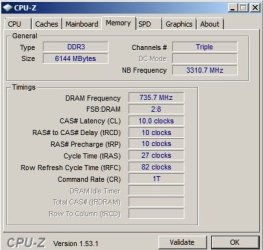
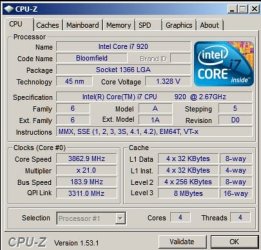
Your ram choice will be important, ram MHz and cpu MHz are linked by ratio. Changing one alters the other.
ex: I use 1333MHz spec'ed ram, in order to get my cpu to 3.8MHz, the ram had to be pushed to 1472MHz. When I had the cpu at stock, 2.6MHz the ram was only at 1066MHz.

The uncore is important as well, I found OC'ing ez with my board. I highly recomend the Gigabyte mobo i use. You know way more than me but I was able to get good numbers with current set up.

I disabled HT to get to this point, increases rams Mb/s by 5000. Please note NBMHz and QPIMHz, this what the uncore can adjust.

luck

ps: Where in S Ohio? I'm from Dayton area. Grad of Wright State Univ.

pss: use 1600 or 2000MHz ram if you want to OC cpu to 4GHz or higher.
 

Attachments

  • cpuz ram.jpg
    cpuz ram.jpg
    26.7 KB · Views: 2
  • cpuz 3.8.jpg
    cpuz 3.8.jpg
    37.9 KB · Views: 1
Last edited:

My Computer

Computer Manufacturer/Model Number
DIY #3, #2
OS
W7 Ulti/64, XP Pro/32
CPU
INTEL i7 920 DO, Core2 Duo 6400
Motherboard
GIGABYTE EX58 UD3R-SLI, EP45-UD3R
Memory
KINGSTON DDR3 1333MHz, CORSAIR DDR2 800MHz
Graphics Card(s)
EVGA GTX 260 x2, 8800 GTX
Sound Card
REALTEK HD onboard, ditto
Monitor(s) Displays
SONY 40" BRAVIA LCD
Screen Resolution
1360 X 768
Hard Drives
OCZ VERTEX/RAID0 -3, Vertex 30GB
PSU
COOLERMASTER 900W, ENERMAX 850W
Case
COOLERMASTER HAF 932 x2
Cooling
stock
Keyboard
MS
Mouse
MS
Internet Speed
ADSL 3MB/768KBs
Other Info
amateur enthusiast
Back
Top