JavaScript is disabled. For a better experience, please enable JavaScript in your browser before proceeding.
You are using an out of date browser. It may not display this or other websites correctly.
You should upgrade or use an
alternative browser .
Solved GIS - Restore Image View
Too Many Friends Gone
Guru
Gold Member
VIP
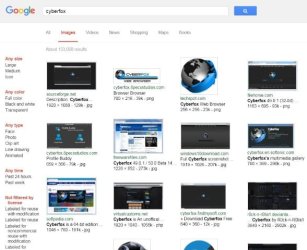
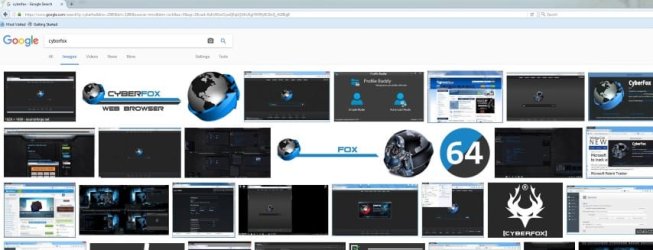
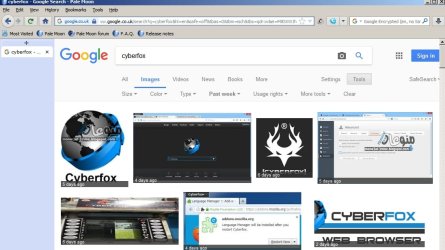
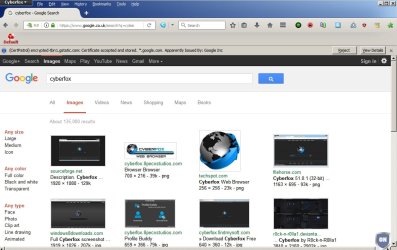
After switching to Cyberfox from Pale Moon, my GIS results look like Image 1 (bottom)
It used to work like Image 2 (on top), which I vastly prefer:
I have looked through GIS settings and asked questions at the Cyberfox forum with no luck. Any suggestions?
Cyberfox-01.JPG
43.8 KB
· Views: 26
Cyberfox-02.JPG
47.9 KB
· Views: 3
Last edited: Feb 11, 2017
Computer Manufacturer/Model Number Self OS Main - Windows 7 Pro SP1 64-Bit; 2nd - Windows Server 2008 R2 CPU Main - Core i7 2600K; 2nd - Core i7 920 Motherboard Main - Asus P8Z68-V Pro/Gen3; 2nd - Gigabyte GA-EX58-UDR3 Memory Main - 16GB Corsair Vengeance; 2nd - 12GB Corsair Vengeance Graphics Card(s) Main - XFX Radeon 6870 1GB; 2nd - XFX Radeon 4870 1GB Sound Card Both: Onboard Realtek Azalia Monitor(s) Displays Main - Hann 25" + I-INC 25" + Acer 23"; 2nd - Upgrading Soon Screen Resolution Main - 1920x1080 (All Three Monitors); 2nd - Upgrading Soon Hard Drives Main - (1) Crucial M4 128GB (Boot)
Main - (1) Seagate 2TB 64MB Cache (Data)
Main - (1) Seagate 2TB 64MB Cache (Data Backup)
2nd - (1) Intel X25-M SSD 80GB (Boot)
2nd - (3) Seagate 1TB 32MB Cache (Data Backup)
2nd - (1) Seagate 320GB (Because) PSU Main - OCZ 600W Modular; 2nd - OCZ 600W Case Main - Thermaltake Element G; 2nd - NZXT something or other Cooling Main - Corsair H80; 2nd - Prolimatech Megahalems Keyboard Main - Razer Reclusa; 2nd - Old MS Keyboard Mouse Main - Logitech MX Revolution; 2nd - Old MS Mouse Internet Speed 20Mbps Time-Warner Cable
New member
Guru
Gold Member
VIP
Okay as far as I can work out it's nothing to do with Cyberfox. I'm reading that Google is experimenting with removing left panel search options.
You can try this search query:
PHP:
https://www.google.co.uk/search?q=cyberfox&hl=en&safe=off&tbas=0&tbm=isch&tbs=qdr:w&ei=M8SXWJhY7IToBMi9kvAI
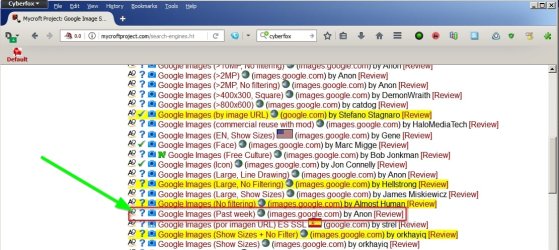
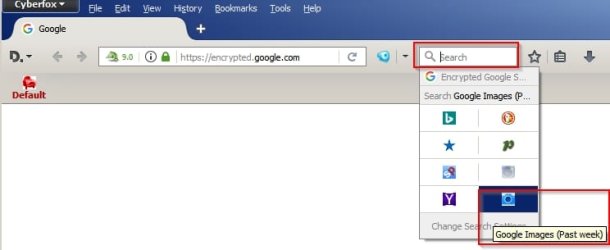
Or you can get similar options in Cyberfox by installing the search plugin here:
Mycroft Project: Google Image Search Engine Plugins - Firefox IE Chrome
Get this one:
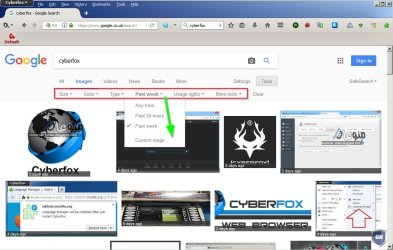
Then it adds a toolbar with dropdown filters.
You'll need the search bar enabled.
Computer type Laptop Computer Manufacturer/Model Number ASUS OS Microsoft Windows 7 Home Premium 64-bit 7601 Multiprocessor Free Service Pack 1 CPU AMD C-60 APU with Radeon(tm) HD Graphics Motherboard ASUSTeK COMPUTER INC. X501U Memory 4.00 GB Graphics Card(s) AMD Radeon HD 6290 Graphics Sound Card (1) AMD High Definition Audio Device (2) Realtek High Defi Screen Resolution 1366 x 768 x 32 bits (4294967296 colors) @ 60 Hz Hard Drives Hitachi HTS545050A7E380 SATA Disk Device Antivirus Comodo CIS & FW, SecureAplus App Whitelisting, Threatfire Browser Cyberfox 64bit, Opera 64bit, Airfox Other Info Spy-The-Spy, HitmanPro.Alert, Norton Connect Safe, MJRegWatcher, BitDefender TrafficLight, Voodoo Shield, Zemana AntiMalware
New member
Guru
Gold Member
VIP
I was going to suggest asking at Cyberfox Forum but I see that you already did:
Google Image Search - 8pecxstudios Support Forums
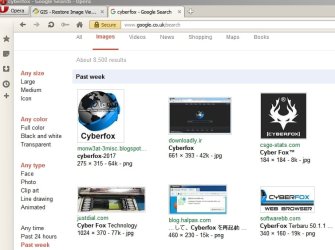
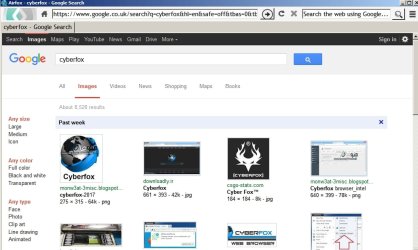
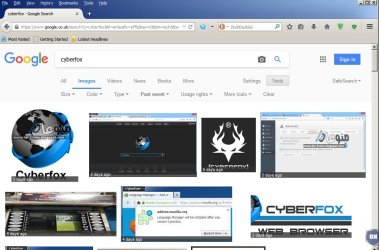
Just out of interest here's screenshots from different browsers but using the same search query.
Opera (Presto version)
Airfox (old version before they moved cache location)
Firefox Portable (old version)
Palemoon Portable
Computer type Laptop Computer Manufacturer/Model Number ASUS OS Microsoft Windows 7 Home Premium 64-bit 7601 Multiprocessor Free Service Pack 1 CPU AMD C-60 APU with Radeon(tm) HD Graphics Motherboard ASUSTeK COMPUTER INC. X501U Memory 4.00 GB Graphics Card(s) AMD Radeon HD 6290 Graphics Sound Card (1) AMD High Definition Audio Device (2) Realtek High Defi Screen Resolution 1366 x 768 x 32 bits (4294967296 colors) @ 60 Hz Hard Drives Hitachi HTS545050A7E380 SATA Disk Device Antivirus Comodo CIS & FW, SecureAplus App Whitelisting, Threatfire Browser Cyberfox 64bit, Opera 64bit, Airfox Other Info Spy-The-Spy, HitmanPro.Alert, Norton Connect Safe, MJRegWatcher, BitDefender TrafficLight, Voodoo Shield, Zemana AntiMalware
New member
Guru
Gold Member
VIP
Hold on. I've got this the wrong way round. You don't want the left pane results. I've been looking at how to get them to display!
Anyway for me Cyberfox works like this and I'm using the latest version.
Computer type Laptop Computer Manufacturer/Model Number ASUS OS Microsoft Windows 7 Home Premium 64-bit 7601 Multiprocessor Free Service Pack 1 CPU AMD C-60 APU with Radeon(tm) HD Graphics Motherboard ASUSTeK COMPUTER INC. X501U Memory 4.00 GB Graphics Card(s) AMD Radeon HD 6290 Graphics Sound Card (1) AMD High Definition Audio Device (2) Realtek High Defi Screen Resolution 1366 x 768 x 32 bits (4294967296 colors) @ 60 Hz Hard Drives Hitachi HTS545050A7E380 SATA Disk Device Antivirus Comodo CIS & FW, SecureAplus App Whitelisting, Threatfire Browser Cyberfox 64bit, Opera 64bit, Airfox Other Info Spy-The-Spy, HitmanPro.Alert, Norton Connect Safe, MJRegWatcher, BitDefender TrafficLight, Voodoo Shield, Zemana AntiMalware
New member
Guru
Gold Member
VIP
Okay with cache cleared and javascript disabled it looks like this:
Type
about:support into the address bar and press Enter. Copy the results and paste here.
Computer type Laptop Computer Manufacturer/Model Number ASUS OS Microsoft Windows 7 Home Premium 64-bit 7601 Multiprocessor Free Service Pack 1 CPU AMD C-60 APU with Radeon(tm) HD Graphics Motherboard ASUSTeK COMPUTER INC. X501U Memory 4.00 GB Graphics Card(s) AMD Radeon HD 6290 Graphics Sound Card (1) AMD High Definition Audio Device (2) Realtek High Defi Screen Resolution 1366 x 768 x 32 bits (4294967296 colors) @ 60 Hz Hard Drives Hitachi HTS545050A7E380 SATA Disk Device Antivirus Comodo CIS & FW, SecureAplus App Whitelisting, Threatfire Browser Cyberfox 64bit, Opera 64bit, Airfox Other Info Spy-The-Spy, HitmanPro.Alert, Norton Connect Safe, MJRegWatcher, BitDefender TrafficLight, Voodoo Shield, Zemana AntiMalware
Too Many Friends Gone
Guru
Gold Member
VIP
Thread Starter
Yeah, it's weird. I tried it in chrome and it worked the way I like it to. I'm used to Firefox (or one of its variants) and really don't want to start over with all my plugins, etc. I've attached the about:support results.
Near as I can tell it may have something to do with Java.
Computer Manufacturer/Model Number Self OS Main - Windows 7 Pro SP1 64-Bit; 2nd - Windows Server 2008 R2 CPU Main - Core i7 2600K; 2nd - Core i7 920 Motherboard Main - Asus P8Z68-V Pro/Gen3; 2nd - Gigabyte GA-EX58-UDR3 Memory Main - 16GB Corsair Vengeance; 2nd - 12GB Corsair Vengeance Graphics Card(s) Main - XFX Radeon 6870 1GB; 2nd - XFX Radeon 4870 1GB Sound Card Both: Onboard Realtek Azalia Monitor(s) Displays Main - Hann 25" + I-INC 25" + Acer 23"; 2nd - Upgrading Soon Screen Resolution Main - 1920x1080 (All Three Monitors); 2nd - Upgrading Soon Hard Drives Main - (1) Crucial M4 128GB (Boot)
Main - (1) Seagate 2TB 64MB Cache (Data)
Main - (1) Seagate 2TB 64MB Cache (Data Backup)
2nd - (1) Intel X25-M SSD 80GB (Boot)
2nd - (3) Seagate 1TB 32MB Cache (Data Backup)
2nd - (1) Seagate 320GB (Because) PSU Main - OCZ 600W Modular; 2nd - OCZ 600W Case Main - Thermaltake Element G; 2nd - NZXT something or other Cooling Main - Corsair H80; 2nd - Prolimatech Megahalems Keyboard Main - Razer Reclusa; 2nd - Old MS Keyboard Mouse Main - Logitech MX Revolution; 2nd - Old MS Mouse Internet Speed 20Mbps Time-Warner Cable
New member
Guru
Gold Member
VIP
Thanks for the profile info. I don't think Java is the issue. I don't have Java installed but I can get Google Image search to display in different ways.
I notice that your Cyberfox isn't the latest version.
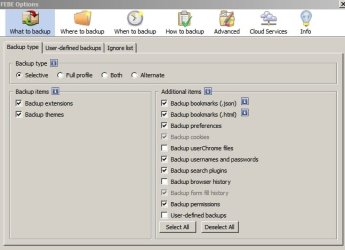
Suggest: Backup profile to include bookmarks and extensions. Use a directory outside of appdata for the backup.
FEBE Firefox Extension - this works with Cyberfox.
See:
a problem with firefox
But that's for Firefox. For Cyberfox you'll have to check for and delete everything here:
C:\Users\Username\AppData\Roaming\8pecxstudios
C:\Users\Username\AppData\Local\8pecxstudios
C:\Program Files\Cyberfox
Then once removed reboot and download the latest version of Cyberfox and do a fresh install.
Test Google Image Search. If it works install the FEBE add on and use it to restore your bookmarks and extensions.
Computer type Laptop Computer Manufacturer/Model Number ASUS OS Microsoft Windows 7 Home Premium 64-bit 7601 Multiprocessor Free Service Pack 1 CPU AMD C-60 APU with Radeon(tm) HD Graphics Motherboard ASUSTeK COMPUTER INC. X501U Memory 4.00 GB Graphics Card(s) AMD Radeon HD 6290 Graphics Sound Card (1) AMD High Definition Audio Device (2) Realtek High Defi Screen Resolution 1366 x 768 x 32 bits (4294967296 colors) @ 60 Hz Hard Drives Hitachi HTS545050A7E380 SATA Disk Device Antivirus Comodo CIS & FW, SecureAplus App Whitelisting, Threatfire Browser Cyberfox 64bit, Opera 64bit, Airfox Other Info Spy-The-Spy, HitmanPro.Alert, Norton Connect Safe, MJRegWatcher, BitDefender TrafficLight, Voodoo Shield, Zemana AntiMalware
New member
Guru
Gold Member
VIP
Will check back here tomorrow.
Computer type Laptop Computer Manufacturer/Model Number ASUS OS Microsoft Windows 7 Home Premium 64-bit 7601 Multiprocessor Free Service Pack 1 CPU AMD C-60 APU with Radeon(tm) HD Graphics Motherboard ASUSTeK COMPUTER INC. X501U Memory 4.00 GB Graphics Card(s) AMD Radeon HD 6290 Graphics Sound Card (1) AMD High Definition Audio Device (2) Realtek High Defi Screen Resolution 1366 x 768 x 32 bits (4294967296 colors) @ 60 Hz Hard Drives Hitachi HTS545050A7E380 SATA Disk Device Antivirus Comodo CIS & FW, SecureAplus App Whitelisting, Threatfire Browser Cyberfox 64bit, Opera 64bit, Airfox Other Info Spy-The-Spy, HitmanPro.Alert, Norton Connect Safe, MJRegWatcher, BitDefender TrafficLight, Voodoo Shield, Zemana AntiMalware
New member
Guru
Gold Member
VIP
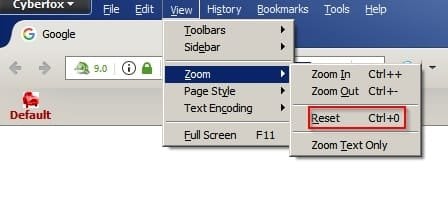
Just had another thought. What happens if you reset page zoom with window maximized?
Or you can click inside the window and use [Ctrl+] and {Ctrl -]
Or Ctrl and spin the mouse wheel if you use a mouse.
Computer type Laptop Computer Manufacturer/Model Number ASUS OS Microsoft Windows 7 Home Premium 64-bit 7601 Multiprocessor Free Service Pack 1 CPU AMD C-60 APU with Radeon(tm) HD Graphics Motherboard ASUSTeK COMPUTER INC. X501U Memory 4.00 GB Graphics Card(s) AMD Radeon HD 6290 Graphics Sound Card (1) AMD High Definition Audio Device (2) Realtek High Defi Screen Resolution 1366 x 768 x 32 bits (4294967296 colors) @ 60 Hz Hard Drives Hitachi HTS545050A7E380 SATA Disk Device Antivirus Comodo CIS & FW, SecureAplus App Whitelisting, Threatfire Browser Cyberfox 64bit, Opera 64bit, Airfox Other Info Spy-The-Spy, HitmanPro.Alert, Norton Connect Safe, MJRegWatcher, BitDefender TrafficLight, Voodoo Shield, Zemana AntiMalware
Too Many Friends Gone
Guru
Gold Member
VIP
Thread Starter
Thanks for the advice. I thought your comment about the profile seemed promising so I tried the portable version and it worked fine. I then cleaned out my profile, uninstalled everything, reinstalled, used FEBE to restore everything and guess what? It worked fine again.
...but...
After restarting Cyberfox once everything was set up it crapped out again. Restarting with Add-Ons disabled did not help. This has got me scratching my head.
Computer Manufacturer/Model Number Self OS Main - Windows 7 Pro SP1 64-Bit; 2nd - Windows Server 2008 R2 CPU Main - Core i7 2600K; 2nd - Core i7 920 Motherboard Main - Asus P8Z68-V Pro/Gen3; 2nd - Gigabyte GA-EX58-UDR3 Memory Main - 16GB Corsair Vengeance; 2nd - 12GB Corsair Vengeance Graphics Card(s) Main - XFX Radeon 6870 1GB; 2nd - XFX Radeon 4870 1GB Sound Card Both: Onboard Realtek Azalia Monitor(s) Displays Main - Hann 25" + I-INC 25" + Acer 23"; 2nd - Upgrading Soon Screen Resolution Main - 1920x1080 (All Three Monitors); 2nd - Upgrading Soon Hard Drives Main - (1) Crucial M4 128GB (Boot)
Main - (1) Seagate 2TB 64MB Cache (Data)
Main - (1) Seagate 2TB 64MB Cache (Data Backup)
2nd - (1) Intel X25-M SSD 80GB (Boot)
2nd - (3) Seagate 1TB 32MB Cache (Data Backup)
2nd - (1) Seagate 320GB (Because) PSU Main - OCZ 600W Modular; 2nd - OCZ 600W Case Main - Thermaltake Element G; 2nd - NZXT something or other Cooling Main - Corsair H80; 2nd - Prolimatech Megahalems Keyboard Main - Razer Reclusa; 2nd - Old MS Keyboard Mouse Main - Logitech MX Revolution; 2nd - Old MS Mouse Internet Speed 20Mbps Time-Warner Cable
New member
Guru
Gold Member
VIP
Well maybe something in your profile is the issue as it seems that it only happened after a relaunch?
What is your search engine?
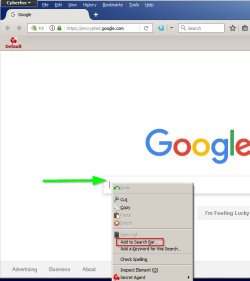
Try encrypted google search and set as default. You can get it from that site I linked or use this addon:
Add to Search Bar :: Add-ons for Firefox
If you navigate to encrypted dot google dot com and right click in the search box you get the option to add to search bar. Add and then click again to add a description and keyword. The keyword needed is
g
You can than set as default search engine and disable the addon. See if that makes any difference. I'm not sure that it will but it's how mine is setup.
Also which version of Cyberfox did you use? There are 32bit and 64bit versions for different graphics cards. Maybe using the wrong version makes a difference.
Computer type Laptop Computer Manufacturer/Model Number ASUS OS Microsoft Windows 7 Home Premium 64-bit 7601 Multiprocessor Free Service Pack 1 CPU AMD C-60 APU with Radeon(tm) HD Graphics Motherboard ASUSTeK COMPUTER INC. X501U Memory 4.00 GB Graphics Card(s) AMD Radeon HD 6290 Graphics Sound Card (1) AMD High Definition Audio Device (2) Realtek High Defi Screen Resolution 1366 x 768 x 32 bits (4294967296 colors) @ 60 Hz Hard Drives Hitachi HTS545050A7E380 SATA Disk Device Antivirus Comodo CIS & FW, SecureAplus App Whitelisting, Threatfire Browser Cyberfox 64bit, Opera 64bit, Airfox Other Info Spy-The-Spy, HitmanPro.Alert, Norton Connect Safe, MJRegWatcher, BitDefender TrafficLight, Voodoo Shield, Zemana AntiMalware
New member
Guru
Gold Member
VIP
Just a note to say that I looked at QuickJava addon. I wonder what would happen if you disabled it and cleared cookies and cache then relaunched Cyberfox.
Computer type Laptop Computer Manufacturer/Model Number ASUS OS Microsoft Windows 7 Home Premium 64-bit 7601 Multiprocessor Free Service Pack 1 CPU AMD C-60 APU with Radeon(tm) HD Graphics Motherboard ASUSTeK COMPUTER INC. X501U Memory 4.00 GB Graphics Card(s) AMD Radeon HD 6290 Graphics Sound Card (1) AMD High Definition Audio Device (2) Realtek High Defi Screen Resolution 1366 x 768 x 32 bits (4294967296 colors) @ 60 Hz Hard Drives Hitachi HTS545050A7E380 SATA Disk Device Antivirus Comodo CIS & FW, SecureAplus App Whitelisting, Threatfire Browser Cyberfox 64bit, Opera 64bit, Airfox Other Info Spy-The-Spy, HitmanPro.Alert, Norton Connect Safe, MJRegWatcher, BitDefender TrafficLight, Voodoo Shield, Zemana AntiMalware
New member
Guru
Gold Member
VIP
Another test:
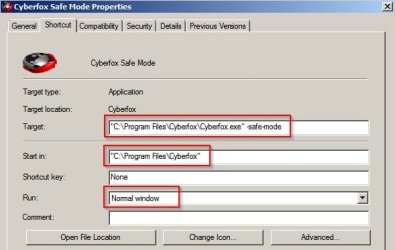
Maybe copy your Cyberfox shortcut or create a new one and set properties like this:
If you are using 32bit Cyberfox you'd need to modify paths as below.
Target:
"C:\Program Files (x86)\Cyberfox\Cyberfox.exe" -safe-mode
Start in:...
"C:\Program Files (x86)\Cyberfox"
/use the modified shortcut to launch Cyberfox and see if the issue remains.
Last edited: Feb 8, 2017
Computer type Laptop Computer Manufacturer/Model Number ASUS OS Microsoft Windows 7 Home Premium 64-bit 7601 Multiprocessor Free Service Pack 1 CPU AMD C-60 APU with Radeon(tm) HD Graphics Motherboard ASUSTeK COMPUTER INC. X501U Memory 4.00 GB Graphics Card(s) AMD Radeon HD 6290 Graphics Sound Card (1) AMD High Definition Audio Device (2) Realtek High Defi Screen Resolution 1366 x 768 x 32 bits (4294967296 colors) @ 60 Hz Hard Drives Hitachi HTS545050A7E380 SATA Disk Device Antivirus Comodo CIS & FW, SecureAplus App Whitelisting, Threatfire Browser Cyberfox 64bit, Opera 64bit, Airfox Other Info Spy-The-Spy, HitmanPro.Alert, Norton Connect Safe, MJRegWatcher, BitDefender TrafficLight, Voodoo Shield, Zemana AntiMalware
Too Many Friends Gone
Guru
Gold Member
VIP
Thread Starter
I backed everything up again, then imported only the things which would have been very difficult to recreate from scratch. So far so good.
It's funny that disabling all extensions wouldn't have reset whatever was causing the problem. I didn't really have a ton of them. I also stuck with the generic theme this time around.
I have switched browsers from Firefox to Pale Moon to Waterfox to Cyberfox and carried the same profile all the way along. It is odd that the problem did not immediately appear after one of those changes if that was the problem. Maybe this will end up in the "who knows?" category once all is said and done, assuming things don't go bad again.
Computer Manufacturer/Model Number Self OS Main - Windows 7 Pro SP1 64-Bit; 2nd - Windows Server 2008 R2 CPU Main - Core i7 2600K; 2nd - Core i7 920 Motherboard Main - Asus P8Z68-V Pro/Gen3; 2nd - Gigabyte GA-EX58-UDR3 Memory Main - 16GB Corsair Vengeance; 2nd - 12GB Corsair Vengeance Graphics Card(s) Main - XFX Radeon 6870 1GB; 2nd - XFX Radeon 4870 1GB Sound Card Both: Onboard Realtek Azalia Monitor(s) Displays Main - Hann 25" + I-INC 25" + Acer 23"; 2nd - Upgrading Soon Screen Resolution Main - 1920x1080 (All Three Monitors); 2nd - Upgrading Soon Hard Drives Main - (1) Crucial M4 128GB (Boot)
Main - (1) Seagate 2TB 64MB Cache (Data)
Main - (1) Seagate 2TB 64MB Cache (Data Backup)
2nd - (1) Intel X25-M SSD 80GB (Boot)
2nd - (3) Seagate 1TB 32MB Cache (Data Backup)
2nd - (1) Seagate 320GB (Because) PSU Main - OCZ 600W Modular; 2nd - OCZ 600W Case Main - Thermaltake Element G; 2nd - NZXT something or other Cooling Main - Corsair H80; 2nd - Prolimatech Megahalems Keyboard Main - Razer Reclusa; 2nd - Old MS Keyboard Mouse Main - Logitech MX Revolution; 2nd - Old MS Mouse Internet Speed 20Mbps Time-Warner Cable
New member
Guru
Gold Member
VIP
Just a note to say that Cyberfox 51.0.2 has been released but it breaks installed search engines. You can add them back but if you were going to update maybe wait for a fix.
Computer type Laptop Computer Manufacturer/Model Number ASUS OS Microsoft Windows 7 Home Premium 64-bit 7601 Multiprocessor Free Service Pack 1 CPU AMD C-60 APU with Radeon(tm) HD Graphics Motherboard ASUSTeK COMPUTER INC. X501U Memory 4.00 GB Graphics Card(s) AMD Radeon HD 6290 Graphics Sound Card (1) AMD High Definition Audio Device (2) Realtek High Defi Screen Resolution 1366 x 768 x 32 bits (4294967296 colors) @ 60 Hz Hard Drives Hitachi HTS545050A7E380 SATA Disk Device Antivirus Comodo CIS & FW, SecureAplus App Whitelisting, Threatfire Browser Cyberfox 64bit, Opera 64bit, Airfox Other Info Spy-The-Spy, HitmanPro.Alert, Norton Connect Safe, MJRegWatcher, BitDefender TrafficLight, Voodoo Shield, Zemana AntiMalware
Too Many Friends Gone
Guru
Gold Member
VIP
Thread Starter
I reinstalled from scratch today and that's the version I have. If by "installed search engines" you mean the Search bar, I almost never use it.
Remember the good old days when browsers got updated once a year or so and they actually tested things in advance? I must be getting old.
Computer Manufacturer/Model Number Self OS Main - Windows 7 Pro SP1 64-Bit; 2nd - Windows Server 2008 R2 CPU Main - Core i7 2600K; 2nd - Core i7 920 Motherboard Main - Asus P8Z68-V Pro/Gen3; 2nd - Gigabyte GA-EX58-UDR3 Memory Main - 16GB Corsair Vengeance; 2nd - 12GB Corsair Vengeance Graphics Card(s) Main - XFX Radeon 6870 1GB; 2nd - XFX Radeon 4870 1GB Sound Card Both: Onboard Realtek Azalia Monitor(s) Displays Main - Hann 25" + I-INC 25" + Acer 23"; 2nd - Upgrading Soon Screen Resolution Main - 1920x1080 (All Three Monitors); 2nd - Upgrading Soon Hard Drives Main - (1) Crucial M4 128GB (Boot)
Main - (1) Seagate 2TB 64MB Cache (Data)
Main - (1) Seagate 2TB 64MB Cache (Data Backup)
2nd - (1) Intel X25-M SSD 80GB (Boot)
2nd - (3) Seagate 1TB 32MB Cache (Data Backup)
2nd - (1) Seagate 320GB (Because) PSU Main - OCZ 600W Modular; 2nd - OCZ 600W Case Main - Thermaltake Element G; 2nd - NZXT something or other Cooling Main - Corsair H80; 2nd - Prolimatech Megahalems Keyboard Main - Razer Reclusa; 2nd - Old MS Keyboard Mouse Main - Logitech MX Revolution; 2nd - Old MS Mouse Internet Speed 20Mbps Time-Warner Cable
New member
Guru
Gold Member
VIP
I meant the list of default search engines included in Cyberfox gets broken apparently by a language pask update that was included. Default search engine is the one you set and use for searches from the omnibox or highlight some text and right click to see options.
Usually I use Encryted Google but if I want some privacy I'll switch to another search engine.
Internet privacy - Wikipedia
Additional search engines - 8pecxstudios Support Forums
The default ones included in Cyberfox are supposed to be these:
Computer type Laptop Computer Manufacturer/Model Number ASUS OS Microsoft Windows 7 Home Premium 64-bit 7601 Multiprocessor Free Service Pack 1 CPU AMD C-60 APU with Radeon(tm) HD Graphics Motherboard ASUSTeK COMPUTER INC. X501U Memory 4.00 GB Graphics Card(s) AMD Radeon HD 6290 Graphics Sound Card (1) AMD High Definition Audio Device (2) Realtek High Defi Screen Resolution 1366 x 768 x 32 bits (4294967296 colors) @ 60 Hz Hard Drives Hitachi HTS545050A7E380 SATA Disk Device Antivirus Comodo CIS & FW, SecureAplus App Whitelisting, Threatfire Browser Cyberfox 64bit, Opera 64bit, Airfox Other Info Spy-The-Spy, HitmanPro.Alert, Norton Connect Safe, MJRegWatcher, BitDefender TrafficLight, Voodoo Shield, Zemana AntiMalware
New member
Guru
Gold Member
VIP
Just a note to say that Cyberfox 51.0.2 has been released but it breaks installed search engines. You can add them back but if you were going to update maybe wait for a fix.
Cyberfox 51.0.3 released with fixes.
Hooray! Your Cyberfox is up to date >> Cyberfox
Fixed: Search engines missing due to en-US language pack overriding the default search engines.
Last edited: Feb 11, 2017
Computer type Laptop Computer Manufacturer/Model Number ASUS OS Microsoft Windows 7 Home Premium 64-bit 7601 Multiprocessor Free Service Pack 1 CPU AMD C-60 APU with Radeon(tm) HD Graphics Motherboard ASUSTeK COMPUTER INC. X501U Memory 4.00 GB Graphics Card(s) AMD Radeon HD 6290 Graphics Sound Card (1) AMD High Definition Audio Device (2) Realtek High Defi Screen Resolution 1366 x 768 x 32 bits (4294967296 colors) @ 60 Hz Hard Drives Hitachi HTS545050A7E380 SATA Disk Device Antivirus Comodo CIS & FW, SecureAplus App Whitelisting, Threatfire Browser Cyberfox 64bit, Opera 64bit, Airfox Other Info Spy-The-Spy, HitmanPro.Alert, Norton Connect Safe, MJRegWatcher, BitDefender TrafficLight, Voodoo Shield, Zemana AntiMalware
Too Many Friends Gone
Guru
Gold Member
VIP
Thread Starter
I got the same update this morning. In my case, I was relieved it didn't break anything as my GIS problem appears to be solved. Thanks for the heads up and for all your help. I think fixing the profile issues has taken care of me. I'm trying to remember, but I think I have been reusing that profile since the WinXP days.
Computer Manufacturer/Model Number Self OS Main - Windows 7 Pro SP1 64-Bit; 2nd - Windows Server 2008 R2 CPU Main - Core i7 2600K; 2nd - Core i7 920 Motherboard Main - Asus P8Z68-V Pro/Gen3; 2nd - Gigabyte GA-EX58-UDR3 Memory Main - 16GB Corsair Vengeance; 2nd - 12GB Corsair Vengeance Graphics Card(s) Main - XFX Radeon 6870 1GB; 2nd - XFX Radeon 4870 1GB Sound Card Both: Onboard Realtek Azalia Monitor(s) Displays Main - Hann 25" + I-INC 25" + Acer 23"; 2nd - Upgrading Soon Screen Resolution Main - 1920x1080 (All Three Monitors); 2nd - Upgrading Soon Hard Drives Main - (1) Crucial M4 128GB (Boot)
Main - (1) Seagate 2TB 64MB Cache (Data)
Main - (1) Seagate 2TB 64MB Cache (Data Backup)
2nd - (1) Intel X25-M SSD 80GB (Boot)
2nd - (3) Seagate 1TB 32MB Cache (Data Backup)
2nd - (1) Seagate 320GB (Because) PSU Main - OCZ 600W Modular; 2nd - OCZ 600W Case Main - Thermaltake Element G; 2nd - NZXT something or other Cooling Main - Corsair H80; 2nd - Prolimatech Megahalems Keyboard Main - Razer Reclusa; 2nd - Old MS Keyboard Mouse Main - Logitech MX Revolution; 2nd - Old MS Mouse Internet Speed 20Mbps Time-Warner Cable