Solved Performing Image Restore Computer Uses Wrong Image

positron777

New member
Local time
11:17 PM
Messages
18
I am having some weird problems and need help.

I have windows 7 ultimate.

I have used three different programs, malware antimalware, AVG, and Windows Defender and found zero problems on my home, single computer. I uninstalled AVG.

Ok. So am thinking I will restore from my windowsimagebackup 11-14-17 on external Harddrive. I added the date after I performed my image backup. I will simply remove the date so I just have "WindowsImageBackup" (Without " marks.) and do a restore.

I also have three other WindowsImageBackups on my external F: harddrive. The three have dates 6-4-19, 2-8-20, and 3-23-20 added so as to not over right them, and see them.

I want to go back as far as possible to as pristine as possible windows 7. I am thinking less errors to deal with.

However, when I do an image restore, the computer sees F: drive but uses an image 1-20-20, which is not listed on any harddrive. If I had an image from that date, I already deleted it some months ago from F: drive. It is not listed on F: drive as a double check.

What is causing the image restore to see an image that has been deleted, and what do I do to restore using "WindowsImageBackup" from date 11-14-17?

cheers and thanks for any help and time.
pos777
 

My Computer

Computer type
PC/Desktop
Computer Manufacturer/Model Number
Unknown
OS
windows 7 Ultimate x64
Motherboard
Gigabyte GA-31M-ES2L
Graphics Card(s)
GE-Force Experience
Antivirus
Malware Antimalware
Browser
Firefox
Where are you getting those dates from?

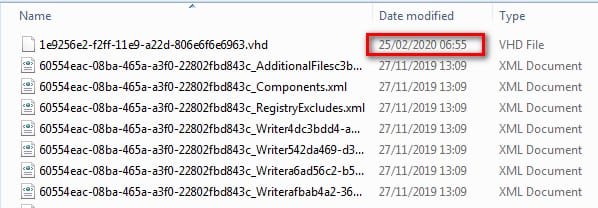
Did you check the date of the vhd file?

vhd-date.jpg
 

My Computers

System One System Two

  • Computer type
    PC/Desktop
    OS
    7 X64
    CPU
    i5 8400
    Motherboard
    gigabyte b365m ds3h
    Memory
    2x8gb 3200mhz
    Hard Drives
    various
    PSU
    pure power 11 400w cm
    Case
    Coolermaster
    Cooling
    cryorig m9i
  • Computer type
    PC/Desktop
    OS
    7x64
    CPU
    g5400
    Motherboard
    ga b365m ds3h
    Memory
    8gb ddr4 2400
    PSU
    xfx pro 450w
Where are you getting those dates from?

Did you check the date of the vhd file?

View attachment 411435


Thanks for your reply SIW2. When the computer is searching for an image to restore, after reboot, the date is part of the information provided, which is 1-20-20.

The dates I used were when the backup images were created.

When fully booted up into windows 7 ultimate x64, when I open explorer, power on external G: drive, I don't see any 1-20-20 date for one of my image backups.


In the past, I have performed backups with no problems, so I don't understand the problem unless corruption has occurred.

What is a vhd file?

cheers and thanks again.


pos777
 

My Computer

Computer type
PC/Desktop
Computer Manufacturer/Model Number
Unknown
OS
windows 7 Ultimate x64
Motherboard
Gigabyte GA-31M-ES2L
Graphics Card(s)
GE-Force Experience
Antivirus
Malware Antimalware
Browser
Firefox
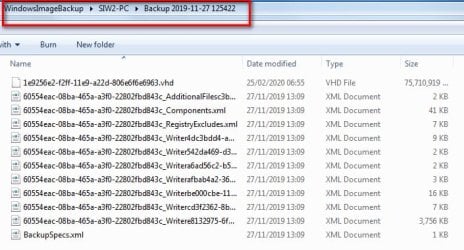
the vhd file is the actual image file.It is large.

It is inside the windowsimagebackup folder. Take a look and check the date on it

vhd-file.jpg
 

My Computers

System One System Two

  • Computer type
    PC/Desktop
    OS
    7 X64
    CPU
    i5 8400
    Motherboard
    gigabyte b365m ds3h
    Memory
    2x8gb 3200mhz
    Hard Drives
    various
    PSU
    pure power 11 400w cm
    Case
    Coolermaster
    Cooling
    cryorig m9i
  • Computer type
    PC/Desktop
    OS
    7x64
    CPU
    g5400
    Motherboard
    ga b365m ds3h
    Memory
    8gb ddr4 2400
    PSU
    xfx pro 450w
When you create an image older blocks are moved into shadow storage. The vhd file you can see contains the most recent image.
To restore from an earlier image than the date on vhd file requires accessing shadow storage, which you might not have if you are renaming/moving your image folders.

You could also do a search for *.vhd to find where they all are. I don't know what you are using for search, the free everything by voidtools is good
voidtools
 

My Computers

System One System Two

  • Computer type
    PC/Desktop
    OS
    7 X64
    CPU
    i5 8400
    Motherboard
    gigabyte b365m ds3h
    Memory
    2x8gb 3200mhz
    Hard Drives
    various
    PSU
    pure power 11 400w cm
    Case
    Coolermaster
    Cooling
    cryorig m9i
  • Computer type
    PC/Desktop
    OS
    7x64
    CPU
    g5400
    Motherboard
    ga b365m ds3h
    Memory
    8gb ddr4 2400
    PSU
    xfx pro 450w
When you create an image older blocks are moved into shadow storage. The vhd file you can see contains the most recent image.
To restore from an earlier image than the date on vhd file requires accessing shadow storage, which you might not have if you are renaming/moving your image folders.

You could also do a search for *.vhd to find where they all are. I don't know what you are using for search, the free everything by voidtools is good
voidtools


I double clicked on each of the windowsimagebackup folders and each Modified date simply stated the date I performed the backup image,

except,

the "WindowsImageBackup 11-14-17" folder which states Modified date 1-14-20. Wow. Yet, when

I click on properties, it says that I created the image on 11-14-17.


But it was just the other day, I thought, that I removed the date to read "WindowsImageBackup".

Was it my changing the name that altered the modification date? Maybe I read the date wrong when I restored using the image. Maybe it said 1-24-2020. My eyesight is not exactly the best.

Does that mean I actually already backed up using the 11-14-17 image file? If so, then that is exactly what I wanted.


cheers and thanks.
pos777
 

My Computer

Computer type
PC/Desktop
Computer Manufacturer/Model Number
Unknown
OS
windows 7 Ultimate x64
Motherboard
Gigabyte GA-31M-ES2L
Graphics Card(s)
GE-Force Experience
Antivirus
Malware Antimalware
Browser
Firefox
So far, the printer has been working great, and all seems to be in order. Defrag has not messed up the computer, printer etc.


As of now I think all is a ok. Will keep informed if a problems pops up. I did uninstall CCleaner.


Thanks to gentlemen who helped me solve the problem. When I was in college we did not learn about computers, so this was a nice learning experience.


positron777
 

My Computer

Computer type
PC/Desktop
Computer Manufacturer/Model Number
Unknown
OS
windows 7 Ultimate x64
Motherboard
Gigabyte GA-31M-ES2L
Graphics Card(s)
GE-Force Experience
Antivirus
Malware Antimalware
Browser
Firefox
:-)
 

My Computers

System One System Two

  • Computer type
    PC/Desktop
    OS
    7 X64
    CPU
    i5 8400
    Motherboard
    gigabyte b365m ds3h
    Memory
    2x8gb 3200mhz
    Hard Drives
    various
    PSU
    pure power 11 400w cm
    Case
    Coolermaster
    Cooling
    cryorig m9i
  • Computer type
    PC/Desktop
    OS
    7x64
    CPU
    g5400
    Motherboard
    ga b365m ds3h
    Memory
    8gb ddr4 2400
    PSU
    xfx pro 450w
Well, after an image restore, printer working this afternoon, I just went to print, and .....


I just attempted to print a pdf and in printer box upper left corner of screen, under status says

error - prin just occurred again. Size of file is 29.4KB/64KB (A small box comes up in the upper left corner saying HP deskjet 1050 J410 series printing, with name, status, owner, pages, size etc.......

The printer printed just the top line and stopped. After a minute or so, it just spit the paper out. The printer's power light is just blinking and the HP symbol in the bottom right tray is blinking.

I just did an image backup from 2017 this morning, trying to make sure win 7 was in the best condition possible, nearly 3 years before my problems started, and has worked this afternoon.

I am at a loss. Any thoughts?
pos

ps. Just tried printing again, and absolutely nothing, Under status it again says error - prin

pss. I just ran HP scan doctor, it found issues, and went to print test page, Nothing, nothing, not even a hint.


psss. Just used HP easy start, which installed all new software, no print of test page. Nothing.
 
Last edited:

My Computer

Computer type
PC/Desktop
Computer Manufacturer/Model Number
Unknown
OS
windows 7 Ultimate x64
Motherboard
Gigabyte GA-31M-ES2L
Graphics Card(s)
GE-Force Experience
Antivirus
Malware Antimalware
Browser
Firefox
Just now, after running easy start, I just ran glary Utilities and got rid of 2000+ tracks (erased), and 300+ mb of file cleaning, then rebooted, and the printer works like a charm again.

Will keep informed.

pos
 

My Computer

Computer type
PC/Desktop
Computer Manufacturer/Model Number
Unknown
OS
windows 7 Ultimate x64
Motherboard
Gigabyte GA-31M-ES2L
Graphics Card(s)
GE-Force Experience
Antivirus
Malware Antimalware
Browser
Firefox
Well, the printer now only prints ~80% and now 10%, so it varies. I have tried easy start again, changed usb cable, but to no avail. I will try a restore again and see what happens.
 

My Computer

Computer type
PC/Desktop
Computer Manufacturer/Model Number
Unknown
OS
windows 7 Ultimate x64
Motherboard
Gigabyte GA-31M-ES2L
Graphics Card(s)
GE-Force Experience
Antivirus
Malware Antimalware
Browser
Firefox
Well, went to bed with printing problems. This morning, booted up the computer and the printer works just fine, but now having problems with Malware Antimalware. Right clicking Malware in tray says all is on and protecting, yet when trying to open the program, a message says Malware is not working.


I have rebooted my computer 4 times now, with the same results.


I have used three different antivirus programs over the last couple of days, and no infection. However, do you think there might be an infection causing all these intermittent programs?

I just checked and Windows Defender will also not open.

pos
 

My Computer

Computer type
PC/Desktop
Computer Manufacturer/Model Number
Unknown
OS
windows 7 Ultimate x64
Motherboard
Gigabyte GA-31M-ES2L
Graphics Card(s)
GE-Force Experience
Antivirus
Malware Antimalware
Browser
Firefox
If you suspect malware, you could try a free bootable antimalware thing.

There are many for example
Download Dr.Web Live Disk - MajorGeeks

If you have other issues, it might be simpler just to do a clean install and start from scratch. That assumes you have the installation media and your windows license key.
 

My Computers

System One System Two

  • Computer type
    PC/Desktop
    OS
    7 X64
    CPU
    i5 8400
    Motherboard
    gigabyte b365m ds3h
    Memory
    2x8gb 3200mhz
    Hard Drives
    various
    PSU
    pure power 11 400w cm
    Case
    Coolermaster
    Cooling
    cryorig m9i
  • Computer type
    PC/Desktop
    OS
    7x64
    CPU
    g5400
    Motherboard
    ga b365m ds3h
    Memory
    8gb ddr4 2400
    PSU
    xfx pro 450w
If you suspect malware, you could try a free bootable antimalware thing.

There are many for example
Download Dr.Web Live Disk - MajorGeeks

If you have other issues, it might be simpler just to do a clean install and start from scratch. That assumes you have the installation media and your windows license key.


Thanks for your reply WIW2. I do have a license key. The "random" problems got so bad that Firefox refused to open, a contual box opened asking if it could mess with the registry I guess. So firefox was messed up, Malware Antimalware would not open although the taskbar says all 4 protections are on. The printer is working again, but who knows for how long.


I downloaded Kapersky and ran that as well. It also found no viruses, malware etc.


I downloaded Dr. Web Live Disk but will have to obtain a larger dvd as mine won't accommodate 780mb.


I have checked the hd, memory and they appear to be working fine. On another forum, a gent posted that he is also having random problems, and after he purchased a new hd.


Is there a chance that there is some new virus we know nothing about? The problems just seem so random to me.


Cheers and thanks for the information SIW2. Much appreciated.
pos
 

My Computer

Computer type
PC/Desktop
Computer Manufacturer/Model Number
Unknown
OS
windows 7 Ultimate x64
Motherboard
Gigabyte GA-31M-ES2L
Graphics Card(s)
GE-Force Experience
Antivirus
Malware Antimalware
Browser
Firefox
If you have already scanned with several avs , an infection is very unlikely.

Save yourself a lot of time by doing a clean install.
 

My Computers

System One System Two

  • Computer type
    PC/Desktop
    OS
    7 X64
    CPU
    i5 8400
    Motherboard
    gigabyte b365m ds3h
    Memory
    2x8gb 3200mhz
    Hard Drives
    various
    PSU
    pure power 11 400w cm
    Case
    Coolermaster
    Cooling
    cryorig m9i
  • Computer type
    PC/Desktop
    OS
    7x64
    CPU
    g5400
    Motherboard
    ga b365m ds3h
    Memory
    8gb ddr4 2400
    PSU
    xfx pro 450w
I don't have a disc. Can I use a friends disc and my key and ID?


I powered on the computer this morning and I could not open programs. Rebooted and all works again.


I may just purchase another computer as this one is some years old.


I want to thank you for all you have done and wish good health.


pos
 

My Computer

Computer type
PC/Desktop
Computer Manufacturer/Model Number
Unknown
OS
windows 7 Ultimate x64
Motherboard
Gigabyte GA-31M-ES2L
Graphics Card(s)
GE-Force Experience
Antivirus
Malware Antimalware
Browser
Firefox
I don't have a disc. Can I use a friends disc and my key

Of course.
 

My Computers

System One System Two

  • Computer type
    PC/Desktop
    OS
    7 X64
    CPU
    i5 8400
    Motherboard
    gigabyte b365m ds3h
    Memory
    2x8gb 3200mhz
    Hard Drives
    various
    PSU
    pure power 11 400w cm
    Case
    Coolermaster
    Cooling
    cryorig m9i
  • Computer type
    PC/Desktop
    OS
    7x64
    CPU
    g5400
    Motherboard
    ga b365m ds3h
    Memory
    8gb ddr4 2400
    PSU
    xfx pro 450w
Hi SIW2,


Another weird problem just happened. I just rebooted my computer and my entire "downloads" folder was in my "recycle bin". In my bottom tray the "explorer" icon was gone, with a "recycle bin" icon in its place. Also my Malware Antimalware was not in the tray, and was closed.


With all the other "random" problems listed in previous posts in this string, something has to be going on.


cheers
pos
 

My Computer

Computer type
PC/Desktop
Computer Manufacturer/Model Number
Unknown
OS
windows 7 Ultimate x64
Motherboard
Gigabyte GA-31M-ES2L
Graphics Card(s)
GE-Force Experience
Antivirus
Malware Antimalware
Browser
Firefox
"downloads" should have read "libraries", everything in the "libraries" was in the recycle bin after booting up.
Besides that, another icon was placed where the "libraries" icon should have been in the tray.


Malwayrebytes supplied a fixlog.txt etc to repair some stuff. So far, the past few days have been ok.


Malware Anti-malware wants me to change my IP address, which I have requested. I should hear back in a few days.


I hope this helps someone else on the board.


pos
 

My Computer

Computer type
PC/Desktop
Computer Manufacturer/Model Number
Unknown
OS
windows 7 Ultimate x64
Motherboard
Gigabyte GA-31M-ES2L
Graphics Card(s)
GE-Force Experience
Antivirus
Malware Antimalware
Browser
Firefox
Back
Top