Good/Bad of using Program Files (x86) vs Program Files

raymm

Banned
Local time
4:30 AM
Messages
26
Good/Bad of using Program Files (x86) vs Program Files

How do I know what to put where?
How do I knw if a program is x86 or 64?
Running Win7 64
 

My Computer My Computer

OS
Windows 7 X64
CPU
Inte Core 2 Duo E6420 Socket 77LGA [email protected]
Motherboard
ASUSTek Computer P5B-Deluxe Rev 1.xx, Chipset P965/G965
Memory
DDR2 Dula 8192 MBytes Symmetric DRAM Freq 400 MHz FSB 2:3
Graphics Card(s)
NVIDIA GeForce 8800 GTS, Perfm level 3D, V A2, Mem 320 MByte
Hard Drives
USB 2 * 2 Terabytes.
USB 1 * 500 GiG
4 SETA
Other Info
Mainboard Model P5B-Deluxe (0x0000035B - 0x15997268)

Caches: L2 D-Chache 32 KBytes x2 8-way set associative, 64-byte line size.

L1 I-Chache 32 KBytes x2 8-way set associative, 64-byte line size.

L2 Cache 4096 KBytes 16-way set associative, 64-byte line size.
Graphic Interface version PCI-Express

BIOS American Mega Trends V 1101 03/09/2007
Chipset
----------------------------------
64-bit software will (should, if the installer is correctly written) automatically install to Program Files.

32-bit software will (should, if the installer is correctly written) automatically install to Program Files (x86).

If in doubt, use Program Files (x86).
 
Hi raymm and welcome to Windows 7 Forums :party:

As you have pointed out, the 64-bit versions of W7 have 2 Program Files folders - the standard one, where 64-bit compatible programs are installed, and the one with the (x86) suffix where 32-bit programs are stored.

If you are just simply installing programs, either from their media or from a download, then you don't need to worry about which directory they will get installed to as this is taken care of for you.

Generally speaking, unless a program specifically mentions 64-bit then it will be installed in the (x86) folder. Note that some programs do not install in either folder; instead they create and use their own.
 

My Computer My Computer

Computer type
PC/Desktop
Computer Manufacturer/Model Number
Dwarf Dwf/11/2012 r09/2013
OS
Windows 8.1 Pro RTM x64
CPU
Intel Core-i5-3570K 4-core @ 3.4GHz (Ivy Bridge) (OC 4.4GHz)
Motherboard
ASRock Z77 Extreme4-M
Memory
4 x 4GB DDR3-1600 Corsair Vengeance CMZ8GX3M2A1600C9B (16GB)
Graphics Card(s)
MSI GeForce GTX770 Gaming OC 2GB
Sound Card
Realtek High Definition on board solution (ALC 898)
Monitor(s) Displays
ViewSonic VA1912w Widescreen (VGA)
Screen Resolution
1440x900
Hard Drives
OCZ Agility 3 SSD 120GB SATA III x2 (RAID 0)
Samsung HD501LJ 500GB SATA II x2
Hitachi HDS721010CLA332 1TB SATA II
Iomega 1.5TB Ext USB 2.0
WD 2.0TB Ext USB 3.0
PSU
XFX Pro Series 850W Semi-Modular
Case
Gigabyte IF233
Cooling
1 x 120mm Front Inlet 1 x 120mm Rear Exhaust
Keyboard
Microsoft Comfort Curve Keyboard 3000 (USB)
Mouse
Microsoft Comfort Mouse 3000 for Business (USB)
Internet Speed
NetGear DG834Gv3 ADSL Modem/Router (Ethernet) ~4.0 Mb/s (O2)
Antivirus
Avast! 8.0.1497
Browser
IE 11
Other Info
Optical Drive: HL-DT-ST BD-RE BH10LS30 SATA Bluray
Lexmark S305 Printer/Scanner/Copier (USB)
WEI Score: 8.1/8.1/8.5/8.5/8.25
Asus Eee PC 1011PX Netbook (Windows 7 x86 Starter)
Ok, thanks for above.
When installing, the program usually asks what directory to install into, and, as explained above, suggests Program Files (x86) or Program Files, depending on info provided by software being installed.

Putting some software into Program Files (x86) and some into Program Files means I have to search 2 directories to find programs.

In addition, I try to install programs files to my D: drive (a separate physical drive) so if I have to reinstall Windows from an image, I have at least some programs that remain installed after the restore.

So I have four directories to search to find programs.

What if I just installed everything (32 and 64 bit programs) into Program Files, rather than some into Program Files (x86) and some into Program Files.

Does it really matter if a program is in Program Files (x86) or in Program Files?
 

My Computer My Computer

OS
Windows 7 X64
CPU
Inte Core 2 Duo E6420 Socket 77LGA [email protected]
Motherboard
ASUSTek Computer P5B-Deluxe Rev 1.xx, Chipset P965/G965
Memory
DDR2 Dula 8192 MBytes Symmetric DRAM Freq 400 MHz FSB 2:3
Graphics Card(s)
NVIDIA GeForce 8800 GTS, Perfm level 3D, V A2, Mem 320 MByte
Hard Drives
USB 2 * 2 Terabytes.
USB 1 * 500 GiG
4 SETA
Other Info
Mainboard Model P5B-Deluxe (0x0000035B - 0x15997268)

Caches: L2 D-Chache 32 KBytes x2 8-way set associative, 64-byte line size.

L1 I-Chache 32 KBytes x2 8-way set associative, 64-byte line size.

L2 Cache 4096 KBytes 16-way set associative, 64-byte line size.
Graphic Interface version PCI-Express

BIOS American Mega Trends V 1101 03/09/2007
Chipset
----------------------------------
I would like to know the answer to the above post as well. Does it matter which I install to? Why can't they all just be installed to one folder? Is it just for organizational sake, or does it actually matter?

Also, I just had a program that wouldn't work when installed to either folder, and instead I had to install under C:, which makes me wonder, what are all the other folders, 64 or 32? If it matters so much which Program Files folder you install to, then surely every non Program Files folder must be only 32 or 64, right? So that means if every other folder is 64 let's say, then the only place on the entire computer where 32 bit programs will run is the Program Files x86 folder.
 

My Computer My Computer

Computer Manufacturer/Model Number
Asus G73SW
OS
Windows 7 Ultimate 64bit
When the software gives a folder to install to, let it do that. As Dwarf points out it will go where it needs to be.
As for having to "search" for programs, right click on it's shortcut and pin to Start Menu or Task Bar whichever is convenient for you. this way you will have quick, easy access to it.
Windows 7 search is capable of finding it wherever it is.
 

My Computer My Computer

Computer type
PC/Desktop
Computer Manufacturer/Model Number
Home Built Desktop By DataTech
OS
Windows 7 Ultimate X64 SP1
CPU
Intel i5-2550K, Differing ~4.4-4.8GHz No built in GPU
Motherboard
ASUS P8Z68-V PRO/GEN3
Memory
16GB G.Skill Sniper 1866MHz @ 2133MHz 2x8GB
Graphics Card(s)
ASUS GTX650TIB-DC2OC-2GD5, (650TI Boost)
Sound Card
Onboard Realtek 5-1
Monitor(s) Displays
Samsung P2570HD
Screen Resolution
1920x1080
Hard Drives
Samsung 840 Pro 256GB SSD for OS, 500GB Seagate Constellation (Enterprise drive) for Data
PSU
Corsair HX650W
Case
Inwin Dragon Rider
Cooling
Hyper 212 EVO w/two Noctua fans, push-pull, @1300 RPM
Keyboard
E-Z Eyes, bright yellow keys with large characters
Mouse
steelseries SENSEI Laser Pro Gaming
Internet Speed
48-51Mbs Mbs down, 11 Mbs up Xfinity Cable
Antivirus
Norton Internet Security 2013
Browser
IE 10, Opera, Pale Moon if needed
Other Info
4 case fans, LG BluRay-RE, ASUS DVD-RW, Mr. Fusion power supply, 1.21 gigawatts.
Just to throw a little confusion into the thread ( :geek: ), I install all my apps (32 bit and 64 bit) to a partition named "Apps" (with the exception of some, such as AV, etc.). The path is generall H:\AppName. I never have any compatibility issues. I run Win7u 64 bit and various flavors of Win7 32 bit.

James
 

My Computer My Computer

OS
Win7U 64 RTM
CPU
Q9550
Motherboard
GA-EP45-UD3R
Memory
8GB Gskill
Graphics Card(s)
ASUS|EAH4850/HTDI/1GD3/A
Sound Card
xfi Plat
Monitor(s) Displays
Dell 2405fpw
Screen Resolution
1920x1200
Hard Drives
Seagate & WD sata Drives
PSU
Antec
Case
Antec
Keyboard
MS Natural Ergonomic 4000
Mouse
Logitech MX610 USB Cordless
When the software gives a folder to install to, let it do that. As Dwarf points out it will go where it needs to be.
As for having to "search" for programs, right click on it's shortcut and pin to Start Menu or Task Bar whichever is convenient for you. this way you will have quick, easy access to it.
Windows 7 search is capable of finding it wherever it is.

It says to install it to C:, and I found out the program won't work properly otherwise. I was told the installer is 32, but the program is 64, so it can't go in either PF folder.

So I want to know, what are the non PF folders? How is C:, for instance, different from the PF folders? Why did that program work there?
 

My Computer My Computer

Computer Manufacturer/Model Number
Asus G73SW
OS
Windows 7 Ultimate 64bit
When the software gives a folder to install to, let it do that. As Dwarf points out it will go where it needs to be.
As for having to "search" for programs, right click on it's shortcut and pin to Start Menu or Task Bar whichever is convenient for you. this way you will have quick, easy access to it.
Windows 7 search is capable of finding it wherever it is.
You can also right-click on the program object (in Windows Explorer, for example) and then select "Send to... Desktop (create shortcut)". Now you don't need to search at all to run a program, because it's on your desktop. You can of course then rename the desktop shortcut if you want to anything else, since it's just renaming that shortcut, not the original program object itself.

Furthermore, you can then PIN that desktop shortcut to the taskbar or start menu, for quick access. Again, this avoids having to search anything to run a program.

And of course, once the desktop shortcut for it gets pinned to the Start Menu or Taskbar, you now really no longer need it on the desktop as well... unless you want it there as a duplicate. But (a) the taskbar will provide true single-click launching of the program (really, just like the Quick Launch bar of WinXP), (b) the start menu provides fairly direct and organized launching of the program (assuming you organize your Start Menu into high-level folders and then move the "raw" folders put there by installers into the hight-level organizational folders), and (c) the desktop shortcut requires a double-click to launch. Up to you.

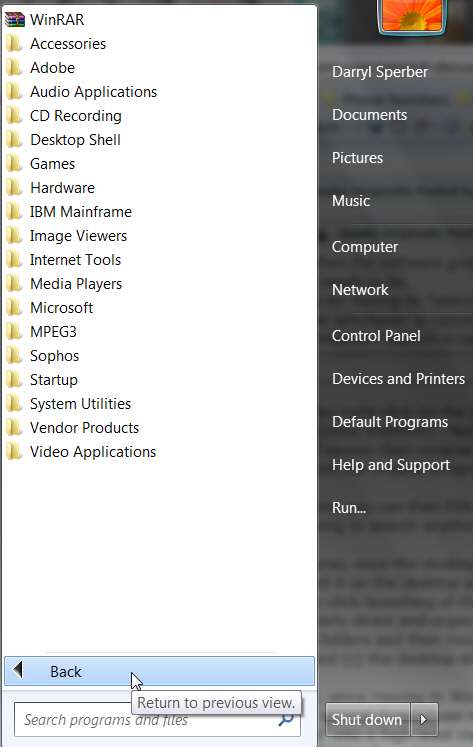
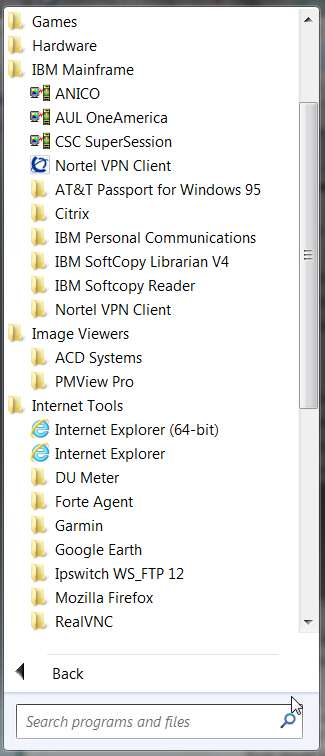
Personally, since moving to Win7 I've tried to keep my desktop program objects to a minimum, preferring to pin the several dozen I use regularly to a double-high taskbar using small icons. Everything is, of course, "organized" into a high-level menu structure on the Start Menu, because I can't stand multiple columns of first-level folders for software products that spread out across my entire screen (as they used to in Win98 and WinXP) or otherwise make themselves inconvenient to locate even if they're now automatically alphabetical (since Win7 now handles it as a huge scrollable list of Start Menu folders, which is just as clumsy to navigate through although it looks a bit more organized).

For example:

start1u.jpg


start2o.jpg


It says to install it to C:, and I found out the program won't work properly otherwise. I was told the installer is 32, but the program is 64, so it can't go in either PF folder.
This is probably a residual from a very old original installer approach taken by that product when it was 16-bit DOS and FAT files structures, before before FAT32 when the era of "long file names" arrived.

The problem is not one of Win7, it is one of the software product and its design and implementation. I assure you, your observed restriction where the program folder HAS to go into the root of C rather than under one of the two flavors of \Program Files or \Program Files (x86), well that's the fault of the application program... not Win7.


So I want to know, what are the non PF folders? How is C:, for instance, different from the PF folders? Why did that program work there?
Again, not a Win7 issue. It's an application program fault... take it up with the vendor (assuming it's not a 10-year old legacy program, but rather is "current" and actually maintained by the author).

As far as \Program Files vs. \Program Files (x86) on C, and as far as putting a second pair onto a second drive (so that you now have 4 folders), in my experience there is really no difference in the first two. They are BOTH in the PATH variable (e.g. if you use a DOS-like launching method of Start -> Run, rather than using a program/shortcut which is obviously MUCH easier and more convenient), so a program of any kind (32-bit of 64-bit) will be found an executed just fine from either location when Start -> Run is used.

If you have both 32-bit and 64-bit versions that both work, on a 64-bit system you would prefer to run the 64-bit version of the program. That will happen automatically because \Program Files (where the 64-bit programs get installed if the author packaged the installer file correctly) occurs EARLIER ON PATH. Searching of \Program Files (x86) will occur LATER ON PATH, so the 64-bit version will be used if both exist.

But EITHER will work, because BOTH are on the system PATH variable. And of course launching a program from a shortcut object is far and away the absolutely most convenient method, topped by the Taskbar shortcut which is a true single-click launch.

If you want to create your own "private" off-C version of an executable location for installed programs (say on D), I would suggest only making one, not two. There's really nothing magic about either of the names... only how a well-written installer script will create the program file directory by default, and in fact whether or not it will in fact put everything it installs on D or whether some "straggler" pieces will actually get installed onto the C-version anyway, because of sloppily written installer script.

Now is you want to make the programs installed onto your D-version "target" folder be accessible through Start -> Run as easily as those installed in your C-version are, you would need to add your D-version(s) of \Program Files to the PATH environment variable.


Otherwise, there is really no difference between \Program Files and \Program Files (x86) other than to support old poorly-written installer files, when everything was either 16-bit or 32-bit. This is simply an implementation approach to differentiate 32-bit from 64-bit, but programs of either flavor placed in either directory WILL STILL RUN JUST FINE.

Using program objects or shortcuts to program objects, this is the "modern" way to launch programs. And having the object/shortcuts pinned to the Taskbar or Start Menu, or sent to the Desktop... that's the most convenient way to organize and utilize program objects for easy launching.

There is no reason to "search" anything to launch a program you use frequently. Simplify your life and create a launchable shortcut somewhere.

Also, you should enable "RUN" (like it used to be on the WinXP Start Menu) to appear on the Start Menu popup (see my screenshot above), which for some reason is NOT enabled by default in Win7. Personally, I couldn't live without it.


That's just my opinion.

 

My Computer My Computer

Computer type
PC/Desktop
Computer Manufacturer/Model Number
Home-built, two systems (1) and (2)
OS
Windows 7 Pro x64 (1), Win7 Pro X64 (2)
CPU
i5-3350p 3.1Ghz/6MB-cache (1); E8400 3.0Ghz/6MB-cache (2)
Motherboard
ASUS P8Z77-V Pro (1); ASUS P5Q3 (2)
Memory
8GB PC3-12800 DDR3 (1); 4GB PC3-10600 DDR3 (2)
Graphics Card(s)
ATI HD7750 (1), (see TV cards); ATI R7 250 (2)
Sound Card
Realtek ALC892 HD Audio (1); Realtek ALC1200 HD Audio (2)
Monitor(s) Displays
Eizo HD2441W LCD, Eizo S2433W (1); Eizo 24" S2433W (2)
Screen Resolution
1920x1200, 1920x1200 (1); 1920x1200 (2)
Hard Drives
(1) 1TB SATA-II (7200RPM), 2x2TB SATA-III (7200RPM), 250GB SATA-III (10000RPM) for OS; 2x2TB external USB 3.0

(2) 320GB SATA-II (7200RPM), 750GB SATA-II (7200RPM), 150GB SATA-II (10000RPM) for OS; 2TB external USB 3.0
PSU
Nesteq ECS-6001 600W (1); Nesteq ECS-5001 500W (2)
Case
Acousti-Case 360 (1) and (2)
Cooling
Noctua NH-U12P SE2 for CPU, 2x120mm case fans (1) and (2)
Keyboard
IBM PS/2 (1) and (2)
Mouse
Logitech MX Revolution wireless (1); Microsoft wired (2)
Internet Speed
100mbps down / 10mbps up
Antivirus
Microsoft Security Essentials; Malwarebyte Anti-Malware Pro
Browser
Firefox
Other Info
Ceton InfiniTV 4-tuner cablecard-enabled TV card as well as Hauppauge HVR-2250 OTA/ATSC 2-tuner TV card in (1), running under Win7 WMC
"But EITHER will work, because BOTH are on the system PATH variable. And of course launching a program from a shortcut object is far and away the absolutely most convenient method, topped by the Taskbar shortcut which is a true single-click launch."

This is exactly what I thought. And yes the program is very old, a video poker program that is 10+ years old. I like to install everything into PF, and then like you said I put the shortcuts wherever I want. I am noticing a lot of confusion when Googling, with people who are answering these questions seemingly thinking incorrect things about the OP. I am simply curious about how it works, I'm not saying I need to be able to do this or that. I just wanted to know why it matters where you install it, let alone a program actually not working in PF or PF (x86), but rather only in C:\. I still don't understand, but such is computers.
 

My Computer My Computer

Computer Manufacturer/Model Number
Asus G73SW
OS
Windows 7 Ultimate 64bit
Back
Top