Good Defrag Program

Romulinx2

British & Ex Oric PC user
Pro User
VIP
Local time
3:41 PM
Messages
1,003
Location
UK

My Computer

Computer Manufacturer/Model Number
Dilithium Computers/Engineering (Myself) Star date 42.739285.5432.9
OS
Win7 Ultimate x64 on Desktop / Win7 Ultimate x86 on laptop / Win7 x86 Starter on Netbook
CPU
AMD Phenom 965 X4 3.4Ghz cpu Black Edition
Motherboard
Gigabyte 790XT
Memory
12 Gb DDR3
Graphics Card(s)
Nvidea Gforce GTX 470
Sound Card
Onboard Realtek hi-fi
Monitor(s) Displays
Lg 3D led 23"
Screen Resolution
1920x1080
Hard Drives
Loads maxstore sata 1 & 2/ loads of partitions + 1Tb Hitachi sata 2. 256Gb Crucial ssd.
PSU
OCZ 700W GameXstream
Case
Artec 10000
Cooling
On board + many case fans
Keyboard
Logitech wireless K350
Mouse
Inferno gaming mouse
Internet Speed
Talk talk. 10Mb
Other Info
My PC was hand built with matchsticks. xbox 360 controller. Printers,fax.........
Has to be better than what 7 is offering.... I have found XP to be better, faster, more accurate. It doesnt even want to report on other disks for me in 7000... only truly analyzes C: and lordy it takes forever to defrag 80gigs

anyways, i either used vopt (aka 0&0) or ashampoo myself... i may give this one a whirl as well

thanks Rom :)
 

My Computer

Computer Manufacturer/Model Number
CUSTOM
OS
XP/win7 x86 build 7127
CPU
Athlon64 X2 DUAL 4200+ 2.21ghz
Motherboard
ASUS K8 PRO SLI
Memory
2GB Dual Chan DDR2 Corsair
Graphics Card(s)
Nvidia 6800GT
Sound Card
nvidia
Monitor(s) Displays
19' LCD
Screen Resolution
1280x1024
Hard Drives
WD 250, 2x500, 2x1TB IDE/USB
WD 250 SATA (system)
SEAGATE 120 Sata
PSU
coolermaster 450
Case
SUPERFLOWER
Cooling
1 HDD bay fan, 5x80mm Case Fans, AEROGATE II Fan/Temp
Keyboard
MS wireless
Mouse
MS Wireless
Internet Speed
fassssssssst
No problem. The new version can be run from the command line also. :)
 

My Computer

Computer Manufacturer/Model Number
Dilithium Computers/Engineering (Myself) Star date 42.739285.5432.9
OS
Win7 Ultimate x64 on Desktop / Win7 Ultimate x86 on laptop / Win7 x86 Starter on Netbook
CPU
AMD Phenom 965 X4 3.4Ghz cpu Black Edition
Motherboard
Gigabyte 790XT
Memory
12 Gb DDR3
Graphics Card(s)
Nvidea Gforce GTX 470
Sound Card
Onboard Realtek hi-fi
Monitor(s) Displays
Lg 3D led 23"
Screen Resolution
1920x1080
Hard Drives
Loads maxstore sata 1 & 2/ loads of partitions + 1Tb Hitachi sata 2. 256Gb Crucial ssd.
PSU
OCZ 700W GameXstream
Case
Artec 10000
Cooling
On board + many case fans
Keyboard
Logitech wireless K350
Mouse
Inferno gaming mouse
Internet Speed
Talk talk. 10Mb
Other Info
My PC was hand built with matchsticks. xbox 360 controller. Printers,fax.........

My Computer

Computer Manufacturer/Model Number
self built
OS
Windows 7 Professional 64-bit
CPU
Intel E8400 3GHz
Motherboard
Intel DX48BT2
Memory
Kingston PC3-10700H 4Gb
Graphics Card(s)
XFX Radeon HD 5850 BlackEd.
Sound Card
Asus Xonar DG
Monitor(s) Displays
2x Samsung SM-T220HD 22"
Screen Resolution
1680x1050 on two monitors
Hard Drives
OCZ Vertex 2 120gb 3.5" (OS)
Seagate Momentus XT 500gb
Samsung F3 1Tb (games)
2x Samsung F1 1Tb
PSU
Thermaltake ToughPower 850w
Case
Thermaltake Armor
Cooling
Scythe Mugen II
Keyboard
Microsoft Comfort Curve USB
Mouse
Razer Diamondback 3G
Internet Speed
8128/443
Actually the version of defrag that comes with Win7 is a big improvement on what was included in previous versions of windows.

Check out: Engineering Windows 7 : Disk Defragmentation – Background and Engineering the Windows 7 Improvements and you'l see why its been improved.

So for now Im happy to stick with the included defragger.

Yea, i respectfulllllllly reserve the right to argue that one :p My user XPerience so far with 7's defrag has not impressed me one bit at all. This is the year 2009 and still the defrag hasnt changed much since win98/nt4. Given all the 3rd parties out there, you would think MS would get their act together....

Swarf have you done any stop watch timing or other comparisions with say the above mentioned 3rd party apps? Why cant MS have a defrag on-the-fly by now? Also like i reported, the 7 defrag wont report/analyze my other disks connected in this rig... doesnt even go thru the whole analyze process... and always reports 0% which i know cant be true... you can schedule a defrag, but big deal, you could also do that in 98 if memory serves me right. Well over 10 years to think this out or put in a think tank and this is the result with defrag in 7? i mean seriously, this is a big thorn in my side

I respect your views and feedback swarf, but i respectfully disagree with you here on this one... atleast up to this point with 7

 

My Computer

Computer Manufacturer/Model Number
CUSTOM
OS
XP/win7 x86 build 7127
CPU
Athlon64 X2 DUAL 4200+ 2.21ghz
Motherboard
ASUS K8 PRO SLI
Memory
2GB Dual Chan DDR2 Corsair
Graphics Card(s)
Nvidia 6800GT
Sound Card
nvidia
Monitor(s) Displays
19' LCD
Screen Resolution
1280x1024
Hard Drives
WD 250, 2x500, 2x1TB IDE/USB
WD 250 SATA (system)
SEAGATE 120 Sata
PSU
coolermaster 450
Case
SUPERFLOWER
Cooling
1 HDD bay fan, 5x80mm Case Fans, AEROGATE II Fan/Temp
Keyboard
MS wireless
Mouse
MS Wireless
Internet Speed
fassssssssst
Yeah, I tried the built in defrag. Can't say I was overly impressed with it either.
 

My Computer

Computer type
PC/Desktop
Computer Manufacturer/Model Number
Systems by SmartEyeball
OS
8 Pro x64
CPU
i7 3770K 4.6GHz
Motherboard
ASUS P8Z77 WS
Memory
16GB G.Skill Trident X 2666mhz
Graphics Card(s)
x2 EVGA 780 Ti Superclocked SLI
Sound Card
SB X-FI Surround 5.1 PRO USB / ATH-AD900 Headphones
Monitor(s) Displays
x3 Dell U2410 / 58" Samsung
Screen Resolution
5760*1200/ 1920*1200
Hard Drives
2x Intel 520 240GB (RAID 0) * 2x WD Caviar Blacks 2TB (RAID 0) * 2TB WD Caviar Black * Sony Optirac DVD
PSU
Silverstone Strider Evolution 1200W
Case
Thermaltake Level 10 GT Snow Edition
Cooling
Noctua NH-D14
Keyboard
Topre Realforce // Ducky Shine MX Black // Filco Ninja TKL
Mouse
Thermaltake Theron (Highly Recommended) + Razer Imperator
Antivirus
MSE
Browser
IE, FF, WaterFox
Other Info
GT Extreme V2 Sim Racing Cockpit + 40" LCD and K/B Mouse stand ▼
Fanatec CSR Elite Wheel + Clubsport V1 Pedals + CSR shifter/7G-H ▼Saitek X52 Pro ▼ TrackIR 5 Pro
Buttkicker v2 Seat Rumbler with Dedicated 5.1 and Sub Woofer attached to frame ▼
=
Bloody Big Grin
Yea, i respectfulllllllly reserve the right to argue that one :p My user XPerience so far with 7's defrag has not impressed me one bit at all. This is the year 2009 and still the defrag hasnt changed much since win98/nt4. Given all the 3rd parties out there, you would think MS would get their act together....

Swarf have you done any stop watch timing or other comparisions with say the above mentioned 3rd party apps? Why cant MS have a defrag on-the-fly by now? Also like i reported, the 7 defrag wont report/analyze my other disks connected in this rig... doesnt even go thru the whole analyze process... and always reports 0% which i know cant be true... you can schedule a defrag, but big deal, you could also do that in 98 if memory serves me right. Well over 10 years to think this out or put in a think tank and this is the result with defrag in 7? i mean seriously, this is a big thorn in my side

I respect your views and feedback swarf, but i respectfully disagree with you here on this one... atleast up to this point with 7


Yep I have mine defrag at 4am while Im asleep so how long it takes to do the job is irrelevant. Defrag happily processes all 5 hds on my machine. Have you been through the scheduler and selected the hds you want defragging?

Ive used plenty of other defraggers and some are good but Ive never bothered with how long it takes because its done at night.
 

My Computer

Computer Manufacturer/Model Number
self built
OS
Windows 7 Professional 64-bit
CPU
Intel E8400 3GHz
Motherboard
Intel DX48BT2
Memory
Kingston PC3-10700H 4Gb
Graphics Card(s)
XFX Radeon HD 5850 BlackEd.
Sound Card
Asus Xonar DG
Monitor(s) Displays
2x Samsung SM-T220HD 22"
Screen Resolution
1680x1050 on two monitors
Hard Drives
OCZ Vertex 2 120gb 3.5" (OS)
Seagate Momentus XT 500gb
Samsung F3 1Tb (games)
2x Samsung F1 1Tb
PSU
Thermaltake ToughPower 850w
Case
Thermaltake Armor
Cooling
Scythe Mugen II
Keyboard
Microsoft Comfort Curve USB
Mouse
Razer Diamondback 3G
Internet Speed
8128/443
two programs i like both are Defraggler and JK Defrag. Both are really good, but the latter of the two offers an optimization feature for peak performance. Defraggler is a bit faster and does a really good job defragging your system too. They are both free, so check these two out and draw a comparison for yourself.
 

My Computer

Computer Manufacturer/Model Number
Dell Latitude D505
OS
Windows 7
CPU
Pentium M 1.5 Ghz
Memory
1 GB DDR-333 RAM
Graphics Card(s)
Intel 852/855 GM/GME
Monitor(s) Displays
15" XGA LCD and 28" standard TV w/ S-Video output
Screen Resolution
1024 X 768
Hard Drives
40 GB Hard Drive, 20 GB external
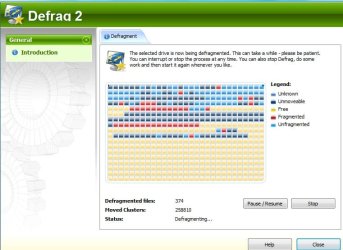
I normally use Ashampoo defrag , which is part of the Winoptimizer suite.

ASHAMPOODEFRAG2009-01-03_051913.jpg


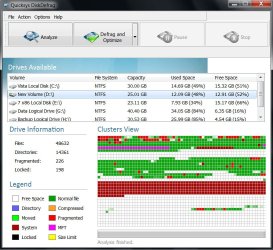
Recently came across Quicksys Disk Defrag , which Yup Yup mentioned earlier.

QDISKDEFRAG2009-03-19_033724.jpg

Both work really well.
 

My Computers

System One System Two

  • Computer type
    PC/Desktop
    OS
    7 X64
    CPU
    i5 8400
    Motherboard
    gigabyte b365m ds3h
    Memory
    2x8gb 3200mhz
    Hard Drives
    various
    PSU
    pure power 11 400w cm
    Case
    Coolermaster
    Cooling
    cryorig m9i
  • Computer type
    PC/Desktop
    OS
    7x64
    CPU
    g5400
    Motherboard
    ga b365m ds3h
    Memory
    8gb ddr4 2400
    PSU
    xfx pro 450w
Recently came across Quicksys Disk Defrag , which Yup Yup mentioned earlier.

View attachment 6120

Both work really well.

That looks like a nicer program than Auslogics program gonna have to try that one out all because it has the analyzer.
 

My Computer

Computer Manufacturer/Model Number
HP Compaq Presario/SR5113WM
OS
Windows 7 Ultimate x64/ Windows Vista Ultimate x64
CPU
AMD Athlon 64 X2 3600+ 1.9Ghz
Motherboard
Asus M2N68-LA
Memory
PNY Optima Memory DDR2 2GB 2x1 kit
Graphics Card(s)
PNY Nvidia 8400 GS 256MB
Sound Card
On board RealTek
Monitor(s) Displays
Acer X163W LCD
Screen Resolution
1366x768
Hard Drives
Western Digital 160 GB SATA 3G (3.0Gb/sec)
7200 rpm
Western Digital 160 GB IDE
PSU
Dynex 400w
Case
Nothin Special
Cooling
Stock
Keyboard
Standard 102 key with volume and sleep buttons
Mouse
Wireless Logitech LX7
Internet Speed
Comcrap 10mb cable
Other Info
Insignia 2.1 speakers, wireless Xbox 360 controller w/plug n play charger, Belkin wireless G + mimo usb network adapter.
Yea, i respectfulllllllly reserve the right to argue that one :p My user XPerience so far with 7's defrag has not impressed me one bit at all. This is the year 2009 and still the defrag hasnt changed much since win98/nt4. Given all the 3rd parties out there, you would think MS would get their act together....

Thoroughly agree with you. It's amazing that apps like Diskeeper and O&O Defrag have been making the defragmentation process both faster and more able to optimise the placement of system files across the disk/partition for a number of years now, but MS haven't been able to get their sluggish piece of junk inbuilt Disk Defragmenter to work anywhere near as good. Maybe we should get Bill to appropriate O&O Software - then you might see improvements.
 

My Computer

Computer Manufacturer/Model Number
NeverWinter Systems X38
OS
Seven X64 Ultimate 7100 RC1/Vista X64 Ultimate SP1/XP X64 SP2 tri-boot
CPU
Intel E6850 @ 3.2GHz (8 X 400)
Motherboard
GA-X38-DQ6
Memory
2X 2048MB Corsair Dominator PC2-8500
Graphics Card(s)
Crossfire'd ASUS EAH2900XT's
Sound Card
Creative X-Fi Fatal1ty Pro Gamer
Monitor(s) Displays
two (side by side) Samsung 930BF 19" 4ms LCD's
Screen Resolution
1280 X 1024 @ 75Hz
Hard Drives
Two 1TB Seagate Barracuda SATA-II's in RAID(0)
Two 500GB Seagate Barracuda SATA-II's as backups
Two Maxtor 300GB SATA-II's as external storage
PSU
Coolermaster RealPower Pro 850W
Case
Gigabyte 3D Aurora
Cooling
Zalman 9700LED
Keyboard
Logitech G11
Mouse
Logitech MX Revolution
Internet Speed
ADSL1 (1500kpbs down / 256kbps up)
Other Info
Two ASUS 20X DVD-RW Lightscribe optical drives
Logitech X530 5.1ch speaker system
Creative Fatal1ty gaming headset

My Computer

Computer Manufacturer/Model Number
self built
OS
Windows 7 Professional 64-bit
CPU
Intel E8400 3GHz
Motherboard
Intel DX48BT2
Memory
Kingston PC3-10700H 4Gb
Graphics Card(s)
XFX Radeon HD 5850 BlackEd.
Sound Card
Asus Xonar DG
Monitor(s) Displays
2x Samsung SM-T220HD 22"
Screen Resolution
1680x1050 on two monitors
Hard Drives
OCZ Vertex 2 120gb 3.5" (OS)
Seagate Momentus XT 500gb
Samsung F3 1Tb (games)
2x Samsung F1 1Tb
PSU
Thermaltake ToughPower 850w
Case
Thermaltake Armor
Cooling
Scythe Mugen II
Keyboard
Microsoft Comfort Curve USB
Mouse
Razer Diamondback 3G
Internet Speed
8128/443
I just let the Windows 7 defragger work in the background and my disks are never fragmented.
 

My Computer

Computer type
PC/Desktop
Computer Manufacturer/Model Number
Custom Built
OS
Windows 10 Pro x64, Windows 8.1 Pro x64, Windows 7 Ultimate x64 SP1,
CPU
INTEL i9-7920X LGA 2066
Motherboard
Gigabyte X299-WU8 F3
Memory
64 GB (4 X 16 GB) G-Skill V Series DDR4 3200 Quad Channel
Graphics Card(s)
EVGA GTX 1060 SC 3 GB
Sound Card
Realtek Onboard ALC1220
Monitor(s) Displays
2 x Samsung S27E310
Screen Resolution
1920x1080
Hard Drives
Samsung 2 x 970 EVO Plus 500 GB NVMe
1 x 6TB WD 6003FZBX SATA
1 x 6TB WD 60EFRX SATA
12 x 3TB WD 30EFRX SATA
PSU
Seasonic X-1050
Case
Thermaltake Armor+
Cooling
Corsair H80i V2 Liquid AOI Cooler
Keyboard
Logitech G510s
Mouse
Logitech MX Master 2S
Internet Speed
200 Mb/s
Antivirus
ESET NOD32 13.1
Browser
EDGE (Dev, Canary, Beta), Chrome
Other Info
ASUS RT-AC68U router
Malwarebytes 4.0.4
Thoroughly agree with you. It's amazing that apps like Diskeeper and O&O Defrag have been making the defragmentation process both faster and more able to optimise the placement of system files across the disk/partition for a number of years now, but MS haven't been able to get their sluggish piece of junk inbuilt Disk Defragmenter to work anywhere near as good. Maybe we should get Bill to appropriate O&O Software - then you might see improvements.

You *do* realize that M$ defrag is simply licensed technology from the very same DisKeeper company?

I just let the Windows 7 defragger work in the background and my disks are never fragmented.

Yeah - since it is set on its own schedule already, I let it do its thing.
 

My Computers

System One System Two

  • Computer type
    PC/Desktop
    Computer Manufacturer/Model Number
    The Beast Model A (homebrew)
    OS
    Windows 11 21H2 Current build
    CPU
    AMD Ryzen 9 3950X
    Motherboard
    MSI MEG X570 GODLIKE
    Memory
    4 * 32 GB - Corsair Vengeance 3600 MHz
    Graphics Card(s)
    EVGA GeForce RTX 3080 Ti XC3 ULTRA GAMING (12G-P5-3955-KR)
    Sound Card
    Realtek® ALC1220 Codec
    Monitor(s) Displays
    2x Eve Spectrum ES07D03 4K Gaming Monitor (Matte) | Eve Spec
    Screen Resolution
    3x 3840 x 2160
    Hard Drives
    3x Samsung 980 Pro NVMe PCIe 4 M.2 2 TB SSD (MZ-V8P2T0B/AM) } 3x Sabrent Rocket NVMe 4.0 1 TB SSD
    PSU
    PC Power & Cooling’s Silencer Series 1050 Watt, 80 Plus Plat
    Case
    Fractal Design Define 7 XL Dark ATX Full Tower Case
    Cooling
    SteelSeries Apex Pro Wired Gaming Keyboard
    Keyboard
    SteelSeries Apex Pro
    Mouse
    Logitech MX Master 3S | MX Master 3 for business
    Internet Speed
    AT&T LightSpeed Gigabit Duplex Ftth
    Antivirus
    Windows Defender + MB 3
    Browser
    Nightly (default) + Firefox (stable),Chrome, Edge
  • Computer type
    PC/Desktop
    System Manufacturer/Model Number
    Dell Latitude E5470
    OS
    ChromeOS Flex Dev Channel (current)
    CPU
    Intel(R) Core(TM) i5-6300U CPU @ 2.40GHz, 2501 Mhz, 2 Core(s), 4 Logical Processor(s)
    Motherboard
    Dell
    Memory
    16 GB
    Graphics Card(s)
    Intel(R) HD Graphics 520
    Sound Card
    Intel(R) HD Graphics 520 + RealTek Audio
    Monitor(s) Displays
    Dell laptop display 15"
    Screen Resolution
    1920 * 1080
    Hard Drives
    Toshiba 128GB M.2 22300 drive
    INTEL Cherryville 520 Series SSDSC2CW180A 180 GB SATA III SSD
    PSU
    Dell
    Case
    Dell
    Cooling
    Dell
    Keyboard
    Dell
    Mouse
    Logitech MX Master 3S (shared w. Sys 1) | Dell TouchPad
    Internet Speed
    AT&T LightSpeed Gigabit Duplex Ftth
I have to add Iobit's Smart Defrag to the list of excellent defragmenting programs.

I've been using it since it was just a little beta and it's never let me down yet - in fact, I've done some extensive testing, and it does for free what Diskeeper and Raxco PerfectDisk do for money!

It's lightweight, uses little resources and can do almost everything the 'big boys' can do (with the exception of MFT defragging and registry defragging - which Iobit's Advanced SystemCare *does* do)

Just a little FYI for those that aren't liking the default 7 defrag...

Psychlone
 

My Computer

Computer Manufacturer/Model Number
Home-Built
OS
Windows Se7en
CPU
Phenom II 940 CACVC AC 0849 APAW
Motherboard
ASUS M3A79-T Deluxe
Memory
2 X 2GB Corsair Dominator 8500C5D v1.1 (D9's Baby!)
Graphics Card(s)
Sapphire 4870X2
Sound Card
Onboard w/ Creative Gigaworks S750 7.1
Monitor(s) Displays
Acer P241W 24", Samsung Syncmaster 204B 20.1"
Screen Resolution
19X12 for most everything (I rarely use the secondary)
Hard Drives
7 X 500GB Seagate 7200RPM Barracudas
PSU
OCZ GameXstream 1010W
Case
Heavily modified CM Cosmos S (reverse paint scheme, etc.)
Cooling
TRUE + 2 Scythe Slipstream 120mm, + 7 Scythe Slipstream case
Keyboard
MS Wireless 6000 v3.0
Mouse
MS Wireless Laser 6000 v2.0
Internet Speed
7000/864
Back
Top