PC crashes to desktop during games

Fireflasher361

New member
Local time
7:31 AM
Messages
7
Hi all, within the past week or two I've been faced with a recurring issue that's been disrupting my gaming experience.


Some context:

I built my current PC about 4 months ago, all parts are brand new except for my GPU which is a little over 2 years old, however was not used until I installed it to this PC. Specs are as follows -

GPU: EVGA GTX 660 2048MB GDDR5 Graphics Card
CPU: Intel Core i5-4460 CPU @ 3.20GHz
RAM: G.Skill Ripjaws X Series 8GB (2 x 4GB) Dual Channel
Motherboard: MSI Z97 PC Mate LGA1150 Intel Z97 Chipset DDR3 CrossFire SATA3&] USB3.0 A&GbE ATX Motherboard
Power Supply: EVGA 500 B1 80+ BRONZE, 500W Continuous Power
Storage Device 1: Samsung 850 EVO SATA III Internal SSD 250 GB
Storage Device 2: Seagate 1TB Desktop HDD SATA 6Gb/s 64MB Cache 3.5-Inch Internal Bare Drive (ST1000DM003)
Optical Drive: ASUS DRW-24F1ST - DVD SATA SUPERMULTI Burner
Operating System: Windows 7 Home Premium 64-Bit

Note: I've used the SSD as my main storage device up until a few days ago when I installed the Hard Drive. The OS is installed on my SSD.

What is happening:

It seems this problem has been happening in different variations, they are very similar but I will describe all 4 I have encountered.

VARIATION 1:

Within the past week or two, I've started playing Battlefield 3 again. Before this I have played considerably less demanding games, namely League of Legends and Minecraft. I am able to run these on maximum settings no problem, with framerate in the hundreds. However, in the case of Battlefield 3, after a bit of time playing the game in one session, the screen freezes, sound repeats, then goes black. It stays like this for a few seconds before I am at my desktop, Battlefield minimized to tray, and am prompted with this error message- https://gyazo.com/36e60a2399878be43d5a4a6829de41f3

If I try to click on the Battlefield 3 icon, it doesn't open up and the only way I can close the application is manually through Task Manager.

It seems to happen anywhere from 15 minutes to an hour into one Battlefield session.


VARIATION 2:

I also recently purchased the new Metal Gear Solid, only to find this issue is also being replicated on this game as well, but slightly different. Similarly with Battlefield, after a bit of time playing the game (seems to be anywhere from 15-30 minutes in this case), the screen freezes, sound glitches, screen goes black, and after a few seconds I arrive at desktop screen with the game minimized to tray, except no error message, and weirdly, the background ambient sounds keep playing, but nothing else. Same with Battlefield, MGS doesnt open when I click the icon and can only be closed manually through Task Manager by closing the application. However after closing the application the sound was still playing, and I managed to stop it by closing the actual process.


VARIATION 3:

This one happened for the first time earlier today when playing MGS. Same as before, after a bit of time into the playing session is when I start experiencing the problem. Except this time, the screen froze at a more graphically intense moment, as if it were about to freeze and crash to desktop, except this time it didn't crash, it froze for a second and then framerate plummeted to something around 10 fps (not sure but it was really low) and remained that way for a few minutes before it eventually froze for a few seconds, and crashed to desktop the same way as before.


VARIATION 4:

This was the most recent instance of the issue I have experienced. This time back on Battlefield 3. Same as before, a bit of time into the playing session and it does the same thing, except when it freezes, it stays frozen at the last frame for nearly 10 seconds. During this time I tried pressing the caps lock key to see if the light flickered on the keyboard, and it did not turn on. At first it seemed to be a whole system crash, as indicated by the caps lock light test, where I'd have to manually restart the PC to fix it, however it eventually unfroze for a second before going black screen, and I was only able to escape it by pressing Ctrl+Alt+Del. This time, my cursor disappeared, and the whole computer was lagging heavily, it would freeze for around 4 seconds before my mouse movement was registered, or keyboard input was registered, I could tell the mouse was still "there" somehow, because when I moved it around on the desktop screen, I could see the outline of applications lighting up indicating my mouse was hovering over it, however was not appearing. Aside from this, the most important piece of information from this is that my computer froze every 4 seconds before it became responsive to for half a second, before freezing for 4 seconds again. In this instance of the crash I received no DirectX error, oddly. The only way I could get the immense lag to stop was to manually restart the computer.

In previous instances of this issue, I was not too alarmed, however in this case I became concerned enough to write this post since my whole PC nearly crashed as a result of this, and I got heavy PC lag. As weird as it may sound, it's almost as if the issue is evolving.


What I've tried so far:

After the first encounter with this issue, I talked to some of my computer/tech savvy friends and I've tried a few of their suggestions offered to me. These include:


  • Updating to the latest version of DirectX
  • Updating to the latest NVIDIA Graphics Card driver
  • Making sure GPU was set to default clock speed
  • Disabling "Origin in game" option in Origin client
  • Closing NVIDIA Geforce Experience while playing
  • System scans, for malware etc.
  • Error-checking my SSD
  • Monitor temperatures for anything unusual (will post logs if requested)
  • Swapping the RAM sticks into opposite slots
  • Dusting out PC (there was hardly any in the first place)
  • Removing GPU, and making sure it is placed securely in, as well as power connections


I've tried all of these, but to no avail. None of these seemed to have any significant effect on the problem.


Precursors to this issue:

I've closely evaluated what happens before and after this issue takes place. One thing I've noticed that occurs every time just before the game freezes is- The sounds glitches, it sort of repeats/loops and it seems as if the system lags slightly, although nothing noticeable, it's just the sound that makes a very apparent and audible glitched repeating noise, I dont have any examples of it but it sounds exactly like if you were to roll your R's flawlessly. This happens every time without fail, whenever I hear this, I know it's bound to crash soon.


Additional Notes (Important):

The sound glitching/repeating issue has been occurring outside of games since I started using the computer. It seems to happen most frequently whenever I first start up my computer and I open up all the usual applications such as skype, chrome, league client etc.

One example I can give is- I'm listening to music on youtube in one tab on chrome, I open up another tab and load up a website and the sound glitches/repeats for only under a second but it's definitely apparent. This happens when loading anything from another application, tab, document, etc. However it seems to stop happening after about an hour of the computer being turned on.

--------------------------------------------------------------------------------------------------------------------------

This is about all I can think to add to the post as of now, if I can think of any other important details I will add it later. Thank you for taking the time to read and assist me with my issue, it is very much appreciated.

Additionally, let me know if there is a more appropriate forum section for this question.
 

My Computer My Computer

Computer type
PC/Desktop
OS
Windows 7 Home Premium 64bit
Wow. Thanks for a thorough and detailed description of the problem.

I don't know if this would actually help, because to be honest, the audio glitching outside of games is confusing me.

However, what you describe with the gaming issue is similar to what was happening to me last year when gaming. The audio would stutter and the screen would go black. For me, it turned out to be a heat issue with my GPU. The fans weren't spinning fast enough when the card was under load and the GPU would overheat, causing the same problem you are having. It was caused by the Radeon driver's automatic fan speed function not working properly. When I set the GPU's fans manually to about 65%, no more problem. Perhaps the Nvidia software isn't adjusting the fan speed like it should. That would account for the gaming issues, at least.

Now, you said that the GPU temp wasn't out of the ordinary, I believe, but just so others can see and help, what was the peak GPU temp?

Have you done a memory test? Memtest86+ is a good tool to use to test your RAM. Let it run overnight for at least eight passes, and see if that finds any issues. You can get it from here:

Memtest86+ - Advanced Memory Diagnostic Tool

I wish I could be more help, but perhaps another member will see this and be able to recommend a fix for you.
 

My Computer My Computer

Computer type
PC/Desktop
Computer Manufacturer/Model Number
Mellon Labs (custom build)
OS
Win 7 Pro x64/Win 10 Pro x64 dual boot
CPU
AMD FX 8350 Vishera @ 4200
Motherboard
ASUS M5A97 R2.0
Memory
16 GB Mushkin Blackline DDR3-2400 @ 1866 (9-10-10-10-31)
Graphics Card(s)
XFX Radeon R9 280 Double D Black Edition
Sound Card
Realtek HD Audio on MB. Sounds great.
Monitor(s) Displays
Acer 24", Acer 22"
Screen Resolution
3840 x 1080
Hard Drives
1 x Mushkin Chronos 120 GB SSD (Win 10)
1 x Samsung 850 EVO 250 GB SSD (Win 7)
1 x WD 1TB SATA Blue
1 x WD 1TB SATA Green
PSU
Corsair TX-750
Case
CoolerMaster HAF 912+
Cooling
Coolermaster Seidon 240M Liquid AIO. 6 case fans
Keyboard
Logitech G710+
Mouse
Logitech G500s
Internet Speed
Much better since I got fiber, but still way overpriced.
Antivirus
MSE, Malware Bytes for scanning
Browser
Firefox
Other Info
Corsair VOID USB headphones.

A Mellon Labs X-1 - LCD Smartie driven system status display.

Brought to you by the letter E
This could also be a problem caused by insufficient power.

Your 500W supply should be large enough to run the components listed above and the GTX660, but with very little overhead. If there is any degradation of power output from the supply due to capacitor aging or to manufacturing defect then you will show symptoms immediately. (A larger supply can continue to function normally even with reduced output).

When a graphics card calls for power to perform certain tasks and can not get it, it will cut out that process in order to protect itself from permanent damage. These cut-outs can produce all sorts of strange behaviors.
The sound glitch is common because these newer cards run HDMI and use their own sound drivers.

So test the items Mellon Head mentioned first. Also try running the PC with the sides removed and maybe even a small house fan blowing air into the case - and see if that makes any difference (assuming a heat problem - also a common cause).

But if you don't find anything there then start looking at that power supply. If you can borrow someone's PS to test with (preferably larger than yours) that would be ideal.

Another possibility is a defective graphics card.
When a card is defective and just crashes and doesn't work, well that is easy to diagnose.
But when they work - but..... that is always very hard to track down.
If you can test with another graphics card you can confirm or eliminate this as a possibility much faster and easier.
 

My Computer My Computer

Computer type
PC/Desktop
Computer Manufacturer/Model Number
Home Built - Jan 2013
OS
Windows 7 64 Bit Home Premium SP1
CPU
i7-3820
Motherboard
Asus P9X79-PRO - Bios 4608
Memory
GSkill F3-14900CL9Q - 16GB
Graphics Card(s)
EVGA GeForce GTX660 - Driver 352.86
Sound Card
On board Realtek ALC898
Monitor(s) Displays
Acer S271HL
Screen Resolution
1920 x 1080
Hard Drives
#1- Samsung 840 Pro Series
#2- Western Digital WD1002FAEX Sata3 Black
#3- Western Digital WD1002FAEX Sata3 Black
PSU
Corsair CMPSU-850TX-V2 - 850 watt (by Seasonic)
Case
Corsair Obsidian 550D
Cooling
Standard 3 120mm case fans, Cooler Master Hyper 212 EVO
Keyboard
MS KC-0405
Mouse
Intellimouse 5-button
Internet Speed
56 Mbits/Sec (on a good day)
Antivirus
Avast & Malwarebytes
Browser
Firefox
Other Info
Asus DVD - DRW-24B1ST 24X
Pardon me for the late response. Anyways, it seems this issue is indeed evolving. Earlier today I was playing league of legends and for the first time, I found myself faced with this error on this game as well. Except this time, my computer blue screened and restarted. Here are the error reports and whatnot, and any other information I found that could be of use -


https://gyazo.com/e8f9a833d46cd2178122dc1f541199f5
https://gyazo.com/af674f48e72f5669fd40d779cb3c0ae7

https://gyazo.com/de0c6b228a563b89cda54ad4ed835e45
^This one was from the error message that pops up once the computer restarted and arrived at desktop.

https://gyazo.com/b63b5841b45e9f602851fad62f048755
^I found a lot of these in the application part of event view around the times that I encountered the crashes to desktop.

https://gyazo.com/9a16d8d1389ebc24187fd6009d6bdb27


Also, I apologize but I do not have logs from when any of the crashes to desktop occurred, however I do not recall ever seeing the GPU peak anywhere above 60 at all. I might be wrong but based on what I've seen so far, this is what I've come to believe. I will try the memtest at some point here, and I'll get back to you with the results.

I am at my wit's end here with what to do and I really hope you can solve this issue for me because at this point I don't know what else to do. Thank you for your responses.
 

My Computer My Computer

Computer type
PC/Desktop
OS
Windows 7 Home Premium 64bit

My Computer My Computer

Computer type
PC/Desktop
Computer Manufacturer/Model Number
Home Built - Jan 2013
OS
Windows 7 64 Bit Home Premium SP1
CPU
i7-3820
Motherboard
Asus P9X79-PRO - Bios 4608
Memory
GSkill F3-14900CL9Q - 16GB
Graphics Card(s)
EVGA GeForce GTX660 - Driver 352.86
Sound Card
On board Realtek ALC898
Monitor(s) Displays
Acer S271HL
Screen Resolution
1920 x 1080
Hard Drives
#1- Samsung 840 Pro Series
#2- Western Digital WD1002FAEX Sata3 Black
#3- Western Digital WD1002FAEX Sata3 Black
PSU
Corsair CMPSU-850TX-V2 - 850 watt (by Seasonic)
Case
Corsair Obsidian 550D
Cooling
Standard 3 120mm case fans, Cooler Master Hyper 212 EVO
Keyboard
MS KC-0405
Mouse
Intellimouse 5-button
Internet Speed
56 Mbits/Sec (on a good day)
Antivirus
Avast & Malwarebytes
Browser
Firefox
Other Info
Asus DVD - DRW-24B1ST 24X
Hi,
Do you have your system hooked up to a ups back up battery ?
Just how many items are connected to the same outlet ?

I was reading some stuff about the hdd used it was split mostly bad reviews but one mentioning the above inquiries ;)
Power failure can happen for many reasons = not always the psu's fault but using a Bronzed series psu isn't always a good idea usually people will suggest a gold series minimum or platinum for best results

But it does start with the electrical outlet is it a real grounded outlet or modified from old wiring 2 wire/ real 3 wire ?
 

My Computer My Computer

Computer type
PC/Desktop
Computer Manufacturer/Model Number
Custom assembled by me :}
OS
Win-7-Pro64bit 7-H-Prem-64bit
CPU
i7-5930K 2nd i9-9940x both water blocked VRM's too
Motherboard
ASUS SABERTOOTH X99 2nd ASUS x299 Apex
Memory
Trident-z 3200C14 2nd Trident-z 3600C16
Graphics Card(s)
EVGA 1080ti ftw3 2nd Titan Xp both water blocked
Sound Card
Built-in Realtek
Monitor(s) Displays
1-AOC G2460PG 24"G-Sync 144Hz/ 2nd 1-ASUS VG248QE 24" 144Hz
Screen Resolution
1920 x 1080 144Hz
Hard Drives
2-Samsung M.2 Evo & Evo Plus
2-Samsung 850 EVO 500GB SSD's/ 3-2.5 W.D. Black 1tb-&3-1tb/3-3.5 WD Black 1tb hdd's
PSU
EVGA SuperNOVA 1000-P2 2nd 1200-P2
Case
2-Corsair Obsidian Series 450D Black ATX Mid Tower
Cooling
Custom water loops
Keyboard
Logitech G710+/ 2nd Logitech G910
Mouse
2-RedDragon M901 Perdition 16400 dpi Gaming mouse = wired
Internet Speed
Comcast Ping 19ms 89.31mbps download speed 6.12mbps upload
Antivirus
Malwarebytes Pro/ Superantispyware Pro
Browser
FireFox & Pale moon
Other Info
2nd ASUS X299 Apex/Intel i9-9940x with Custom water loop/7H-Prem-x64/Corsair 450D case/Ram Trident-z 3600C16 4x8gb / Samsung970Evo plus 500gb SSD/Dual ssd EZ swap evo/PSU EVGA SuperNova 1200w-P2 80+Platinum/GPU Titan Xp /8-ML-140 on push-pull on 2-280GTX rads
Hi there, I just concluded my Memtest86 and the results showed no errors with both modules inserted at the same time.

@TVeblen I do not have another power supply to test with, but I do have another GPU, NVIDIA GTX 645 that came with my other Alienware PC, that can be used to test if absolutely necessary. Also I'll be sure to get a post up on that forum section here soon. Thanks for the information.

@ThrashZone Thank you for your reply. My system is not hooked up to a backup UPS battery of any sort. It is connected to the wall outlet. Although, I have an extension cord type thing with multiple outlets (im not sure what it's called) hooked up to the same outlet for my monitor and other electronics. Here's pictures of my setup/outlet configuration and what not -

Imgur: The most awesome images on the Internet
3rd one is under my desk.

And yes, they're grounded outlets.
 

My Computer My Computer

Computer type
PC/Desktop
OS
Windows 7 Home Premium 64bit
Power Strip is the word you were looking for == Normally there would be nothing wrong with the way you have them hooked up. The Power Strip appears to be of the $10 variety. They do not do very much and could cause the problem you are having. Try plugging everything else into a different outlet and plug your monitor directly into the wall. You can test the PC that way and see if you still have the problem. If you don't have the problem, it may be time for a more expensive power strip.
 

My Computer My Computer

Computer type
PC/Desktop
Computer Manufacturer/Model Number
Custom Build
OS
Windows 7 Home Premium 32-Bit - Build 7600 SP1
CPU
Intel Core i3-2120 3.30Ghz
Motherboard
Asus P8Z68-V LX Intel Z68 Socket H2 ATX
Memory
Kingston 4 GB DDR3 1333 mhz
Graphics Card(s)
AMD Radeon HD6670
Sound Card
Sound Blaster Audigy SE 24-Bit
Monitor(s) Displays
Asus VE228
Screen Resolution
1440 X 900
Hard Drives
OCZ Vertex 3 120 GB Sata 3 SSD ==
Kingston SH103/S3 120 G Hyper X 120 GB SSD ==
Western Digital 500 GB Caviar Green 7200 RPM ==
PSU
Corsair CX600M == 600 Watt
Case
NZXT Apollo - Silver with Clear Side Panel
Cooling
Three 120 mm Fans
Keyboard
Microsoft Natural 4000
Mouse
Microsoft Custom Optical 3000
Internet Speed
AT&T Fiber Optic Wireless Network
Antivirus
Microsoft Security Essentials
Browser
Chrome
Other Info
120 mm Blue LED Fan -- Three Blue LED Lazer Light Sticks
Hi and thanks,
Surge protectors are good and all but here in the u.s.a. we also need ups back up batteries mostly because here the power is not as stable as one would hope for :)
ups's have other good features like keeping a steady current insuring these psu's get what they ask for
Not to mention if the power goes completely out they give you time to shut down properly.

The power going out isn't the damaging part it's the quick or power coming back on that is the damaging part
Something I always add to an expensive object like computers/ lcd t.v.s/...

I take it you've taken a face plate off an outlet and confirmed 2 wires and 1 ground wire exist and are all connected to the outlet :D
 

My Computer My Computer

Computer type
PC/Desktop
Computer Manufacturer/Model Number
Custom assembled by me :}
OS
Win-7-Pro64bit 7-H-Prem-64bit
CPU
i7-5930K 2nd i9-9940x both water blocked VRM's too
Motherboard
ASUS SABERTOOTH X99 2nd ASUS x299 Apex
Memory
Trident-z 3200C14 2nd Trident-z 3600C16
Graphics Card(s)
EVGA 1080ti ftw3 2nd Titan Xp both water blocked
Sound Card
Built-in Realtek
Monitor(s) Displays
1-AOC G2460PG 24"G-Sync 144Hz/ 2nd 1-ASUS VG248QE 24" 144Hz
Screen Resolution
1920 x 1080 144Hz
Hard Drives
2-Samsung M.2 Evo & Evo Plus
2-Samsung 850 EVO 500GB SSD's/ 3-2.5 W.D. Black 1tb-&3-1tb/3-3.5 WD Black 1tb hdd's
PSU
EVGA SuperNOVA 1000-P2 2nd 1200-P2
Case
2-Corsair Obsidian Series 450D Black ATX Mid Tower
Cooling
Custom water loops
Keyboard
Logitech G710+/ 2nd Logitech G910
Mouse
2-RedDragon M901 Perdition 16400 dpi Gaming mouse = wired
Internet Speed
Comcast Ping 19ms 89.31mbps download speed 6.12mbps upload
Antivirus
Malwarebytes Pro/ Superantispyware Pro
Browser
FireFox & Pale moon
Other Info
2nd ASUS X299 Apex/Intel i9-9940x with Custom water loop/7H-Prem-x64/Corsair 450D case/Ram Trident-z 3600C16 4x8gb / Samsung970Evo plus 500gb SSD/Dual ssd EZ swap evo/PSU EVGA SuperNova 1200w-P2 80+Platinum/GPU Titan Xp /8-ML-140 on push-pull on 2-280GTX rads
Ok mate now just my two cents worth
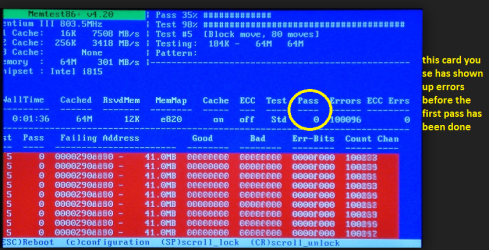
1. I would be running a memtest for one thing http://www.sevenforums.com/tutorials/105647-ram-test-memtest86.html (see pics for detail) but please remember no less than 8 passes otherwise the results will be useless - unless the errors come up fairly quickly.

2. Before that please follow this and post back what you find a pic would be good

Using HW Info
PART A:
You can test the volts on the PSU with HW Info
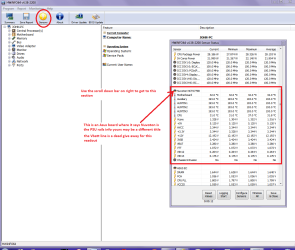
HWiNFO, HWiNFO32/64 - Download <download the right bit version and close the right hand window select Sensorsand scroll down to the power section where you will see what the volts aredoing see my pic. Now the section you want will be labelled - fpr example Asusboards usually have "Nuvoton" and Gigabyte boards "ITE" inany case the section you want will have Vbatt or VBAT in it (dead give away)
The original right hand window shows the machine running and is handy for thatbut for looking at the components in some detail close it and use the main lefthand side panel
FOR OTHER COMPONENTS
PART B:
Open each small square with + in it on the section the components are in andthen click on the individual component/s (it will highlight in blue) - in theright hand side will appear all sorts of details including brands speeds andother essential info that particular device. See pic for example.


Just one last thing you can of course see if the PSU has sufficient capabilities using this calculator eXtreme Power Supply Calculator
 

Attachments

  • MEM2.PNG
    MEM2.PNG
    193.9 KB · Views: 1
  • HW INFO DESKTOP PSU.PNG
    HW INFO DESKTOP PSU.PNG
    49.8 KB · Views: 1

My Computer My Computer

Computer type
PC/Desktop
Computer Manufacturer/Model Number
Own build (new) Desk1 / Asus ROG Win 7 / Desk2 1st build
OS
Desk1 7 Home Prem / Desk2 10 Pro / Main lap Asus ROG 10 Pro 2 laptop Toshiba 7 Pro Asus P2520 7 & 10
CPU
Desk1 i5 3750K / Laptop i7 GTX 860M / Desk2 i5 2500
Motherboard
Desk1 Asus P877-V / Desk2 Gigabyte H67 UD3H / Laptop ?
Memory
Desk1 8GB (1866) / Desk2 16GB (1333) / Laptop 8Gb DDR3
Graphics Card(s)
Desk 1& 2NVidia GTX 650 & Laptops on board Intel
Sound Card
Desk 1 & 2 -XONAR DG Realtek High Def audio Laptop
Monitor(s) Displays
Desk 1 Benq HD 2450 / Desk2 Philips 24" / Laptop 17.5"
Screen Resolution
1920x1080 D1 & D2 & Laptop 1
Hard Drives
Desk1 Samsung 120GB 830 SSD
Asus ROG 256GB 850 Pro SSD
Desk2 Samsung 840 256 SSD
Toshiba 120GB EVO
PSU
Desk 1 Corsair HX 1050/ Laptop ? / Desk 2 Corsair HX 650
Case
Desk 1 Cooler HAF XM ? Toshiba laptop / Desk2 Coolermaster
Cooling
Fans on all Desk1 -2 Desk2 - all Coolermasters 5 Laptop ?
Keyboard
Desk 1 MS Sidewinder X6 Desk 2 MS Sidewinder X 4
Mouse
Desk 1&2 - Gigabyte MS 900 gamer - laptop - Logitec wireless
Internet Speed
ADSL2+
Other Info
One other Desktop (tester) and spare Toshba laptop both with SSD's
Running Kaspersky 2016 ISS on all machines config'd identically
Logitec audio stereo systems on each machine (x3)
Canon MG5250MFC
Router/modem TP-Link running WPA2SK
Are you oc'ing your ram or using a xmp profile ?
 

My Computer My Computer

Computer type
PC/Desktop
Computer Manufacturer/Model Number
Custom assembled by me :}
OS
Win-7-Pro64bit 7-H-Prem-64bit
CPU
i7-5930K 2nd i9-9940x both water blocked VRM's too
Motherboard
ASUS SABERTOOTH X99 2nd ASUS x299 Apex
Memory
Trident-z 3200C14 2nd Trident-z 3600C16
Graphics Card(s)
EVGA 1080ti ftw3 2nd Titan Xp both water blocked
Sound Card
Built-in Realtek
Monitor(s) Displays
1-AOC G2460PG 24"G-Sync 144Hz/ 2nd 1-ASUS VG248QE 24" 144Hz
Screen Resolution
1920 x 1080 144Hz
Hard Drives
2-Samsung M.2 Evo & Evo Plus
2-Samsung 850 EVO 500GB SSD's/ 3-2.5 W.D. Black 1tb-&3-1tb/3-3.5 WD Black 1tb hdd's
PSU
EVGA SuperNOVA 1000-P2 2nd 1200-P2
Case
2-Corsair Obsidian Series 450D Black ATX Mid Tower
Cooling
Custom water loops
Keyboard
Logitech G710+/ 2nd Logitech G910
Mouse
2-RedDragon M901 Perdition 16400 dpi Gaming mouse = wired
Internet Speed
Comcast Ping 19ms 89.31mbps download speed 6.12mbps upload
Antivirus
Malwarebytes Pro/ Superantispyware Pro
Browser
FireFox & Pale moon
Other Info
2nd ASUS X299 Apex/Intel i9-9940x with Custom water loop/7H-Prem-x64/Corsair 450D case/Ram Trident-z 3600C16 4x8gb / Samsung970Evo plus 500gb SSD/Dual ssd EZ swap evo/PSU EVGA SuperNova 1200w-P2 80+Platinum/GPU Titan Xp /8-ML-140 on push-pull on 2-280GTX rads
Here is a cheap handy little tool I use for A/C outlets.

https://jet.com/product/detail/814d...92a889efc3b0&gclid=CNeqhu3hjMoCFYEfHwod3JwH7w

b49c630c442cc6f1a09dedade18d061f.1500
 

My Computer My Computer

Computer type
PC/Desktop
Computer Manufacturer/Model Number
Home made Desktop
OS
Windows 10 Pro. 64/ version 1709 Windows 7 Pro/64
CPU
Intel i7-6800K @ 4.3
Motherboard
ASUS X-99 Deluxe II
Memory
Corsair Platinum 16 gig @2400
Graphics Card(s)
EVGA GTX 1070 OC
Monitor(s) Displays
Asus 27" LED LCD/VE278Q
Screen Resolution
1920-1080 or 1280-720 HDMI
Hard Drives
INTEL SSD 730-240 Gb Sata 3.0/
PSU
EVGA Platium 1200W
Case
Phanteks Luxe Tempered Glass 8 fans/ one radiator
Cooling
XSPC/ Water Cooled CPU
Keyboard
Das 4 Professional
Mouse
Logitech M705/MX Anywhere 2-S
Internet Speed
100 mbits
Antivirus
Microsoft Security Essentials/ Malwarebytes Premium 3.0/ SAS
Browser
I.E. 11 default/Firefox/ ISP Time Warner Cable/Spectrum
Other Info
LG BluRay Burner/
Sound system-KLipsch-THX/
Icy Dock ssd Hot Swap bays.
@ThrashZone As far as I know, I am not using either.
 

My Computer My Computer

Computer type
PC/Desktop
OS
Windows 7 Home Premium 64bit
Okay it seems just your C19 default timings which run at full blast 800Mhz
My C16 run at 532Mhz

That's a nice device LBB and available at any Home depot or Lowe's.. great to have and check outlets :thumbsup:
 

My Computer My Computer

Computer type
PC/Desktop
Computer Manufacturer/Model Number
Custom assembled by me :}
OS
Win-7-Pro64bit 7-H-Prem-64bit
CPU
i7-5930K 2nd i9-9940x both water blocked VRM's too
Motherboard
ASUS SABERTOOTH X99 2nd ASUS x299 Apex
Memory
Trident-z 3200C14 2nd Trident-z 3600C16
Graphics Card(s)
EVGA 1080ti ftw3 2nd Titan Xp both water blocked
Sound Card
Built-in Realtek
Monitor(s) Displays
1-AOC G2460PG 24"G-Sync 144Hz/ 2nd 1-ASUS VG248QE 24" 144Hz
Screen Resolution
1920 x 1080 144Hz
Hard Drives
2-Samsung M.2 Evo & Evo Plus
2-Samsung 850 EVO 500GB SSD's/ 3-2.5 W.D. Black 1tb-&3-1tb/3-3.5 WD Black 1tb hdd's
PSU
EVGA SuperNOVA 1000-P2 2nd 1200-P2
Case
2-Corsair Obsidian Series 450D Black ATX Mid Tower
Cooling
Custom water loops
Keyboard
Logitech G710+/ 2nd Logitech G910
Mouse
2-RedDragon M901 Perdition 16400 dpi Gaming mouse = wired
Internet Speed
Comcast Ping 19ms 89.31mbps download speed 6.12mbps upload
Antivirus
Malwarebytes Pro/ Superantispyware Pro
Browser
FireFox & Pale moon
Other Info
2nd ASUS X299 Apex/Intel i9-9940x with Custom water loop/7H-Prem-x64/Corsair 450D case/Ram Trident-z 3600C16 4x8gb / Samsung970Evo plus 500gb SSD/Dual ssd EZ swap evo/PSU EVGA SuperNova 1200w-P2 80+Platinum/GPU Titan Xp /8-ML-140 on push-pull on 2-280GTX rads
I have use one for years. Even a Professional Electrician that wires homes can make a mistake. This is just a easy way for us non electrician to check outlets. Then contact a electrician to correct the problem.
I found problem in my house that had to be corrected.
 

My Computer My Computer

Computer type
PC/Desktop
Computer Manufacturer/Model Number
Home made Desktop
OS
Windows 10 Pro. 64/ version 1709 Windows 7 Pro/64
CPU
Intel i7-6800K @ 4.3
Motherboard
ASUS X-99 Deluxe II
Memory
Corsair Platinum 16 gig @2400
Graphics Card(s)
EVGA GTX 1070 OC
Monitor(s) Displays
Asus 27" LED LCD/VE278Q
Screen Resolution
1920-1080 or 1280-720 HDMI
Hard Drives
INTEL SSD 730-240 Gb Sata 3.0/
PSU
EVGA Platium 1200W
Case
Phanteks Luxe Tempered Glass 8 fans/ one radiator
Cooling
XSPC/ Water Cooled CPU
Keyboard
Das 4 Professional
Mouse
Logitech M705/MX Anywhere 2-S
Internet Speed
100 mbits
Antivirus
Microsoft Security Essentials/ Malwarebytes Premium 3.0/ SAS
Browser
I.E. 11 default/Firefox/ ISP Time Warner Cable/Spectrum
Other Info
LG BluRay Burner/
Sound system-KLipsch-THX/
Icy Dock ssd Hot Swap bays.
@ICIT2LOL Hi, I already performed the Memtest, I did 9 Passes and it came back with 0 errors.

I'm not sure I understand what it is I'm supposed to be looking for in HWiNFO but, here is what I found-

https://gyazo.com/347477ceafbd22e0fec5fde31f792210
Ok mate yes that is the correct section and the rails all look pretty healthy to me. By the by did you run that calculator to see if the PSU has enough grunt??
 

My Computer My Computer

Computer type
PC/Desktop
Computer Manufacturer/Model Number
Own build (new) Desk1 / Asus ROG Win 7 / Desk2 1st build
OS
Desk1 7 Home Prem / Desk2 10 Pro / Main lap Asus ROG 10 Pro 2 laptop Toshiba 7 Pro Asus P2520 7 & 10
CPU
Desk1 i5 3750K / Laptop i7 GTX 860M / Desk2 i5 2500
Motherboard
Desk1 Asus P877-V / Desk2 Gigabyte H67 UD3H / Laptop ?
Memory
Desk1 8GB (1866) / Desk2 16GB (1333) / Laptop 8Gb DDR3
Graphics Card(s)
Desk 1& 2NVidia GTX 650 & Laptops on board Intel
Sound Card
Desk 1 & 2 -XONAR DG Realtek High Def audio Laptop
Monitor(s) Displays
Desk 1 Benq HD 2450 / Desk2 Philips 24" / Laptop 17.5"
Screen Resolution
1920x1080 D1 & D2 & Laptop 1
Hard Drives
Desk1 Samsung 120GB 830 SSD
Asus ROG 256GB 850 Pro SSD
Desk2 Samsung 840 256 SSD
Toshiba 120GB EVO
PSU
Desk 1 Corsair HX 1050/ Laptop ? / Desk 2 Corsair HX 650
Case
Desk 1 Cooler HAF XM ? Toshiba laptop / Desk2 Coolermaster
Cooling
Fans on all Desk1 -2 Desk2 - all Coolermasters 5 Laptop ?
Keyboard
Desk 1 MS Sidewinder X6 Desk 2 MS Sidewinder X 4
Mouse
Desk 1&2 - Gigabyte MS 900 gamer - laptop - Logitec wireless
Internet Speed
ADSL2+
Other Info
One other Desktop (tester) and spare Toshba laptop both with SSD's
Running Kaspersky 2016 ISS on all machines config'd identically
Logitec audio stereo systems on each machine (x3)
Canon MG5250MFC
Router/modem TP-Link running WPA2SK
Hi there all, I tried a few things such as rearranging my power management/outlet stuff and it seemed to be fixed, until earlier. I was playing battlefield when it crashed to desktop again. I had my headphones off this time and I noticed that the GPU fan stopped completely when the crash occured, then started spinning again at a lower RPM, despite having my GPU fan settings set at around 65% RPM. Let me know what you can gather from this.
 

My Computer My Computer

Computer type
PC/Desktop
OS
Windows 7 Home Premium 64bit
Sounds like your fan is seizing up, to be honest. Perhaps the bearings are starting to go.
 

My Computer My Computer

Computer type
PC/Desktop
Computer Manufacturer/Model Number
Mellon Labs (custom build)
OS
Win 7 Pro x64/Win 10 Pro x64 dual boot
CPU
AMD FX 8350 Vishera @ 4200
Motherboard
ASUS M5A97 R2.0
Memory
16 GB Mushkin Blackline DDR3-2400 @ 1866 (9-10-10-10-31)
Graphics Card(s)
XFX Radeon R9 280 Double D Black Edition
Sound Card
Realtek HD Audio on MB. Sounds great.
Monitor(s) Displays
Acer 24", Acer 22"
Screen Resolution
3840 x 1080
Hard Drives
1 x Mushkin Chronos 120 GB SSD (Win 10)
1 x Samsung 850 EVO 250 GB SSD (Win 7)
1 x WD 1TB SATA Blue
1 x WD 1TB SATA Green
PSU
Corsair TX-750
Case
CoolerMaster HAF 912+
Cooling
Coolermaster Seidon 240M Liquid AIO. 6 case fans
Keyboard
Logitech G710+
Mouse
Logitech G500s
Internet Speed
Much better since I got fiber, but still way overpriced.
Antivirus
MSE, Malware Bytes for scanning
Browser
Firefox
Other Info
Corsair VOID USB headphones.

A Mellon Labs X-1 - LCD Smartie driven system status display.

Brought to you by the letter E
And that could lead to the GPU overheating and crashing the card, which may or may not affect the PC. It would certainly affect your gaming.
 

My Computer My Computer

Computer type
PC/Desktop
Computer Manufacturer/Model Number
Home Built - Jan 2013
OS
Windows 7 64 Bit Home Premium SP1
CPU
i7-3820
Motherboard
Asus P9X79-PRO - Bios 4608
Memory
GSkill F3-14900CL9Q - 16GB
Graphics Card(s)
EVGA GeForce GTX660 - Driver 352.86
Sound Card
On board Realtek ALC898
Monitor(s) Displays
Acer S271HL
Screen Resolution
1920 x 1080
Hard Drives
#1- Samsung 840 Pro Series
#2- Western Digital WD1002FAEX Sata3 Black
#3- Western Digital WD1002FAEX Sata3 Black
PSU
Corsair CMPSU-850TX-V2 - 850 watt (by Seasonic)
Case
Corsair Obsidian 550D
Cooling
Standard 3 120mm case fans, Cooler Master Hyper 212 EVO
Keyboard
MS KC-0405
Mouse
Intellimouse 5-button
Internet Speed
56 Mbits/Sec (on a good day)
Antivirus
Avast & Malwarebytes
Browser
Firefox
Other Info
Asus DVD - DRW-24B1ST 24X
Back
Top