Google Search

Just lost my search settings on google again.
The settings were good for a few days but just now are lost.

...

Any ideas on how to prevent this would be appreciated, thanks!

Whatever browser & disk/cookie cleaner you use need to be set to preserve the Google cookies when they close/run. That simple.
 

My Computer

Computer Manufacturer/Model Number
Custom built machine
OS
W7 x64
CPU
Intel Q9300 2.5Ghz Quad LGA775 (Would like Q9650)
Motherboard
Gigabyte GA-EP45T-UD3R (F6 Bios)
Memory
4Gb OCZ Gold 1,333Mhz
Graphics Card(s)
Palit HD4850 O/C Sonic 512Mb DDR3, Dual DViD's
Sound Card
Azalia to twin Samson 50w Studio Monitors
Monitor(s) Displays
Twin Dell (E-IPS) U2311H 23.6" Screens
Screen Resolution
1920 x 1080 @ 60Hz
Hard Drives
Crucial M4 SSD, archives on twin Western Digital Caviar Black WD2002FAEX, 2TB, 7200rpm HDD's, Samsung Ritemaster CD/DVD Burner...
PSU
OCZ 600w
Case
Lian-Li PC8 acoustifoamed' aluminium tower
Cooling
Scythe 140mm Zipang
Keyboard
Cherry PS/2 custom model
Mouse
Lenovo USB laser "Thinkpad" Mouse
Internet Speed
ADSL2+ @14Mbps downstream & Cat6 Gigabit Ethernet
Antivirus
NOD32
Browser
Opera
Other Info
Silicon Dust HD Homerun Dual FTA (Ethernet) TV Tuners, Dray Tek Vigor 2850Vn router and 8x HP Gigabit Switch. Lian-Li CR26 Card Reader, Canon MF4430 iSensys laser printer/scanner.
Just lost my search settings on google again.
The settings were good for a few days but just now are lost.

...

Any ideas on how to prevent this would be appreciated, thanks!

Whatever browser & disk/cookie cleaner you use need to be set to preserve the Google cookies when they close/run. That simple.

I didn't clean anything but may have hit my limit on how much is in the temporary folder, could be that the OS starts removing files if it goes over that limit.
I will check on that, thank you!
 

My Computer

Computer Manufacturer/Model Number
Personal Build
OS
Windows 7 Home Premium 64 bit (OEM) SP1
CPU
i7-875K (No Overclock)
Motherboard
GA-P55-USB3 Rev. 2, F9 bios
Memory
4GB G.SKILL Ripjaws Series 1600 7-8-7-24-2t 1.65V
Graphics Card(s)
XFX HD-577X-ZNFC 5770 1GB
Sound Card
Onboard
Monitor(s) Displays
Asus VH222H Black 21.5
Screen Resolution
1920X1080 @60 Hz
Hard Drives
SAMSUNG Spinpoint F3 HD103SJ 1TB
PSU
CORSAIR CMPSU-650TX 650W
Case
COOLER MASTER RC-692-KKN2 CM690 II Advanced
Cooling
COOLER MASTER Hyper 212+
Keyboard
Microsoft Comfort Curve Keyboard 2000
Mouse
Microsoft IntelliMouse Optical 1.1A
Internet Speed
3 Mb/s
Other Info
ASUS DRW-24B1ST/BLK/B/AS

Browser:
IE9
George,

Are you still deleting temporary internet files? Are you deleting browsing history or any of the other things listed, such as cookies? There is an option to delete history on exit, is that checked? Uncheck it if it is.

What web browser are you using?

You can increase the temporary internet file size if you are worried about it.

Go into internet options, under the advanced tab. scroll down and look for "empty temporary internet files when browser is closed", and make sure it is Unchecked. It will be listed towards the bottom under "security"

Is your computer shutting off normally or are you having problems? Do you turn it off by clicking the "shutdown" button?
 

My Computer

Computer type
PC/Desktop
Computer Manufacturer/Model Number
Custom Asus Build
OS
Microsoft Windows 8.1 Pro 64-bit
CPU
Intel(R) Core(TM) i3-4130 CPU @ 3.40GHz
Motherboard
B85M-E
Memory
8.00 GB
Graphics Card(s)
None
Sound Card
Realtek High Definition Audio
Monitor(s) Displays
Asus 23.6" Monitor
Screen Resolution
1920 x 1080 x 32 bits (4294967296 colors) @ 60 Hz
Hard Drives
INTEL SSDSC2BW180A4
Samsung SSD 840 PRO Series
PSU
Seasonic S12II-380Bronze
Case
Lian Li
Cooling
Fan, Passive
Keyboard
Logitech K120
Mouse
Microsoft Touch Mouse
Internet Speed
4ms Ping, 19.0 Mbps Download, 19.0 Mbps Upload
Antivirus
Eset Endpoint
Browser
Internet Explorer, Chrome
George,

Are you still deleting temporary internet files? Are you deleting browsing history or any of the other things listed, such as cookies? There is an option to delete history on exit, is that checked? Uncheck it if it is.

What web browser are you using?

You can increase the temporary internet file size if you are worried about it.

Go into internet options, under the advanced tab. scroll down and look for "empty temporary internet files when browser is closed", and make sure it is Unchecked. It will be listed towards the bottom under "security"

Is your computer shutting off normally or are you having problems? Do you turn it off by clicking the "shutdown" button?

It was checked so I unchecked it. Thanks.

Sometimes it'll be a week or so and no problem.
During this time I close the programs and exit using shutdown.
Next day restart the computer and it still works.
 

My Computer

Computer Manufacturer/Model Number
Personal Build
OS
Windows 7 Home Premium 64 bit (OEM) SP1
CPU
i7-875K (No Overclock)
Motherboard
GA-P55-USB3 Rev. 2, F9 bios
Memory
4GB G.SKILL Ripjaws Series 1600 7-8-7-24-2t 1.65V
Graphics Card(s)
XFX HD-577X-ZNFC 5770 1GB
Sound Card
Onboard
Monitor(s) Displays
Asus VH222H Black 21.5
Screen Resolution
1920X1080 @60 Hz
Hard Drives
SAMSUNG Spinpoint F3 HD103SJ 1TB
PSU
CORSAIR CMPSU-650TX 650W
Case
COOLER MASTER RC-692-KKN2 CM690 II Advanced
Cooling
COOLER MASTER Hyper 212+
Keyboard
Microsoft Comfort Curve Keyboard 2000
Mouse
Microsoft IntelliMouse Optical 1.1A
Internet Speed
3 Mb/s
Other Info
ASUS DRW-24B1ST/BLK/B/AS

Browser:
IE9
George,

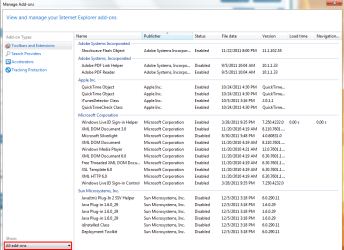
Provided you are still having trouble, let me know what web browser you are using. Also, post a picture of ALL your addons, and I'll post a pic to let you know what I mean:
addonspng.png

Also George, it may be your antivirus deleting "bad" cookies. What is your antivirus, and does it delete cookies, and does it delete them often? Does anything else on your system delete cookies?

Does google require you to be "signed in"? (Discovered that it doesn't require this)

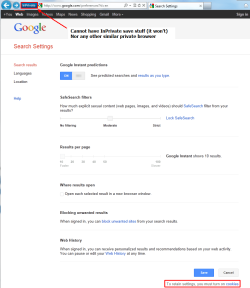
Does this look familiar? Have you saved all the correct settings?:
Googlepng.png
 

My Computer

Computer type
PC/Desktop
Computer Manufacturer/Model Number
Custom Asus Build
OS
Microsoft Windows 8.1 Pro 64-bit
CPU
Intel(R) Core(TM) i3-4130 CPU @ 3.40GHz
Motherboard
B85M-E
Memory
8.00 GB
Graphics Card(s)
None
Sound Card
Realtek High Definition Audio
Monitor(s) Displays
Asus 23.6" Monitor
Screen Resolution
1920 x 1080 x 32 bits (4294967296 colors) @ 60 Hz
Hard Drives
INTEL SSDSC2BW180A4
Samsung SSD 840 PRO Series
PSU
Seasonic S12II-380Bronze
Case
Lian Li
Cooling
Fan, Passive
Keyboard
Logitech K120
Mouse
Microsoft Touch Mouse
Internet Speed
4ms Ping, 19.0 Mbps Download, 19.0 Mbps Upload
Antivirus
Eset Endpoint
Browser
Internet Explorer, Chrome
I use IE9. I don't sign in to google.
I also use malwarebytes and MSE, run full scans every two days using both simultaneously but in over a year have never found a single virus or bad file from either of them.

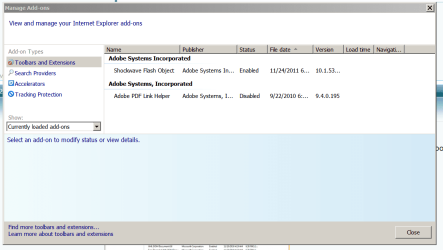
Here's my ad-ons, only two.

Capture.PNG
 

My Computer

Computer Manufacturer/Model Number
Personal Build
OS
Windows 7 Home Premium 64 bit (OEM) SP1
CPU
i7-875K (No Overclock)
Motherboard
GA-P55-USB3 Rev. 2, F9 bios
Memory
4GB G.SKILL Ripjaws Series 1600 7-8-7-24-2t 1.65V
Graphics Card(s)
XFX HD-577X-ZNFC 5770 1GB
Sound Card
Onboard
Monitor(s) Displays
Asus VH222H Black 21.5
Screen Resolution
1920X1080 @60 Hz
Hard Drives
SAMSUNG Spinpoint F3 HD103SJ 1TB
PSU
CORSAIR CMPSU-650TX 650W
Case
COOLER MASTER RC-692-KKN2 CM690 II Advanced
Cooling
COOLER MASTER Hyper 212+
Keyboard
Microsoft Comfort Curve Keyboard 2000
Mouse
Microsoft IntelliMouse Optical 1.1A
Internet Speed
3 Mb/s
Other Info
ASUS DRW-24B1ST/BLK/B/AS

Browser:
IE9
I rarely use inprivate.
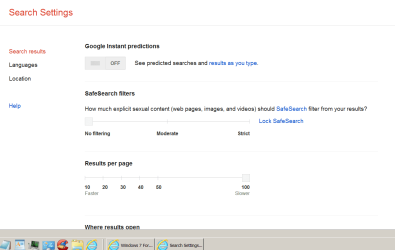
Everything is set correct, it changes in a day or sometimes in a week, it varies.


Capture.PNG
 

My Computer

Computer Manufacturer/Model Number
Personal Build
OS
Windows 7 Home Premium 64 bit (OEM) SP1
CPU
i7-875K (No Overclock)
Motherboard
GA-P55-USB3 Rev. 2, F9 bios
Memory
4GB G.SKILL Ripjaws Series 1600 7-8-7-24-2t 1.65V
Graphics Card(s)
XFX HD-577X-ZNFC 5770 1GB
Sound Card
Onboard
Monitor(s) Displays
Asus VH222H Black 21.5
Screen Resolution
1920X1080 @60 Hz
Hard Drives
SAMSUNG Spinpoint F3 HD103SJ 1TB
PSU
CORSAIR CMPSU-650TX 650W
Case
COOLER MASTER RC-692-KKN2 CM690 II Advanced
Cooling
COOLER MASTER Hyper 212+
Keyboard
Microsoft Comfort Curve Keyboard 2000
Mouse
Microsoft IntelliMouse Optical 1.1A
Internet Speed
3 Mb/s
Other Info
ASUS DRW-24B1ST/BLK/B/AS

Browser:
IE9
Alrighty George,

Are you having more trouble? Perhaps it will take a few more days before you can determine if your stuff gets deleted again. If it does, we may see about going through IE options inch by inch to check all settings. I'll post detailed pictures for you if you need it. Seems to me like somehow the cookies are getting removed, and they are necessary to save those settings.
 

My Computer

Computer type
PC/Desktop
Computer Manufacturer/Model Number
Custom Asus Build
OS
Microsoft Windows 8.1 Pro 64-bit
CPU
Intel(R) Core(TM) i3-4130 CPU @ 3.40GHz
Motherboard
B85M-E
Memory
8.00 GB
Graphics Card(s)
None
Sound Card
Realtek High Definition Audio
Monitor(s) Displays
Asus 23.6" Monitor
Screen Resolution
1920 x 1080 x 32 bits (4294967296 colors) @ 60 Hz
Hard Drives
INTEL SSDSC2BW180A4
Samsung SSD 840 PRO Series
PSU
Seasonic S12II-380Bronze
Case
Lian Li
Cooling
Fan, Passive
Keyboard
Logitech K120
Mouse
Microsoft Touch Mouse
Internet Speed
4ms Ping, 19.0 Mbps Download, 19.0 Mbps Upload
Antivirus
Eset Endpoint
Browser
Internet Explorer, Chrome
Alrighty George,

Are you having more trouble? Perhaps it will take a few more days before you can determine if your stuff gets deleted again. If it does, we may see about going through IE options inch by inch to check all settings. I'll post detailed pictures for you if you need it. Seems to me like somehow the cookies are getting removed, and they are necessary to save those settings.

Thanks. I'm going to get into this, it's interesting... a little.

I'll report back if I find a solution.
 

My Computer

Computer Manufacturer/Model Number
Personal Build
OS
Windows 7 Home Premium 64 bit (OEM) SP1
CPU
i7-875K (No Overclock)
Motherboard
GA-P55-USB3 Rev. 2, F9 bios
Memory
4GB G.SKILL Ripjaws Series 1600 7-8-7-24-2t 1.65V
Graphics Card(s)
XFX HD-577X-ZNFC 5770 1GB
Sound Card
Onboard
Monitor(s) Displays
Asus VH222H Black 21.5
Screen Resolution
1920X1080 @60 Hz
Hard Drives
SAMSUNG Spinpoint F3 HD103SJ 1TB
PSU
CORSAIR CMPSU-650TX 650W
Case
COOLER MASTER RC-692-KKN2 CM690 II Advanced
Cooling
COOLER MASTER Hyper 212+
Keyboard
Microsoft Comfort Curve Keyboard 2000
Mouse
Microsoft IntelliMouse Optical 1.1A
Internet Speed
3 Mb/s
Other Info
ASUS DRW-24B1ST/BLK/B/AS

Browser:
IE9
Still having this problem with google search.
In the google search setting the "google instant predictions" keeps getting reset to on.
When they're on you only have 10 search results per page and results don't open in a new window. Slowing me down some.

This time it was a few hours, I was doing many searches and then all of a sudden my saved search settings were gone for the next search.
 

My Computer

Computer Manufacturer/Model Number
Personal Build
OS
Windows 7 Home Premium 64 bit (OEM) SP1
CPU
i7-875K (No Overclock)
Motherboard
GA-P55-USB3 Rev. 2, F9 bios
Memory
4GB G.SKILL Ripjaws Series 1600 7-8-7-24-2t 1.65V
Graphics Card(s)
XFX HD-577X-ZNFC 5770 1GB
Sound Card
Onboard
Monitor(s) Displays
Asus VH222H Black 21.5
Screen Resolution
1920X1080 @60 Hz
Hard Drives
SAMSUNG Spinpoint F3 HD103SJ 1TB
PSU
CORSAIR CMPSU-650TX 650W
Case
COOLER MASTER RC-692-KKN2 CM690 II Advanced
Cooling
COOLER MASTER Hyper 212+
Keyboard
Microsoft Comfort Curve Keyboard 2000
Mouse
Microsoft IntelliMouse Optical 1.1A
Internet Speed
3 Mb/s
Other Info
ASUS DRW-24B1ST/BLK/B/AS

Browser:
IE9
George,

I can only think that the reason the things get deleted is your internet cookies or temporary files get replaced by "newer" ones. You might try creating a google account and using it to sign in. The settings should be saved that way. As google may track information, if you are worried about it, you don't have to provide your real name or anything. I wouldn't give google my real name. Hope this helps
 

My Computer

Computer type
PC/Desktop
Computer Manufacturer/Model Number
Custom Asus Build
OS
Microsoft Windows 8.1 Pro 64-bit
CPU
Intel(R) Core(TM) i3-4130 CPU @ 3.40GHz
Motherboard
B85M-E
Memory
8.00 GB
Graphics Card(s)
None
Sound Card
Realtek High Definition Audio
Monitor(s) Displays
Asus 23.6" Monitor
Screen Resolution
1920 x 1080 x 32 bits (4294967296 colors) @ 60 Hz
Hard Drives
INTEL SSDSC2BW180A4
Samsung SSD 840 PRO Series
PSU
Seasonic S12II-380Bronze
Case
Lian Li
Cooling
Fan, Passive
Keyboard
Logitech K120
Mouse
Microsoft Touch Mouse
Internet Speed
4ms Ping, 19.0 Mbps Download, 19.0 Mbps Upload
Antivirus
Eset Endpoint
Browser
Internet Explorer, Chrome
George,

I can only think that the reason the things get deleted is your internet cookies or temporary files get replaced by "newer" ones. You might try creating a google account and using it to sign in. The settings should be saved that way. As google may track information, if you are worried about it, you don't have to provide your real name or anything. I wouldn't give google my real name. Hope this helps

I guess I'll try that.
Maybe some files expire, I noticed on the cookie properties it had an expiration time but don't know much about it.

Thank you for the help!
 

My Computer

Computer Manufacturer/Model Number
Personal Build
OS
Windows 7 Home Premium 64 bit (OEM) SP1
CPU
i7-875K (No Overclock)
Motherboard
GA-P55-USB3 Rev. 2, F9 bios
Memory
4GB G.SKILL Ripjaws Series 1600 7-8-7-24-2t 1.65V
Graphics Card(s)
XFX HD-577X-ZNFC 5770 1GB
Sound Card
Onboard
Monitor(s) Displays
Asus VH222H Black 21.5
Screen Resolution
1920X1080 @60 Hz
Hard Drives
SAMSUNG Spinpoint F3 HD103SJ 1TB
PSU
CORSAIR CMPSU-650TX 650W
Case
COOLER MASTER RC-692-KKN2 CM690 II Advanced
Cooling
COOLER MASTER Hyper 212+
Keyboard
Microsoft Comfort Curve Keyboard 2000
Mouse
Microsoft IntelliMouse Optical 1.1A
Internet Speed
3 Mb/s
Other Info
ASUS DRW-24B1ST/BLK/B/AS

Browser:
IE9
Back
Top