
Google slowing down

trendy

David H.
Member
VIP
Local time
9:14 PM
Messages
379
Location
Swansea South Wales UK
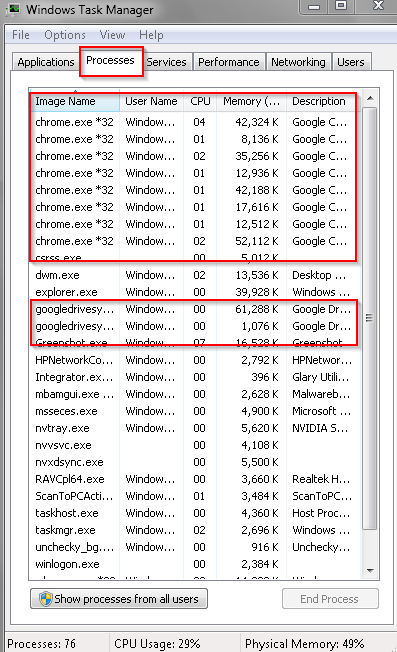
Can someone please confirm that the figures in the image is correct when google chrome is open.
Many thanks.
lTRH0vJ.png
 

My Computer

Computer type
PC/Desktop
Computer Manufacturer/Model Number
Home Build windows 7 Home premium.Built by a local computer shop.
OS
Summary Operating System Windows 7 Home Premium 64-bit SP1 CPU AMD Athlon II X2 250 23 °C
CPU
AMD Athlon II X2 250
Motherboard
Manufacturer BIOSTAR Group Model N61PB-M2S (Socket AM2 )
Memory
Total memory slots 4 Used memory slots 2 Free memory slots 2
Graphics Card(s)
Name Generic Non-PnP Monitor on NVIDIA GeForce 6150SE nForce
Sound Card
Realtek High Definition Audio Playback Devices Realtek Dig
Monitor(s) Displays
Acer
Hard Drives
Main C drive is now a 120GB SSD With only operating system and programs.
Second HDD 1TB with all documents etc.
Keyboard
HID Keyboard Device Device Kind Keyboard Device Name HID K
Antivirus
Karsersky
Browser
Google
Other Info
Summary
Operating System
Windows 7 Home Premium 64-bit SP1
CPU
AMD Athlon II X2 250 23 °C
Regor 45nm Technology
RAM
4.00GB Dual-Channel DDR2 @ 401MHz (6-6-6-18)
Motherboard
BIOSTAR Group N61PB-M2S (Socket AM2 ) 40 °C
Graphics
Generic Non-PnP Monitor (1024x768@60Hz)
128MB NVIDIA GeForce 6150SE nForce 430 (Biostar Microtech Int'l)
Storage
1863GB West
Hi there Googledrive is what s using up your CPU ... to many tabs use up the Memory
 

My Computer

Computer Manufacturer/Model Number
W530-3630QM1
OS
windows 7 home 64bit
CPU
INTEL-CORE I7
Memory
16GB
Hard Drives
750GB
Browser
Chrome
indeed. maxie is right. Too many tabs or programs open but not enough ram to run all of those will slow down the performance of your system dramatically.
 

My Computer

Computer type
PC/Desktop
Computer Manufacturer/Model Number
custom built
OS
Windows 7 ultimate 64-bit
CPU
Intel I7 2600K 3.4ghz
Motherboard
Asus Evo P8P67
Memory
Corsair 16gb ddr3 1600mhz
Graphics Card(s)
Nvidia Geforce gt 430
Sound Card
Sound Blaster Titanium x-fi pci express
Monitor(s) Displays
Dell E198WFP
Hard Drives
1 western digital 2TB drive.
PSU
Antec 1200 watt
Case
Inwin Dragon Rider
Cooling
6 case supplied cooling fans
Keyboard
logitech mk700
Mouse
logitech m705
Internet Speed
25-50mbps download; 10mbps upload(i think)
Antivirus
avg free 2014
Browser
mozilla firefox
Other Info
Also have a pretty bad speaker setup which is a klipsch promedia 5.1 surround speaker setup with huge subwoofer and lg blu ray player/writer. Also a hp officejet pro 8600 plus wireless all in one and a logitech s7500 webcam.
Thanks both,But only google page was open,Can you please explain a little more.
Thanks
 

My Computer

Computer type
PC/Desktop
Computer Manufacturer/Model Number
Home Build windows 7 Home premium.Built by a local computer shop.
OS
Summary Operating System Windows 7 Home Premium 64-bit SP1 CPU AMD Athlon II X2 250 23 °C
CPU
AMD Athlon II X2 250
Motherboard
Manufacturer BIOSTAR Group Model N61PB-M2S (Socket AM2 )
Memory
Total memory slots 4 Used memory slots 2 Free memory slots 2
Graphics Card(s)
Name Generic Non-PnP Monitor on NVIDIA GeForce 6150SE nForce
Sound Card
Realtek High Definition Audio Playback Devices Realtek Dig
Monitor(s) Displays
Acer
Hard Drives
Main C drive is now a 120GB SSD With only operating system and programs.
Second HDD 1TB with all documents etc.
Keyboard
HID Keyboard Device Device Kind Keyboard Device Name HID K
Antivirus
Karsersky
Browser
Google
Other Info
Summary
Operating System
Windows 7 Home Premium 64-bit SP1
CPU
AMD Athlon II X2 250 23 °C
Regor 45nm Technology
RAM
4.00GB Dual-Channel DDR2 @ 401MHz (6-6-6-18)
Motherboard
BIOSTAR Group N61PB-M2S (Socket AM2 ) 40 °C
Graphics
Generic Non-PnP Monitor (1024x768@60Hz)
128MB NVIDIA GeForce 6150SE nForce 430 (Biostar Microtech Int'l)
Storage
1863GB West
Hi there, Google Drive is running, it may be that you have the Google Drive application on your desktop, this could be where that is coming from, the Chrome.exe many times could be that you have a lot of tabs open?

Download CCleaner and use the Autorun feature to disable things like Google Drive desktop to start when Windows starts will help a little
 

My Computer

Computer type
Laptop
Computer Manufacturer/Model Number
Lenovo X61
OS
Windows 7 Professional x64
CPU
Centrino vPro 2.0 Ghz Dual Core
Motherboard
Lenovo 7674GS3
Memory
3GB
Graphics Card(s)
Intel 965 Chipset
Sound Card
Intel 965 Chipset
Monitor(s) Displays
ThinkPad Display
Screen Resolution
1024x768
Hard Drives
128GB Corsair GTX SSD
Mouse
Lenovo TrackPad
Internet Speed
Fast...
Antivirus
AVG
Browser
Chrome
Thanks both,But only google page was open,Can you please explain a little more.
Thanks
When I first start Chrome {only one tab}
...I get 8 instances listed in task manager too
...then it goes down to 3 or 4 instances depending on the website.
 

My Computer

Computer type
Laptop
Computer Manufacturer/Model Number
Employer provided Dell Latitude
OS
W7 Pro SP1 64bit
CPU
i7
Memory
8GB
Graphics Card(s)
Intel HD Graphics
Hard Drives
crappy SSD
Antivirus
Employer mandated Symantec Endpoint Protection
Browser
Pale Moon 64bit, IE11 64bit & Chrome 64bit
Most of those instances are cached instances and do not really use active RAM. Have a look into Resource Monitor > Memory tab and you will probebly find a lot of Standby RAM. That is 'available' RAM and does not impact anything.

Note: My current RAM usage is high because I have Windows 7 running PLUS Windows 8.1 in a virtual machine.
 

Attachments

  • 2014-01-31_1757.png
    2014-01-31_1757.png
    8.4 KB · Views: 1

My Computer

Computer Manufacturer/Model Number
HP, Dell, Gateway, Toshiba - 4 laptops and 2 desktops
OS
Vista, Windows7, Mint Mate, Zorin, Windows 8
CPU
from 1.6GHz Duo to i7
Monitor(s) Displays
2x HP w2207
Hard Drives
5x HDD, 7x SSD, 12x Externals
Keyboard
with trackball - no mices
Mouse
Trackball mice
Internet Speed
DSL 6000
Back
Top