Google toolbar won't show in pinned websites

bsn321

New member
Local time
11:25 PM
Messages
12
Hi all - new to Windows 7 and coming up to speed.

I have downloaded Google toolbar for use in IE and having a problem.

When I launch IE by opening the actual IE icon, I can see the Google toolbar. Further, while this instance of IE is open, I can right click on IE toolbar area to see what toolbars and toolbar options are available (i.e., see other toolbars that are installed, choose to display them, etc.)

BUT - there are several websites I frequent, and have pinned them to the Windows 7 taskbar. When I launch those websites from the pinned icon, it launches IE, but I don't see Google toolbar. In fact, I can't even then see an option to display the google toolbar, or any other toolbars, for that matter. When IE is launched using the pinned versions, it's as if IE has lost all recollection of having any toolbars installed.

I have also recently created a "quick launch" area in the task bar (I always preferred that in Windows XP). Same result there. In short, the only instance of IE that runs with installed toolbars is the original IE icon that came loaded with Windows 7.

What am I missing?

Many thanks -
Brad

PS - I'll need to check IE version, but this is new Acer computer running Windows 7 64 bit. I think it must be at least IE9?
 

My Computer My Computer

At a glance

Windows 7 64 bit
OS
Windows 7 64 bit
I believe I know what's going on...

I bet the toolbar is only installed in 64 bit browser and your shortcuts on taskbar are to 32bit IE... or visa versa!

Also, make sure when you are right clicking in toolbar area that you are in a blank area and not on top of any buttons!
 

My Computer My Computer

At a glance

Windows 7 Ultimate 64 bit Steve Ballmer Signa...Intel Core 2 Quad - Q9550 - 2.83GHz stock - O...4GB DDR2 800MHz (PC6400) OCZ ReaperNvidia GE Force 8800 GTS
Computer Manufacturer/Model Number
Homebrew PC - "Alpha_Dawg"
OS
Windows 7 Ultimate 64 bit Steve Ballmer Signature Edition
CPU
Intel Core 2 Quad - Q9550 - 2.83GHz stock - OC'd to 3.6GHz
Motherboard
Gigabyte EP45-UD3P
Memory
4GB DDR2 800MHz (PC6400) OCZ Reaper
Graphics Card(s)
Nvidia GE Force 8800 GTS
Sound Card
Asus Xonar DX
Monitor(s) Displays
Samsung SyncMaster 2333HD
Screen Resolution
1920 x 1080
Hard Drives
WD Caviar Black 750GB - 7200RPM - 32MB cache
WD Caviar Green 1.5TB - 5400RPM - 64MB cache
WD Caviar Green 2.0TB - 5400RPM - 64MB cache
PSU
PC Power & Cooling Silencer 750
Case
Gigabyte 3D Aurora
Cooling
Case is Air - 5ea. 120mm fans (mix of Arctic and Xigmatec)
Keyboard
MS Natural Wireless KB
Mouse
MS Wireless Mouse
Internet Speed
50 mbps down/5 mbps up
Other Info
AVerMedia - AVerTVHD G2 Dual Tuner Card
Thanks Darryl - I will investigate this.

However - a little more help might be needed. If when I created the shortcuts in the in taskbar I just dragged them from the address bar into the taskbar, why wouldn't it be the same bit-version of IE?

That is - I'm not sure how I would even make a shortcut that isn't the same as the version of IE I'm running. This is a new laptop and one of the first things I did was to install Google Toolbar in IE.

I guess I little more advice on what to check for and how to fix would be most appreciated. Even if I did somehow figure out that my shortcuts were 32 bit vs. 64 bit (or vice versa) - I wouldn't know what to do next or how to make them same as IE.

Many thanks -
Brad
 

My Computer My Computer

At a glance

Windows 7 64 bit
OS
Windows 7 64 bit
Anyone?
 

My Computer My Computer

At a glance

Windows 7 64 bit
OS
Windows 7 64 bit
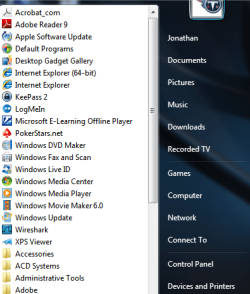
Did you check both the 32 and 64 bit versions of IE??? Since you have the 64bit Win7, you have both versions of IE...???

Here is what you should see at the top of Start --> All Programs...

Start_menu.png
 

My Computer My Computer

At a glance

Windows 7 Ultimate 64 bit Steve Ballmer Signa...Intel Core 2 Quad - Q9550 - 2.83GHz stock - O...4GB DDR2 800MHz (PC6400) OCZ ReaperNvidia GE Force 8800 GTS
Computer Manufacturer/Model Number
Homebrew PC - "Alpha_Dawg"
OS
Windows 7 Ultimate 64 bit Steve Ballmer Signature Edition
CPU
Intel Core 2 Quad - Q9550 - 2.83GHz stock - OC'd to 3.6GHz
Motherboard
Gigabyte EP45-UD3P
Memory
4GB DDR2 800MHz (PC6400) OCZ Reaper
Graphics Card(s)
Nvidia GE Force 8800 GTS
Sound Card
Asus Xonar DX
Monitor(s) Displays
Samsung SyncMaster 2333HD
Screen Resolution
1920 x 1080
Hard Drives
WD Caviar Black 750GB - 7200RPM - 32MB cache
WD Caviar Green 1.5TB - 5400RPM - 64MB cache
WD Caviar Green 2.0TB - 5400RPM - 64MB cache
PSU
PC Power & Cooling Silencer 750
Case
Gigabyte 3D Aurora
Cooling
Case is Air - 5ea. 120mm fans (mix of Arctic and Xigmatec)
Keyboard
MS Natural Wireless KB
Mouse
MS Wireless Mouse
Internet Speed
50 mbps down/5 mbps up
Other Info
AVerMedia - AVerTVHD G2 Dual Tuner Card
I will check (on other computer right now).

But are you saying I should have BOTH versions of IE installed? Or only the 64-bit version (since OS is 64?)

Many thanks.
 

My Computer My Computer

At a glance

Windows 7 64 bit
OS
Windows 7 64 bit
Okay - I'm on the computer in question now. Yes - I do indeed have both 32 and 64 bit versions of IE installed (came installed on computer).

So to summarize my issue:

From the start menu, when I open each of the versions of IE, it shows the Google toolbar in both. Further, when I right click in the toolbar area, it shows options to show all toolbars (i.e., Menu, Favorites, Command, Status, AND Google toolbar, which is "checked" to show).

When I open a pinned version of a favorite website, it opens IE in 32 bit, but does NOT show the Google Toolbar. Further - when I right click near the toolbar, it only gives me options for Menu, Favorites, Command, Status AND NO Google Toolbar is even listed for me to turn on.

This is true for favorites that are "pinned" in the bottom taskbar as well as those launched from a "quick launch" folder I've created in the bottom taskbar.

So this brings up new question: do I need both versions of IE???

AND - how does one choose the version of IE into which Google Toolbar is installed? Perhaps I need to go to Google and install while I'm using the 32 bit version. I guess I'll try that - but any insight as to why I need both IE verions is greatly appreciated.
 

My Computer My Computer

At a glance

Windows 7 64 bit
OS
Windows 7 64 bit
Okay - sorry for all the messages - but figured I'd keep it moving with updates.

While I had a 32 bit version of IE open, I went to Google and installed the Google toolbar.

So again - when I open IE directly from the Start Menu - in both versions - it shows the Google Toolbar.

Still no Google toolbar when I open from a pinned or quick launch favorite.

Another test: I launch IE from the Start Menu - and it shows Google Toolbar. I go to a website. I right click and drag the website onto the Desktop to save a shortcut to the link. When I open that link, it opens IE (32 bit version) with no toolbar.

What am I missing??? Something definitely seems to be wrong.
 

My Computer My Computer

At a glance

Windows 7 64 bit
OS
Windows 7 64 bit
As I investigate more - anyone have thoughts on this?

Internet Explorer 9's nagging 64-bit woes

This could definitely be the culprit. The example of the Bing toolbar is exactly the same issue I'm having with Google toolbar.

Is it okay to delete the 64-bit IE???
 

My Computer My Computer

At a glance

Windows 7 64 bit
OS
Windows 7 64 bit
Well I'm still at it.

I downloaded Google Chrome and found something interesting.

I open Google Chrome and go to a website. I bookmark this website in Chrome. I drag the bookmark from Chrome onto the Windows 7 Desktop. When I click on that saved link on the desktop, it opens the link with IE 32-bit WITH GOOGLE TOOLBAR.

?????

This is crazy. Anyone who can shed light on this - I'd love to figure out what's going on. This work around with Chrome is silly.
 

My Computer My Computer

At a glance

Windows 7 64 bit
OS
Windows 7 64 bit
Try to delete one of those pinned websites and then create a new one and let us know if any change...

ANd yes, for compatibility all 64 bit Win7 also have the 32 bit browser!
 

My Computer My Computer

At a glance

Windows 7 Ultimate 64 bit Steve Ballmer Signa...Intel Core 2 Quad - Q9550 - 2.83GHz stock - O...4GB DDR2 800MHz (PC6400) OCZ ReaperNvidia GE Force 8800 GTS
Computer Manufacturer/Model Number
Homebrew PC - "Alpha_Dawg"
OS
Windows 7 Ultimate 64 bit Steve Ballmer Signature Edition
CPU
Intel Core 2 Quad - Q9550 - 2.83GHz stock - OC'd to 3.6GHz
Motherboard
Gigabyte EP45-UD3P
Memory
4GB DDR2 800MHz (PC6400) OCZ Reaper
Graphics Card(s)
Nvidia GE Force 8800 GTS
Sound Card
Asus Xonar DX
Monitor(s) Displays
Samsung SyncMaster 2333HD
Screen Resolution
1920 x 1080
Hard Drives
WD Caviar Black 750GB - 7200RPM - 32MB cache
WD Caviar Green 1.5TB - 5400RPM - 64MB cache
WD Caviar Green 2.0TB - 5400RPM - 64MB cache
PSU
PC Power & Cooling Silencer 750
Case
Gigabyte 3D Aurora
Cooling
Case is Air - 5ea. 120mm fans (mix of Arctic and Xigmatec)
Keyboard
MS Natural Wireless KB
Mouse
MS Wireless Mouse
Internet Speed
50 mbps down/5 mbps up
Other Info
AVerMedia - AVerTVHD G2 Dual Tuner Card
Hi Darryl - you wrote:

Try to delete one of those pinned websites and then create a new one and let us know if any change… .
I've tried this several times. Both before and after attempting to reinstall G Toolbar. No difference.

It would appear that whenever I attempt to create a saved linked right from any version of IE, it won't reopen with Google Toolbar.

When I create a link from saving a bookmark in Chrome, then IE shows google toolbar.
 

My Computer My Computer

At a glance

Windows 7 64 bit
OS
Windows 7 64 bit
Does anyone have this same experience with Google Toolbar not showing up in a pinned site in IE 9?
 

My Computer My Computer

At a glance

Windows 7 64 bit
OS
Windows 7 64 bit
I'm hoping somebody can confirm they have a similar problem with Google Toolbar not showing up in IE9 when launching from a pinned website?

Or - if anyone uses Google Toolbar and it IS working - that would be helpful as well.

Many thanks
 

My Computer My Computer

At a glance

Windows 7 64 bit
OS
Windows 7 64 bit
This issue bugged me a little bit.

The short answer is: "The pinned site window automatically starts an isolated instance of Internet Explorer that runs in a special mode (note that Browser Helper Objects and other toolbars are not enabled in this Internet Explorer mode)."

From msdn.microsoft.com: Pinned Sites: Windows 7 Desktop Integration with Internet Explorer 9
 

My Computer My Computer

At a glance

Windows 7 Ultimate x64
OS
Windows 7 Ultimate x64
IE9 is a PITA when it comes to links. IE9 opens a special browser session when you launch a link THAT WAS CREATED WITH IE9. This special browser session disables BHOs and other toolbars (like Google Toolbar). If you create a link with any other browser (Chrome or even IE8), everything works fine, i.e. the Google Toolbar (and any other additional toolbars) are available.

Hey Microsoft, how about a "Settings" choice to allow other toolbars?

BTW, this isn't the only gripe I have about IE9. The list is quite long.
 

My Computer My Computer

At a glance

Windows 7 Ultimate 64-bit
OS
Windows 7 Ultimate 64-bit
Chrome doesn't open a pinned site, it just creates a pinned instance of Chrome if it doesn't already exist.

IE10 also behaves the same way as IE9, even though IE10 is running in both instances at once (all the 32-bit plugins work in the 64-bit version), except the toolbars aren't present.

I post because I don't generally pin tabs, I pin programs. This behaviour is peculiar, as even AV toolbars don't load (e.g. Avast! Web Rep).
 

My Computer My Computer

At a glance

Win 7 Home Premium x64 SP1Intel Core i3-380M8GB DDR3-1066Integrated Intel HD (1st Gen - Arrandale/Iron...
Computer type
Laptop
Computer Manufacturer/Model Number
Acer 5742
OS
Win 7 Home Premium x64 SP1
CPU
Intel Core i3-380M
Motherboard
Acer HM55 based c/w Insyde BIOS 1.30
Memory
8GB DDR3-1066
Graphics Card(s)
Integrated Intel HD (1st Gen - Arrandale/Ironlake)
Sound Card
Realtek HD / Intel Display HD
Monitor(s) Displays
15" 1366x768 WXGA HD LCD
Screen Resolution
1366x768
Hard Drives
750GB Seagate ST750LX003-1AC15 Hybrid SSD 8GB 64MB 7200rpm SATAIII (running on SATAII controller)
PSU
10.8V 6600mAh Extended Battery c/w 90W charger
Case
Acer Aspire Chassis
Cooling
Arctic Silver MX2 TIM to standard HSF
Keyboard
Standard
Mouse
Touchpad
Internet Speed
10MB ADSL
Antivirus
Avast Free Anti-Virus 8.0
Browser
Chrome/IE10
Open Internet explorer,
Use Alt+HA or Gear symbol/ About Internet explorer,
Post the results,
Yes you need both versions 32 and 64 bit,
First thing is to notice if you see any of these Blue symbols activated,
active%20x%20filtering-2.jpg

The 32 bit version is the most reliable,
Most people who use Google toolbar also enjoy using Google Bookmarks instead of pinning sites to the Taskbar along with Spell checker/ Translate.....
http://www.sevenforums.com/tutorials/9733-screenshots-files-upload-post-seven-forums.html
 
Last edited:

My Computer My Computer

At a glance

Win-7-Pro64bit 7-H-Prem-64biti7-5930K 2nd i9-9940x both water blocked VRM'...Trident-z 3200C14 2nd Trident-z 3600C16EVGA 1080ti ftw3 2nd Titan Xp both water blocked
Computer type
PC/Desktop
Computer Manufacturer/Model Number
Custom assembled by me :}
OS
Win-7-Pro64bit 7-H-Prem-64bit
CPU
i7-5930K 2nd i9-9940x both water blocked VRM's too
Motherboard
ASUS SABERTOOTH X99 2nd ASUS x299 Apex
Memory
Trident-z 3200C14 2nd Trident-z 3600C16
Graphics Card(s)
EVGA 1080ti ftw3 2nd Titan Xp both water blocked
Sound Card
Built-in Realtek
Monitor(s) Displays
1-AOC G2460PG 24"G-Sync 144Hz/ 2nd 1-ASUS VG248QE 24" 144Hz
Screen Resolution
1920 x 1080 144Hz
Hard Drives
2-Samsung M.2 Evo & Evo Plus
2-Samsung 850 EVO 500GB SSD's/ 3-2.5 W.D. Black 1tb-&3-1tb/3-3.5 WD Black 1tb hdd's
PSU
EVGA SuperNOVA 1000-P2 2nd 1200-P2
Case
2-Corsair Obsidian Series 450D Black ATX Mid Tower
Cooling
Custom water loops
Keyboard
Logitech G710+/ 2nd Logitech G910
Mouse
2-RedDragon M901 Perdition 16400 dpi Gaming mouse = wired
Internet Speed
Comcast Ping 19ms 89.31mbps download speed 6.12mbps upload
Antivirus
Malwarebytes Pro/ Superantispyware Pro
Browser
FireFox & Pale moon
Other Info
2nd ASUS X299 Apex/Intel i9-9940x with Custom water loop/7H-Prem-x64/Corsair 450D case/Ram Trident-z 3600C16 4x8gb / Samsung970Evo plus 500gb SSD/Dual ssd EZ swap evo/PSU EVGA SuperNova 1200w-P2 80+Platinum/GPU Titan Xp /8-ML-140 on push-pull on 2-280GTX rads


Avast! Web Rep is the one I was looking at. It is present in ordinary IE windows, but pinned tabs don't show any of the toolbars. Seems odd that the pinned IE tab differs from the standard one in this way.

It's not InPrivate browsing or tracking protection settings (as there are none).
 

My Computer My Computer

At a glance

Win 7 Home Premium x64 SP1Intel Core i3-380M8GB DDR3-1066Integrated Intel HD (1st Gen - Arrandale/Iron...
Computer type
Laptop
Computer Manufacturer/Model Number
Acer 5742
OS
Win 7 Home Premium x64 SP1
CPU
Intel Core i3-380M
Motherboard
Acer HM55 based c/w Insyde BIOS 1.30
Memory
8GB DDR3-1066
Graphics Card(s)
Integrated Intel HD (1st Gen - Arrandale/Ironlake)
Sound Card
Realtek HD / Intel Display HD
Monitor(s) Displays
15" 1366x768 WXGA HD LCD
Screen Resolution
1366x768
Hard Drives
750GB Seagate ST750LX003-1AC15 Hybrid SSD 8GB 64MB 7200rpm SATAIII (running on SATAII controller)
PSU
10.8V 6600mAh Extended Battery c/w 90W charger
Case
Acer Aspire Chassis
Cooling
Arctic Silver MX2 TIM to standard HSF
Keyboard
Standard
Mouse
Touchpad
Internet Speed
10MB ADSL
Antivirus
Avast Free Anti-Virus 8.0
Browser
Chrome/IE10
Most likely is Avast but lets Reset ie just so we can be sure your on default settings first and see if this process helps contain some add-ons,
http://www.sevenforums.com/tutorials/1222-internet-explorer-reset.html
Confirm this reset process,
https://amp7wa.blu.livefilestore.com/y2pW4oK0_iNT_3N8uSPsed-vF1heQ6B5bYh2CuBFd17ci7Dl4f5xx0h6lYowxhVXeDyoAuxQsZ9XVbQfc6_Om21WyvHxf_8DQj35U4Cf7SXkA8p5wFNLaIhMSn9re9aeGJg/Reset%20process.jpg?psid=1
After clicking on don't Enable add-ons,
Use Alt+TA or Gear symbol/ Manage add-ons/ Click on Show all add-ons on the middle left,
And confirm if all third party add-ons are disabled.
 

My Computer My Computer

At a glance

Win-7-Pro64bit 7-H-Prem-64biti7-5930K 2nd i9-9940x both water blocked VRM'...Trident-z 3200C14 2nd Trident-z 3600C16EVGA 1080ti ftw3 2nd Titan Xp both water blocked
Computer type
PC/Desktop
Computer Manufacturer/Model Number
Custom assembled by me :}
OS
Win-7-Pro64bit 7-H-Prem-64bit
CPU
i7-5930K 2nd i9-9940x both water blocked VRM's too
Motherboard
ASUS SABERTOOTH X99 2nd ASUS x299 Apex
Memory
Trident-z 3200C14 2nd Trident-z 3600C16
Graphics Card(s)
EVGA 1080ti ftw3 2nd Titan Xp both water blocked
Sound Card
Built-in Realtek
Monitor(s) Displays
1-AOC G2460PG 24"G-Sync 144Hz/ 2nd 1-ASUS VG248QE 24" 144Hz
Screen Resolution
1920 x 1080 144Hz
Hard Drives
2-Samsung M.2 Evo & Evo Plus
2-Samsung 850 EVO 500GB SSD's/ 3-2.5 W.D. Black 1tb-&3-1tb/3-3.5 WD Black 1tb hdd's
PSU
EVGA SuperNOVA 1000-P2 2nd 1200-P2
Case
2-Corsair Obsidian Series 450D Black ATX Mid Tower
Cooling
Custom water loops
Keyboard
Logitech G710+/ 2nd Logitech G910
Mouse
2-RedDragon M901 Perdition 16400 dpi Gaming mouse = wired
Internet Speed
Comcast Ping 19ms 89.31mbps download speed 6.12mbps upload
Antivirus
Malwarebytes Pro/ Superantispyware Pro
Browser
FireFox & Pale moon
Other Info
2nd ASUS X299 Apex/Intel i9-9940x with Custom water loop/7H-Prem-x64/Corsair 450D case/Ram Trident-z 3600C16 4x8gb / Samsung970Evo plus 500gb SSD/Dual ssd EZ swap evo/PSU EVGA SuperNova 1200w-P2 80+Platinum/GPU Titan Xp /8-ML-140 on push-pull on 2-280GTX rads
Back
Top