Grand Prix 4

quincysw

New member
Local time
11:23 PM
Messages
25
Location
Hemel Hempstead
Can anyone tell me if Grand Prix 4 is compatible with windows 7. Your help would be gratefully appreciated.
 

My Computer

Computer type
PC/Desktop
Computer Manufacturer/Model Number
HP ProDesk 400 G2.5 SFF
OS
Windows 7 Professional 64bit
CPU
Intel(R) Core(TM) i5-4590S [email protected](4CPU's)~3.0GHz
Motherboard
ASRock N68C-S UCC
Memory
8192MB RAM
Graphics Card(s)
ATI Radeon HD 5450
Sound Card
Microsoft High Definition Audio Device
Monitor(s) Displays
HP LE2202x LED Backlit LCD
Screen Resolution
1920x1080
Hard Drives
Maxtor 6 YO8OMO SCSI Disk Device 74.51 GB
Internet Speed
20mb
Hi there,

Judging by the response in this thread, GP4 should run fine in Windows 7. There are some basic solutions posted there for minor issues, just in case. Let us know if you'd like any help getting it to run.

Cheers,

Walker
Windows Outreach Team
 

My Computer

Computer Manufacturer/Model Number
HP Pavilion dm3 (netbook) *** 27" iMac (Dual-Boot)
OS
Windows 7 Home Premium (64-bit) *** Windows XP SP3 (32-bit), OSX 10.6
CPU
AMD Athlon Neo X2 1.6GHz *** Intel Core i7 Quad Core 2.8GHz
Memory
4.00 GB *** 4.00 GB
Graphics Card(s)
ATI Radeon HD 3200, 384MB *** ATI Radeon HD 4850, 1GB
Sound Card
ATI High Definition Audio *** ATI High Definition Audio
Monitor(s) Displays
LG Flatron W2053TX
Screen Resolution
1600 x 900 (monitor), 1266 x 768 (laptop) *** 2560 x 1440
Hard Drives
300 GB SATA (internal), 500 GB HP SimpleSave (external) *** 1 TB SATA (internal), 160 GB LaCie (external)
Mouse
Logitech Cordless Optical Mouse for Notebooks
Internet Speed
Broadband
Hi there,

Judging by the response in this thread, GP4 should run fine in Windows 7. There are some basic solutions posted there for minor issues, just in case. Let us know if you'd like any help getting it to run.

Cheers,

Walker
Windows Outreach Team


Thankyou for the help
 

My Computer

Computer type
PC/Desktop
Computer Manufacturer/Model Number
HP ProDesk 400 G2.5 SFF
OS
Windows 7 Professional 64bit
CPU
Intel(R) Core(TM) i5-4590S [email protected](4CPU's)~3.0GHz
Motherboard
ASRock N68C-S UCC
Memory
8192MB RAM
Graphics Card(s)
ATI Radeon HD 5450
Sound Card
Microsoft High Definition Audio Device
Monitor(s) Displays
HP LE2202x LED Backlit LCD
Screen Resolution
1920x1080
Hard Drives
Maxtor 6 YO8OMO SCSI Disk Device 74.51 GB
Internet Speed
20mb
Sure, and like I said let us know if you run into any issues. Looks like a fun game :)

Walker
Windows Outreach Team
 

My Computer

Computer Manufacturer/Model Number
HP Pavilion dm3 (netbook) *** 27" iMac (Dual-Boot)
OS
Windows 7 Home Premium (64-bit) *** Windows XP SP3 (32-bit), OSX 10.6
CPU
AMD Athlon Neo X2 1.6GHz *** Intel Core i7 Quad Core 2.8GHz
Memory
4.00 GB *** 4.00 GB
Graphics Card(s)
ATI Radeon HD 3200, 384MB *** ATI Radeon HD 4850, 1GB
Sound Card
ATI High Definition Audio *** ATI High Definition Audio
Monitor(s) Displays
LG Flatron W2053TX
Screen Resolution
1600 x 900 (monitor), 1266 x 768 (laptop) *** 2560 x 1440
Hard Drives
300 GB SATA (internal), 500 GB HP SimpleSave (external) *** 1 TB SATA (internal), 160 GB LaCie (external)
Mouse
Logitech Cordless Optical Mouse for Notebooks
Internet Speed
Broadband
Well I installed GP4 and when selecting play it said " you must install directx 8.1 before running the game" I then selected " install directx 8.1" and got a message " directx has completed successfully". When again selecting play I get the original request to install directx 8.1
HELP please I so much want to play the game.

regards

Brian
 

My Computer

Computer type
PC/Desktop
Computer Manufacturer/Model Number
HP ProDesk 400 G2.5 SFF
OS
Windows 7 Professional 64bit
CPU
Intel(R) Core(TM) i5-4590S [email protected](4CPU's)~3.0GHz
Motherboard
ASRock N68C-S UCC
Memory
8192MB RAM
Graphics Card(s)
ATI Radeon HD 5450
Sound Card
Microsoft High Definition Audio Device
Monitor(s) Displays
HP LE2202x LED Backlit LCD
Screen Resolution
1920x1080
Hard Drives
Maxtor 6 YO8OMO SCSI Disk Device 74.51 GB
Internet Speed
20mb
Well I installed GP4 and when selecting play it said " you must install directx 8.1 before running the game" I then selected " install directx 8.1" and got a message " directx has completed successfully". When again selecting play I get the original request to install directx 8.1
HELP please I so much want to play the game.

regards

Brian

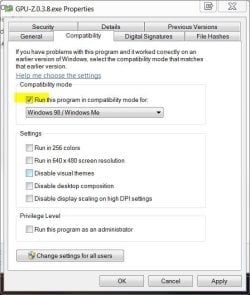
Have yo tried running the .exe as in Win 98 compatibility mode?

win 98.JPG

(right-click the .exe > properties >compatibly tab)
 

My Computer

Computer type
PC/Desktop
Computer Manufacturer/Model Number
Systems by SmartEyeball
OS
8 Pro x64
CPU
i7 3770K 4.6GHz
Motherboard
ASUS P8Z77 WS
Memory
16GB G.Skill Trident X 2666mhz
Graphics Card(s)
x2 EVGA 780 Ti Superclocked SLI
Sound Card
SB X-FI Surround 5.1 PRO USB / ATH-AD900 Headphones
Monitor(s) Displays
x3 Dell U2410 / 58" Samsung
Screen Resolution
5760*1200/ 1920*1200
Hard Drives
2x Intel 520 240GB (RAID 0) * 2x WD Caviar Blacks 2TB (RAID 0) * 2TB WD Caviar Black * Sony Optirac DVD
PSU
Silverstone Strider Evolution 1200W
Case
Thermaltake Level 10 GT Snow Edition
Cooling
Noctua NH-D14
Keyboard
Topre Realforce // Ducky Shine MX Black // Filco Ninja TKL
Mouse
Thermaltake Theron (Highly Recommended) + Razer Imperator
Antivirus
MSE
Browser
IE, FF, WaterFox
Other Info
GT Extreme V2 Sim Racing Cockpit + 40" LCD and K/B Mouse stand ▼
Fanatec CSR Elite Wheel + Clubsport V1 Pedals + CSR shifter/7G-H ▼Saitek X52 Pro ▼ TrackIR 5 Pro
Buttkicker v2 Seat Rumbler with Dedicated 5.1 and Sub Woofer attached to frame ▼
=
Bloody Big Grin
Thankyou very much everything is running fine now.
 

My Computer

Computer type
PC/Desktop
Computer Manufacturer/Model Number
HP ProDesk 400 G2.5 SFF
OS
Windows 7 Professional 64bit
CPU
Intel(R) Core(TM) i5-4590S [email protected](4CPU's)~3.0GHz
Motherboard
ASRock N68C-S UCC
Memory
8192MB RAM
Graphics Card(s)
ATI Radeon HD 5450
Sound Card
Microsoft High Definition Audio Device
Monitor(s) Displays
HP LE2202x LED Backlit LCD
Screen Resolution
1920x1080
Hard Drives
Maxtor 6 YO8OMO SCSI Disk Device 74.51 GB
Internet Speed
20mb
Hi again,

Glad to hear it's working well for you now! Thanks for your help, smarteyeball.

Cheers,

Walker
Windows Outreach Team
 

My Computer

Computer Manufacturer/Model Number
HP Pavilion dm3 (netbook) *** 27" iMac (Dual-Boot)
OS
Windows 7 Home Premium (64-bit) *** Windows XP SP3 (32-bit), OSX 10.6
CPU
AMD Athlon Neo X2 1.6GHz *** Intel Core i7 Quad Core 2.8GHz
Memory
4.00 GB *** 4.00 GB
Graphics Card(s)
ATI Radeon HD 3200, 384MB *** ATI Radeon HD 4850, 1GB
Sound Card
ATI High Definition Audio *** ATI High Definition Audio
Monitor(s) Displays
LG Flatron W2053TX
Screen Resolution
1600 x 900 (monitor), 1266 x 768 (laptop) *** 2560 x 1440
Hard Drives
300 GB SATA (internal), 500 GB HP SimpleSave (external) *** 1 TB SATA (internal), 160 GB LaCie (external)
Mouse
Logitech Cordless Optical Mouse for Notebooks
Internet Speed
Broadband
OK I have the same problem and have tried compatibility solution w/ 98, 2000 XP and XP pro - any other suggestions?
Can't get paste wanting install directx 8.1" and got a message " directx has completed successfully". When again selecting play I get the original request to install directx 8.1
New Hp quad core w nvidia gtx 4600 and one of my favorite games :-(
 

My Computer

Computer Manufacturer/Model Number
HP Pavilion Elite
OS
win 7 64
CPU
intel quad core i7
Motherboard
?
Memory
9 gb
Graphics Card(s)
nvidia gforce gtx 460
Sound Card
reltek hi def audio
Monitor(s) Displays
samsung led 1080p
Hard Drives
2 500gb raid
hi guys,

I have the same problem it seems....

I tried fixing the problem, but so far UNSUCCESSFUL... Tried changing the compatibilty mode..but again nothing!

I'm using Windows 7 64 bit on i7 960 3.2Ghz + 8 GB DDR III & 1GB V/card....

Amy help will be greatly appreciated!

Thanks to all
 

My Computer

OS
Windows 7 64 bit
CPU
i7 960 3.2Ghz
Motherboard
Gigabyte X58A-UD3R
Memory
8 GB DDR III
Graphics Card(s)
Gigabyte GTX465 1GB GDDRS
Sound Card
on board
Monitor(s) Displays
LG Flatron 19"
Hard Drives
1x500GB
1x160GB
1x250GB External
1x1TB External
PSU
850w
Installing GpXPatch and setting the compatibility mode, including run as administrator for both gpx and gp4.exe usually solves this problem. In gpx set cpu to 1 as for some rigs running 64bit, gp4 does not like running in dual core cpu mode.
mortal, forums moderator grandprixgames.org (GP3/4 racing simulations and F1 community site).
 

My Computer

OS
Win 7 Home 32bit
hello again guys,

I'm back with a :) ;)

Luckily through some help on a GP4 forum, same users who are experts have helped me solve the problem.

Check this out; GP4 with Windows 7 64 bit [fixed]

All I needed to do was keep going with installation, & once GPX Patch addon was installed, I could start smelling the fumes from the F1 Cars of GP4!!

Thanks to all!
 

My Computer

OS
Windows 7 64 bit
CPU
i7 960 3.2Ghz
Motherboard
Gigabyte X58A-UD3R
Memory
8 GB DDR III
Graphics Card(s)
Gigabyte GTX465 1GB GDDRS
Sound Card
on board
Monitor(s) Displays
LG Flatron 19"
Hard Drives
1x500GB
1x160GB
1x250GB External
1x1TB External
PSU
850w
refer posts here:-
Grand Prix 4 intermittently crashing to desktop (CTD) resolved and getting GP4 running just right
GP4 Game Setup

19/Jan/2017:-

I can say without a doubt that this has resolved the issue.
No crash to desktop after more than 10 straight runs...woohoooooooooooooooooooooooooooo.

Testing:-
I have run the game on two PC's in multiplayer mode.
Enabled the AI to control both cars by pressing the P key ingame. (this is if your using keyboard for controller, if your using wheel it will be space bar)
Then stepped away and let the race run on it's own.
Regarding the multiplayer, In gpxpatch select:- Use CPU 0 for the Host PC
and for the Join PC select:- Use CPU 1.
I observed that if you select Use CPU 0 for both PC's the gameplay will lag and game will be unplayable.

Resolution 4 steps:-

Step 1:-

-Disable the antivirus to stop it running in the background, affects gameplay, causes lag.
-Right click on GP4.exe, then properties and on compatibility tab set it to winxpsp2, and select:- Run this program as Administrator
-Right click on gpxpatch.exe then properties and select:- Run this program as Administrator, don't select Run this program in compatibility mode for
-In gpxpatch as mentioned select Use CPU 0 from drop down.


Step 2:-

Adjusting windows to use the highest CPU clock rate for the game

#Enable Maximum Performance Power Settings
Click Start, "Control Panel" and then "Power Options."
Click the "Show Additional Plans" drop-down arrow. Enable the "High Performance" option then click "Change Plan Settings."
Click the "Change Advanced Power Settings" link in the new window. The Power Options window appears.
Click the "+" symbol next to the "Processor Power Management" value, then "Minimum Processor State." Click the "Setting %" label, then change the value in the box field to "100."
Click "System Cooling Policy" then the "Setting" label. Change the value to "Active."
Click "Maximum Processor State" then "Setting." Change the value to "100."
Click the "Apply" button then "OK." Click the "back" arrow button in the Edit Plan Settings window. Close the Select a Power Plan window. Windows applies the changes to the power settings and utilizes 100 percent of the processor available power for the active application on the screen.

Step 3:-

Then To optimize gameplay, especially for multiplayer:-

This needs to be done just once:-
-Delete this file from your GP4 folder:- f1graphics.cfg
-Start the game using:- gpxpatch.exe, and in the 'Games' menu, click on exit, don't save on your way out
-You will notice a new f1graphics.cfg file created
-Open the f1graphics.cfg file in notepad and change the following values on the left for these options:-

1 ; f1graphics.cfg controls all settings (default 0)
1920 ; [RELEASE] Game 3D Horizontal Resolution
1080 ; [RELEASE] Game 3D Vertical Resolution
1920 ; [DEBUG] Game 3D Horizontal Resolution
1080 ; [DEBUG] Game 3D Vertical Resolution
0 ; Full dynamic video walls v2
0 ; TV style overlays on track cameras.
1 ; [DEBUG] Enable hardware T&L if available
1 ; [RELEASE] Enable hardware T&L if available
1 ; Low track geometry (1 on, 0 off)
1 ; Low res geometry track (1 low res, 0 normal)

-Start the game again:-gpxpatch.exe
-In the Games menu, goto Options---> Graphics
-click on Advanced
-Grab the 'frame rate' slider bar and adjust it 30fps
-Save the game when you exit i.e finished playing

note:-
Playing with the fps slider bar and starting the race, you will notice something when pressing the 'O' key
which is test of the processor utilisation, it will vary depending on what fps you choose.
keeping it less than 100% processor occupancy is where you want it to be.
on my FX6300 6 core cpu running at 3.5ghz at 30fps starting at the back of the race I get 45% processor occupancy
the race runs smooth.


Step 4:-

download this utility:-
PC Services Optimizer - Tweak Windows Services With a Mouse Click - Smart PC Utilities

It is free to download it has Gaming mode, explanation:-

Games Optimization
PC Services Optimizer comes with Gaming Mode that effectively boosts your computer gaming performance. Gaming Mode gives your system an immediate performance boost by temporary suspending unnecessary Windows features to free up computer resources and focus processing power on games you play.

This is pretty much it

 
Last edited:

My Computer

Computer type
PC/Desktop
Computer Manufacturer/Model Number
Custom build
OS
Windows 7 SP1 64bit
CPU
AMD Fx 8350 8 core
Motherboard
Asus
Memory
16 Gig
Graphics Card(s)
Ati radeon 7850
Back
Top