Solved GRAPHICS_DRIVER_TDR_FAULT 0x116, constant atikmpag.sys BSODs

ePeen

Banned
Local time
9:16 AM
Messages
306
Location
Long Island, New York
Hello Seven Forums, I'm ePeen and I hail from OCN. I have decided to come here as I know there are very many intelligent members here that can hopefully help me solve my issue.

System Specs (NOTHING IS OVERCLOCKED, ALL AT STOCK):

i7 2600k
Asus P8P67 Pro B3 Rev 3.1
Corsair Vengeance 1600 8GB DDR3 @ 9-9-9-24 1.5v
Samsung Spinpoint 1TB
Asus Radeon HD 5850 (two in crossfire)
Windows 7 Ultimate x64
Corsair H70
Acer Eyefinity 5040x1050
Corsair CMPSU-750TX-750w
X-Fi Titanium Fata1ity Professional
I am 100% at my wits end. I am frustrated because I JUST got done with putting my computer back together after my SATA controler died. I am plagued with atikmpag.sys BSODs, and I am at my wits end with this, I can't put up with it anymore, so I need help. I am now convinced this issue is not software related since I have reformatted and STILL have these BSODs.
Please read everything I have written to help me to the best of your ability, I will try anything.. I cannot put up with these BSODs anymore.

I have tried:

- Full uninstall and reinstall of GPU drivers
- Going from the traditional 11.10 (what I have been using for awhile) to 11.12, no avail.
- Pax drivers rather than Creative official drivers.
- Reformatting Windows and installing a fresh 11.12 + cap as well as Creative's official drivers.
- None of my hardware is overclocked.

I have a feeling this is related to my multi monitiors, but I do not know, because I blue screened before I had the three monitors while playing L4D2 one night. It only happens, and by only, I mean ONLY HAPPENS when I start up a video game, or am playing a video game. It does not happen idle, or at least has not happened at all in the old Windows installation, and the new Windows installation.

For example, I installed Killing Floor before. I went to start it up and all three of my monitors flickered black rapidly, and then also showed the desktop at some points. Eventually, it crashed and displayed an error, which I do not remember. I started it up again, but this time it worked, and I play for about an hour and all was well. I just installed the Diablo 3 beta, went to start it up, and as it was loading, all three of my monitors rapidly flickered, and then my rig proceeded to lock up, and then BSOD'd.

At this point, I am convinced one of my cards is on its way out, but as you see, I have no idea and I cannot be sure.

Here is a dump file which you can quickly download and take a look at if you know how to read them, just to see if you get any additional information more than I could.
I'd just like to note that every single BSOD is atikmpag.sys related, there have been NO other types. I don't know if any other piece of failing hardware can cause a atikmpag.sys BSOD, so if not, it's definitely one of my GPUs.

If it's of any consolation, these issues started happening right after my previous P8P67 Pro SATA controller shorted and killed my previous F3 1TB as well. After I got brand new parts (both HDD and MOBO) back from RMA and put it together, the problems began.

Edit 1: A user on OCN recommended I save both of my BIOS'es using GPU-z so he could take a look. Well, as I went to save the BIOS on my first GPU, my rig froze, but I could hear audio. My friends on Skype said "Woah.. Pat, we can hear ourselves", and then all three of my monitors went black and into standby (orange light). After about 15 seconds, the Skype audio stopped. I hard shut down and powered back up...
 

My Computer My Computer

At a glance

Windows 7 Ultimate x64i7-2600KCorsair Vengeance 8GB DDR3 @ 1600Mhz (9-9-9-24)Asus Radeon HD 5850 (Crossfire)
OS
Windows 7 Ultimate x64
CPU
i7-2600K
Motherboard
Asus P8P67 Pro B3 (Rev 3.1)
Memory
Corsair Vengeance 8GB DDR3 @ 1600Mhz (9-9-9-24)
Graphics Card(s)
Asus Radeon HD 5850 (Crossfire)
Sound Card
X-Fi Titanium Fata1ity Professional
Monitor(s) Displays
Acer Eyefinity
Screen Resolution
5040x1050
Hard Drives
Samsung Spinpoint F3 1TB
PSU
Corsair CMPSU-750TX 750W
Case
LIAN LI Lancool PC-K56
Cooling
Corsair H70
Keyboard
Ducky Shine / Das Ultimate Blank
Mouse
Razer Lachesis
  • Like
Reactions: JMH
Hello ePeen,

> "It's not a true crash, in the sense that the bluescreen was initiated only because the combination of video driver and video hardware was being unresponsive, and not because of any synchronous processing exception".

Since Vista, the "Timeout Detection and Recovery" (TDR) components of the OS video subsystem have been capable of doing some truly impressive things to try to recover from issues which would have caused earlier OSs like XP to crash.

As a last resort, the TDR subsystem sends the video driver a "please restart yourself now!" command and waits a few seconds.

If there's no response, the OS concludes that the video driver/hardware combo has truly collapsed in a heap, and it fires off that stop 0x116 BSOD.

* If playing with video driver versions hasn't helped, make sure the box is not overheating.

* Try removing a side panel and aiming a big mains fan straight at the motherboard and GPU.

* Run it like that for a few hours or days - long enough to ascertain whether cooler temperatures make a difference.

* If so, it might be as simple as dust buildup and subsequently inadequate cooling.

* I would download cpu-z and gpu-z (both free) and keep an eye on the video temps Let us know if you need help
http://www.sevenforums.com/crash-lo...op-0x116-video_tdr_error-troubleshooting.html


> > Please run the update readiness tool and then update to SP-1


Ensure you install the correct 64 or 32 bit option for your system)

Download the System Update Readiness Tool (64bit)

Download the System Update Readiness Tool (32bit)

Learn how to install Windows 7 Service Pack 1 (SP1)
 

My Computer My Computer

At a glance

Win 7 Ultimate 64-bit. SP1.Intel i7 -720QM.[1.6GHz Turbo Boost 2.8GHz. 6...8 DDR 3 RAM. 1066MHZATI 1024 MB. DDR3. Radeon HD5650
Computer Manufacturer/Model Number
LAPTOP. HP Pavilion dv7-4010TX .
OS
Win 7 Ultimate 64-bit. SP1.
CPU
Intel i7 -720QM.[1.6GHz Turbo Boost 2.8GHz. 6MB Cache.]
Memory
8 DDR 3 RAM. 1066MHZ
Graphics Card(s)
ATI 1024 MB. DDR3. Radeon HD5650
Monitor(s) Displays
17.3" High Definition Brightview LCD. LED Backlit.
Screen Resolution
1600 x 900.
Hard Drives
640GB
Case
Laptop / notebook.
Mouse
Logitech Anywhere mouse. MX.
Internet Speed
ADSL [ but too slow ]
I will install SP1, thanks very much for your reply. If you don't mind me asking, I have read before by Googling that SP1 is known to fix this issue sometimes. What exactly fixes it in SP1, and how? I'm very interested.
 

My Computer My Computer

At a glance

Windows 7 Ultimate x64i7-2600KCorsair Vengeance 8GB DDR3 @ 1600Mhz (9-9-9-24)Asus Radeon HD 5850 (Crossfire)
OS
Windows 7 Ultimate x64
CPU
i7-2600K
Motherboard
Asus P8P67 Pro B3 (Rev 3.1)
Memory
Corsair Vengeance 8GB DDR3 @ 1600Mhz (9-9-9-24)
Graphics Card(s)
Asus Radeon HD 5850 (Crossfire)
Sound Card
X-Fi Titanium Fata1ity Professional
Monitor(s) Displays
Acer Eyefinity
Screen Resolution
5040x1050
Hard Drives
Samsung Spinpoint F3 1TB
PSU
Corsair CMPSU-750TX 750W
Case
LIAN LI Lancool PC-K56
Cooling
Corsair H70
Keyboard
Ducky Shine / Das Ultimate Blank
Mouse
Razer Lachesis

My Computer My Computer

At a glance

Win 7 Ultimate 64-bit. SP1.Intel i7 -720QM.[1.6GHz Turbo Boost 2.8GHz. 6...8 DDR 3 RAM. 1066MHZATI 1024 MB. DDR3. Radeon HD5650
Computer Manufacturer/Model Number
LAPTOP. HP Pavilion dv7-4010TX .
OS
Win 7 Ultimate 64-bit. SP1.
CPU
Intel i7 -720QM.[1.6GHz Turbo Boost 2.8GHz. 6MB Cache.]
Memory
8 DDR 3 RAM. 1066MHZ
Graphics Card(s)
ATI 1024 MB. DDR3. Radeon HD5650
Monitor(s) Displays
17.3" High Definition Brightview LCD. LED Backlit.
Screen Resolution
1600 x 900.
Hard Drives
640GB
Case
Laptop / notebook.
Mouse
Logitech Anywhere mouse. MX.
Internet Speed
ADSL [ but too slow ]
Well JMH, I bring good news so far. After updating to SP1 and disabling ULPS in the registry (I read that it causes many issues with crossfire), I was finally able to start up a game in Black Ops without blue screening instantly, and I can also start Diablo 3 up with no issues, as last time it also blue screened upon launch. I can definitely consider this a fix seeing as every single time I went to previously start up a private match in Black Ops, it would BSOD without second thought.

So far for the moment this is solved. I will continue to monitor my computer closely, as I won't consider it fully stable until I see no issues for at least a week or so. Hopefully we never meet again, but thank you very much for the assistance.
 

My Computer My Computer

At a glance

Windows 7 Ultimate x64i7-2600KCorsair Vengeance 8GB DDR3 @ 1600Mhz (9-9-9-24)Asus Radeon HD 5850 (Crossfire)
OS
Windows 7 Ultimate x64
CPU
i7-2600K
Motherboard
Asus P8P67 Pro B3 (Rev 3.1)
Memory
Corsair Vengeance 8GB DDR3 @ 1600Mhz (9-9-9-24)
Graphics Card(s)
Asus Radeon HD 5850 (Crossfire)
Sound Card
X-Fi Titanium Fata1ity Professional
Monitor(s) Displays
Acer Eyefinity
Screen Resolution
5040x1050
Hard Drives
Samsung Spinpoint F3 1TB
PSU
Corsair CMPSU-750TX 750W
Case
LIAN LI Lancool PC-K56
Cooling
Corsair H70
Keyboard
Ducky Shine / Das Ultimate Blank
Mouse
Razer Lachesis
Indeed we hope to NOT meet the BSOD way!
;)
 

My Computer My Computer

At a glance

Win 7 Ultimate 64-bit. SP1.Intel i7 -720QM.[1.6GHz Turbo Boost 2.8GHz. 6...8 DDR 3 RAM. 1066MHZATI 1024 MB. DDR3. Radeon HD5650
Computer Manufacturer/Model Number
LAPTOP. HP Pavilion dv7-4010TX .
OS
Win 7 Ultimate 64-bit. SP1.
CPU
Intel i7 -720QM.[1.6GHz Turbo Boost 2.8GHz. 6MB Cache.]
Memory
8 DDR 3 RAM. 1066MHZ
Graphics Card(s)
ATI 1024 MB. DDR3. Radeon HD5650
Monitor(s) Displays
17.3" High Definition Brightview LCD. LED Backlit.
Screen Resolution
1600 x 900.
Hard Drives
640GB
Case
Laptop / notebook.
Mouse
Logitech Anywhere mouse. MX.
Internet Speed
ADSL [ but too slow ]
Unfortunately, I have returned with another DMP file, so I have marked the thread "unresolved".

I checked my system up-time prior to getting the crash, and my rig was going strong for almost 6 days. I was playing Devil May Cry 4 on eyefinity, etc... I was excited, hadn't seen that stupid BSOD in almost a week. I buy myself the expansion for Battlefield 3, not even 30 minutes into the game... I BSOD.

Where do we go from here, JMH?

I ran Furmark to test my GPUs for artifacts, but something I noticed during the test.... my 2nd 5850 (crossfire) was going between 0% load and 2% load. Does Furmark not utilize multi GPU setups, or is something wrong with my 2nd GPU?

See here:

dojrE.jpg


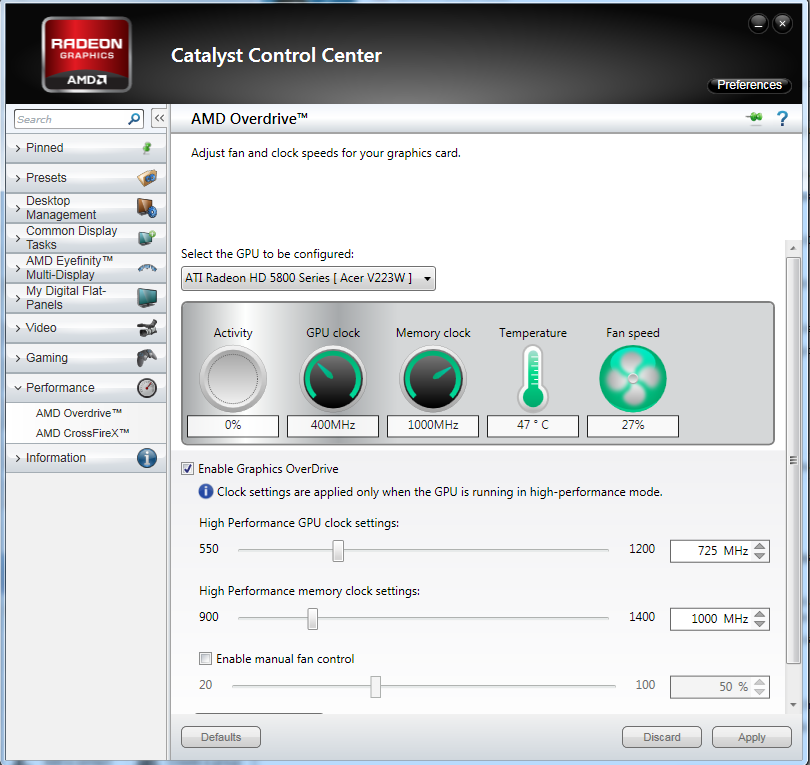
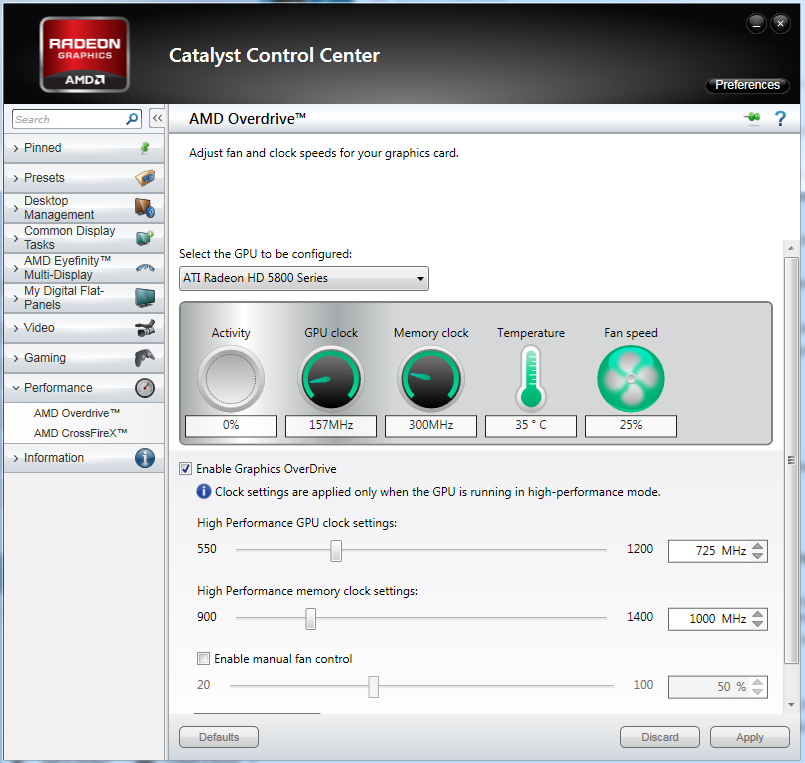
Maybe this is something else to mention, in CCC, the first GPU is running at different clocks (both core and memory) than the 2nd GPU. See here:

1 -
FAhXO.png


2 -
nxk6v.png


Is this normal? *Note that I was idle at the desktop whilst print screening those*.
**I have attached the latest DMP file to my post :)
 

My Computer My Computer

At a glance

Windows 7 Ultimate x64i7-2600KCorsair Vengeance 8GB DDR3 @ 1600Mhz (9-9-9-24)Asus Radeon HD 5850 (Crossfire)
OS
Windows 7 Ultimate x64
CPU
i7-2600K
Motherboard
Asus P8P67 Pro B3 (Rev 3.1)
Memory
Corsair Vengeance 8GB DDR3 @ 1600Mhz (9-9-9-24)
Graphics Card(s)
Asus Radeon HD 5850 (Crossfire)
Sound Card
X-Fi Titanium Fata1ity Professional
Monitor(s) Displays
Acer Eyefinity
Screen Resolution
5040x1050
Hard Drives
Samsung Spinpoint F3 1TB
PSU
Corsair CMPSU-750TX 750W
Case
LIAN LI Lancool PC-K56
Cooling
Corsair H70
Keyboard
Ducky Shine / Das Ultimate Blank
Mouse
Razer Lachesis
Not too bad up for 5+ days.
As a matter of interest do you reboot every so often?


These crashes were caused by memory exception (probably a driver).
Please run these two tests to verify your memory and find which driver is causing the problem.

If you are overclocking anything reset to default before running these tests.
In other words STOP!!!


1-Memtest.
*Download a copy of Memtest86 and burn the ISO to a CD using Iso Recorder or another ISO burning program. Memtest86+ - Advanced Memory Diagnostic Tool

*Boot from the CD, and leave it running for at least 5 or 6 passes.

Just remember, any time Memtest reports errors, it can be either bad RAM or a bad motherboard slot.

Test the sticks individually, and if you find a good one, test it in all slots.

Any errors are indicative of a memory problem.

If a known good stick fails in a motherboard slot it is probably the slot.
http://www.sevenforums.com/tutorials/105647-ram-test-memtest86.html


2-Driver verifier

Using Driver Verifier is an iffy proposition. Most times it'll crash and it'll tell you what the driver is. But sometimes it'll crash and won't tell you the driver. Other times it'll crash before you can log in to Windows. If you can't get to Safe Mode, then you'll have to resort to offline editing of the registry to disable Driver Verifier.

I'd suggest that you first backup your data and then make sure you've got access to another computer so you can contact us if problems arise. Then make a System Restore point (so you can restore the system using the Vista/Win7 Startup Repair feature).

In Windows 7 you can make a Startup Repair disk by going to Start....All Programs...Maintenance...Create a System Repair Disc - with Windows Vista you'll have to use your installation disk or the "Repair your computer" option at the top of the Safe Mode menu .

Then, here's the procedure:
- Go to Start and type in "verifier" (without the quotes) and press Enter
- Select "Create custom settings (for code developers)" and click "Next"
- Select "Select individual settings from a full list" and click "Next"
- Select everything EXCEPT FOR "Low Resource Simulation" and click "Next"
- Select "Select driver names from a list" and click "Next"
Then select all drivers NOT provided by Microsoft and click "Next"
- Select "Finish" on the next page.

Reboot the system and wait for it to crash to the Blue Screen. Continue to use your system normally, and if you know what causes the crash, do that repeatedly. The objective here is to get the system to crash because Driver Verifier is stressing the drivers out. If it doesn't crash for you, then let it run for at least 36 hours of continuous operation (an estimate on my part).

If you can't get into Windows because it crashes too soon, try it in Safe Mode.
If you can't get into Safe Mode, try using System Restore from your installation DVD to set the system back to the previous restore point that you created.
http://www.sevenforums.com/tutorials/101379-driver-verifier-enable-disable.html


Further Reading
Using Driver Verifier to identify issues with Windows drivers for advanced users
 

My Computer My Computer

At a glance

Win 7 Ultimate 64-bit. SP1.Intel i7 -720QM.[1.6GHz Turbo Boost 2.8GHz. 6...8 DDR 3 RAM. 1066MHZATI 1024 MB. DDR3. Radeon HD5650
Computer Manufacturer/Model Number
LAPTOP. HP Pavilion dv7-4010TX .
OS
Win 7 Ultimate 64-bit. SP1.
CPU
Intel i7 -720QM.[1.6GHz Turbo Boost 2.8GHz. 6MB Cache.]
Memory
8 DDR 3 RAM. 1066MHZ
Graphics Card(s)
ATI 1024 MB. DDR3. Radeon HD5650
Monitor(s) Displays
17.3" High Definition Brightview LCD. LED Backlit.
Screen Resolution
1600 x 900.
Hard Drives
640GB
Case
Laptop / notebook.
Mouse
Logitech Anywhere mouse. MX.
Internet Speed
ADSL [ but too slow ]
Interesting you ask that question. As a matter of fact, I do not shut down or restart often. I even have hibernation and sleep mode disabled, as well as the hard disk never turns off, and hybrid sleep is disabled as well. When I go to bed, I simply just turn my monitors off and walk away, then when I awake in the morning, just turn my monitors back on and resume my tasks.

And I have not overclocked. Everything is factory defaults as this is a brand new motherboard that I received from RMA, so I did not want to overclock until I ensured that everything worked as intended (clearly it does not).

Anyways... I have installed Memtest86+'s USB key onto my USB drive. I will run memtest on each stick, and then individually just to get it over with and make sure my RAM is okay. I will report back with the results as soon as I can!
 

My Computer My Computer

At a glance

Windows 7 Ultimate x64i7-2600KCorsair Vengeance 8GB DDR3 @ 1600Mhz (9-9-9-24)Asus Radeon HD 5850 (Crossfire)
OS
Windows 7 Ultimate x64
CPU
i7-2600K
Motherboard
Asus P8P67 Pro B3 (Rev 3.1)
Memory
Corsair Vengeance 8GB DDR3 @ 1600Mhz (9-9-9-24)
Graphics Card(s)
Asus Radeon HD 5850 (Crossfire)
Sound Card
X-Fi Titanium Fata1ity Professional
Monitor(s) Displays
Acer Eyefinity
Screen Resolution
5040x1050
Hard Drives
Samsung Spinpoint F3 1TB
PSU
Corsair CMPSU-750TX 750W
Case
LIAN LI Lancool PC-K56
Cooling
Corsair H70
Keyboard
Ducky Shine / Das Ultimate Blank
Mouse
Razer Lachesis
I suggest as a good "computer housekeeping rule" you reboot at least every few days.
 

My Computer My Computer

At a glance

Win 7 Ultimate 64-bit. SP1.Intel i7 -720QM.[1.6GHz Turbo Boost 2.8GHz. 6...8 DDR 3 RAM. 1066MHZATI 1024 MB. DDR3. Radeon HD5650
Computer Manufacturer/Model Number
LAPTOP. HP Pavilion dv7-4010TX .
OS
Win 7 Ultimate 64-bit. SP1.
CPU
Intel i7 -720QM.[1.6GHz Turbo Boost 2.8GHz. 6MB Cache.]
Memory
8 DDR 3 RAM. 1066MHZ
Graphics Card(s)
ATI 1024 MB. DDR3. Radeon HD5650
Monitor(s) Displays
17.3" High Definition Brightview LCD. LED Backlit.
Screen Resolution
1600 x 900.
Hard Drives
640GB
Case
Laptop / notebook.
Mouse
Logitech Anywhere mouse. MX.
Internet Speed
ADSL [ but too slow ]
Interesting you ask that question. As a matter of fact, I do not shut down or restart often. I even have hibernation and sleep mode disabled, as well as the hard disk never turns off, and hybrid sleep is disabled as well. When I go to bed, I simply just turn my monitors off and walk away, then when I awake in the morning, just turn my monitors back on and resume my tasks.

And I have not overclocked. Everything is factory defaults as this is a brand new motherboard that I received from RMA, so I did not want to overclock until I ensured that everything worked as intended (clearly it does not).

Anyways... I have installed Memtest86+'s USB key onto my USB drive. I will run memtest on each stick, and then individually just to get it over with and make sure my RAM is okay. I will report back with the results as soon as I can!

Given there was only one DMP file provided we cant spot any trends. If you get more crashes upload the DMP files.

Re: rebooting. If you have the slightest memory leaks (and most computer apps do) they will magnify over time. If this is a one off I wouldnt worry but I would reboot more often if for no other reason the to keep from fragmenting memory/PF.
 

My Computer My Computer

At a glance

Win 8 Release candidate 8400[email protected]4 gigsNvidia 9600M
Computer Manufacturer/Model Number
HP Pavillion dv-7 1005 Tx
OS
Win 8 Release candidate 8400
CPU
[email protected]
Memory
4 gigs
Graphics Card(s)
Nvidia 9600M
Sound Card
HD built-in
Monitor(s) Displays
17" Wxga
Screen Resolution
1440x900
Cooling
none
Internet Speed
45Mb down 5Mb up
I have a backup computer, so I can still respond to you guys as memtest goes. Thank you for that reboot tip, I learn something new everyday here with the knowledge you're giving me, and I thank you for that.

For the sake of being lazy, if both sticks pass 6 passes of Memtest, would you say running the sticks individually is necessary? Memtest takes a lot longer than I thought. If it's absolutely best to run the sticks individually as well, I of course will.

**Also, I included a DMP in my OP, but it was not in the correct format, so I have edited this post and attached a TDR BSOD I got 5 days ago that you can debug if you wish.

And one final thing, gentlemen. I have been reading about my issues, and it seems they can be related to the "ATK0110 driver", and it just so happens I have an Asus P8P67 board. If it's of any consolation, every time I reformat, I install the drivers and chipset right off of the disc that comes with the board, rather than getting the latest version off of Asus' website. Could this my issue?
 

My Computer My Computer

At a glance

Windows 7 Ultimate x64i7-2600KCorsair Vengeance 8GB DDR3 @ 1600Mhz (9-9-9-24)Asus Radeon HD 5850 (Crossfire)
OS
Windows 7 Ultimate x64
CPU
i7-2600K
Motherboard
Asus P8P67 Pro B3 (Rev 3.1)
Memory
Corsair Vengeance 8GB DDR3 @ 1600Mhz (9-9-9-24)
Graphics Card(s)
Asus Radeon HD 5850 (Crossfire)
Sound Card
X-Fi Titanium Fata1ity Professional
Monitor(s) Displays
Acer Eyefinity
Screen Resolution
5040x1050
Hard Drives
Samsung Spinpoint F3 1TB
PSU
Corsair CMPSU-750TX 750W
Case
LIAN LI Lancool PC-K56
Cooling
Corsair H70
Keyboard
Ducky Shine / Das Ultimate Blank
Mouse
Razer Lachesis
I have a backup computer, so I can still respond to you guys as memtest goes. Thank you for that reboot tip, I learn something new everyday here with the knowledge you're giving me, and I thank you for that.

For the sake of being lazy, if both sticks pass 6 passes of Memtest, would you say running the sticks individually is necessary? Memtest takes a lot longer than I thought. If it's absolutely best to run the sticks individually as well, I of course will.

**Also, I included a DMP in my OP, but it was not in the correct format, so I have edited this post and attached a TDR BSOD I got 5 days ago that you can debug if you wish.

And one final thing, gentlemen. I have been reading about my issues, and it seems they can be related to the "ATK0110 driver", and it just so happens I have an Asus P8P67 board. If it's of any consolation, every time I reformat, I install the drivers and chipset right off of the disc that comes with the board, rather than getting the latest version off of Asus' website. Could this my issue?

Ladies and Gentlemen {grin] JMH= Jan

Ken

The driver off the disk probably isnt the latest and their earlier drivers were problematic. IF the date on the disk driver is before 2009 dont use it.
 

My Computer My Computer

At a glance

Win 8 Release candidate 8400[email protected]4 gigsNvidia 9600M
Computer Manufacturer/Model Number
HP Pavillion dv-7 1005 Tx
OS
Win 8 Release candidate 8400
CPU
[email protected]
Memory
4 gigs
Graphics Card(s)
Nvidia 9600M
Sound Card
HD built-in
Monitor(s) Displays
17" Wxga
Screen Resolution
1440x900
Cooling
none
Internet Speed
45Mb down 5Mb up
Would you be able to check that dump file and tell me if that driver is even listed? I'm fairly sure P67 boards weren't manufactured back in 2009 :P
 

My Computer My Computer

At a glance

Windows 7 Ultimate x64i7-2600KCorsair Vengeance 8GB DDR3 @ 1600Mhz (9-9-9-24)Asus Radeon HD 5850 (Crossfire)
OS
Windows 7 Ultimate x64
CPU
i7-2600K
Motherboard
Asus P8P67 Pro B3 (Rev 3.1)
Memory
Corsair Vengeance 8GB DDR3 @ 1600Mhz (9-9-9-24)
Graphics Card(s)
Asus Radeon HD 5850 (Crossfire)
Sound Card
X-Fi Titanium Fata1ity Professional
Monitor(s) Displays
Acer Eyefinity
Screen Resolution
5040x1050
Hard Drives
Samsung Spinpoint F3 1TB
PSU
Corsair CMPSU-750TX 750W
Case
LIAN LI Lancool PC-K56
Cooling
Corsair H70
Keyboard
Ducky Shine / Das Ultimate Blank
Mouse
Razer Lachesis
Would you be able to check that dump file and tell me if that driver is even listed? I'm fairly sure P67 boards weren't manufactured back in 2009 :P

By "that driver" do you mean the ATK?

If so it isnt
 

My Computer My Computer

At a glance

Win 8 Release candidate 8400[email protected]4 gigsNvidia 9600M
Computer Manufacturer/Model Number
HP Pavillion dv-7 1005 Tx
OS
Win 8 Release candidate 8400
CPU
[email protected]
Memory
4 gigs
Graphics Card(s)
Nvidia 9600M
Sound Card
HD built-in
Monitor(s) Displays
17" Wxga
Screen Resolution
1440x900
Cooling
none
Internet Speed
45Mb down 5Mb up
Thanks, was wondering.. so that's not my issue I guess. Also, question about Memtest. I have been reading, and it says if all sticks pass 2-3 passes, then there's virtually no need to individually test the sticks, as if a stick was bad, even with both inserted, it would show errors. Would you agree?
 

My Computer My Computer

At a glance

Windows 7 Ultimate x64i7-2600KCorsair Vengeance 8GB DDR3 @ 1600Mhz (9-9-9-24)Asus Radeon HD 5850 (Crossfire)
OS
Windows 7 Ultimate x64
CPU
i7-2600K
Motherboard
Asus P8P67 Pro B3 (Rev 3.1)
Memory
Corsair Vengeance 8GB DDR3 @ 1600Mhz (9-9-9-24)
Graphics Card(s)
Asus Radeon HD 5850 (Crossfire)
Sound Card
X-Fi Titanium Fata1ity Professional
Monitor(s) Displays
Acer Eyefinity
Screen Resolution
5040x1050
Hard Drives
Samsung Spinpoint F3 1TB
PSU
Corsair CMPSU-750TX 750W
Case
LIAN LI Lancool PC-K56
Cooling
Corsair H70
Keyboard
Ducky Shine / Das Ultimate Blank
Mouse
Razer Lachesis
Ran memtest for about two hours and ten minutes, so two passes. Showed no errors, no hiccups, I am convinced it is not my RAM, as memtest usually reports issues with RAM very quickly.

I may have found my issue. I thought about it and said "So far I have only blue screened in games, intensive games none the less". So, I ran Furmark correctly this time, last time I did not run it in full screen so my crossfire wasn't being utilized. Within twenty minutes of running Furmark, my 2nd GPU had hit 90c, and the 1st GPU sat at around 85c. Fan speeds were exceeding 70%, so setting fan profiles wouldn't save me in that situation.

Could this be my issue after all, heat just building up over and over again, eventually just overheating? I mean, you also have to think about it... two GPUs running at close to 90c, that adds up, and then you have other components too..

I am 100% not okay with my GPUs running that hot in the winter, because I live in an attic, and in the summer, it's almost the equivalent of sitting outside, even with my air conditioner. So pretty much if this is the winter temps for my GPUs, it won't even survive summer.

Unsure of what to do at this point.....
 

My Computer My Computer

At a glance

Windows 7 Ultimate x64i7-2600KCorsair Vengeance 8GB DDR3 @ 1600Mhz (9-9-9-24)Asus Radeon HD 5850 (Crossfire)
OS
Windows 7 Ultimate x64
CPU
i7-2600K
Motherboard
Asus P8P67 Pro B3 (Rev 3.1)
Memory
Corsair Vengeance 8GB DDR3 @ 1600Mhz (9-9-9-24)
Graphics Card(s)
Asus Radeon HD 5850 (Crossfire)
Sound Card
X-Fi Titanium Fata1ity Professional
Monitor(s) Displays
Acer Eyefinity
Screen Resolution
5040x1050
Hard Drives
Samsung Spinpoint F3 1TB
PSU
Corsair CMPSU-750TX 750W
Case
LIAN LI Lancool PC-K56
Cooling
Corsair H70
Keyboard
Ducky Shine / Das Ultimate Blank
Mouse
Razer Lachesis
Life is a balance...
You have to decide how far you want to push your computer & the consequences of doing same...
 

My Computer My Computer

At a glance

Win 7 Ultimate 64-bit. SP1.Intel i7 -720QM.[1.6GHz Turbo Boost 2.8GHz. 6...8 DDR 3 RAM. 1066MHZATI 1024 MB. DDR3. Radeon HD5650
Computer Manufacturer/Model Number
LAPTOP. HP Pavilion dv7-4010TX .
OS
Win 7 Ultimate 64-bit. SP1.
CPU
Intel i7 -720QM.[1.6GHz Turbo Boost 2.8GHz. 6MB Cache.]
Memory
8 DDR 3 RAM. 1066MHZ
Graphics Card(s)
ATI 1024 MB. DDR3. Radeon HD5650
Monitor(s) Displays
17.3" High Definition Brightview LCD. LED Backlit.
Screen Resolution
1600 x 900.
Hard Drives
640GB
Case
Laptop / notebook.
Mouse
Logitech Anywhere mouse. MX.
Internet Speed
ADSL [ but too slow ]
This is very true. Would you say this is a possible cause? If it is, I will do my best to purchase a full tower capable of good cable management and multiple fan configurations.

Even if this isn't a direct cause, I am still not personally okay with my GPUs running that hot, you wouldn't be either I presume. I'm just a little confused as I thought Furmark was not an accurate representation as to what your temps will be whilst gaming.
 

My Computer My Computer

At a glance

Windows 7 Ultimate x64i7-2600KCorsair Vengeance 8GB DDR3 @ 1600Mhz (9-9-9-24)Asus Radeon HD 5850 (Crossfire)
OS
Windows 7 Ultimate x64
CPU
i7-2600K
Motherboard
Asus P8P67 Pro B3 (Rev 3.1)
Memory
Corsair Vengeance 8GB DDR3 @ 1600Mhz (9-9-9-24)
Graphics Card(s)
Asus Radeon HD 5850 (Crossfire)
Sound Card
X-Fi Titanium Fata1ity Professional
Monitor(s) Displays
Acer Eyefinity
Screen Resolution
5040x1050
Hard Drives
Samsung Spinpoint F3 1TB
PSU
Corsair CMPSU-750TX 750W
Case
LIAN LI Lancool PC-K56
Cooling
Corsair H70
Keyboard
Ducky Shine / Das Ultimate Blank
Mouse
Razer Lachesis
I don't mean to bump an old thread, my apologies, just wanted to keep you guys updated. Previously I had been on the same AMD drivers for quite a few re-installs (specifically speaking 11.12). I got a BSOD about a week ago that showed an ATI related sys driver, so I decided to try 12.1, and ever since then I have not *knocks on wood* have had BSODs.

Hopefully that was the cause after all, if not, I'll take it upon myself to further diagnose my issue, as it will be hardware related at this point... and that will be up to RMAs and such.

Anyways, thanks again for your help, I shall mark this as solved, which I hope it also is! :)
 

My Computer My Computer

At a glance

Windows 7 Ultimate x64i7-2600KCorsair Vengeance 8GB DDR3 @ 1600Mhz (9-9-9-24)Asus Radeon HD 5850 (Crossfire)
OS
Windows 7 Ultimate x64
CPU
i7-2600K
Motherboard
Asus P8P67 Pro B3 (Rev 3.1)
Memory
Corsair Vengeance 8GB DDR3 @ 1600Mhz (9-9-9-24)
Graphics Card(s)
Asus Radeon HD 5850 (Crossfire)
Sound Card
X-Fi Titanium Fata1ity Professional
Monitor(s) Displays
Acer Eyefinity
Screen Resolution
5040x1050
Hard Drives
Samsung Spinpoint F3 1TB
PSU
Corsair CMPSU-750TX 750W
Case
LIAN LI Lancool PC-K56
Cooling
Corsair H70
Keyboard
Ducky Shine / Das Ultimate Blank
Mouse
Razer Lachesis
Back
Top