GTX260 Video Artifacting/BSODs

Shook

New member
Member
VIP
Local time
8:15 PM
Messages
109
[FONT=&quot]Forgive me now, but this may be a long post because I am at my wit's end with this problem that has been occurring ever since my build (Oct09).

Im running:
AMD Athlon II x4 630 Propus 2.8Ghz Socket AM3 95W
BFG GTX260 "BFGEGTX260MC896OCDE"
Gigabyte MA790GPT-UD3H Mobo with AM3 socket
2x2GB G.Skill F3-10666CL8D-4GBHK
Rosewill Green Series RG630-2 630W PSU
Win 7 Ultimate 64bit on 1600x900 Resolution[/FONT]
[FONT=&quot]Rest of system specs are in my sig[/FONT]
[FONT=&quot]
Note: I usually use EVGA precision to crank my video card fan up to about 80%

It started with video artifacting and this problem still occurs, as well as random BSODs.

A link to a youtube video of an example of the video artifacting in Call of Duty Modern Warfare 2 YouTube - CoDMW2 Bugs.wmv

So, I'll be gaming it up, game will freeze, sometimes telling me the video driver has crashed and recovered, then if I Ctrl+Alt+Del to desktop then back into the game, it will work fine.... sometimes for a couple minutes but mostly for only a few seconds before I have to go back to desktop and back again. Most of the time after doing that over and over, the artifacting will get worse than whats in the my youtube video posted above, and look like its snowing on my screen. If i then restart my pc, it will work just fine, usually for a good amount of time, but eventually will do it again. Also this happens no matter what game I play. I also experience hangs and slight video corruption while playing full screen videos whether it be .avi files from my hard drive or streaming flash videos online.

Now for the BSODs which seem random(I can't find any pattern in them anyway).
I've gotten:
Cache Manager
Memory Management - quite a few times
PFN_List_Corrupt - a few times
And quite a few more which didn't point to any reason. I am attaching a rar file with only 1 minidump in it, because thats all that was in my folder

WHAT I'VE TRIED:
-Basically every nVidia drivers for win7 with no avail
-Updated my BIOS to version F2 which gigabyte's website says is the correct one for my CPU
-Updated the Chipset drivers
-Checked temps while gaming and they stay below 60 degrees Celsius
-Called BFG tech and tried everything they said, but to no avail
-Tried using the other PCI-e 8x slot on my board, no difference
-I've ran memtest86 on the RAM with no errors
-I've also ran a memtest on the VRAM with no errors

According the G.Skill's website, the ram timings should be 8-8-8-21 but my mobo defaulted to 9-9-9-24 so i changed it to what G.Skill suggests.[/FONT]

Could anyone help me PLEASE or at least point me in the right direction. Any help would be greatly appreciated.


Edit: I have posted about this before, but had no luck in fixing the issue http://www.sevenforums.com/graphic-cards/40200-problems-my-new-gtx260.html
 
Last edited:

My Computer My Computer

At a glance

Windows 7 Ultimate x64Intel i5 2500k @ 4.7Ghz16GB Corsair Vengeance DDR3 1600EVGA Classified GTX560ti 448 core
Computer Manufacturer/Model Number
ME
OS
Windows 7 Ultimate x64
CPU
Intel i5 2500k @ 4.7Ghz
Motherboard
ASUS P8Z68-V
Memory
16GB Corsair Vengeance DDR3 1600
Graphics Card(s)
EVGA Classified GTX560ti 448 core
Sound Card
ASUS Xonar DG - Logitech G930 Headset
Monitor(s) Displays
ASUS 24" VE247
Screen Resolution
1920x1080
Hard Drives
120GB OCZ Agility 3 SSD
WD 500GB Caviar Blue x 2
PSU
Seasonic x650 Gold Certified Modular
Case
Corsair 400R / NZXT Sentry Mesh Fan Controller
Cooling
Corsair H100 / XIGMATEK 120mm White LED x 9
Keyboard
Logitech G15
Mouse
Logitech G9x
Internet Speed
20Mbit
Take out the card and try the integrated 3300 chipset. I have that board - have you tried the beta F4B BIOS or are at F3? Stick with F3 and try the integrated graphics. I would also run Prime 95 for a couple of hours to test the CPU and run chkdsk too.

Does your case have enough cooling? That PSU is also a bad choice in terms of quality, but try the above steps first.
 

My Computer My Computer

At a glance

Windows 7 Ultimate x86-64[email protected] 1066MHz FSB6GB DDR3 1066MHz9300M GS 256MB Dedicated (Speed) + Intel4500M...
Computer Manufacturer/Model Number
Sony Vaio Z46GDU
OS
Windows 7 Ultimate x86-64
CPU
[email protected] 1066MHz FSB
Motherboard
Sony branded
Memory
6GB DDR3 1066MHz
Graphics Card(s)
9300M GS 256MB Dedicated (Speed) + Intel4500MHD (Stamina)
Sound Card
Realtek HD Audio
Monitor(s) Displays
13.1' WXGA
Screen Resolution
1600x900
Hard Drives
320GB 7200RPM w/ 16MB cache
Internet Speed
1MB/s
I also have a gtx 260 I don't know when you purchased it but I do know that their were a lot of chips that were released that were defective. In my case EVGA had pulled all the 260's off Newegg and replaced them with what they quoted as saying quality tested cards. My point being after all your testing an RMA maybe your only choice. Fabe
 

My Computer My Computer

At a glance

Windows 7 ultimate 64 bit / XP Home sp3intel Core 2 Duo E8400 3.0ghz8 gigs 1066 OCZ Fata1tyEVGA GTX 580 Call of Duty Black Ops Edition
Computer Manufacturer/Model Number
Self Built
OS
Windows 7 ultimate 64 bit / XP Home sp3
CPU
intel Core 2 Duo E8400 3.0ghz
Motherboard
Asus P5ND bios 1401
Memory
8 gigs 1066 OCZ Fata1ty
Graphics Card(s)
EVGA GTX 580 Call of Duty Black Ops Edition
Sound Card
Creative Soundblaster Audigy 2zs
Monitor(s) Displays
Asus 24in LCD's 2MS X2
Screen Resolution
1920x1080p @60Hz
Hard Drives
WD Caviar 500 Black/ WD Caviar 200 Blue
PSU
OCZ 700W GameXtreme
Case
NZXT Apollo
Cooling
Corsair H50 CPU/120mm x3 /60mm x2 /Corsair Dominator Ram
Keyboard
Logitech Bluetooth Wireless MX5000
Mouse
Logitech Bluetooth Wireless MX1000
Internet Speed
Download 19.83 Upload 0.97
Other Info
Logitech Z2300 Speakers/ Bose Noise Cancelling Headphones/Avermedia PCI-e Hybrid TV Bravo/Epson NX415 all in one/ 4 Port Powered USB Hub/ LG 10x Bluray Burner /TSST Corp DVDRW External
Take out the card and try the integrated 3300 chipset. I have that board - have you tried the beta F4B BIOS or are at F3? Stick with F3 and try the integrated graphics. I would also run Prime 95 for a couple of hours to test the CPU and run chkdsk too.

Does your case have enough cooling? That PSU is also a bad choice in terms of quality, but try the above steps first.

Thanks for replying. I havnt tried running the integrated gfx card... I don't want to run it either, but i guess i could test it. Also ill try and go up to the next BIOS but beta BIOS just scares me. I know the PSU isnt top of the line or anything but the guys at BFG Tech said should be more than enough power for my card. Also I'm running 7 tri-cool fans and nothing gets hot.
 

My Computer My Computer

At a glance

Windows 7 Ultimate x64Intel i5 2500k @ 4.7Ghz16GB Corsair Vengeance DDR3 1600EVGA Classified GTX560ti 448 core
Computer Manufacturer/Model Number
ME
OS
Windows 7 Ultimate x64
CPU
Intel i5 2500k @ 4.7Ghz
Motherboard
ASUS P8Z68-V
Memory
16GB Corsair Vengeance DDR3 1600
Graphics Card(s)
EVGA Classified GTX560ti 448 core
Sound Card
ASUS Xonar DG - Logitech G930 Headset
Monitor(s) Displays
ASUS 24" VE247
Screen Resolution
1920x1080
Hard Drives
120GB OCZ Agility 3 SSD
WD 500GB Caviar Blue x 2
PSU
Seasonic x650 Gold Certified Modular
Case
Corsair 400R / NZXT Sentry Mesh Fan Controller
Cooling
Corsair H100 / XIGMATEK 120mm White LED x 9
Keyboard
Logitech G15
Mouse
Logitech G9x
Internet Speed
20Mbit
I also have a gtx 260 I don't know when you purchased it but I do know that their were a lot of chips that were released that were defective. In my case EVGA had pulled all the 260's off Newegg and replaced them with what they quoted as saying quality tested cards. My point being after all your testing an RMA maybe your only choice. Fabe

Yea I'm thinking it might come down to that Fabe, just dont want to go through the whole RMA process and that not fix anything and im out the cash for shipping.


Any ideas on the BSODs anyone?
 

My Computer My Computer

At a glance

Windows 7 Ultimate x64Intel i5 2500k @ 4.7Ghz16GB Corsair Vengeance DDR3 1600EVGA Classified GTX560ti 448 core
Computer Manufacturer/Model Number
ME
OS
Windows 7 Ultimate x64
CPU
Intel i5 2500k @ 4.7Ghz
Motherboard
ASUS P8Z68-V
Memory
16GB Corsair Vengeance DDR3 1600
Graphics Card(s)
EVGA Classified GTX560ti 448 core
Sound Card
ASUS Xonar DG - Logitech G930 Headset
Monitor(s) Displays
ASUS 24" VE247
Screen Resolution
1920x1080
Hard Drives
120GB OCZ Agility 3 SSD
WD 500GB Caviar Blue x 2
PSU
Seasonic x650 Gold Certified Modular
Case
Corsair 400R / NZXT Sentry Mesh Fan Controller
Cooling
Corsair H100 / XIGMATEK 120mm White LED x 9
Keyboard
Logitech G15
Mouse
Logitech G9x
Internet Speed
20Mbit
I also have a gtx 260 I don't know when you purchased it but I do know that their were a lot of chips that were released that were defective. In my case EVGA had pulled all the 260's off Newegg and replaced them with what they quoted as saying quality tested cards. My point being after all your testing an RMA maybe your only choice. Fabe

Yea I'm thinking it might come down to that Fabe, just dont want to go through the whole RMA process and that not fix anything and im out the cash for shipping.


Any ideas on the BSODs anyone?

As above, uninstall Nvidia drivers, run Driver Sweeper in safe mode, reboot into safe mode, PC off, card out, PC on, BIOS up, integrated graphics set to UMA+Framebuffer, reboot.

Install latest drivers. No BSOD, its the card. Leave the F3 BIOS for now.
 

My Computer My Computer

At a glance

Windows 7 Ultimate x86-64[email protected] 1066MHz FSB6GB DDR3 1066MHz9300M GS 256MB Dedicated (Speed) + Intel4500M...
Computer Manufacturer/Model Number
Sony Vaio Z46GDU
OS
Windows 7 Ultimate x86-64
CPU
[email protected] 1066MHz FSB
Motherboard
Sony branded
Memory
6GB DDR3 1066MHz
Graphics Card(s)
9300M GS 256MB Dedicated (Speed) + Intel4500MHD (Stamina)
Sound Card
Realtek HD Audio
Monitor(s) Displays
13.1' WXGA
Screen Resolution
1600x900
Hard Drives
320GB 7200RPM w/ 16MB cache
Internet Speed
1MB/s
As above, uninstall Nvidia drivers, run Driver Sweeper in safe mode, reboot into safe mode, PC off, card out, PC on, BIOS up, integrated graphics set to UMA+Framebuffer, reboot.

Install latest drivers. No BSOD, its the card. Leave the F3 BIOS for now.

Yea i'll try that tomorrow on my day off. I'm running the F2 BIOS, because thats what gigabyte is telling me to run for the AMD 630 X4. Should i update to the F3?
 

My Computer My Computer

At a glance

Windows 7 Ultimate x64Intel i5 2500k @ 4.7Ghz16GB Corsair Vengeance DDR3 1600EVGA Classified GTX560ti 448 core
Computer Manufacturer/Model Number
ME
OS
Windows 7 Ultimate x64
CPU
Intel i5 2500k @ 4.7Ghz
Motherboard
ASUS P8Z68-V
Memory
16GB Corsair Vengeance DDR3 1600
Graphics Card(s)
EVGA Classified GTX560ti 448 core
Sound Card
ASUS Xonar DG - Logitech G930 Headset
Monitor(s) Displays
ASUS 24" VE247
Screen Resolution
1920x1080
Hard Drives
120GB OCZ Agility 3 SSD
WD 500GB Caviar Blue x 2
PSU
Seasonic x650 Gold Certified Modular
Case
Corsair 400R / NZXT Sentry Mesh Fan Controller
Cooling
Corsair H100 / XIGMATEK 120mm White LED x 9
Keyboard
Logitech G15
Mouse
Logitech G9x
Internet Speed
20Mbit
heat my friend, artifacting 9 times out of 10 is caused by heat.
 

My Computer My Computer

At a glance

Windows 7 Ultimate x64Core 2 Extreme QX9770 @ 4.3ghz4GB DDR2 1000EVGA 8800GT SSC SLI
Computer Manufacturer/Model Number
Custom Built By Me
OS
Windows 7 Ultimate x64
CPU
Core 2 Extreme QX9770 @ 4.3ghz
Motherboard
EVGA 780i A2
Memory
4GB DDR2 1000
Graphics Card(s)
EVGA 8800GT SSC SLI
Sound Card
Creative Xifi Xtreme Gamer
Monitor(s) Displays
Westinghouse L2210NW
Screen Resolution
1680x1050
Hard Drives
2 x 150gb WD Raptors Raid 0 For OS/
750gb Hitachi for Storage
PSU
Enermax Galaxy kilowatt Modular
Case
Custom Lian Li Extended ATX
Cooling
Ultra 120 Lapped with twin 120mm fans
Keyboard
Razor Reclusa
Mouse
Logitech Optical
Internet Speed
Verizon Fios 30mb down / 20mb up
As above, uninstall Nvidia drivers, run Driver Sweeper in safe mode, reboot into safe mode, PC off, card out, PC on, BIOS up, integrated graphics set to UMA+Framebuffer, reboot.

Install latest drivers. No BSOD, its the card. Leave the F3 BIOS for now.

Yea i'll try that tomorrow on my day off. I'm running the F2 BIOS, because thats what gigabyte is telling me to run for the AMD 630 X4. Should i update to the F3?

Yes, get the F3 BIOS and try out the integrated GPU option.
 

My Computer My Computer

At a glance

Windows 7 Ultimate x86-64[email protected] 1066MHz FSB6GB DDR3 1066MHz9300M GS 256MB Dedicated (Speed) + Intel4500M...
Computer Manufacturer/Model Number
Sony Vaio Z46GDU
OS
Windows 7 Ultimate x86-64
CPU
[email protected] 1066MHz FSB
Motherboard
Sony branded
Memory
6GB DDR3 1066MHz
Graphics Card(s)
9300M GS 256MB Dedicated (Speed) + Intel4500MHD (Stamina)
Sound Card
Realtek HD Audio
Monitor(s) Displays
13.1' WXGA
Screen Resolution
1600x900
Hard Drives
320GB 7200RPM w/ 16MB cache
Internet Speed
1MB/s
Okay, tomorrow I'll update to F3 bios and try it without my vid card. Tonight though I have gotten 3 blue screens and counting....
BAD_POOL_LIST
System_Service_Exception
PFN_List_Corrupt

For some odd reason the dump files are not showing up in Windows/minidump so i can't post them
 

My Computer My Computer

At a glance

Windows 7 Ultimate x64Intel i5 2500k @ 4.7Ghz16GB Corsair Vengeance DDR3 1600EVGA Classified GTX560ti 448 core
Computer Manufacturer/Model Number
ME
OS
Windows 7 Ultimate x64
CPU
Intel i5 2500k @ 4.7Ghz
Motherboard
ASUS P8Z68-V
Memory
16GB Corsair Vengeance DDR3 1600
Graphics Card(s)
EVGA Classified GTX560ti 448 core
Sound Card
ASUS Xonar DG - Logitech G930 Headset
Monitor(s) Displays
ASUS 24" VE247
Screen Resolution
1920x1080
Hard Drives
120GB OCZ Agility 3 SSD
WD 500GB Caviar Blue x 2
PSU
Seasonic x650 Gold Certified Modular
Case
Corsair 400R / NZXT Sentry Mesh Fan Controller
Cooling
Corsair H100 / XIGMATEK 120mm White LED x 9
Keyboard
Logitech G15
Mouse
Logitech G9x
Internet Speed
20Mbit
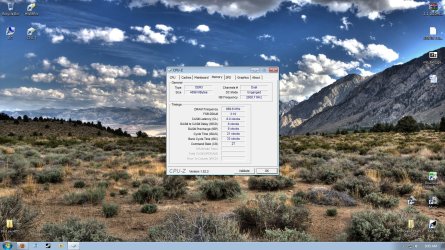
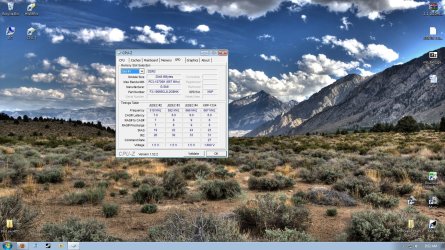
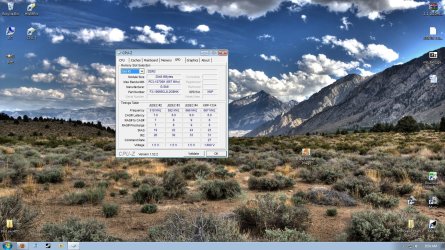
Windows tracks physical pages of memory using a table called the Page Frame Database. This database (which actually is just a big one-dimensional array) is indexed by physical page number. As a result, the page frame database is typically referred to as the Page Frame Number list or PFN. This ususaly accours for one ot two reasons, the first is being memory corruption. If their is a buggy driver in the system that is writing on memory that it doesn't own it could easily corrupt one of it's PFN lists or entires. So as suggested all ready try removing the nvida driver as explained and then reinatall it. Or you could just let windows install a driver and see if the issue still appears. Bad pool lits or header. Once again a driver issue. Just a thought you said you ran memtest have you tried it with one stick in at a time? Also try just using 1 stick after doing the driver reinastall. I would also like to have a look at what CPU-z lists as your memory and timings. Could you Copy and Paste screen shots of it on both sticks? CPUID Thanks. Fabe
 

My Computer My Computer

At a glance

Windows 7 ultimate 64 bit / XP Home sp3intel Core 2 Duo E8400 3.0ghz8 gigs 1066 OCZ Fata1tyEVGA GTX 580 Call of Duty Black Ops Edition
Computer Manufacturer/Model Number
Self Built
OS
Windows 7 ultimate 64 bit / XP Home sp3
CPU
intel Core 2 Duo E8400 3.0ghz
Motherboard
Asus P5ND bios 1401
Memory
8 gigs 1066 OCZ Fata1ty
Graphics Card(s)
EVGA GTX 580 Call of Duty Black Ops Edition
Sound Card
Creative Soundblaster Audigy 2zs
Monitor(s) Displays
Asus 24in LCD's 2MS X2
Screen Resolution
1920x1080p @60Hz
Hard Drives
WD Caviar 500 Black/ WD Caviar 200 Blue
PSU
OCZ 700W GameXtreme
Case
NZXT Apollo
Cooling
Corsair H50 CPU/120mm x3 /60mm x2 /Corsair Dominator Ram
Keyboard
Logitech Bluetooth Wireless MX5000
Mouse
Logitech Bluetooth Wireless MX1000
Internet Speed
Download 19.83 Upload 0.97
Other Info
Logitech Z2300 Speakers/ Bose Noise Cancelling Headphones/Avermedia PCI-e Hybrid TV Bravo/Epson NX415 all in one/ 4 Port Powered USB Hub/ LG 10x Bluray Burner /TSST Corp DVDRW External
Will try and run the memtest on each individual stick today as well. Should it put the single stick in slot 0? And how many passes do you recommend i do?
 

Attachments

  • mem.jpg
    mem.jpg
    267.9 KB · Views: 71
  • slot1.jpg
    slot1.jpg
    279.1 KB · Views: 70
  • slot2.jpg
    slot2.jpg
    280.1 KB · Views: 67

My Computer My Computer

At a glance

Windows 7 Ultimate x64Intel i5 2500k @ 4.7Ghz16GB Corsair Vengeance DDR3 1600EVGA Classified GTX560ti 448 core
Computer Manufacturer/Model Number
ME
OS
Windows 7 Ultimate x64
CPU
Intel i5 2500k @ 4.7Ghz
Motherboard
ASUS P8Z68-V
Memory
16GB Corsair Vengeance DDR3 1600
Graphics Card(s)
EVGA Classified GTX560ti 448 core
Sound Card
ASUS Xonar DG - Logitech G930 Headset
Monitor(s) Displays
ASUS 24" VE247
Screen Resolution
1920x1080
Hard Drives
120GB OCZ Agility 3 SSD
WD 500GB Caviar Blue x 2
PSU
Seasonic x650 Gold Certified Modular
Case
Corsair 400R / NZXT Sentry Mesh Fan Controller
Cooling
Corsair H100 / XIGMATEK 120mm White LED x 9
Keyboard
Logitech G15
Mouse
Logitech G9x
Internet Speed
20Mbit
Your tRas is tighter than the XMP profile suggests 21 instead of 23. Try loosening that to match.
 

My Computer My Computer

At a glance

8 Pro x64i7 3770K 4.6GHz16GB G.Skill Trident X 2666mhzx2 EVGA 780 Ti Superclocked SLI
Computer type
PC/Desktop
Computer Manufacturer/Model Number
Systems by SmartEyeball
OS
8 Pro x64
CPU
i7 3770K 4.6GHz
Motherboard
ASUS P8Z77 WS
Memory
16GB G.Skill Trident X 2666mhz
Graphics Card(s)
x2 EVGA 780 Ti Superclocked SLI
Sound Card
SB X-FI Surround 5.1 PRO USB / ATH-AD900 Headphones
Monitor(s) Displays
x3 Dell U2410 / 58" Samsung
Screen Resolution
5760*1200/ 1920*1200
Hard Drives
2x Intel 520 240GB (RAID 0) * 2x WD Caviar Blacks 2TB (RAID 0) * 2TB WD Caviar Black * Sony Optirac DVD
PSU
Silverstone Strider Evolution 1200W
Case
Thermaltake Level 10 GT Snow Edition
Cooling
Noctua NH-D14
Keyboard
Topre Realforce // Ducky Shine MX Black // Filco Ninja TKL
Mouse
Thermaltake Theron (Highly Recommended) + Razer Imperator
Antivirus
MSE
Browser
IE, FF, WaterFox
Other Info
GT Extreme V2 Sim Racing Cockpit + 40" LCD and K/B Mouse stand ▼
Fanatec CSR Elite Wheel + Clubsport V1 Pedals + CSR shifter/7G-H ▼Saitek X52 Pro ▼ TrackIR 5 Pro
Buttkicker v2 Seat Rumbler with Dedicated 5.1 and Sub Woofer attached to frame ▼
=
Bloody Big Grin
smartyeyeball is right I would follow his suggestion. Then as to which slot I would refer to the manual. It's been a while since I have done any memtesting but some Motherboards will recommend the slot some won't my DFI was the one closet to the edge of the board is how we explained it then.So I would see if they say if running only 1 stick place it in slot X. Times? 8- 10 passes. Seems like a lot but once again certain numbered calculations during one pass such as the 5th(if I remember correctly) in the sequence on memtest stresses the memory more than other calculations.Fabe
 

My Computer My Computer

At a glance

Windows 7 ultimate 64 bit / XP Home sp3intel Core 2 Duo E8400 3.0ghz8 gigs 1066 OCZ Fata1tyEVGA GTX 580 Call of Duty Black Ops Edition
Computer Manufacturer/Model Number
Self Built
OS
Windows 7 ultimate 64 bit / XP Home sp3
CPU
intel Core 2 Duo E8400 3.0ghz
Motherboard
Asus P5ND bios 1401
Memory
8 gigs 1066 OCZ Fata1ty
Graphics Card(s)
EVGA GTX 580 Call of Duty Black Ops Edition
Sound Card
Creative Soundblaster Audigy 2zs
Monitor(s) Displays
Asus 24in LCD's 2MS X2
Screen Resolution
1920x1080p @60Hz
Hard Drives
WD Caviar 500 Black/ WD Caviar 200 Blue
PSU
OCZ 700W GameXtreme
Case
NZXT Apollo
Cooling
Corsair H50 CPU/120mm x3 /60mm x2 /Corsair Dominator Ram
Keyboard
Logitech Bluetooth Wireless MX5000
Mouse
Logitech Bluetooth Wireless MX1000
Internet Speed
Download 19.83 Upload 0.97
Other Info
Logitech Z2300 Speakers/ Bose Noise Cancelling Headphones/Avermedia PCI-e Hybrid TV Bravo/Epson NX415 all in one/ 4 Port Powered USB Hub/ LG 10x Bluray Burner /TSST Corp DVDRW External
Your tRas is tighter than the XMP profile suggests 21 instead of 23. Try loosening that to match.

Changed the tRas to 23 now i will run the memtest for each individual stick and get back to you guys
 

My Computer My Computer

At a glance

Windows 7 Ultimate x64Intel i5 2500k @ 4.7Ghz16GB Corsair Vengeance DDR3 1600EVGA Classified GTX560ti 448 core
Computer Manufacturer/Model Number
ME
OS
Windows 7 Ultimate x64
CPU
Intel i5 2500k @ 4.7Ghz
Motherboard
ASUS P8Z68-V
Memory
16GB Corsair Vengeance DDR3 1600
Graphics Card(s)
EVGA Classified GTX560ti 448 core
Sound Card
ASUS Xonar DG - Logitech G930 Headset
Monitor(s) Displays
ASUS 24" VE247
Screen Resolution
1920x1080
Hard Drives
120GB OCZ Agility 3 SSD
WD 500GB Caviar Blue x 2
PSU
Seasonic x650 Gold Certified Modular
Case
Corsair 400R / NZXT Sentry Mesh Fan Controller
Cooling
Corsair H100 / XIGMATEK 120mm White LED x 9
Keyboard
Logitech G15
Mouse
Logitech G9x
Internet Speed
20Mbit
Okay, ran both sticks of RAM through 10 passes of memtest each, and no errors. Just uninstalled and took out my nVidia 260, and running my on board ati 3300hd. Am going to update bios to F3 as well.
 

My Computer My Computer

At a glance

Windows 7 Ultimate x64Intel i5 2500k @ 4.7Ghz16GB Corsair Vengeance DDR3 1600EVGA Classified GTX560ti 448 core
Computer Manufacturer/Model Number
ME
OS
Windows 7 Ultimate x64
CPU
Intel i5 2500k @ 4.7Ghz
Motherboard
ASUS P8Z68-V
Memory
16GB Corsair Vengeance DDR3 1600
Graphics Card(s)
EVGA Classified GTX560ti 448 core
Sound Card
ASUS Xonar DG - Logitech G930 Headset
Monitor(s) Displays
ASUS 24" VE247
Screen Resolution
1920x1080
Hard Drives
120GB OCZ Agility 3 SSD
WD 500GB Caviar Blue x 2
PSU
Seasonic x650 Gold Certified Modular
Case
Corsair 400R / NZXT Sentry Mesh Fan Controller
Cooling
Corsair H100 / XIGMATEK 120mm White LED x 9
Keyboard
Logitech G15
Mouse
Logitech G9x
Internet Speed
20Mbit
After troubleshooting with some friends, they seem to think its the power supply. What do you guys think about my 630watt rosewill? you think it actually puts out 630w continously? According to my GFX card it needs 550w. Would the psu be supplying enough?
 
Last edited:

My Computer My Computer

At a glance

Windows 7 Ultimate x64Intel i5 2500k @ 4.7Ghz16GB Corsair Vengeance DDR3 1600EVGA Classified GTX560ti 448 core
Computer Manufacturer/Model Number
ME
OS
Windows 7 Ultimate x64
CPU
Intel i5 2500k @ 4.7Ghz
Motherboard
ASUS P8Z68-V
Memory
16GB Corsair Vengeance DDR3 1600
Graphics Card(s)
EVGA Classified GTX560ti 448 core
Sound Card
ASUS Xonar DG - Logitech G930 Headset
Monitor(s) Displays
ASUS 24" VE247
Screen Resolution
1920x1080
Hard Drives
120GB OCZ Agility 3 SSD
WD 500GB Caviar Blue x 2
PSU
Seasonic x650 Gold Certified Modular
Case
Corsair 400R / NZXT Sentry Mesh Fan Controller
Cooling
Corsair H100 / XIGMATEK 120mm White LED x 9
Keyboard
Logitech G15
Mouse
Logitech G9x
Internet Speed
20Mbit
The only true way to test a power supply would be to use the very expensive diagnostic equipment used in labs. But for us regular folks: I tested my power supply by hooking up my (analog) multimeter to the PCI-E dongles that I used to connect my GTX260 (I used a spare pair from the power supply while I was testing). I then observed the meter while I used the computer, first watching the voltage, then the amps, to see if there was any drop-off or erratic behavior while booting or using the computer. My reading were rock solid. So I declared my power supply good.

I spent uncountable hours trying to correct my TDR problem with bluescreen crash using a GTX260 after installing Windows 7 (TDR = Timeout Detection & Recovery = "Display Driver Stopped Responding and has Recovered"). It turns out that the video card was bad. The strange thing was that I was using it without problems in the same rig for 9 months with XP-SP3! After doing countless diagnostics I finally bought a new GeForce 9500GT card for $50 to use while I RMA'd the GTX260 back to EVGA. Installing the 'new' card ended all my video problems. When I got the replacement card back and installed it there were no problems. Both cards use the same nVidia Drivers.
So my advice is to not rule out a bad card. Ultimately that is what you may be dealing with.
 

My Computer My Computer

At a glance

Windows 7 64 Bit Home Premium SP1i7-3820GSkill F3-14900CL9Q - 16GBEVGA GeForce GTX660 - Driver 352.86
Computer type
PC/Desktop
Computer Manufacturer/Model Number
Home Built - Jan 2013
OS
Windows 7 64 Bit Home Premium SP1
CPU
i7-3820
Motherboard
Asus P9X79-PRO - Bios 4608
Memory
GSkill F3-14900CL9Q - 16GB
Graphics Card(s)
EVGA GeForce GTX660 - Driver 352.86
Sound Card
On board Realtek ALC898
Monitor(s) Displays
Acer S271HL
Screen Resolution
1920 x 1080
Hard Drives
#1- Samsung 840 Pro Series
#2- Western Digital WD1002FAEX Sata3 Black
#3- Western Digital WD1002FAEX Sata3 Black
PSU
Corsair CMPSU-850TX-V2 - 850 watt (by Seasonic)
Case
Corsair Obsidian 550D
Cooling
Standard 3 120mm case fans, Cooler Master Hyper 212 EVO
Keyboard
MS KC-0405
Mouse
Intellimouse 5-button
Internet Speed
56 Mbits/Sec (on a good day)
Antivirus
Avast & Malwarebytes
Browser
Firefox
Other Info
Asus DVD - DRW-24B1ST 24X
Is this the PSU?

Newegg.com - Rosewill RX630-S-B 630W ATX12V v2.2 & EPS12V v2.91 SLI Ready CrossFire Ready 80 PLUS Certified Active PFC Power Supply - Power Supplies

The 12v rails are getting close to a 260's max amp load draw, but it should be okay. (Amps are more important than wattage)

What 12v rail do you have your card connected to?

Just remember that normally the hardwired 4/8 pin CPU power and 24 pin motherboard power connectors are generally part of the 12v1 rail. Perhaps try connecting the card to to a different 12v rail to further 'evenly distribute' the load. ie connect the card to 12v2, 12v3 etc

If memtest with the correct timings / voltages are passing okay, and the power distribution is even - then unfortunately you could indeed be looking at a faulty card after all.
 

My Computer My Computer

At a glance

8 Pro x64i7 3770K 4.6GHz16GB G.Skill Trident X 2666mhzx2 EVGA 780 Ti Superclocked SLI
Computer type
PC/Desktop
Computer Manufacturer/Model Number
Systems by SmartEyeball
OS
8 Pro x64
CPU
i7 3770K 4.6GHz
Motherboard
ASUS P8Z77 WS
Memory
16GB G.Skill Trident X 2666mhz
Graphics Card(s)
x2 EVGA 780 Ti Superclocked SLI
Sound Card
SB X-FI Surround 5.1 PRO USB / ATH-AD900 Headphones
Monitor(s) Displays
x3 Dell U2410 / 58" Samsung
Screen Resolution
5760*1200/ 1920*1200
Hard Drives
2x Intel 520 240GB (RAID 0) * 2x WD Caviar Blacks 2TB (RAID 0) * 2TB WD Caviar Black * Sony Optirac DVD
PSU
Silverstone Strider Evolution 1200W
Case
Thermaltake Level 10 GT Snow Edition
Cooling
Noctua NH-D14
Keyboard
Topre Realforce // Ducky Shine MX Black // Filco Ninja TKL
Mouse
Thermaltake Theron (Highly Recommended) + Razer Imperator
Antivirus
MSE
Browser
IE, FF, WaterFox
Other Info
GT Extreme V2 Sim Racing Cockpit + 40" LCD and K/B Mouse stand ▼
Fanatec CSR Elite Wheel + Clubsport V1 Pedals + CSR shifter/7G-H ▼Saitek X52 Pro ▼ TrackIR 5 Pro
Buttkicker v2 Seat Rumbler with Dedicated 5.1 and Sub Woofer attached to frame ▼
=
Bloody Big Grin
Newegg.com - Rosewill Green Series RG630-2 630W Continuous @40°C,80 PLUS Certified,ATX12V v2.3,SLI Ready,CrossFire Ready,Active PFC"Compatible with Core i7, i5" Power Supply - Power Supplies
Thats my PSU

Newegg.com - BFG Tech BFGEGTX260MC896OCDE GeForce GTX 260 896MB 448-bit GDDR3 PCI Express 2.0 x16 HDCP Ready SLI Support Video Card - Desktop Graphics / Video Cards
Thats my GFX Card

Just looked and my card is connected to the only PCI-e connectors that are on my PSU. Two connectors one is a 6-pin and one is an 8-pin where 2 pins can come apart so i can use just the 6-pin. So 2 6-pin connectors.

My vid card did come with an adapter, but according to the instructions in the video card box, they gave me the wrong adapter. They gave me a Dual 6-pin PCIe to 8-pin PCIe power adapter that the instructions say to use on a GTX 280 or 295. I apparently could try a dual 4-pin peripheral to 6-pin PCIe power adapter if i had one, correct? I'll see if my buddy has one or if i can pick one up in town.
 

My Computer My Computer

At a glance

Windows 7 Ultimate x64Intel i5 2500k @ 4.7Ghz16GB Corsair Vengeance DDR3 1600EVGA Classified GTX560ti 448 core
Computer Manufacturer/Model Number
ME
OS
Windows 7 Ultimate x64
CPU
Intel i5 2500k @ 4.7Ghz
Motherboard
ASUS P8Z68-V
Memory
16GB Corsair Vengeance DDR3 1600
Graphics Card(s)
EVGA Classified GTX560ti 448 core
Sound Card
ASUS Xonar DG - Logitech G930 Headset
Monitor(s) Displays
ASUS 24" VE247
Screen Resolution
1920x1080
Hard Drives
120GB OCZ Agility 3 SSD
WD 500GB Caviar Blue x 2
PSU
Seasonic x650 Gold Certified Modular
Case
Corsair 400R / NZXT Sentry Mesh Fan Controller
Cooling
Corsair H100 / XIGMATEK 120mm White LED x 9
Keyboard
Logitech G15
Mouse
Logitech G9x
Internet Speed
20Mbit
Back
Top