
Half of memory is not usable - Please help me understand where it is

Go right above that colored bar you are looking at to processes and it will show you what and how much ram is being used for what. I don't use Ubuntu. You can use Windows 7 all by it's self to see a lot of things.

In Windows, it says 2GB hardware reserved. I cannot trace where that is in resource monitor or performance monitor. In Ubuntu, it ONLY registers that I have 2GB of RAM.


This is usually due to a faulty RAM configuration. Windows can see the RAM, but it can't use it.

Make absolutely sure the RAM you are using is actually compatible with your board.

If you are certain the RAM is compatible, and properly seated. Then you need to test with another RAM stick.

The fact that Ubuntu can not see the RAM at all tends to confirm the faulty configuration hypothesis.

There are quite a few things that can cause odd memory problems, but in view of the posts to date, this is almost certainly a faulty RAM configuration, or a defective RAM stick.

Regards....Mike Connor
 

My Computer My Computer

At a glance

Several, including Windows 7 x64 Ultimate
OS
Several, including Windows 7 x64 Ultimate
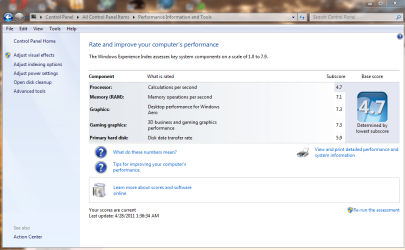
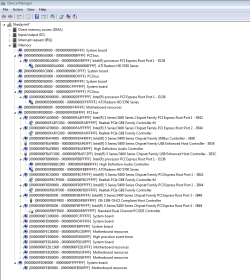
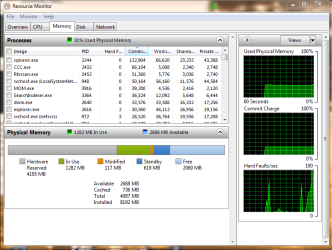
I just installed another 4GB of RAM. I can only use 4GB of RAM now. So I have 8GB total, and can only use 4GB, half of what is installed. Attached is the latest device manager by memory address and the latest windows score index, which has dropped to an abysmal 4.7 somehow, though I am not sure how.
 

Attachments

  • more memory capture.PNG
    more memory capture.PNG
    24.8 KB · Views: 39
  • new windows experience.PNG
    new windows experience.PNG
    66.4 KB · Views: 53
  • new resource.PNG
    new resource.PNG
    31.6 KB · Views: 68

My Computer My Computer

At a glance

Windows 7 x64 ProfessionalIntel Core i5 7502x2GB Gskill Ripjaw SeriesATI Radeon HD 5750
OS
Windows 7 x64 Professional
CPU
Intel Core i5 750
Motherboard
MSI P55 GD65
Memory
2x2GB Gskill Ripjaw Series
Graphics Card(s)
ATI Radeon HD 5750
Look at your "hardware reserved" section under Resource monitor. That is a hefty 4 GB chunk right there!!

....If Ubuntu gives you information you like I'm sure they have a web site. Many people here leave instruction of how to use Ubuntu to help with problems and we use them and say thank you. Or don't use them and say thank you, it's your computer you choose. To the best of my little pea brains knowledge their is no operating system that suites every body in every way. Work with us and we will work with you!!!!
And I respect that. I am not one of those microsoft haters . Granted I use Ubuntu as my main OS but I still run Windows 7 on VM. But I still think my linux does "more" for me than my windows could even imagine. :)
 
Last edited:

My Computer My Computer

At a glance

Ubuntu 10.10 64 bit/Window 7 VMCore 2 Duo 2.2 Ghz4 GB Kingston ValueRAM (DDR2 800)nVidia 240 GT
Computer Manufacturer/Model Number
Custom
OS
Ubuntu 10.10 64 bit/Window 7 VM
CPU
Core 2 Duo 2.2 Ghz
Motherboard
ECS g31 mATX
Memory
4 GB Kingston ValueRAM (DDR2 800)
Graphics Card(s)
nVidia 240 GT
Sound Card
Onboard
Monitor(s) Displays
19" Dell LCD
Hard Drives
500 GB Seagate Drive x 2
PSU
Antec 430 Watt
Case
Coolermaster
Keyboard
Microsoft Ergonomic Keyboard 4000
Mouse
Laser Mouse (Logitech)
You are correct gpost3 it does seem like a lot for hardware. Could it be picking it up off the work group or something like that. I don't think that could happen. In use is only 1282mb. My hardware is only 770mb. To the OP. What kind of hardware do you have hooked to this computer. I surly don't know how 4gb +can be allocated to hardware. That's a lot of hardware. I would unplug one piece of hardware at a time and see what happens. I would also disconnect from any network and see what happens.
 

My Computer My Computer

At a glance

Windows 10 Pro. 64/ version 1709 Windows 7 Pr...Intel i7-6800K @ 4.3Corsair Platinum 16 gig @2400EVGA GTX 1070 OC
Computer type
PC/Desktop
Computer Manufacturer/Model Number
Home made Desktop
OS
Windows 10 Pro. 64/ version 1709 Windows 7 Pro/64
CPU
Intel i7-6800K @ 4.3
Motherboard
ASUS X-99 Deluxe II
Memory
Corsair Platinum 16 gig @2400
Graphics Card(s)
EVGA GTX 1070 OC
Monitor(s) Displays
Asus 27" LED LCD/VE278Q
Screen Resolution
1920-1080 or 1280-720 HDMI
Hard Drives
INTEL SSD 730-240 Gb Sata 3.0/
PSU
EVGA Platium 1200W
Case
Phanteks Luxe Tempered Glass 8 fans/ one radiator
Cooling
XSPC/ Water Cooled CPU
Keyboard
Das 4 Professional
Mouse
Logitech M705/MX Anywhere 2-S
Internet Speed
100 mbits
Antivirus
Microsoft Security Essentials/ Malwarebytes Premium 3.0/ SAS
Browser
I.E. 11 default/Firefox/ ISP Time Warner Cable/Spectrum
Other Info
LG BluRay Burner/
Sound system-KLipsch-THX/
Icy Dock ssd Hot Swap bays.
By the way, I just wanted to thank everyone here for being really helpful - quick and knowledgeable responses, I really appreciate it. I work as a pentester, but my focus has never really been hardware, so I had wanted to build my own computer. Looks like that was a mistake...spent a lot of money, and it is not working right. Additionally, the heatsink I used is a monster of a heatsink, shouldn't have listened to a friends recommendation on that. I wouldn't even mind taking it in to a repair place, except they are insanely expensive -$75 for "diagnosis" and then $100+ for repair. I sincerely appreciate the help everyone is giving.
 

My Computer My Computer

At a glance

Windows 7 x64 ProfessionalIntel Core i5 7502x2GB Gskill Ripjaw SeriesATI Radeon HD 5750
OS
Windows 7 x64 Professional
CPU
Intel Core i5 750
Motherboard
MSI P55 GD65
Memory
2x2GB Gskill Ripjaw Series
Graphics Card(s)
ATI Radeon HD 5750
You are correct gpost3 it does seem like a lot for hardware. Could it be picking it up off the work group or something like that. I don't think that could happen. In use is only 1282mb. My hardware is only 770mb. To the OP. What kind of hardware do you have hooked to this computer. I surly don't know how 4gb +can be allocated to hardware. That's a lot of hardware. I would unplug one piece of hardware at a time and see what happens. I would also disconnect from any network and see what happens.

The only hardware I have is the graphics card (ATI Radeon HD 5750, and according to tech support they shouldn't be using my RAM at all, and they blame all operating systems for allocating memory that way), two hard drives, a cd burner, a wireless usb adapter, and a usb wireless keyboard/mouse.

As far as I know, the installed RAM is compatible. Here is the RAM I have:

Newegg.com - G.SKILL Ripjaws Series 4GB (2 x 2GB) 240-Pin DDR3 SDRAM DDR3 1333 (PC3 10666) Desktop Memory Model F3-10666CL8D-4GBRM

Newegg.com - G.SKILL NS 4GB (2 x 2GB) 240-Pin DDR3 SDRAM DDR3 1333 (PC3 10666) Desktop Memory Model F3-10666CL9D-4GBNS

Quick sidebars - Why would my proc performance have tanked in the windows experience index? And what is the easiest way to clean thermal paste off of the CPU so I can remove the current heatsink and place a different one. I did have an offer from Intel to test it and RMA if something is really wrong, but then I will be without the use of that computer for some time.
 
Last edited:

My Computer My Computer

At a glance

Windows 7 x64 ProfessionalIntel Core i5 7502x2GB Gskill Ripjaw SeriesATI Radeon HD 5750
OS
Windows 7 x64 Professional
CPU
Intel Core i5 750
Motherboard
MSI P55 GD65
Memory
2x2GB Gskill Ripjaw Series
Graphics Card(s)
ATI Radeon HD 5750

My Computer My Computer

At a glance

Several, including Windows 7 x64 Ultimate
OS
Several, including Windows 7 x64 Ultimate

My Computer My Computer

At a glance

Windows 7 x64 ProfessionalIntel Core i5 7502x2GB Gskill Ripjaw SeriesATI Radeon HD 5750
OS
Windows 7 x64 Professional
CPU
Intel Core i5 750
Motherboard
MSI P55 GD65
Memory
2x2GB Gskill Ripjaw Series
Graphics Card(s)
ATI Radeon HD 5750

My Computer My Computer

At a glance

Windows 10 Pro (x64)Intel Core i7-3930K (3.2GHz - 4.5GHz)4x Samsung 4GB PC3-12800 DDR3 (16GB 1600MHz)Nvidia Geforce GTX 690
Computer type
PC/Desktop
Computer Manufacturer/Model Number
Alienware Aurora ALX R4
OS
Windows 10 Pro (x64)
CPU
Intel Core i7-3930K (3.2GHz - 4.5GHz)
Motherboard
Alienware Aurora-R4 x79
Memory
4x Samsung 4GB PC3-12800 DDR3 (16GB 1600MHz)
Graphics Card(s)
Nvidia Geforce GTX 690
Sound Card
SteelSeries Siberia Elite
Monitor(s) Displays
Dell UltraSharp U3011
Screen Resolution
2560x1600
Hard Drives
Samsung 850 Pro 256 GB, Seagate 1TB Desktop Hybrid HDD, 2x Western Digital 4TB Green HDD
PSU
875W Some Dell PSU <.<
Case
Alienware Aurora ALX
Cooling
Custom Liquid Cooling (EK CPU & GPU blocks) dual EK 480RAD
Keyboard
Logitech G710+ Mechanical
Mouse
Logitech G700s
Internet Speed
Verizon Fios (50 mbps average)
Other Info
Server: Intel NUC D54250WYK: i5-4250U, 16GB, 256 GB mSATA, Windows Server 2012 R2
You need memory remapping...

There is no option in the BIOS. Additionally, it is strange that always half of the RAM is reserved. I understand remapping memory from the graphics card, etc, but why is it always half of the RAM being reserved - where is it going that it would need to be remapped? It seems strange that boards will ship without a BIOS that allows memory remapping and yet boast being able to hold over 16GB of RAM...
 

My Computer My Computer

At a glance

Windows 7 x64 ProfessionalIntel Core i5 7502x2GB Gskill Ripjaw SeriesATI Radeon HD 5750
OS
Windows 7 x64 Professional
CPU
Intel Core i5 750
Motherboard
MSI P55 GD65
Memory
2x2GB Gskill Ripjaw Series
Graphics Card(s)
ATI Radeon HD 5750
The problem is the RAM configuration. The only way that much RAM is "Reserved" is if Windows can see it but can't use it.

This was also a recent problem with the same thing;

http://www.sevenforums.com/hardware-devices/158762-8gb-installed-ram-only-3-74-usable-help.html

Regards....Mike Connor

What is not configured properly? It is using default settings - I did not mess with the BIOS, RAM is properly seated.

The fact that Windows can see the RAM, but is unable to use it, indicates an unsupported RAM configuration. That usually means you have the wrong RAM sticks.

Regards....Mike Connor
 

My Computer My Computer

At a glance

Several, including Windows 7 x64 Ultimate
OS
Several, including Windows 7 x64 Ultimate
The problem is the RAM configuration. The only way that much RAM is "Reserved" is if Windows can see it but can't use it.

This was also a recent problem with the same thing;

http://www.sevenforums.com/hardware-devices/158762-8gb-installed-ram-only-3-74-usable-help.html

Regards....Mike Connor

What is not configured properly? It is using default settings - I did not mess with the BIOS, RAM is properly seated.

The fact that Windows can see the RAM, but is unable to use it, indicates an unsupported RAM configuration. That usually means you have the wrong RAM sticks.

Regards....Mike Connor

If they are "wrong" then shouldn't it not recognize ANY of the RAM, and not just half of it? How do I find out if the RAM i posted above is compatible? As far as I know it should be.
 

My Computer My Computer

At a glance

Windows 7 x64 ProfessionalIntel Core i5 7502x2GB Gskill Ripjaw SeriesATI Radeon HD 5750
OS
Windows 7 x64 Professional
CPU
Intel Core i5 750
Motherboard
MSI P55 GD65
Memory
2x2GB Gskill Ripjaw Series
Graphics Card(s)
ATI Radeon HD 5750
What is not configured properly? It is using default settings - I did not mess with the BIOS, RAM is properly seated.

The fact that Windows can see the RAM, but is unable to use it, indicates an unsupported RAM configuration. That usually means you have the wrong RAM sticks.

Regards....Mike Connor

If they are "wrong" then shouldn't it not recognize ANY of the RAM, and not just half of it? How do I find out if the RAM i posted above is compatible? As far as I know it should be.

Read the thread I linked to. The problem was identical, and it was caused by using an unsupported RAM configuration. That means the RAM doesn't work properly.

The motherboard manufacturer should have a list of supported RAM types.

You MUST use a supported RAM type, as others simply wont work, even though Windows can see them.

"It should be" is not good enough. It MUST be compatible, or it wont work properly.

Regards....Mike Connor
 

My Computer My Computer

At a glance

Several, including Windows 7 x64 Ultimate
OS
Several, including Windows 7 x64 Ultimate
There is no option in the BIOS. Additionally, it is strange that always half of the RAM is reserved. I understand remapping memory from the graphics card, etc, but why is it always half of the RAM being reserved - where is it going that it would need to be remapped? It seems strange that boards will ship without a BIOS that allows memory remapping and yet boast being able to hold over 16GB of RAM...

Then you need to go talk to MSI about it.
Without memory remapping it won't matter.
Further more there have been several BIOS updates for your board.
 

My Computer My Computer

At a glance

Windows 10 Pro (x64)Intel Core i7-3930K (3.2GHz - 4.5GHz)4x Samsung 4GB PC3-12800 DDR3 (16GB 1600MHz)Nvidia Geforce GTX 690
Computer type
PC/Desktop
Computer Manufacturer/Model Number
Alienware Aurora ALX R4
OS
Windows 10 Pro (x64)
CPU
Intel Core i7-3930K (3.2GHz - 4.5GHz)
Motherboard
Alienware Aurora-R4 x79
Memory
4x Samsung 4GB PC3-12800 DDR3 (16GB 1600MHz)
Graphics Card(s)
Nvidia Geforce GTX 690
Sound Card
SteelSeries Siberia Elite
Monitor(s) Displays
Dell UltraSharp U3011
Screen Resolution
2560x1600
Hard Drives
Samsung 850 Pro 256 GB, Seagate 1TB Desktop Hybrid HDD, 2x Western Digital 4TB Green HDD
PSU
875W Some Dell PSU <.<
Case
Alienware Aurora ALX
Cooling
Custom Liquid Cooling (EK CPU & GPU blocks) dual EK 480RAD
Keyboard
Logitech G710+ Mechanical
Mouse
Logitech G700s
Internet Speed
Verizon Fios (50 mbps average)
Other Info
Server: Intel NUC D54250WYK: i5-4250U, 16GB, 256 GB mSATA, Windows Server 2012 R2
If they are "wrong" then shouldn't it not recognize ANY of the RAM, and not just half of it? How do I find out if the RAM i posted above is compatible? As far as I know it should be.

No. What happens in a lot of cases is exactly what is happening to you. Windows can see the RAM, but it is unable to use it, because the configuration is unsupported, and Windows marks what it can't use as "Reserved Hardware".

It is not being used for anything else, it is simply unusable.

The actual reason(s) why it doesn't work is irrelevant here, there can be lots of reasons. You need to find RAM that works on your board.

Regards....Mike Connor
 

My Computer My Computer

At a glance

Several, including Windows 7 x64 Ultimate
OS
Several, including Windows 7 x64 Ultimate
The fact that Windows can see the RAM, but is unable to use it, indicates an unsupported RAM configuration. That usually means you have the wrong RAM sticks.

Regards....Mike Connor

If they are "wrong" then shouldn't it not recognize ANY of the RAM, and not just half of it? How do I find out if the RAM i posted above is compatible? As far as I know it should be.

Read the thread I linked to. The problem was identical, and it was caused by using an unsupported RAM configuration. That means the RAM doesn't work properly.

The motherboard manufacturer should have a list of supported RAM types.

You MUST use a supported RAM type, as others simply wont work, even though Windows can see them.

"It should be" is not good enough. It MUST be compatible, or it wont work properly.

Regards....Mike Connor

According to the motherboard specifications, it is dual channel DDR3 1066/1333/1600*/2000*/2133* (OC). http://www.msi.com/product/mb/P55-GD65.html#?div=Basic

According to the Gskill website, the first type of RAM I have, Ripjaw, is guaranteed to work with MSI P55 GD65. G.SKILL-Products

The other set of RAM I bought, F3-10666CL9D-4GBNS, looks like it might not be meant for my mobo. However, that does not explain why the issues were occurring with the first set of RAM.
 

My Computer My Computer

At a glance

Windows 7 x64 ProfessionalIntel Core i5 7502x2GB Gskill Ripjaw SeriesATI Radeon HD 5750
OS
Windows 7 x64 Professional
CPU
Intel Core i5 750
Motherboard
MSI P55 GD65
Memory
2x2GB Gskill Ripjaw Series
Graphics Card(s)
ATI Radeon HD 5750
There is no option in the BIOS. Additionally, it is strange that always half of the RAM is reserved. I understand remapping memory from the graphics card, etc, but why is it always half of the RAM being reserved - where is it going that it would need to be remapped? It seems strange that boards will ship without a BIOS that allows memory remapping and yet boast being able to hold over 16GB of RAM...

Then you need to go talk to MSI about it.
Without memory remapping it won't matter.
Further more there have been several BIOS updates for your board.

I used the MSI LiveUpdate 5 tool to update my BIOS to 1.10, which it said was the latest.
 

My Computer My Computer

At a glance

Windows 7 x64 ProfessionalIntel Core i5 7502x2GB Gskill Ripjaw SeriesATI Radeon HD 5750
OS
Windows 7 x64 Professional
CPU
Intel Core i5 750
Motherboard
MSI P55 GD65
Memory
2x2GB Gskill Ripjaw Series
Graphics Card(s)
ATI Radeon HD 5750
If they are "wrong" then shouldn't it not recognize ANY of the RAM, and not just half of it? How do I find out if the RAM i posted above is compatible? As far as I know it should be.

Read the thread I linked to. The problem was identical, and it was caused by using an unsupported RAM configuration. That means the RAM doesn't work properly.

The motherboard manufacturer should have a list of supported RAM types.

You MUST use a supported RAM type, as others simply wont work, even though Windows can see them.

"It should be" is not good enough. It MUST be compatible, or it wont work properly.

Regards....Mike Connor

According to the motherboard specifications, it is dual channel DDR3 1066/1333/1600*/2000*/2133* (OC). http://www.msi.com/product/mb/P55-GD65.html#?div=Basic

According to the Gskill website, the first type of RAM I have, Ripjaw, is guaranteed to work with MSI P55 GD65. G.SKILL-Products

The other set of RAM I bought, F3-10666CL9D-4GBNS, looks like it might not be meant for my mobo. However, that does not explain why the issues were occurring with the first set of RAM.

Presumably, the main idea right now is to get your machine running properly. In which case, what previous issues various components may have had is also irrelevant. Just forget about them, and try to obtain RAM which works.

Nothing else will help, you can't remap it , or use software to "repair" it, or anything like that if it is an "Unsupported Configuration". The fact that Windows can see the RAM, but marks it as "Reserved Hardware" confirms this, Windows is telling you that it can not use the RAM. The only thing you can do is find RAM that works.

If you have bought RAM from a firm that guarantees it will work, then there is no problem, because it obviously does not, and you can simply return it.

Regards....Mike Connor
 

My Computer My Computer

At a glance

Several, including Windows 7 x64 Ultimate
OS
Several, including Windows 7 x64 Ultimate
Just for fun, have you tried loosening off the heatsink yet?
 

My Computer My Computer

At a glance

Win 7 Ultimate x64FX-8350 @ 4.6 GHz so farADATA XPG V1 Series Black 8GB DDR3 1600Sapphire R9 270x Dual-X
Computer type
PC/Desktop
Computer Manufacturer/Model Number
Me
OS
Win 7 Ultimate x64
CPU
FX-8350 @ 4.6 GHz so far
Motherboard
Asus M5A97 EVO
Memory
ADATA XPG V1 Series Black 8GB DDR3 1600
Graphics Card(s)
Sapphire R9 270x Dual-X
Sound Card
Xonar DGX w/ Corsair Vengence 1300
Monitor(s) Displays
Acer S232HL Abid
Screen Resolution
1920x1080
Hard Drives
120 GB OCZ Vertex 3
500 GB Seagate 7200.12
PSU
Antec Earthwatts 650W Green
Case
Antec Three Hundred
Cooling
Cooler Master 212 EVO
Keyboard
Logitech G510
Mouse
Logitech G500s
Internet Speed
35000/3000
I agree with stormy that this is not OS issue.

Additionally, the heatsink I used is a monster of a heatsink, shouldn't have listened to a friends recommendation on that.
I have always used Intel and smaller Arctic Cooler heatsink fans with 0 problems. Since I don't overclock, I never buy monster heatsinks and tend to stay away from MSI/Gigabyte/Asus motherboards because their BIOS is blotted with OCing features. I have used ECS boards with very good success - granted they have less features in BIOS but what little it does - does well and quite stable of a motherboard in my opinion. You don't really need that monster heatsink unless you plan to OC (mainly for games).

Just for fun, have you tried loosening off the heatsink yet?
Try that.

And try running the RAM on single channel mode? Another thing that beats me is according to OP, MemTest86+ is able to see and test all 4 GB of RAM. :huh: My suspicion goes towards your CPU (being improperly seated or damaged or whatever) and then to your motherboard.
 

My Computer My Computer

At a glance

Ubuntu 10.10 64 bit/Window 7 VMCore 2 Duo 2.2 Ghz4 GB Kingston ValueRAM (DDR2 800)nVidia 240 GT
Computer Manufacturer/Model Number
Custom
OS
Ubuntu 10.10 64 bit/Window 7 VM
CPU
Core 2 Duo 2.2 Ghz
Motherboard
ECS g31 mATX
Memory
4 GB Kingston ValueRAM (DDR2 800)
Graphics Card(s)
nVidia 240 GT
Sound Card
Onboard
Monitor(s) Displays
19" Dell LCD
Hard Drives
500 GB Seagate Drive x 2
PSU
Antec 430 Watt
Case
Coolermaster
Keyboard
Microsoft Ergonomic Keyboard 4000
Mouse
Laser Mouse (Logitech)
Back
Top