I recently upgraded my computer by replacing my motherboard, case, and power supply. At first I figured everything was done right, and it took a while before I realized that windows finds 12GB of ram, 5.99GB usable. Besides that, I also find that my transfer speeds by usb are incredibly slow, hitting a max of 5.7MB/sec, and normally sitting around 3.8.
I cant imagine what went wrong, except for fearing the worst; a bent pin on the cpu. I don't actually have any thermal paste, and cant remove/reseat it, so does anyone have any suggestions that might be causing these issues?
I cant imagine what went wrong, except for fearing the worst; a bent pin on the cpu. I don't actually have any thermal paste, and cant remove/reseat it, so does anyone have any suggestions that might be causing these issues?
My Computer
At a glance
Windows 7 Home Premium x64Intel Core i5 4690k 3.50GHZ - OC to 3.924GB @ 1600 - 2x Corsair XMS 3 4gb, 2x Patrio...MSI GTX 1060 6G OCV1
- Computer type
- PC/Desktop
- OS
- Windows 7 Home Premium x64
- CPU
- Intel Core i5 4690k 3.50GHZ - OC to 3.9
- Motherboard
- GA-Z97X-SLI
- Memory
- 24GB @ 1600 - 2x Corsair XMS 3 4gb, 2x Patriot Viper 8gb
- Graphics Card(s)
- MSI GTX 1060 6G OCV1
- Monitor(s) Displays
- 3x Acer H236HL, 1x LG 42"
- Screen Resolution
- 7680x1080
- Hard Drives
- 1 x 128gb Toshiba Q Series Pro
2 x 2TB Seagate Baracuda
- PSU
- Thermaltake Smart M850
- Case
- APEVIA X-TROOPER
- Cooling
- Cooler Master GeminII S524
- Keyboard
- Logitech G110
- Mouse
- Razer Deathadder 2013
- Internet Speed
- 100/50 mb/sec


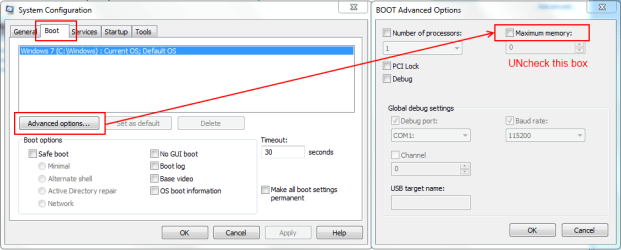
 rb:Search type msconfig and hit enter. In the Boot tab, click the Advanced Options button. In the window that opens uncheck the box for Maximum Memory, OK, Apply, then reboot and see if that helps.