
Solved Only half of RAM usable

Mintos45

Banned
Local time
7:16 AM
Messages
194
Location
Somewhere in a hole, Sydney, Australia
I bought a Vostro 430 around two and a half years ago, and about a week ago, I got this weird message in My Computer Properties - Installed memory (RAM): 6.oo GB (3.96 GB usable). Does that mean that out of my 3 RAM Sticks, only 2 of them are working? And if so/if not, will this affect my computer performance (gaming, watching videos etc.)

Thanks
 

My Computer My Computer

Computer Manufacturer/Model Number
Dell - Vostro 430
OS
Windows 7 Professional x64 SP1
CPU
Intel Core i7 860 @2.80GHz
Motherboard
Dell 054KM3
Memory
6144MB DDR3-SDRAM (3 x 2048 DDR3)
Graphics Card(s)
nVidia GeForce 310
Sound Card
Realtek High Definition Audio ALC662
Monitor(s) Displays
Dell Computer DELL E2311H
Screen Resolution
1920 x 1080
Hard Drives
Seagate Barracuda ST3750528AS (750 GB)
PSU
J515T 350W
Case
14.58inH x 6.69inW x 17.43inD
Cooling
Fan from the Box heehee
Keyboard
Rapoo Wireless Keyboard
Mouse
Rapoo Wireless Mouse
Internet Speed
1 byte every 2.6 hours
Other Info
Dreaming of building a new PC :D

Cant wait :)
Hello Mintos45 and welcome to Seven Forums.

Could you post a screenshot of your resource monitor (memory tab)? It might give a better idea of how your memory is being utilized. How much usable RAM did you have prior to the issue first surfacing a week ago? Did you change out any hardware like a graphics card? Did you rearrange your RAM modules?

http://www.sevenforums.com/tutorials/12523-resource-monitor.html

http://www.sevenforums.com/tutorials/9733-screenshots-files-upload-post-seven-forums.html
 

My Computer My Computer

Computer type
Laptop
Computer Manufacturer/Model Number
Sony Vaio VPCEB47GM Laptop
OS
Win 7 Pro 64-bit
CPU
Intel i5 2.4 Ghz
Memory
8GB DDR3
Graphics Card(s)
Intel HD 3000
Sound Card
IDT High Definition
Monitor(s) Displays
15.6 WGXA Anti-Glare LED
Screen Resolution
1280x800
Hard Drives
640Gb 7200rpm
Antivirus
MSE
Browser
Opera (primary) with IE9 backup
You are probably running a 32 bit Windows version. Only the 64 bit version can address more than ~3.5 GB RAM.
 

My Computer My Computer

OS
Windows 7 Ultimate x64
CPU
Intel Core i7-2600K
Motherboard
ASUS P8P67
Memory
16 GB (4x4) G.Skill Ripjaws DDR3-1600
Graphics Card(s)
2048MB HIS Radeon 6970 IceQ Turbo
Sound Card
Creative X-Fi Xtreme Audio
Monitor(s) Displays
Iiyama ProLite B2712HDS (27"@1920x1080)
Screen Resolution
1920x1080
Hard Drives
2 TB on usual HDD
60 GB on OCZ Vertex 3 (SATA3) for Windows
240 GB on OCZ Vertex 3 Max IOPS (SATA3) for games
Case
Lian-Li
Mouse
Logitech G500
Internet Speed
100mbit/s over fibreoptic cable
I am running a 64 bit Windows 7 Professional.
 

Attachments

  • res.JPG
    res.JPG
    114.3 KB · Views: 64
  • reess.JPG
    reess.JPG
    10.8 KB · Views: 577

My Computer My Computer

Computer Manufacturer/Model Number
Dell - Vostro 430
OS
Windows 7 Professional x64 SP1
CPU
Intel Core i7 860 @2.80GHz
Motherboard
Dell 054KM3
Memory
6144MB DDR3-SDRAM (3 x 2048 DDR3)
Graphics Card(s)
nVidia GeForce 310
Sound Card
Realtek High Definition Audio ALC662
Monitor(s) Displays
Dell Computer DELL E2311H
Screen Resolution
1920 x 1080
Hard Drives
Seagate Barracuda ST3750528AS (750 GB)
PSU
J515T 350W
Case
14.58inH x 6.69inW x 17.43inD
Cooling
Fan from the Box heehee
Keyboard
Rapoo Wireless Keyboard
Mouse
Rapoo Wireless Mouse
Internet Speed
1 byte every 2.6 hours
Other Info
Dreaming of building a new PC :D

Cant wait :)
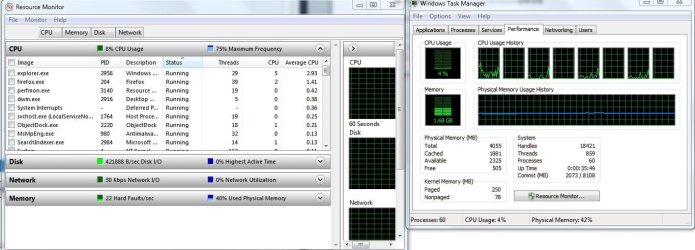
Hello Mintos45 and welcome to Seven Forums.

Could you post a screenshot of your resource monitor (memory tab)? It might give a better idea of how your memory is being utilized. How much usable RAM did you have prior to the issue first surfacing a week ago? Did you change out any hardware like a graphics card? Did you rearrange your RAM modules?

http://www.sevenforums.com/tutorials/12523-resource-monitor.html

http://www.sevenforums.com/tutorials/9733-screenshots-files-upload-post-seven-forums.html

I had 6GB usable RAM before.
Haven't changed out the Graphics Card.
I remembered rearranging the RAM Sticks.
 

Attachments

  • Ressssss.JPG
    Ressssss.JPG
    167.2 KB · Views: 31

My Computer My Computer

Computer Manufacturer/Model Number
Dell - Vostro 430
OS
Windows 7 Professional x64 SP1
CPU
Intel Core i7 860 @2.80GHz
Motherboard
Dell 054KM3
Memory
6144MB DDR3-SDRAM (3 x 2048 DDR3)
Graphics Card(s)
nVidia GeForce 310
Sound Card
Realtek High Definition Audio ALC662
Monitor(s) Displays
Dell Computer DELL E2311H
Screen Resolution
1920 x 1080
Hard Drives
Seagate Barracuda ST3750528AS (750 GB)
PSU
J515T 350W
Case
14.58inH x 6.69inW x 17.43inD
Cooling
Fan from the Box heehee
Keyboard
Rapoo Wireless Keyboard
Mouse
Rapoo Wireless Mouse
Internet Speed
1 byte every 2.6 hours
Other Info
Dreaming of building a new PC :D

Cant wait :)
If you go ahead and download CPU-Z, open it up and see what it says for your installed memory. If it SEES and recognizes your 3rd stick, then that's a bit of a strange predicament you've got. If it doesn't though, just go ahead and try to re-seat your memory stick or try another slot. If it's a dead stick, the system would usually throw up an error at POST so I doubt it's that, which is good.

You can do the same thing in the BIOS, somewhere in the menu you'll see installed memory and you can see if the 3rd stick is being recognized by the system.
 

My Computer My Computer

OS
Windows 7 Professional x64
Couple of possibilities. If the RAM modules are from different manufacturers, rearranging them could have affected how they're "seen" by the BIOS. You could check for bad modules by installing just one stick. Usable RAM should be around 1-1.5GB depending on how much memory is set aside for graphics. Check each module individually. I'm not familiar with how many slots your Dell mobo has. Assuming 4, and you're using only 3, Dell may have a specific requirement to use slots 1, 2 & 3; or 1, 3 & 4; or 2, 3 & 4 etc for optimum RAM performance.

Another thought. Did you happen to change out or bump the CPU? A bent pin can also cause erratic RAM behavior.

If your BIOS was changed (sometimes by malware, sometimes by design) something called Memory Remapping could have changed. If Memory remapping options appear in the BIOS at all, make sure it is turned on.

You could also check msconfig. Click the Start orb, and type: msconfig. Open Boot tab > Advanced Options button. In that window, there is a setting for Maximum Memory. Make sure the checkbox is clear (not checked), then reboot your computer.

I'm running out of ideas. :confused:
 

My Computer My Computer

Computer type
Laptop
Computer Manufacturer/Model Number
Sony Vaio VPCEB47GM Laptop
OS
Win 7 Pro 64-bit
CPU
Intel i5 2.4 Ghz
Memory
8GB DDR3
Graphics Card(s)
Intel HD 3000
Sound Card
IDT High Definition
Monitor(s) Displays
15.6 WGXA Anti-Glare LED
Screen Resolution
1280x800
Hard Drives
640Gb 7200rpm
Antivirus
MSE
Browser
Opera (primary) with IE9 backup
Oh yeah and you can try and make your system run a full POST by turning off 'quick post' (or a variation of that in your specific BIOS), or just popping out the CMOS battery (the little watch battery in your motherboard) while the power's off for about a minute. When you swapped out your sticks the system might have just never even noticed that somehow.
 

My Computer My Computer

OS
Windows 7 Professional x64
Couple of possibilities. If the RAM modules are from different manufacturers, rearranging them could have affected how they're "seen" by the BIOS. You could check for bad modules by installing just one stick. Usable RAM should be around 1-1.5GB depending on how much memory is set aside for graphics. Check each module individually. I'm not familiar with how many slots your Dell mobo has. Assuming 4, and you're using only 3, Dell may have a specific requirement to use slots 1, 2 & 3; or 1, 3 & 4; or 2, 3 & 4 etc for optimum RAM performance.

Another thought. Did you happen to change out or bump the CPU? A bent pin can also cause erratic RAM behavior.

If your BIOS was changed (sometimes by malware, sometimes by design) something called Memory Remapping could have changed. If Memory remapping options appear in the BIOS at all, make sure it is turned on.

You could also check msconfig. Click the Start orb, and type: msconfig. Open Boot tab > Advanced Options button. In that window, there is a setting for Maximum Memory. Make sure the checkbox is clear (not checked), then reboot your computer.

I'm running out of ideas. :confused:

I'm not sure where to find the specific requirements for RAM Slots in my motherboard.
I haven't done anything with my current CPU (Came with the computer).
Memory remapping isn't in my BIOS and Maximum Memory isn't checked in msconfig.
I'm really stumped on this one.
 

My Computer My Computer

Computer Manufacturer/Model Number
Dell - Vostro 430
OS
Windows 7 Professional x64 SP1
CPU
Intel Core i7 860 @2.80GHz
Motherboard
Dell 054KM3
Memory
6144MB DDR3-SDRAM (3 x 2048 DDR3)
Graphics Card(s)
nVidia GeForce 310
Sound Card
Realtek High Definition Audio ALC662
Monitor(s) Displays
Dell Computer DELL E2311H
Screen Resolution
1920 x 1080
Hard Drives
Seagate Barracuda ST3750528AS (750 GB)
PSU
J515T 350W
Case
14.58inH x 6.69inW x 17.43inD
Cooling
Fan from the Box heehee
Keyboard
Rapoo Wireless Keyboard
Mouse
Rapoo Wireless Mouse
Internet Speed
1 byte every 2.6 hours
Other Info
Dreaming of building a new PC :D

Cant wait :)
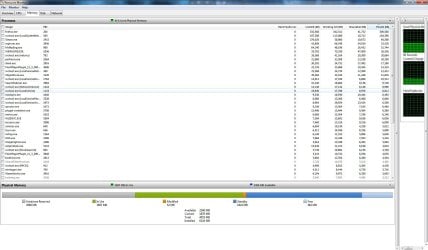
Oh yeah and you can try and make your system run a full POST by turning off 'quick post' (or a variation of that in your specific BIOS), or just popping out the CMOS battery (the little watch battery in your motherboard) while the power's off for about a minute. When you swapped out your sticks the system might have just never even noticed that somehow.

It didn't work. :(
 

My Computer My Computer

Computer Manufacturer/Model Number
Dell - Vostro 430
OS
Windows 7 Professional x64 SP1
CPU
Intel Core i7 860 @2.80GHz
Motherboard
Dell 054KM3
Memory
6144MB DDR3-SDRAM (3 x 2048 DDR3)
Graphics Card(s)
nVidia GeForce 310
Sound Card
Realtek High Definition Audio ALC662
Monitor(s) Displays
Dell Computer DELL E2311H
Screen Resolution
1920 x 1080
Hard Drives
Seagate Barracuda ST3750528AS (750 GB)
PSU
J515T 350W
Case
14.58inH x 6.69inW x 17.43inD
Cooling
Fan from the Box heehee
Keyboard
Rapoo Wireless Keyboard
Mouse
Rapoo Wireless Mouse
Internet Speed
1 byte every 2.6 hours
Other Info
Dreaming of building a new PC :D

Cant wait :)
Try to test it with CPU-Z and see if your memory's even being recognized by the system like I said. It really sounds like you might just need to re-seat the sticks.
 

My Computer My Computer

OS
Windows 7 Professional x64
Yeah, CPU-Z can detect my 3 sticks no problem, seems my computer can't... this calls for a WTF moment. :/
 

My Computer My Computer

Computer Manufacturer/Model Number
Dell - Vostro 430
OS
Windows 7 Professional x64 SP1
CPU
Intel Core i7 860 @2.80GHz
Motherboard
Dell 054KM3
Memory
6144MB DDR3-SDRAM (3 x 2048 DDR3)
Graphics Card(s)
nVidia GeForce 310
Sound Card
Realtek High Definition Audio ALC662
Monitor(s) Displays
Dell Computer DELL E2311H
Screen Resolution
1920 x 1080
Hard Drives
Seagate Barracuda ST3750528AS (750 GB)
PSU
J515T 350W
Case
14.58inH x 6.69inW x 17.43inD
Cooling
Fan from the Box heehee
Keyboard
Rapoo Wireless Keyboard
Mouse
Rapoo Wireless Mouse
Internet Speed
1 byte every 2.6 hours
Other Info
Dreaming of building a new PC :D

Cant wait :)
Wow that is absurd. You can take a (or 2) stick out and then reboot, watch the POST beep and come up with a "system memory has changed" error and say okay and let it boot. Then turn it off and stick that other one back in to any free slot and hopefully the "memory change" error comes up again, so it'll start a-new and run it with all 3 sticks. If not it could be your motherboard or chipset driver, I'd definitely try and update them.

If that doesn't work, I'd punch your computer in the face if I were you.
 

My Computer My Computer

OS
Windows 7 Professional x64
IT WORKED!!! FINALLY!!! Thanks a lot, been worrying about this and haven't been using my computer much, can finally return to gaming! :)
 

My Computer My Computer

Computer Manufacturer/Model Number
Dell - Vostro 430
OS
Windows 7 Professional x64 SP1
CPU
Intel Core i7 860 @2.80GHz
Motherboard
Dell 054KM3
Memory
6144MB DDR3-SDRAM (3 x 2048 DDR3)
Graphics Card(s)
nVidia GeForce 310
Sound Card
Realtek High Definition Audio ALC662
Monitor(s) Displays
Dell Computer DELL E2311H
Screen Resolution
1920 x 1080
Hard Drives
Seagate Barracuda ST3750528AS (750 GB)
PSU
J515T 350W
Case
14.58inH x 6.69inW x 17.43inD
Cooling
Fan from the Box heehee
Keyboard
Rapoo Wireless Keyboard
Mouse
Rapoo Wireless Mouse
Internet Speed
1 byte every 2.6 hours
Other Info
Dreaming of building a new PC :D

Cant wait :)
If your 430 i using an older BIOS an upgrade might help. Unfortunately, a bad BIOS upgrade could also turn your computer into a giant paperweight.

Vostro 430 - Dell - Search - All Dell.com

This may be one of those times to see if the folks on the Dell forum have any other suggestions. It's just puzzling that all apparently was OK up until a week ago. I also found the 430 specs for memory. Doesn't say anything about what slots to use if you're using an odd number of sticks.

Memory
Memory module connector 4 DIMM slots
Memory module capacity 1 GB, 2 GB, or 4 GB
Type 1066 MHz, 1333 MHz DDR3
Minimum memory 1 GB

Maximum memory 16 GB

Source


My Computer My Computer

Computer type
Laptop
Computer Manufacturer/Model Number
Sony Vaio VPCEB47GM Laptop
OS
Win 7 Pro 64-bit
CPU
Intel i5 2.4 Ghz
Memory
8GB DDR3
Graphics Card(s)
Intel HD 3000
Sound Card
IDT High Definition
Monitor(s) Displays
15.6 WGXA Anti-Glare LED
Screen Resolution
1280x800
Hard Drives
640Gb 7200rpm
Antivirus
MSE
Browser
Opera (primary) with IE9 backup
Yeah... me too. What fixed it? I was apparently typing over your repsonse.
 

My Computer My Computer

Computer type
Laptop
Computer Manufacturer/Model Number
Sony Vaio VPCEB47GM Laptop
OS
Win 7 Pro 64-bit
CPU
Intel i5 2.4 Ghz
Memory
8GB DDR3
Graphics Card(s)
Intel HD 3000
Sound Card
IDT High Definition
Monitor(s) Displays
15.6 WGXA Anti-Glare LED
Screen Resolution
1280x800
Hard Drives
640Gb 7200rpm
Antivirus
MSE
Browser
Opera (primary) with IE9 backup
Wow that is absurd. You can take a (or 2) stick out and then reboot, watch the POST beep and come up with a "system memory has changed" error and say okay and let it boot. Then turn it off and stick that other one back in to any free slot and hopefully the "memory change" error comes up again, so it'll start a-new and run it with all 3 sticks. If not it could be your motherboard or chipset driver, I'd definitely try and update them.

If that doesn't work, I'd punch your computer in the face if I were you.

Something like that, taking out the sticks and replacing them one by one. It seems that when I was swapping out sticks I might not have installed one of them correctly or something.
 

My Computer My Computer

Computer Manufacturer/Model Number
Dell - Vostro 430
OS
Windows 7 Professional x64 SP1
CPU
Intel Core i7 860 @2.80GHz
Motherboard
Dell 054KM3
Memory
6144MB DDR3-SDRAM (3 x 2048 DDR3)
Graphics Card(s)
nVidia GeForce 310
Sound Card
Realtek High Definition Audio ALC662
Monitor(s) Displays
Dell Computer DELL E2311H
Screen Resolution
1920 x 1080
Hard Drives
Seagate Barracuda ST3750528AS (750 GB)
PSU
J515T 350W
Case
14.58inH x 6.69inW x 17.43inD
Cooling
Fan from the Box heehee
Keyboard
Rapoo Wireless Keyboard
Mouse
Rapoo Wireless Mouse
Internet Speed
1 byte every 2.6 hours
Other Info
Dreaming of building a new PC :D

Cant wait :)
Back
Top