Hang Dog Win 7

Tram 1

New member
Member
Local time
2:36 AM
Messages
83
Hi,

Doggies do seem to be my thing at the moment.

Is there a tutorial here on Seven forums that shows/informs how to speed up Win 7 boot up times?

Mine is a new build PC but it still takes about 90 seconds from boot up to desk top.

I know about tweaks in msconfig and services but there has to be something else to speed up these boot times.

At start up my OS seems to hang at " Starting Windows ".
 

My Computer

OS
Win7
Not sure, i dont have a password, so that decreases boot time massively :P
Enzo.
 

My Computer

Computer Manufacturer/Model Number
Custom Build
OS
W7 RTM Ultimate x64
CPU
Intel Q8400 @ 2.66GHZ
Motherboard
Gigabyte GA-EG45M-UD2H
Memory
4GB DDR2-800
Graphics Card(s)
Gainward GTS 450 GLH 1GB Edition
Sound Card
Integrated 8 Channel
Monitor(s) Displays
AOC 23.6 Inch Widescreen LCD
Screen Resolution
1920x1080
Hard Drives
Seagate 500GB Internal
Western Digital 1TB Internal

Hitachi 1TB External
PSU
Apevia Java Power 500W
Case
Cooler Master HAF 922 Black
Cooling
Stock Intel CPU Fan
Keyboard
HP SK-2960 Multimedia Keyboard
Mouse
Logitech M350 Wireless Gaming Mouse
Internet Speed
1.5MB
Tram 1, could you post your system specs?

Greetz Ronald E
 

My Computer

OS
Windows 7 RC Ultimate Build 7100 X64
CPU
AMD Phenom X4 9550 2,2 Ghz Quad-Core
Motherboard
GigaByte GA-MA78GPM-DS2H
Memory
Corsair 4 GB DDR2-800 DHX Kit
Graphics Card(s)
XFX Nvidia GF9600GT
Sound Card
Creative X-Fi Titanium - Fatal1ty Professional
Monitor(s) Displays
Samsung LE32B450 32 Inch LCD TV
Screen Resolution
1680X1050
Hard Drives
Western Digital WD5000AAKS (500GB)
Maxtor 6H500F0 (500GB)
Samsung HD161HJ (160GB)
Western Digital WD20 00JB (200GB)
PSU
Cooler Master Real Power M (1000 Watt)
Case
Tacens Sagitta II
Cooling
1 X 230mm, 1 X 400mm Aura-fan & 1 X 120mm Ventus Pro Ice
Keyboard
Sweex Wireless Desktop (keyboard)
Mouse
Sweex Wireless Desktop (mouse)
Internet Speed
20 MB/sec
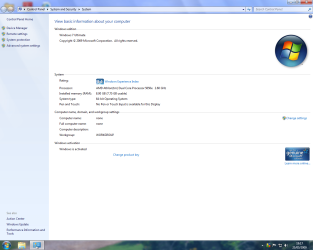
Heres how:

right click the "my computer" icon.

Select properties.

Take a screenshot*

Attach to your post using the attach button above the message box (AKA the paperclip)


* To Take a screenshot, find the "prt sc" button usually in the top row second group from the right.

Open paint, located in accessories, which is in the all programs section.

PRESS CTRL + V, in paint of course..

Save to desktop, or where ever.

Done!


Enzo.
 

My Computer

Computer Manufacturer/Model Number
Custom Build
OS
W7 RTM Ultimate x64
CPU
Intel Q8400 @ 2.66GHZ
Motherboard
Gigabyte GA-EG45M-UD2H
Memory
4GB DDR2-800
Graphics Card(s)
Gainward GTS 450 GLH 1GB Edition
Sound Card
Integrated 8 Channel
Monitor(s) Displays
AOC 23.6 Inch Widescreen LCD
Screen Resolution
1920x1080
Hard Drives
Seagate 500GB Internal
Western Digital 1TB Internal

Hitachi 1TB External
PSU
Apevia Java Power 500W
Case
Cooler Master HAF 922 Black
Cooling
Stock Intel CPU Fan
Keyboard
HP SK-2960 Multimedia Keyboard
Mouse
Logitech M350 Wireless Gaming Mouse
Internet Speed
1.5MB
Thanks, Enzo, for explaining it allready!

Or you could use SIW: SIW | Download
and get your info from there.

This is a tool for System Information.
Under Hardware - System Summary you can find lots of info.

<use the standalone-version... Then you don't have to install, just run.>

Greetz Ronald E
 

My Computer

OS
Windows 7 RC Ultimate Build 7100 X64
CPU
AMD Phenom X4 9550 2,2 Ghz Quad-Core
Motherboard
GigaByte GA-MA78GPM-DS2H
Memory
Corsair 4 GB DDR2-800 DHX Kit
Graphics Card(s)
XFX Nvidia GF9600GT
Sound Card
Creative X-Fi Titanium - Fatal1ty Professional
Monitor(s) Displays
Samsung LE32B450 32 Inch LCD TV
Screen Resolution
1680X1050
Hard Drives
Western Digital WD5000AAKS (500GB)
Maxtor 6H500F0 (500GB)
Samsung HD161HJ (160GB)
Western Digital WD20 00JB (200GB)
PSU
Cooler Master Real Power M (1000 Watt)
Case
Tacens Sagitta II
Cooling
1 X 230mm, 1 X 400mm Aura-fan & 1 X 120mm Ventus Pro Ice
Keyboard
Sweex Wireless Desktop (keyboard)
Mouse
Sweex Wireless Desktop (mouse)
Internet Speed
20 MB/sec
Heres how:

right click the "my computer" icon.

Select properties.

Take a screenshot*

Attach to your post using the attach button above the message box (AKA the paperclip)


* To Take a screenshot, find the "prt sc" button usually in the top row second group from the right.

Open paint, located in accessories, which is in the all programs section.

PRESS CTRL + V, in paint of course..

Save to desktop, or where ever.

Done!

Enzo.

Thanks Enzo.
 

My Computer

OS
Win7
Hi ronalde and will do,........'.er... how do I do that? :o

Hello ronalde,

I went a little further and I need some help.

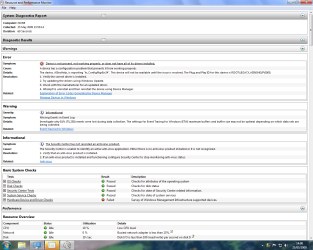
In screen shot 1 the first three entries, I don't know how to resolve these.

I don't know how to find the troublesome device, I only have 6 devices fitted to the PC, 1x internal HD, 2 x optical drives, 1x floppy, 1 x front multi hub and 1x external usb back up HD, all appears to be working, I checked in device manger, I saw no problems.

Anti virus, I have freebie AVG installed, it appears to work OK, I've already done a system scan with it with nothing found.

But system is saying no anti virus installed. :confused:

Event logger, Yesterday I had to do a restore after the PC would not respond properly after a Windows update.

There was 1 urgent update and three recommended, I blithely installed all 4 updates, hence the problem.

I don't think it was the urgent update that caused the problem,....but I don't know, I did reinstall it and no problem.

Microsoft in their wisdom,....or maybe not.....have made windows update automatic, you have no control, this is bound to cause problems in the future,.....this newbie thinks.

I digress, I don't know how to resolve this issue,.....if I need to.

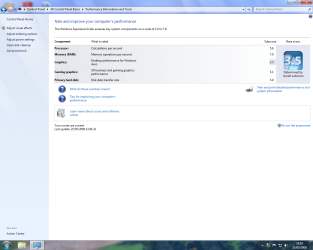
Lastly is the performance screen, I can't get this above 3.5 no matter what I do, as this is a new build, I'm a little disapointed,....or should I be?

Advice on any of the screen shots would be appreciated as would advise on speeding up boot times.
 

Attachments

  • Screen Shot  1.png
    Screen Shot 1.png
    61.7 KB · Views: 83
  • Screen Shot 2.png
    Screen Shot 2.png
    77.6 KB · Views: 91
  • Screen Shot 3.png
    Screen Shot 3.png
    78.4 KB · Views: 59

My Computer

OS
Win7
Hey, Tram1.

Have you got a AMD Cool & Quiet-app installed?
Or something else from AMD or Asus?

The error your performance-log gives, is a little bug in either one of these programs. Nothing to worry about, but you could solve it by reinstalling these apps.

Like in Vista & XP, Windows isn't always able to find and check the antivirus-program. You can indicate that you don't want Windows to check your antivirus. I'm using Eset Smart Security Business x64 and Windows detects it perfectly. Maybe something for you?
It uses a lot less resources than AVG. Especially the freebie.

About Windows Update, I have configured my settings that it will automatically download updates but I decide when it installs them.
Especially when there goes something wrong, I can simply rule out if it's an update or not. Just system-restore, and everythings works fine.
(Only had to do this one time, fortunatly.)

In the Performance-index screen, could you click "View and print detailed performance and system information". Could place a screenshot?
I'm guessing you don't have a very strong graphicscard, do you?
It determines your score by your lowest score and your desktop-performance stands at 3.5.

Greetz Ronald E
 

My Computer

OS
Windows 7 RC Ultimate Build 7100 X64
CPU
AMD Phenom X4 9550 2,2 Ghz Quad-Core
Motherboard
GigaByte GA-MA78GPM-DS2H
Memory
Corsair 4 GB DDR2-800 DHX Kit
Graphics Card(s)
XFX Nvidia GF9600GT
Sound Card
Creative X-Fi Titanium - Fatal1ty Professional
Monitor(s) Displays
Samsung LE32B450 32 Inch LCD TV
Screen Resolution
1680X1050
Hard Drives
Western Digital WD5000AAKS (500GB)
Maxtor 6H500F0 (500GB)
Samsung HD161HJ (160GB)
Western Digital WD20 00JB (200GB)
PSU
Cooler Master Real Power M (1000 Watt)
Case
Tacens Sagitta II
Cooling
1 X 230mm, 1 X 400mm Aura-fan & 1 X 120mm Ventus Pro Ice
Keyboard
Sweex Wireless Desktop (keyboard)
Mouse
Sweex Wireless Desktop (mouse)
Internet Speed
20 MB/sec
No problem :P

And for the popup thats nagging you about no antivirus, the solution i used was to disable popups about the antivirus ( Open action center, Security, Antivirus, and Turn off messages about Virus Protection. )

Easy as piehh :P

Enzo.
 

My Computer

Computer Manufacturer/Model Number
Custom Build
OS
W7 RTM Ultimate x64
CPU
Intel Q8400 @ 2.66GHZ
Motherboard
Gigabyte GA-EG45M-UD2H
Memory
4GB DDR2-800
Graphics Card(s)
Gainward GTS 450 GLH 1GB Edition
Sound Card
Integrated 8 Channel
Monitor(s) Displays
AOC 23.6 Inch Widescreen LCD
Screen Resolution
1920x1080
Hard Drives
Seagate 500GB Internal
Western Digital 1TB Internal

Hitachi 1TB External
PSU
Apevia Java Power 500W
Case
Cooler Master HAF 922 Black
Cooling
Stock Intel CPU Fan
Keyboard
HP SK-2960 Multimedia Keyboard
Mouse
Logitech M350 Wireless Gaming Mouse
Internet Speed
1.5MB
Hi ronalde and thanks.
Have you got a AMD Cool & Quiet-app installed?
Or something else from AMD or Asus?
Yes on the ASUS Mobo disk came cool and quite, ( I think ), I had a hell of a time trying to install this mobo disk, got there eventually, Ithought the above had installed, will check this.
Like in Vista & XP, Windows isn't always able to find and check the anti virus-program. You can indicate that you don't want Windows to check your anti virus. I'm using Eset Smart Security Business x64 and Windows detects it perfectly. Maybe something for you?

It uses a lot less resources than AVG. Especially the freebie.
How do I indicate this? because of build constraints, unless it's free I will stick to AVG. The best thing I ever did some time ago was be rid of Norton anything.
About Windows Update, I have configured my settings that it will automatically download updates but I decide when it installs them.
Especially when there goes something wrong, I can simply rule out if it's an update or not. Just system-restore, and everything works fine.
(Only had to do this one time, fortunately.)
How do I do this please?
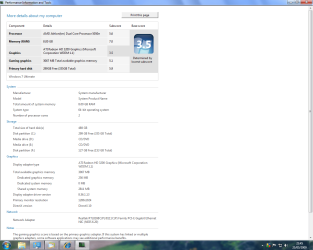
In the Performance-index screen, could you click "View and print detailed performance and system information". Could place a screen shot?
Is this it, I have lost myself a bit, if not how do I get to it?
I'm guessing you don't have a very strong graphics card, do you?
It determines your score by your lowest score and your desktop-performance stands at 3.5.
Spot on, in fact I don't have GC installed at all relying on the on board, this is deliberate on my part.

My old machine had all the the bit's and pieces including a GC but it was using power and the PC is on most hours of the day.

This time I went and tried to build a machine that suited my use, surfing, photos', music, home stuff but no games but future proofing as best as I could, budget and power consumption were also constraints.

My last PC was a singing and dancing affair and sent the meter spinning.

Having said that I went overboard on the RAM but this was more to do with the fact that I believe RAM prices are going to hit the roof in the next few months, so I thought sod it.

I had 4gb installed up to last week while building PC and testing OSs, I installed another 4gb yesterday, 8GB is the most my MB will support, I have noticed little if anything for the outlay, in fact I'm a little disappointed, perhaps I expected to much and as this PC will never be stretched.

Any hints on speeding up WIN 7 boot times would be great.
 

Attachments

  • Screen Shot 4.png
    Screen Shot 4.png
    54.2 KB · Views: 27

My Computer

OS
Win7

My Computer

Computer Manufacturer/Model Number
Hera
OS
Windows 7 Ultimate x64, Mint 9
CPU
Intel i5-2500k
Motherboard
ASUS P8P67 Pro
Memory
2x 4Gb Corsair VENGEANCE DDR3-1600
Graphics Card(s)
NVidia GeForce N260GTX Twin Frozr
Sound Card
Realtek HD OnBoard Audio
Monitor(s) Displays
ASUS 24" Monitor
Screen Resolution
1920x1080
Hard Drives
G.SKILL Phoenix Series 60GB SATA II MLC Internal Solid State Drive (SSD)
SAMSUNG Spinpoint F3R 1TB 7200 RPM 32MB Cache SATA II
PSU
Cooler Master Real Power Pro 750W
Case
Cooler Master Haf 932
Cooling
Fans
Keyboard
Razer Tarantula
Mouse
Razer Lachesis
Internet Speed
not fast enough
Quote:
Have you got a AMD Cool & Quiet-app installed?
Or something else from AMD or Asus?
Yes on the ASUS Mobo disk came cool and quite, ( I think ), I had a hell of a time trying to install this mobo disk, got there eventually, Ithought the above had installed, will check this.
It could be installed, but is it working properly with W7? That's the question. I had problems with another app. Also gave weird errors in Event Viewer.
Like in Vista & XP, Windows isn't always able to find and check the anti virus-program. You can indicate that you don't want Windows to check your anti virus. I'm using Eset Smart Security Business x64 and Windows detects it perfectly. Maybe something for you?
It uses a lot less resources than AVG. Especially the freebie.

How do I indicate this? because of build constraints, unless it's free I will stick to AVG. The best thing I ever did some time ago was be rid of Norton anything.

Good thing of you to get rid of Norton. Worthless!
I'll pm you about Eset.
About disabling messages, like Enzo said:

And for the popup thats nagging you about no antivirus, the solution i used was to disable popups about the antivirus ( Open action center, Security, Antivirus, and Turn off messages about Virus Protection. )

About Windows Update, I have configured my settings that it will automatically download updates but I decide when it installs them.
Especially when there goes something wrong, I can simply rule out if it's an update or not. Just system-restore, and everything works fine.
(Only had to do this one time, fortunately.)
How do I do this please?

Got to Start -> Windows Update -> then click Change Settings. A windows opens where you can choose several updates. Choose "Download updates but let me choose wether to install them". Finished. Now you will get notifications about new updates, but it won't install them unless you agree with them.

In the Performance-index screen, could you click "View and print detailed performance and system information". Could place a screen shot?

Is this it, I have lost myself a bit, if not how do I get to it?
You got it right! And like I was expecting, and you allready said, you got the HD3200 GC. That's why your score is lower. The rest of your scores is very nice. Well done!

Any hints on speeding up WIN 7 boot times would be great.
You could look here on how to disable services in W7:
http://www.sevenforums.com/tutorials/2495-services-start-disable.html
Here's a list with the recommended settings by Black Viper:
Windows 7 Service Configurations by Black Viper

Hope it wil help you speeding up boottime.
Have you allready tried the link suggested by lordbob75?
http://www.sevenforums.com/tutorials...tart-time.html

Greetz Ronald E
 

My Computer

OS
Windows 7 RC Ultimate Build 7100 X64
CPU
AMD Phenom X4 9550 2,2 Ghz Quad-Core
Motherboard
GigaByte GA-MA78GPM-DS2H
Memory
Corsair 4 GB DDR2-800 DHX Kit
Graphics Card(s)
XFX Nvidia GF9600GT
Sound Card
Creative X-Fi Titanium - Fatal1ty Professional
Monitor(s) Displays
Samsung LE32B450 32 Inch LCD TV
Screen Resolution
1680X1050
Hard Drives
Western Digital WD5000AAKS (500GB)
Maxtor 6H500F0 (500GB)
Samsung HD161HJ (160GB)
Western Digital WD20 00JB (200GB)
PSU
Cooler Master Real Power M (1000 Watt)
Case
Tacens Sagitta II
Cooling
1 X 230mm, 1 X 400mm Aura-fan & 1 X 120mm Ventus Pro Ice
Keyboard
Sweex Wireless Desktop (keyboard)
Mouse
Sweex Wireless Desktop (mouse)
Internet Speed
20 MB/sec

My Computer

Computer Manufacturer/Model Number
Hera
OS
Windows 7 Ultimate x64, Mint 9
CPU
Intel i5-2500k
Motherboard
ASUS P8P67 Pro
Memory
2x 4Gb Corsair VENGEANCE DDR3-1600
Graphics Card(s)
NVidia GeForce N260GTX Twin Frozr
Sound Card
Realtek HD OnBoard Audio
Monitor(s) Displays
ASUS 24" Monitor
Screen Resolution
1920x1080
Hard Drives
G.SKILL Phoenix Series 60GB SATA II MLC Internal Solid State Drive (SSD)
SAMSUNG Spinpoint F3R 1TB 7200 RPM 32MB Cache SATA II
PSU
Cooler Master Real Power Pro 750W
Case
Cooler Master Haf 932
Cooling
Fans
Keyboard
Razer Tarantula
Mouse
Razer Lachesis
Internet Speed
not fast enough

My Computer

OS
Windows 7 RC Ultimate Build 7100 X64
CPU
AMD Phenom X4 9550 2,2 Ghz Quad-Core
Motherboard
GigaByte GA-MA78GPM-DS2H
Memory
Corsair 4 GB DDR2-800 DHX Kit
Graphics Card(s)
XFX Nvidia GF9600GT
Sound Card
Creative X-Fi Titanium - Fatal1ty Professional
Monitor(s) Displays
Samsung LE32B450 32 Inch LCD TV
Screen Resolution
1680X1050
Hard Drives
Western Digital WD5000AAKS (500GB)
Maxtor 6H500F0 (500GB)
Samsung HD161HJ (160GB)
Western Digital WD20 00JB (200GB)
PSU
Cooler Master Real Power M (1000 Watt)
Case
Tacens Sagitta II
Cooling
1 X 230mm, 1 X 400mm Aura-fan & 1 X 120mm Ventus Pro Ice
Keyboard
Sweex Wireless Desktop (keyboard)
Mouse
Sweex Wireless Desktop (mouse)
Internet Speed
20 MB/sec

My Computer

Computer Manufacturer/Model Number
Hera
OS
Windows 7 Ultimate x64, Mint 9
CPU
Intel i5-2500k
Motherboard
ASUS P8P67 Pro
Memory
2x 4Gb Corsair VENGEANCE DDR3-1600
Graphics Card(s)
NVidia GeForce N260GTX Twin Frozr
Sound Card
Realtek HD OnBoard Audio
Monitor(s) Displays
ASUS 24" Monitor
Screen Resolution
1920x1080
Hard Drives
G.SKILL Phoenix Series 60GB SATA II MLC Internal Solid State Drive (SSD)
SAMSUNG Spinpoint F3R 1TB 7200 RPM 32MB Cache SATA II
PSU
Cooler Master Real Power Pro 750W
Case
Cooler Master Haf 932
Cooling
Fans
Keyboard
Razer Tarantula
Mouse
Razer Lachesis
Internet Speed
not fast enough
Greetz Ronald E[/QUOTE]

Hi ronalde, apologies for my late reply, I've been getting carried away in exploring all the links and trying out suggestions.

The restart count app, interesting one this, the first time I used it I got a restart count of 74 seconds and that was with a Win password required.

I'm not sure if that is good or bad but it was a once off.

I then looked at the black viper link/instructions, very useful, thanks for that.

Not happy with 74 seconds I thought I would start doing some of the BV configurations in fact I went through the whole damn list, setting disabling or manual setting as suggested.

Having rebooted I was expecting something other then slower but that's what I got, 126 seconds, I rebooted again, 128 seconds.

So I undid what I did, reboot 102 seconds, ok, disabled password and realized printer was on, so powered that off, 98 seconds, ran count again 5 minutes later got it down to 92 seconds.

If I average 100 seconds boot time, how is that for WIN 7? I think that's very slow but then I wasn't happy with 74 seconds.

I'm going to play with BVs configuration because clearly even I could fathom there is stuff regarding my system I can disable or set to manual.

But I have not been able to beat my original 74 seconds and I don't know why.

Thanks for the windows download advise, changed that, so feel a little more in control.

Just curious, do you think my on board graphics/setup will support touch screen or Airo ( I realize I need a monitor that does as well ) or will I require a separate GC?

I will look at anything you have on Eset.
 

My Computer

OS
Win7
Yeah, it looks like you could run it just fine. Your rating on the gaming graphics is about the same as mine, but your Aero is lower. You should be ok.

As for restart times, mine is about a minute. 60 seconds. 100 seconds is not bad at all.

~Lordbob
 

My Computer

Computer Manufacturer/Model Number
Hera
OS
Windows 7 Ultimate x64, Mint 9
CPU
Intel i5-2500k
Motherboard
ASUS P8P67 Pro
Memory
2x 4Gb Corsair VENGEANCE DDR3-1600
Graphics Card(s)
NVidia GeForce N260GTX Twin Frozr
Sound Card
Realtek HD OnBoard Audio
Monitor(s) Displays
ASUS 24" Monitor
Screen Resolution
1920x1080
Hard Drives
G.SKILL Phoenix Series 60GB SATA II MLC Internal Solid State Drive (SSD)
SAMSUNG Spinpoint F3R 1TB 7200 RPM 32MB Cache SATA II
PSU
Cooler Master Real Power Pro 750W
Case
Cooler Master Haf 932
Cooling
Fans
Keyboard
Razer Tarantula
Mouse
Razer Lachesis
Internet Speed
not fast enough
Yeah, it looks like you could run it just fine. Your rating on the gaming graphics is about the same as mine, but your Aero is lower. You should be ok.

As for restart times, mine is about a minute. 60 seconds. 100 seconds is not bad at all.

~Lordbob

Thanks Lordbob. :)

As of today now have login down to a steady in between 45-51 seconds.

Had a simple lesson in bcdedit today, apparently, I think I understand, on start up my system was looking for a boot log of HD or the remnants of one that no longer existed and this was way slowing things down.

I want to get boot to desktop down to 25 seconds.
 

My Computer

OS
Win7
Back
Top