How to initialize new SSD disk (on old PC configuration)

Steampunk7

New member
Member
VIP
Local time
6:05 PM
Messages
119
How to initialize new SSD disk (in old PC configuration)

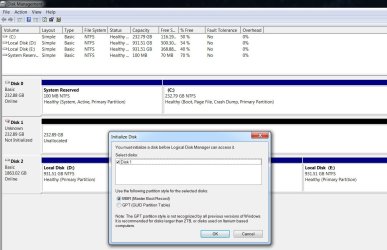
I just recently pick up a Samsung SSD 860 EVO 250GB for my PC. My system disk is Samsung SSD 850 EVO 250GB. Besides I also have 2 TB hard drive, split into two partitions.

I was planning to use this new, third disk solely for gaming.

I havent' gone through this process before, so I need an advice - should I chose MBR or GPT? I understand that GPT is recommended only for disks larger than 2 TB. In the process of initialization I haven't passed this step yet, since I don't wish to check the wrong option.

The other question: at the moment I have two disks and three partitions: C, D, and E. In Disk Management this third disk (strangely) is listed as Disk1 (I thought it should be listed as Disk 2...?)

I would like to name this new disk to be Local Disk (F:). How could I do that?
 

Attachments

  • adisk.jpg
    adisk.jpg
    137.9 KB · Views: 0
Last edited:

My Computer My Computer

At a glance

Windows 7 Ultimate x64Intel(R) Xeon(R) CPU E3-1231 v3 @ 3.40GHz16 GBAMD Radeon (TM) R9 390 Series
Computer type
PC/Desktop
OS
Windows 7 Ultimate x64
CPU
Intel(R) Xeon(R) CPU E3-1231 v3 @ 3.40GHz
Motherboard
ASUSTeK COMPUTER INC. Z97-A Rev 1.xx
Memory
16 GB
Graphics Card(s)
AMD Radeon (TM) R9 390 Series
Sound Card
(1) AMD High Definition Audio Device (2) Realtek High Defi
Never mind.
 

My Computer My Computer

At a glance

Windows 7 Ultimate x64Intel(R) Xeon(R) CPU E3-1231 v3 @ 3.40GHz16 GBAMD Radeon (TM) R9 390 Series
Computer type
PC/Desktop
OS
Windows 7 Ultimate x64
CPU
Intel(R) Xeon(R) CPU E3-1231 v3 @ 3.40GHz
Motherboard
ASUSTeK COMPUTER INC. Z97-A Rev 1.xx
Memory
16 GB
Graphics Card(s)
AMD Radeon (TM) R9 390 Series
Sound Card
(1) AMD High Definition Audio Device (2) Realtek High Defi
Disk numbers are related to the SATA port you have attached the disk to.
SATA 0 = Disk 0, SATA 1 = Disk 1

As I understood, you're going to install Win 7 on the new SSD (Disk1). During Win 7 installation the disk will be formatted (as Legacy - MBR).
- Detach all other disks from the MB leaving on only the disk 1. It's very important or you may end with the boot loader on another disk.
- Do a Clean Install Windows 7
- When finished, attach the other disks (0 & 2)
- During POST, launch the boot menu and choose the disk you want to boot from (disk 0 or disk 1)

If you don't intent to install Win 7, use disk manager to initialize the disk (as it isn't a boot disk, can be MBR or GPT). My suggestion is to low format as Legacy - MBR
 

My Computers My Computers

  • At a glance

    Windows 7 HP 64i5 6600K - 800MHz to 4200MHz4+4G GSkill DDR4 3000IG - Intel 530
    Computer type
    PC/Desktop
    Computer Manufacturer/Model Number
    custom build
    OS
    Windows 7 HP 64
    CPU
    i5 6600K - 800MHz to 4200MHz
    Motherboard
    GA-Z170-HD3P
    Memory
    4+4G GSkill DDR4 3000
    Graphics Card(s)
    IG - Intel 530
    Monitor(s) Displays
    Samsung 226BW
    Screen Resolution
    1680x1050
    Hard Drives
    (1) -1 SM951 – 128GB M.2 AHCI PCIe SSD drive for Windows 7 and Lubuntu
    (2) -1 WD SATA 3 - 1T for Data
    (3) -1 WD SATA 3 - 1T for backup
    PSU
    Thermaltake 450W TR2 gold
    Keyboard
    Old and good Chicony mechanical keyboard
    Mouse
    Logitech mX performance - 9 buttons (had to disable some)
    Internet Speed
    500Mb/s
    Browser
    Firefox 64
    Other Info
    TinyWall firewall
  • At a glance

    Windows 7 Proi7-4500U 800MHz to 3.0GHz(4+4)G DDR3 1600IG intel 4400 + NVIDIA GeForce GT 745M
    Computer type
    Laptop
    System Manufacturer/Model Number
    Asus Q550LF
    OS
    Windows 7 Pro
    CPU
    i7-4500U 800MHz to 3.0GHz
    Motherboard
    Asus Q550LF
    Memory
    (4+4)G DDR3 1600
    Graphics Card(s)
    IG intel 4400 + NVIDIA GeForce GT 745M
    Sound Card
    Realtek
    Monitor(s) Displays
    LG Display LP156WF4-SPH1
    Screen Resolution
    1920 x 1080
    Hard Drives
    BX500 120G SSD for Windows and programs +
    1T HDD for data
    Internet Speed
    500 Mb/s
    Browser
    Firefox
    Other Info
    TinyWall firewall
As I mentioned, I was planning to use this new SSD disk solely for gaming (not for installing Win7 on it).
I was in a process of initializing and needed advice quickly. After 24 hours without reply, I decided to took a chance and to play it by the ear. I opted for MBR.
Thank you Megahertz, anyway.
 

My Computer My Computer

At a glance

Windows 7 Ultimate x64Intel(R) Xeon(R) CPU E3-1231 v3 @ 3.40GHz16 GBAMD Radeon (TM) R9 390 Series
Computer type
PC/Desktop
OS
Windows 7 Ultimate x64
CPU
Intel(R) Xeon(R) CPU E3-1231 v3 @ 3.40GHz
Motherboard
ASUSTeK COMPUTER INC. Z97-A Rev 1.xx
Memory
16 GB
Graphics Card(s)
AMD Radeon (TM) R9 390 Series
Sound Card
(1) AMD High Definition Audio Device (2) Realtek High Defi
Back
Top