Solved hard disk changed to dynamic type after using disk management

Christin you atm just follow the instructions given by Greg on the conversion, mixing up your plan to copy the movies in C. If there are any farther problem ( i hope there will not be, you can trust Greg blindfolded) ; we all are here .

Dont worry, ok ? Proceed now. :)
 

My Computer My Computer

Computer type
PC/Desktop
Computer Manufacturer/Model Number
Self Assembled
OS
Microsoft Windows 10 Pro Insider Preview 64-bit
CPU
Intel(R) Core(TM) i3-4130 CPU @ 3.40GHz
Motherboard
Gigabyte Technology Co., Ltd. B85M-D3H
Memory
Corsair Vengence 4GB x2 (8.00GB Dual-Channel DDR3 @ 798MHz)
Graphics Card(s)
2047MB GeForce GTS 450 (ZOTAC International)
Sound Card
Onboard (Realtek High Definition Audio)
Monitor(s) Displays
LG Flatron E2040T
Screen Resolution
1600x900
Hard Drives
Western Digital 1 TB
Seagate 500 GB
PSU
Corsair VS550
Case
Cooler Master K380
Cooling
Cooler Master Seidon 120V Plus
Keyboard
Logitech MK260r
Mouse
Logitech MK260r
Internet Speed
PMPL Broadband
Antivirus
Windows Defender + MBAM
Browser
Firefox
Other Info
Dell Studio 15" Laptop
Then delete F and G.

Then convert the remaining partitions to basic with Partition Wizard.

Then remake F and G as 2 logical partitions inside an extended partition. Then move the stuff back from Ftemp and Gtemp.

I'm assuming F and G contain only data and not installed programs of some type.

yes I have almost 233GB left in my C drive.

you said to delete F and G,do I have to do it using disk management or partition wizard?

On clicking "convert dynamic to basic" option will all my local disks change to basic?
Also do I have to create new F & G drives or will they be there automatically?
 

My Computer My Computer

Computer Manufacturer/Model Number
hp pavilion dv6-7012tx
OS
windows 7 home premium 64-bit
CPU
2nd generation i5
Memory
6GB
Graphics Card(s)
Nvidia Geforce GT630M(2GB)
Monitor(s) Displays
LED
Screen Resolution
1366*768
Hard Drives
Hitachi 640GB Hard Disk
Even if you loss, Kaktussoft just one week ago guided one user to recover an entire hdd filled of data :geek:

can u please tell me the link where Kaktussoft provided hdd recovery?
Don't understand what you want me do to? Explain how to recover lost partitions?
The guy I helped did a DISKPART CLEAN that wipes first MB of harddrive (he wanted to wipe just 1 partition). In that location are the partition tables (first 512 bytes, sector 0). lucky for him... partitions were aligned and started at 1MB. So data in partitions was still there!

I let him perfom How to perform lost partition recovery and deleted partition recovery under Windows? Partition Recovery Help.
"full disk", "quick scan"..... after that everything was back and I made his day.

But OP has a totally different problem!
 

My Computer My Computer

Computer type
Laptop
Computer Manufacturer/Model Number
ACER ASPIRE 5742G
OS
Microsoft Windows 7 Home Premium 64-bits 7601 Multiprocessor Free Service Pack 1
CPU
Intel(R) Core(TM) i3 CPU M 370 @ 2.40GHz
Motherboard
Acer Aspire 5742G
Memory
4,00 GB
Graphics Card(s)
ATI Mobility Radeon HD 5400 Series
Sound Card
(1) AMD High Definition Audio Device (2) Realtek High Defi
Screen Resolution
1366 x 768 x 32 bits (4294967296 colors) @ 60 Hz
Hard Drives
WDC WD5000BEVT-22ZAT0
Then delete F and G.

Then convert the remaining partitions to basic with Partition Wizard.

Then remake F and G as 2 logical partitions inside an extended partition. Then move the stuff back from Ftemp and Gtemp.

I'm assuming F and G contain only data and not installed programs of some type.

yes I have almost 233GB left in my C drive.

you said to delete F and G,do I have to do it using disk management or partition wizard?

On clicking "convert dynamic to basic" option will all my local disks change to basic?
Also do I have to create new F & G drives or will they be there automatically?

I would use Partition Wizard for ALL operations.

You have to copy the stuff on F and G to somewhere or it will be lost when you delete F and G.

You will have to re-create F and G manually. You will have full control over what size they are.

I think "convert dynamic to basic" will change all local disks.

Worry about getting your data off of F and G first.
 

My Computer My Computer

Computer type
PC/Desktop
Computer Manufacturer/Model Number
Ignatz Special; 4 speed manual gearbox; factory air conditioning; one of one
OS
Windows 7 Home Premium SP1, 64-bit
CPU
Intel Skylake i5-6600K, not overclocked
Motherboard
AsRock Z170M Extreme 4, micro ATX
Memory
8 GB HyperX DDR4-2666 (2 x 4 GB)
Graphics Card(s)
none; graphics are integrated on CPU
Sound Card
onboard: Realtek ALC1150; external: USB Behringer UF0-202
Monitor(s) Displays
Dell S2340M 23 inch IPS
Screen Resolution
1600 x 900
Hard Drives
System: Crucial MX100 series SSD, 128 GB;
Data: Samsung Spinpoint 103SJ, 1 TB;
Backup: WD Caviar Green WD30EZRX-00D8PB0, 3 TB
PSU
Rosewill SilentNight 500 watt fanless, semi-modular
Case
Antec Solo II
Cooling
Noctua NH-U12S; Noctua F12 intake, Noctua S12A exhaust
Keyboard
Microsoft 200 6JH-00001 USB
Mouse
Dell or Microsoft optical wired; USB
Antivirus
Microsoft Security Essentials and Malwarebytes Premium
Browser
Pale Moon
Other Info
All fans PWM; speeds at idle: CPU circa 500 rpm; intake circa 600 rpm; exhaust circa 600 rpm; CPU temps 27 idle and 47 C load in a warm room (27 C/81 F) when running Intel Extreme Tuning Utility stress test.
After the conversion, when you will be making the partitions again, you must to format those as logical, otherwise the same problem will arise again.
 

My Computer My Computer

Computer type
PC/Desktop
Computer Manufacturer/Model Number
Self Assembled
OS
Microsoft Windows 10 Pro Insider Preview 64-bit
CPU
Intel(R) Core(TM) i3-4130 CPU @ 3.40GHz
Motherboard
Gigabyte Technology Co., Ltd. B85M-D3H
Memory
Corsair Vengence 4GB x2 (8.00GB Dual-Channel DDR3 @ 798MHz)
Graphics Card(s)
2047MB GeForce GTS 450 (ZOTAC International)
Sound Card
Onboard (Realtek High Definition Audio)
Monitor(s) Displays
LG Flatron E2040T
Screen Resolution
1600x900
Hard Drives
Western Digital 1 TB
Seagate 500 GB
PSU
Corsair VS550
Case
Cooler Master K380
Cooling
Cooler Master Seidon 120V Plus
Keyboard
Logitech MK260r
Mouse
Logitech MK260r
Internet Speed
PMPL Broadband
Antivirus
Windows Defender + MBAM
Browser
Firefox
Other Info
Dell Studio 15" Laptop
After the conversion, when you will be making the partitions again, you must to format those as logical, otherwise the same problem will arise again.


Will I get the option to convert to logical?
 

My Computer My Computer

Computer Manufacturer/Model Number
hp pavilion dv6-7012tx
OS
windows 7 home premium 64-bit
CPU
2nd generation i5
Memory
6GB
Graphics Card(s)
Nvidia Geforce GT630M(2GB)
Monitor(s) Displays
LED
Screen Resolution
1366*768
Hard Drives
Hitachi 640GB Hard Disk
You would first make an extended partition. Once that is made, you can make as many logicals inside the extended as you want. You would NOT want more "primary" partitions. Just one extended---and then however many logicals you want inside it---presumably 2 (F and G).

What is on G right now?
 

My Computer My Computer

Computer type
PC/Desktop
Computer Manufacturer/Model Number
Ignatz Special; 4 speed manual gearbox; factory air conditioning; one of one
OS
Windows 7 Home Premium SP1, 64-bit
CPU
Intel Skylake i5-6600K, not overclocked
Motherboard
AsRock Z170M Extreme 4, micro ATX
Memory
8 GB HyperX DDR4-2666 (2 x 4 GB)
Graphics Card(s)
none; graphics are integrated on CPU
Sound Card
onboard: Realtek ALC1150; external: USB Behringer UF0-202
Monitor(s) Displays
Dell S2340M 23 inch IPS
Screen Resolution
1600 x 900
Hard Drives
System: Crucial MX100 series SSD, 128 GB;
Data: Samsung Spinpoint 103SJ, 1 TB;
Backup: WD Caviar Green WD30EZRX-00D8PB0, 3 TB
PSU
Rosewill SilentNight 500 watt fanless, semi-modular
Case
Antec Solo II
Cooling
Noctua NH-U12S; Noctua F12 intake, Noctua S12A exhaust
Keyboard
Microsoft 200 6JH-00001 USB
Mouse
Dell or Microsoft optical wired; USB
Antivirus
Microsoft Security Essentials and Malwarebytes Premium
Browser
Pale Moon
Other Info
All fans PWM; speeds at idle: CPU circa 500 rpm; intake circa 600 rpm; exhaust circa 600 rpm; CPU temps 27 idle and 47 C load in a warm room (27 C/81 F) when running Intel Extreme Tuning Utility stress test.
C, "system reserved", RECOVERY, 103MB partition. These remain after deleting F and G. So still 4 partitions!! No more partitions can be created. What's in 103MB partition? Delete that partition as well. So ending up with 3 partitions.

Then convert dynamic disk to basic with PW or EASUS. Try to boot and look if it works. If so.. create 2 extra LOGICAL partitions with same tool. In win7 disk management assign drive letters and call them F and G.
 

My Computer My Computer

Computer type
Laptop
Computer Manufacturer/Model Number
ACER ASPIRE 5742G
OS
Microsoft Windows 7 Home Premium 64-bits 7601 Multiprocessor Free Service Pack 1
CPU
Intel(R) Core(TM) i3 CPU M 370 @ 2.40GHz
Motherboard
Acer Aspire 5742G
Memory
4,00 GB
Graphics Card(s)
ATI Mobility Radeon HD 5400 Series
Sound Card
(1) AMD High Definition Audio Device (2) Realtek High Defi
Screen Resolution
1366 x 768 x 32 bits (4294967296 colors) @ 60 Hz
Hard Drives
WDC WD5000BEVT-22ZAT0
After the conversion, when you will be making the partitions again, you must to format those as logical, otherwise the same problem will arise again.


Will I get the option to convert to logical?

You have got a lot of nice suggestions already. :)

Have you copied the movies to C ? After that, have you deleted the F and G with PW boot CD ? After doing these two, go for the conversion.

When done try to boot, and if it boots, post another screenshot of the changed disk management, before going for further partitioning, I guess it would be better.
 

My Computer My Computer

Computer type
PC/Desktop
Computer Manufacturer/Model Number
Self Assembled
OS
Microsoft Windows 10 Pro Insider Preview 64-bit
CPU
Intel(R) Core(TM) i3-4130 CPU @ 3.40GHz
Motherboard
Gigabyte Technology Co., Ltd. B85M-D3H
Memory
Corsair Vengence 4GB x2 (8.00GB Dual-Channel DDR3 @ 798MHz)
Graphics Card(s)
2047MB GeForce GTS 450 (ZOTAC International)
Sound Card
Onboard (Realtek High Definition Audio)
Monitor(s) Displays
LG Flatron E2040T
Screen Resolution
1600x900
Hard Drives
Western Digital 1 TB
Seagate 500 GB
PSU
Corsair VS550
Case
Cooler Master K380
Cooling
Cooler Master Seidon 120V Plus
Keyboard
Logitech MK260r
Mouse
Logitech MK260r
Internet Speed
PMPL Broadband
Antivirus
Windows Defender + MBAM
Browser
Firefox
Other Info
Dell Studio 15" Laptop
After the conversion, when you will be making the partitions again, you must to format those as logical, otherwise the same problem will arise again.


Will I get the option to convert to logical?
With partition tools you have the option to convert partition form logical to primary and vice versa. But with this restrictions:

  • Physical disk: maximum 4 primary partitions
  • 0 or more logical partions can be placed in a "extended partition". So logical partitions must be next to each other.
  • "extended partition" counts as 1 primary partition
Always set "system reserved" as primary so you can boot from it! Same for WIN7 partition in case you want to boot directly from it.
Always set "RECOVERY" as primary as most recovery needs that.

So I instruct you to keep those 3 partitions PRIMARY or make them PRIMARY after conversion to basic disk. Make all other (F and G) logical
 

My Computer My Computer

Computer type
Laptop
Computer Manufacturer/Model Number
ACER ASPIRE 5742G
OS
Microsoft Windows 7 Home Premium 64-bits 7601 Multiprocessor Free Service Pack 1
CPU
Intel(R) Core(TM) i3 CPU M 370 @ 2.40GHz
Motherboard
Acer Aspire 5742G
Memory
4,00 GB
Graphics Card(s)
ATI Mobility Radeon HD 5400 Series
Sound Card
(1) AMD High Definition Audio Device (2) Realtek High Defi
Screen Resolution
1366 x 768 x 32 bits (4294967296 colors) @ 60 Hz
Hard Drives
WDC WD5000BEVT-22ZAT0
  • Like
Reactions: Arc
It's quite safe!! It only replaces 42 to 07 on some places. Takes 3 seconds to complete

open the dynamic disk which you want to convert, and jump to 0th sector as shown:

0st-sector.gif
 

My Computer My Computer

Computer type
Laptop
Computer Manufacturer/Model Number
ACER ASPIRE 5742G
OS
Microsoft Windows 7 Home Premium 64-bits 7601 Multiprocessor Free Service Pack 1
CPU
Intel(R) Core(TM) i3 CPU M 370 @ 2.40GHz
Motherboard
Acer Aspire 5742G
Memory
4,00 GB
Graphics Card(s)
ATI Mobility Radeon HD 5400 Series
Sound Card
(1) AMD High Definition Audio Device (2) Realtek High Defi
Screen Resolution
1366 x 768 x 32 bits (4294967296 colors) @ 60 Hz
Hard Drives
WDC WD5000BEVT-22ZAT0
I posted video tutorials which could not be more clear how to choose the disk to convert to Basic, then convert C to Logical to add adjacent Logical partitions as needed. Since you can't seem to follow any steps even when shown a movie how to do them, I will go over them one more time:

1. Download pw422.zip ISO rightclick the download to Extract files.

2. Rightclick the .iso file in folder to burn to CD using Windows Image burner.

3. Move the data off of F and G. Back up all of your data externally.

4. Boot the PW CD, rightclick F and G to Delete each, clicking OK after each, then Apply.

5. Then click on the Dynamic HD to highlight it, choose from Disk tab to "Convert Dynamic Disk to Basic." Apply step.

6. Once disk is converted, rightclick C to Modify>Set to Logical, OK. Apply step.

7. If you need to shrink C further to make your new Logical partition, rightclick it to Resize as desired, OK, Apply.

8. Create New Logical NTFS partition adjacent to C, label and letter it.
 
  • Like
Reactions: Arc
C, "system reserved", RECOVERY, 103MB partition. These remain after deleting F and G. So still 4 partitions!! No more partitions can be created. What's in 103MB partition? Delete that partition as well. So ending up with 3 partitions.

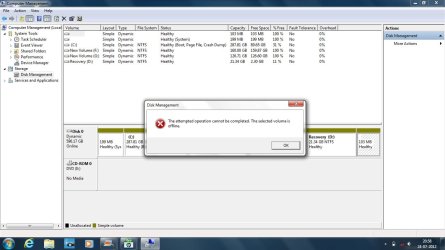
I don't what's in the 103MB partition,but when I tried to delete it through disk management a message pops-up saying operation cannot be done.
Here's the screenshot :
Untitled1.jpg

What to do now?Won't I be able to create new partitions?
Please help.
 

My Computer My Computer

Computer Manufacturer/Model Number
hp pavilion dv6-7012tx
OS
windows 7 home premium 64-bit
CPU
2nd generation i5
Memory
6GB
Graphics Card(s)
Nvidia Geforce GT630M(2GB)
Monitor(s) Displays
LED
Screen Resolution
1366*768
Hard Drives
Hitachi 640GB Hard Disk
Try to delete it with Partition Wizard.

Disk Management is a limited tool.

If PW won't do it, you may have to put that partition "on line". That can be done with diskpart.
 

My Computer My Computer

Computer type
PC/Desktop
Computer Manufacturer/Model Number
Ignatz Special; 4 speed manual gearbox; factory air conditioning; one of one
OS
Windows 7 Home Premium SP1, 64-bit
CPU
Intel Skylake i5-6600K, not overclocked
Motherboard
AsRock Z170M Extreme 4, micro ATX
Memory
8 GB HyperX DDR4-2666 (2 x 4 GB)
Graphics Card(s)
none; graphics are integrated on CPU
Sound Card
onboard: Realtek ALC1150; external: USB Behringer UF0-202
Monitor(s) Displays
Dell S2340M 23 inch IPS
Screen Resolution
1600 x 900
Hard Drives
System: Crucial MX100 series SSD, 128 GB;
Data: Samsung Spinpoint 103SJ, 1 TB;
Backup: WD Caviar Green WD30EZRX-00D8PB0, 3 TB
PSU
Rosewill SilentNight 500 watt fanless, semi-modular
Case
Antec Solo II
Cooling
Noctua NH-U12S; Noctua F12 intake, Noctua S12A exhaust
Keyboard
Microsoft 200 6JH-00001 USB
Mouse
Dell or Microsoft optical wired; USB
Antivirus
Microsoft Security Essentials and Malwarebytes Premium
Browser
Pale Moon
Other Info
All fans PWM; speeds at idle: CPU circa 500 rpm; intake circa 600 rpm; exhaust circa 600 rpm; CPU temps 27 idle and 47 C load in a warm room (27 C/81 F) when running Intel Extreme Tuning Utility stress test.
Try to delete it with Partition Wizard.

Disk Management is a limited tool.

If PW won't do it, you may have to put that partition "on line". That can be done with diskpart.


Is diskpart another software?If so that means doing booting using PW would useless?
 

My Computer My Computer

Computer Manufacturer/Model Number
hp pavilion dv6-7012tx
OS
windows 7 home premium 64-bit
CPU
2nd generation i5
Memory
6GB
Graphics Card(s)
Nvidia Geforce GT630M(2GB)
Monitor(s) Displays
LED
Screen Resolution
1366*768
Hard Drives
Hitachi 640GB Hard Disk
What is on 103MB partition?
 

My Computer My Computer

Computer type
Laptop
Computer Manufacturer/Model Number
ACER ASPIRE 5742G
OS
Microsoft Windows 7 Home Premium 64-bits 7601 Multiprocessor Free Service Pack 1
CPU
Intel(R) Core(TM) i3 CPU M 370 @ 2.40GHz
Motherboard
Acer Aspire 5742G
Memory
4,00 GB
Graphics Card(s)
ATI Mobility Radeon HD 5400 Series
Sound Card
(1) AMD High Definition Audio Device (2) Realtek High Defi
Screen Resolution
1366 x 768 x 32 bits (4294967296 colors) @ 60 Hz
Hard Drives
WDC WD5000BEVT-22ZAT0
Diskpart is a program built into Windows.

If you need to use it, it is available to you.

Do you now have access to a Partition Wizard boot disk? If so, try using it to delete that 103 MB partition.

If PW cannot delete it, then you will probably have to use diskpart to make that partition "online" and then try again to delete it.
 

My Computer My Computer

Computer type
PC/Desktop
Computer Manufacturer/Model Number
Ignatz Special; 4 speed manual gearbox; factory air conditioning; one of one
OS
Windows 7 Home Premium SP1, 64-bit
CPU
Intel Skylake i5-6600K, not overclocked
Motherboard
AsRock Z170M Extreme 4, micro ATX
Memory
8 GB HyperX DDR4-2666 (2 x 4 GB)
Graphics Card(s)
none; graphics are integrated on CPU
Sound Card
onboard: Realtek ALC1150; external: USB Behringer UF0-202
Monitor(s) Displays
Dell S2340M 23 inch IPS
Screen Resolution
1600 x 900
Hard Drives
System: Crucial MX100 series SSD, 128 GB;
Data: Samsung Spinpoint 103SJ, 1 TB;
Backup: WD Caviar Green WD30EZRX-00D8PB0, 3 TB
PSU
Rosewill SilentNight 500 watt fanless, semi-modular
Case
Antec Solo II
Cooling
Noctua NH-U12S; Noctua F12 intake, Noctua S12A exhaust
Keyboard
Microsoft 200 6JH-00001 USB
Mouse
Dell or Microsoft optical wired; USB
Antivirus
Microsoft Security Essentials and Malwarebytes Premium
Browser
Pale Moon
Other Info
All fans PWM; speeds at idle: CPU circa 500 rpm; intake circa 600 rpm; exhaust circa 600 rpm; CPU temps 27 idle and 47 C load in a warm room (27 C/81 F) when running Intel Extreme Tuning Utility stress test.
Did you move files from F and G to C already? if so F and G can be deleted now. Do it in disk management
 

My Computer My Computer

Computer type
Laptop
Computer Manufacturer/Model Number
ACER ASPIRE 5742G
OS
Microsoft Windows 7 Home Premium 64-bits 7601 Multiprocessor Free Service Pack 1
CPU
Intel(R) Core(TM) i3 CPU M 370 @ 2.40GHz
Motherboard
Acer Aspire 5742G
Memory
4,00 GB
Graphics Card(s)
ATI Mobility Radeon HD 5400 Series
Sound Card
(1) AMD High Definition Audio Device (2) Realtek High Defi
Screen Resolution
1366 x 768 x 32 bits (4294967296 colors) @ 60 Hz
Hard Drives
WDC WD5000BEVT-22ZAT0
C, "system reserved", RECOVERY, 103MB partition. These remain after deleting F and G. So still 4 partitions!! No more partitions can be created. What's in 103MB partition? Delete that partition as well. So ending up with 3 partitions.

I don't what's in the 103MB partition,but when I tried to delete it through disk management a message pops-up saying operation cannot be done.
Here's the screenshot :
View attachment 223080

What to do now?Won't I be able to create new partitions?
Please help.
rightclick on 103MB partition and "assign drive letter" to it. Now it puts it online most of the time.
 

My Computer My Computer

Computer type
Laptop
Computer Manufacturer/Model Number
ACER ASPIRE 5742G
OS
Microsoft Windows 7 Home Premium 64-bits 7601 Multiprocessor Free Service Pack 1
CPU
Intel(R) Core(TM) i3 CPU M 370 @ 2.40GHz
Motherboard
Acer Aspire 5742G
Memory
4,00 GB
Graphics Card(s)
ATI Mobility Radeon HD 5400 Series
Sound Card
(1) AMD High Definition Audio Device (2) Realtek High Defi
Screen Resolution
1366 x 768 x 32 bits (4294967296 colors) @ 60 Hz
Hard Drives
WDC WD5000BEVT-22ZAT0
What to do now?Won't I be able to create new partitions?
Please help.
Christin forget the 103 MB partition ... most probably (I am guessing) that is some unallocated space, and so you cannot delete it.

Move your movies (as those are important to you) to C and then delete the F and G using Partition Wizard bootable CD . Then your Disk will be ready to be converted to a basic one again.

Do the conversion, and post teh changed the disk management screenshot for us.

Edit : If after deleting F and G , still it is not converted to basic, then we may be sure that the 103 mb partition is a real partition, otherwise it will be added to the unallocated space generated by deleting the other two partitions.
 

My Computer My Computer

Computer type
PC/Desktop
Computer Manufacturer/Model Number
Self Assembled
OS
Microsoft Windows 10 Pro Insider Preview 64-bit
CPU
Intel(R) Core(TM) i3-4130 CPU @ 3.40GHz
Motherboard
Gigabyte Technology Co., Ltd. B85M-D3H
Memory
Corsair Vengence 4GB x2 (8.00GB Dual-Channel DDR3 @ 798MHz)
Graphics Card(s)
2047MB GeForce GTS 450 (ZOTAC International)
Sound Card
Onboard (Realtek High Definition Audio)
Monitor(s) Displays
LG Flatron E2040T
Screen Resolution
1600x900
Hard Drives
Western Digital 1 TB
Seagate 500 GB
PSU
Corsair VS550
Case
Cooler Master K380
Cooling
Cooler Master Seidon 120V Plus
Keyboard
Logitech MK260r
Mouse
Logitech MK260r
Internet Speed
PMPL Broadband
Antivirus
Windows Defender + MBAM
Browser
Firefox
Other Info
Dell Studio 15" Laptop
Back
Top