Solved hard disk changed to dynamic type after using disk management

OK ... are you sure that there are only three primary partitions and one logical partition now ?

How to Create Partition with partition manager? Partition Wizard Create Partition Video Help

Create Partition help of partition software - Partition Wizard.

Part the logical partition into sub partitions, as stated in the above links, obviously format those as logical.

Apply all the changes, and done.

Edit : I am sure that what ignatzatsonic said is just right, you can upload a camera snip of the partition wizard window too.
 

My Computer

Computer type
PC/Desktop
Computer Manufacturer/Model Number
Self Assembled
OS
Microsoft Windows 10 Pro Insider Preview 64-bit
CPU
Intel(R) Core(TM) i3-4130 CPU @ 3.40GHz
Motherboard
Gigabyte Technology Co., Ltd. B85M-D3H
Memory
Corsair Vengence 4GB x2 (8.00GB Dual-Channel DDR3 @ 798MHz)
Graphics Card(s)
2047MB GeForce GTS 450 (ZOTAC International)
Sound Card
Onboard (Realtek High Definition Audio)
Monitor(s) Displays
LG Flatron E2040T
Screen Resolution
1600x900
Hard Drives
Western Digital 1 TB
Seagate 500 GB
PSU
Corsair VS550
Case
Cooler Master K380
Cooling
Cooler Master Seidon 120V Plus
Keyboard
Logitech MK260r
Mouse
Logitech MK260r
Internet Speed
PMPL Broadband
Antivirus
Windows Defender + MBAM
Browser
Firefox
Other Info
Dell Studio 15" Laptop
Did you even see the Steps I typed out for you again in Post 52? I feel like I've wasted my time typing that all out for you when you apparently don't even see my posts or ignore them.
 
guys my windows not starting.A black screen appears with following written:

autochk program not found-skipping AUTOCHECK
After that the laptop restarts & a screen appears with 2 options:
1.launch startup repair
2.start windows normally
On choosing 2 the above process continues & on choosing 1 it asks for windows cd.

Can anybody please tell me what is this ?
 

My Computer

Computer Manufacturer/Model Number
hp pavilion dv6-7012tx
OS
windows 7 home premium 64-bit
CPU
2nd generation i5
Memory
6GB
Graphics Card(s)
Nvidia Geforce GT630M(2GB)
Monitor(s) Displays
LED
Screen Resolution
1366*768
Hard Drives
Hitachi 640GB Hard Disk
I'd go back into Partition Wizard and post a screen shot of what it shows.
 

My Computer

Computer type
PC/Desktop
Computer Manufacturer/Model Number
Ignatz Special; 4 speed manual gearbox; factory air conditioning; one of one
OS
Windows 7 Home Premium SP1, 64-bit
CPU
Intel Skylake i5-6600K, not overclocked
Motherboard
AsRock Z170M Extreme 4, micro ATX
Memory
8 GB HyperX DDR4-2666 (2 x 4 GB)
Graphics Card(s)
none; graphics are integrated on CPU
Sound Card
onboard: Realtek ALC1150; external: USB Behringer UF0-202
Monitor(s) Displays
Dell S2340M 23 inch IPS
Screen Resolution
1600 x 900
Hard Drives
System: Crucial MX100 series SSD, 128 GB;
Data: Samsung Spinpoint 103SJ, 1 TB;
Backup: WD Caviar Green WD30EZRX-00D8PB0, 3 TB
PSU
Rosewill SilentNight 500 watt fanless, semi-modular
Case
Antec Solo II
Cooling
Noctua NH-U12S; Noctua F12 intake, Noctua S12A exhaust
Keyboard
Microsoft 200 6JH-00001 USB
Mouse
Dell or Microsoft optical wired; USB
Antivirus
Microsoft Security Essentials and Malwarebytes Premium
Browser
Pale Moon
Other Info
All fans PWM; speeds at idle: CPU circa 500 rpm; intake circa 600 rpm; exhaust circa 600 rpm; CPU temps 27 idle and 47 C load in a warm room (27 C/81 F) when running Intel Extreme Tuning Utility stress test.
guys my windows not starting.A black screen appears with following written:

autochk program not found-skipping AUTOCHECK
After that the laptop restarts & a screen appears with 2 options:
1.launch startup repair
2.start windows normally
On choosing 2 the above process continues & on choosing 1 it asks for windows cd.

Can anybody please tell me what is this ?

Here's the screenshot of partition wizard after converting disk to basic.Hope it helps.
2012-07-25 01.32.23-1.jpg
 
Last edited:

My Computer

Computer Manufacturer/Model Number
hp pavilion dv6-7012tx
OS
windows 7 home premium 64-bit
CPU
2nd generation i5
Memory
6GB
Graphics Card(s)
Nvidia Geforce GT630M(2GB)
Monitor(s) Displays
LED
Screen Resolution
1366*768
Hard Drives
Hitachi 640GB Hard Disk
Did you even see the Steps I typed out for you again in Post 52? I feel like I've wasted my time typing that all out for you when you apparently don't even see my posts or ignore them.

hey Greg I followed as u told.But now my windows ain't starting.I already posted the problem.Why are u not replying?
Hey Arc please help.
 

My Computer

Computer Manufacturer/Model Number
hp pavilion dv6-7012tx
OS
windows 7 home premium 64-bit
CPU
2nd generation i5
Memory
6GB
Graphics Card(s)
Nvidia Geforce GT630M(2GB)
Monitor(s) Displays
LED
Screen Resolution
1366*768
Hard Drives
Hitachi 640GB Hard Disk
Did you do anything specific before it stopped booting?

If not then it is likely reacting to the Dynamic disk which often will not boot Windows.

The same solution applies as given before. Boot PW CD to work through the steps I gave you.

This is why I had you make the PW Boot CD instead of use Easeus or an installed solution, so you have the ability to rescue your install. Most of these Dynamic cases we see cannot boot. And we see at least one a week for 3 years. All of them are solved. Just follow the steps.
 

My Computer

Computer type
Laptop
Computer Manufacturer/Model Number
ACER ASPIRE 5742G
OS
Microsoft Windows 7 Home Premium 64-bits 7601 Multiprocessor Free Service Pack 1
CPU
Intel(R) Core(TM) i3 CPU M 370 @ 2.40GHz
Motherboard
Acer Aspire 5742G
Memory
4,00 GB
Graphics Card(s)
ATI Mobility Radeon HD 5400 Series
Sound Card
(1) AMD High Definition Audio Device (2) Realtek High Defi
Screen Resolution
1366 x 768 x 32 bits (4294967296 colors) @ 60 Hz
Hard Drives
WDC WD5000BEVT-22ZAT0
guys my windows not starting.A black screen appears with following written:

autochk program not found-skipping AUTOCHECK
After that the laptop restarts & a screen appears with 2 options:
1.launch startup repair
2.start windows normally
On choosing 2 the above process continues & on choosing 1 it asks for windows cd.

Can anybody please tell me what is this ?

Here's the screenshot of partition wizard after converting disk to basic.Hope it helps.
View attachment 223106
Where is partition with label RECOVERY as posted earlier?
222795d1342962679-hard-disk-changed-dynamic-type-after-using-disk-management-untitled.jpg
 

My Computer

Computer type
Laptop
Computer Manufacturer/Model Number
ACER ASPIRE 5742G
OS
Microsoft Windows 7 Home Premium 64-bits 7601 Multiprocessor Free Service Pack 1
CPU
Intel(R) Core(TM) i3 CPU M 370 @ 2.40GHz
Motherboard
Acer Aspire 5742G
Memory
4,00 GB
Graphics Card(s)
ATI Mobility Radeon HD 5400 Series
Sound Card
(1) AMD High Definition Audio Device (2) Realtek High Defi
Screen Resolution
1366 x 768 x 32 bits (4294967296 colors) @ 60 Hz
Hard Drives
WDC WD5000BEVT-22ZAT0
guys my windows not starting.A black screen appears with following written:

autochk program not found-skipping AUTOCHECK
After that the laptop restarts & a screen appears with 2 options:
1.launch startup repair
2.start windows normally
On choosing 2 the above process continues & on choosing 1 it asks for windows cd.

Can anybody please tell me what is this ?

Here's the screenshot of partition wizard after converting disk to basic.Hope it helps.
View attachment 223106
Where is partition with label RECOVERY as posted earlier?
222795d1342962679-hard-disk-changed-dynamic-type-after-using-disk-management-untitled.jpg

I have made recovery dvd with that drive & now its of no use,so I deleted it.
 

My Computer

Computer Manufacturer/Model Number
hp pavilion dv6-7012tx
OS
windows 7 home premium 64-bit
CPU
2nd generation i5
Memory
6GB
Graphics Card(s)
Nvidia Geforce GT630M(2GB)
Monitor(s) Displays
LED
Screen Resolution
1366*768
Hard Drives
Hitachi 640GB Hard Disk
Did you do anything specific before it stopped booting?

If not then it is likely reacting to the Dynamic disk which often will not boot Windows.

The same solution applies as given before. Boot PW CD to work through the steps I gave you.

This is why I had you make the PW Boot CD instead of use Easeus or an installed solution, so you have the ability to rescue your install. Most of these Dynamic cases we see cannot boot. And we see at least one a week for 3 years. All of them are solved. Just follow the steps.


Hey Greg I'm totally confused.Which steps to follow?
 

My Computer

Computer Manufacturer/Model Number
hp pavilion dv6-7012tx
OS
windows 7 home premium 64-bit
CPU
2nd generation i5
Memory
6GB
Graphics Card(s)
Nvidia Geforce GT630M(2GB)
Monitor(s) Displays
LED
Screen Resolution
1366*768
Hard Drives
Hitachi 640GB Hard Disk
You need to concentrate on nothing else other than getting these steps done now. We will help you and you can ask all the questions you need but it needs to be only working forward through the steps.

1. Download pw422.zip ISO, rightclick the download to Extract files.

2. Rightclick the .iso file in folder to burn to CD using Windows Image burner.

3. Boot the PW CD, rightclick F and G to Delete each, clicking OK after each, then Apply.

4. Then click on the Dynamic HD to highlight it, choose from Disk tab to "Convert Dynamic Disk to Basic." Apply step. How to convert dynamic disk to basic disk with Partition Wizard?

5. Once disk is converted, rightclick C to Modify>Set to Logical, OK. Apply step. How to set partition as Primary or Logical.

6. If you need to shrink C further to make your new Logical partition, rightclick it to Resize as desired, OK, Apply. Partition Wizard Resize Partition Video Help.

7. Create New Logical NTFS partition adjacent to C, label and letter it. Partition Wizard Create Partition Video Help
 
Last edited:
You need to concentrate on nothing else other than getting these steps done now. We will help you and you can ask all the questions you need but it needs to be only working forward through the steps.

1. Download pw422.zip ISO, rightclick the download to Extract files.

2. Rightclick the .iso file in folder to burn to CD using Windows Image burner.

3. Boot the PW CD, rightclick F and G to Delete each, clicking OK after each, then Apply.

4. Then click on the Dynamic HD to highlight it, choose from Disk tab to "Convert Dynamic Disk to Basic." Apply step. How to convert dynamic disk to basic disk with Partition Wizard?


5. Once disk is converted, rightclick C to Modify>Set to Logical, OK. Apply step. How to set partition as Primary or Logical.

6. If you need to shrink C further to make your new Logical partition, rightclick it to Resize as desired, OK, Apply. Partition Wizard Resize Partition Video Help.

7. Create New Logical NTFS partition adjacent to C, label and letter it. Partition Wizard Create Partition Video Help

but the option to convert C to logical is not highlighted in modify option & i am not able to do that operation.
help help help....
 

My Computer

Computer Manufacturer/Model Number
hp pavilion dv6-7012tx
OS
windows 7 home premium 64-bit
CPU
2nd generation i5
Memory
6GB
Graphics Card(s)
Nvidia Geforce GT630M(2GB)
Monitor(s) Displays
LED
Screen Resolution
1366*768
Hard Drives
Hitachi 640GB Hard Disk
Hey Arc please help.
Christin very sorry ... I am to go out right now ... Duty calls :(

Follow Greg ... he is the best person you can ever imagine :D
 

My Computer

Computer type
PC/Desktop
Computer Manufacturer/Model Number
Self Assembled
OS
Microsoft Windows 10 Pro Insider Preview 64-bit
CPU
Intel(R) Core(TM) i3-4130 CPU @ 3.40GHz
Motherboard
Gigabyte Technology Co., Ltd. B85M-D3H
Memory
Corsair Vengence 4GB x2 (8.00GB Dual-Channel DDR3 @ 798MHz)
Graphics Card(s)
2047MB GeForce GTS 450 (ZOTAC International)
Sound Card
Onboard (Realtek High Definition Audio)
Monitor(s) Displays
LG Flatron E2040T
Screen Resolution
1600x900
Hard Drives
Western Digital 1 TB
Seagate 500 GB
PSU
Corsair VS550
Case
Cooler Master K380
Cooling
Cooler Master Seidon 120V Plus
Keyboard
Logitech MK260r
Mouse
Logitech MK260r
Internet Speed
PMPL Broadband
Antivirus
Windows Defender + MBAM
Browser
Firefox
Other Info
Dell Studio 15" Laptop
but the option to convert C to logical is not highlighted in modify option & i am not able to do that operation.
help help help....

So you have completed Steps 3 and 4 to delete F and G, convert HD to Basic and applied those steps?

If so see if Win7 will boot now, post back a Disk Mgmt screenshot and we will proceed with converting C to Logical and arranging your partitions as you please.

If not post back a camera snap of the full PW CD drive map and listings showing all columns.
 
Last edited:
but the option to convert C to logical is not highlighted in modify option & i am not able to do that operation.
help help help....

So you have completed all of the steps to delete F and G, convert HD to Basic and applied those steps?

If so see if Win7 will boot now, post back a Disk Mgmt screenshot and we will proceed with converting C to Logical and arranging your partitions as you please.

If not post back a camera snap of the full PW CD drive map and listings showing all columns.

I have deleted F & G & converted HD to basic.But the laptop ain't starting.
After showing windows logo a screen appears saying "autochk program not found-skipping AUTOCHECK" & it restarts.This continues.

I have already posted the problem in details in POST#83 & posted the PW screenshot in POST#85.

Please Greg look into it & provide a solution.You guys are the only hope.
 

My Computer

Computer Manufacturer/Model Number
hp pavilion dv6-7012tx
OS
windows 7 home premium 64-bit
CPU
2nd generation i5
Memory
6GB
Graphics Card(s)
Nvidia Geforce GT630M(2GB)
Monitor(s) Displays
LED
Screen Resolution
1366*768
Hard Drives
Hitachi 640GB Hard Disk
I did not ask to see old screenshots, I asked to see a camera snap of PW drive map as it appears now after you've converted back to Basic. Is there some reason you can't follow simple steps given?

After you post the screenshot and are waiting for us to read it, confirm that the first partition is still marked System Active. If it's isn't, mark it Active by rightclicking to Modify>Set to Active, OK. Then click on the DIsk # to highlight it, from Disk tab select Rebuild MBR, OK, Apply steps. Reboot.

If Win7 won't start then boot into Win7 DVD System Recovery Options or System Repair Disk to run Startup Repair - Run 3 Separate Times until Win7 starts.

You've already revealed tonight that you deleted your Recovery partition. What other random impulsive actions have you taken that may have knackered your installation further?
 
Last edited:
I did not ask to see old screenshots, I asked to see a camera snap of PW drive map as it appears now after you've converted back to Basic. Is there some reason you can't follow simple steps given?

After you post the screenshot and are waiting for us to read it, confirm that the first partition is still marked System Active. If it's isn't, mark it Active by rightclicking to Modify>Set to Active, OK. Then click on the DIsk # to highlight it, from Disk tab select Rebuild MBR, OK, Apply steps. Reboot.

If Win7 won't start then boot into Win7 DVD System Recovery Options or System Repair Disk to run Startup Repair - Run 3 Separate Times until Win7 starts.

You've already revealed tonight that you deleted your Recovery partition. What other random impulsive actions have you taken that may have knackered your installation further?

hey Greg don't be angry man.I'm asking so many questions just because I'm nervous.
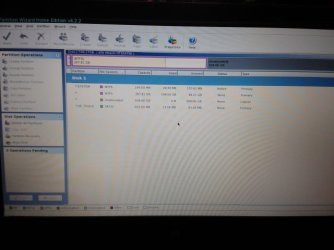
By the way here's the camera snap of PW I just took:
2012-07-25 12.27.53.jpg

what to do now?

I found that the SYSTEM partition is active but the C drive ain't active.Should I set C drive to active?
 

My Computer

Computer Manufacturer/Model Number
hp pavilion dv6-7012tx
OS
windows 7 home premium 64-bit
CPU
2nd generation i5
Memory
6GB
Graphics Card(s)
Nvidia Geforce GT630M(2GB)
Monitor(s) Displays
LED
Screen Resolution
1366*768
Hard Drives
Hitachi 640GB Hard Disk
Your PW screenshot looks perfect! And win7 is actually booting! It just can't find autchk.exe
So it skips it (it should perform an automatic chkdsk).

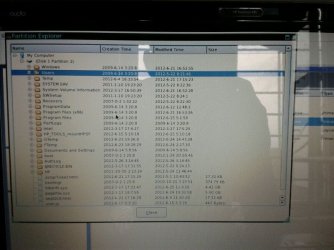
Can you right click C in PW and do "explore" (or something like that)? windows folders and files are still there?
 

My Computer

Computer type
Laptop
Computer Manufacturer/Model Number
ACER ASPIRE 5742G
OS
Microsoft Windows 7 Home Premium 64-bits 7601 Multiprocessor Free Service Pack 1
CPU
Intel(R) Core(TM) i3 CPU M 370 @ 2.40GHz
Motherboard
Acer Aspire 5742G
Memory
4,00 GB
Graphics Card(s)
ATI Mobility Radeon HD 5400 Series
Sound Card
(1) AMD High Definition Audio Device (2) Realtek High Defi
Screen Resolution
1366 x 768 x 32 bits (4294967296 colors) @ 60 Hz
Hard Drives
WDC WD5000BEVT-22ZAT0
Your PW screenshot looks perfect! And win7 is actually booting! It just can't find autchk.exe
So it skips it (it should perform an automatic chkdsk).

Can you right click C in PW and do "explore" (or something like that)? windows folders and files are still there?

yes I can explore C drive & I can see every folder there.
Here's the screenshot:
UC_Photo_001.jpg

What to do now?
 

My Computer

Computer Manufacturer/Model Number
hp pavilion dv6-7012tx
OS
windows 7 home premium 64-bit
CPU
2nd generation i5
Memory
6GB
Graphics Card(s)
Nvidia Geforce GT630M(2GB)
Monitor(s) Displays
LED
Screen Resolution
1366*768
Hard Drives
Hitachi 640GB Hard Disk
Back
Top