

You are using an out of date browser. It may not display this or other websites correctly.
You should upgrade or use an alternative browser.
You should upgrade or use an alternative browser.
Hard disk drive recovery c full - help!
- Thread starter niccih
- Start date
Good afternoon, I hope you are still here 

Firstly I want to apologise as i hope I haven't messed up . I did not recieve your message whs (hello and thanks!) until after i had connected to the internet and installed microsoft security. I had taken the link as the go ahead.
Thanks so far for all your help, I have to say it's really rewarding doing it yourself.
Anyway, I had paid for 1 year of virus protection when i purchased the laptop from Dell last April, so it should still have had a couple of months left on it but i'll be honest i can't remember whether it was Norton or not. So like whs said there is a possibility there are traces of that still...
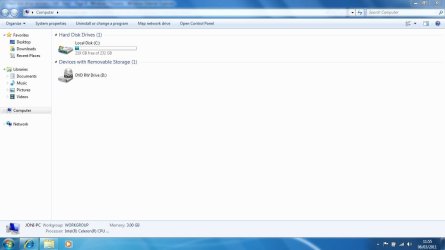
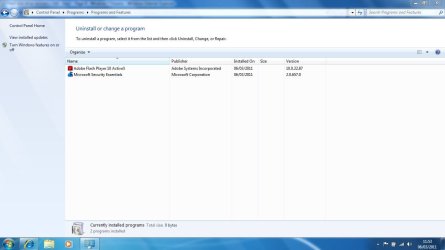
I don't know if this is any help or not but I have attached snips which i thought might help you see if everything is as it should be. Obviously let me know please if you need any further info, or if I do need to uninstall microsoft security.
Many thanks! (I won't be back on here for a few hours now just to let you know)
Firstly I want to apologise as i hope I haven't messed up
. I did not recieve your message whs (hello and thanks!) until after i had connected to the internet and installed microsoft security. I had taken the link as the go ahead.Thanks so far for all your help, I have to say it's really rewarding doing it yourself.
Anyway, I had paid for 1 year of virus protection when i purchased the laptop from Dell last April, so it should still have had a couple of months left on it but i'll be honest i can't remember whether it was Norton or not. So like whs said there is a possibility there are traces of that still...
I don't know if this is any help or not but I have attached snips which i thought might help you see if everything is as it should be. Obviously let me know please if you need any further info, or if I do need to uninstall microsoft security.
Many thanks! (I won't be back on here for a few hours now just to let you know)
Attachments

My Computer
At a glance
WINDOWS 7 64-bit
- Computer Manufacturer/Model Number
- DELL Inspiron 1545
- OS
- WINDOWS 7 64-bit
Hi niccih and welcome back. Glad to see you're back online. In looking at your snips, it appears that (a) you've successfully reinstalled your Windows 7 and (b) your control panel > programs and features only shows two installed programs ... Microsoft Security Essentials and Adobe Flash. Did you happen to look through your newly created start menu > all programs to see if you have any other antivirus or antispyware listed? If you do, let us know and we can probably steer you in the right direction for an uninstaller.
From your Adobe Flash version it looks like it's seriously out of date. The latest version is 10.2.152.32 and if it's not updated you could be leaving your computer open to some security issues. Don't try to uninstall the old one from the control panel. Use the official Adobe uninstaller here:
Uninstall Flash Player | Windows
Then you can reinstall the latest version from here (don't forget to uncheck the free Google toolbar offer if you don't want it):
Adobe - Install a different version of Adobe Flash Player
Since a lot of websites use flash content I think this should be a priority. Once that's done let us know what else you want to do and we can offer some advice or moral support.
From your Adobe Flash version it looks like it's seriously out of date. The latest version is 10.2.152.32 and if it's not updated you could be leaving your computer open to some security issues. Don't try to uninstall the old one from the control panel. Use the official Adobe uninstaller here:
Uninstall Flash Player | Windows
Then you can reinstall the latest version from here (don't forget to uncheck the free Google toolbar offer if you don't want it):
Adobe - Install a different version of Adobe Flash Player
Since a lot of websites use flash content I think this should be a priority. Once that's done let us know what else you want to do and we can offer some advice or moral support.
My Computer
At a glance
Win 7 Pro 64-bitIntel i5 2.4 Ghz8GB DDR3Intel HD 3000
- Computer type
- Laptop
- Computer Manufacturer/Model Number
- Sony Vaio VPCEB47GM Laptop
- OS
- Win 7 Pro 64-bit
- CPU
- Intel i5 2.4 Ghz
- Memory
- 8GB DDR3
- Graphics Card(s)
- Intel HD 3000
- Sound Card
- IDT High Definition
- Monitor(s) Displays
- 15.6 WGXA Anti-Glare LED
- Screen Resolution
- 1280x800
- Hard Drives
- 640Gb 7200rpm
- Antivirus
- MSE
- Browser
- Opera (primary) with IE9 backup
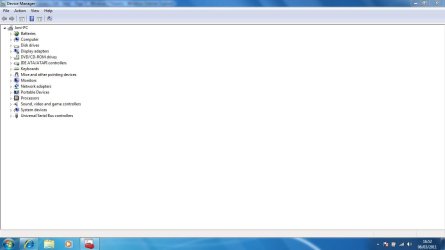
Can you post a screenshot of Device Manager?

My Computer
At a glance
ME/XP/Vista/Win7
- OS
- ME/XP/Vista/Win7
Hi,
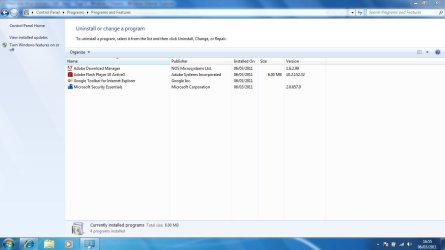
I have installed the newest Adobe Flash Player, and hope I have successfully uninstalled the old version. I've attached a snip, hopefully this will be of use to you to confirm that. I have attached also Device Manager for Theog (hello!).
I'm still not sure whether I have any other old virus protection on here, I can't see anything obvious but really wouldn't know if i was missing anything. I checked my old list of all programs as suggested but don't see any. Could it have been uninstalled last time I unsuccessfully tried to reinstall windows?
I don't know if there is anything else I need to do... I can't think of anything. Really I'm just clueless on computers about what I should update and how often. For example, the Adobe flash player I would have had no idea I had to update it. Perhaps if someone would be kind enough to just tell me what I should be updating on a regular basis and where I get the updates so i can keep my laptop in tip top condition.
Thanks so much for all of your help
I have installed the newest Adobe Flash Player, and hope I have successfully uninstalled the old version. I've attached a snip, hopefully this will be of use to you to confirm that. I have attached also Device Manager for Theog (hello!).
I'm still not sure whether I have any other old virus protection on here, I can't see anything obvious but really wouldn't know if i was missing anything. I checked my old list of all programs as suggested but don't see any. Could it have been uninstalled last time I unsuccessfully tried to reinstall windows?
I don't know if there is anything else I need to do...
I can't think of anything. Really I'm just clueless on computers about what I should update and how often. For example, the Adobe flash player I would have had no idea I had to update it. Perhaps if someone would be kind enough to just tell me what I should be updating on a regular basis and where I get the updates so i can keep my laptop in tip top condition. Thanks so much for all of your help
Attachments
My Computer
At a glance
WINDOWS 7 64-bit
- Computer Manufacturer/Model Number
- DELL Inspiron 1545
- OS
- WINDOWS 7 64-bit

Your snips look good. marsmimar covered the flash player update - although even if you do nothing, the updates will eventually come automatically. Adobe has their own way to update the Flash player.
I bet you get a lot of MS updates. Install them all. Just watch out for the SP1 update. That you should install all by itself. People who installed it together with another bunch of updates at the same time sometimes had problems.
And then I think it is VERY IMPORTANT that you start imaging so that you do not have to go thru this whole procedure again. Have a look at my tutorial and let us know whether you think you can handle that: http://www.sevenforums.com/tutorials/73828-imaging-free-macrium.html?ltr=I
PS: I would uninstall this Google Toolbar. You got it with the Flash player because you did not untick it.
I bet you get a lot of MS updates. Install them all. Just watch out for the SP1 update. That you should install all by itself. People who installed it together with another bunch of updates at the same time sometimes had problems.
And then I think it is VERY IMPORTANT that you start imaging so that you do not have to go thru this whole procedure again. Have a look at my tutorial and let us know whether you think you can handle that: http://www.sevenforums.com/tutorials/73828-imaging-free-macrium.html?ltr=I
PS: I would uninstall this Google Toolbar. You got it with the Flash player because you did not untick it.
My Computer
At a glance
Vista, Windows7, Mint Mate, Zorin, Windows 8from 1.6GHz Duo to i7
- Computer Manufacturer/Model Number
- HP, Dell, Gateway, Toshiba - 4 laptops and 2 desktops
- OS
- Vista, Windows7, Mint Mate, Zorin, Windows 8
- CPU
- from 1.6GHz Duo to i7
- Monitor(s) Displays
- 2x HP w2207
- Hard Drives
- 5x HDD, 7x SSD, 12x Externals
- Keyboard
- with trackball - no mices
- Mouse
- Trackball mice
- Internet Speed
- DSL 6000

- Local time
- 9:51 AM
- Messages
- 12,011
Niccih:
You’ve done very well and received good advice.
Get Windows updated per WHS’s advice.
These would then be major areas left to consider. I would probably attack them in this order:
1: Possibly dividing your hard drive into 2 partitions. It’s entirely optional, but many on this forum do it. It’s easily done. You would then put your data on the new second partition rather than on C. All that would be on C would be Windows and your programs.
2: Configure a few things like System Restore, Windows Update, Windows Firewall, Hibernation, and Microsoft Security Essentials.
3: Restoring your data from your external drive after you decide about #1 above.
4: Possibly downloading and installing a second free program to protect against “malware” as opposed to viruses. This is also optional, but I’d guess most on this forum do so.
5: Develop and implement a backup strategy for Windows and for your data, likely using Macrium for the Windows portion.
You’ve done very well and received good advice.
Get Windows updated per WHS’s advice.
These would then be major areas left to consider. I would probably attack them in this order:
1: Possibly dividing your hard drive into 2 partitions. It’s entirely optional, but many on this forum do it. It’s easily done. You would then put your data on the new second partition rather than on C. All that would be on C would be Windows and your programs.
2: Configure a few things like System Restore, Windows Update, Windows Firewall, Hibernation, and Microsoft Security Essentials.
3: Restoring your data from your external drive after you decide about #1 above.
4: Possibly downloading and installing a second free program to protect against “malware” as opposed to viruses. This is also optional, but I’d guess most on this forum do so.
5: Develop and implement a backup strategy for Windows and for your data, likely using Macrium for the Windows portion.
My Computer
At a glance
Windows 7 Home Premium SP1, 64-bitIntel Skylake i5-6600K, not overclocked8 GB HyperX DDR4-2666 (2 x 4 GB)none; graphics are integrated on CPU
- Computer type
- PC/Desktop
- Computer Manufacturer/Model Number
- Ignatz Special; 4 speed manual gearbox; factory air conditioning; one of one
- OS
- Windows 7 Home Premium SP1, 64-bit
- CPU
- Intel Skylake i5-6600K, not overclocked
- Motherboard
- AsRock Z170M Extreme 4, micro ATX
- Memory
- 8 GB HyperX DDR4-2666 (2 x 4 GB)
- Graphics Card(s)
- none; graphics are integrated on CPU
- Sound Card
- onboard: Realtek ALC1150; external: USB Behringer UF0-202
- Monitor(s) Displays
- Dell S2340M 23 inch IPS
- Screen Resolution
- 1600 x 900
- Hard Drives
- System: Crucial MX100 series SSD, 128 GB;
Data: Samsung Spinpoint 103SJ, 1 TB;
Backup: WD Caviar Green WD30EZRX-00D8PB0, 3 TB
- PSU
- Rosewill SilentNight 500 watt fanless, semi-modular
- Case
- Antec Solo II
- Cooling
- Noctua NH-U12S; Noctua F12 intake, Noctua S12A exhaust
- Keyboard
- Microsoft 200 6JH-00001 USB
- Mouse
- Dell or Microsoft optical wired; USB
- Antivirus
- Microsoft Security Essentials and Malwarebytes Premium
- Browser
- Pale Moon
- Other Info
- All fans PWM; speeds at idle: CPU circa 500 rpm; intake circa 600 rpm; exhaust circa 600 rpm; CPU temps 27 idle and 47 C load in a warm room (27 C/81 F) when running Intel Extreme Tuning Utility stress test.
I second everything WHS said. Especially the part about getting a system image and a repair disk (which will be a part of the system image process regardless of which imaging tool you decide to use.)
Other than getting a system image sooner rather than later, there's no pressure that you HAVE to install other programs right away. A lot of times you'll discover quite by accident that you need a certain program. It's perfectly OK to wait until you need something and then install it. If you're not sure about something you can always ask other questions here at Seven Forums.
On a personal note, you are not clueless. You are a very capable and adventurous person who sailed through a difficult task with flying colors. As far as knowing when or if a program needs to be updated, look at your snip of Programs and Features. The right column is called Version. Most of the installed programs will have a version number. You could go to that program's website and see if you have the latest version. Or you could use another freebie called Secunia. Under Products (upper left on their home page) is something called Online Software Inspector. You can let them scan your computer periodically to see if anything is outdated. Nothing is installed on your computer with OSI. Or you could install their free PSI program that has a larger data base of programs. For right now, I think the OSI would do you well.
Secunia.com
Take your time, don't rush into something, and ask questions. You've done a really great job! Don't be a stranger here.
Other than getting a system image sooner rather than later, there's no pressure that you HAVE to install other programs right away. A lot of times you'll discover quite by accident that you need a certain program. It's perfectly OK to wait until you need something and then install it. If you're not sure about something you can always ask other questions here at Seven Forums.
On a personal note, you are not clueless. You are a very capable and adventurous person who sailed through a difficult task with flying colors. As far as knowing when or if a program needs to be updated, look at your snip of Programs and Features. The right column is called Version. Most of the installed programs will have a version number. You could go to that program's website and see if you have the latest version. Or you could use another freebie called Secunia. Under Products (upper left on their home page) is something called Online Software Inspector. You can let them scan your computer periodically to see if anything is outdated. Nothing is installed on your computer with OSI. Or you could install their free PSI program that has a larger data base of programs. For right now, I think the OSI would do you well.
Secunia.com
Take your time, don't rush into something, and ask questions. You've done a really great job! Don't be a stranger here.
My Computer
At a glance
Win 7 Pro 64-bitIntel i5 2.4 Ghz8GB DDR3Intel HD 3000
- Computer type
- Laptop
- Computer Manufacturer/Model Number
- Sony Vaio VPCEB47GM Laptop
- OS
- Win 7 Pro 64-bit
- CPU
- Intel i5 2.4 Ghz
- Memory
- 8GB DDR3
- Graphics Card(s)
- Intel HD 3000
- Sound Card
- IDT High Definition
- Monitor(s) Displays
- 15.6 WGXA Anti-Glare LED
- Screen Resolution
- 1280x800
- Hard Drives
- 640Gb 7200rpm
- Antivirus
- MSE
- Browser
- Opera (primary) with IE9 backup
ignazatsonic made a good suggestion seperating your user data into a seperate partition. I have made this tutorial for it: http://www.sevenforums.com/tutorials/72427-data-partition.html I would, however, suggest to tackle this only after you are firm in imaging. There are some possible traps moving the data to another partition and we should discuss the details in great length once you are ready to do it.
There is one implication though with a seperate data partition - you have to then image that partition too just in case one of your data files ever gets lost or corrupted. It is just another parachute to keep your system safe from trouble.
I once lost my whole data partition due to an error I made handling the Partition Wizard program. I was sure glad that I had made an image of the data partition the day before so that I was able to recover the whole data. These things happen to any of us, but if you are prepared, you can always bail yourself out.
There is one implication though with a seperate data partition - you have to then image that partition too just in case one of your data files ever gets lost or corrupted. It is just another parachute to keep your system safe from trouble.
I once lost my whole data partition due to an error I made handling the Partition Wizard program. I was sure glad that I had made an image of the data partition the day before so that I was able to recover the whole data. These things happen to any of us, but if you are prepared, you can always bail yourself out.
My Computer
At a glance
Vista, Windows7, Mint Mate, Zorin, Windows 8from 1.6GHz Duo to i7
- Computer Manufacturer/Model Number
- HP, Dell, Gateway, Toshiba - 4 laptops and 2 desktops
- OS
- Vista, Windows7, Mint Mate, Zorin, Windows 8
- CPU
- from 1.6GHz Duo to i7
- Monitor(s) Displays
- 2x HP w2207
- Hard Drives
- 5x HDD, 7x SSD, 12x Externals
- Keyboard
- with trackball - no mices
- Mouse
- Trackball mice
- Internet Speed
- DSL 6000

Well done and nice work Mars, Ignat, WHS and others - help gladly given where it is most needed. What a credit to Seven Forums you are 
My Computer
At a glance
Windows 10 Pro x64 ; Xubuntu x64Intel i7 860 @ 2.80 GHz O/C'ed to 4.0GHz16GB Corsair Vengance DDR3 @ 661 MHz Dual Cha...EVGA NVidia GTX 560 1024MB
- Computer type
- PC/Desktop
- Computer Manufacturer/Model Number
- Golden Mk. I.4
- OS
- Windows 10 Pro x64 ; Xubuntu x64
- CPU
- Intel i7 860 @ 2.80 GHz O/C'ed to 4.0GHz
- Motherboard
- Gigabyte P55A-UD3R Rev.1. Award BIOS F13
- Memory
- 16GB Corsair Vengance DDR3 @ 661 MHz Dual Channel (9-9-9-24)
- Graphics Card(s)
- EVGA NVidia GTX 560 1024MB
- Sound Card
- Realtek Integrated
- Monitor(s) Displays
- Dual Samsung SyncMaster 2494HS
- Screen Resolution
- 1920*1080 and 1920*1080
- Hard Drives
- 1*Samsung 840 EVO 120GB SSD;
1*OCZ Vertex 2 60GB SSD;
2*Samsung F3 SpinPoint 1TB in RAID0;
1*Samsung F1 SpinPoint 1TB;
2*Western Digital 1TB External USB 3.0
1*Western Digital 500GB External USB 3.0
1*Seagate 500GB External USB 2.0
- PSU
- Thermaltake ToughPower QFan 750W
- Case
- Thermaltake Element S VK60001W2Z
- Cooling
- Corsair H60 Water Cooling, 2*230mm and 2*80mm case fans
- Keyboard
- Logitech G110
- Mouse
- Logitech MX518

WHS, as far as the backup of the data partition, I might suggest Sync Toy. It will copy the user partition to her external hard drive and is simple to use.
My Computers
-
At a glance
Windows 11 ProRyzen 9 5900X32GB G Skill DDR4-3600EVGA RTX 3080 FTW 3 Ultra- Computer type
- PC/Desktop
- Computer Manufacturer/Model Number
- ALWAYS UNDER CONSTRUCTION
- OS
- Windows 11 Pro
- CPU
- Ryzen 9 5900X
- Motherboard
- Asus X570 Crosshair Viii Hero
- Memory
- 32GB G Skill DDR4-3600
- Graphics Card(s)
- EVGA RTX 3080 FTW 3 Ultra
- Sound Card
- On Board/Sennheiser PC37X Headset
- Monitor(s) Displays
- 3 X Asus 27"
- Screen Resolution
- 2560x1440
- Hard Drives
- 2 X 1 TB NVME drives
- PSU
- EVGA 850
- Case
- Phanteks Eclipse P400A
- Cooling
- EVGA 280 AIO
- Keyboard
- Logitech G510s/ Logitech G13
- Mouse
- Logitech G502
- Internet Speed
- 24/1
- Antivirus
- ESET/MBAM Pro/SAS Pro
- Browser
- Chrome/ Firefox/ Edge
-
At a glance
Windows 11 ProIntel Ultra 9 288V32 GB LPDDR5X 8533- Computer type
- Laptop
- System Manufacturer/Model Number
- Dell 16 Plus
- OS
- Windows 11 Pro
- CPU
- Intel Ultra 9 288V
- Memory
- 32 GB LPDDR5X 8533
- Monitor(s) Displays
- 16" Mini-LED HDR600 Touch 90 Hz
- Screen Resolution
- 2560X1600
- Hard Drives
- 1 TB NVME
I agree, that is a good option. I just use Macrium for that because I always image both partitions together. For me it is a one step deal and I do not really care about the extra disk space it takes - I have acres of that.WHS, as far as the backup of the data partition, I might suggest Sync Toy. It will copy the user partition to her external hard drive and is simple to use.
My Computer
At a glance
Vista, Windows7, Mint Mate, Zorin, Windows 8from 1.6GHz Duo to i7
- Computer Manufacturer/Model Number
- HP, Dell, Gateway, Toshiba - 4 laptops and 2 desktops
- OS
- Vista, Windows7, Mint Mate, Zorin, Windows 8
- CPU
- from 1.6GHz Duo to i7
- Monitor(s) Displays
- 2x HP w2207
- Hard Drives
- 5x HDD, 7x SSD, 12x Externals
- Keyboard
- with trackball - no mices
- Mouse
- Trackball mice
- Internet Speed
- DSL 6000
Hi,
I have installed the newest Adobe Flash Player, and hope I have successfully uninstalled the old version. I've attached a snip, hopefully this will be of use to you to confirm that. I have attached also Device Manager for Theog (hello!).
I'm still not sure whether I have any other old virus protection on here, I can't see anything obvious but really wouldn't know if i was missing anything. I checked my old list of all programs as suggested but don't see any. Could it have been uninstalled last time I unsuccessfully tried to reinstall windows?
I don't know if there is anything else I need to do...
Thanks so much for all of your help
Before you start your backing up, you may like to install all the hardware software for your notebook.(Display, keyboard, touchpad,etc)
My Computer
At a glance
ME/XP/Vista/Win7
- OS
- ME/XP/Vista/Win7
reightonsands
New member
- Local time
- 5:51 PM
- Messages
- 1
Had exactly the same problem, followed instructions and hey presto! worked a treat. Thank you. Got to say I'm pretty clueless too!
My Computer
At a glance
windows 7 premium
- OS
- windows 7 premium
reightonsands, Welcome to Seven Forums. I'm glad you have your problem solved. If you went through that and were successful, you are not clueless. But, you were able to follow the advice in the thread, solve your problem and learn something in the process. Next time you are faced with this situation, you will know exactly what to do. Stick around, there is much more information on this site. Check out the tutorials here. Just go to the top of the page and click on tutorials. There is much to learn there. Hope you'll stick around and congratulations for resolving your issue.
My Computers
-
At a glance
Windows 11 ProRyzen 9 5900X32GB G Skill DDR4-3600EVGA RTX 3080 FTW 3 Ultra- Computer type
- PC/Desktop
- Computer Manufacturer/Model Number
- ALWAYS UNDER CONSTRUCTION
- OS
- Windows 11 Pro
- CPU
- Ryzen 9 5900X
- Motherboard
- Asus X570 Crosshair Viii Hero
- Memory
- 32GB G Skill DDR4-3600
- Graphics Card(s)
- EVGA RTX 3080 FTW 3 Ultra
- Sound Card
- On Board/Sennheiser PC37X Headset
- Monitor(s) Displays
- 3 X Asus 27"
- Screen Resolution
- 2560x1440
- Hard Drives
- 2 X 1 TB NVME drives
- PSU
- EVGA 850
- Case
- Phanteks Eclipse P400A
- Cooling
- EVGA 280 AIO
- Keyboard
- Logitech G510s/ Logitech G13
- Mouse
- Logitech G502
- Internet Speed
- 24/1
- Antivirus
- ESET/MBAM Pro/SAS Pro
- Browser
- Chrome/ Firefox/ Edge
-
At a glance
Windows 11 ProIntel Ultra 9 288V32 GB LPDDR5X 8533- Computer type
- Laptop
- System Manufacturer/Model Number
- Dell 16 Plus
- OS
- Windows 11 Pro
- CPU
- Intel Ultra 9 288V
- Memory
- 32 GB LPDDR5X 8533
- Monitor(s) Displays
- 16" Mini-LED HDR600 Touch 90 Hz
- Screen Resolution
- 2560X1600
- Hard Drives
- 1 TB NVME
hey guys i have the exact same problem that has been fixed here - i have recovery (c and OS (D and recovery drive is full, yet OS is 75% empty. have 126.20gb of unallocated space, but cant seem to get that space onto my recovery disk. i am on my sisters laptop now, as i am attempting to re-install windows 7 like what has been done on this thread on my laptop, but when i try to download to OS, it says it doesnt have the available space, even though i formatted it previously. followed this guide but now i am stuck and i cant seem to make it work, will post back when windows either doesnt download or does and i will say how it went.
would really appreciate some help, my laptops been this way for 6 months now and its starting to really bug me now, i have windows 7 64 bit if that helps. thanks
and OS (D and recovery drive is full, yet OS is 75% empty. have 126.20gb of unallocated space, but cant seem to get that space onto my recovery disk. i am on my sisters laptop now, as i am attempting to re-install windows 7 like what has been done on this thread on my laptop, but when i try to download to OS, it says it doesnt have the available space, even though i formatted it previously. followed this guide but now i am stuck and i cant seem to make it work, will post back when windows either doesnt download or does and i will say how it went.would really appreciate some help, my laptops been this way for 6 months now and its starting to really bug me now, i have windows 7 64 bit if that helps. thanks
My Computer
At a glance
Windows 7 64 bit
- OS
- Windows 7 64 bit
Hi all... I registered on this forum to say "THANK YOU!!!" I had the EXACT same issue as "niccih" and your solutions worked perfectly!! I now know EXACTLY where to go for all my computer-help needs! Thank you very very much!!!
My Computer
At a glance
Windows 7
- OS
- Windows 7
ESRO2, we are glad it helped and happy you resolved your issues. Anytime you need help, that is what we are here for. We hope you come around often. When you have the time, in the top left corner there is a section called tutorials. Click on that and look at the tutorials. There is much to learn and help with many problems. Thanks for letting us know this thread helped. Good luck.
My Computers
-
At a glance
Windows 11 ProRyzen 9 5900X32GB G Skill DDR4-3600EVGA RTX 3080 FTW 3 Ultra- Computer type
- PC/Desktop
- Computer Manufacturer/Model Number
- ALWAYS UNDER CONSTRUCTION
- OS
- Windows 11 Pro
- CPU
- Ryzen 9 5900X
- Motherboard
- Asus X570 Crosshair Viii Hero
- Memory
- 32GB G Skill DDR4-3600
- Graphics Card(s)
- EVGA RTX 3080 FTW 3 Ultra
- Sound Card
- On Board/Sennheiser PC37X Headset
- Monitor(s) Displays
- 3 X Asus 27"
- Screen Resolution
- 2560x1440
- Hard Drives
- 2 X 1 TB NVME drives
- PSU
- EVGA 850
- Case
- Phanteks Eclipse P400A
- Cooling
- EVGA 280 AIO
- Keyboard
- Logitech G510s/ Logitech G13
- Mouse
- Logitech G502
- Internet Speed
- 24/1
- Antivirus
- ESET/MBAM Pro/SAS Pro
- Browser
- Chrome/ Firefox/ Edge
-
At a glance
Windows 11 ProIntel Ultra 9 288V32 GB LPDDR5X 8533- Computer type
- Laptop
- System Manufacturer/Model Number
- Dell 16 Plus
- OS
- Windows 11 Pro
- CPU
- Intel Ultra 9 288V
- Memory
- 32 GB LPDDR5X 8533
- Monitor(s) Displays
- 16" Mini-LED HDR600 Touch 90 Hz
- Screen Resolution
- 2560X1600
- Hard Drives
- 1 TB NVME
Similar threads
- Replies
- 6
- Views
- 2K


- Replies
- 8
- Views
- 2K

- Replies
- 14
- Views
- 5K
- Replies
- 1
- Views
- 2K
