Hard Disk Partition Letter Missing in Windows 7 - Fix

How to Fix Missing Vista Hard Disk Partition Letter in Windows 7

   Information
This will show you how to fix the missing already installed Windows Vista hard disk partition in Windows 7 when you have just installed Windows 7 from boot to dual or multi boot with Vista.
   Note
This will also work for a missing XP hard drive partition in Windows 7 as well.
   Tip
If you install Windows 7 from within Vista to the other partition or drive instead, then Vista should show up in Windows 7 then. However, installing Windows 7 from within Vista instead of at boot may not always install properly if something in Vista interferes during installation.

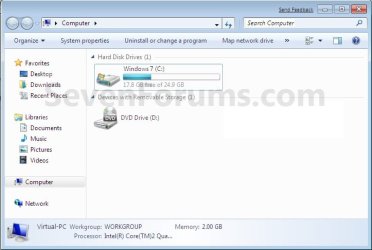
EXAMPLE: Missing Vista Hard Disk Partition Letter in Windows 7
NOTE: The left screenshot is in the Computer window, and the right screenshot is in Disk Management.
Example2.jpg

Example1.jpg

Here's How:
1. Open the Control Panel (All Items view), and click on the Administrative Tools icon, then close the Control Panel window.

2. Click on Computer Management in Administrative Tools.

3. If prompted by UAC, click on Yes. Close the Administrative Tools window.

4. In the left pane under Storage, click on Disk Management. (See screenshot below step 5)

5. In the right pane, right click on the Vista hard disk partition that is missing it's drive letter, then click on Change Drive Letter and Paths. (See screenshot below)
Step1.jpg
6. Click on the Add button. (See screenshot below)
Step2.jpg
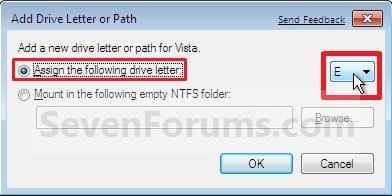
7. Select (dot) Assign the following drive letter, then select a drive letter you want to have assigned to the Vista disk partition and click on OK. (See screenshot below)
Step3.jpg
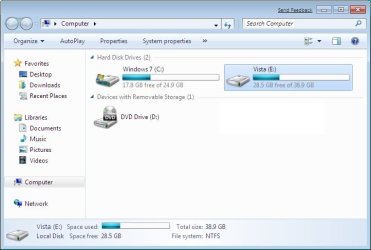
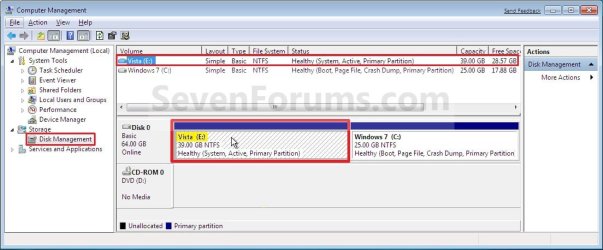
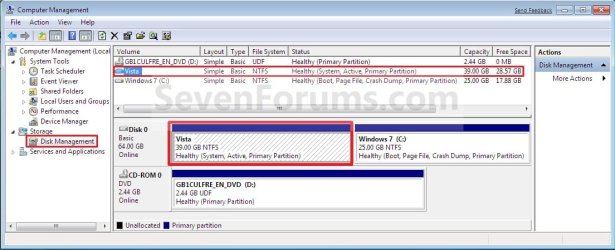
8. The Vista Hard Disk Partition will now show up in Windows 7. (See screenshots below)
NOTE: The left screenshot is in the Computer window, and the right screenshot is in Disk Management.
After2.jpg

After1.jpg

That's it,
Shawn


Last edited:
"Change Drive Letter and Paths" is not available

What if the option "Change Drive Letter and Paths" is greyed out?
 

My Computer

Computer Manufacturer/Model Number
Intel
OS
Windows 7 Ultimate x64 SP1
CPU
Intel Core 2 Duo
Motherboard
ASUS
Memory
4 GB
Graphics Card(s)
GeForce
Sound Card
Logitek
Monitor(s) Displays
Samsung 22'
Screen Resolution
1920x1200
Hard Drives
Seagate 1 TB
PSU
Orient
Case
Orient
Cooling
Orient
Keyboard
Mitsumi
Mouse
Logitek
Internet Speed
3056 Mbps/1024 MBps
Hello Longnh, and welcome to Seven Forums.

Could you post a screenshot of your Disk Management showing all of your drives layout? :)
 

My Computer

Computer type
PC/Desktop
Computer Manufacturer/Model Number
Self built custom
OS
64-bit Windows 11 Pro for Workstations
CPU
Intel i7-8700K OC'd to 5 GHz
Motherboard
ASUS ROG Maximus XI Formula Z390
Memory
64 GB (4x16GB) G.SKILL TridentZ RGB DDR4 3600 MHz
Graphics Card(s)
ASUS ROG-STRIX-GTX1080TI-O11G-GAMING
Sound Card
Integrated
Monitor(s) Displays
2 x Samsung Odyssey G7 27"
Screen Resolution
2560x1440
Hard Drives
1TB Samsung 990 PRO M.2,
4TB Samsung 990 PRO PRO M.2,
TerraMaster F8 SSD Plus NAS
PSU
Seasonic Prime Titanium 850W
Case
Thermaltake Core P3
Cooling
Corsair Hydro H115i
Keyboard
Logitech wireless K800
Mouse
Logitech MX Master 4
Internet Speed
2 Gb/s Download and 100 Mb/s Upload
Antivirus
Malwarebyte Anti-Malware Premium
Browser
Google Chrome
Other Info
Logitech Z625 speaker system,
Logitech BRIO 4K Pro webcam,
HP Color LaserJet Pro MFP M477fdn,
APC SMART-UPS RT 1000 XL - SURT1000XLI,
Galaxy S23 Plus phone
Hey Brink, thanks for your quick reply.

I'm using dual XP and Windows 7. That partition (F:) didn't show up in Windows 7 though I can still see it in Disk Management (the only information is total size, there's no label, letter, free space, used space). When I right-clicked, "Format" was the only option available in context menu (Disk Management). Everything's normal in XP, I mean I can read/write to that partition if I boot into XP. It's so weird.

After I formatted that partition, it works well now (so I cannot take any screenshot). I can see it in both XP and Windows 7 (but my data was gone, of course). Basically my problem was solved, but I'm still curious about this error.
 

My Computer

Computer Manufacturer/Model Number
Intel
OS
Windows 7 Ultimate x64 SP1
CPU
Intel Core 2 Duo
Motherboard
ASUS
Memory
4 GB
Graphics Card(s)
GeForce
Sound Card
Logitek
Monitor(s) Displays
Samsung 22'
Screen Resolution
1920x1200
Hard Drives
Seagate 1 TB
PSU
Orient
Case
Orient
Cooling
Orient
Keyboard
Mitsumi
Mouse
Logitek
Internet Speed
3056 Mbps/1024 MBps
Longnh,

I'm not certain what was the issue, but I'm happy to hear that you got it sorted. :)
 

My Computer

Computer type
PC/Desktop
Computer Manufacturer/Model Number
Self built custom
OS
64-bit Windows 11 Pro for Workstations
CPU
Intel i7-8700K OC'd to 5 GHz
Motherboard
ASUS ROG Maximus XI Formula Z390
Memory
64 GB (4x16GB) G.SKILL TridentZ RGB DDR4 3600 MHz
Graphics Card(s)
ASUS ROG-STRIX-GTX1080TI-O11G-GAMING
Sound Card
Integrated
Monitor(s) Displays
2 x Samsung Odyssey G7 27"
Screen Resolution
2560x1440
Hard Drives
1TB Samsung 990 PRO M.2,
4TB Samsung 990 PRO PRO M.2,
TerraMaster F8 SSD Plus NAS
PSU
Seasonic Prime Titanium 850W
Case
Thermaltake Core P3
Cooling
Corsair Hydro H115i
Keyboard
Logitech wireless K800
Mouse
Logitech MX Master 4
Internet Speed
2 Gb/s Download and 100 Mb/s Upload
Antivirus
Malwarebyte Anti-Malware Premium
Browser
Google Chrome
Other Info
Logitech Z625 speaker system,
Logitech BRIO 4K Pro webcam,
HP Color LaserJet Pro MFP M477fdn,
APC SMART-UPS RT 1000 XL - SURT1000XLI,
Galaxy S23 Plus phone
Hello Brink..
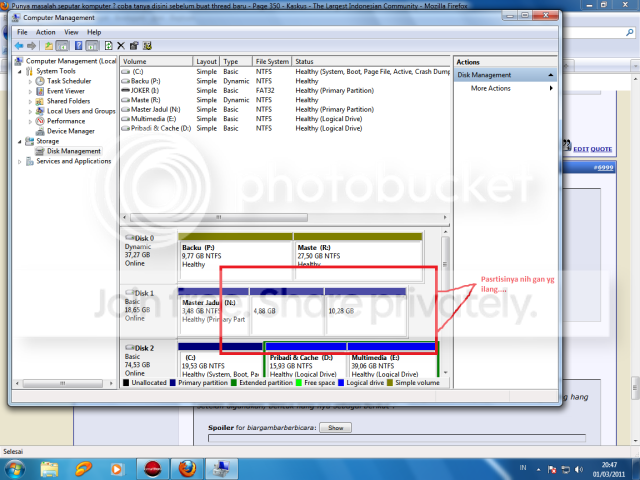
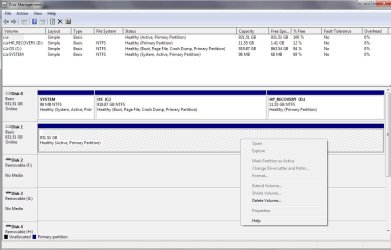
I have same problem like longnh have.. this my screenshot
Untitled-4.png


i have important file in my 2 partition.. please help me , to make 7 assign this partition without format it


Thanks in Advance

Bajol
 

My Computer

OS
Windows 7 Ultimate X64 SP1
CPU
Phenom B55
Motherboard
DFI lanparty M2RS
Memory
Corsair XMS2 8GB
Graphics Card(s)
zotac 9800 GTX
Sound Card
-
Monitor(s) Displays
LG W2253S
Screen Resolution
1920 x 1080
Hard Drives
WDC 1TB Master, WDC 2TB Slave
PSU
Seasonic M12 520
Case
Simbadda :p
Cooling
Thermaltake Frio
Keyboard
-
Mouse
A4tech Glazer :p
Hello Bajol,

Do you have access to them to be able to copy the files to another location, then format them to get a drive letter and copy the files back?
 

My Computer

Computer type
PC/Desktop
Computer Manufacturer/Model Number
Self built custom
OS
64-bit Windows 11 Pro for Workstations
CPU
Intel i7-8700K OC'd to 5 GHz
Motherboard
ASUS ROG Maximus XI Formula Z390
Memory
64 GB (4x16GB) G.SKILL TridentZ RGB DDR4 3600 MHz
Graphics Card(s)
ASUS ROG-STRIX-GTX1080TI-O11G-GAMING
Sound Card
Integrated
Monitor(s) Displays
2 x Samsung Odyssey G7 27"
Screen Resolution
2560x1440
Hard Drives
1TB Samsung 990 PRO M.2,
4TB Samsung 990 PRO PRO M.2,
TerraMaster F8 SSD Plus NAS
PSU
Seasonic Prime Titanium 850W
Case
Thermaltake Core P3
Cooling
Corsair Hydro H115i
Keyboard
Logitech wireless K800
Mouse
Logitech MX Master 4
Internet Speed
2 Gb/s Download and 100 Mb/s Upload
Antivirus
Malwarebyte Anti-Malware Premium
Browser
Google Chrome
Other Info
Logitech Z625 speaker system,
Logitech BRIO 4K Pro webcam,
HP Color LaserJet Pro MFP M477fdn,
APC SMART-UPS RT 1000 XL - SURT1000XLI,
Galaxy S23 Plus phone
Hello Bajol,

Do you have access to them to be able to copy the files to another location, then format them to get a drive letter and copy the files back?
No I can't acces it..
In this case, i'm login as administrator. But I'm still can't acces both of them.

My only way is acces the drive from XP and backup the files from there.
i have formatted HDD through 7 disk management and 7 can recognize now

thanks for the advice

Bajol
 

My Computer

OS
Windows 7 Ultimate X64 SP1
CPU
Phenom B55
Motherboard
DFI lanparty M2RS
Memory
Corsair XMS2 8GB
Graphics Card(s)
zotac 9800 GTX
Sound Card
-
Monitor(s) Displays
LG W2253S
Screen Resolution
1920 x 1080
Hard Drives
WDC 1TB Master, WDC 2TB Slave
PSU
Seasonic M12 520
Case
Simbadda :p
Cooling
Thermaltake Frio
Keyboard
-
Mouse
A4tech Glazer :p
You're most welcome Bajol. I'm happy to hear that you got it sorted. :)
 

My Computer

Computer type
PC/Desktop
Computer Manufacturer/Model Number
Self built custom
OS
64-bit Windows 11 Pro for Workstations
CPU
Intel i7-8700K OC'd to 5 GHz
Motherboard
ASUS ROG Maximus XI Formula Z390
Memory
64 GB (4x16GB) G.SKILL TridentZ RGB DDR4 3600 MHz
Graphics Card(s)
ASUS ROG-STRIX-GTX1080TI-O11G-GAMING
Sound Card
Integrated
Monitor(s) Displays
2 x Samsung Odyssey G7 27"
Screen Resolution
2560x1440
Hard Drives
1TB Samsung 990 PRO M.2,
4TB Samsung 990 PRO PRO M.2,
TerraMaster F8 SSD Plus NAS
PSU
Seasonic Prime Titanium 850W
Case
Thermaltake Core P3
Cooling
Corsair Hydro H115i
Keyboard
Logitech wireless K800
Mouse
Logitech MX Master 4
Internet Speed
2 Gb/s Download and 100 Mb/s Upload
Antivirus
Malwarebyte Anti-Malware Premium
Browser
Google Chrome
Other Info
Logitech Z625 speaker system,
Logitech BRIO 4K Pro webcam,
HP Color LaserJet Pro MFP M477fdn,
APC SMART-UPS RT 1000 XL - SURT1000XLI,
Galaxy S23 Plus phone
Brink:
I am having the same problem. When my XP died I bought a HP running Windows 7 Home Premium 64. While most of the files I wanted are backed up to a portable hard drive, I thought the easiest way to move my files was to remove the drive from the old computer and put it in the new and drag and drop the files where I wanted on the new one. I then planed to keep the drive in for storage and backup.
(I was not planning to duel boot to XP as I understand that windows checks and does not run on different computer, but if it is possible I would be interested in doing so)
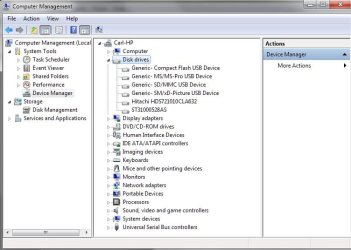
I have followed the steps listed to add a hard drive. I have scanned for changes. I have uninstalled and reinstalled the drive in Device Manager. I have changed folder options to show hidden files.
I do not want to reformat the drive at least until I transfer some files off it.
Any help you or other forum members can give will be greatly appreciated.
Thank you very much.
Ben
 

Attachments

  • HardDriveProblem.jpg
    HardDriveProblem.jpg
    214.6 KB · Views: 2,102
  • HardDriveProblem1.jpg
    HardDriveProblem1.jpg
    108.9 KB · Views: 2,180

My Computer

Computer Manufacturer/Model Number
HP
OS
Windows 7 Home Premium 64bit
CPU
i5
Memory
8 Gig
Monitor(s) Displays
HP 2311x
Hard Drives
1T
Hello Ben, and welcome to Seven Forums.

From looking at your screenshots, the 931.51 GB HDD (Disk 1) doesn't have anything on it since it still has all of it's available space free. :(
 

My Computer

Computer type
PC/Desktop
Computer Manufacturer/Model Number
Self built custom
OS
64-bit Windows 11 Pro for Workstations
CPU
Intel i7-8700K OC'd to 5 GHz
Motherboard
ASUS ROG Maximus XI Formula Z390
Memory
64 GB (4x16GB) G.SKILL TridentZ RGB DDR4 3600 MHz
Graphics Card(s)
ASUS ROG-STRIX-GTX1080TI-O11G-GAMING
Sound Card
Integrated
Monitor(s) Displays
2 x Samsung Odyssey G7 27"
Screen Resolution
2560x1440
Hard Drives
1TB Samsung 990 PRO M.2,
4TB Samsung 990 PRO PRO M.2,
TerraMaster F8 SSD Plus NAS
PSU
Seasonic Prime Titanium 850W
Case
Thermaltake Core P3
Cooling
Corsair Hydro H115i
Keyboard
Logitech wireless K800
Mouse
Logitech MX Master 4
Internet Speed
2 Gb/s Download and 100 Mb/s Upload
Antivirus
Malwarebyte Anti-Malware Premium
Browser
Google Chrome
Other Info
Logitech Z625 speaker system,
Logitech BRIO 4K Pro webcam,
HP Color LaserJet Pro MFP M477fdn,
APC SMART-UPS RT 1000 XL - SURT1000XLI,
Galaxy S23 Plus phone
Thank you for your attention to my problem. I too saw it showed noting on the disk, but I assure you that it is almost half full.

And even so it should let me add a drive letter should it not?

Ben
 

My Computer

Computer Manufacturer/Model Number
HP
OS
Windows 7 Home Premium 64bit
CPU
i5
Memory
8 Gig
Monitor(s) Displays
HP 2311x
Hard Drives
1T
Ben,

There appears to be some sort of issue with the file system on Disk 1 since it's not showing as either NTFS or FAT32.

You might see if you may be able to use the free Partition Wizard to either try and recovery Disk 1 or assign a drive letter to Disk 1.

If that fails, then you could use the link below to create a live Ubuntu disc to try and recover any files you wanted from Disk 1.

Use Ubuntu Live CD to Backup Files from Your Dead Windows Computer - How-To Geek

Afterwards, and there's nothing else you want on the drive, it looks like you may need to run the clean command on Disk 1 to completely wipe it clean, then format it give it a drive letter.
 

My Computer

Computer type
PC/Desktop
Computer Manufacturer/Model Number
Self built custom
OS
64-bit Windows 11 Pro for Workstations
CPU
Intel i7-8700K OC'd to 5 GHz
Motherboard
ASUS ROG Maximus XI Formula Z390
Memory
64 GB (4x16GB) G.SKILL TridentZ RGB DDR4 3600 MHz
Graphics Card(s)
ASUS ROG-STRIX-GTX1080TI-O11G-GAMING
Sound Card
Integrated
Monitor(s) Displays
2 x Samsung Odyssey G7 27"
Screen Resolution
2560x1440
Hard Drives
1TB Samsung 990 PRO M.2,
4TB Samsung 990 PRO PRO M.2,
TerraMaster F8 SSD Plus NAS
PSU
Seasonic Prime Titanium 850W
Case
Thermaltake Core P3
Cooling
Corsair Hydro H115i
Keyboard
Logitech wireless K800
Mouse
Logitech MX Master 4
Internet Speed
2 Gb/s Download and 100 Mb/s Upload
Antivirus
Malwarebyte Anti-Malware Premium
Browser
Google Chrome
Other Info
Logitech Z625 speaker system,
Logitech BRIO 4K Pro webcam,
HP Color LaserJet Pro MFP M477fdn,
APC SMART-UPS RT 1000 XL - SURT1000XLI,
Galaxy S23 Plus phone
Only option I have id Help

When I right click the Healthy (recovery partition), the only option i get is Help. Can I get past this?
 
Last edited by a moderator:

My Computer

OS
windows 7
Hello Lionofct, and welcome to Seven Forums.

The Healthy (recovery partition) is your OEM factory recovery partition that allows you to be able to reinstall Windows 7 back to factory conditions. You would not want to add a drive letter or do anything else to this partition. Doing so, coud risk you no longer being able to use it to reinstall Windows 7 with. :(

Hope this helps,
Shawn
 

My Computer

Computer type
PC/Desktop
Computer Manufacturer/Model Number
Self built custom
OS
64-bit Windows 11 Pro for Workstations
CPU
Intel i7-8700K OC'd to 5 GHz
Motherboard
ASUS ROG Maximus XI Formula Z390
Memory
64 GB (4x16GB) G.SKILL TridentZ RGB DDR4 3600 MHz
Graphics Card(s)
ASUS ROG-STRIX-GTX1080TI-O11G-GAMING
Sound Card
Integrated
Monitor(s) Displays
2 x Samsung Odyssey G7 27"
Screen Resolution
2560x1440
Hard Drives
1TB Samsung 990 PRO M.2,
4TB Samsung 990 PRO PRO M.2,
TerraMaster F8 SSD Plus NAS
PSU
Seasonic Prime Titanium 850W
Case
Thermaltake Core P3
Cooling
Corsair Hydro H115i
Keyboard
Logitech wireless K800
Mouse
Logitech MX Master 4
Internet Speed
2 Gb/s Download and 100 Mb/s Upload
Antivirus
Malwarebyte Anti-Malware Premium
Browser
Google Chrome
Other Info
Logitech Z625 speaker system,
Logitech BRIO 4K Pro webcam,
HP Color LaserJet Pro MFP M477fdn,
APC SMART-UPS RT 1000 XL - SURT1000XLI,
Galaxy S23 Plus phone
You're most welcome. :)
 

My Computer

Computer type
PC/Desktop
Computer Manufacturer/Model Number
Self built custom
OS
64-bit Windows 11 Pro for Workstations
CPU
Intel i7-8700K OC'd to 5 GHz
Motherboard
ASUS ROG Maximus XI Formula Z390
Memory
64 GB (4x16GB) G.SKILL TridentZ RGB DDR4 3600 MHz
Graphics Card(s)
ASUS ROG-STRIX-GTX1080TI-O11G-GAMING
Sound Card
Integrated
Monitor(s) Displays
2 x Samsung Odyssey G7 27"
Screen Resolution
2560x1440
Hard Drives
1TB Samsung 990 PRO M.2,
4TB Samsung 990 PRO PRO M.2,
TerraMaster F8 SSD Plus NAS
PSU
Seasonic Prime Titanium 850W
Case
Thermaltake Core P3
Cooling
Corsair Hydro H115i
Keyboard
Logitech wireless K800
Mouse
Logitech MX Master 4
Internet Speed
2 Gb/s Download and 100 Mb/s Upload
Antivirus
Malwarebyte Anti-Malware Premium
Browser
Google Chrome
Other Info
Logitech Z625 speaker system,
Logitech BRIO 4K Pro webcam,
HP Color LaserJet Pro MFP M477fdn,
APC SMART-UPS RT 1000 XL - SURT1000XLI,
Galaxy S23 Plus phone
i was using dell backup and a drive letter was not showing up in windows explorer so i changed the drive letter in disk management to something else, and it showed up in windows, and then changed it back to the origianl letter. so everything would work the way it was before, and it worked.
 

My Computer

OS
winows 7 home premium 64
:sarc: I've been doing computers since before DOS & I can't actually believe that really worked!!!! Thats wild stuff! Your the Master & Appreciate it! I had to register here just to thank you!

Will drop in more now Im a member! Thanx again so much!!
 

My Computer

Computer type
PC/Desktop
OS
Win7, OSX, Win8
Back
Top