
Dual Boot Installation with Windows 7 and Vista

How to Setup a Dual Boot Installation with Windows 7 and Vista

   Information
This will show you how to install Windows 7 and Vista to dual boot with when you already have either Windows 7 or Vista installed first.
   Note
With a dual boot installaton, you will have two operating systems (OS) installed. When you start the computer, you will have the choice to choose which OS you would like to start up to. This method is the easiest way of doing a dual boot with these two operating systems.
   Tip
When dual booting with another OS (ex: Vista or XP), you may not always have that OS partition show up in Computer with a driver letter in Windows 7. If this happens, then you will just need to add a drive letter to the OS (ex: Vista or XP) partition in Windows 7 Disk Management for it to show up in Computer with a driver letter.
   Warning
Windows 7 Minimum Hardware Requirements:

NOTE: For more iformation on this, see: Windows 7 system requirements
  • 1 GHz 32-bit or 64-bit processor
  • 1 GB RAM for 32-bit Windows 7 OR 2 GB RAM for 64-bit Windows 7
  • 16 GB available disk space 32-bit Windows 7 OR 20 GB for 64-bit Windows 7
  • Support for DirectX 9 graphics with 128 MB memory (in order to enable Aero theme)
  • DVD-R/W Drive
  • Internet or phone access to activate Windows 7.
Vista Minimum Hardware Requirements:
NOTE: For more information, see: Microsoft Windows Vista: Recommended System Requirements

Vista Home Basic
  • Processor: 1GHz (32 or 64 bit)
  • System Memory (RAM): 512MB
  • Hard Drive: 20GB with 15GB available for Vista
  • Video Card: 32MB Memory and DirectX 9 Support
  • DVD-ROM Drive
Vista Home Premium, Business, or Ultimate
  • Processor: 1GHz (32 or 64 bit)
  • System Memory (RAM): 1GB
  • Hard Drive: 40GB with 15GB available for Vista
  • Video Card: 128MB Memory, DirectX 9 Support with: WDDM Driver, Pixel Shader 2.0, 32bits per pixel
  • DVD-ROM Drive

EXAMPLE: Windows Boot Manager
NOTE: This is the boot screen where you select what operating system that you would like to start. By default, you have 30 seconds to choose another operating system before the default operating system will start automatically.
Boot_Manager.jpg


Here's How:
1. If Installing Second OS on a Separate Hard Drive
NOTE: This is if you are going to install the second OS (Windows 7 or Vista) on a separate hard drive than the first OS in installed on.
A) Go to step 3.
2. If Installing Second OS on another Partition on the Same Hard Drive
NOTE: This is if you are going to install the second OS (Windows 7 or Vista) on a different partition on the same hard drive than the first OS is installed on.
A) If Vista was installed first, then create a new partition for Windows 7 (second OS) to be installed on later if you do not already have one to use. (See screenshot below)
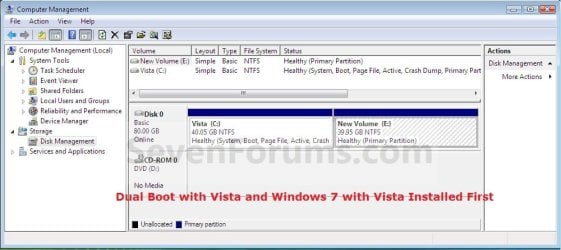
Create_Windows7_Partition_.jpg
B) If Windows 7 was installed first, then create a new partition for Vista (second OS) to be installed on later if you do not already have one to use. (See screenshot below)
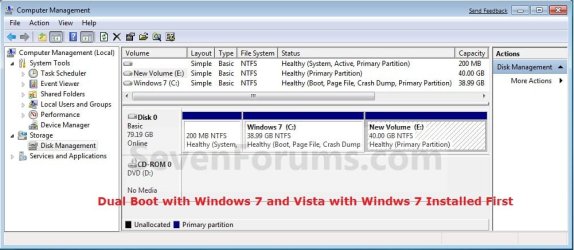
Create_Vista_Partition_.jpg
3. Insert the second OS (Windows 7 or Vista) installation DVD, and restart the computer to start installing it.
A) If Vista was installed first, then select the new partition (step 2A) or drive and do a clean install of Windows 7 (second OS) on it. (See screenshot below)
Windows7_Partition.jpg
B) If Windows 7 was installed first, then select the new partition (step 2B) or drive and do a clean install of Vista (second OS) on it. (See screenshot below)
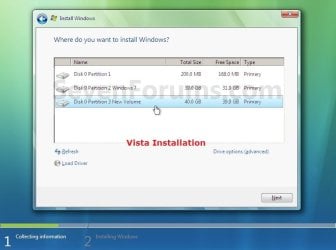
Vista_Partition.jpg
4. When the second OS is finished installing you will now have the option to select which OS to start to in the Windows Boot Manager screen at start up. (See example screenshot at the top of the tutorial)
NOTE: Whatever OS you install last will be the OS listed first in the Windows Boot Manager screen at startup.

5. This is what you will see in Disk Management below if you installed the second OS on another partition on the same hard drive (step 2).
A) If Vista was installed first. (See screenshot below)
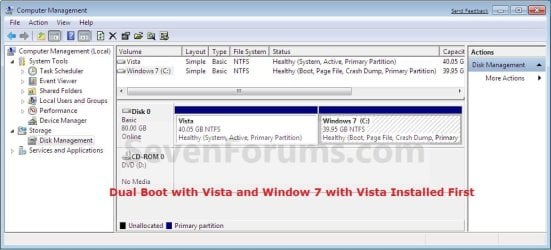
Disk_Management-Windows7.jpg
B) If Windows 7 was installed first. (See screenshot below)
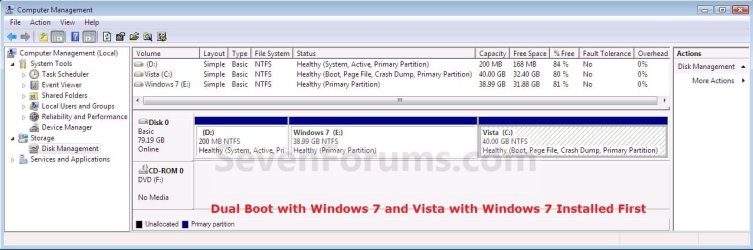
Disk_Management-Vista.jpg
That's it,
Shawn


Last edited:
Thanks. This is exactly what I needed to know.
 

My Computer My Computer

At a glance

Windows 7 Ultimate Edition x64Q9650 E0 @ 4.0 GHz 1.304v2x2GB Corsair Dominator PC2-8500C5D 1100 Mhz ...eVGA/Gigabyte GTX 480's SLI
OS
Windows 7 Ultimate Edition x64
CPU
Q9650 E0 @ 4.0 GHz 1.304v
Motherboard
eVGA 750i FTW!
Memory
2x2GB Corsair Dominator PC2-8500C5D 1100 Mhz 5-5-5-15
Graphics Card(s)
eVGA/Gigabyte GTX 480's SLI
Sound Card
X-Fi XtremeGamer
Monitor(s) Displays
Dell U2410 24" IPS Panel (Beautiful)
Screen Resolution
1900 x 1200 & 1680 x 1050
Hard Drives
WD Caviar Black 640GB AALS x2 (Raid0) + Seagate Pro 500GB External x2
PSU
Enermax Revolution 85+ 1050w PSU
Case
Cooler Master HAF 932 H20
Cooling
Apogee GTZ, Feser 360, D5 Vario, Scythe GT 1850's
Keyboard
Logitech G11
Mouse
Logitech MX-518 / G9
Internet Speed
Fast!
Other Info
Nikon D40 DSLR 18-105mm VR - Nikon 35mm f/1.8 & 55-200mm VR
Bose Companion 3 - 16GB Patriot Xporter USB - ATH AD900's & UR Triple.Fi 10 Custom Phones w/ 32GB iPod Touch 3rd Gen -
Google Nexus One (Phone Rocks!) w/ Kingston 16GB MicroSDHC Class 10 running Amon RA1.7 and Cyan 5.06.1
You're welcome Gunther. :)
 

My Computer My Computer

At a glance

64-bit Windows 11 Pro for WorkstationsIntel i7-8700K OC'd to 5 GHz64 GB (4x16GB) G.SKILL TridentZ RGB DDR4 3600...ASUS ROG-STRIX-GTX1080TI-O11G-GAMING
Computer type
PC/Desktop
Computer Manufacturer/Model Number
Self built custom
OS
64-bit Windows 11 Pro for Workstations
CPU
Intel i7-8700K OC'd to 5 GHz
Motherboard
ASUS ROG Maximus XI Formula Z390
Memory
64 GB (4x16GB) G.SKILL TridentZ RGB DDR4 3600 MHz
Graphics Card(s)
ASUS ROG-STRIX-GTX1080TI-O11G-GAMING
Sound Card
Integrated
Monitor(s) Displays
2 x Samsung Odyssey G7 27"
Screen Resolution
2560x1440
Hard Drives
1TB Samsung 990 PRO M.2,
4TB Samsung 990 PRO PRO M.2,
TerraMaster F8 SSD Plus NAS
PSU
Seasonic Prime Titanium 850W
Case
Thermaltake Core P3
Cooling
Corsair Hydro H115i
Keyboard
Logitech wireless K800
Mouse
Logitech MX Master 4
Internet Speed
2 Gb/s Download and 100 Mb/s Upload
Antivirus
Malwarebyte Anti-Malware Premium
Browser
Google Chrome
Other Info
Logitech Z625 speaker system,
Logitech BRIO 4K Pro webcam,
HP Color LaserJet Pro MFP M477fdn,
APC SMART-UPS RT 1000 XL - SURT1000XLI,
Galaxy S23 Plus phone
can i install W7 on the same Partition..as a Fresh OS
i am using XP

This will not disturb the Data in d other Partitions.

I M Using C for Installing OS
D:\ for Softwares
E:\Movies
F:\Music

kindly help
 

My Computer My Computer

At a glance

W72GB
OS
W7
Memory
2GB
hi

i m sory but my english not so good.There fore i cant understand this tuttorial perfectly want to ask you some questions
i have an asus notebook f3sv.i have one hdd with two partition as C: and D:
In C: allready vista installed.Now i m downloading seven rc .
i want to be sure this tuttorial is fit to may pc:o
1-when i ll finish download i will burn it a blank dvd
2-then i will boot may pc from dvd
3-then i will choice custom installation and i ll choice D: partition for installation seven
4-and ı will have two os
is that all steps correct?

note:i have a recovery partition in C in same time and i dont want to loose it because i have no recovery dvd.if i install seven in C over vista will i loose that recovery partition?
 

My Computer My Computer

At a glance

vistat77002 gb8600M
Computer Manufacturer/Model Number
asus f3sv240dr
OS
vista
CPU
t7700
Memory
2 gb
Graphics Card(s)
8600M
Hard Drives
250 GB
Hello Nonpasaran, and welcome to Seven Forums.

Almost. After your step 1, you will need to create a new partition (Step 2A in tutorial) to install Windows 7 to. You cannot use the D: partition since that is your recovery partition.

Hope this helps,
Shawn
 

My Computer My Computer

At a glance

64-bit Windows 11 Pro for WorkstationsIntel i7-8700K OC'd to 5 GHz64 GB (4x16GB) G.SKILL TridentZ RGB DDR4 3600...ASUS ROG-STRIX-GTX1080TI-O11G-GAMING
Computer type
PC/Desktop
Computer Manufacturer/Model Number
Self built custom
OS
64-bit Windows 11 Pro for Workstations
CPU
Intel i7-8700K OC'd to 5 GHz
Motherboard
ASUS ROG Maximus XI Formula Z390
Memory
64 GB (4x16GB) G.SKILL TridentZ RGB DDR4 3600 MHz
Graphics Card(s)
ASUS ROG-STRIX-GTX1080TI-O11G-GAMING
Sound Card
Integrated
Monitor(s) Displays
2 x Samsung Odyssey G7 27"
Screen Resolution
2560x1440
Hard Drives
1TB Samsung 990 PRO M.2,
4TB Samsung 990 PRO PRO M.2,
TerraMaster F8 SSD Plus NAS
PSU
Seasonic Prime Titanium 850W
Case
Thermaltake Core P3
Cooling
Corsair Hydro H115i
Keyboard
Logitech wireless K800
Mouse
Logitech MX Master 4
Internet Speed
2 Gb/s Download and 100 Mb/s Upload
Antivirus
Malwarebyte Anti-Malware Premium
Browser
Google Chrome
Other Info
Logitech Z625 speaker system,
Logitech BRIO 4K Pro webcam,
HP Color LaserJet Pro MFP M477fdn,
APC SMART-UPS RT 1000 XL - SURT1000XLI,
Galaxy S23 Plus phone

My Computer My Computer

At a glance

64-bit Windows 11 Pro for WorkstationsIntel i7-8700K OC'd to 5 GHz64 GB (4x16GB) G.SKILL TridentZ RGB DDR4 3600...ASUS ROG-STRIX-GTX1080TI-O11G-GAMING
Computer type
PC/Desktop
Computer Manufacturer/Model Number
Self built custom
OS
64-bit Windows 11 Pro for Workstations
CPU
Intel i7-8700K OC'd to 5 GHz
Motherboard
ASUS ROG Maximus XI Formula Z390
Memory
64 GB (4x16GB) G.SKILL TridentZ RGB DDR4 3600 MHz
Graphics Card(s)
ASUS ROG-STRIX-GTX1080TI-O11G-GAMING
Sound Card
Integrated
Monitor(s) Displays
2 x Samsung Odyssey G7 27"
Screen Resolution
2560x1440
Hard Drives
1TB Samsung 990 PRO M.2,
4TB Samsung 990 PRO PRO M.2,
TerraMaster F8 SSD Plus NAS
PSU
Seasonic Prime Titanium 850W
Case
Thermaltake Core P3
Cooling
Corsair Hydro H115i
Keyboard
Logitech wireless K800
Mouse
Logitech MX Master 4
Internet Speed
2 Gb/s Download and 100 Mb/s Upload
Antivirus
Malwarebyte Anti-Malware Premium
Browser
Google Chrome
Other Info
Logitech Z625 speaker system,
Logitech BRIO 4K Pro webcam,
HP Color LaserJet Pro MFP M477fdn,
APC SMART-UPS RT 1000 XL - SURT1000XLI,
Galaxy S23 Plus phone
Hello Nonpasaran, and welcome to Seven Forums.

Almost. After your step 1, you will need to create a new partition (Step 2A in tutorial) to install Windows 7 to. You cannot use the D: partition since that is your recovery partition.

Hope this helps,
Shawn
hi shawn
i m sory but i can t understand:o
you said you have to create a new partition but where?
in C which one still installed vista? and how? is there any tutorial about it?
this is my disk. its in fact same disc D is only a partition.i have just one hdd
ekranalntsdmx.jpg

ekranalntswpc.jpg
 

My Computer My Computer

At a glance

vistat77002 gb8600M
Computer Manufacturer/Model Number
asus f3sv240dr
OS
vista
CPU
t7700
Memory
2 gb
Graphics Card(s)
8600M
Hard Drives
250 GB

My Computer My Computer

At a glance

64-bit Windows 11 Pro for WorkstationsIntel i7-8700K OC'd to 5 GHz64 GB (4x16GB) G.SKILL TridentZ RGB DDR4 3600...ASUS ROG-STRIX-GTX1080TI-O11G-GAMING
Computer type
PC/Desktop
Computer Manufacturer/Model Number
Self built custom
OS
64-bit Windows 11 Pro for Workstations
CPU
Intel i7-8700K OC'd to 5 GHz
Motherboard
ASUS ROG Maximus XI Formula Z390
Memory
64 GB (4x16GB) G.SKILL TridentZ RGB DDR4 3600 MHz
Graphics Card(s)
ASUS ROG-STRIX-GTX1080TI-O11G-GAMING
Sound Card
Integrated
Monitor(s) Displays
2 x Samsung Odyssey G7 27"
Screen Resolution
2560x1440
Hard Drives
1TB Samsung 990 PRO M.2,
4TB Samsung 990 PRO PRO M.2,
TerraMaster F8 SSD Plus NAS
PSU
Seasonic Prime Titanium 850W
Case
Thermaltake Core P3
Cooling
Corsair Hydro H115i
Keyboard
Logitech wireless K800
Mouse
Logitech MX Master 4
Internet Speed
2 Gb/s Download and 100 Mb/s Upload
Antivirus
Malwarebyte Anti-Malware Premium
Browser
Google Chrome
Other Info
Logitech Z625 speaker system,
Logitech BRIO 4K Pro webcam,
HP Color LaserJet Pro MFP M477fdn,
APC SMART-UPS RT 1000 XL - SURT1000XLI,
Galaxy S23 Plus phone
Last edited:

My Computers My Computers

  • At a glance

    7 X64i5 84002x8gb 3200mhz
    Computer type
    PC/Desktop
    OS
    7 X64
    CPU
    i5 8400
    Motherboard
    gigabyte b365m ds3h
    Memory
    2x8gb 3200mhz
    Hard Drives
    various
    PSU
    pure power 11 400w cm
    Case
    Coolermaster
    Cooling
    cryorig m9i
  • At a glance

    7x64g54008gb ddr4 2400
    Computer type
    PC/Desktop
    OS
    7x64
    CPU
    g5400
    Motherboard
    ga b365m ds3h
    Memory
    8gb ddr4 2400
    PSU
    xfx pro 450w
thanks shawn
 

My Computer My Computer

At a glance

vistat77002 gb8600M
Computer Manufacturer/Model Number
asus f3sv240dr
OS
vista
CPU
t7700
Memory
2 gb
Graphics Card(s)
8600M
Hard Drives
250 GB
You're welcome Nonpasaran.
 

My Computer My Computer

At a glance

64-bit Windows 11 Pro for WorkstationsIntel i7-8700K OC'd to 5 GHz64 GB (4x16GB) G.SKILL TridentZ RGB DDR4 3600...ASUS ROG-STRIX-GTX1080TI-O11G-GAMING
Computer type
PC/Desktop
Computer Manufacturer/Model Number
Self built custom
OS
64-bit Windows 11 Pro for Workstations
CPU
Intel i7-8700K OC'd to 5 GHz
Motherboard
ASUS ROG Maximus XI Formula Z390
Memory
64 GB (4x16GB) G.SKILL TridentZ RGB DDR4 3600 MHz
Graphics Card(s)
ASUS ROG-STRIX-GTX1080TI-O11G-GAMING
Sound Card
Integrated
Monitor(s) Displays
2 x Samsung Odyssey G7 27"
Screen Resolution
2560x1440
Hard Drives
1TB Samsung 990 PRO M.2,
4TB Samsung 990 PRO PRO M.2,
TerraMaster F8 SSD Plus NAS
PSU
Seasonic Prime Titanium 850W
Case
Thermaltake Core P3
Cooling
Corsair Hydro H115i
Keyboard
Logitech wireless K800
Mouse
Logitech MX Master 4
Internet Speed
2 Gb/s Download and 100 Mb/s Upload
Antivirus
Malwarebyte Anti-Malware Premium
Browser
Google Chrome
Other Info
Logitech Z625 speaker system,
Logitech BRIO 4K Pro webcam,
HP Color LaserJet Pro MFP M477fdn,
APC SMART-UPS RT 1000 XL - SURT1000XLI,
Galaxy S23 Plus phone

My Computer My Computer

At a glance

vistat77002 gb8600M
Computer Manufacturer/Model Number
asus f3sv240dr
OS
vista
CPU
t7700
Memory
2 gb
Graphics Card(s)
8600M
Hard Drives
250 GB
No problem.

D: is your OEM Vista recovery partition. If you use it, then you will not be able to restore your OEM Vista back to a factory default condition with it. :(
 

My Computer My Computer

At a glance

64-bit Windows 11 Pro for WorkstationsIntel i7-8700K OC'd to 5 GHz64 GB (4x16GB) G.SKILL TridentZ RGB DDR4 3600...ASUS ROG-STRIX-GTX1080TI-O11G-GAMING
Computer type
PC/Desktop
Computer Manufacturer/Model Number
Self built custom
OS
64-bit Windows 11 Pro for Workstations
CPU
Intel i7-8700K OC'd to 5 GHz
Motherboard
ASUS ROG Maximus XI Formula Z390
Memory
64 GB (4x16GB) G.SKILL TridentZ RGB DDR4 3600 MHz
Graphics Card(s)
ASUS ROG-STRIX-GTX1080TI-O11G-GAMING
Sound Card
Integrated
Monitor(s) Displays
2 x Samsung Odyssey G7 27"
Screen Resolution
2560x1440
Hard Drives
1TB Samsung 990 PRO M.2,
4TB Samsung 990 PRO PRO M.2,
TerraMaster F8 SSD Plus NAS
PSU
Seasonic Prime Titanium 850W
Case
Thermaltake Core P3
Cooling
Corsair Hydro H115i
Keyboard
Logitech wireless K800
Mouse
Logitech MX Master 4
Internet Speed
2 Gb/s Download and 100 Mb/s Upload
Antivirus
Malwarebyte Anti-Malware Premium
Browser
Google Chrome
Other Info
Logitech Z625 speaker system,
Logitech BRIO 4K Pro webcam,
HP Color LaserJet Pro MFP M477fdn,
APC SMART-UPS RT 1000 XL - SURT1000XLI,
Galaxy S23 Plus phone
No problem.

D: is your OEM Vista recovery partition. If you use it, then you will not be able to restore your OEM Vista back to a factory default condition with it. :(
ok now i understand:)
but are you sure?
because you can see in first picture there is a partition about 6 Gb i know it s the recovery partition is it correct? and i always know that partition in included C. but i guess i m wrong:)
 

My Computer My Computer

At a glance

vistat77002 gb8600M
Computer Manufacturer/Model Number
asus f3sv240dr
OS
vista
CPU
t7700
Memory
2 gb
Graphics Card(s)
8600M
Hard Drives
250 GB
Sorry Nonpasarn. I meant to say that your first partition is the OEM recovery partition instead. :o

If you do not have anything on the D: drive that you want to keep, then yes you can select it during the installation of Windows 7, format it, and finish installing Windows 7 on it.
 

My Computer My Computer

At a glance

64-bit Windows 11 Pro for WorkstationsIntel i7-8700K OC'd to 5 GHz64 GB (4x16GB) G.SKILL TridentZ RGB DDR4 3600...ASUS ROG-STRIX-GTX1080TI-O11G-GAMING
Computer type
PC/Desktop
Computer Manufacturer/Model Number
Self built custom
OS
64-bit Windows 11 Pro for Workstations
CPU
Intel i7-8700K OC'd to 5 GHz
Motherboard
ASUS ROG Maximus XI Formula Z390
Memory
64 GB (4x16GB) G.SKILL TridentZ RGB DDR4 3600 MHz
Graphics Card(s)
ASUS ROG-STRIX-GTX1080TI-O11G-GAMING
Sound Card
Integrated
Monitor(s) Displays
2 x Samsung Odyssey G7 27"
Screen Resolution
2560x1440
Hard Drives
1TB Samsung 990 PRO M.2,
4TB Samsung 990 PRO PRO M.2,
TerraMaster F8 SSD Plus NAS
PSU
Seasonic Prime Titanium 850W
Case
Thermaltake Core P3
Cooling
Corsair Hydro H115i
Keyboard
Logitech wireless K800
Mouse
Logitech MX Master 4
Internet Speed
2 Gb/s Download and 100 Mb/s Upload
Antivirus
Malwarebyte Anti-Malware Premium
Browser
Google Chrome
Other Info
Logitech Z625 speaker system,
Logitech BRIO 4K Pro webcam,
HP Color LaserJet Pro MFP M477fdn,
APC SMART-UPS RT 1000 XL - SURT1000XLI,
Galaxy S23 Plus phone
Sorry Nonpasarn. I meant to say that your first partition is the OEM recovery partition instead. :o

If you do not have anything on the D: drive that you want to keep, then yes you can select it during the installation of Windows 7, format it, and finish installing Windows 7 on it.
ok great thanks shawn at least we deal:D
 

My Computer My Computer

At a glance

vistat77002 gb8600M
Computer Manufacturer/Model Number
asus f3sv240dr
OS
vista
CPU
t7700
Memory
2 gb
Graphics Card(s)
8600M
Hard Drives
250 GB
That's great news Nonpasaran. I'm happy to hear that you got Windows 7 installed in a dual boot with Vista. :)
 

My Computer My Computer

At a glance

64-bit Windows 11 Pro for WorkstationsIntel i7-8700K OC'd to 5 GHz64 GB (4x16GB) G.SKILL TridentZ RGB DDR4 3600...ASUS ROG-STRIX-GTX1080TI-O11G-GAMING
Computer type
PC/Desktop
Computer Manufacturer/Model Number
Self built custom
OS
64-bit Windows 11 Pro for Workstations
CPU
Intel i7-8700K OC'd to 5 GHz
Motherboard
ASUS ROG Maximus XI Formula Z390
Memory
64 GB (4x16GB) G.SKILL TridentZ RGB DDR4 3600 MHz
Graphics Card(s)
ASUS ROG-STRIX-GTX1080TI-O11G-GAMING
Sound Card
Integrated
Monitor(s) Displays
2 x Samsung Odyssey G7 27"
Screen Resolution
2560x1440
Hard Drives
1TB Samsung 990 PRO M.2,
4TB Samsung 990 PRO PRO M.2,
TerraMaster F8 SSD Plus NAS
PSU
Seasonic Prime Titanium 850W
Case
Thermaltake Core P3
Cooling
Corsair Hydro H115i
Keyboard
Logitech wireless K800
Mouse
Logitech MX Master 4
Internet Speed
2 Gb/s Download and 100 Mb/s Upload
Antivirus
Malwarebyte Anti-Malware Premium
Browser
Google Chrome
Other Info
Logitech Z625 speaker system,
Logitech BRIO 4K Pro webcam,
HP Color LaserJet Pro MFP M477fdn,
APC SMART-UPS RT 1000 XL - SURT1000XLI,
Galaxy S23 Plus phone
Thanks for a very clear set of instructions which enabled me to instal Windows 7 first time!! This is probably a silly question but is it possible to switch from one operating system to another without having to reboot each time? Once again many thanks for an excellent tutorial. Roy
 

My Computer My Computer

At a glance

Winows XP Media
OS
Winows XP Media
Back
Top