
You are using an out of date browser. It may not display this or other websites correctly.
You should upgrade or use an alternative browser.
You should upgrade or use an alternative browser.
hard disk partition
- Thread starter veerreddy
- Start date
HELLO VEERREDDY,
WHICH OPERATINGSYSTEM ARE YOU USED?
FOR WINDOWS 7 AND VISTA CHECKOUT THIS LINKS
http://pcsupport.about.com/od/windows7/ht/partition-hard-drive-windows-7.htm
http://www.howtogeek.com/howto/windows-vista/resize-a-partition-for-free-in-windows-vista/
WHICH OPERATINGSYSTEM ARE YOU USED?
FOR WINDOWS 7 AND VISTA CHECKOUT THIS LINKS
http://pcsupport.about.com/od/windows7/ht/partition-hard-drive-windows-7.htm
http://www.howtogeek.com/howto/windows-vista/resize-a-partition-for-free-in-windows-vista/
Last edited:
My Computer
- OS
- windows 7 Ultimate
- Motherboard
- GIGABIT
- Graphics Card(s)
- RAIDON
- Monitor(s) Displays
- BENQ
- Hard Drives
- SEAGATE
- Mouse
- ZENITH

Veerreddy,
Please see this:
http://www.sevenforums.com/tutorials/2670-partition-volume-extend.html
Regards,
Golden
Please see this:
http://www.sevenforums.com/tutorials/2670-partition-volume-extend.html
Regards,
Golden
My Computer
- Computer type
- PC/Desktop
- Computer Manufacturer/Model Number
- Golden Mk. I.4
- OS
- Windows 10 Pro x64 ; Xubuntu x64
- CPU
- Intel i7 860 @ 2.80 GHz O/C'ed to 4.0GHz
- Motherboard
- Gigabyte P55A-UD3R Rev.1. Award BIOS F13
- Memory
- 16GB Corsair Vengance DDR3 @ 661 MHz Dual Channel (9-9-9-24)
- Graphics Card(s)
- EVGA NVidia GTX 560 1024MB
- Sound Card
- Realtek Integrated
- Monitor(s) Displays
- Dual Samsung SyncMaster 2494HS
- Screen Resolution
- 1920*1080 and 1920*1080
- Hard Drives
- 1*Samsung 840 EVO 120GB SSD;
1*OCZ Vertex 2 60GB SSD;
2*Samsung F3 SpinPoint 1TB in RAID0;
1*Samsung F1 SpinPoint 1TB;
2*Western Digital 1TB External USB 3.0
1*Western Digital 500GB External USB 3.0
1*Seagate 500GB External USB 2.0
- PSU
- Thermaltake ToughPower QFan 750W
- Case
- Thermaltake Element S VK60001W2Z
- Cooling
- Corsair H60 Water Cooling, 2*230mm and 2*80mm case fans
- Keyboard
- Logitech G110
- Mouse
- Logitech MX518

- Local time
- 5:01 PM
- Messages
- 1,346
can anyone help please....presently i am having only one drive which is having 900gb while doing partition i am not able to get extend partition option
A free utility that works very well for extending a partition is Partition Wizard. They have tutorials on their site, including videos, which can be very beneficial in understanding the process. I suggest you visit the following link where you can download the program and review the information about extending a partition;
http://www.partitionwizard.com/free-partition-manager.html
When visiting the site please read the selection highlighted in the image before proceeding with a download;
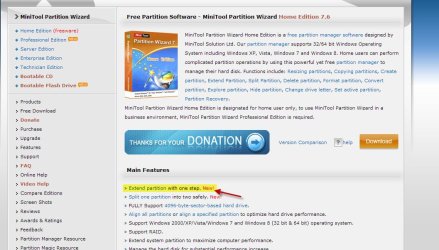
Hope this helps.
My Computer
- Computer type
- PC/Desktop
- Computer Manufacturer/Model Number
- Custom Built
- OS
- Windows 7 Professional x64
- CPU
- Intel i5 quad processor
- Motherboard
- DP67BG
- Memory
- 16 GB
- Graphics Card(s)
- Radeon HD 5770
- Sound Card
- Realtek High Definition Audio
- Monitor(s) Displays
- Samsung SyncMaster
- Screen Resolution
- 1920X1080
- Hard Drives
- WD 2TB (SATA Internal)
WD 1TB (USB External)
- PSU
- Corsair GS800
- Case
- Tower (Generic)
- Cooling
- 3 Internal Fans
- Keyboard
- MS Wireless
- Mouse
- MS Optical Wired
- Internet Speed
- 54 mbps
- Antivirus
- Emsisoft
- Browser
- IE-Version 9, Palemoon-Version 24.2.0
If you go the PW route, read this:
http://www.sevenforums.com/tutorials/93322-partition-wizard-use-bootable-cd.html
http://www.sevenforums.com/tutorials/93322-partition-wizard-use-bootable-cd.html
My Computer
- Computer type
- PC/Desktop
- Computer Manufacturer/Model Number
- Golden Mk. I.4
- OS
- Windows 10 Pro x64 ; Xubuntu x64
- CPU
- Intel i7 860 @ 2.80 GHz O/C'ed to 4.0GHz
- Motherboard
- Gigabyte P55A-UD3R Rev.1. Award BIOS F13
- Memory
- 16GB Corsair Vengance DDR3 @ 661 MHz Dual Channel (9-9-9-24)
- Graphics Card(s)
- EVGA NVidia GTX 560 1024MB
- Sound Card
- Realtek Integrated
- Monitor(s) Displays
- Dual Samsung SyncMaster 2494HS
- Screen Resolution
- 1920*1080 and 1920*1080
- Hard Drives
- 1*Samsung 840 EVO 120GB SSD;
1*OCZ Vertex 2 60GB SSD;
2*Samsung F3 SpinPoint 1TB in RAID0;
1*Samsung F1 SpinPoint 1TB;
2*Western Digital 1TB External USB 3.0
1*Western Digital 500GB External USB 3.0
1*Seagate 500GB External USB 2.0
- PSU
- Thermaltake ToughPower QFan 750W
- Case
- Thermaltake Element S VK60001W2Z
- Cooling
- Corsair H60 Water Cooling, 2*230mm and 2*80mm case fans
- Keyboard
- Logitech G110
- Mouse
- Logitech MX518
- Local time
- 5:01 PM
- Messages
- 1,346
hai george,
when i was trying download its unable to download
See image below;
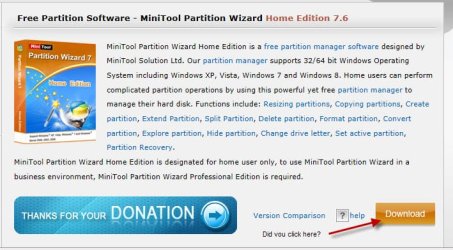
What happened when you clicked on the "Download" selection?
My Computer
- Computer type
- PC/Desktop
- Computer Manufacturer/Model Number
- Custom Built
- OS
- Windows 7 Professional x64
- CPU
- Intel i5 quad processor
- Motherboard
- DP67BG
- Memory
- 16 GB
- Graphics Card(s)
- Radeon HD 5770
- Sound Card
- Realtek High Definition Audio
- Monitor(s) Displays
- Samsung SyncMaster
- Screen Resolution
- 1920X1080
- Hard Drives
- WD 2TB (SATA Internal)
WD 1TB (USB External)
- PSU
- Corsair GS800
- Case
- Tower (Generic)
- Cooling
- 3 Internal Fans
- Keyboard
- MS Wireless
- Mouse
- MS Optical Wired
- Internet Speed
- 54 mbps
- Antivirus
- Emsisoft
- Browser
- IE-Version 9, Palemoon-Version 24.2.0

- Local time
- 4:01 PM
- Messages
- 50,634
Please post back a screenshot of your maximized Disk Management drive map and listings:
1. Type Disk Management in Start Search box.
2. Open Disk Mgmt. window and maximize it.
3. Type Snipping Tool in Start Search box.
4. Open Snipping Tool, choose Rectangular Snip, click New, draw a box around full drive map and all listings.
5, Save Snip, attach using paper clip in Reply Box.
Tell us what is on each partition and what you want to do and we will give you the steps. Chances are it can be done in Disk Mgmt.
1. Type Disk Management in Start Search box.
2. Open Disk Mgmt. window and maximize it.
3. Type Snipping Tool in Start Search box.
4. Open Snipping Tool, choose Rectangular Snip, click New, draw a box around full drive map and all listings.
5, Save Snip, attach using paper clip in Reply Box.
Tell us what is on each partition and what you want to do and we will give you the steps. Chances are it can be done in Disk Mgmt.
Similar threads
- Replies
- 2
- Views
- 3K
- Replies
- 5
- Views
- 4K
- Replies
- 13
- Views
- 1K

- Replies
- 1
- Views
- 1K
