Hello all,
Need some tips and tricks to install a new Seagate Sata hard drive.
This is a 1 TB drive and it will install internally.
I have a 500 gig Seagate Sata installed but I need more storage.
I'm using Windows 7 RC1 X64
My plan is to make a restore point, shut the system down, let her sit for a few minutes and then install the new drive in the Sata 2 connection and then power up.
Any tips/suggestion are welcome.
Regards,
Adrian
Need some tips and tricks to install a new Seagate Sata hard drive.
This is a 1 TB drive and it will install internally.
I have a 500 gig Seagate Sata installed but I need more storage.
I'm using Windows 7 RC1 X64
My plan is to make a restore point, shut the system down, let her sit for a few minutes and then install the new drive in the Sata 2 connection and then power up.
Any tips/suggestion are welcome.
Regards,
Adrian
My Computer
- Computer Manufacturer/Model Number
- Custom Build
- OS
- Windows 7 7600 1 X64
- CPU
- AMD PHENOM II X 550 PROCESSOR 3.1 ghz
- Motherboard
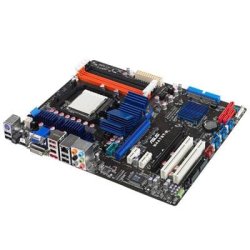
- ASUS M4A78-TE
- Memory
- Corsair 4 gig ddr 3
- Graphics Card(s)
- ati radeon 3300
- Sound Card
- ati hd
- Monitor(s) Displays
- syncmaster 2033sw
- Screen Resolution
- 1600X900 60 hz refresh
- Hard Drives
- twin_seagates SATA's 1 TB & 500 Gig, hitachi_slimline 160 gig
- PSU
- antec_550 watt
- Case
- cooler master GLite
- Cooling
- stock_heat sink
- Internet Speed
- 20mbs up/ 1.5mbs down
- Other Info
- favorite child "stewie"
favorite dog "brian"


 Well done Antman, much joy!!!