
Hard drive is starting to fail

0080900

New member
Member
Local time
1:46 AM
Messages
53
I've exprienced random numerous shutdowns on this laptop over the past two days.

I ran a check disk and it still randomly shuts off on me.

I think my hdd may be failing me now after all these years.

I have no backup solutions such as an external right now, so I really can't backup my hdd and replace it.

What should I do?

These are my system specs
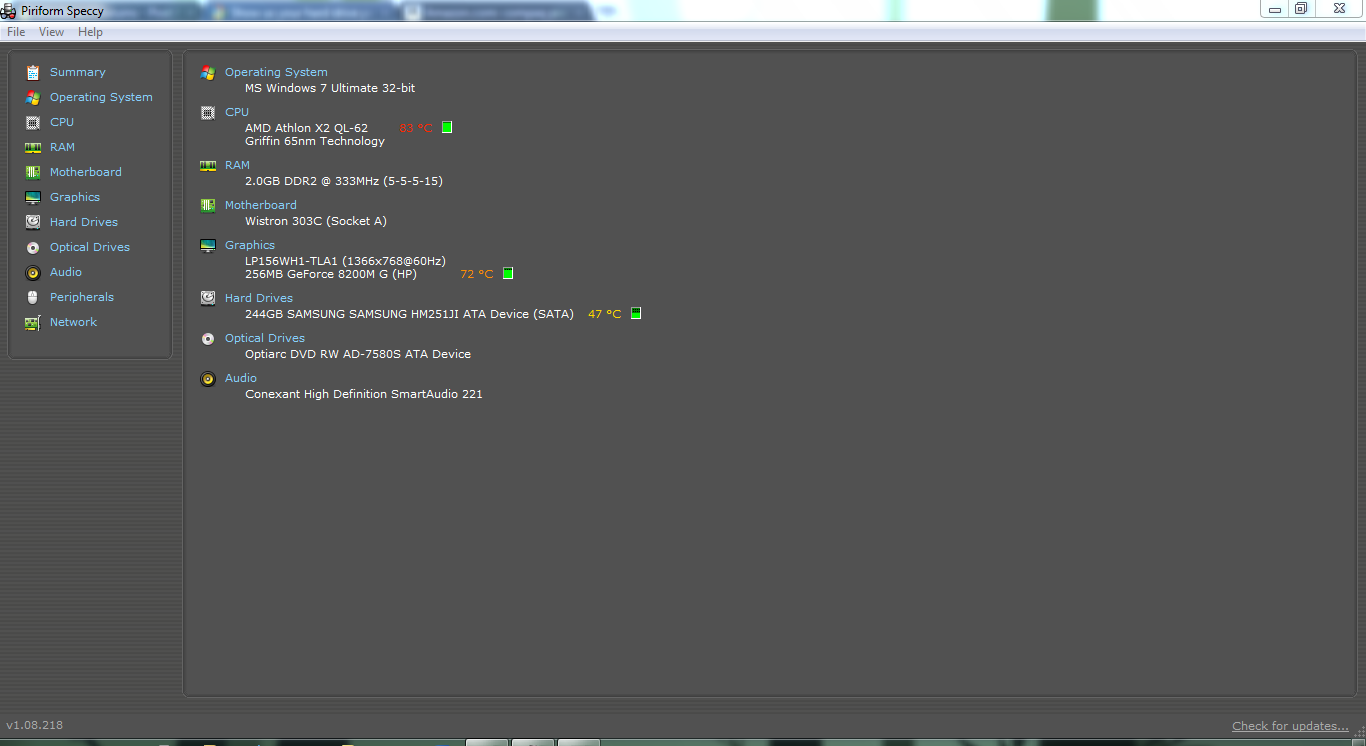
CkU8E.png
 

My Computer My Computer

Computer Manufacturer/Model Number
Compaq Presario CQ60 Notebook PC
OS
Windows 7 Ultimate
CPU
Processor AMD Athlon Dual-Core QL-62, 2000 Mhz, 2 Core(s), 2
Motherboard
Wistron 303C (Socket A)
Memory
2.0GB DDR2
Graphics Card(s)
NVIDIA GeForce 8200M G
Sound Card
Conexant High Definition SmartAudio 221
Screen Resolution
1366 x 768
Hard Drives
232GB SAMSUNG HM251JI ATA Device
Keyboard
tandard PS/2 Keyboard
Mouse
Synaptics PS/2 Port TouchPad
no backup solution poses rather a problem :/
I've had three hard drives fail on me (well, the third is going to happen any day soon ;P ). The first two were because bad sectors appeared all over them, the third sounds awfully clicky with grinding noises. The less you use it, the less risk of it dying sooner. Windows kept telling me there were serious problems with it and instant shutdowns occured in quicker and quicker succession. Try to get your data out of there as soon as possible, whether online backup or external hard drive. also, if you can, buy a small capacity hard drive to replace it with to tide you over until you would be in a position to buy a replacement.
 

My Computer My Computer

Computer type
PC/Desktop
Computer Manufacturer/Model Number
HP Pavilion p6565uk
OS
Windows 7 Home Premium 64bit
CPU
AMD Phenom II X6 1035T @2.6GHz (hexacore) (=15.6GHz)
Motherboard
FOXCONN (2AA9)
Memory
6GB DDR3-1333 (running at 1066)
Graphics Card(s)
NVIDIA/MSI GeForce GTX 770 (2GB)
Sound Card
Realtek HD Audio (with 5.1 surround sound always on)
Monitor(s) Displays
HP 2311x (secondary-workspace), Sharp LL-T1620-H (primary)
Screen Resolution
1924x1080
Hard Drives
480GB Crucial M500 SSD
1TB internal WD Caviar Black
3TB Seagate Barracude 7200rpm (for media storage)
4TB Seagate Desktop drive (mirrored backup)
2TB Apple AirPort Time Capsule
1TB Seagate FreeAgent Desk
500GB Seagate External Desktop Drive
PSU
XCase Dolphin, 700W
Case
Stock HP one that came with it, mid-size ATX
Cooling
Stock fans, they're fairly quiet.
Keyboard
Microsoft Wireless Keyboard 2000+ HP Media Centre Remote
Mouse
Microsoft Wireless Mouse 2000
Internet Speed
20 Mbps down, 50 Mbps up
Antivirus
MSE
Browser
Chrome Beta
Other Info
Also:
- 13" Apple MacBook Air, 2013, i7 @ 1.7GHz, 8GB DDR3, 256GB SSD
- HP Deskjet 3050A
- Two HP ZV5000 laptops (the better of the two recently broke)
- A Compaq Evo D310 (has 2GB RAM and a 2.53GHz P4 but is curiously extremely slow)
- A desk fan - this weather is warm ;)
- A fair few retro consoles
- Too many cables behind the desk, probably a fire hazard.
I'd definitely find a quick solution to backing up if I were you. It may sound a little n00bish, but you could go to Samsung's website and make sure that the current driver for the hard-drive is the latest. If it is, try reinstalling it. And does the laptop just switch off? Or undergo proper shutdown? Or bluescreen? What happens? If it just switches off instantly it could be overheating and it's you fan. My old laptop was completely clogged up with dust and just needed a little hoovering at the vents. ;)
 

My Computer My Computer

Computer Manufacturer/Model Number
HP G56
OS
Windows 7 Home Premium 64bit
CPU
3 GB
Memory
3 GB
Graphics Card(s)
2 Mobile Intel 4 Series Express Chipset Family
Screen Resolution
1366 x 768
Hard Drives
250 GB
Mouse
Microsoft Explorer Mini Mouse
Internet Speed
5 MBPS Download
I'd definitely find a quick solution to backing up if I were you. It may sound a little n00bish, but you could go to Samsung's website and make sure that the current driver for the hard-drive is the latest. If it is, try reinstalling it. And does the laptop just switch off? Or undergo proper shutdown? Or bluescreen? What happens? If it just switches off instantly it could be overheating and it's you fan. My old laptop was completely clogged up with dust and just needed a little hoovering at the vents. ;)

I'm pretty sure it's the hdd dying on me, because Windows told me something about file system errors on this hdd.
 

My Computer My Computer

Computer Manufacturer/Model Number
Compaq Presario CQ60 Notebook PC
OS
Windows 7 Ultimate
CPU
Processor AMD Athlon Dual-Core QL-62, 2000 Mhz, 2 Core(s), 2
Motherboard
Wistron 303C (Socket A)
Memory
2.0GB DDR2
Graphics Card(s)
NVIDIA GeForce 8200M G
Sound Card
Conexant High Definition SmartAudio 221
Screen Resolution
1366 x 768
Hard Drives
232GB SAMSUNG HM251JI ATA Device
Keyboard
tandard PS/2 Keyboard
Mouse
Synaptics PS/2 Port TouchPad
Oh, and it won't shut off randomly on me if I have the power supply plugged in. So I guess it can't live w/o it's power supply without shutting down.
 

My Computer My Computer

Computer Manufacturer/Model Number
Compaq Presario CQ60 Notebook PC
OS
Windows 7 Ultimate
CPU
Processor AMD Athlon Dual-Core QL-62, 2000 Mhz, 2 Core(s), 2
Motherboard
Wistron 303C (Socket A)
Memory
2.0GB DDR2
Graphics Card(s)
NVIDIA GeForce 8200M G
Sound Card
Conexant High Definition SmartAudio 221
Screen Resolution
1366 x 768
Hard Drives
232GB SAMSUNG HM251JI ATA Device
Keyboard
tandard PS/2 Keyboard
Mouse
Synaptics PS/2 Port TouchPad
I've exprienced random numerous shutdowns on this laptop over the past two days.

I ran a check disk and it still randomly shuts off on me.
How does it shut off?? with a blue screen? like a normal shut down? just die from one second to the next?


What should I do?

Tell me us more detail what the problem is so we have a chance to help you


Oh, and it won't shut off randomly on me if I have the power supply plugged in. So I guess it can't live w/o it's power supply without shutting down.
HUH?? are you trying to say that when the mains lead is connected that it works?
That would suggest to me that the battery is at fault
 

My Computer My Computer

Computer Manufacturer/Model Number
Something I threw together
OS
Windows 7 Ultimate x64
CPU
Intel Core i7-2600K
Motherboard
Asus P8P67
Memory
16 GB G Skill F3-10666 CL9D-4GBRL
Graphics Card(s)
ATI Radeon HD 6870
Sound Card
ATI Radeon HDMI / Realtek ALC892
Monitor(s) Displays
2 x 22" standard monitors / LG32LC56v TV to watch films
Screen Resolution
1920 x1080
Hard Drives
2 x OCZ Vertex2 111.79GB
3 x Samsung103SJ
1 x Samsung103UJ
1 x WD3200BEVT
1 x Hitachi5K320-160
PSU
Thermaltake Toughpower Cable Management 750W
Case
Antec 300
Cooling
Noctua NH-U12P SE2 and 5 120mm Case fans
Keyboard
Microsoft Comfort Curve Keyboard 2000
Mouse
Hama M3110 / Logitech M305
Internet Speed
16000
Other Info
I have also used Fedora, Suse, Ubuntu Linux
And all other Windows from 95 to date except ME
It sounds like your battery is bad and shutting off the laptop and CAUSING the errors on the drive from just shutting off.
 

My Computer My Computer

Computer Manufacturer/Model Number
HAL-9000
OS
Windows 7 Ultimate 64bit
CPU
Intel i7 3770K
Motherboard
Asus Sabertooth Z77
Memory
16GB DDR3 1333 Corsair XMS3
Graphics Card(s)
XFX HD6950 2GB EyeFinity
Sound Card
Logitech G35 & Sennheiser PC135 & VIA HD
Monitor(s) Displays
23" HP 2310e, 23" Samsung B2230, 21.5" Viewsonic
Screen Resolution
5760x1080
Hard Drives
16TB of Storage
128GB & 256GB Crucial M4 SSD's, 2X 1TB WD Black, 3x 2TB WD, 3x 2TB Samsung F4, 1.5TB Seagate, WD 500GB,
PSU
Antec True Power New 650watt
Case
Cooler Master HAF-932
Cooling
Corsair H60 Hydro Cooler, 3x 230mm Fans, 2x120mm Fan
Keyboard
Logitech G15 and G13
Mouse
Logitech G700 Gaming Mouse
Internet Speed
50/10 Mbit
Other Info
Speakers : Alesis M1 Active Mk2 Studio Monitors , APC RS 1200 UPS, HP 4500DN Color Laser, HP P1006 mono Laser, Kodak 8500 Dye-Sub, Epson 1280 inkjet, Epson Worforce 610 MFC
I've exprienced random numerous shutdowns on this laptop over the past two days.

I ran a check disk and it still randomly shuts off on me.
How does it shut off?? with a blue screen? like a normal shut down? just die from one second to the next?


What should I do?

Tell me us more detail what the problem is so we have a chance to help you


Oh, and it won't shut off randomly on me if I have the power supply plugged in. So I guess it can't live w/o it's power supply without shutting down.
HUH?? are you trying to say that when the mains lead is connected that it works?
That would suggest to me that the battery is at fault

Like a normal shut down, but with a black screen and doesn't say windows is shutting down or anything. Just a black screen and there it's off

I think the battery is fine cause it recharges and discharges, lasts a while on battery too, but only for a few seconds then it shuts off again if I disconnect the power supply.
 

My Computer My Computer

Computer Manufacturer/Model Number
Compaq Presario CQ60 Notebook PC
OS
Windows 7 Ultimate
CPU
Processor AMD Athlon Dual-Core QL-62, 2000 Mhz, 2 Core(s), 2
Motherboard
Wistron 303C (Socket A)
Memory
2.0GB DDR2
Graphics Card(s)
NVIDIA GeForce 8200M G
Sound Card
Conexant High Definition SmartAudio 221
Screen Resolution
1366 x 768
Hard Drives
232GB SAMSUNG HM251JI ATA Device
Keyboard
tandard PS/2 Keyboard
Mouse
Synaptics PS/2 Port TouchPad
I think the battery is fine cause it recharges and discharges, lasts a while on battery too, but only for a few seconds then it shuts off again if I disconnect the power supply.

lasts a while on battery too, but only for a few seconds??

How old is the battery/laptop?
If it works fine on mains lead then there is no problem with the laptop
 

My Computer My Computer

Computer Manufacturer/Model Number
Something I threw together
OS
Windows 7 Ultimate x64
CPU
Intel Core i7-2600K
Motherboard
Asus P8P67
Memory
16 GB G Skill F3-10666 CL9D-4GBRL
Graphics Card(s)
ATI Radeon HD 6870
Sound Card
ATI Radeon HDMI / Realtek ALC892
Monitor(s) Displays
2 x 22" standard monitors / LG32LC56v TV to watch films
Screen Resolution
1920 x1080
Hard Drives
2 x OCZ Vertex2 111.79GB
3 x Samsung103SJ
1 x Samsung103UJ
1 x WD3200BEVT
1 x Hitachi5K320-160
PSU
Thermaltake Toughpower Cable Management 750W
Case
Antec 300
Cooling
Noctua NH-U12P SE2 and 5 120mm Case fans
Keyboard
Microsoft Comfort Curve Keyboard 2000
Mouse
Hama M3110 / Logitech M305
Internet Speed
16000
Other Info
I have also used Fedora, Suse, Ubuntu Linux
And all other Windows from 95 to date except ME
Go here; HP Battery Health Center and download the HP Battery Check
It should be compatible with your laptop and tell you if the battery is ok or not
 

My Computer My Computer

Computer Manufacturer/Model Number
Something I threw together
OS
Windows 7 Ultimate x64
CPU
Intel Core i7-2600K
Motherboard
Asus P8P67
Memory
16 GB G Skill F3-10666 CL9D-4GBRL
Graphics Card(s)
ATI Radeon HD 6870
Sound Card
ATI Radeon HDMI / Realtek ALC892
Monitor(s) Displays
2 x 22" standard monitors / LG32LC56v TV to watch films
Screen Resolution
1920 x1080
Hard Drives
2 x OCZ Vertex2 111.79GB
3 x Samsung103SJ
1 x Samsung103UJ
1 x WD3200BEVT
1 x Hitachi5K320-160
PSU
Thermaltake Toughpower Cable Management 750W
Case
Antec 300
Cooling
Noctua NH-U12P SE2 and 5 120mm Case fans
Keyboard
Microsoft Comfort Curve Keyboard 2000
Mouse
Hama M3110 / Logitech M305
Internet Speed
16000
Other Info
I have also used Fedora, Suse, Ubuntu Linux
And all other Windows from 95 to date except ME
I've exprienced random numerous shutdowns on this laptop over the past two days.

I ran a check disk and it still randomly shuts off on me.

I think my hdd may be failing me now after all these years.

I have no backup solutions such as an external right now, so I really can't backup my hdd and replace it.

What should I do?

These are my system specs

CkU8E.png

Why do you think your HDD may be failing?
 

My Computer My Computer

Computer type
PC/Desktop
Computer Manufacturer/Model Number
Home built (GeneO industries)/Model 4
OS
Windows 10 Pro. EFI boot partition, full EFI boot
CPU
i7 4770k 4.4GHz (44-44-43-43 turbo) @ 1.248V
Motherboard
ASUS Maximus VI Hero
Memory
16GB (8GBx2) @2200 MHz G.skill Sniper 10-11-10-30-1, 1.6V
Graphics Card(s)
MSI GTX 970 Gaming 4G
Sound Card
Onboard SupremeFX Audio
Monitor(s) Displays
NEC Spectraview 2490WUXi-SV
Screen Resolution
1920 x 1200
Hard Drives
Samsung 850 Pro 256GB (OS), Samsung 2x 128GB 840 Pro SSD in RAID0, 3x WD Blue 6Gb/s 1TB RAID0, WD 2TB Black external USB 3.0, 2TB WD20EARS Green external USB 3.0, 2x 500GB Seagate and 1 750 GB external USB, 1x 350GB external USB3
PSU
Seasonic X-850 (2012 KM3 model)
Case
Fractal Design Define R4
Cooling
NH-D14, NF-F12, NF-A15; NF-P14, NF-P12,NF-A14, S12A PWM
Keyboard
Cooler Master Storm Quickfire Rapid - Brown
Mouse
Logitech G602
Internet Speed
126.4 Mb/s down, 24.3 Mb/s up
Other Info
USB 3.0 x8 , SATA III x8, eSATA, USB 2.0 x6. Samsung DVD R/W drive.

WEI: CPU 7.8, Memory 7.9, Graphics 7.9, Disk 7.9
I agree. Seems to be the battery. I have 2 laptops, an new HP and an old Dell. The Dell's battery is completely gone so I don't even keep it in the laptop. If the power cable comes out... Pooped. ;)
 

My Computer My Computer

Computer Manufacturer/Model Number
HP G56
OS
Windows 7 Home Premium 64bit
CPU
3 GB
Memory
3 GB
Graphics Card(s)
2 Mobile Intel 4 Series Express Chipset Family
Screen Resolution
1366 x 768
Hard Drives
250 GB
Mouse
Microsoft Explorer Mini Mouse
Internet Speed
5 MBPS Download
What a coincidence! One of my friends has an old Dell laptop as well, and when he pulls the power cable out the battery may as well not have a battery as it dies instantly. This gives him a few hard drive problems (eg updates messing up sometimes) but nothing serious (yet). Both my HPs have duff batteries, one dies after 30 seconds, th other dies after 15 minutes :P
 

My Computer My Computer

Computer type
PC/Desktop
Computer Manufacturer/Model Number
HP Pavilion p6565uk
OS
Windows 7 Home Premium 64bit
CPU
AMD Phenom II X6 1035T @2.6GHz (hexacore) (=15.6GHz)
Motherboard
FOXCONN (2AA9)
Memory
6GB DDR3-1333 (running at 1066)
Graphics Card(s)
NVIDIA/MSI GeForce GTX 770 (2GB)
Sound Card
Realtek HD Audio (with 5.1 surround sound always on)
Monitor(s) Displays
HP 2311x (secondary-workspace), Sharp LL-T1620-H (primary)
Screen Resolution
1924x1080
Hard Drives
480GB Crucial M500 SSD
1TB internal WD Caviar Black
3TB Seagate Barracude 7200rpm (for media storage)
4TB Seagate Desktop drive (mirrored backup)
2TB Apple AirPort Time Capsule
1TB Seagate FreeAgent Desk
500GB Seagate External Desktop Drive
PSU
XCase Dolphin, 700W
Case
Stock HP one that came with it, mid-size ATX
Cooling
Stock fans, they're fairly quiet.
Keyboard
Microsoft Wireless Keyboard 2000+ HP Media Centre Remote
Mouse
Microsoft Wireless Mouse 2000
Internet Speed
20 Mbps down, 50 Mbps up
Antivirus
MSE
Browser
Chrome Beta
Other Info
Also:
- 13" Apple MacBook Air, 2013, i7 @ 1.7GHz, 8GB DDR3, 256GB SSD
- HP Deskjet 3050A
- Two HP ZV5000 laptops (the better of the two recently broke)
- A Compaq Evo D310 (has 2GB RAM and a 2.53GHz P4 but is curiously extremely slow)
- A desk fan - this weather is warm ;)
- A fair few retro consoles
- Too many cables behind the desk, probably a fire hazard.
Both my HPs have duff batteries, one dies after 30 seconds, th other dies after 15 minutes :P
Nothing new for HP :roflmao: been there and I ain't going back again!!
 

My Computer My Computer

Computer Manufacturer/Model Number
Something I threw together
OS
Windows 7 Ultimate x64
CPU
Intel Core i7-2600K
Motherboard
Asus P8P67
Memory
16 GB G Skill F3-10666 CL9D-4GBRL
Graphics Card(s)
ATI Radeon HD 6870
Sound Card
ATI Radeon HDMI / Realtek ALC892
Monitor(s) Displays
2 x 22" standard monitors / LG32LC56v TV to watch films
Screen Resolution
1920 x1080
Hard Drives
2 x OCZ Vertex2 111.79GB
3 x Samsung103SJ
1 x Samsung103UJ
1 x WD3200BEVT
1 x Hitachi5K320-160
PSU
Thermaltake Toughpower Cable Management 750W
Case
Antec 300
Cooling
Noctua NH-U12P SE2 and 5 120mm Case fans
Keyboard
Microsoft Comfort Curve Keyboard 2000
Mouse
Hama M3110 / Logitech M305
Internet Speed
16000
Other Info
I have also used Fedora, Suse, Ubuntu Linux
And all other Windows from 95 to date except ME
Both my HPs have duff batteries, one dies after 30 seconds, th other dies after 15 minutes :P
Nothing new for HP :roflmao: been there and I ain't going back again!!

true :p
after two towers and two laptops, all with unique failures (HDD, battery etc.) I am also never going back there again, no matter how nice the HP Envy laptop looks :p
 

My Computer My Computer

Computer type
PC/Desktop
Computer Manufacturer/Model Number
HP Pavilion p6565uk
OS
Windows 7 Home Premium 64bit
CPU
AMD Phenom II X6 1035T @2.6GHz (hexacore) (=15.6GHz)
Motherboard
FOXCONN (2AA9)
Memory
6GB DDR3-1333 (running at 1066)
Graphics Card(s)
NVIDIA/MSI GeForce GTX 770 (2GB)
Sound Card
Realtek HD Audio (with 5.1 surround sound always on)
Monitor(s) Displays
HP 2311x (secondary-workspace), Sharp LL-T1620-H (primary)
Screen Resolution
1924x1080
Hard Drives
480GB Crucial M500 SSD
1TB internal WD Caviar Black
3TB Seagate Barracude 7200rpm (for media storage)
4TB Seagate Desktop drive (mirrored backup)
2TB Apple AirPort Time Capsule
1TB Seagate FreeAgent Desk
500GB Seagate External Desktop Drive
PSU
XCase Dolphin, 700W
Case
Stock HP one that came with it, mid-size ATX
Cooling
Stock fans, they're fairly quiet.
Keyboard
Microsoft Wireless Keyboard 2000+ HP Media Centre Remote
Mouse
Microsoft Wireless Mouse 2000
Internet Speed
20 Mbps down, 50 Mbps up
Antivirus
MSE
Browser
Chrome Beta
Other Info
Also:
- 13" Apple MacBook Air, 2013, i7 @ 1.7GHz, 8GB DDR3, 256GB SSD
- HP Deskjet 3050A
- Two HP ZV5000 laptops (the better of the two recently broke)
- A Compaq Evo D310 (has 2GB RAM and a 2.53GHz P4 but is curiously extremely slow)
- A desk fan - this weather is warm ;)
- A fair few retro consoles
- Too many cables behind the desk, probably a fire hazard.
Back
Top