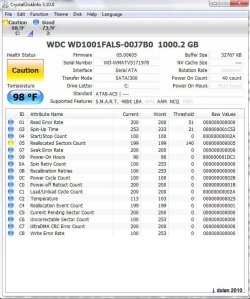
1) Were you having issues before you installed Crystal Disk? If so, what are they?
No; the system is just under a year old (Dell Studio XPS) with a factory install of Win7. Overall the system has been quite stable and I have had very few problems of any significance. I don't recall getting any BSOD errors in the past year.
2) What BSOD error are you getting?
Sorry I didn't post more details with my response here, I made a full post along with the BSOD files in the Crashes-Debugging forum:
http://www.sevenforums.com/crashes-...-when-running-windows-backup.html#post1170551
The error I see is in the BlueScreen View Program is:
IRQL_NOT_LESS_OR_EQUAL
This is an image of the BlueScreen View program:
(Left side of screen)
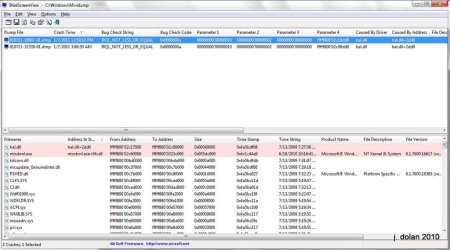
(Screen scrolled to the Right)

I've attached the dump file for you also here (same dump as what is in the post I made in the Crashes-Debugging forum), in case that is helpful, you can download it here:
View attachment 130100
3) What imaging program are you using for your full backup?
I was using the "Backup and Restore" program that was built into Windows 7 in the Control Panel. I was planning on setting up a program like goodsync for every day backups, but though I would grab an entire system backup image with the built in backup program to start with.
I have a new WD Elements 2TB hooked up to a new D-Link N+ 300 router. It appears to be working perfectly, I can read / write to the drive and have not had any errors.
4) When the blue screens occur, are you attempting to backup from within windows?
Yes, I have just gone to the Control Panel and clicked on the Back Up Now button and let it run. I have about 585GB on the internal drive.
I started it last night about a hour before I went to bed, it was running just fine when I left it, but in the morning, the machine had rebooted due to a BSOD error.
I tried the backup again this early this afternoon, while I was at the computer, again it ran for a while, then got the BSOD again, same error as before.
5) Have you tried downloading WD's HD util to diagnose your drive (if not, complete your backup first)?
Give as much detail as possible about your issue and any related info.
James
Yes, I did download it earlier today. I have not been able to compete the backup because of the BSOD error. I am manually coping my Photos / Videos / Documents folders over to the external hard drive, just in case.
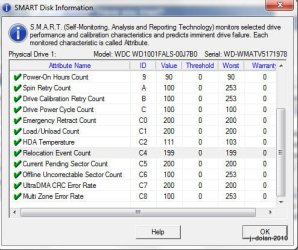
This is the screen from the WD Utility, It reports the same value for the Reallocated Sectors Count, as Crystal Disk did:
WD Utility Screen: (top)

(Bottom - Scrolled down)
Thanks very much for your help;
Jamie