Hard Drive Issue - "Reallocated Sectors Count"

ex

my current reallocated sectors count is 189, and threshold is 140
 

My Computer My Computer

OS
windows 7 ultimate x64
CPU
core2duo
Motherboard
gigabyte
Memory
2.5gb
Graphics Card(s)
hd5670
Monitor(s) Displays
1920 x 1080
Hard Drives
sata 80gb internal
transcend 1.5tb external
PSU
450W
The RAW value is the actual value (in hexadecimal). The steps I outline in the link allow you to set the threshold. It is how the value changes over time which is important. If bad sectors are accumulated rapidly then in my opinion you need to backup your data and retire the HDD.
You do need to to a scan of your HDD and attempt recovery of any bad sectors. On a 1.5TB HDD you need to allow a long time (~ 8 hours say!) to do a full scan.
 

My Computer My Computer

Computer type
PC/Desktop
Computer Manufacturer/Model Number
Own build
OS
Windows 7x64 Home Premium SP1
CPU
Intel i7 2600k
Motherboard
ASUS P8Z68 Deluxe
Memory
G.Skill Ripjaws (DDR3-1600) 2x4GB
Graphics Card(s)
Nvidia GeForce GTS 450; Intel HD Graphics 3000(GT2+)
Monitor(s) Displays
Dell Ultrasharp IPS panel U2311H, Samsung SyncMaster P2350
Screen Resolution
1920x1080
Hard Drives
Samsung 850 Pro SSD 256GB, Samsung SSD 840 120GB, Seagates 1TB Barracuda ST31000528AS x2
PSU
Seasonic M12II 520W
Case
Lian Li Lancool PC-K60
Cooling
Case: 1x120mm, 3x140mm CPU: Hyper 212+
Keyboard
Logitech MK520 (wireless)
Mouse
Logitech MK520
Internet Speed
6-7 Mbps
Antivirus
Norton Security Premium, Malwarebytes on 2 (MSE on 3rd PC)
Browser
FireFox
Other Info
Audio: Logitech Z523 2.1
ok thanks, check disk scan? or any other software suggested,
 

My Computer My Computer

OS
windows 7 ultimate x64
CPU
core2duo
Motherboard
gigabyte
Memory
2.5gb
Graphics Card(s)
hd5670
Monitor(s) Displays
1920 x 1080
Hard Drives
sata 80gb internal
transcend 1.5tb external
PSU
450W
Reallocated sector Seage Barracuda 2 TB

Hi,

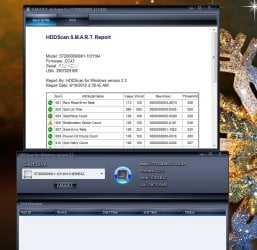
I have just got my hard drive and after running crystal disk info, hd tune and HDDScan it says it has reallocated sector count value 100, worst 100, raw 181, threshold 036.

It is brand new drive and i checked it before putting data in it with above mentioned utilities. After putting data its the same and its been a week now.

I have attached a screenshot please help me decide to send hard drive back to vendor or should i keep it ? hard drive is working fine though.

Thanks for your time.

Seage Barracuda 2 TB 7200 rpm. (ST2000DM001-1CH164)
 

Attachments

  • HDDScan Test 2.jpg
    HDDScan Test 2.jpg
    99.8 KB · Views: 44

My Computer My Computer

OS
Windows 7 Ultimate x64
Hi,

I have just got my hard drive and after running crystal disk info, hd tune and HDDScan it says it has reallocated sector count value 100, worst 100, raw 181, threshold 036.

Seage Barracuda 2 TB 7200 rpm. (ST2000DM001-1CH164)
Using HDDScan (& CrystalDiskInfo) all my HDDs including Seagates (some years old) still have a reallocated sector count of 0.
My understanding is that any bad sectors are mapped out in production and the reallocated sector count for your new HDD should be 0.

Recommendation: Return it if possible.
PS: Thanks for drawing my attention to HDDScan
 

My Computer My Computer

Computer type
PC/Desktop
Computer Manufacturer/Model Number
Own build
OS
Windows 7x64 Home Premium SP1
CPU
Intel i7 2600k
Motherboard
ASUS P8Z68 Deluxe
Memory
G.Skill Ripjaws (DDR3-1600) 2x4GB
Graphics Card(s)
Nvidia GeForce GTS 450; Intel HD Graphics 3000(GT2+)
Monitor(s) Displays
Dell Ultrasharp IPS panel U2311H, Samsung SyncMaster P2350
Screen Resolution
1920x1080
Hard Drives
Samsung 850 Pro SSD 256GB, Samsung SSD 840 120GB, Seagates 1TB Barracuda ST31000528AS x2
PSU
Seasonic M12II 520W
Case
Lian Li Lancool PC-K60
Cooling
Case: 1x120mm, 3x140mm CPU: Hyper 212+
Keyboard
Logitech MK520 (wireless)
Mouse
Logitech MK520
Internet Speed
6-7 Mbps
Antivirus
Norton Security Premium, Malwarebytes on 2 (MSE on 3rd PC)
Browser
FireFox
Other Info
Audio: Logitech Z523 2.1
Back
Top