
SmokeTimer
New member
- Local time
- 5:20 AM
- Messages
- 1
2 problems
-I'm getting the Boot Manager windows failed to start Status: 0xc000000f
- My Hard drive is now labeled system reserved and I cannot
get any files from it.
I've had this rouge alureon virus on one of my HD's for the longest.
Come to find out I had to use TDSSkiller to get rid of it
as no other program could.
The virus was in my boot sector. TDSSkiller detected it
and "cured" it. I restart my computer and next thing I know
I'm getting the -
Boot Manager:
Windows failed to start. A recent hardware of software change might be the cause. To fix the problem:
1.Insert your Windows installation disc and restart the computer.
2.Choose your language settings, and then click "Next".
3.Click "Repair your computer."
If you do not have this disc, contact your system administrator or computer manufacturer for assistance.
Status: 0xc000000f
Info: The boot selection failed because a required device is inaccessible.
I used the Windows repair disc, and it said it detected 1 problem
and attempted to fix it. Restarted computer and getting same error.
Tried repair disc again and it basically said there's nothing
more it can do.
Looked up a few tutorial's on how to manual repair
in cmd, but no method seemed to work.
Instead of repairing I wanted to plug this hard drive into another
PC and just get the files that I need and then reformat.
Well now its saying the hard drive is now my system reserved
and no files are on the hard drive.
In "My Computer" both system reserved are reading 99mb
Screen shot from diskmanager:
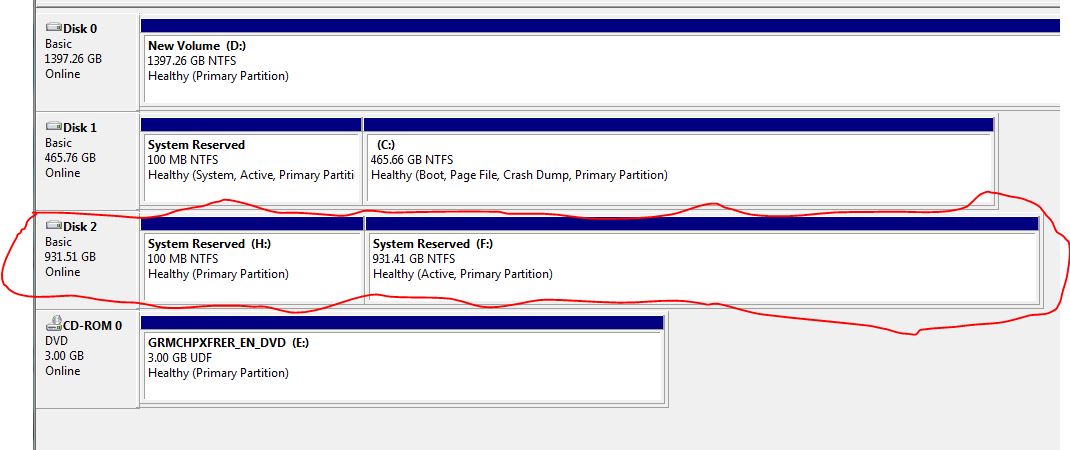
What is going here? I've never ran into this issue before
*EDIT* this is what "My Computer" shows

-I'm getting the Boot Manager windows failed to start Status: 0xc000000f
- My Hard drive is now labeled system reserved and I cannot
get any files from it.
I've had this rouge alureon virus on one of my HD's for the longest.
Come to find out I had to use TDSSkiller to get rid of it
as no other program could.
The virus was in my boot sector. TDSSkiller detected it
and "cured" it. I restart my computer and next thing I know
I'm getting the -
Boot Manager:
Windows failed to start. A recent hardware of software change might be the cause. To fix the problem:
1.Insert your Windows installation disc and restart the computer.
2.Choose your language settings, and then click "Next".
3.Click "Repair your computer."
If you do not have this disc, contact your system administrator or computer manufacturer for assistance.
Status: 0xc000000f
Info: The boot selection failed because a required device is inaccessible.
I used the Windows repair disc, and it said it detected 1 problem
and attempted to fix it. Restarted computer and getting same error.
Tried repair disc again and it basically said there's nothing
more it can do.
Looked up a few tutorial's on how to manual repair
in cmd, but no method seemed to work.
Instead of repairing I wanted to plug this hard drive into another
PC and just get the files that I need and then reformat.
Well now its saying the hard drive is now my system reserved
and no files are on the hard drive.
In "My Computer" both system reserved are reading 99mb
Screen shot from diskmanager:
What is going here? I've never ran into this issue before
*EDIT* this is what "My Computer" shows
Last edited:
My Computer
At a glance
Windows 7 Home Premium
- Computer type
- PC/Desktop
- OS
- Windows 7 Home Premium


