Hard Drive Not Recognized

hollyoaks777

New member
Member
VIP
Local time
8:07 PM
Messages
340
Hard Drive Not Recognized i followed this tutorial http://www.youtube.com/watch?v=Jclt_ylFWXs but i obviously done it wrong and wiped my hard drive and had to buy a new one. I still have the old one what i am wondering is can i take the hard drive out when my system is running and put the old one in and fix it with drivers. It's a Western digital hard drive if that makes any difference.
Thank you in advance.
 

My Computer

OS
windows 7
hi there :)

well on the motherboard you should have a few sata connectors so why don't you plug the drive(leave the new drive in you don't need to take it out) that you replaced back in(WARNING please unplug the pc from the mains lead pull the cable from the pc and press the on/off button for 5-10 seconds to discharge any power in the machine, and touch a piece of clear metal on the pc case to earth yourself to rid any harmful static before doing any work on your pc) and we will go from there ok. i take it its a internal drive? could you post your machine specs to help with diagnosing problems in the forums please.
 
Last edited:

My Computer

Computer Manufacturer/Model Number
packard bell IXTREME M5722
OS
Operating System : Windows 7 Home Premium Edition 6.01.7600 SP1 (x64)
CPU
Processor : Intel Core 2 Quad Q8300 @ 2500 MHz
Motherboard
Mainboard : Packard Bell (Acer EG43M )
Memory
Physical Memory :8GB Corsair4x 2GB 800MHz C5 DDR2
Graphics Card(s)
Video Card : XFX 6700 AMD
Monitor(s) Displays
Maestro 234DL - BenQ V2220 - BenQ VW2420H
Screen Resolution
Current Display :1920x1080p pixels at 60 Hz in HD LED
Hard Drives
Hard Disks : WDC (1000 GB)
Drive C: (Hard Disk) : 428 GB available on 491 GB
Drive D: (Hard Disk) : 426 GB available on 492 GB
SAMSUNG spinpoint HD103SJ 1000.2 GB
(X 2) KINGSTON SSD NOW V 30GB
PSU
XFX ProSeries 550W PSU
Case
PACKARD BELL IXTREME
Cooling
System Blower Current: 150mA Air Flow16CFM ;Akasa 90mm rear
Keyboard
Gigabyte Aivia K8100
Mouse
TRUST-Wireless Laser Mouse - Carbon edition MI-7770C
Internet Speed
TP-LINK > TL-WN951N / AV500 Gigabit Powerline Adapters
Browser
chrome dev
Other Info
EXTRA COOLING>(FAN CONTROLLER) PC Bay Cooler 3 x 40mm fans; Akasa AK-HD-BL Blue hard drive cooler 2 x 40 mm fan 4500 rpm 29.7 dBA
Bios> American Megatrends Inc.
Version : P01-A1
Date : 08/31/2009
You need to format the drive before you can use it for data.

Right-Click on the My Computer icon either on your desktop or in the Start Menu and select Manage.

A new window titled Computer Management comes up.
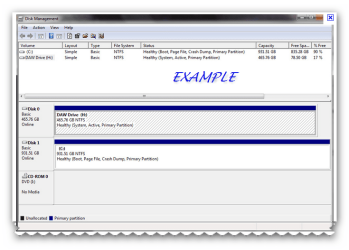
Select Storage from the left hand side by clicking it once, then select Disk Management(local) from the right side by double-clicking it. Find your new drive and format it with one large partition.

First you partition - do a primary partition if you want only one partition on the hard drive. Then you format the partition - again right click and select format use NTSF - use default allocation size and give the new volume a label (no spaces allowed in the name).
 

Attachments

  • Brys snap ?08 ?May ?2011 11h47m54s 01.png
    Brys snap ?08 ?May ?2011 11h47m54s 01.png
    45.1 KB · Views: 19

My Computer

Computer Manufacturer/Model Number
packard bell IXTREME M5722
OS
Operating System : Windows 7 Home Premium Edition 6.01.7600 SP1 (x64)
CPU
Processor : Intel Core 2 Quad Q8300 @ 2500 MHz
Motherboard
Mainboard : Packard Bell (Acer EG43M )
Memory
Physical Memory :8GB Corsair4x 2GB 800MHz C5 DDR2
Graphics Card(s)
Video Card : XFX 6700 AMD
Monitor(s) Displays
Maestro 234DL - BenQ V2220 - BenQ VW2420H
Screen Resolution
Current Display :1920x1080p pixels at 60 Hz in HD LED
Hard Drives
Hard Disks : WDC (1000 GB)
Drive C: (Hard Disk) : 428 GB available on 491 GB
Drive D: (Hard Disk) : 426 GB available on 492 GB
SAMSUNG spinpoint HD103SJ 1000.2 GB
(X 2) KINGSTON SSD NOW V 30GB
PSU
XFX ProSeries 550W PSU
Case
PACKARD BELL IXTREME
Cooling
System Blower Current: 150mA Air Flow16CFM ;Akasa 90mm rear
Keyboard
Gigabyte Aivia K8100
Mouse
TRUST-Wireless Laser Mouse - Carbon edition MI-7770C
Internet Speed
TP-LINK > TL-WN951N / AV500 Gigabit Powerline Adapters
Browser
chrome dev
Other Info
EXTRA COOLING>(FAN CONTROLLER) PC Bay Cooler 3 x 40mm fans; Akasa AK-HD-BL Blue hard drive cooler 2 x 40 mm fan 4500 rpm 29.7 dBA
Bios> American Megatrends Inc.
Version : P01-A1
Date : 08/31/2009
hi there :)

well on the motherboard you should have a few sata connectors so why don't you plug the drive(leave the new drive in you don't need to take it out) that you replaced back in(WARNING please unplug the pc from the mains lead pull the cable from the pc and press the on/off button for 5-10 seconds to discharge any power in the machine, and touch a piece of clear metal on the pc case to earth yourself to rid any harmful static before doing any work on your pc) and we will go from there ok. i take it its a internal drive? could you post your machine specs to help with diagnosing problems in the forums please.

Hi mate what cable would i need to connect.
It is a Dell 1545 inspiron laptop and yes it's internal hard drive.
specs as follows
Built-in Devices Stereo speakers,
Wireless LAN antenna
<LI class=even>Width 14.7 in Depth 9.6 in
<LI class=even>Height 1.5 in Weight 5.7 lbs
<LI class=even>Color Purple passion Screen type Widescreen
<LI class=even>Wireless capabilities IEEE 802.11b,
IEEE 802.11g Processor

  • Processor Intel Pentium T4200 / 2.0 GHz
  • Multi-Core Technology Dual-Core
  • 64-bit Computing Yes
  • Data Bus Speed 800.0 MHz
  • Chipset Type Mobile Intel GM45 Express
Cache Memory

  • Type L2 cache
  • Installed Size 1.0 MB
RAM

  • Installed Size 3.0 GB / 4.0 GB (max)
  • Technology DDR2 SDRAM - 800.0 MHz
Environmental Parameters

  • Environmental standards EPEAT Bronze
Storage Controller

  • Storage controller type Serial ATA
Storage

  • Floppy Drive None
  • Hard Drive 250.0 GB - 5400.0 rpm
  • Storage Removable None
  • Hard drive type Portable
Optical Storage (2nd)

  • 2nd optical storage type None
Optical Storage

  • Type DVD�RW
Card Reader

  • Card reader type 7 in 1 card reader
  • Supported flash memory cards Memory Stick PRO,
    SD Memory Card,
    MultiMediaCard,
    Memory Stick,
    SDIO,
    xD-Picture Card
Display

  • Display Type 15.6 in TFT active matrix
  • Max Resolution 1366 x 768 ( WXGA )
  • Widescreen Display Yes
  • Features Glossy
Video

  • Graphics Processor / Vendor Intel GMA 4500MHD Dynamic Video Memory Technology 5.0
  • Max Allocated RAM Size 256.0 MB
Audio

  • Audio Output Sound card
  • Compliant Standards High Definition Audio
  • Audio Input Microphone
Notebook Camera

  • Camera Type Integrated
  • Sensor Resolution 1.3 Megapixel
Input Device(s)

  • Input device type Keyboard,
    Touchpad
Telecom

  • Modem None
Networking

  • Networking Network adapter
  • Wireless LAN Supported Yes
  • Wireless NIC Dell Wireless 1397
  • Data Link Protocol IEEE 802.11g,
    Fast Ethernet,
    IEEE 802.11b,
    Ethernet
  • Compliant Standards IEEE 802.11b,
    IEEE 802.11g
Expansion / Connectivity

  • Expansion Bays None
  • Expansion Slot(s) 2.0 (total) / 1.0 (free) x ExpressCard/34 - SO DIMM 200-pin,
    1.0 Memory
  • Interfaces 1.0 x Network - Ethernet 10Base-T/100Base-TX - 15 pin HD D-Sub (HD-15),
    1.0 x Hi-Speed USB - VGA - RJ-45,
    1.0 x Audio - Input - Mini-phone 3.5 mm,
    1.0 x Display / video - Line-out/headphones - 4 pin USB Type A,
    3.0 x Microphone - Mini-phone stereo 3.5 mm
Power

  • Power Device External
  • Voltage Required AC 120/230 V ( 50/60 Hz )
Battery

  • Technology 6-cell Lithium ion
  • Installed Qty 1.0
  • Capacity 2200.0 mAh
Operating System / Software

  • OS Provided Microsoft Windows Vista Home Premium
  • Microsoft Office Preloaded Includes a pre-loaded image of select Microsoft Office 2010 suites. Purchase an Office 2010 Product Key Card or disc to activate preloaded software on this PC.
  • Software Roxio Creator DE 10,
    Adobe Acrobat Reader 9.0,
    Microsoft Works
Manufacturer Warranty

  • Service & Support 1 year warranty
  • Service & Support Details Limited warranty - 1 year
Sustainability

  • ENERGY STAR Qualified Yes
  • EPEAT Compliant EPEAT Bronze
 

My Computer

OS
windows 7
thanks for the specs well it being a laptop you would not be able to connect the old drive up they are designed for only one i believe :( you could always sell it on and recover some £££ for the new one you bought. the tutorial you followed did not help you much. if you have deleted data from it there is a possibility that you could install a linux operating system for notebooks but that would mean keep swapping drives (not a good idea). the advice i gave previous is for tower/desktop machines sorry.
 

My Computer

Computer Manufacturer/Model Number
packard bell IXTREME M5722
OS
Operating System : Windows 7 Home Premium Edition 6.01.7600 SP1 (x64)
CPU
Processor : Intel Core 2 Quad Q8300 @ 2500 MHz
Motherboard
Mainboard : Packard Bell (Acer EG43M )
Memory
Physical Memory :8GB Corsair4x 2GB 800MHz C5 DDR2
Graphics Card(s)
Video Card : XFX 6700 AMD
Monitor(s) Displays
Maestro 234DL - BenQ V2220 - BenQ VW2420H
Screen Resolution
Current Display :1920x1080p pixels at 60 Hz in HD LED
Hard Drives
Hard Disks : WDC (1000 GB)
Drive C: (Hard Disk) : 428 GB available on 491 GB
Drive D: (Hard Disk) : 426 GB available on 492 GB
SAMSUNG spinpoint HD103SJ 1000.2 GB
(X 2) KINGSTON SSD NOW V 30GB
PSU
XFX ProSeries 550W PSU
Case
PACKARD BELL IXTREME
Cooling
System Blower Current: 150mA Air Flow16CFM ;Akasa 90mm rear
Keyboard
Gigabyte Aivia K8100
Mouse
TRUST-Wireless Laser Mouse - Carbon edition MI-7770C
Internet Speed
TP-LINK > TL-WN951N / AV500 Gigabit Powerline Adapters
Browser
chrome dev
Other Info
EXTRA COOLING>(FAN CONTROLLER) PC Bay Cooler 3 x 40mm fans; Akasa AK-HD-BL Blue hard drive cooler 2 x 40 mm fan 4500 rpm 29.7 dBA
Bios> American Megatrends Inc.
Version : P01-A1
Date : 08/31/2009
Brian, just a thought. Would it be worthwhile to get a hard drive enclosure and try connecting via USB and do the reformatting to NFTS?
 

My Computer

Computer type
Laptop
Computer Manufacturer/Model Number
Sony Vaio VPCEB47GM Laptop
OS
Win 7 Pro 64-bit
CPU
Intel i5 2.4 Ghz
Memory
8GB DDR3
Graphics Card(s)
Intel HD 3000
Sound Card
IDT High Definition
Monitor(s) Displays
15.6 WGXA Anti-Glare LED
Screen Resolution
1280x800
Hard Drives
640Gb 7200rpm
Antivirus
MSE
Browser
Opera (primary) with IE9 backup
thanks for the specs well it being a laptop you would not be able to connect the old drive up they are designed for only one i believe :( you could always sell it on and recover some £££ for the new one you bought. the tutorial you followed did not help you much. if you have deleted data from it there is a possibility that you could install a linux operating system for notebooks but that would mean keep swapping drives (not a good idea). the advice i gave previous is for tower/desktop machines sorry.

when I bought new hard drive at the computer store the guy said it was Knackered and said it was just sitting at splash screen on his computer. Do you think he could have fixed it but wanted me to spend money on new one. Thanks for your help
 

My Computer

OS
windows 7
Good thinking its worth a try can't see why it would not work it does on normal hard drives converting internal to external. I wonder if there is a docking station?
 

My Computer

Computer Manufacturer/Model Number
packard bell IXTREME M5722
OS
Operating System : Windows 7 Home Premium Edition 6.01.7600 SP1 (x64)
CPU
Processor : Intel Core 2 Quad Q8300 @ 2500 MHz
Motherboard
Mainboard : Packard Bell (Acer EG43M )
Memory
Physical Memory :8GB Corsair4x 2GB 800MHz C5 DDR2
Graphics Card(s)
Video Card : XFX 6700 AMD
Monitor(s) Displays
Maestro 234DL - BenQ V2220 - BenQ VW2420H
Screen Resolution
Current Display :1920x1080p pixels at 60 Hz in HD LED
Hard Drives
Hard Disks : WDC (1000 GB)
Drive C: (Hard Disk) : 428 GB available on 491 GB
Drive D: (Hard Disk) : 426 GB available on 492 GB
SAMSUNG spinpoint HD103SJ 1000.2 GB
(X 2) KINGSTON SSD NOW V 30GB
PSU
XFX ProSeries 550W PSU
Case
PACKARD BELL IXTREME
Cooling
System Blower Current: 150mA Air Flow16CFM ;Akasa 90mm rear
Keyboard
Gigabyte Aivia K8100
Mouse
TRUST-Wireless Laser Mouse - Carbon edition MI-7770C
Internet Speed
TP-LINK > TL-WN951N / AV500 Gigabit Powerline Adapters
Browser
chrome dev
Other Info
EXTRA COOLING>(FAN CONTROLLER) PC Bay Cooler 3 x 40mm fans; Akasa AK-HD-BL Blue hard drive cooler 2 x 40 mm fan 4500 rpm 29.7 dBA
Bios> American Megatrends Inc.
Version : P01-A1
Date : 08/31/2009
Brian, just a thought. Would it be worthwhile to get a hard drive enclosure and try connecting via USB and do the reformatting to NFTS?
so Marsmimar is that the only option to use it as external hard drive or throw it in the bin mate
 

My Computer

OS
windows 7
thanks for the specs well it being a laptop you would not be able to connect the old drive up they are designed for only one i believe :( you could always sell it on and recover some £££ for the new one you bought. the tutorial you followed did not help you much. if you have deleted data from it there is a possibility that you could install a linux operating system for notebooks but that would mean keep swapping drives (not a good idea). the advice i gave previous is for tower/desktop machines sorry.

when I bought new hard drive at the computer store the guy said it was Knackered and said it was just sitting at splash screen on his computer. Do you think he could have fixed it but wanted me to spend money on new one. Thanks for your help

quite possibly he wanted to make money, hard drives are pretty robust when it comes to replacing data etc;)
 

My Computer

Computer Manufacturer/Model Number
packard bell IXTREME M5722
OS
Operating System : Windows 7 Home Premium Edition 6.01.7600 SP1 (x64)
CPU
Processor : Intel Core 2 Quad Q8300 @ 2500 MHz
Motherboard
Mainboard : Packard Bell (Acer EG43M )
Memory
Physical Memory :8GB Corsair4x 2GB 800MHz C5 DDR2
Graphics Card(s)
Video Card : XFX 6700 AMD
Monitor(s) Displays
Maestro 234DL - BenQ V2220 - BenQ VW2420H
Screen Resolution
Current Display :1920x1080p pixels at 60 Hz in HD LED
Hard Drives
Hard Disks : WDC (1000 GB)
Drive C: (Hard Disk) : 428 GB available on 491 GB
Drive D: (Hard Disk) : 426 GB available on 492 GB
SAMSUNG spinpoint HD103SJ 1000.2 GB
(X 2) KINGSTON SSD NOW V 30GB
PSU
XFX ProSeries 550W PSU
Case
PACKARD BELL IXTREME
Cooling
System Blower Current: 150mA Air Flow16CFM ;Akasa 90mm rear
Keyboard
Gigabyte Aivia K8100
Mouse
TRUST-Wireless Laser Mouse - Carbon edition MI-7770C
Internet Speed
TP-LINK > TL-WN951N / AV500 Gigabit Powerline Adapters
Browser
chrome dev
Other Info
EXTRA COOLING>(FAN CONTROLLER) PC Bay Cooler 3 x 40mm fans; Akasa AK-HD-BL Blue hard drive cooler 2 x 40 mm fan 4500 rpm 29.7 dBA
Bios> American Megatrends Inc.
Version : P01-A1
Date : 08/31/2009
Thermaltake BlacX eSATA USB Docking Station >>> Amazon.com: Thermaltake BlacX eSATA USB Docking Station: Electronics


http://www.limitedgoods.com/itemVie...ogleUK&medium=free&campaign=FroogleUK_InStock


Thermaltake BlacX 2.5"/3.5" SATA HDD USB and eSATA Docking Station with Patented Design...This compact docking station supports all 2.5" & 3.5" SATA HDDs up to 2TB; Hot-Swap Capability for Rapid Multi HDDs Access & Exchange; Supports eSATA Transfer Speed up to 3Gbps; Supports USB 2.0 Transfer Speed up to 480Mbps; Windows & Mac OS Compatible; Compact Docking Station Design maximizes heat dissipation & exhaust; Windows Vista Ready; RoHS compliant. Includes Dock, Power adapter, USB 2.0 cable & eSATA cable.
 

My Computer

Computer Manufacturer/Model Number
packard bell IXTREME M5722
OS
Operating System : Windows 7 Home Premium Edition 6.01.7600 SP1 (x64)
CPU
Processor : Intel Core 2 Quad Q8300 @ 2500 MHz
Motherboard
Mainboard : Packard Bell (Acer EG43M )
Memory
Physical Memory :8GB Corsair4x 2GB 800MHz C5 DDR2
Graphics Card(s)
Video Card : XFX 6700 AMD
Monitor(s) Displays
Maestro 234DL - BenQ V2220 - BenQ VW2420H
Screen Resolution
Current Display :1920x1080p pixels at 60 Hz in HD LED
Hard Drives
Hard Disks : WDC (1000 GB)
Drive C: (Hard Disk) : 428 GB available on 491 GB
Drive D: (Hard Disk) : 426 GB available on 492 GB
SAMSUNG spinpoint HD103SJ 1000.2 GB
(X 2) KINGSTON SSD NOW V 30GB
PSU
XFX ProSeries 550W PSU
Case
PACKARD BELL IXTREME
Cooling
System Blower Current: 150mA Air Flow16CFM ;Akasa 90mm rear
Keyboard
Gigabyte Aivia K8100
Mouse
TRUST-Wireless Laser Mouse - Carbon edition MI-7770C
Internet Speed
TP-LINK > TL-WN951N / AV500 Gigabit Powerline Adapters
Browser
chrome dev
Other Info
EXTRA COOLING>(FAN CONTROLLER) PC Bay Cooler 3 x 40mm fans; Akasa AK-HD-BL Blue hard drive cooler 2 x 40 mm fan 4500 rpm 29.7 dBA
Bios> American Megatrends Inc.
Version : P01-A1
Date : 08/31/2009
Ok thank you's for your help off to watch some tv
 

My Computer

OS
windows 7

My Computer

Computer Manufacturer/Model Number
packard bell IXTREME M5722
OS
Operating System : Windows 7 Home Premium Edition 6.01.7600 SP1 (x64)
CPU
Processor : Intel Core 2 Quad Q8300 @ 2500 MHz
Motherboard
Mainboard : Packard Bell (Acer EG43M )
Memory
Physical Memory :8GB Corsair4x 2GB 800MHz C5 DDR2
Graphics Card(s)
Video Card : XFX 6700 AMD
Monitor(s) Displays
Maestro 234DL - BenQ V2220 - BenQ VW2420H
Screen Resolution
Current Display :1920x1080p pixels at 60 Hz in HD LED
Hard Drives
Hard Disks : WDC (1000 GB)
Drive C: (Hard Disk) : 428 GB available on 491 GB
Drive D: (Hard Disk) : 426 GB available on 492 GB
SAMSUNG spinpoint HD103SJ 1000.2 GB
(X 2) KINGSTON SSD NOW V 30GB
PSU
XFX ProSeries 550W PSU
Case
PACKARD BELL IXTREME
Cooling
System Blower Current: 150mA Air Flow16CFM ;Akasa 90mm rear
Keyboard
Gigabyte Aivia K8100
Mouse
TRUST-Wireless Laser Mouse - Carbon edition MI-7770C
Internet Speed
TP-LINK > TL-WN951N / AV500 Gigabit Powerline Adapters
Browser
chrome dev
Other Info
EXTRA COOLING>(FAN CONTROLLER) PC Bay Cooler 3 x 40mm fans; Akasa AK-HD-BL Blue hard drive cooler 2 x 40 mm fan 4500 rpm 29.7 dBA
Bios> American Megatrends Inc.
Version : P01-A1
Date : 08/31/2009
THIS LOOKS THE RIGHT ONE StarTech.com USB 3 SATA Hard Drive Docking Station & Laptop Controller Storage controller- Serial ATA-300- 300 MBps

StarTech.com USB 3 SATA Hard Drive Docking Station & Laptop Controller Storage controller- Serial ATA-300- 300 MBps


The SATDOCKU3SE USB 3.0 Hard Drive Docking Station laptop bundle delivers full external access to any bare 2.5in or 3.5in SATA hard drive, without having to mount the drive in an enclosure or install the hard drive within a computer case. A versatile external storage solution bundled specifically for laptop users, the USB 3.0 HDD docking station includes a 2-port USB 3.0 ExpressCard, which adds two USB 3.0 connections from the host computer to deliver an all-in-one plug and play storage solution that provides access to the hard drive inserted in the dock without having to reboot the computer. Relying on the outstanding data throughput support of USB 3.0, the docking station is capable of data transfer speeds of up to 5Gbps and is backward compatible with USB 2.0/1.1 interface connections (limited to USB 2.0/1.1 speeds unless connected through USB 3.0). PRODUCT FEATURES: SuperSpeed USB 3.0 technology provides fast access for external storage, while still being backwards compatible with USB 2.0 Included ExpressCard USB 3.0 controller card enables older laptops to utilize USB 3.0 connectivity

 

My Computer

Computer Manufacturer/Model Number
packard bell IXTREME M5722
OS
Operating System : Windows 7 Home Premium Edition 6.01.7600 SP1 (x64)
CPU
Processor : Intel Core 2 Quad Q8300 @ 2500 MHz
Motherboard
Mainboard : Packard Bell (Acer EG43M )
Memory
Physical Memory :8GB Corsair4x 2GB 800MHz C5 DDR2
Graphics Card(s)
Video Card : XFX 6700 AMD
Monitor(s) Displays
Maestro 234DL - BenQ V2220 - BenQ VW2420H
Screen Resolution
Current Display :1920x1080p pixels at 60 Hz in HD LED
Hard Drives
Hard Disks : WDC (1000 GB)
Drive C: (Hard Disk) : 428 GB available on 491 GB
Drive D: (Hard Disk) : 426 GB available on 492 GB
SAMSUNG spinpoint HD103SJ 1000.2 GB
(X 2) KINGSTON SSD NOW V 30GB
PSU
XFX ProSeries 550W PSU
Case
PACKARD BELL IXTREME
Cooling
System Blower Current: 150mA Air Flow16CFM ;Akasa 90mm rear
Keyboard
Gigabyte Aivia K8100
Mouse
TRUST-Wireless Laser Mouse - Carbon edition MI-7770C
Internet Speed
TP-LINK > TL-WN951N / AV500 Gigabit Powerline Adapters
Browser
chrome dev
Other Info
EXTRA COOLING>(FAN CONTROLLER) PC Bay Cooler 3 x 40mm fans; Akasa AK-HD-BL Blue hard drive cooler 2 x 40 mm fan 4500 rpm 29.7 dBA
Bios> American Megatrends Inc.
Version : P01-A1
Date : 08/31/2009

My Computer

Computer Manufacturer/Model Number
packard bell IXTREME M5722
OS
Operating System : Windows 7 Home Premium Edition 6.01.7600 SP1 (x64)
CPU
Processor : Intel Core 2 Quad Q8300 @ 2500 MHz
Motherboard
Mainboard : Packard Bell (Acer EG43M )
Memory
Physical Memory :8GB Corsair4x 2GB 800MHz C5 DDR2
Graphics Card(s)
Video Card : XFX 6700 AMD
Monitor(s) Displays
Maestro 234DL - BenQ V2220 - BenQ VW2420H
Screen Resolution
Current Display :1920x1080p pixels at 60 Hz in HD LED
Hard Drives
Hard Disks : WDC (1000 GB)
Drive C: (Hard Disk) : 428 GB available on 491 GB
Drive D: (Hard Disk) : 426 GB available on 492 GB
SAMSUNG spinpoint HD103SJ 1000.2 GB
(X 2) KINGSTON SSD NOW V 30GB
PSU
XFX ProSeries 550W PSU
Case
PACKARD BELL IXTREME
Cooling
System Blower Current: 150mA Air Flow16CFM ;Akasa 90mm rear
Keyboard
Gigabyte Aivia K8100
Mouse
TRUST-Wireless Laser Mouse - Carbon edition MI-7770C
Internet Speed
TP-LINK > TL-WN951N / AV500 Gigabit Powerline Adapters
Browser
chrome dev
Other Info
EXTRA COOLING>(FAN CONTROLLER) PC Bay Cooler 3 x 40mm fans; Akasa AK-HD-BL Blue hard drive cooler 2 x 40 mm fan 4500 rpm 29.7 dBA
Bios> American Megatrends Inc.
Version : P01-A1
Date : 08/31/2009
I will just bin it mate as you can get 1TB for that price thanks anyway.
 

My Computer

OS
windows 7
okey dokey pleasure to help :)
 

My Computer

Computer Manufacturer/Model Number
packard bell IXTREME M5722
OS
Operating System : Windows 7 Home Premium Edition 6.01.7600 SP1 (x64)
CPU
Processor : Intel Core 2 Quad Q8300 @ 2500 MHz
Motherboard
Mainboard : Packard Bell (Acer EG43M )
Memory
Physical Memory :8GB Corsair4x 2GB 800MHz C5 DDR2
Graphics Card(s)
Video Card : XFX 6700 AMD
Monitor(s) Displays
Maestro 234DL - BenQ V2220 - BenQ VW2420H
Screen Resolution
Current Display :1920x1080p pixels at 60 Hz in HD LED
Hard Drives
Hard Disks : WDC (1000 GB)
Drive C: (Hard Disk) : 428 GB available on 491 GB
Drive D: (Hard Disk) : 426 GB available on 492 GB
SAMSUNG spinpoint HD103SJ 1000.2 GB
(X 2) KINGSTON SSD NOW V 30GB
PSU
XFX ProSeries 550W PSU
Case
PACKARD BELL IXTREME
Cooling
System Blower Current: 150mA Air Flow16CFM ;Akasa 90mm rear
Keyboard
Gigabyte Aivia K8100
Mouse
TRUST-Wireless Laser Mouse - Carbon edition MI-7770C
Internet Speed
TP-LINK > TL-WN951N / AV500 Gigabit Powerline Adapters
Browser
chrome dev
Other Info
EXTRA COOLING>(FAN CONTROLLER) PC Bay Cooler 3 x 40mm fans; Akasa AK-HD-BL Blue hard drive cooler 2 x 40 mm fan 4500 rpm 29.7 dBA
Bios> American Megatrends Inc.
Version : P01-A1
Date : 08/31/2009
If you bought a new drive and it does not work [no matter how you tried to set it up] it is possible the drive was bad from the start. All new drives have manufacturers warranty and most places you buy from give a 30 day warranty. At the very least and if with in the 30 days it should be replaced with a brand new drive and being the said guy at the shop says it is stuck at the boot screen what ever..

You may not have been able to set it up at no fault of your own- it might have been a bad drive from the start. If you bought a new drive from this shop- it should be replaced at no charge. Or this person might be trying to get over on ya. If it is a new drive you can avoid him altogether and do a rma with the products support site.. Explain to them the probs- if this shop is in error the drive corp may set the right or drop them as certified sales/support for their products if they are trying to get over on ya..

If buying a used or the drive is older and out of warranty- well that is on you?
 

My Computer

OS
w7
Back
Top