
CriostoirSean
New member
- Local time
- 6:56 AM
- Messages
- 3
Hi everyone,
I installed Ubuntu on my computer a few months ago and created another partition for it on my 1TB hard drive.
I didn't really care for Ubuntu so I decided to delete the partition it was on.
That might have been a mistake.
Well, now there's 87.68GB of free space on my hard disk that I can't use and I don't know how to add it back to my c: partition.
There was another post about this a couple years ago, but I don't understand the instructions and am not actually sure if it worked. Can someone explain how to do this, please? :huh:
I'm not completely computer illiterate, but I'm not familiar with partitioning disks. It was just the one time with Ubuntu.
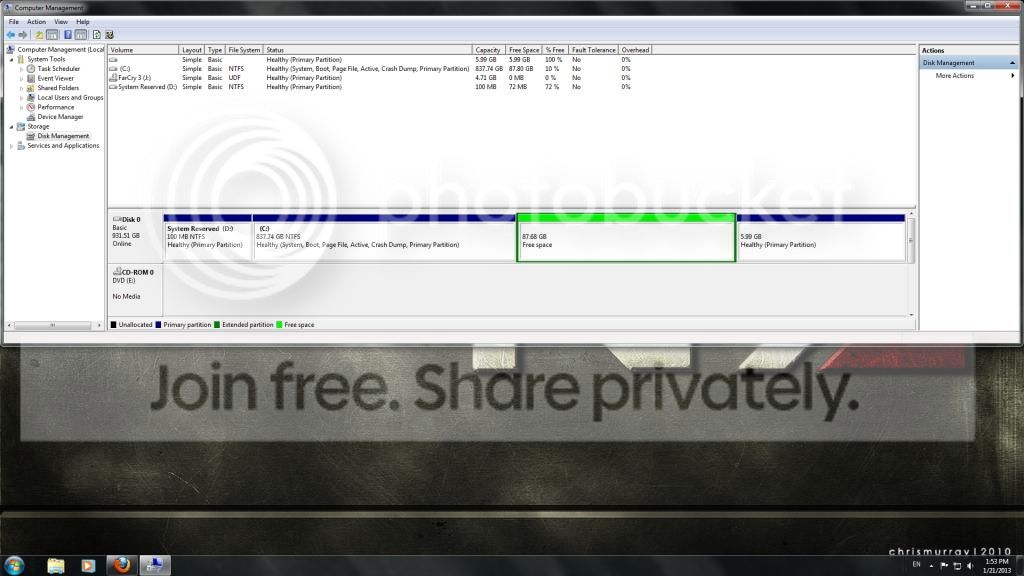
I installed Ubuntu on my computer a few months ago and created another partition for it on my 1TB hard drive.
I didn't really care for Ubuntu so I decided to delete the partition it was on.
That might have been a mistake.
Well, now there's 87.68GB of free space on my hard disk that I can't use and I don't know how to add it back to my c: partition.
There was another post about this a couple years ago, but I don't understand the instructions and am not actually sure if it worked. Can someone explain how to do this, please? :huh:
I'm not completely computer illiterate, but I'm not familiar with partitioning disks. It was just the one time with Ubuntu.
Last edited:
My Computer
At a glance
Windows 7 Ultimate 64-bitAMD Turion 64 X2 Mobile Technology TL-56 1.80...2 GB RAMnVidia nForce [something]
- Computer Manufacturer/Model Number
- HP Pavilion dv6000
- OS
- Windows 7 Ultimate 64-bit
- CPU
- AMD Turion 64 X2 Mobile Technology TL-56 1.80 GHZ
- Memory
- 2 GB RAM
- Graphics Card(s)
- nVidia nForce [something]
- Monitor(s) Displays
- 1...Laptop widescreen


