Wont Let me download to C drive

superjohn89

New member
Local time
8:23 PM
Messages
14
Location
Myrtle Beach
Hello all. I reinstalled my windows today. I normally do this once a year to keep everything clean.

I have a Win 7 64 bit

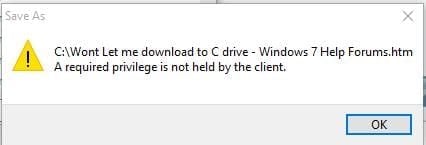
I have a 128 GB SSD as my primary hard drive with a 1 TB HDD as my secondary. Obviously I have windows on my primary and I have one of my computer games that I play on it as well. I like that it wont let me download anything to my primary hard drive (C drive) But, I am confused on why its not letting me. I took a screen shot of what error Im getting, which I even tried saving this picture into the C drive and it wouldn't even let me do that!

Thanks in advance.
 

Attachments

  • pic.jpg
    pic.jpg
    11.3 KB · Views: 25

My Computer My Computer

At a glance

Windows 7 64bitAMD FX(tm) 8350 Eight Core 4.00GHz4.00Geforce GTX 660
Computer type
PC/Desktop
Computer Manufacturer/Model Number
Custom
OS
Windows 7 64bit
CPU
AMD FX(tm) 8350 Eight Core 4.00GHz
Motherboard
GIGABYTE GA-970A-UD3P AM3+ AMD 970 SATA 6Gb/s USB 3.0 ATX
Memory
4.00
Graphics Card(s)
Geforce GTX 660
Monitor(s) Displays
3 monitors
Screen Resolution
1600x900
Hard Drives
1TB HD

128GB SSD
PSU
Apevia 705W
Case
Ultra
Cooling
6 fans
Keyboard
Razer Blackwidow Ultimate 2014
Mouse
Razer Taipan
Internet Speed
20 mbps Down 2 mbps up 18 ping
Antivirus
AVG Free
Browser
Google Chrome
That`s the craziest thing I`ve ever seen, are you the Admin ?
 

My Computer My Computer

At a glance

Windows 10 Pro x64Intel Core i7 6700KGSkill TridentZ RGB 16GB 3600 16-16-16-36EVGA GTX 980 Ti SC x2
Computer type
PC/Desktop
Computer Manufacturer/Model Number
Skylake Special #666
OS
Windows 10 Pro x64
CPU
Intel Core i7 6700K
Motherboard
Asus Sabertooth Z170 Mark 1
Memory
GSkill TridentZ RGB 16GB 3600 16-16-16-36
Graphics Card(s)
EVGA GTX 980 Ti SC x2
Sound Card
Realtek High Definition
Monitor(s) Displays
AOC G2460PG
Screen Resolution
1920 x 1080 144Hz
Hard Drives
Samsung 860 Pro 256GB, Seagate Barracuda 4TB x2
PSU
EVGA 1000 P2, EVGA White Custom Braided Cables
Case
Corsair Vengeance C70 Gunmetal Black
Cooling
Corsair H100i v2, Corsair ML120 x2, Thermal Grizzly Kryonaut
Keyboard
Logitech G910 Orion Spectrum
Mouse
Logitech G700s
Internet Speed
Verizon Fios Quantum Gateway 75/75
Antivirus
Windows Defender, Malwarebytes Free 3.8.3
Browser
Chrome
Other Info
Corsair SP120 x4, LG Blu-ray Drive, Durabrand HT-395 100 Watt Dolby Digital Amp, Corsair H2100 Wireless 7.1 Headset
Yes, I changed all my permissions but not with tons of "errors" popping up. Depending on which account I change, System, Admin, authenticated user, or users I get more or less of the pop up errors. But it does let me change the permissions..

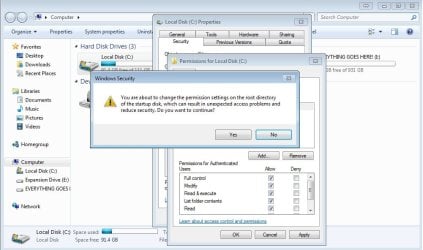
I was messing with my registry earlier today, because I was trying to figure out how to get all my program files and program files 86 into my secondary hard drive. Which I did, but everytime I relogged it was giving me errors. I have reinstalled windows twice since then. I formatted and deleted both my hard drives and re added them. IT was a clean slate.. ( I think). As far as I know, the regitsry fixes it self and goes to default after reinstalling. But I may be wrong. I did notice that everytime I start my computer I get a pop up that says "desktop windows manager stopped working and closed" everytime I turn on my computer. Not sure what that means either. But the pictures included are of what I get when I try and change permissions for the C drive... Like I said, it finally lets me change them though after I click continue on all the error pop ups.

Thanks again for your all help
 

Attachments

  • pic 2.jpg
    pic 2.jpg
    71.5 KB · Views: 2
  • pic 3.jpg
    pic 3.jpg
    122 KB · Views: 0

My Computer My Computer

At a glance

Windows 7 64bitAMD FX(tm) 8350 Eight Core 4.00GHz4.00Geforce GTX 660
Computer type
PC/Desktop
Computer Manufacturer/Model Number
Custom
OS
Windows 7 64bit
CPU
AMD FX(tm) 8350 Eight Core 4.00GHz
Motherboard
GIGABYTE GA-970A-UD3P AM3+ AMD 970 SATA 6Gb/s USB 3.0 ATX
Memory
4.00
Graphics Card(s)
Geforce GTX 660
Monitor(s) Displays
3 monitors
Screen Resolution
1600x900
Hard Drives
1TB HD

128GB SSD
PSU
Apevia 705W
Case
Ultra
Cooling
6 fans
Keyboard
Razer Blackwidow Ultimate 2014
Mouse
Razer Taipan
Internet Speed
20 mbps Down 2 mbps up 18 ping
Antivirus
AVG Free
Browser
Google Chrome
Please note, the second picture is just the pop ups screen shooted individually. They show up in front of the permissions for the C disk folder. As you see in the first picture.

I have reinstalled my computer so many times and Ive never had any issues like this.. This sucks LOL
 

My Computer My Computer

At a glance

Windows 7 64bitAMD FX(tm) 8350 Eight Core 4.00GHz4.00Geforce GTX 660
Computer type
PC/Desktop
Computer Manufacturer/Model Number
Custom
OS
Windows 7 64bit
CPU
AMD FX(tm) 8350 Eight Core 4.00GHz
Motherboard
GIGABYTE GA-970A-UD3P AM3+ AMD 970 SATA 6Gb/s USB 3.0 ATX
Memory
4.00
Graphics Card(s)
Geforce GTX 660
Monitor(s) Displays
3 monitors
Screen Resolution
1600x900
Hard Drives
1TB HD

128GB SSD
PSU
Apevia 705W
Case
Ultra
Cooling
6 fans
Keyboard
Razer Blackwidow Ultimate 2014
Mouse
Razer Taipan
Internet Speed
20 mbps Down 2 mbps up 18 ping
Antivirus
AVG Free
Browser
Google Chrome
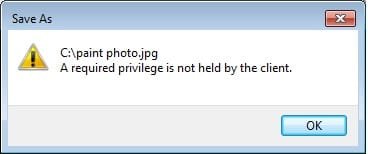
This is what happens now when I try and save a photo from paint in the C drive... After I have have all permissions set for the C drive
 

Attachments

  • pic 4.jpg
    pic 4.jpg
    7.2 KB · Views: 23

My Computer My Computer

At a glance

Windows 7 64bitAMD FX(tm) 8350 Eight Core 4.00GHz4.00Geforce GTX 660
Computer type
PC/Desktop
Computer Manufacturer/Model Number
Custom
OS
Windows 7 64bit
CPU
AMD FX(tm) 8350 Eight Core 4.00GHz
Motherboard
GIGABYTE GA-970A-UD3P AM3+ AMD 970 SATA 6Gb/s USB 3.0 ATX
Memory
4.00
Graphics Card(s)
Geforce GTX 660
Monitor(s) Displays
3 monitors
Screen Resolution
1600x900
Hard Drives
1TB HD

128GB SSD
PSU
Apevia 705W
Case
Ultra
Cooling
6 fans
Keyboard
Razer Blackwidow Ultimate 2014
Mouse
Razer Taipan
Internet Speed
20 mbps Down 2 mbps up 18 ping
Antivirus
AVG Free
Browser
Google Chrome
Why are you changing the location of your program files ?

They belong on C.

A 128 GB ssd for windows and your programs is more then enough.
 

My Computer My Computer

At a glance

Windows 10 Pro x64Intel Core i7 6700KGSkill TridentZ RGB 16GB 3600 16-16-16-36EVGA GTX 980 Ti SC x2
Computer type
PC/Desktop
Computer Manufacturer/Model Number
Skylake Special #666
OS
Windows 10 Pro x64
CPU
Intel Core i7 6700K
Motherboard
Asus Sabertooth Z170 Mark 1
Memory
GSkill TridentZ RGB 16GB 3600 16-16-16-36
Graphics Card(s)
EVGA GTX 980 Ti SC x2
Sound Card
Realtek High Definition
Monitor(s) Displays
AOC G2460PG
Screen Resolution
1920 x 1080 144Hz
Hard Drives
Samsung 860 Pro 256GB, Seagate Barracuda 4TB x2
PSU
EVGA 1000 P2, EVGA White Custom Braided Cables
Case
Corsair Vengeance C70 Gunmetal Black
Cooling
Corsair H100i v2, Corsair ML120 x2, Thermal Grizzly Kryonaut
Keyboard
Logitech G910 Orion Spectrum
Mouse
Logitech G700s
Internet Speed
Verizon Fios Quantum Gateway 75/75
Antivirus
Windows Defender, Malwarebytes Free 3.8.3
Browser
Chrome
Other Info
Corsair SP120 x4, LG Blu-ray Drive, Durabrand HT-395 100 Watt Dolby Digital Amp, Corsair H2100 Wireless 7.1 Headset
I wanted to but I never did get too finish it. I noticed over time that updates to programs and such were going to the C drive. But anything I was downloading was going to the secondary drive. I got full within a year or so.

Just an update. If I make a folder within the C drive, I can download anything to that folder within the C drive.
 

My Computer My Computer

At a glance

Windows 7 64bitAMD FX(tm) 8350 Eight Core 4.00GHz4.00Geforce GTX 660
Computer type
PC/Desktop
Computer Manufacturer/Model Number
Custom
OS
Windows 7 64bit
CPU
AMD FX(tm) 8350 Eight Core 4.00GHz
Motherboard
GIGABYTE GA-970A-UD3P AM3+ AMD 970 SATA 6Gb/s USB 3.0 ATX
Memory
4.00
Graphics Card(s)
Geforce GTX 660
Monitor(s) Displays
3 monitors
Screen Resolution
1600x900
Hard Drives
1TB HD

128GB SSD
PSU
Apevia 705W
Case
Ultra
Cooling
6 fans
Keyboard
Razer Blackwidow Ultimate 2014
Mouse
Razer Taipan
Internet Speed
20 mbps Down 2 mbps up 18 ping
Antivirus
AVG Free
Browser
Google Chrome
I just tried saving to C: on my Win 10 Pro X64 sytem and get this:

NottoC.jpg

Basically I'd say stay away from saving directly to the root of the boot drive and the problem should go away.
 

My Computer My Computer

At a glance

Windows 10 Pro X64Intel Quad Core i7-4770 @ 3.4Ghz16.0GB PC3-12800 DDR3 SDRAM 1600 MHzIntel Integrated HD Graphics
Computer type
PC/Desktop
Computer Manufacturer/Model Number
Lenovo IdeaCenter 450
OS
Windows 10 Pro X64
CPU
Intel Quad Core i7-4770 @ 3.4Ghz
Memory
16.0GB PC3-12800 DDR3 SDRAM 1600 MHz
Graphics Card(s)
Intel Integrated HD Graphics
Sound Card
Realtek HD Audio
Monitor(s) Displays
HP 22" LCD
Screen Resolution
1680 x 1050
Hard Drives
250GB Samsung EVO SATA-3 SSD
2TB Seagate ST2000DM001 SATA-2
1.5TB Seagate ST3150041AS SATA
Keyboard
Dell USB
Mouse
Lenovo USB
Internet Speed
Cable via Road Runner 3MB Upload, 30MB Download
Antivirus
Windows Defender, MBAM Pro, MBAE
Browser
Seamonkey
Other Info
UEFI/GPT
PLDS DVD-RW DH16AERSH
This is default behaviour, that you cannot write files to the root of C. Not without administrative privileges. And just because your user is apart of the Administrators group doesn't immediately mean you have full administrative access to everything. Programs that you run will run like a it would to a standard user. To run a program as administrator, you must accept some UAC from the program.

E.g., start up Notepad and try saving to C's root. Take note of the deny message. Then start Notepad up by running it as administrator, write a txt file to C, and voilà.
 

My Computer My Computer

At a glance

Windows 10, Windows 8.1 Pro, Windows 7 Profes...
Computer type
PC/Desktop
OS
Windows 10, Windows 8.1 Pro, Windows 7 Professional, OS X El Capitan
This is default behaviour, that you cannot write files to the root of C. Not without administrative privileges. And just because your user is apart of the Administrators group doesn't immediately mean you have full administrative access to everything. Programs that you run will run like a it would to a standard user. To run a program as administrator, you must accept some UAC from the program.

E.g., start up Notepad and try saving to C's root. Take note of the deny message. Then start Notepad up by running it as administrator, write a txt file to C, and voilà.

Wow are you correct... But the next question is why now? When I had the same setup before reinstalling win
 

My Computer My Computer

At a glance

Windows 7 64bitAMD FX(tm) 8350 Eight Core 4.00GHz4.00Geforce GTX 660
Computer type
PC/Desktop
Computer Manufacturer/Model Number
Custom
OS
Windows 7 64bit
CPU
AMD FX(tm) 8350 Eight Core 4.00GHz
Motherboard
GIGABYTE GA-970A-UD3P AM3+ AMD 970 SATA 6Gb/s USB 3.0 ATX
Memory
4.00
Graphics Card(s)
Geforce GTX 660
Monitor(s) Displays
3 monitors
Screen Resolution
1600x900
Hard Drives
1TB HD

128GB SSD
PSU
Apevia 705W
Case
Ultra
Cooling
6 fans
Keyboard
Razer Blackwidow Ultimate 2014
Mouse
Razer Taipan
Internet Speed
20 mbps Down 2 mbps up 18 ping
Antivirus
AVG Free
Browser
Google Chrome
Did you have the UAC turned off in your last setup?
 

My Computer My Computer

At a glance

W7 Pro SP1 64biti78GBIntel HD Graphics
Computer type
Laptop
Computer Manufacturer/Model Number
Employer provided Dell Latitude
OS
W7 Pro SP1 64bit
CPU
i7
Memory
8GB
Graphics Card(s)
Intel HD Graphics
Hard Drives
crappy SSD
Antivirus
Employer mandated Symantec Endpoint Protection
Browser
Pale Moon 64bit, IE11 64bit & Chrome 64bit
I have anyhting I download go to the downloads folder by default (the norm) then I either use and delete it or put it where I want.
 

My Computer My Computer

At a glance

Windows 10 Pro x64Intel Core i7 6700KGSkill TridentZ RGB 16GB 3600 16-16-16-36EVGA GTX 980 Ti SC x2
Computer type
PC/Desktop
Computer Manufacturer/Model Number
Skylake Special #666
OS
Windows 10 Pro x64
CPU
Intel Core i7 6700K
Motherboard
Asus Sabertooth Z170 Mark 1
Memory
GSkill TridentZ RGB 16GB 3600 16-16-16-36
Graphics Card(s)
EVGA GTX 980 Ti SC x2
Sound Card
Realtek High Definition
Monitor(s) Displays
AOC G2460PG
Screen Resolution
1920 x 1080 144Hz
Hard Drives
Samsung 860 Pro 256GB, Seagate Barracuda 4TB x2
PSU
EVGA 1000 P2, EVGA White Custom Braided Cables
Case
Corsair Vengeance C70 Gunmetal Black
Cooling
Corsair H100i v2, Corsair ML120 x2, Thermal Grizzly Kryonaut
Keyboard
Logitech G910 Orion Spectrum
Mouse
Logitech G700s
Internet Speed
Verizon Fios Quantum Gateway 75/75
Antivirus
Windows Defender, Malwarebytes Free 3.8.3
Browser
Chrome
Other Info
Corsair SP120 x4, LG Blu-ray Drive, Durabrand HT-395 100 Watt Dolby Digital Amp, Corsair H2100 Wireless 7.1 Headset
Wow you are correct... But the next question is why now? When I had the same setup before reinstalling win
Why were you able to write directly to the root of your C before your reinstall? There's no way we can tell for sure, but it's either one of three things...

Perhaps you were using the builtin Administrator account before. Or more likely, maybe you had UAC set to its lowest and switched off, as UsernameIssues has suggested. It's also possible that the permission settings on the root of your C was altered somehow, Superjohn.
 

My Computer My Computer

At a glance

Windows 10, Windows 8.1 Pro, Windows 7 Profes...
Computer type
PC/Desktop
OS
Windows 10, Windows 8.1 Pro, Windows 7 Professional, OS X El Capitan
Back
Top