
Solved Hard drive partitioning problem

Senator

New member
Local time
12:59 PM
Messages
29
I recently loaded an image of Windows 7 onto a new (larger) hard drive. The process seemed to go smoothly. However, a map of the new hard drive indicates a lot of unusable space in an "Unallocated" partition.

Here is what the drive looks like in Disk Management

2014-08-06_11-36-22.png

and here is another look at it from Windows Explorer and Properties
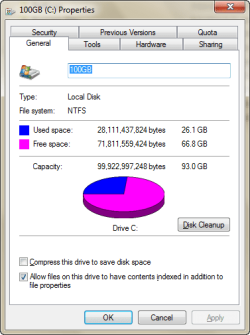
2014-08-06_11-36-01.png

Notice I only have access to 100GB of the more than 300GB total space on the drive. I believe this is just the way the image process works when you go from a smaller drive to a larger drive. The original drive is a 100GB and the new one is 320GB.

I aborted an attempt to "Expand" the 100GB (C) partition, fearing I might create an unrecoverable problem. The process was not all that intuitive and I really know enough to be dangerous here.

I'm relatively sure there is a simple solution to the problem, I'm just not sure what it is and I'm afraid to do something I will regret.

Thanks
 

My Computer

Computer type
PC/Desktop
Computer Manufacturer/Model Number
HP
OS
Windows 7 Professional 64bit
CPU
Core2 Duo
Memory
4GB
Hard Drives
1TB WD
You were on the right track when you aborted.

You need to add that unallocated space to C. You do that in Windows Disk Management by choosing C and right clicking, which is probably what you did to "expand".

What are you going to do with Disk 1, the old drive?
 

My Computer

Computer type
PC/Desktop
Computer Manufacturer/Model Number
Ignatz Special; 4 speed manual gearbox; factory air conditioning; one of one
OS
Windows 7 Home Premium SP1, 64-bit
CPU
Intel Skylake i5-6600K, not overclocked
Motherboard
AsRock Z170M Extreme 4, micro ATX
Memory
8 GB HyperX DDR4-2666 (2 x 4 GB)
Graphics Card(s)
none; graphics are integrated on CPU
Sound Card
onboard: Realtek ALC1150; external: USB Behringer UF0-202
Monitor(s) Displays
Dell S2340M 23 inch IPS
Screen Resolution
1600 x 900
Hard Drives
System: Crucial MX100 series SSD, 128 GB;
Data: Samsung Spinpoint 103SJ, 1 TB;
Backup: WD Caviar Green WD30EZRX-00D8PB0, 3 TB
PSU
Rosewill SilentNight 500 watt fanless, semi-modular
Case
Antec Solo II
Cooling
Noctua NH-U12S; Noctua F12 intake, Noctua S12A exhaust
Keyboard
Microsoft 200 6JH-00001 USB
Mouse
Dell or Microsoft optical wired; USB
Antivirus
Microsoft Security Essentials and Malwarebytes Premium
Browser
Pale Moon
Other Info
All fans PWM; speeds at idle: CPU circa 500 rpm; intake circa 600 rpm; exhaust circa 600 rpm; CPU temps 27 idle and 47 C load in a warm room (27 C/81 F) when running Intel Extreme Tuning Utility stress test.
That worked. Here is what it looks like in Disk Management now. However, I need to change the name of the drive.

2014-08-06_21-06-48.png

What are you going to do with Disk 1, the old drive?

I have several older laptop hard drives that are close to being sent to the bone-yard and this may be one of them.

Thanks very much for your help.
 

My Computer

Computer type
PC/Desktop
Computer Manufacturer/Model Number
HP
OS
Windows 7 Professional 64bit
CPU
Core2 Duo
Memory
4GB
Hard Drives
1TB WD

My Computer

Computer type
PC/Desktop
Computer Manufacturer/Model Number
Ignatz Special; 4 speed manual gearbox; factory air conditioning; one of one
OS
Windows 7 Home Premium SP1, 64-bit
CPU
Intel Skylake i5-6600K, not overclocked
Motherboard
AsRock Z170M Extreme 4, micro ATX
Memory
8 GB HyperX DDR4-2666 (2 x 4 GB)
Graphics Card(s)
none; graphics are integrated on CPU
Sound Card
onboard: Realtek ALC1150; external: USB Behringer UF0-202
Monitor(s) Displays
Dell S2340M 23 inch IPS
Screen Resolution
1600 x 900
Hard Drives
System: Crucial MX100 series SSD, 128 GB;
Data: Samsung Spinpoint 103SJ, 1 TB;
Backup: WD Caviar Green WD30EZRX-00D8PB0, 3 TB
PSU
Rosewill SilentNight 500 watt fanless, semi-modular
Case
Antec Solo II
Cooling
Noctua NH-U12S; Noctua F12 intake, Noctua S12A exhaust
Keyboard
Microsoft 200 6JH-00001 USB
Mouse
Dell or Microsoft optical wired; USB
Antivirus
Microsoft Security Essentials and Malwarebytes Premium
Browser
Pale Moon
Other Info
All fans PWM; speeds at idle: CPU circa 500 rpm; intake circa 600 rpm; exhaust circa 600 rpm; CPU temps 27 idle and 47 C load in a warm room (27 C/81 F) when running Intel Extreme Tuning Utility stress test.
Back
Top