
I recently loaded an image of Windows 7 onto a new (larger) hard drive. The process seemed to go smoothly. However, a map of the new hard drive indicates a lot of unusable space in an "Unallocated" partition.
Here is what the drive looks like in Disk Management
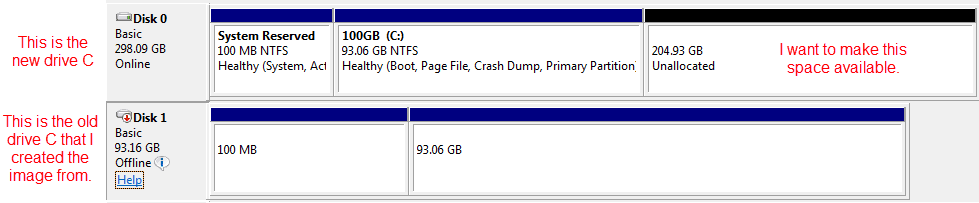
and here is another look at it from Windows Explorer and Properties
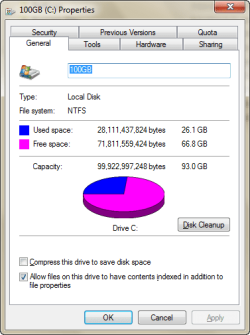
Notice I only have access to 100GB of the more than 300GB total space on the drive. I believe this is just the way the image process works when you go from a smaller drive to a larger drive. The original drive is a 100GB and the new one is 320GB.
I aborted an attempt to "Expand" the 100GB (C) partition, fearing I might create an unrecoverable problem. The process was not all that intuitive and I really know enough to be dangerous here.
I'm relatively sure there is a simple solution to the problem, I'm just not sure what it is and I'm afraid to do something I will regret.
Thanks
Here is what the drive looks like in Disk Management
and here is another look at it from Windows Explorer and Properties
Notice I only have access to 100GB of the more than 300GB total space on the drive. I believe this is just the way the image process works when you go from a smaller drive to a larger drive. The original drive is a 100GB and the new one is 320GB.
I aborted an attempt to "Expand" the 100GB (C) partition, fearing I might create an unrecoverable problem. The process was not all that intuitive and I really know enough to be dangerous here.
I'm relatively sure there is a simple solution to the problem, I'm just not sure what it is and I'm afraid to do something I will regret.
Thanks
My Computer
At a glance
Windows 7 Professional 64bitCore2 Duo4GB
- Computer type
- PC/Desktop
- Computer Manufacturer/Model Number
- HP
- OS
- Windows 7 Professional 64bit
- CPU
- Core2 Duo
- Memory
- 4GB
- Hard Drives
- 1TB WD


