Hard drive possible cause of stuttering?

Soulfly

New member
Local time
11:50 PM
Messages
30
Hey everyone!

So, for a bout a year and a half, I've had this weird problem where for example, if I would be scrolling down a page in Firefox, there was a stutter going on every few seconds. The same kind of deal would happen when watching videos...if there was a movement whatsoever in the video, there would be stuttering, but if the picture was still for example a guy just sitting in a chair talking, it would be fine. I remember doing a fresh install of Windows 7 when still having this problem, but wouldn't fix the problem.

It'd be the same when playing games, again, the same thing happening, the stuttering would happen if I was only moving, but not when I would be standing still. It wouldn't happen on all the games I played, but I noticed this kind of behaviour on some of them. For all this time, I didn't really mind that problem, since I wasn't much into games, but now I'm playing more of them, and it's becoming a problem.

I've done a few hardware replacements over the years, like the RAM, I thought maybe it was faulty RAM, but the problem still persisted. I also switched out the 8800gt video card with another one that I have when I was using both of them for SLI, but nothing changed. I also got a new PSU.

I've also just recently bought a new CPU, and again, nothing changed. So...this just leaves out the hard drive, or god forbid, even the motherboard, which I hope is not, but it's 6-7 years old...

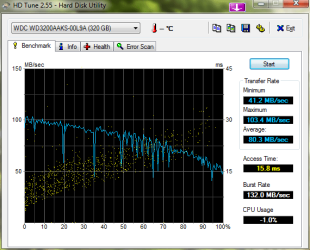
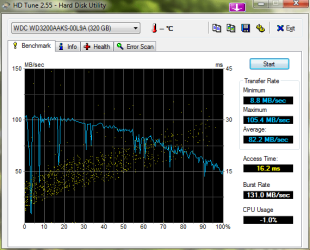
I've ran Malwarebytes and even did some defragmentation, without returning positive results. I've also ran Scandisk and Western Digital LifeGuard Diagnostics...Both were saying that the hard drive was healthy. But, I've ran HD tune, and I'm not sure how to interpret the results, but the graph doesn't really look like other people's graphs. Here are two different tests that I've done (Screenshots below).

I'm really wondering if it's the hard drive, also, the boot time to windows is pretty long (about a minute and 30 seconds), but that could be just all the crap that's in there.

Thank you so much for your time, and please let me know if you need more info!
 

Attachments
  • HDTune_Benchmark_WDC_WD3200AAKS-00L9A.png
    HDTune_Benchmark_WDC_WD3200AAKS-00L9A.png
    18 KB · Views: 12
  • HDTune_Benchmark_WDC_WD3200AAKS-00L9A_2.png
    HDTune_Benchmark_WDC_WD3200AAKS-00L9A_2.png
    17.9 KB · Views: 8

My Computer My Computer

At a glance

Windows 7 Professional x64Intel Core i5 4670K @ 3.40GHz8.00GB Dual-Channel DDR3 @ 665MHz2047MB NVIDIA GeForce GTX 760 (Gigabyte)
OS
Windows 7 Professional x64
CPU
Intel Core i5 4670K @ 3.40GHz
Motherboard
Gigabyte Technology Co., Ltd. Z97X-UD5H
Memory
8.00GB Dual-Channel DDR3 @ 665MHz
Graphics Card(s)
2047MB NVIDIA GeForce GTX 760 (Gigabyte)
Monitor(s) Displays
Asus VG248
Screen Resolution
1920X1080
Hard Drives
232GB Samsung SSD 840 EVO 250G SCSI Disk Device (SSD)
PSU
650 watts Corsair Bronze
I just ran a Memtest through the night...9 passes and no errors, so I don't think that the Ram is the culprit here.
 

My Computer My Computer

At a glance

Windows 7 Professional x64Intel Core i5 4670K @ 3.40GHz8.00GB Dual-Channel DDR3 @ 665MHz2047MB NVIDIA GeForce GTX 760 (Gigabyte)
OS
Windows 7 Professional x64
CPU
Intel Core i5 4670K @ 3.40GHz
Motherboard
Gigabyte Technology Co., Ltd. Z97X-UD5H
Memory
8.00GB Dual-Channel DDR3 @ 665MHz
Graphics Card(s)
2047MB NVIDIA GeForce GTX 760 (Gigabyte)
Monitor(s) Displays
Asus VG248
Screen Resolution
1920X1080
Hard Drives
232GB Samsung SSD 840 EVO 250G SCSI Disk Device (SSD)
PSU
650 watts Corsair Bronze
The hardrive isn't used when watching YouTube videos, not much any way. Only used when loading cache. My first guess from your description of the problem, I would definitely say RAM is the issue. I don't understand why, 4GB of RAM should be more than capable of running a YouTube video.

When watching a YouTube video, and when it "stutters", can you open Task Manger and open the "Performance" tab. What is your "Free" and "Available" Physical Memory values?
 

My Computer My Computer

At a glance

Windows 7 Home Premium x64Intel Core i7-3770S Quad @ 3.1 GHz (Turbo-Boo...16GB (DDR3) @1,600MHz Corsair Vengeance 2EVGA GeForce GTX 960 SuperSC ACX 2.0+ 2GB
Computer type
PC/Desktop
Computer Manufacturer/Model Number
Custom Build
OS
Windows 7 Home Premium x64
CPU
Intel Core i7-3770S Quad @ 3.1 GHz (Turbo-Boost to 3.9GHz)
Motherboard
ASUS ROG Maximus V Formula ATX
Memory
16GB (DDR3) @1,600MHz Corsair Vengeance 2
Graphics Card(s)
EVGA GeForce GTX 960 SuperSC ACX 2.0+ 2GB
Monitor(s) Displays
Acer 23" S230HL
Screen Resolution
1920 x 1080
Hard Drives
Seagate 1TB @7,200rpm
PSU
850W Power Supply (Thermaltake - SP850M)
Case
NZXT SWITCH 810 Gun-Metal CA-SW810-G1
Cooling
Cooler Master Hyper 212 EVO (RR-212E-20PK)
Keyboard
Logitech G510
Mouse
Logitech G602
Internet Speed
5Mbps Download / 756kbps Upload
Antivirus
Microsoft Security Essentials
copy important data to an external device

cleanup junk files, recycling bin, temp inet files, etc...

uninstall programs you dont really use but use up ram in your system tray, or at least dont let it auto start.

then defrag all of your harddrive partitions, fragmentation can really choke a system..
 

My Computer My Computer

At a glance

windows 7 home premium
OS
windows 7 home premium
The hardrive isn't used when watching YouTube videos, not much any way. Only used when loading cache. My first guess from your description of the problem, I would definitely say RAM is the issue. I don't understand why, 4GB of RAM should be more than capable of running a YouTube video.

When watching a YouTube video, and when it "stutters", can you open Task Manger and open the "Performance" tab. What is your "Free" and "Available" Physical Memory values?

Available would be around 2100 and free would be around 400. I borrowed a hard drive from my brother and I'll do a clean install on that, to see if it's the hard drive or not. Thanks for sticking around!
 

My Computer My Computer

At a glance

Windows 7 Professional x64Intel Core i5 4670K @ 3.40GHz8.00GB Dual-Channel DDR3 @ 665MHz2047MB NVIDIA GeForce GTX 760 (Gigabyte)
OS
Windows 7 Professional x64
CPU
Intel Core i5 4670K @ 3.40GHz
Motherboard
Gigabyte Technology Co., Ltd. Z97X-UD5H
Memory
8.00GB Dual-Channel DDR3 @ 665MHz
Graphics Card(s)
2047MB NVIDIA GeForce GTX 760 (Gigabyte)
Monitor(s) Displays
Asus VG248
Screen Resolution
1920X1080
Hard Drives
232GB Samsung SSD 840 EVO 250G SCSI Disk Device (SSD)
PSU
650 watts Corsair Bronze
Then it shouldn't be RAM if you have that much available. Is your graphics driver up to date?
 

My Computer My Computer

At a glance

Windows 7 Home Premium x64Intel Core i7-3770S Quad @ 3.1 GHz (Turbo-Boo...16GB (DDR3) @1,600MHz Corsair Vengeance 2EVGA GeForce GTX 960 SuperSC ACX 2.0+ 2GB
Computer type
PC/Desktop
Computer Manufacturer/Model Number
Custom Build
OS
Windows 7 Home Premium x64
CPU
Intel Core i7-3770S Quad @ 3.1 GHz (Turbo-Boost to 3.9GHz)
Motherboard
ASUS ROG Maximus V Formula ATX
Memory
16GB (DDR3) @1,600MHz Corsair Vengeance 2
Graphics Card(s)
EVGA GeForce GTX 960 SuperSC ACX 2.0+ 2GB
Monitor(s) Displays
Acer 23" S230HL
Screen Resolution
1920 x 1080
Hard Drives
Seagate 1TB @7,200rpm
PSU
850W Power Supply (Thermaltake - SP850M)
Case
NZXT SWITCH 810 Gun-Metal CA-SW810-G1
Cooling
Cooler Master Hyper 212 EVO (RR-212E-20PK)
Keyboard
Logitech G510
Mouse
Logitech G602
Internet Speed
5Mbps Download / 756kbps Upload
Antivirus
Microsoft Security Essentials
Then it shouldn't be RAM if you have that much available. Is your graphics driver up to date?

That's what I'm thinking.
You are using SLI right? Could it possibly be microstuttering?
 

My Computer My Computer

At a glance

Windows 7 ProfessionalIntel i5-4670kG.SKILL Ripjaws X Series 16GB 1600mhz (F3-160...EVGA GTX770 SC ACX 2gb
Computer type
PC/Desktop
Computer Manufacturer/Model Number
I made her myself :)
OS
Windows 7 Professional
CPU
Intel i5-4670k
Motherboard
Asus Z87-Pro
Memory
G.SKILL Ripjaws X Series 16GB 1600mhz (F3-1600C9D-16GXM)
Graphics Card(s)
EVGA GTX770 SC ACX 2gb
Monitor(s) Displays
Acer H236HLbid 23" ips 5ms GTG
Screen Resolution
1080p
Hard Drives
-128gb Samsung 840 Pro (C drive with OS)
-1tb WD Black 7200rpm 64mb WD1002FAEX (music, programs, files, etc.)
-120gb Samsung 840 evo (games)
PSU
SeaSonic M12II 750watt
Case
Coolermaster HAF 922 all black, usb 3.0
Cooling
CPU: CM hyper 212 evo with push-pull Cougar Vortex fans
Keyboard
CM Storm QuickFire TK (brown switch mechanical)
Mouse
perixx mx-2000
Internet Speed
21Mb/s down, 2Mb/s up (on a good day)
Antivirus
Malwarebytes and Microsoft Security Essentials
Browser
Chrome
Other Info
Fans on case: front 200mm in, top 200mm out, x2 side 120mm in (cougar vortex), rear 120mm out

I've never seen my cpu go above 40c and my card above 60c even with intense games or benchmarks
I don't overclock anything, as I rely on this machine too much for other things to risk it getting fried.
Then it shouldn't be RAM if you have that much available. Is your graphics driver up to date?

That's what I'm thinking.
You are using SLI right? Could it possibly be microstuttering?

I used to run SLI, but I stopped when I started having this problem I believe. I tried both cards separately, but still have the same problem. I did uninstall the driver before doing the switch, and reinstalled the latest driver to try the other card, but to no avail. Could both cards just be faulty or is it the fact that this motherboard has recognized geforce 8800gt's as evil? Haha. I borrowed a hard drive from my brother and will be doing a clean install on that and use it on my system to see if it's a hard drive problem, because at this point, I've pretty much narrowed it down to the hard drive and motherboard, and I pray to god that it's not the motherboard, since I've based my build on that. :huh:

Edit: Yes, it is like microstuttering. I'm happy that there's a term for it. I've tested the problem a couple of times on this game, that I used to be running smoothly without problem, since there hardware requirement is so minimal. The game is Soldat, which is a side-scrolling 2D game. When I would be moving to the right, or to the left, there would be this lag in between intervals, each interval would be like 50ms or so, and it's just constant.

Thank you so much for your time guys, I really appreciate it and I will be updating you guys tomorrow on how my brother's hard drive reacts with the clean install.
 
Last edited:

My Computer My Computer

At a glance

Windows 7 Professional x64Intel Core i5 4670K @ 3.40GHz8.00GB Dual-Channel DDR3 @ 665MHz2047MB NVIDIA GeForce GTX 760 (Gigabyte)
OS
Windows 7 Professional x64
CPU
Intel Core i5 4670K @ 3.40GHz
Motherboard
Gigabyte Technology Co., Ltd. Z97X-UD5H
Memory
8.00GB Dual-Channel DDR3 @ 665MHz
Graphics Card(s)
2047MB NVIDIA GeForce GTX 760 (Gigabyte)
Monitor(s) Displays
Asus VG248
Screen Resolution
1920X1080
Hard Drives
232GB Samsung SSD 840 EVO 250G SCSI Disk Device (SSD)
PSU
650 watts Corsair Bronze
nvidia drivers are hard to remove completely. Remove them with driver sweeper (now driver fusion) before installing the non SLI ones again.
 

My Computer My Computer

At a glance

Win 7 Pro 64-bit 7601AMD Phenom 9650 QuadCore, revision DR-B35 GB yes I run 2x 2GB and 1x 1GB, different b...NVIDIA GeForce 9800 GT 512 Mb, unknown manufa...
Computer type
PC/Desktop
Computer Manufacturer/Model Number
custom built
OS
Win 7 Pro 64-bit 7601
CPU
AMD Phenom 9650 QuadCore, revision DR-B3
Motherboard
ASUS M4A78
Memory
5 GB yes I run 2x 2GB and 1x 1GB, different brand, spank me.
Graphics Card(s)
NVIDIA GeForce 9800 GT 512 Mb, unknown manufacturer.
Sound Card
Crappy Realtek Integrated Audio
Monitor(s) Displays
Fujitsu Siemens P19-3P
Screen Resolution
1280 x 1024 x 32 bits @ 60 Hz Oh yeah, 4:3 rocks!
Hard Drives
(1) MAXTOR S TM3320613AS SATA Disk Device (2) STM35004 18AS SATA Disk Device (3) TOSHIBA USB 2.5"-HDD
PSU
whatever, around 450w
Case
Scavenged from old company PC, 10+ years old
Cooling
CPU fan, GPU fan, case fan, nothing fancy
Keyboard
Microsoft, PS/2, white.
Mouse
Optical, logitec.
Internet Speed
effective max speeds: 70-ish kB/s down 30-ish kB/s up
Antivirus
Avira, free edition.
Browser
Firefox with FXChrome to make it look like Google Chrome :P
Other Info
Was discarded by previous owner due to "horrible performance".
Was running Win Xp from a IDE drive. Yeah. Was a pain.
SATA II drive and Win7 and it zips away! Yay!
Hey guys, sorry to get back to you so late, it was a hectic week.

So...I did a clean install on the hard drive that I borrowed from my brother, and same thing happens, still stutters, but I don't think it's the hard drive. It all narrows it down to the video card and motherboard....I again did a clean install of the video driver, switched my 8800gt with the other one, same thing again. Could a motherboard really cause this kind of stuttering?
 

My Computer My Computer

At a glance

Windows 7 Professional x64Intel Core i5 4670K @ 3.40GHz8.00GB Dual-Channel DDR3 @ 665MHz2047MB NVIDIA GeForce GTX 760 (Gigabyte)
OS
Windows 7 Professional x64
CPU
Intel Core i5 4670K @ 3.40GHz
Motherboard
Gigabyte Technology Co., Ltd. Z97X-UD5H
Memory
8.00GB Dual-Channel DDR3 @ 665MHz
Graphics Card(s)
2047MB NVIDIA GeForce GTX 760 (Gigabyte)
Monitor(s) Displays
Asus VG248
Screen Resolution
1920X1080
Hard Drives
232GB Samsung SSD 840 EVO 250G SCSI Disk Device (SSD)
PSU
650 watts Corsair Bronze
Back
Top