Solved Hard Drive Problem - 500 GB Disk - only 371 GB un-allocated space ??

BigFatBoy

New member
Member
Local time
10:38 AM
Messages
17
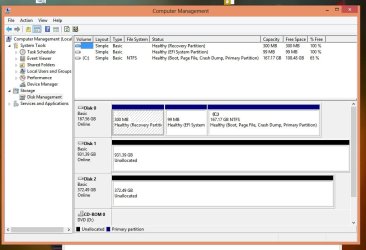
I know that HDD manufacturer's use one unit of measurement while OS's use another unit of measurement for HDD disk capacity. I expect my "500GB" drive to have about 465 GB of actual free space. Yet Windows, DISKPART, and (3) different hard drive testing software programs all indicate that the actual free space on the *used HDD I am installing is reported at 371 GB.

The drive shows up in Windows Disk Management as signed and initialized and sized as 371 GB. I thought there might be a hidden partition or a shadow copy of some kind on the drive, but I found nothing. I ran the drive through the Diskpart command's "Clean" process with no change in the free space available. I do have Windows system protection ON, but only on my "C:|" drive and not on the HDD I am concerned about. The HDD did not show up in Systems Properties\System Protection. I purchased the HDD online as "used". I must be missing something, but I do not know what. Any help will be appreciated.

bfb
 

My Computer My Computer

At a glance

W8x64ProIntel 3rd Gen i516GB samsung (8x2)intel embedded
Computer type
PC/Desktop
Computer Manufacturer/Model Number
Home Build
OS
W8x64Pro
CPU
Intel 3rd Gen i5
Motherboard
asus p8z77-v
Memory
16GB samsung (8x2)
Graphics Card(s)
intel embedded
Monitor(s) Displays
lcd
Hard Drives
Two: SSD SATA 3; HHD SATA 2
Disk 0: W8P OS= C:; remaining is data folders
Disk 1: Data Storage
PSU
cooler master

My Computer My Computer

At a glance

Win7 Enterprise, Win7 x86 (Ult 7600), Win7 x6...AMD fx8350 4ghz, AMD-32 2400mhz, AMD-64 3200m...2gb, 4gb on the Ult 7600, 4gb on Technet RTM,...Draw my own Graphics, several nVidia cards
Computer type
PC/Desktop
Computer Manufacturer/Model Number
Built them myself, Science Experiments !
OS
Win7 Enterprise, Win7 x86 (Ult 7600), Win7 x64 Ult 7600, TechNet RTM on AMD x64 (2.8Ghz)
CPU
AMD fx8350 4ghz, AMD-32 2400mhz, AMD-64 3200mhz, AMDx64 2.8G
Motherboard
SIS 755, ECS-K8M890M-M (Ult 7600), GigaByte & others
Memory
2gb, 4gb on the Ult 7600, 4gb on Technet RTM, 32gb on FX8350
Graphics Card(s)
Draw my own Graphics, several nVidia cards
Sound Card
on motherboard
Monitor(s) Displays
19" flat scr, 28" I-Inc widescr,22" Emprex Widescr, 23" Acer
Screen Resolution
1280 x 1024, 1440 x 900, 1920 x 1080
Hard Drives
6 pata Ide HD's & 2 Sata HD's
added 80gb external on Ult 7600 computer,
numerous extra 1tb, 2TB, 3Tb SATA HD's
A collection of ext HD Docks w/ HDs
PSU
430w, 550w, 600w, 700, 800, etc
Case
All Generic Full Towers
Cooling
Open Air & a few fans, some w/ colored LEDs
Keyboard
Compaq & Dell recycled from GoodWill
Mouse
Made in China Optical Wired Mouse
Internet Speed
Fast Cable InterNet
Antivirus
AVG Free on 24 different Desktops, NO Problems!
Browser
IE 8 is preferred, but use FireFox sometimes
Other Info
Linksys Routers, switches, & Hubs
Too Many USB Flash Drives to count, Biggest is 64GB !
Eight computers in my home network.
Sixteen computers at my business network.
Linked via TeamViewer !
Lots of old used spare computer parts everywhere!
attached is the screen shot requested:

Hitachi Ultra Star AK2000 HUA722050CLA330
500GB
Sata II (3Gb/s)
7200 RPM
June 2011
 

Attachments

  • DiskMng.jpg
    DiskMng.jpg
    72.9 KB · Views: 11

My Computer My Computer

At a glance

W8x64ProIntel 3rd Gen i516GB samsung (8x2)intel embedded
Computer type
PC/Desktop
Computer Manufacturer/Model Number
Home Build
OS
W8x64Pro
CPU
Intel 3rd Gen i5
Motherboard
asus p8z77-v
Memory
16GB samsung (8x2)
Graphics Card(s)
intel embedded
Monitor(s) Displays
lcd
Hard Drives
Two: SSD SATA 3; HHD SATA 2
Disk 0: W8P OS= C:; remaining is data folders
Disk 1: Data Storage
PSU
cooler master
I am thinking you may have to try some bootable HD software outside of the Windows operating system to ZERO the HD. Since you bought it used it may have been in some other system with a different kind of OS or format (like a Tivo box HD). Start by making a Partition Wizard bootable CD & boot up from that to see what details it gives for this HD.

:ar: http://www.sevenforums.com/tutorials/93322-partition-wizard-use-bootable-cd.html?ltr=P


Edit: Link for Hitachi Hard Drive utilities

:ar: https://www1.hgst.com/hdd/support/download.htm#DFT
 
Last edited:

My Computer My Computer

At a glance

Win7 Enterprise, Win7 x86 (Ult 7600), Win7 x6...AMD fx8350 4ghz, AMD-32 2400mhz, AMD-64 3200m...2gb, 4gb on the Ult 7600, 4gb on Technet RTM,...Draw my own Graphics, several nVidia cards
Computer type
PC/Desktop
Computer Manufacturer/Model Number
Built them myself, Science Experiments !
OS
Win7 Enterprise, Win7 x86 (Ult 7600), Win7 x64 Ult 7600, TechNet RTM on AMD x64 (2.8Ghz)
CPU
AMD fx8350 4ghz, AMD-32 2400mhz, AMD-64 3200mhz, AMDx64 2.8G
Motherboard
SIS 755, ECS-K8M890M-M (Ult 7600), GigaByte & others
Memory
2gb, 4gb on the Ult 7600, 4gb on Technet RTM, 32gb on FX8350
Graphics Card(s)
Draw my own Graphics, several nVidia cards
Sound Card
on motherboard
Monitor(s) Displays
19" flat scr, 28" I-Inc widescr,22" Emprex Widescr, 23" Acer
Screen Resolution
1280 x 1024, 1440 x 900, 1920 x 1080
Hard Drives
6 pata Ide HD's & 2 Sata HD's
added 80gb external on Ult 7600 computer,
numerous extra 1tb, 2TB, 3Tb SATA HD's
A collection of ext HD Docks w/ HDs
PSU
430w, 550w, 600w, 700, 800, etc
Case
All Generic Full Towers
Cooling
Open Air & a few fans, some w/ colored LEDs
Keyboard
Compaq & Dell recycled from GoodWill
Mouse
Made in China Optical Wired Mouse
Internet Speed
Fast Cable InterNet
Antivirus
AVG Free on 24 different Desktops, NO Problems!
Browser
IE 8 is preferred, but use FireFox sometimes
Other Info
Linksys Routers, switches, & Hubs
Too Many USB Flash Drives to count, Biggest is 64GB !
Eight computers in my home network.
Sixteen computers at my business network.
Linked via TeamViewer !
Lots of old used spare computer parts everywhere!
Reply

thanks. I'll give Partition Wizard Bootable CD.
 

My Computer My Computer

At a glance

W8x64ProIntel 3rd Gen i516GB samsung (8x2)intel embedded
Computer type
PC/Desktop
Computer Manufacturer/Model Number
Home Build
OS
W8x64Pro
CPU
Intel 3rd Gen i5
Motherboard
asus p8z77-v
Memory
16GB samsung (8x2)
Graphics Card(s)
intel embedded
Monitor(s) Displays
lcd
Hard Drives
Two: SSD SATA 3; HHD SATA 2
Disk 0: W8P OS= C:; remaining is data folders
Disk 1: Data Storage
PSU
cooler master

My Computer My Computer

At a glance

Win7 Enterprise, Win7 x86 (Ult 7600), Win7 x6...AMD fx8350 4ghz, AMD-32 2400mhz, AMD-64 3200m...2gb, 4gb on the Ult 7600, 4gb on Technet RTM,...Draw my own Graphics, several nVidia cards
Computer type
PC/Desktop
Computer Manufacturer/Model Number
Built them myself, Science Experiments !
OS
Win7 Enterprise, Win7 x86 (Ult 7600), Win7 x64 Ult 7600, TechNet RTM on AMD x64 (2.8Ghz)
CPU
AMD fx8350 4ghz, AMD-32 2400mhz, AMD-64 3200mhz, AMDx64 2.8G
Motherboard
SIS 755, ECS-K8M890M-M (Ult 7600), GigaByte & others
Memory
2gb, 4gb on the Ult 7600, 4gb on Technet RTM, 32gb on FX8350
Graphics Card(s)
Draw my own Graphics, several nVidia cards
Sound Card
on motherboard
Monitor(s) Displays
19" flat scr, 28" I-Inc widescr,22" Emprex Widescr, 23" Acer
Screen Resolution
1280 x 1024, 1440 x 900, 1920 x 1080
Hard Drives
6 pata Ide HD's & 2 Sata HD's
added 80gb external on Ult 7600 computer,
numerous extra 1tb, 2TB, 3Tb SATA HD's
A collection of ext HD Docks w/ HDs
PSU
430w, 550w, 600w, 700, 800, etc
Case
All Generic Full Towers
Cooling
Open Air & a few fans, some w/ colored LEDs
Keyboard
Compaq & Dell recycled from GoodWill
Mouse
Made in China Optical Wired Mouse
Internet Speed
Fast Cable InterNet
Antivirus
AVG Free on 24 different Desktops, NO Problems!
Browser
IE 8 is preferred, but use FireFox sometimes
Other Info
Linksys Routers, switches, & Hubs
Too Many USB Flash Drives to count, Biggest is 64GB !
Eight computers in my home network.
Sixteen computers at my business network.
Linked via TeamViewer !
Lots of old used spare computer parts everywhere!
Hi BigFatBoy :dinesh::dinesh:

The unique 372.49GB indicates that the HDD was used on a Mcintosh. (The rest of the drive constitute a Host Protected Area created by the computer manufacturer. I am not going to deliberate on this further.:))

OK, to that extent DocBrown was right.

But................Conventional partitioning/formatting tools will not see the HPA, just like Windows didn't. So forget about it.

Even DBAN can't touch it.

There are advanced tools to reclaim the Host Protected Area and by the very nature difficult to understand and use by normal users.

So here is an easy tool you may try first.

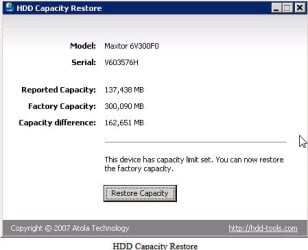
Download and install the HDD Capacity Restore Tool from HDDGURU: HDD Capacity Restore Tool ( Works only with 32bits Windows )


Run it. Make sure the correct drive you want to reclaim is shown. Click on " Restore Capacity"

HDDCRTTOOL.jpg

Screenshot: Courtesy - hddguru.com ( I don't have a HPAed drive to try. :D)

Please do report the results. If it does not work I can point to other tools.
 

My Computer My Computer

At a glance

Windows 7 Home Premium 32 bit
OS
Windows 7 Home Premium 32 bit
thank you for the feedback. the following are the suggestions I have used with results:
-> Partition Wizard via bootable CD: wipe the HDD and filled each sector with zeros. - No change is HDD capacity
-> HDD Capacity Restore Tool: website states software *only works on W32bit; *my install is Wx64 bit, not-used.
-> Darik's Boot and Nuke: *not used as yet.
I note that Darik's software claims to use same procedures as Partition Wizard bootable CD
Should I try it anyway??
thank you.

ps 7.27.13
I downloaded and ran HDD Guru's "HDD Low Level Format Tool" based on following statement in the Atola Technology Blog July 19, 2007 "Restoring Factory Hard Disk Capacity". The entire article is a complete guide on recovering hard drive factory capacity.

"sometimes a damaged Master Boot Record may cause the BIOS and/or the Operating System to misdetect the true hard drive capacity. In this case you would need to use a zero-fill tool."

Results unchanged after applying low level format...
 
Last edited:

My Computer My Computer

At a glance

W8x64ProIntel 3rd Gen i516GB samsung (8x2)intel embedded
Computer type
PC/Desktop
Computer Manufacturer/Model Number
Home Build
OS
W8x64Pro
CPU
Intel 3rd Gen i5
Motherboard
asus p8z77-v
Memory
16GB samsung (8x2)
Graphics Card(s)
intel embedded
Monitor(s) Displays
lcd
Hard Drives
Two: SSD SATA 3; HHD SATA 2
Disk 0: W8P OS= C:; remaining is data folders
Disk 1: Data Storage
PSU
cooler master
thank you for the feedback. the following are the suggestions I have used with results:
-> Partition Wizard via bootable CD: wipe the HDD and filled each sector with zeros. - No change is HDD capacity
-> HDD Capacity Restore Tool: website states software *only works on W32bit; *my install is Wx64 bit, not-used.
-> Darik's Boot and Nuke: *not used as yet.
I note that Darik's software claims to use same procedures as Partition Wizard bootable CD
Should I try it anyway??
thank you.

As I told you in my previous post conventional Partition/formatting tools as well as DBAN will not touch the Host Protected Area and you will draw a blank. Try as much as you can.:) ( Do your own research on reclaiming Host Protected Area)

It should still be easier to hook up your HDD as a second internal drive on a 32bit Windows and try the Capacity Restore Tool. ( the no-sweat method)

OK, if you can't or do not want to do it on another PC and would like to do it on your PC only, then - as promised in my previous post ;) - I would suggest HDAT2.

HDAT2/CBL Hard Disk Repair Utility ( It can be tried in Demo mode on Windows. If it shows the HPA area, you have to boot in DOS and run. No execute command will work on Windows. Will work on DOS only)

Explanation of Host Protected Area:
http://en.wikipedia.org/wiki/Host_protected_area

HDD Capacity Restore Tool:
http://hddguru.com/software/2007.07.20-HDD-Capacity-Res...

HDAT2/CBL Repair Utility:
http://www.hdat2.com
http://www.hdat2.com/hdat2_faq.html
http://www.hdat2.com/files/cookbook_v11.pdf

Good luck. I have blown my conch :)
 

My Computer My Computer

At a glance

Windows 7 Home Premium 32 bit
OS
Windows 7 Home Premium 32 bit
To: DocBrown and jumanji Please see the PS in my earlier post dated 7.27.2013.

I am assuming that the Low Level Format Tool from HDD Guru was needed based on the article about using the HD Capacity Recovery Tool. The article on the HD Recovery Tool indicated a low level format and filling with zeros was needed to erase the MBR. I do not know if using the low level formatting tool removed the Host Protected Area. However, after low level formatting, the drive capacity remains unchanged.

Again, using the HD Recovery Capacity tool requires W32. Since I do not have a 32 bit Windows machine of my own or someone else's to work with, I will have to abandon that option for now.

I will use the information on the HPA provided above and see what I can come up with.... You seem to indicate that HDAT2 might show the HPA area, and if so, I would have to boot in Dos and run HDAT2 from there; no problem. If I can not discern an HPA using HDAT2 then I can keep looking OR find a W32 PC.

Which leads me to ask; IF the HD Capacity Recovery software runs only on W32, could I not devise a way to run the HD-C Recovery SW on the hard drive from Dos or from a Linux boot device using my current x64 PC???
thank you
bfb
 

My Computer My Computer

At a glance

W8x64ProIntel 3rd Gen i516GB samsung (8x2)intel embedded
Computer type
PC/Desktop
Computer Manufacturer/Model Number
Home Build
OS
W8x64Pro
CPU
Intel 3rd Gen i5
Motherboard
asus p8z77-v
Memory
16GB samsung (8x2)
Graphics Card(s)
intel embedded
Monitor(s) Displays
lcd
Hard Drives
Two: SSD SATA 3; HHD SATA 2
Disk 0: W8P OS= C:; remaining is data folders
Disk 1: Data Storage
PSU
cooler master
In your case, it is crystal clear that 372.49 GB indicates that it was used on a Mcintosh, and the manufacturer of the PC had created the HPA wherein resides the image of the OS for recovery or whatever..

So the problem is due to HPA and not a corrupted MBR. And so it is no wonder that the HDD LLF tool did not touch the HPA. ( that is one of my favourite programs which I always use to zero my pen drives and recommend.)

Glad to know that you have seen the Atola blog Restoring Factory Hard Drive Capacity » Official Atola Technology Blog ( I had mentioned this in one of my posts here long back and infact my recommendation to you is based on it. :))

Honestly, I haven't come across any way to run the 32bit Capacity Restore Tool from outside Windows. I also do not know why the masters Atola do not have a 64 bit tool. May be there are some practical technical difficulties. Otherwise they would have made it.

May be an alternate way is to hide your 64 bits system partition, install 32bit Windows on another small partition just to run this tool once. Once you accomplish the task, you may revert your system back.

I may request other experts here to guide you on this, if you want to take that route.
 

My Computer My Computer

At a glance

Windows 7 Home Premium 32 bit
OS
Windows 7 Home Premium 32 bit
Perhaps you could use VMware player to create a 32 bit windows 7 virtual machine and run the program from there.
 

My Computer My Computer

At a glance

Windows 7 Professional 64bitAMD Athlon II X3 44012.0 GB Dual-Channel DDR3 @ 669MHzAMD Radeon HD 6850
OS
Windows 7 Professional 64bit
CPU
AMD Athlon II X3 440
Motherboard
ASUS M4A77TD
Memory
12.0 GB Dual-Channel DDR3 @ 669MHz
Graphics Card(s)
AMD Radeon HD 6850
Sound Card
AMD High Definition Audio Device
Monitor(s) Displays
Dell 317FP, Generic PnP Monitor
Screen Resolution
1920x1080
Hard Drives
112GB OCZ OCZ-AGIL ITY3 SATA Disk Device (SSD)
932GB Western Digital WDC WD10 01FALS-00E3A0 SATA Disk Device (SATA)
466GB Western Digital WDC WD50 01AALS-00L3B2 SATA Disk Device (SATA)
Case
ANTEC 300 ILLUSION
Cooling
CoolerMaster Hyper 212 plus
Other Info
I have two 4GB Corsair XMS3 modules and two 2GB Corsair XMS3 modules.
jumanji,

I wanted to let you know I followed your instructions regarding my hard drive with a displayed reduced capacity. HDAT2 did show that a partition of 100.2GB was hidden on the drive. HDAT2 also easily removed the partition's hidden status and displayed the full capacity after I ran HDAT2 to set the Max address. The biggest problem I encountered was..*EDIT: confusing the CD drive letter when HDAT2 displayed the A:\ command prompt>. Of note, I may not have tried the software had it not been for the HDAT2 guidance document which I found indispensable.

thank you for your help; I would not have been able to identify the problem nor find a the solution without it.
best regards...
bfb
 
Last edited:

My Computer My Computer

At a glance

W8x64ProIntel 3rd Gen i516GB samsung (8x2)intel embedded
Computer type
PC/Desktop
Computer Manufacturer/Model Number
Home Build
OS
W8x64Pro
CPU
Intel 3rd Gen i5
Motherboard
asus p8z77-v
Memory
16GB samsung (8x2)
Graphics Card(s)
intel embedded
Monitor(s) Displays
lcd
Hard Drives
Two: SSD SATA 3; HHD SATA 2
Disk 0: W8P OS= C:; remaining is data folders
Disk 1: Data Storage
PSU
cooler master
Glad to know that you used HDAT2 and were able to reclaim the HPA.:thumbsup:
I have to admit that though I had all the info and knowhow on dealing with the situation, I had never encountered a situation where I could have tried it and you had that opportunity. Great work.

Now I think I have to learn from you on using HDAT2.;)

I do not know exactly which version of HDAT2 you used but definitely there is a DOS boot CD ISO version. I faintly remember having used Rufus Rufus - Create bootable USB drives the easy way to create a bootable pen drive with that ISO. I went as far as booting from it to run HDAT2 but as I said I had no occasion to use it. It was just a mock trial whether I could run it from a pen drive.

Good day. Cheers.
 

My Computer My Computer

At a glance

Windows 7 Home Premium 32 bit
OS
Windows 7 Home Premium 32 bit
Back
Top