HDD Un Allocated Space

shaju304

New member
Local time
6:20 AM
Messages
16
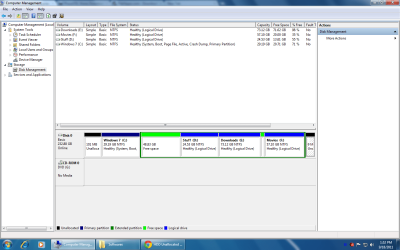
Hi. I installed windows 7 on C Drive. previously it was on drive D. After a fresh install, im unable to convert the un- allocated space to a usable drive.
Please check the screen shot. The HDD also contains a lot of un allocated free spaces.

Using Partition Wizard, i tried checking whethter the un allocated drive 48.89 gb contains errors. it found that it contains systems files of the previous windows installation. But My computer shows it as complete 48.89 Gb.
:(
 

Attachments

  • Untitled.png
    Untitled.png
    48.9 KB · Views: 31

My Computer

OS
Windows 7 Ultimate
This is Windows 7 and not eXPired. You don't need all of those small logical drives. In Windows 7, there are libraries and userprofile folders to help you organize your data.

Can't you simply add that space to the right of you C onto the C by extending the C?

Let me look back at your diskmanagment map again for further recommendations.
 

My Computer

Computer Manufacturer/Model Number
Toshiba Satellite S875D-S7239 laptop
OS
MS Windows 7 Ultimate SP1 64-bit
CPU
AMD A10-4600M
Motherboard
AMD Pumori (Socket FT1)
Memory
6.00 GB Dual-Channel DDR3 @ 798MHz (11-11-12-28)
Graphics Card(s)
AMD Radeon HD 7660G
Sound Card
High Definition Audio Device
Monitor(s) Displays
Generic PnP Monitor (1600x900@60Hz)
Screen Resolution
1600x900@60Hz
Hard Drives
SSD 119GB Corsair CSSD-V128GB2 ATA Device
Keyboard
Standard PS/2 Keyboard
Mouse
HP Wireless Optical Mobile Mouse Model FHA-3410
Internet Speed
What the local pub, local coffee shop offers.
Other Info
Optical Drive:MATSHITA BD-CMB UJ160B ATA Device


Also have an Asus ha1002xp netbook with Win 7 Ultimate installed.

My Computer

Computer Manufacturer/Model Number
Custom Build
OS
Windows 7 Ultimate x64/Windows 8 Consumer Preview x64/Ubuntu 11.04
CPU
Intel Pentium Dual Core E6700 3.2GHz
Motherboard
ASUS P5G41T-M LX
Memory
Strontium 8192MB DDR3 1333Mhz
Graphics Card(s)
msi GeForce N560GTX-M2D1GD5 1GB
Sound Card
Realtek HD Audio
Monitor(s) Displays
CHIMEI CMV 221D 22"
Screen Resolution
1680x1050
Hard Drives
Seagate Barracuda LP Green 3.5'' 2TB Internal HDD 5900RPM + WD Elements Desktop 1TB External HDD 7200RPM
PSU
SHAW Viper-1500w Gaming PSU
Case
Black eMaxx ATX Mini Tower Case
Keyboard
Microsoft Wireless Keyboard 1000
Mouse
Microsoft Wireless Optical Mouse 2000
Internet Speed
100GB @ 4.76Mbps
OK.
The quickest thing is to get yourself an external USB drive of 300-500 GB in size.

Use RoboCopy commands to copy your d,e,and f over to the external drive.

As a safety measure, make a system image backup of C to the external drive using Windows Backup and Restore. That's just in case you goof.

Now whether you use Disk Management, DISKPART, or Partition Wizard your end objective is to merge all of the other space (but not C) into one and only one PRIMARY PARTITION.

Now I suggest you make that C about 60 GB in size.
The idea is that C will contain Win 7 and any programs you install.

The rest of the disk will be one Primary Partition where you will keep all of your pics, videos, music, etc.
 

My Computer

Computer Manufacturer/Model Number
Toshiba Satellite S875D-S7239 laptop
OS
MS Windows 7 Ultimate SP1 64-bit
CPU
AMD A10-4600M
Motherboard
AMD Pumori (Socket FT1)
Memory
6.00 GB Dual-Channel DDR3 @ 798MHz (11-11-12-28)
Graphics Card(s)
AMD Radeon HD 7660G
Sound Card
High Definition Audio Device
Monitor(s) Displays
Generic PnP Monitor (1600x900@60Hz)
Screen Resolution
1600x900@60Hz
Hard Drives
SSD 119GB Corsair CSSD-V128GB2 ATA Device
Keyboard
Standard PS/2 Keyboard
Mouse
HP Wireless Optical Mobile Mouse Model FHA-3410
Internet Speed
What the local pub, local coffee shop offers.
Other Info
Optical Drive:MATSHITA BD-CMB UJ160B ATA Device


Also have an Asus ha1002xp netbook with Win 7 Ultimate installed.
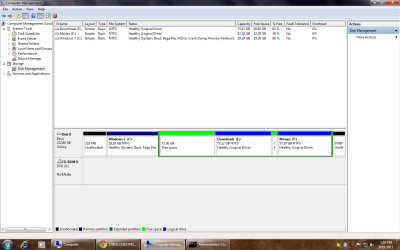
Guys. This is the latest Screenshot. 73 GB of free Space (in Green). The only option available when i right click the Green Space is New Simple Volume. However. The error is 'There is no enough space available to complete the operation'.

Forgive me for my ignorance.
 

Attachments

  • Untitled.png
    Untitled.png
    51.5 KB · Views: 11

My Computer

OS
Windows 7 Ultimate
There are three types of partitions: primary partitions, extended partitions and logical drives. A disk may contain up to four primary partitions (only one of which can be active), or three primary partitions and one extended partition. In the extended partition, the user can create logical drives (i.e. "simulate" several smaller-sized hard drives).

Merge space with C or E. What is unallocated at start of drive? On mine, it's the System Partition.

http://www.sevenforums.com/tutorials/2670-partition-volume-extend.html?ltr=P

http://www.mydigitallife.info/how-t...m-been-created-during-windows-7-installation/
 

My Computer

Computer type
PC/Desktop
Computer Manufacturer/Model Number
Dell Inspiron 660
OS
Windows 7 Home Premium 64bit
CPU
Intel Core i3-3240
Motherboard
Dell 084J0R
Memory
8GB DDR3 SDRAM
Graphics Card(s)
EVGA GeForce GT 620
Sound Card
Intel Panther Point PCH High Definition Audio
Monitor(s) Displays
Acer G205HV
Screen Resolution
1600 x 900
Hard Drives
Sandisk SSD 64GB SDSSDP064G
Seagate HDD 1TB ST1000DM003-1CH162
PSU
Dell 300W
Case
Dell Inspiron
Keyboard
Logitech Wireless K320/B350
Mouse
Microsoft
Internet Speed
25Mbps/4Mbps
Antivirus
Avast
Browser
Mozilla Firefox
shaju,
We're telling you that you can't create anything until you merge some stuff together.

Be sure to read what Comp wrote.
 

My Computer

Computer Manufacturer/Model Number
Toshiba Satellite S875D-S7239 laptop
OS
MS Windows 7 Ultimate SP1 64-bit
CPU
AMD A10-4600M
Motherboard
AMD Pumori (Socket FT1)
Memory
6.00 GB Dual-Channel DDR3 @ 798MHz (11-11-12-28)
Graphics Card(s)
AMD Radeon HD 7660G
Sound Card
High Definition Audio Device
Monitor(s) Displays
Generic PnP Monitor (1600x900@60Hz)
Screen Resolution
1600x900@60Hz
Hard Drives
SSD 119GB Corsair CSSD-V128GB2 ATA Device
Keyboard
Standard PS/2 Keyboard
Mouse
HP Wireless Optical Mobile Mouse Model FHA-3410
Internet Speed
What the local pub, local coffee shop offers.
Other Info
Optical Drive:MATSHITA BD-CMB UJ160B ATA Device


Also have an Asus ha1002xp netbook with Win 7 Ultimate installed.
Guys. This is the latest Screenshot. 73 GB of free Space (in Green). The only option available when i right click the Green Space is New Simple Volume. However. The error is 'There is no enough space available to complete the operation'.

Forgive me for my ignorance.
This space is still a partition. Are you sure that there is no "Delete Partition" when you right click on it to make it "unallocated". Only then you can do anything with that space.

Btw: the other posters are right. Your disk layout is a mess. There is no need to have all those little partitions. One big partition subdivided into folders is much more efficient.
 

My Computer

Computer Manufacturer/Model Number
HP, Dell, Gateway, Toshiba - 4 laptops and 2 desktops
OS
Vista, Windows7, Mint Mate, Zorin, Windows 8
CPU
from 1.6GHz Duo to i7
Monitor(s) Displays
2x HP w2207
Hard Drives
5x HDD, 7x SSD, 12x Externals
Keyboard
with trackball - no mices
Mouse
Trackball mice
Internet Speed
DSL 6000
Yup. The only option when i right click the 'Free Space is 'New simple Volume which eventually does not work;
And the un-allocated space
 

My Computer

OS
Windows 7 Ultimate

My Computer

Computer Manufacturer/Model Number
HP, Dell, Gateway, Toshiba - 4 laptops and 2 desktops
OS
Vista, Windows7, Mint Mate, Zorin, Windows 8
CPU
from 1.6GHz Duo to i7
Monitor(s) Displays
2x HP w2207
Hard Drives
5x HDD, 7x SSD, 12x Externals
Keyboard
with trackball - no mices
Mouse
Trackball mice
Internet Speed
DSL 6000
shaku,
Here you go:
Go to an elevated command prompt and enter:
Diskpart
select disk 0
list partition
Now you look at that partition list and determine the numeral assigned to the partition you want delete.
As an example, I'm going to use partition3.
select partition 3
detail partition
--just to make sure you didn't goof
delete partition override
exit
exit
 

My Computer

Computer Manufacturer/Model Number
Toshiba Satellite S875D-S7239 laptop
OS
MS Windows 7 Ultimate SP1 64-bit
CPU
AMD A10-4600M
Motherboard
AMD Pumori (Socket FT1)
Memory
6.00 GB Dual-Channel DDR3 @ 798MHz (11-11-12-28)
Graphics Card(s)
AMD Radeon HD 7660G
Sound Card
High Definition Audio Device
Monitor(s) Displays
Generic PnP Monitor (1600x900@60Hz)
Screen Resolution
1600x900@60Hz
Hard Drives
SSD 119GB Corsair CSSD-V128GB2 ATA Device
Keyboard
Standard PS/2 Keyboard
Mouse
HP Wireless Optical Mobile Mouse Model FHA-3410
Internet Speed
What the local pub, local coffee shop offers.
Other Info
Optical Drive:MATSHITA BD-CMB UJ160B ATA Device


Also have an Asus ha1002xp netbook with Win 7 Ultimate installed.
Partition Manager

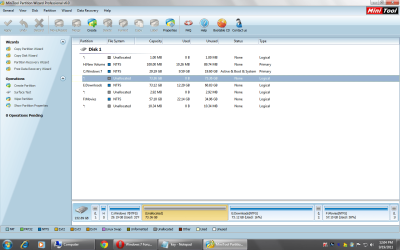
Guys. Ive tried using partition manager professional edition. Almost all operations i try leads to operations pending on the left panel.

The free space shown in device manager is shown as 'UN--ALLOCATED' space in Partition manager.

Here is the screen shot as of now.
Recommendation since im a amateur wrt to computing. Apologies for the same.
 

Attachments

  • Partition Wizard.png
    Partition Wizard.png
    71.2 KB · Views: 3

My Computer

OS
Windows 7 Ultimate
Use Partition Wizard. We have a couple of tutorials.

Or use DiskPart.
 

My Computer

Computer Manufacturer/Model Number
Toshiba Satellite S875D-S7239 laptop
OS
MS Windows 7 Ultimate SP1 64-bit
CPU
AMD A10-4600M
Motherboard
AMD Pumori (Socket FT1)
Memory
6.00 GB Dual-Channel DDR3 @ 798MHz (11-11-12-28)
Graphics Card(s)
AMD Radeon HD 7660G
Sound Card
High Definition Audio Device
Monitor(s) Displays
Generic PnP Monitor (1600x900@60Hz)
Screen Resolution
1600x900@60Hz
Hard Drives
SSD 119GB Corsair CSSD-V128GB2 ATA Device
Keyboard
Standard PS/2 Keyboard
Mouse
HP Wireless Optical Mobile Mouse Model FHA-3410
Internet Speed
What the local pub, local coffee shop offers.
Other Info
Optical Drive:MATSHITA BD-CMB UJ160B ATA Device


Also have an Asus ha1002xp netbook with Win 7 Ultimate installed.
@ karlsnooks

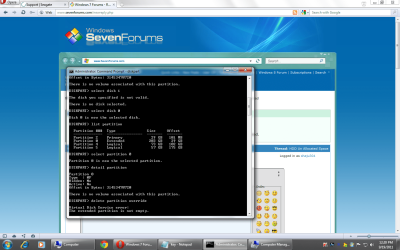
Tried the elevated command prompt.
I get the following error msg.

Kindly check the screen shot and comment

Mine is a 250 Gb HDD
 

My Computer

OS
Windows 7 Ultimate
@KArlsnooks
 

Attachments

  • Command Prompt.png
    Command Prompt.png
    122.9 KB · Views: 10

My Computer

OS
Windows 7 Ultimate
Excellent.

Now use diskpart again, but this time
do a
list volume

And attach a snip of what you see.

Or did you know that you can use your mouse to select an area of the cmd screen and then hit the ENTER key. The area you highlighted will be copied to the clipboard. You can then use Ctrl + V to paste the clipboard into your next post.

Try it. You will get to where you like it for saving what's on the command console.
 

My Computer

Computer Manufacturer/Model Number
Toshiba Satellite S875D-S7239 laptop
OS
MS Windows 7 Ultimate SP1 64-bit
CPU
AMD A10-4600M
Motherboard
AMD Pumori (Socket FT1)
Memory
6.00 GB Dual-Channel DDR3 @ 798MHz (11-11-12-28)
Graphics Card(s)
AMD Radeon HD 7660G
Sound Card
High Definition Audio Device
Monitor(s) Displays
Generic PnP Monitor (1600x900@60Hz)
Screen Resolution
1600x900@60Hz
Hard Drives
SSD 119GB Corsair CSSD-V128GB2 ATA Device
Keyboard
Standard PS/2 Keyboard
Mouse
HP Wireless Optical Mobile Mouse Model FHA-3410
Internet Speed
What the local pub, local coffee shop offers.
Other Info
Optical Drive:MATSHITA BD-CMB UJ160B ATA Device


Also have an Asus ha1002xp netbook with Win 7 Ultimate installed.
Back
Top