Hard Drive showing as full mysteriously

I am having exactly the same problem

I'm having exactly the same problem.

This is my Windows Disk Manager Report:

2ntb7t4.jpg


The C drive seems to be reporting correctly - I moved a ton of stuff out of D and into C when this first started.
25gcuf5.jpg


D is my recovery partition - it's fine too

But my Data Drive (Q) is reporting as full when it is less than half full.

33vzp15.jpg


At this point the only think I can think of is to back up all the files and reformat the disk. At least it is a data drive.

I'd love to figure out what is happening.

My tech level is moderate - so many of the suggestions you have made in this thread are out of my range.
 

My Computer My Computer

At a glance

Win 7 64
OS
Win 7 64
Download and run WinDirStat (as previously mentioned):

WinDirStat - Permalinks to downloads and other content

Focus, of course, on your Q drive. Make sure to select the Options menu dropdown and select all of the "Show ..." options. Post a screenshot of what you get (adjust columns and such to show maximum info).
 

My Computer My Computer

At a glance

Windows 7 Ultimate x64
OS
Windows 7 Ultimate x64
WinDIrStat did the trick - the drive was FULL of 200+G of backup .zip files - none of the other programs has ever detected them - but the HUGE purple block of .zips was a dead giveaway as to where the problem was located.

I'm off to get an external BU drive - The Q drive was originally my backup drive and then I moved my pictures over - I had no idea the old backups were not deleting.

Sixteen thumbs up! :D

I've been trying to solve this for 6 months and every time I clear space it fills up again (duh) I thought it was all my pictures. I have no idea why none of my other disk programs showed the files - but WinDirStat is amazing.

Time to purchase a new backup drive and reset the backup parameter.

Thanks F5ing!
 

My Computer My Computer

At a glance

Win 7 64
OS
Win 7 64
You're quite welcome! Glad to hear you were able to identify and solve your problem. And thank you for your reply about what you found and your fix!!

Let us know if there are any further issues!
 

My Computer My Computer

At a glance

Windows 7 Ultimate x64
OS
Windows 7 Ultimate x64
Lazyislander i does your issue still persist?

If it does do you have a Windows 7 DVD if you do please try a in-place upgrade follow the guide below please:

How to Perform an In-Place Upgrade on Windows Vista, Windows 7, Windows Server 2008 & Windows Server 2008 R2

Please before attempting the in-place upgrade please backup your current system and data to an external hard drive.

It seems hard to pinpoint the cause or issue affecting the hard drive space space reporting and the above may cure it. Using registry cleaners may have a hand in the issue you are now facing.

Hope this helps.
 

My Computer My Computer

At a glance

Windows 7 Ultimate x64AMD turion 64x2 TL-64 2.2GhzSodimm DDR2 4GBATI Radeon 1250 128MB IGP
Computer Manufacturer/Model Number
HP Compaq 6715B
OS
Windows 7 Ultimate x64
CPU
AMD turion 64x2 TL-64 2.2Ghz
Motherboard
HC030
Memory
Sodimm DDR2 4GB
Graphics Card(s)
ATI Radeon 1250 128MB IGP
Hard Drives
Fujitsu Siemens 500GB sata 3.0 Gb/s
I have happened to have this same problem, twice now. # weeks ago I had only 3 gigs left on a 600 gig drive and it made no sense. Used WinDirStat and found a huge block of the same color in the graphic which made me very suspicious. Looking at this block it was 500 plus gigs under a weird binary named folder, the folder name was (e69c372f-738f-426f-9) so I opened it and all the files were named in a similar nature. All the files were set as VLC media player files but I suspected this was false. I deleted VLC media player and they all converted to Winamp files. So in desperation I deleted the wntire folder contents and all was well. Well till today 3 weeks later I find the drive is full once again with little use other than looking at emails and news sites. Same problem again with 521 GIGS of media files under this weird binary folder as named above (e69c372f-738f-426f-9). Once again I deleted everything in the folder and its back to normal.

Anyone have a clue why this keeps happening?

Windows 7 64 bit Premium
 

My Computer My Computer

At a glance

Windows 7 64bit, Premium
Computer Manufacturer/Model Number
HP
OS
Windows 7 64bit, Premium
Hard Drives
600 gig
Welcome bailenforcer!

Sounds like it's time for a malware check. Probably best to start a new thread for this, though (as you've already identified the files that were taking up the space). A new thread would likely attract more attention, and for those that are following this thread you can post a link to your new thread here (in case they've anything to offer you).

BTW, VLC likely had nothing to do with your problem, so no real need to uninstall it. But it does sound like Windows' file associations got screwed up some kind of way. What were the file extensions for those suspicious files?
 

My Computer My Computer

At a glance

Windows 7 Ultimate x64
OS
Windows 7 Ultimate x64
Same problem...

I'm having the same problem (also with a Lenovo laptop, FWIW)...

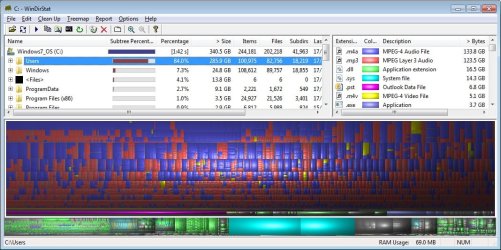
I ran WinDirStat and which shows about 340 GB used out of 653 GB on my c: drive - and yet I have less than 4 GB free on the drive. I use my computer almost exclusively for music (as you can see from the screenshot), but my entire music collection is only about 260 GB and everything else combined is tiny. At first I thought iTunes may have been saving duplicate copies of my music files, but that should be accounted for in the disk usage if that was the case...

HELP! :confused:
 

Attachments

  • windirstat.jpg
    windirstat.jpg
    116.9 KB · Views: 4

My Computer My Computer

At a glance

Windows 7Intel Core i7-3520M 2.9 GHz8GB
Computer type
Laptop
Computer Manufacturer/Model Number
Lenovo P580
OS
Windows 7
CPU
Intel Core i7-3520M 2.9 GHz
Memory
8GB
Hard Drives
One partitioned 750 GB drive
C: 653 GB
D: 25.4 GB
Just giving this a bump, hoping someone is familiar with the problem and can offer some help. Thx...
 

My Computer My Computer

At a glance

Windows 7Intel Core i7-3520M 2.9 GHz8GB
Computer type
Laptop
Computer Manufacturer/Model Number
Lenovo P580
OS
Windows 7
CPU
Intel Core i7-3520M 2.9 GHz
Memory
8GB
Hard Drives
One partitioned 750 GB drive
C: 653 GB
D: 25.4 GB
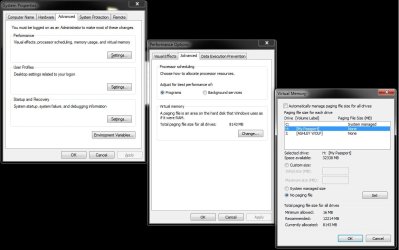
This is also another picture based on the previous poster. Seems like only 8GB is used in the virtual memory.

EDIT:-
There is a post before this explaining a similar problem to the thread starter. Had to mention this just in case somebody reads this before a mod approves my main post and gets confused. :)
 

Attachments

  • Virtual Memory H Drive.jpg
    Virtual Memory H Drive.jpg
    72.8 KB · Views: 2
Last edited:

My Computer My Computer

At a glance

Windows 7 Home Premium SP1 64bit
Computer type
PC/Desktop
Computer Manufacturer/Model Number
Custom
OS
Windows 7 Home Premium SP1 64bit
Antivirus
AVG Free
Browser
Firefox, Chrome
Back
Top