Hard Drive spins up, isn't selectable

lhul5ley

New member
Local time
5:19 AM
Messages
6
My wife has a Western Digital hard drive. We are located in Italy currently. I was moving some files around on it to take to another computer and after I disconnected, the next computer couldn't pull anything up. Back to the original PC and the drive spins up and sounds fine, but I when I go to computer, it usually says my passport and it now says nothing, and the hard drive won't load up.

When I click the bottom right menu, it gives me the option to disconnect the passport, after a few seconds of reluctance. Help?
 

My Computer My Computer

Computer type
PC/Desktop
Computer Manufacturer/Model Number
Custom Build
OS
Windows 7 Home Premium 64 Bit

My Computer My Computer

Computer type
PC/Desktop
Computer Manufacturer/Model Number
Custom assembled by me :}
OS
Win-7-Pro64bit 7-H-Prem-64bit
CPU
i7-5930K 2nd i9-9940x both water blocked VRM's too
Motherboard
ASUS SABERTOOTH X99 2nd ASUS x299 Apex
Memory
Trident-z 3200C14 2nd Trident-z 3600C16
Graphics Card(s)
EVGA 1080ti ftw3 2nd Titan Xp both water blocked
Sound Card
Built-in Realtek
Monitor(s) Displays
1-AOC G2460PG 24"G-Sync 144Hz/ 2nd 1-ASUS VG248QE 24" 144Hz
Screen Resolution
1920 x 1080 144Hz
Hard Drives
2-Samsung M.2 Evo & Evo Plus
2-Samsung 850 EVO 500GB SSD's/ 3-2.5 W.D. Black 1tb-&3-1tb/3-3.5 WD Black 1tb hdd's
PSU
EVGA SuperNOVA 1000-P2 2nd 1200-P2
Case
2-Corsair Obsidian Series 450D Black ATX Mid Tower
Cooling
Custom water loops
Keyboard
Logitech G710+/ 2nd Logitech G910
Mouse
2-RedDragon M901 Perdition 16400 dpi Gaming mouse = wired
Internet Speed
Comcast Ping 19ms 89.31mbps download speed 6.12mbps upload
Antivirus
Malwarebytes Pro/ Superantispyware Pro
Browser
FireFox & Pale moon
Other Info
2nd ASUS X299 Apex/Intel i9-9940x with Custom water loop/7H-Prem-x64/Corsair 450D case/Ram Trident-z 3600C16 4x8gb / Samsung970Evo plus 500gb SSD/Dual ssd EZ swap evo/PSU EVGA SuperNova 1200w-P2 80+Platinum/GPU Titan Xp /8-ML-140 on push-pull on 2-280GTX rads
DDLCrIO.png


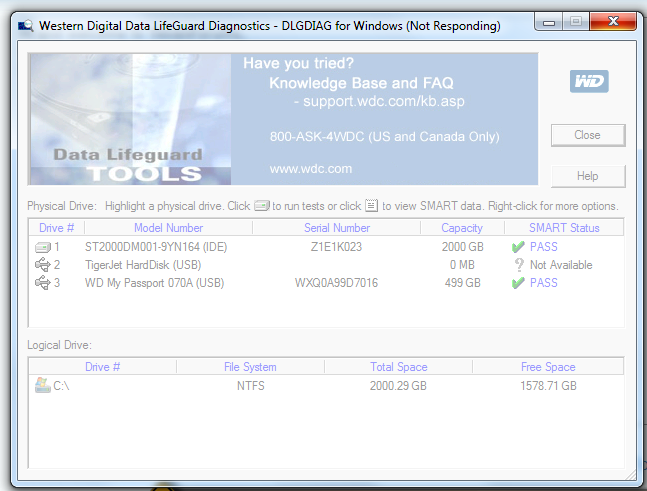
Everything I try with the hard drive connected, freezes. Disk Management, any recovery programs, ANYTHING. Nothing works, it all freezes if it is doing ANYTHING with the hard drive. It seems the data is uncorrupted, something is just keeping it from booting. This is the screencap of the frozen Western Digital Lifeguard Diagnostics program, just after I removed the hard drive from my PC. I plugged it back in, and attempted a scan, and the program froze.
 

My Computer My Computer

Computer type
PC/Desktop
Computer Manufacturer/Model Number
Custom Build
OS
Windows 7 Home Premium 64 Bit
XxTklhB.png


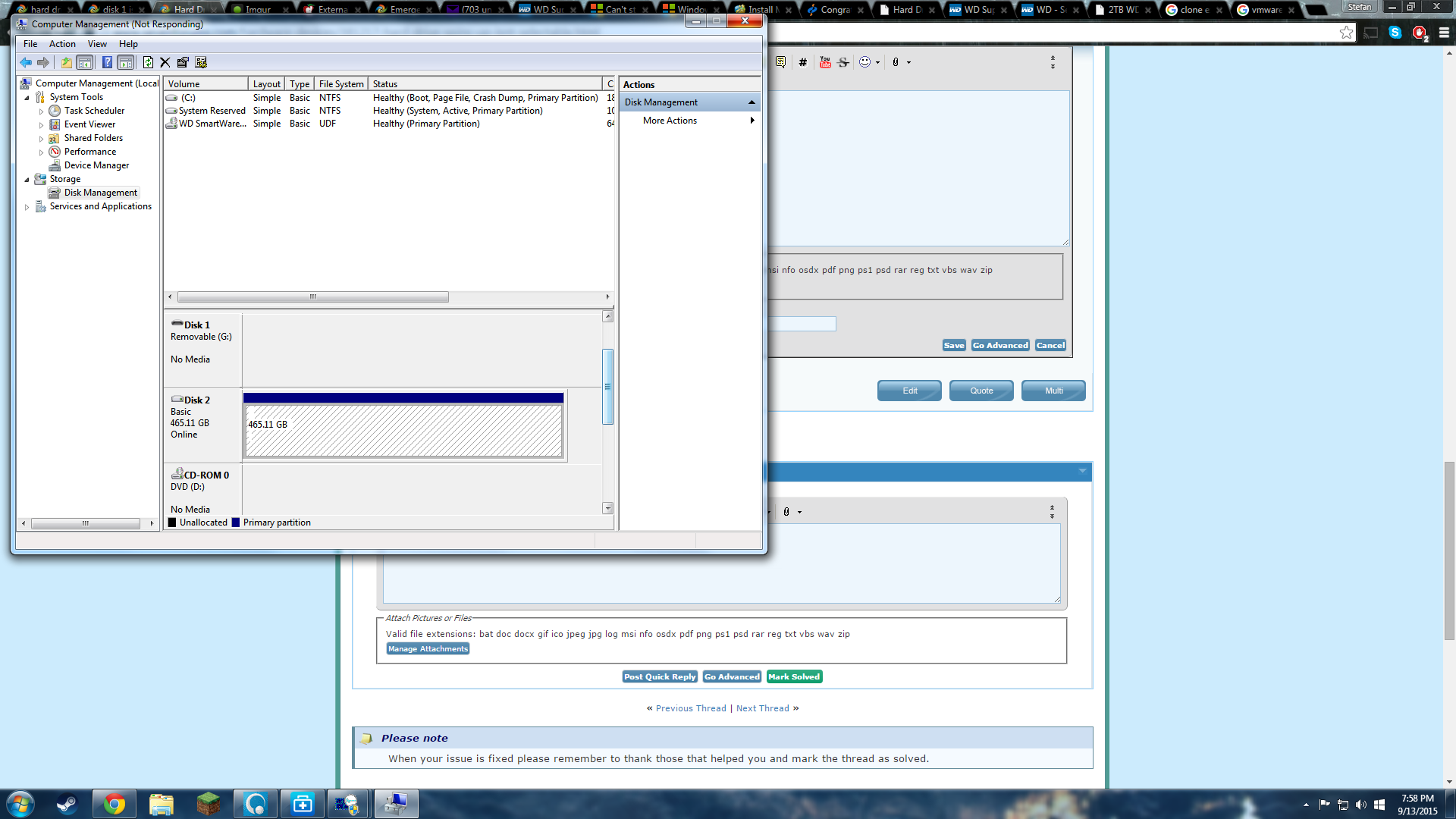
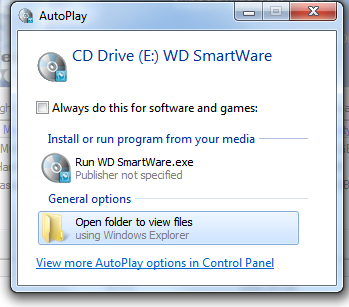
On top of this, when I plug the hard drive in, I get this option.

ieNlrbZ.png


When I click view files, however, it just loads and loads and loads.. Nothing actually works.
 
Last edited:

My Computer My Computer

Computer type
PC/Desktop
Computer Manufacturer/Model Number
Custom Build
OS
Windows 7 Home Premium 64 Bit
Hi,
No kidding did you test with Linux or not ?
 

My Computer My Computer

Computer type
PC/Desktop
Computer Manufacturer/Model Number
Custom assembled by me :}
OS
Win-7-Pro64bit 7-H-Prem-64bit
CPU
i7-5930K 2nd i9-9940x both water blocked VRM's too
Motherboard
ASUS SABERTOOTH X99 2nd ASUS x299 Apex
Memory
Trident-z 3200C14 2nd Trident-z 3600C16
Graphics Card(s)
EVGA 1080ti ftw3 2nd Titan Xp both water blocked
Sound Card
Built-in Realtek
Monitor(s) Displays
1-AOC G2460PG 24"G-Sync 144Hz/ 2nd 1-ASUS VG248QE 24" 144Hz
Screen Resolution
1920 x 1080 144Hz
Hard Drives
2-Samsung M.2 Evo & Evo Plus
2-Samsung 850 EVO 500GB SSD's/ 3-2.5 W.D. Black 1tb-&3-1tb/3-3.5 WD Black 1tb hdd's
PSU
EVGA SuperNOVA 1000-P2 2nd 1200-P2
Case
2-Corsair Obsidian Series 450D Black ATX Mid Tower
Cooling
Custom water loops
Keyboard
Logitech G710+/ 2nd Logitech G910
Mouse
2-RedDragon M901 Perdition 16400 dpi Gaming mouse = wired
Internet Speed
Comcast Ping 19ms 89.31mbps download speed 6.12mbps upload
Antivirus
Malwarebytes Pro/ Superantispyware Pro
Browser
FireFox & Pale moon
Other Info
2nd ASUS X299 Apex/Intel i9-9940x with Custom water loop/7H-Prem-x64/Corsair 450D case/Ram Trident-z 3600C16 4x8gb / Samsung970Evo plus 500gb SSD/Dual ssd EZ swap evo/PSU EVGA SuperNova 1200w-P2 80+Platinum/GPU Titan Xp /8-ML-140 on push-pull on 2-280GTX rads
Hello Ihul5ley!

So the initial system sees and works fine with the drive, but the second one doesn't?

I would suggest you switching ports, and even trying through a USB hub with a new USB cable. If the drive works on the first PC check it with the WD DLG there, perform both Quick and Extended tests and post the SMART values here. :)

If the drive passes and the first PC sees it, the problem could be connected to some kind of privacy/permissions settings of the files themselves and/or the first PC.

Move the data from the external My Passport, leave it empty, does the same happen again with the second PC? Do other USB 3.0 devices work correctly with it?

Post back! :)

CK_WD
 

My Computer My Computer

Computer type
PC/Desktop
OS
Windows 7 Home Premium x64
Hey guys, Thrash, no I have not tried any Linux testing. I am not familiar at all with Linux, not even in the slightest.

CKWD, the hard drive now doesn't work on any system. I have tried 3 laptops and have been unsuccessful with all 3 machines. I plugged it into my surround sound system and it isn't recognized there either
 
Last edited:

My Computer My Computer

Computer type
PC/Desktop
Computer Manufacturer/Model Number
Custom Build
OS
Windows 7 Home Premium 64 Bit
So not even the original PC that you mentioned in the first post can see it?

Did you try changing the cable?
 

My Computer My Computer

Computer type
PC/Desktop
Computer Manufacturer/Model Number
Custom Build
OS
Windows 7 Ultimate x64 SP1
CPU
AMD Phenom 2 1090T
Motherboard
Gigabyte GA-890FXA-UD5
Memory
2x8GB Kingston HyperX Fury Black 1600Mhz Unganged
Graphics Card(s)
MSI GTX 970 Gaming 4G
Sound Card
Realtek On-Board HD 7.1 Audio / Logitech G35
Monitor(s) Displays
3xAcer GD245HQ
Screen Resolution
1920x1080
Hard Drives
Samsung 850 Pro 512GB SSD - OS /
WD Caviar Black SATA 3 - 1 TBx2 - Dynamic RAID 0 /
WD Caviar Green SATA 2 - 640GBx2 - Dynamic RAID 0 /
WD Caviar Green SATA 2 - 640GB - Internal Backup /
Seagate Barracude SATA 3 - 3TB - External Backup/ Sync
PSU
HighPower 1000W
Case
Cooler Master HAF 932
Cooling
Noctua NH-D14
Keyboard
Logitech G19
Mouse
Logitech G500
Internet Speed
100/4 Mbit Cable (100GB quota)
Antivirus
ZoneAlarm Extreme Security / MBAM Pro / MBAE Free / SAS Free
Browser
IE 11 - Firefox - Chrome
Other Info
Logitech F710/ G27/ G940/ Z5500 // TrackIR 5 // Nvidia 3D Surround Vision
The computer knows that the drive is there. The hard drive spins up, the light comes on. It just bogs everything down that tries to access it in any way. Disk management won't even pull up with the hard drive connected. Any programs, such as a diagnostic, bog down and stop responding when they try to access the drive.
 

My Computer My Computer

Computer type
PC/Desktop
Computer Manufacturer/Model Number
Custom Build
OS
Windows 7 Home Premium 64 Bit

My Computer My Computer

Computer type
PC/Desktop
Computer Manufacturer/Model Number
Custom Build
OS
Windows 7 Ultimate x64 SP1
CPU
AMD Phenom 2 1090T
Motherboard
Gigabyte GA-890FXA-UD5
Memory
2x8GB Kingston HyperX Fury Black 1600Mhz Unganged
Graphics Card(s)
MSI GTX 970 Gaming 4G
Sound Card
Realtek On-Board HD 7.1 Audio / Logitech G35
Monitor(s) Displays
3xAcer GD245HQ
Screen Resolution
1920x1080
Hard Drives
Samsung 850 Pro 512GB SSD - OS /
WD Caviar Black SATA 3 - 1 TBx2 - Dynamic RAID 0 /
WD Caviar Green SATA 2 - 640GBx2 - Dynamic RAID 0 /
WD Caviar Green SATA 2 - 640GB - Internal Backup /
Seagate Barracude SATA 3 - 3TB - External Backup/ Sync
PSU
HighPower 1000W
Case
Cooler Master HAF 932
Cooling
Noctua NH-D14
Keyboard
Logitech G19
Mouse
Logitech G500
Internet Speed
100/4 Mbit Cable (100GB quota)
Antivirus
ZoneAlarm Extreme Security / MBAM Pro / MBAE Free / SAS Free
Browser
IE 11 - Firefox - Chrome
Other Info
Logitech F710/ G27/ G940/ Z5500 // TrackIR 5 // Nvidia 3D Surround Vision
With zero knowledge, how does one 'try with linux' lol
 

My Computer My Computer

Computer type
PC/Desktop
Computer Manufacturer/Model Number
Custom Build
OS
Windows 7 Home Premium 64 Bit
You have been given a tutorial in post #2. ;)
 

My Computer My Computer

Computer type
PC/Desktop
Computer Manufacturer/Model Number
Custom Build
OS
Windows 7 Ultimate x64 SP1
CPU
AMD Phenom 2 1090T
Motherboard
Gigabyte GA-890FXA-UD5
Memory
2x8GB Kingston HyperX Fury Black 1600Mhz Unganged
Graphics Card(s)
MSI GTX 970 Gaming 4G
Sound Card
Realtek On-Board HD 7.1 Audio / Logitech G35
Monitor(s) Displays
3xAcer GD245HQ
Screen Resolution
1920x1080
Hard Drives
Samsung 850 Pro 512GB SSD - OS /
WD Caviar Black SATA 3 - 1 TBx2 - Dynamic RAID 0 /
WD Caviar Green SATA 2 - 640GBx2 - Dynamic RAID 0 /
WD Caviar Green SATA 2 - 640GB - Internal Backup /
Seagate Barracude SATA 3 - 3TB - External Backup/ Sync
PSU
HighPower 1000W
Case
Cooler Master HAF 932
Cooling
Noctua NH-D14
Keyboard
Logitech G19
Mouse
Logitech G500
Internet Speed
100/4 Mbit Cable (100GB quota)
Antivirus
ZoneAlarm Extreme Security / MBAM Pro / MBAE Free / SAS Free
Browser
IE 11 - Firefox - Chrome
Other Info
Logitech F710/ G27/ G940/ Z5500 // TrackIR 5 // Nvidia 3D Surround Vision
OK, ThrashZone gave you a very good suggestion to try and see whether Linux could see the drive. I shall go with it but in my own way - with what I am familiar with to some extent..

Don't worry if you don't know anything about Linux - neither me knows much about it. But we all use it to recover files when with the drive Windows plays truant .

Please read this post http://www.sevenforums.com/hardware...ly-unrecognisable-hard-drive.html#post2936753.

Prepare your Lucid Puppy Pendrive using Rufus. https://rufus.akeo.ie/ (If you have any data on the pendrive back it up elsewhere since all data in it will be lost when Rufus formats the pendrive and writes Lucid Puppy in it.)

Read this and try to familiarise yourself on how to use Lucid Puppy. http://www.sevenforums.com/software/198909-lucid-puppy-way-recover-files-non-bootable-computer.html In your case it will be the non-responding external drive.

With your WD external drive plugged in and the Lucid Puppy pen drive plugged in, boot your PC. Use the onetime boot menu to boot Lucid Puppy from the pendrive.

Also answer this question: Did you install Smartware on your PC? Just answer yes or no and do not install it.

If it is a problem with Smartware, CKWD will be the best WD man. So I request CKWD to standby. So also ThrashZone and GoKay to retrieve me in any difficult situation.:)

No need to be in a hurry. Do it all in a calm and composed manner. Take your time. ( I generally do not come in if it is a WD drive since these have some special problems associated with Smartware and Hardware encryption and if it comes to that I may hand you over to CKWD :). Let us see how it goes with Lucid Puppy.)

 

My Computer My Computer

OS
Windows 7 Home Premium 32 bit
I support Jumanji and TrashZone to try with Linux. :)

Briefly again, the idea here is to boot temporarily to another OS, one of Linux or Ubuntu even. You do that by creating a bootable flash drive, like already explained how, and installing the iso for that OS on it, again explained. When you are finished with these keep the flash drive connected, reboot, go to BIOS, set as Boot priority 1 the flash rive and it will start booting from the Linux/Ubuntu on it. These are much simpler and use simpler and lighter algorithms than Windows, thus it is often easier to access problematic drives. Try this and post back! :)

Do also change the cable. I wouldn't believe this to be a Smartware issue, though, as the drive has been connected to numerous PCs with the same unsuccessful result. If the above mentioned don't work I would say there is some kind of damage to the enclosure. :/ I hope this is not the case!

Good luck!

CK_WD
 

My Computer My Computer

Computer type
PC/Desktop
OS
Windows 7 Home Premium x64
Back
Top