
i found this thread http://www.sevenforums.com/hardware...rive-works-internally-but-not-externally.html which is opposite to my problem and its been a year since the last post. So i make a new thread.
As you can see in the title. My Hd drives works externally but not internally.
I have 4 HD`s
1.) ST31000528AS
2.) WD500AAKX
3.) WD6400AAKS
4.) ST500DM002 ( this is my local hd)
the rest is my other hd drive but not connected. Now i want to add atleast 1 or 2 hd to my computer. So I start adding the first one which is the #1 drive the ST31000528AS. I plug the cables to the hd then turn on my computer. But its always freezes at the bios screen then it will turn off automatically.
I tried all the other hd drives from 1-3 drives i listed above. They got the same results. So i searched about the problem and i found this thread http://www.sevenforums.com/general-discussion/217130-bios-screen-freezes-startup.html . I also used the disk clean command. To format my hd. But the problem still persists.
That problem occured only when i connect it internally but when i connect it externally its working fine. What do you think is the problem?
I tried replacing the sata cables and connecting it to different sata port. But got the same results :3
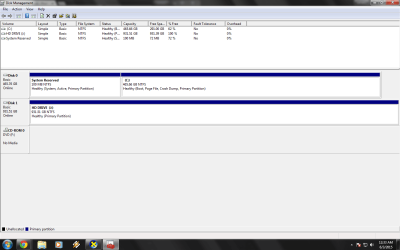
The Hard Drive J is the ST31000528AS. Connected externally and it`s working fine.
SPECS :
OS: windows 7 x64bit
CPU: Inter Core i5 3.10 GHz
Motherboard: H61H2-M12
Memory: Kingston KVR1333D3N9/4g (8gb overall)
GPU: AMD Radeon Hd 6670 DDR3 1GB
HD: ST500DM002
Power Supply : Generic 600 watts
As you can see in the title. My Hd drives works externally but not internally.
I have 4 HD`s
1.) ST31000528AS
2.) WD500AAKX
3.) WD6400AAKS
4.) ST500DM002 ( this is my local hd)
the rest is my other hd drive but not connected. Now i want to add atleast 1 or 2 hd to my computer. So I start adding the first one which is the #1 drive the ST31000528AS. I plug the cables to the hd then turn on my computer. But its always freezes at the bios screen then it will turn off automatically.
I tried all the other hd drives from 1-3 drives i listed above. They got the same results. So i searched about the problem and i found this thread http://www.sevenforums.com/general-discussion/217130-bios-screen-freezes-startup.html . I also used the disk clean command. To format my hd. But the problem still persists.
That problem occured only when i connect it internally but when i connect it externally its working fine. What do you think is the problem?
I tried replacing the sata cables and connecting it to different sata port. But got the same results :3
The Hard Drive J is the ST31000528AS. Connected externally and it`s working fine.
SPECS :
OS: windows 7 x64bit
CPU: Inter Core i5 3.10 GHz
Motherboard: H61H2-M12
Memory: Kingston KVR1333D3N9/4g (8gb overall)
GPU: AMD Radeon Hd 6670 DDR3 1GB
HD: ST500DM002
Power Supply : Generic 600 watts
Attachments
Last edited:
My Computer
- Computer type
- PC/Desktop
- Computer Manufacturer/Model Number
- ECS
- OS
- Windows 7 Ultimate x64
- CPU
- Intel Core i5 3.10 GHz
- Motherboard
- H61H2-M12
- Memory
- kingston kvr1333d3n9/4g
- Graphics Card(s)
- AMD Radeon HD 6670 DDR3 1GB
- Hard Drives
- ST500DM002-1BD142 ATA
- Antivirus
- Microsoft Essentials
- Browser
- Google Chrome


