Hard not showin up

Kuzum

New member
Local time
6:54 PM
Messages
7
Ive bought a WD cavier blue hard drive (160GB), installed it and added it as a partition.
After several weeks the partition disappeared from "My Computer" (E:\).
I opened the computer case and replugged the data cable, So it showed up again and worked properlly.
After 2 days it disappeard again, I replugged the data cable again but this time it didnt show up.
Ive changed about 4 data cables and tried plugging them to different SATA ports, didnt help.
I updated my BIOS to the latest version, didnt help.
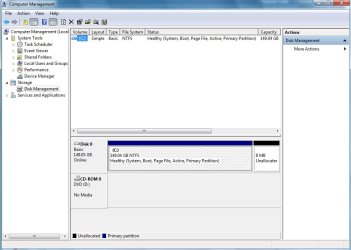
The hard drive isnt showing up anywhere (Device Manager, Disk Managment, BIOS).
The hard doesnt even show in the WD Data LifeGuard Diagnostic.
The hard drive itself spins up, so i guess its not a power issue.
Im desperate, dont know what to do.


Specs:
OS: Win7 32bit Ultimate
CPU: Intel Core 2 Quad Q9550
RAM: 4GB Kingston
Motherboard: Gigabyte GA-EP43-DS3
 

My Computer My Computer

OS
Windows 7 Ultimate 32bit
Hello Kuzum, welcome to the forum.
It sounds to me as if the HDD has died I suggest taking it back to where you bought it and asking for a new one
 

My Computer My Computer

Computer Manufacturer/Model Number
Something I threw together
OS
Windows 7 Ultimate x64
CPU
Intel Core i7-2600K
Motherboard
Asus P8P67
Memory
16 GB G Skill F3-10666 CL9D-4GBRL
Graphics Card(s)
ATI Radeon HD 6870
Sound Card
ATI Radeon HDMI / Realtek ALC892
Monitor(s) Displays
2 x 22" standard monitors / LG32LC56v TV to watch films
Screen Resolution
1920 x1080
Hard Drives
2 x OCZ Vertex2 111.79GB
3 x Samsung103SJ
1 x Samsung103UJ
1 x WD3200BEVT
1 x Hitachi5K320-160
PSU
Thermaltake Toughpower Cable Management 750W
Case
Antec 300
Cooling
Noctua NH-U12P SE2 and 5 120mm Case fans
Keyboard
Microsoft Comfort Curve Keyboard 2000
Mouse
Hama M3110 / Logitech M305
Internet Speed
16000
Other Info
I have also used Fedora, Suse, Ubuntu Linux
And all other Windows from 95 to date except ME
So its most likely the hard's problem, not the motherboard's problem, right?
 

My Computer My Computer

OS
Windows 7 Ultimate 32bit
Presumably your other drive(s) are working, so it sounds like the hard drive is faulty.
Have you tried taking it out of a different SATA port on the motherboard?
 

My Computer My Computer

Computer Manufacturer/Model Number
The Monolith. 3.1
OS
Windows 7 Home Premium 64 bit
CPU
i7 [email protected]
Motherboard
Gigabyte Z77-D3H
Memory
2x4GB Corsair Vegeance DDR3
Graphics Card(s)
XFX GTX 260 Black Edition
Sound Card
none-through large stereo hi fi
Monitor(s) Displays
Croosover 27MDP LED IPS Dell 2408 WFP
Screen Resolution
2560x1440 1920x1200
Hard Drives
1x Samsung 840Pro 128GB SSD
1x Samsung Spinpoint F1 1TB
PSU
Corsair AX 850 Watt
Case
Cooler Master ACTS 840
Cooling
Be Quiet! Dark Rock Pro
Keyboard
Enermax Aurora
Mouse
Logitech Ballmouse
Internet Speed
20MBPS


Ive set it up as a partition, it worked for some time like i stated at my post.
But Here you go, the C:\ is my boot drive.

Presumably your other drive(s) are working, so it sounds like the hard drive is faulty.
Have you tried taking it out of a different SATA port on the motherboard?

Yes i tried plugging into different ports.
 

Attachments

  • Mgmnt.jpg
    Mgmnt.jpg
    60.6 KB · Views: 7

My Computer My Computer

OS
Windows 7 Ultimate 32bit
Yes it would seem that it is defect, you could maybe try it in another PC if you want to be 100% certain but remember the movement involved may just get it working for a while longer, before it expires again.
 

My Computer My Computer

Computer Manufacturer/Model Number
Something I threw together
OS
Windows 7 Ultimate x64
CPU
Intel Core i7-2600K
Motherboard
Asus P8P67
Memory
16 GB G Skill F3-10666 CL9D-4GBRL
Graphics Card(s)
ATI Radeon HD 6870
Sound Card
ATI Radeon HDMI / Realtek ALC892
Monitor(s) Displays
2 x 22" standard monitors / LG32LC56v TV to watch films
Screen Resolution
1920 x1080
Hard Drives
2 x OCZ Vertex2 111.79GB
3 x Samsung103SJ
1 x Samsung103UJ
1 x WD3200BEVT
1 x Hitachi5K320-160
PSU
Thermaltake Toughpower Cable Management 750W
Case
Antec 300
Cooling
Noctua NH-U12P SE2 and 5 120mm Case fans
Keyboard
Microsoft Comfort Curve Keyboard 2000
Mouse
Hama M3110 / Logitech M305
Internet Speed
16000
Other Info
I have also used Fedora, Suse, Ubuntu Linux
And all other Windows from 95 to date except ME
If it cant be fixed, Is there any way to recover the data that was saved on it?
Cause every program i downloaded couldnt find the physical\logical drive.
 

My Computer My Computer

OS
Windows 7 Ultimate 32bit
If it cant be fixed, Is there any way to recover the data that was saved on it?
Cause every program i downloaded couldnt find the physical\logical drive.

Probably not without considerable expense sorry, but like I suggested movement may wake it up for a while I would certainly try removing it give it a LITTLE shake and try again, if you are lucky you may yet get your data off of it.
 

My Computer My Computer

Computer Manufacturer/Model Number
Something I threw together
OS
Windows 7 Ultimate x64
CPU
Intel Core i7-2600K
Motherboard
Asus P8P67
Memory
16 GB G Skill F3-10666 CL9D-4GBRL
Graphics Card(s)
ATI Radeon HD 6870
Sound Card
ATI Radeon HDMI / Realtek ALC892
Monitor(s) Displays
2 x 22" standard monitors / LG32LC56v TV to watch films
Screen Resolution
1920 x1080
Hard Drives
2 x OCZ Vertex2 111.79GB
3 x Samsung103SJ
1 x Samsung103UJ
1 x WD3200BEVT
1 x Hitachi5K320-160
PSU
Thermaltake Toughpower Cable Management 750W
Case
Antec 300
Cooling
Noctua NH-U12P SE2 and 5 120mm Case fans
Keyboard
Microsoft Comfort Curve Keyboard 2000
Mouse
Hama M3110 / Logitech M305
Internet Speed
16000
Other Info
I have also used Fedora, Suse, Ubuntu Linux
And all other Windows from 95 to date except ME
If it cant be fixed, Is there any way to recover the data that was saved on it?
Cause every program i downloaded couldnt find the physical\logical drive.

Probably not without considerable expense sorry, but like I suggested movement may wake it up for a while I would certainly try removing it give it a LITTLE shake and try again, if you are lucky you may yet get your data off of it.

Ok, will try.
Thanks.

Just last question, if the hard drive itself spins what could be the problem with it?
 

My Computer My Computer

OS
Windows 7 Ultimate 32bit
If it cant be fixed, Is there any way to recover the data that was saved on it?
Cause every program i downloaded couldnt find the physical\logical drive.

Probably not without considerable expense sorry, but like I suggested movement may wake it up for a while I would certainly try removing it give it a LITTLE shake and try again, if you are lucky you may yet get your data off of it.

Ok, will try.
Thanks.

Just last question, if the hard drive itself spins what could be the problem with it?
This is a guess but the read write heads may be sticking or it could be a problem with the circuit board or it may even be possible that dust or moisture has gotten into the drive; What Causes Hard Drive Failure? - Interrupt19
 

My Computer My Computer

Computer Manufacturer/Model Number
Something I threw together
OS
Windows 7 Ultimate x64
CPU
Intel Core i7-2600K
Motherboard
Asus P8P67
Memory
16 GB G Skill F3-10666 CL9D-4GBRL
Graphics Card(s)
ATI Radeon HD 6870
Sound Card
ATI Radeon HDMI / Realtek ALC892
Monitor(s) Displays
2 x 22" standard monitors / LG32LC56v TV to watch films
Screen Resolution
1920 x1080
Hard Drives
2 x OCZ Vertex2 111.79GB
3 x Samsung103SJ
1 x Samsung103UJ
1 x WD3200BEVT
1 x Hitachi5K320-160
PSU
Thermaltake Toughpower Cable Management 750W
Case
Antec 300
Cooling
Noctua NH-U12P SE2 and 5 120mm Case fans
Keyboard
Microsoft Comfort Curve Keyboard 2000
Mouse
Hama M3110 / Logitech M305
Internet Speed
16000
Other Info
I have also used Fedora, Suse, Ubuntu Linux
And all other Windows from 95 to date except ME
Will HD show in Device Manager?
 

My Computer My Computer

OS
ME/XP/Vista/Win7
If it will not show up, I don't know if this will help, but download Western Digitals diagnostic program and see if it can pick up the drive.
 

My Computers My Computers

System One System Two

  • Computer type
    PC/Desktop
    Computer Manufacturer/Model Number
    ALWAYS UNDER CONSTRUCTION
    OS
    Windows 11 Pro
    CPU
    Ryzen 9 5900X
    Motherboard
    Asus X570 Crosshair Viii Hero
    Memory
    32GB G Skill DDR4-3600
    Graphics Card(s)
    EVGA RTX 3080 FTW 3 Ultra
    Sound Card
    On Board/Sennheiser PC37X Headset
    Monitor(s) Displays
    3 X Asus 27"
    Screen Resolution
    2560x1440
    Hard Drives
    2 X 1 TB NVME drives
    PSU
    EVGA 850
    Case
    Phanteks Eclipse P400A
    Cooling
    EVGA 280 AIO
    Keyboard
    Logitech G510s/ Logitech G13
    Mouse
    Logitech G502
    Internet Speed
    24/1
    Antivirus
    ESET/MBAM Pro/SAS Pro
    Browser
    Chrome/ Firefox/ Edge
  • Computer type
    Laptop
    System Manufacturer/Model Number
    Dell 16 Plus
    OS
    Windows 11 Pro
    CPU
    Intel Ultra 9 288V
    Memory
    32 GB LPDDR5X 8533
    Monitor(s) Displays
    16" Mini-LED HDR600 Touch 90 Hz
    Screen Resolution
    2560X1600
    Hard Drives
    1 TB NVME
If it will not show up, I don't know if this will help, but download Western Digitals diagnostic program and see if it can pick up the drive.


Ive bought a WD cavier blue hard drive (160GB), installed it and added it as a partition.
After several weeks the partition disappeared from "My Computer" (E:\).
I opened the computer case and replugged the data cable, So it showed up again and worked properlly.
After 2 days it disappeard again, I replugged the data cable again but this time it didnt show up.
Ive changed about 4 data cables and tried plugging them to different SATA ports, didnt help.
I updated my BIOS to the latest version, didnt help.
The hard drive isnt showing up anywhere (Device Manager, Disk Managment, BIOS).
The hard doesnt even show in the WD Data LifeGuard Diagnostic.
The hard drive itself spins up, so i guess its not a power issue.
Im desperate, dont know what to do.


Specs:
OS: Win7 32bit Ultimate
CPU: Intel Core 2 Quad Q9550
RAM: 4GB Kingston
Motherboard: Gigabyte GA-EP43-DS3

...
 

My Computer My Computer

OS
Windows 7 Ultimate 32bit
Back
Top