
Solved Harddisk appears as local disk

Bill just noticed on the list Hitman Pro I wonder if it has been let loose for a search?

The other thing I noticed too was you mentioned some Apple items.

Now I don't know again I am no expert most of the simple fixes I get are due to a lot of rubbish downloaded linked to Apple - not that I am saying stoleaway is downloading rubbish but as you know Apple stuff is heavily targeted by sneakyware:huh:
 

My Computer

Computer type
PC/Desktop
Computer Manufacturer/Model Number
Own build (new) Desk1 / Asus ROG Win 7 / Desk2 1st build
OS
Desk1 7 Home Prem / Desk2 10 Pro / Main lap Asus ROG 10 Pro 2 laptop Toshiba 7 Pro Asus P2520 7 & 10
CPU
Desk1 i5 3750K / Laptop i7 GTX 860M / Desk2 i5 2500
Motherboard
Desk1 Asus P877-V / Desk2 Gigabyte H67 UD3H / Laptop ?
Memory
Desk1 8GB (1866) / Desk2 16GB (1333) / Laptop 8Gb DDR3
Graphics Card(s)
Desk 1& 2NVidia GTX 650 & Laptops on board Intel
Sound Card
Desk 1 & 2 -XONAR DG Realtek High Def audio Laptop
Monitor(s) Displays
Desk 1 Benq HD 2450 / Desk2 Philips 24" / Laptop 17.5"
Screen Resolution
1920x1080 D1 & D2 & Laptop 1
Hard Drives
Desk1 Samsung 120GB 830 SSD
Asus ROG 256GB 850 Pro SSD
Desk2 Samsung 840 256 SSD
Toshiba 120GB EVO
PSU
Desk 1 Corsair HX 1050/ Laptop ? / Desk 2 Corsair HX 650
Case
Desk 1 Cooler HAF XM ? Toshiba laptop / Desk2 Coolermaster
Cooling
Fans on all Desk1 -2 Desk2 - all Coolermasters 5 Laptop ?
Keyboard
Desk 1 MS Sidewinder X6 Desk 2 MS Sidewinder X 4
Mouse
Desk 1&2 - Gigabyte MS 900 gamer - laptop - Logitec wireless
Internet Speed
ADSL2+
Other Info
One other Desktop (tester) and spare Toshba laptop both with SSD's
Running Kaspersky 2016 ISS on all machines config'd identically
Logitec audio stereo systems on each machine (x3)
Canon MG5250MFC
Router/modem TP-Link running WPA2SK
Norton didn't came with my com, should I continue to uninstall it?

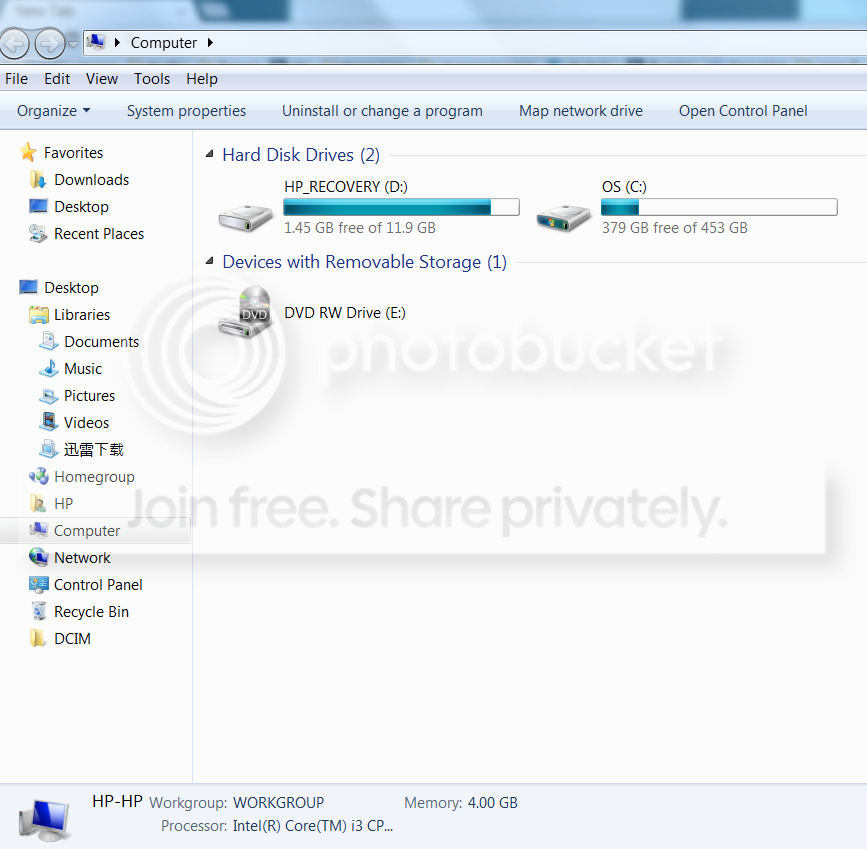
My computer looks like this now hmm
computer.png


What is system protection? How do I check it?

I dont' think I did any backup/ mirroring.
 

My Computer

Computer Manufacturer/Model Number
HP Pavillion Slimline
OS
Microsoft Windows 7 Home Premium 64-bit 7600 Multiprocessor Free
CPU
Intel(R) Core(TM) i3 CPU 550 @ 3.20GHz
Motherboard
MSI 2A9C
Memory
4.00 GB
Graphics Card(s)
ATI Radeon HD 5450
Sound Card
(1) ATI High Definition Audio Device (2) Realtek High Defi
Screen Resolution
1600 x 900 x 32 bits (4294967296 colors) @ 60 Hz
Hard Drives
(1) ST3500418AS (2) Generic- Multi-Card USB Device (3) WD 10EAVS External USB Device
and the error for WPD is "This device cannot start. (Code 10)"
 

My Computer

Computer Manufacturer/Model Number
HP Pavillion Slimline
OS
Microsoft Windows 7 Home Premium 64-bit 7600 Multiprocessor Free
CPU
Intel(R) Core(TM) i3 CPU 550 @ 3.20GHz
Motherboard
MSI 2A9C
Memory
4.00 GB
Graphics Card(s)
ATI Radeon HD 5450
Sound Card
(1) ATI High Definition Audio Device (2) Realtek High Defi
Screen Resolution
1600 x 900 x 32 bits (4294967296 colors) @ 60 Hz
Hard Drives
(1) ST3500418AS (2) Generic- Multi-Card USB Device (3) WD 10EAVS External USB Device
John: Don't know Hitman Pro, what list do you see it on?

stoleaway: Need a disk management image

Norton - if you have the disks or the key from purchase - uninstall, run the Norton cleanup and install MSE. Norton is very aggressive and can interfere with Windows when it does it's job. Tinkering around with Norton configuration is time consuming, reading the Norton logs and finding if Norton locked a service or application is time consuming. Both of these should be done with Norton support and it's well.... time consuming. The easiest thing is to move it completely out of the way by uninstalling and running the Norton cleanup utility.

This is of course your decision, you apparently have a paid subscription for Norton and to not use it is a waste of money.

System Protection - Computer properties->system protection (text link on left side of window) - post a screen shot showing the automatic restore points list (drives with checkboxes)

WPD - don't worry 'bout that, it's related to the card reader. I'm going to ask you to nuke the ghosts and WPD after you complete the current tasks. This is a critical stage of the USB cleanup and we're going to have to proceed carefully to avoid having to repeat steps. Not as dire as it sounds, just a pain having to do it over. Basically, when we get there, you have to remove all attached devices, clean up the ghost devices (and WPD), rebuild the USB cache, and- this is the critical part - attach one working USB device, not the Seagate. You'll end up with a few "new" issues that need to be addressed (most likely the card reader again) and all of your USB devices will install their respective drivers when you plug them in (camera, printer, HD drives, flash drives, etc). This is because we told Windows to forget about them.

Prep for Seagate drive resolution - download the following:
The first two tools will tell you more about your drive, the third tool will hopefully fix it, if not there are other repair tools and data recovery only tools. When we get to this point, you'll have to decide what you want to do - keep trying to repair the drive or get as much data off it as possible, then RMA under warranty.
Note: Seagate claims that 20% of returned drives are ok. just a note. What they don't say is that it's your time to figure that out =:>


SeaTools for windows
--> Howto: How to use SeaTools for Windows


CrystalDiskInfo 5.0.5
--> I'll see if there's a tutorial on this, just download it for now.


Testdisk - stable release 6.13
--> Howto: http://www.sevenforums.com/software/190430-regain-lost-drive-using-test-disk-illustrated-guide.html

As always, thanks for everything on your side of my monitor

Bill
.
 

My Computer

Computer type
Laptop
Computer Manufacturer/Model Number
HP Pavilion dv6-6c10us
OS
x64 (6.3.9600) Win8.1 Pro & soon dual boot x64 (6.1.7601) Win7_SP1 HomePrem
CPU
AMD A6-3420M APU with Radeon(tm) HD Graphics
Motherboard
Hewlett-Packard 1805
Memory
6.00 GB
Graphics Card(s)
AMD Radeon(TM) HD 6520G
Sound Card
(1) AMD High Definition Audio Device (2) IDT High Definiti
Monitor(s) Displays
HP W2072a 20" LCD (1600 x 900) @ 60 Hz
Screen Resolution
1366 x 768 x 32 bits (4294967296 colors) @ 60 Hz
Hard Drives
ST640LM0 00 HM641JI SATA Disk Device
Keyboard
Logitech k520 wireless KB
Mouse
Logitech m320 wireless mouse (bundled with KB)
Internet Speed
15/5 | 54 MB Wireless 'n'
Antivirus
Realtime: Defender or Avast | On-demand: Malwarebytes, ESET
Browser
IE 11 on Win8, IE 10 on win 7
Other Info
Media: [Gimp, Audacity, VLC] || Comm: [WEmail 2012, Skype] || Productivity: [OpenOffice,| Textpad] || Utils: [Sysinternals, cCleaner, Speccy, Defraggler]
When / if you uninstall Norton, make sure that Windows firewall is turned back on.
 

My Computer

Computer type
Laptop
Computer Manufacturer/Model Number
HP Pavilion dv6-6c10us
OS
x64 (6.3.9600) Win8.1 Pro & soon dual boot x64 (6.1.7601) Win7_SP1 HomePrem
CPU
AMD A6-3420M APU with Radeon(tm) HD Graphics
Motherboard
Hewlett-Packard 1805
Memory
6.00 GB
Graphics Card(s)
AMD Radeon(TM) HD 6520G
Sound Card
(1) AMD High Definition Audio Device (2) IDT High Definiti
Monitor(s) Displays
HP W2072a 20" LCD (1600 x 900) @ 60 Hz
Screen Resolution
1366 x 768 x 32 bits (4294967296 colors) @ 60 Hz
Hard Drives
ST640LM0 00 HM641JI SATA Disk Device
Keyboard
Logitech k520 wireless KB
Mouse
Logitech m320 wireless mouse (bundled with KB)
Internet Speed
15/5 | 54 MB Wireless 'n'
Antivirus
Realtime: Defender or Avast | On-demand: Malwarebytes, ESET
Browser
IE 11 on Win8, IE 10 on win 7
Other Info
Media: [Gimp, Audacity, VLC] || Comm: [WEmail 2012, Skype] || Productivity: [OpenOffice,| Textpad] || Utils: [Sysinternals, cCleaner, Speccy, Defraggler]
Once I see the System Restore screen shot
here's the plan

turn off monitoring for all devices, EXCEPT C:
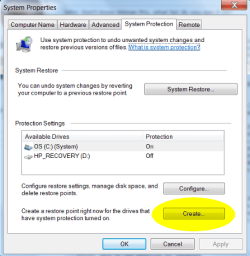
manually create a restore point - "1211xx PreGhost Device cleanup" (name suggestion)
disconnect all USB devices

In Device Manager: show hidden
uninstall all Ghost devices
uninstall WPD
exit

In Windows explorer
navigate to C:\Windows\System32\Driverstore
ren InfCache.1 InfCache_1.old
--> if you have permission problems, right click the file, select properties, select security tab, click edit, click add, add the object Administrators and give them full access
connect your WD ext drive (only the WD drive, not the Seagate)
restart your machine

Put an SD card in the card reader and post a Disk Management screen shot.
If the card reader doesn't have a drive letter - assign it one now.

check Device manager for ghost or problem devices
WPD might have a warning if you couldn't assign a drive letter or the driver needs to be installed manually - don't worry about that now.

The next thing you'll try is Testdisk. Yeah!
Disconnect the WD and remove the SD card

I'll wait until you catch up. I guess your work is keeping you busy.

Bill
.
 

My Computer

Computer type
Laptop
Computer Manufacturer/Model Number
HP Pavilion dv6-6c10us
OS
x64 (6.3.9600) Win8.1 Pro & soon dual boot x64 (6.1.7601) Win7_SP1 HomePrem
CPU
AMD A6-3420M APU with Radeon(tm) HD Graphics
Motherboard
Hewlett-Packard 1805
Memory
6.00 GB
Graphics Card(s)
AMD Radeon(TM) HD 6520G
Sound Card
(1) AMD High Definition Audio Device (2) IDT High Definiti
Monitor(s) Displays
HP W2072a 20" LCD (1600 x 900) @ 60 Hz
Screen Resolution
1366 x 768 x 32 bits (4294967296 colors) @ 60 Hz
Hard Drives
ST640LM0 00 HM641JI SATA Disk Device
Keyboard
Logitech k520 wireless KB
Mouse
Logitech m320 wireless mouse (bundled with KB)
Internet Speed
15/5 | 54 MB Wireless 'n'
Antivirus
Realtime: Defender or Avast | On-demand: Malwarebytes, ESET
Browser
IE 11 on Win8, IE 10 on win 7
Other Info
Media: [Gimp, Audacity, VLC] || Comm: [WEmail 2012, Skype] || Productivity: [OpenOffice,| Textpad] || Utils: [Sysinternals, cCleaner, Speccy, Defraggler]
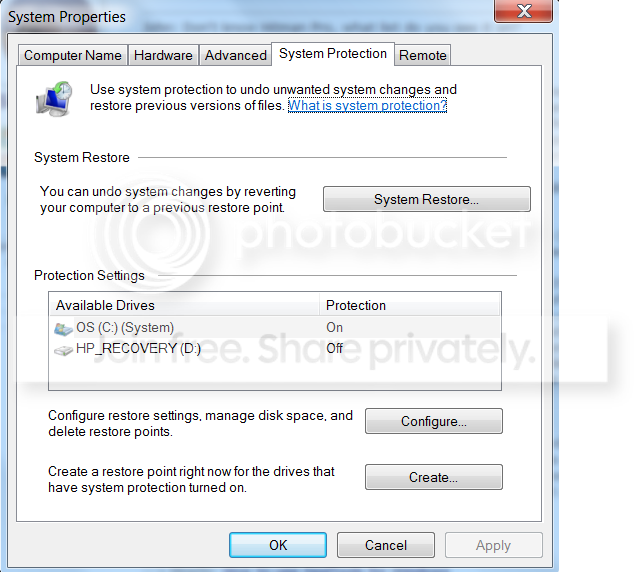
system protection is this?
com.png


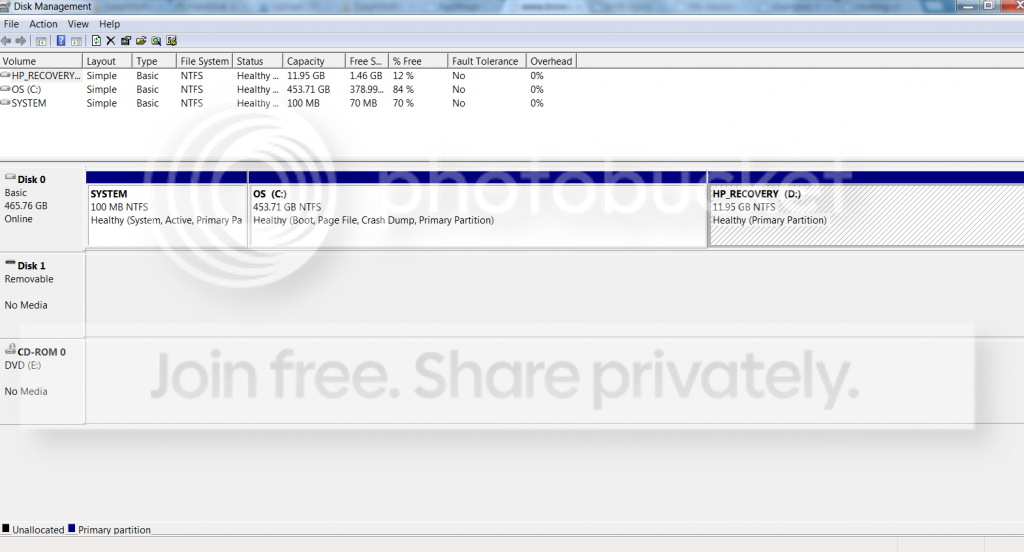
disk mgmt :
comm.png


okay, dl-ed the 3 stuffs (do i need to do anything now?)

going to uninstall norton & stuffs now.

turn off monitoring for all devices - how do i do this?
 

My Computer

Computer Manufacturer/Model Number
HP Pavillion Slimline
OS
Microsoft Windows 7 Home Premium 64-bit 7600 Multiprocessor Free
CPU
Intel(R) Core(TM) i3 CPU 550 @ 3.20GHz
Motherboard
MSI 2A9C
Memory
4.00 GB
Graphics Card(s)
ATI Radeon HD 5450
Sound Card
(1) ATI High Definition Audio Device (2) Realtek High Defi
Screen Resolution
1600 x 900 x 32 bits (4294967296 colors) @ 60 Hz
Hard Drives
(1) ST3500418AS (2) Generic- Multi-Card USB Device (3) WD 10EAVS External USB Device
Great, thanks.

Seatools and CrustalInfo - install both utilities
Testdisk - open the zip folder using Windows explorer and extract all files to a new folder (testdisk-6.13), no install required.

Ok on Norton

System protection is only monitoring the C: drive, so you don't have to change anything.
However, you need to create a restore point (RP) before you nuke the ghost devices. This gives you the means to restore your system to the point and time of creating the SP. Only system files and the registry are turned back in time. I don't think you'll need to use it, it's a precautionary measure only.

Follow the instructions in post# 126 and you'll be ready to begin using the disk tools. I'm going to skip the analysis tools (SeaTools & CrystalDiskInfo) for now and go straight to the recovery tool (Testdisk).

After you have completed all of the steps in 126, connect the ext Seagate. Report the status - drive miracurously works or still a bugger. I expect it to still be a problem.

This is going to be tedious because of the condition of the drive - slow.
Follow these instructions in
Regain a lost drive using Test Disk - An Illustrated Guide

Notes: Run Testdisk as administrator,
post an image of step 10, and
make sure you select the Seagate drive

Since the Seagate responds poorly, you might want to give Testdisk LOTS of time to analyze that drive. I don't know if it will be quick or take time, I'm only saying that you shouldn't be surprised if Testdisk appears to hang - it might take overnight to get to the point where you can then write disk info.

When Testdisk gets to the write phase - do it, and complete the tutorial.

Backup your data if the drive is recovered. Otherwise, we'll use other tools to try and get your data.

Bill
.
 

Attachments

  • SRcreate.png
    SRcreate.png
    31.3 KB · Views: 2

My Computer

Computer type
Laptop
Computer Manufacturer/Model Number
HP Pavilion dv6-6c10us
OS
x64 (6.3.9600) Win8.1 Pro & soon dual boot x64 (6.1.7601) Win7_SP1 HomePrem
CPU
AMD A6-3420M APU with Radeon(tm) HD Graphics
Motherboard
Hewlett-Packard 1805
Memory
6.00 GB
Graphics Card(s)
AMD Radeon(TM) HD 6520G
Sound Card
(1) AMD High Definition Audio Device (2) IDT High Definiti
Monitor(s) Displays
HP W2072a 20" LCD (1600 x 900) @ 60 Hz
Screen Resolution
1366 x 768 x 32 bits (4294967296 colors) @ 60 Hz
Hard Drives
ST640LM0 00 HM641JI SATA Disk Device
Keyboard
Logitech k520 wireless KB
Mouse
Logitech m320 wireless mouse (bundled with KB)
Internet Speed
15/5 | 54 MB Wireless 'n'
Antivirus
Realtime: Defender or Avast | On-demand: Malwarebytes, ESET
Browser
IE 11 on Win8, IE 10 on win 7
Other Info
Media: [Gimp, Audacity, VLC] || Comm: [WEmail 2012, Skype] || Productivity: [OpenOffice,| Textpad] || Utils: [Sysinternals, cCleaner, Speccy, Defraggler]

My Computer

Computer type
PC/Desktop
Computer Manufacturer/Model Number
Own build (new) Desk1 / Asus ROG Win 7 / Desk2 1st build
OS
Desk1 7 Home Prem / Desk2 10 Pro / Main lap Asus ROG 10 Pro 2 laptop Toshiba 7 Pro Asus P2520 7 & 10
CPU
Desk1 i5 3750K / Laptop i7 GTX 860M / Desk2 i5 2500
Motherboard
Desk1 Asus P877-V / Desk2 Gigabyte H67 UD3H / Laptop ?
Memory
Desk1 8GB (1866) / Desk2 16GB (1333) / Laptop 8Gb DDR3
Graphics Card(s)
Desk 1& 2NVidia GTX 650 & Laptops on board Intel
Sound Card
Desk 1 & 2 -XONAR DG Realtek High Def audio Laptop
Monitor(s) Displays
Desk 1 Benq HD 2450 / Desk2 Philips 24" / Laptop 17.5"
Screen Resolution
1920x1080 D1 & D2 & Laptop 1
Hard Drives
Desk1 Samsung 120GB 830 SSD
Asus ROG 256GB 850 Pro SSD
Desk2 Samsung 840 256 SSD
Toshiba 120GB EVO
PSU
Desk 1 Corsair HX 1050/ Laptop ? / Desk 2 Corsair HX 650
Case
Desk 1 Cooler HAF XM ? Toshiba laptop / Desk2 Coolermaster
Cooling
Fans on all Desk1 -2 Desk2 - all Coolermasters 5 Laptop ?
Keyboard
Desk 1 MS Sidewinder X6 Desk 2 MS Sidewinder X 4
Mouse
Desk 1&2 - Gigabyte MS 900 gamer - laptop - Logitec wireless
Internet Speed
ADSL2+
Other Info
One other Desktop (tester) and spare Toshba laptop both with SSD's
Running Kaspersky 2016 ISS on all machines config'd identically
Logitec audio stereo systems on each machine (x3)
Canon MG5250MFC
Router/modem TP-Link running WPA2SK
Be very careful with your keyboard while using Testdisk. Very useful app, and powerful, but it responds to hotkeys and the arrow keys make changes in some modes. Watch your screen to see when the arrow keys might be active for changes rather than cursor movement.

Even if Testdisk is unsuccessful in recovering your MBR/partitions it can be used to find deleted files to copy them out to other media.

Regarding CrystalDisk, if you download the portable version you can just unzip and run it. Normally it recognizes/reads attached drives almost immediately after launch -- in your case it might not be so quick.

Since the Seagate responds poorly, you might want to give Testdisk LOTS of time to analyze that drive. I don't know if it will be quick or take time, I'm only saying that you shouldn't be surprised if Testdisk appears to hang - it might take overnight to get to the point where you can then write disk info.

The good thing here is that Testdisk gives you a sector by sector report on its progress...

The bad news is that if you're really anxious you'll be tempted to just sit there and watch it rather than go do something else with your life while it does its job.
 

My Computer

OS
Windows 7 Ultimate x64
Hey F5ing that Testdisk I ran a Google and if stoleaway is interested this YT vid is really easy to follow:)


My Computer

Computer type
PC/Desktop
Computer Manufacturer/Model Number
Own build (new) Desk1 / Asus ROG Win 7 / Desk2 1st build
OS
Desk1 7 Home Prem / Desk2 10 Pro / Main lap Asus ROG 10 Pro 2 laptop Toshiba 7 Pro Asus P2520 7 & 10
CPU
Desk1 i5 3750K / Laptop i7 GTX 860M / Desk2 i5 2500
Motherboard
Desk1 Asus P877-V / Desk2 Gigabyte H67 UD3H / Laptop ?
Memory
Desk1 8GB (1866) / Desk2 16GB (1333) / Laptop 8Gb DDR3
Graphics Card(s)
Desk 1& 2NVidia GTX 650 & Laptops on board Intel
Sound Card
Desk 1 & 2 -XONAR DG Realtek High Def audio Laptop
Monitor(s) Displays
Desk 1 Benq HD 2450 / Desk2 Philips 24" / Laptop 17.5"
Screen Resolution
1920x1080 D1 & D2 & Laptop 1
Hard Drives
Desk1 Samsung 120GB 830 SSD
Asus ROG 256GB 850 Pro SSD
Desk2 Samsung 840 256 SSD
Toshiba 120GB EVO
PSU
Desk 1 Corsair HX 1050/ Laptop ? / Desk 2 Corsair HX 650
Case
Desk 1 Cooler HAF XM ? Toshiba laptop / Desk2 Coolermaster
Cooling
Fans on all Desk1 -2 Desk2 - all Coolermasters 5 Laptop ?
Keyboard
Desk 1 MS Sidewinder X6 Desk 2 MS Sidewinder X 4
Mouse
Desk 1&2 - Gigabyte MS 900 gamer - laptop - Logitec wireless
Internet Speed
ADSL2+
Other Info
One other Desktop (tester) and spare Toshba laptop both with SSD's
Running Kaspersky 2016 ISS on all machines config'd identically
Logitec audio stereo systems on each machine (x3)
Canon MG5250MFC
Router/modem TP-Link running WPA2SK
All very good advice, Steve. Thanks.

Your caution on the keyboard is very important.

The best thing is to make the machine off limits for the duration. Let Testdisk work as hard as it has to without interruption. If now isn't convenient to be without the PC, schedule a time to accomplish the task.

If you can't schedule time until the weekend, that's fine.... work on it on your schedule.
Be very careful with your keyboard while using Testdisk. Very useful app, and powerful, but it responds to hotkeys and the arrow keys make changes in some modes. Watch your screen to see when the arrow keys might be active for changes rather than cursor movement.
.....
The bad news is that if you're really anxious you'll be tempted to just sit there and watch it rather than go do something else with your life while it does its job.
John: Thanks for posting the video.

stoleaway: Don't watch the video while Testdisk is running.

If you start Testdisk before you go to sleep, then we'll know how much it gets done in 7-8 hours. There's no user iteraction needed after you verify the drive information and hit OK to start writing.

In the morning check the status, if it's making progress, let it continue. It's big drive..... and it's really slow.
 

My Computer

Computer type
Laptop
Computer Manufacturer/Model Number
HP Pavilion dv6-6c10us
OS
x64 (6.3.9600) Win8.1 Pro & soon dual boot x64 (6.1.7601) Win7_SP1 HomePrem
CPU
AMD A6-3420M APU with Radeon(tm) HD Graphics
Motherboard
Hewlett-Packard 1805
Memory
6.00 GB
Graphics Card(s)
AMD Radeon(TM) HD 6520G
Sound Card
(1) AMD High Definition Audio Device (2) IDT High Definiti
Monitor(s) Displays
HP W2072a 20" LCD (1600 x 900) @ 60 Hz
Screen Resolution
1366 x 768 x 32 bits (4294967296 colors) @ 60 Hz
Hard Drives
ST640LM0 00 HM641JI SATA Disk Device
Keyboard
Logitech k520 wireless KB
Mouse
Logitech m320 wireless mouse (bundled with KB)
Internet Speed
15/5 | 54 MB Wireless 'n'
Antivirus
Realtime: Defender or Avast | On-demand: Malwarebytes, ESET
Browser
IE 11 on Win8, IE 10 on win 7
Other Info
Media: [Gimp, Audacity, VLC] || Comm: [WEmail 2012, Skype] || Productivity: [OpenOffice,| Textpad] || Utils: [Sysinternals, cCleaner, Speccy, Defraggler]
Hey F5ing that Testdisk I ran a Google and if stoleaway is interested this YT vid is really easy to follow:)

That is a great video for new users! Really shows you what to expect and how it might work for you. Note that they're using Photorec, not Testdisk, so the steps are somewhat different. The UI is the same though and he mentions some important caveats that apply to both.

Interesting to note that he could've used Testdisk rather than Photorec to recover, and he wouldn't have lost the name of the file that was recovered. The drive would've looked just like it did before the quick format.
 

My Computer

OS
Windows 7 Ultimate x64
Thanks fellas I just ran across it looking up that app. Thought it would be good for anyone who was watching too!:)

Hum just noticed that F5 I missed that photrec wasn't quick enough :o
 

My Computer

Computer type
PC/Desktop
Computer Manufacturer/Model Number
Own build (new) Desk1 / Asus ROG Win 7 / Desk2 1st build
OS
Desk1 7 Home Prem / Desk2 10 Pro / Main lap Asus ROG 10 Pro 2 laptop Toshiba 7 Pro Asus P2520 7 & 10
CPU
Desk1 i5 3750K / Laptop i7 GTX 860M / Desk2 i5 2500
Motherboard
Desk1 Asus P877-V / Desk2 Gigabyte H67 UD3H / Laptop ?
Memory
Desk1 8GB (1866) / Desk2 16GB (1333) / Laptop 8Gb DDR3
Graphics Card(s)
Desk 1& 2NVidia GTX 650 & Laptops on board Intel
Sound Card
Desk 1 & 2 -XONAR DG Realtek High Def audio Laptop
Monitor(s) Displays
Desk 1 Benq HD 2450 / Desk2 Philips 24" / Laptop 17.5"
Screen Resolution
1920x1080 D1 & D2 & Laptop 1
Hard Drives
Desk1 Samsung 120GB 830 SSD
Asus ROG 256GB 850 Pro SSD
Desk2 Samsung 840 256 SSD
Toshiba 120GB EVO
PSU
Desk 1 Corsair HX 1050/ Laptop ? / Desk 2 Corsair HX 650
Case
Desk 1 Cooler HAF XM ? Toshiba laptop / Desk2 Coolermaster
Cooling
Fans on all Desk1 -2 Desk2 - all Coolermasters 5 Laptop ?
Keyboard
Desk 1 MS Sidewinder X6 Desk 2 MS Sidewinder X 4
Mouse
Desk 1&2 - Gigabyte MS 900 gamer - laptop - Logitec wireless
Internet Speed
ADSL2+
Other Info
One other Desktop (tester) and spare Toshba laptop both with SSD's
Running Kaspersky 2016 ISS on all machines config'd identically
Logitec audio stereo systems on each machine (x3)
Canon MG5250MFC
Router/modem TP-Link running WPA2SK
Thanks fellas I just ran across it looking up that app. Thought it would be good for anyone who was watching too!:)

Hum just noticed that F5 I missed that photrec wasn't quick enough :o

Not to worry, John. Other than clicking on Testdisk rather than Photorec, the first steps are all the same. From downloading, unzipping, launching, and then through the first few steps of actually using it. So you actually get a good idea of what to expect.

Kind of odd that he used Testdisk in the name of the video while actually using Photorec within the video. Especially considering Testdisk would've performed a cleaner recovery (no loss of file name).
 

My Computer

OS
Windows 7 Ultimate x64
PhotoRec is much safer than TestDisk since it does not write anything to the hard drive being recovered.

Confidence booster::)

http://www.sevenforums.com/software/193467-guide-using-photorec-recovery-software.html

Yes, very true. If all you're trying to do is recover data from the drive Photorec may be the best bet. The one downside I can think of though is that it recovers most everything that has ever been deleted yet still exists (if you have all recognizable file types selected). So you can end up with tons of trash to sort through, complicated by the fact that you lose so many of the file names. This might not be much of an issue though, if used on a data partition or external drive. It's a pain when used on a partition that contained an OS or a drive that's been through years of activity and it recovers a bunch of intentionally deleted files, old temp files, or even any file types that were stored in temp directories.

Even so, it is the safest route as far as data protection is concerned.
 

My Computer

OS
Windows 7 Ultimate x64

My Computer

Computer type
PC/Desktop
Computer Manufacturer/Model Number
Own build (new) Desk1 / Asus ROG Win 7 / Desk2 1st build
OS
Desk1 7 Home Prem / Desk2 10 Pro / Main lap Asus ROG 10 Pro 2 laptop Toshiba 7 Pro Asus P2520 7 & 10
CPU
Desk1 i5 3750K / Laptop i7 GTX 860M / Desk2 i5 2500
Motherboard
Desk1 Asus P877-V / Desk2 Gigabyte H67 UD3H / Laptop ?
Memory
Desk1 8GB (1866) / Desk2 16GB (1333) / Laptop 8Gb DDR3
Graphics Card(s)
Desk 1& 2NVidia GTX 650 & Laptops on board Intel
Sound Card
Desk 1 & 2 -XONAR DG Realtek High Def audio Laptop
Monitor(s) Displays
Desk 1 Benq HD 2450 / Desk2 Philips 24" / Laptop 17.5"
Screen Resolution
1920x1080 D1 & D2 & Laptop 1
Hard Drives
Desk1 Samsung 120GB 830 SSD
Asus ROG 256GB 850 Pro SSD
Desk2 Samsung 840 256 SSD
Toshiba 120GB EVO
PSU
Desk 1 Corsair HX 1050/ Laptop ? / Desk 2 Corsair HX 650
Case
Desk 1 Cooler HAF XM ? Toshiba laptop / Desk2 Coolermaster
Cooling
Fans on all Desk1 -2 Desk2 - all Coolermasters 5 Laptop ?
Keyboard
Desk 1 MS Sidewinder X6 Desk 2 MS Sidewinder X 4
Mouse
Desk 1&2 - Gigabyte MS 900 gamer - laptop - Logitec wireless
Internet Speed
ADSL2+
Other Info
One other Desktop (tester) and spare Toshba laptop both with SSD's
Running Kaspersky 2016 ISS on all machines config'd identically
Logitec audio stereo systems on each machine (x3)
Canon MG5250MFC
Router/modem TP-Link running WPA2SK
hi guys thanks for the help :) I will only be able to try doing these stuffs on Friday or Saturday tho >< I will try to do them asap tho, rly busy w work recently, really sorry! & as usual, thanks for the help! :D
 

My Computer

Computer Manufacturer/Model Number
HP Pavillion Slimline
OS
Microsoft Windows 7 Home Premium 64-bit 7600 Multiprocessor Free
CPU
Intel(R) Core(TM) i3 CPU 550 @ 3.20GHz
Motherboard
MSI 2A9C
Memory
4.00 GB
Graphics Card(s)
ATI Radeon HD 5450
Sound Card
(1) ATI High Definition Audio Device (2) Realtek High Defi
Screen Resolution
1600 x 900 x 32 bits (4294967296 colors) @ 60 Hz
Hard Drives
(1) ST3500418AS (2) Generic- Multi-Card USB Device (3) WD 10EAVS External USB Device
No problem - do this when you have the time. We'll be here

Bill
.
 

My Computer

Computer type
Laptop
Computer Manufacturer/Model Number
HP Pavilion dv6-6c10us
OS
x64 (6.3.9600) Win8.1 Pro & soon dual boot x64 (6.1.7601) Win7_SP1 HomePrem
CPU
AMD A6-3420M APU with Radeon(tm) HD Graphics
Motherboard
Hewlett-Packard 1805
Memory
6.00 GB
Graphics Card(s)
AMD Radeon(TM) HD 6520G
Sound Card
(1) AMD High Definition Audio Device (2) IDT High Definiti
Monitor(s) Displays
HP W2072a 20" LCD (1600 x 900) @ 60 Hz
Screen Resolution
1366 x 768 x 32 bits (4294967296 colors) @ 60 Hz
Hard Drives
ST640LM0 00 HM641JI SATA Disk Device
Keyboard
Logitech k520 wireless KB
Mouse
Logitech m320 wireless mouse (bundled with KB)
Internet Speed
15/5 | 54 MB Wireless 'n'
Antivirus
Realtime: Defender or Avast | On-demand: Malwarebytes, ESET
Browser
IE 11 on Win8, IE 10 on win 7
Other Info
Media: [Gimp, Audacity, VLC] || Comm: [WEmail 2012, Skype] || Productivity: [OpenOffice,| Textpad] || Utils: [Sysinternals, cCleaner, Speccy, Defraggler]
Back
Top