Solved Harddisk appears as local disk

OMG guys! My ext harddisk is working again now omg~︿︿
 

My Computer

Computer Manufacturer/Model Number
HP Pavillion Slimline
OS
Microsoft Windows 7 Home Premium 64-bit 7600 Multiprocessor Free
CPU
Intel(R) Core(TM) i3 CPU 550 @ 3.20GHz
Motherboard
MSI 2A9C
Memory
4.00 GB
Graphics Card(s)
ATI Radeon HD 5450
Sound Card
(1) ATI High Definition Audio Device (2) Realtek High Defi
Screen Resolution
1600 x 900 x 32 bits (4294967296 colors) @ 60 Hz
Hard Drives
(1) ST3500418AS (2) Generic- Multi-Card USB Device (3) WD 10EAVS External USB Device
There is no network share for my harddisk I think. Reached step 12 of this http://www.sevenforums.com/software/190430-regain-lost-drive-using-test-disk-illustrated-guide.html then there's a write error in the end hmm.

Slartybart mentioned to post screenshots as you progress through the Testdisk steps. It's a good idea. Otherwise, you're pretty much on your own. Well, at least as far as any help I can provide, because I'm not sure exactly where you were to get that message.

Maybe some of the others will chime in.
 

My Computer

OS
Windows 7 Ultimate x64
OMG guys! My ext harddisk is working again now omg~︿︿

It will be very interesting if you post all screenshots. (Connect only the problem hard disk.) I know it is going to be a time-consuming affair but take your time but do not bother if it is gonna be too much of a strain. ( Stop at the screen where you are required to hit the write command. Do not rewrite the partition table, if your external HDD is already working.)

If it works and you are able to access the files, I would recommend that you copy post-haste all the contents elsewhere and run the Seatools(DOS) on it.
 
Last edited:

My Computer

OS
Windows 7 Home Premium 32 bit
:what:Fantastic news!

As jumanji said "Back up your data NOW"..... ok perhaps I'm taking literary license with his suggestion, but you get the idea.

After all your data is safe - please do as F5ing suggests - fire up Testdisk once again and post a screenshot of where you confirm the disk selection - that's it, quit out of Testdisk - you don't have to run through it again. If you did save the screens from the first run - please post them as well, for historical purposes. I'm not sure what they will tell us, but.......

Your PM said that you were going to try again. Please describe the steps you took, did you boot from USB or Optical disc (OD)? Did the first run of Testdisk just brute force through the problem, or what? I'm really curious and ecstatic.

Testdisk is an amazing utility - a write error and the disk works again.....:cool:

So the question now is.... how do you convince Seagate that the drive is questionable and get them to repair/replace it under warranty? Maybe you could point them to this thread on sevenforums.

Bill
.

OMG guys! My ext harddisk is working again now omg~︿︿
 
Last edited:

My Computer

Computer type
Laptop
Computer Manufacturer/Model Number
HP Pavilion dv6-6c10us
OS
x64 (6.3.9600) Win8.1 Pro & soon dual boot x64 (6.1.7601) Win7_SP1 HomePrem
CPU
AMD A6-3420M APU with Radeon(tm) HD Graphics
Motherboard
Hewlett-Packard 1805
Memory
6.00 GB
Graphics Card(s)
AMD Radeon(TM) HD 6520G
Sound Card
(1) AMD High Definition Audio Device (2) IDT High Definiti
Monitor(s) Displays
HP W2072a 20" LCD (1600 x 900) @ 60 Hz
Screen Resolution
1366 x 768 x 32 bits (4294967296 colors) @ 60 Hz
Hard Drives
ST640LM0 00 HM641JI SATA Disk Device
Keyboard
Logitech k520 wireless KB
Mouse
Logitech m320 wireless mouse (bundled with KB)
Internet Speed
15/5 | 54 MB Wireless 'n'
Antivirus
Realtime: Defender or Avast | On-demand: Malwarebytes, ESET
Browser
IE 11 on Win8, IE 10 on win 7
Other Info
Media: [Gimp, Audacity, VLC] || Comm: [WEmail 2012, Skype] || Productivity: [OpenOffice,| Textpad] || Utils: [Sysinternals, cCleaner, Speccy, Defraggler]
This is really good news eh? :)

Be good to see the screenshots as it has got me pulled in now.
 

My Computer

Computer type
PC/Desktop
Computer Manufacturer/Model Number
Own build (new) Desk1 / Asus ROG Win 7 / Desk2 1st build
OS
Desk1 7 Home Prem / Desk2 10 Pro / Main lap Asus ROG 10 Pro 2 laptop Toshiba 7 Pro Asus P2520 7 & 10
CPU
Desk1 i5 3750K / Laptop i7 GTX 860M / Desk2 i5 2500
Motherboard
Desk1 Asus P877-V / Desk2 Gigabyte H67 UD3H / Laptop ?
Memory
Desk1 8GB (1866) / Desk2 16GB (1333) / Laptop 8Gb DDR3
Graphics Card(s)
Desk 1& 2NVidia GTX 650 & Laptops on board Intel
Sound Card
Desk 1 & 2 -XONAR DG Realtek High Def audio Laptop
Monitor(s) Displays
Desk 1 Benq HD 2450 / Desk2 Philips 24" / Laptop 17.5"
Screen Resolution
1920x1080 D1 & D2 & Laptop 1
Hard Drives
Desk1 Samsung 120GB 830 SSD
Asus ROG 256GB 850 Pro SSD
Desk2 Samsung 840 256 SSD
Toshiba 120GB EVO
PSU
Desk 1 Corsair HX 1050/ Laptop ? / Desk 2 Corsair HX 650
Case
Desk 1 Cooler HAF XM ? Toshiba laptop / Desk2 Coolermaster
Cooling
Fans on all Desk1 -2 Desk2 - all Coolermasters 5 Laptop ?
Keyboard
Desk 1 MS Sidewinder X6 Desk 2 MS Sidewinder X 4
Mouse
Desk 1&2 - Gigabyte MS 900 gamer - laptop - Logitec wireless
Internet Speed
ADSL2+
Other Info
One other Desktop (tester) and spare Toshba laptop both with SSD's
Running Kaspersky 2016 ISS on all machines config'd identically
Logitec audio stereo systems on each machine (x3)
Canon MG5250MFC
Router/modem TP-Link running WPA2SK
I'll bring the popcorn and we can all watch the picture.

stoleaway menitoned about 1TB of data - so even with the improvement, backing that up will take some time.
 

My Computer

Computer type
Laptop
Computer Manufacturer/Model Number
HP Pavilion dv6-6c10us
OS
x64 (6.3.9600) Win8.1 Pro & soon dual boot x64 (6.1.7601) Win7_SP1 HomePrem
CPU
AMD A6-3420M APU with Radeon(tm) HD Graphics
Motherboard
Hewlett-Packard 1805
Memory
6.00 GB
Graphics Card(s)
AMD Radeon(TM) HD 6520G
Sound Card
(1) AMD High Definition Audio Device (2) IDT High Definiti
Monitor(s) Displays
HP W2072a 20" LCD (1600 x 900) @ 60 Hz
Screen Resolution
1366 x 768 x 32 bits (4294967296 colors) @ 60 Hz
Hard Drives
ST640LM0 00 HM641JI SATA Disk Device
Keyboard
Logitech k520 wireless KB
Mouse
Logitech m320 wireless mouse (bundled with KB)
Internet Speed
15/5 | 54 MB Wireless 'n'
Antivirus
Realtime: Defender or Avast | On-demand: Malwarebytes, ESET
Browser
IE 11 on Win8, IE 10 on win 7
Other Info
Media: [Gimp, Audacity, VLC] || Comm: [WEmail 2012, Skype] || Productivity: [OpenOffice,| Textpad] || Utils: [Sysinternals, cCleaner, Speccy, Defraggler]
I'll bring the popcorn and we can all watch the picture.

stoleaway menitoned about 1TB of data - so even with the improvement, backing that up will take some time.
Hum Bill this really is what puts me off large drives such a lot to loose eh? But hey I have got some bits and pieces out of this anyway:)
 

My Computer

Computer type
PC/Desktop
Computer Manufacturer/Model Number
Own build (new) Desk1 / Asus ROG Win 7 / Desk2 1st build
OS
Desk1 7 Home Prem / Desk2 10 Pro / Main lap Asus ROG 10 Pro 2 laptop Toshiba 7 Pro Asus P2520 7 & 10
CPU
Desk1 i5 3750K / Laptop i7 GTX 860M / Desk2 i5 2500
Motherboard
Desk1 Asus P877-V / Desk2 Gigabyte H67 UD3H / Laptop ?
Memory
Desk1 8GB (1866) / Desk2 16GB (1333) / Laptop 8Gb DDR3
Graphics Card(s)
Desk 1& 2NVidia GTX 650 & Laptops on board Intel
Sound Card
Desk 1 & 2 -XONAR DG Realtek High Def audio Laptop
Monitor(s) Displays
Desk 1 Benq HD 2450 / Desk2 Philips 24" / Laptop 17.5"
Screen Resolution
1920x1080 D1 & D2 & Laptop 1
Hard Drives
Desk1 Samsung 120GB 830 SSD
Asus ROG 256GB 850 Pro SSD
Desk2 Samsung 840 256 SSD
Toshiba 120GB EVO
PSU
Desk 1 Corsair HX 1050/ Laptop ? / Desk 2 Corsair HX 650
Case
Desk 1 Cooler HAF XM ? Toshiba laptop / Desk2 Coolermaster
Cooling
Fans on all Desk1 -2 Desk2 - all Coolermasters 5 Laptop ?
Keyboard
Desk 1 MS Sidewinder X6 Desk 2 MS Sidewinder X 4
Mouse
Desk 1&2 - Gigabyte MS 900 gamer - laptop - Logitec wireless
Internet Speed
ADSL2+
Other Info
One other Desktop (tester) and spare Toshba laptop both with SSD's
Running Kaspersky 2016 ISS on all machines config'd identically
Logitec audio stereo systems on each machine (x3)
Canon MG5250MFC
Router/modem TP-Link running WPA2SK
The problem isn't the drives, the problem is all the crap we collect and think is important.
They're great for backup - buy two and raid them in case one goes =:>
 

My Computer

Computer type
Laptop
Computer Manufacturer/Model Number
HP Pavilion dv6-6c10us
OS
x64 (6.3.9600) Win8.1 Pro & soon dual boot x64 (6.1.7601) Win7_SP1 HomePrem
CPU
AMD A6-3420M APU with Radeon(tm) HD Graphics
Motherboard
Hewlett-Packard 1805
Memory
6.00 GB
Graphics Card(s)
AMD Radeon(TM) HD 6520G
Sound Card
(1) AMD High Definition Audio Device (2) IDT High Definiti
Monitor(s) Displays
HP W2072a 20" LCD (1600 x 900) @ 60 Hz
Screen Resolution
1366 x 768 x 32 bits (4294967296 colors) @ 60 Hz
Hard Drives
ST640LM0 00 HM641JI SATA Disk Device
Keyboard
Logitech k520 wireless KB
Mouse
Logitech m320 wireless mouse (bundled with KB)
Internet Speed
15/5 | 54 MB Wireless 'n'
Antivirus
Realtime: Defender or Avast | On-demand: Malwarebytes, ESET
Browser
IE 11 on Win8, IE 10 on win 7
Other Info
Media: [Gimp, Audacity, VLC] || Comm: [WEmail 2012, Skype] || Productivity: [OpenOffice,| Textpad] || Utils: [Sysinternals, cCleaner, Speccy, Defraggler]
The problem isn't the drives, the problem is all the crap we collect and think is important.
They're great for backup - buy two and raid them in case one goes =:>
Well I had better read up on RAIDS cos I really don't know what that is all about, but I would still prefer two 500GB instead of a 1TB.

Mind you I really don't store that much data although have just built Betty and she might take some larger drives I suppose LOL!!:geek:
 

My Computer

Computer type
PC/Desktop
Computer Manufacturer/Model Number
Own build (new) Desk1 / Asus ROG Win 7 / Desk2 1st build
OS
Desk1 7 Home Prem / Desk2 10 Pro / Main lap Asus ROG 10 Pro 2 laptop Toshiba 7 Pro Asus P2520 7 & 10
CPU
Desk1 i5 3750K / Laptop i7 GTX 860M / Desk2 i5 2500
Motherboard
Desk1 Asus P877-V / Desk2 Gigabyte H67 UD3H / Laptop ?
Memory
Desk1 8GB (1866) / Desk2 16GB (1333) / Laptop 8Gb DDR3
Graphics Card(s)
Desk 1& 2NVidia GTX 650 & Laptops on board Intel
Sound Card
Desk 1 & 2 -XONAR DG Realtek High Def audio Laptop
Monitor(s) Displays
Desk 1 Benq HD 2450 / Desk2 Philips 24" / Laptop 17.5"
Screen Resolution
1920x1080 D1 & D2 & Laptop 1
Hard Drives
Desk1 Samsung 120GB 830 SSD
Asus ROG 256GB 850 Pro SSD
Desk2 Samsung 840 256 SSD
Toshiba 120GB EVO
PSU
Desk 1 Corsair HX 1050/ Laptop ? / Desk 2 Corsair HX 650
Case
Desk 1 Cooler HAF XM ? Toshiba laptop / Desk2 Coolermaster
Cooling
Fans on all Desk1 -2 Desk2 - all Coolermasters 5 Laptop ?
Keyboard
Desk 1 MS Sidewinder X6 Desk 2 MS Sidewinder X 4
Mouse
Desk 1&2 - Gigabyte MS 900 gamer - laptop - Logitec wireless
Internet Speed
ADSL2+
Other Info
One other Desktop (tester) and spare Toshba laptop both with SSD's
Running Kaspersky 2016 ISS on all machines config'd identically
Logitec audio stereo systems on each machine (x3)
Canon MG5250MFC
Router/modem TP-Link running WPA2SK
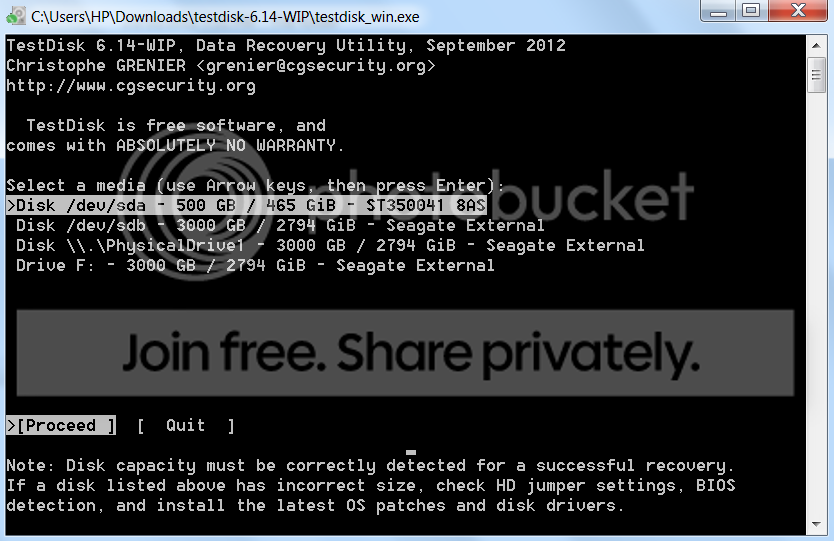
I boot testdisk from a usb heh
this is when I first tried it,
testdisk.png


then today I did testdisk again it became like this
HOOO.png


I am backing up my data now & I will probably send seagate an email together with a link to this thread & ask them about the hdd ^^

thanks for the help guys! XD
 

My Computer

Computer Manufacturer/Model Number
HP Pavillion Slimline
OS
Microsoft Windows 7 Home Premium 64-bit 7600 Multiprocessor Free
CPU
Intel(R) Core(TM) i3 CPU 550 @ 3.20GHz
Motherboard
MSI 2A9C
Memory
4.00 GB
Graphics Card(s)
ATI Radeon HD 5450
Sound Card
(1) ATI High Definition Audio Device (2) Realtek High Defi
Screen Resolution
1600 x 900 x 32 bits (4294967296 colors) @ 60 Hz
Hard Drives
(1) ST3500418AS (2) Generic- Multi-Card USB Device (3) WD 10EAVS External USB Device
I'm so grateful you came back to share what you found.

When you say you booted testdisk from a USB:
  • does that mean you had testdisk stored on the USB, and just launched it from there (in other words, you booted your machine normally via your installed OS and simply launched testdisk from where it was stored on a USB)?
-- OR --
  • does that mean you booted your machine off of a bootable USB, and then ran testdisk?
I'm surprised to see that drive represented the way it is, in both screenshots, just with a couple of insignificant differences between the two. The drive appears to be represented as three separate entries in each screenshot. Now that the drive is "fixed" I would've expected to see only one entry that represented the problematic drive.
 

My Computer

OS
Windows 7 Ultimate x64
I'm missing something stoleaway. Both of those screenshots look the same to me. I know that they are differnt - the background changes slightly. Please enlighten me - what do you see that I don't?

Would you mind explaining the process used to put Testdisk on the USB and make it bootable?

You are welcome stoleaway, glad you are able to get your data.
Good luck with Seagate, I'm sure they'll make it right.

Most importantly - thank you for sticking through a difficult trouble shooting session. Your system is up-to-date too.
Two weeks is about my limit with my own machines, and we made it just iunder the wire. I was very glad to hear the news.

Bill
.
 

My Computer

Computer type
Laptop
Computer Manufacturer/Model Number
HP Pavilion dv6-6c10us
OS
x64 (6.3.9600) Win8.1 Pro & soon dual boot x64 (6.1.7601) Win7_SP1 HomePrem
CPU
AMD A6-3420M APU with Radeon(tm) HD Graphics
Motherboard
Hewlett-Packard 1805
Memory
6.00 GB
Graphics Card(s)
AMD Radeon(TM) HD 6520G
Sound Card
(1) AMD High Definition Audio Device (2) IDT High Definiti
Monitor(s) Displays
HP W2072a 20" LCD (1600 x 900) @ 60 Hz
Screen Resolution
1366 x 768 x 32 bits (4294967296 colors) @ 60 Hz
Hard Drives
ST640LM0 00 HM641JI SATA Disk Device
Keyboard
Logitech k520 wireless KB
Mouse
Logitech m320 wireless mouse (bundled with KB)
Internet Speed
15/5 | 54 MB Wireless 'n'
Antivirus
Realtime: Defender or Avast | On-demand: Malwarebytes, ESET
Browser
IE 11 on Win8, IE 10 on win 7
Other Info
Media: [Gimp, Audacity, VLC] || Comm: [WEmail 2012, Skype] || Productivity: [OpenOffice,| Textpad] || Utils: [Sysinternals, cCleaner, Speccy, Defraggler]
I'm missing something stoleaway. Both of those screenshots look the same to me. I know that they are differnt - the background changes slightly. Please enlighten me - what do you see that I don't?

The only two differences I can spot relate to drive locations (dev/sdb vs. dev/sdd and PhysicalDisk1 vs. PhysicalDisk3).

Would you mind explaining the process used to put Testdisk on the USB and make it bootable?
As far as I know, there is no "bootable version" of Testdisk. But it can run on many OSs, and is included in a few live iso's (although it is usually not the most up to date stable version). Or he could've just used some USB with a bootable system on it and run it from the location he originally downloaded it to on his hard drive.


I am backing up my data now & I will probably send seagate an email together with a link to this thread & ask them about the hdd ^^

thanks for the help guys! XD
You're most welcome! Hopefully you can grab all of the data off of it while it's relatively responsive.

Please let us know if you're able to finish copying out your data, and how it goes with Seagate as well.
 

My Computer

OS
Windows 7 Ultimate x64
Two weeks is about my limit with my own machines, and we made it just iunder the wire. I was very glad to hear the news.

But what if the problem was trying to get access to your precious data? :cry:

Betcha you'd carry on a day or two longer. Especially if you thought you were finally getting to be "this close" to being able to get it!! :mad:
 

My Computer

OS
Windows 7 Ultimate x64
Yeah, the only problem with "this close" is it often remains that way forever!

It's like trying to get somewhere by cutting the distance travelled in half - there's always the other half to travel.
10 miles to go, 5 miles to go, 2.5 miles to go, 1.25 miles to go.........

But sure, I am persistent - another thing I like to try is the "give it a rest" method. I'll come back to a problem months later and the bits have magically healed - try one last ditch effort and Wow, it works.

:roflmao:

Did you get all of your data off of the drive? Great if you did!

Ok, seriously - please tell me what you and F5ing see in the two images that I'm missing.
edit: never mind - thanks Steve, I see it now

And also please describe the USB procedure you used - was it a bootable USB? How did you create it - what tools, methods?

The information might help other members. I'm helping on another thread with a similar yet different ext HD issue - they can't get as far with Testdisk in Windows, maybe the USB route will help.

Thanks,

Bill
.
 

My Computer

Computer type
Laptop
Computer Manufacturer/Model Number
HP Pavilion dv6-6c10us
OS
x64 (6.3.9600) Win8.1 Pro & soon dual boot x64 (6.1.7601) Win7_SP1 HomePrem
CPU
AMD A6-3420M APU with Radeon(tm) HD Graphics
Motherboard
Hewlett-Packard 1805
Memory
6.00 GB
Graphics Card(s)
AMD Radeon(TM) HD 6520G
Sound Card
(1) AMD High Definition Audio Device (2) IDT High Definiti
Monitor(s) Displays
HP W2072a 20" LCD (1600 x 900) @ 60 Hz
Screen Resolution
1366 x 768 x 32 bits (4294967296 colors) @ 60 Hz
Hard Drives
ST640LM0 00 HM641JI SATA Disk Device
Keyboard
Logitech k520 wireless KB
Mouse
Logitech m320 wireless mouse (bundled with KB)
Internet Speed
15/5 | 54 MB Wireless 'n'
Antivirus
Realtime: Defender or Avast | On-demand: Malwarebytes, ESET
Browser
IE 11 on Win8, IE 10 on win 7
Other Info
Media: [Gimp, Audacity, VLC] || Comm: [WEmail 2012, Skype] || Productivity: [OpenOffice,| Textpad] || Utils: [Sysinternals, cCleaner, Speccy, Defraggler]
Thanks Steve, I missed that. Sheesh - 20 times I missed that. But I did notice the version 6.14 - that's the beta version, stable is 6.13. C'est la vie! - it worked.
The only two differences I can spot relate to drive locations (dev/sdb vs. dev/sdd and PhysicalDisk1 vs. PhysicalDisk3).
As you noted, Testdisk site references Live CDs (Hirens, UBCD, etc). It would be useful to know how stoelaway did it. I suppose you could run command from a Windows install disk, if you put Testdisk on the Flash drive.
As far as I know, there is no "bootable version" of Testdisk. But it can run on many OSs, and is included in a few live iso's (although it is usually not the most up to date stable version). Or he could've just used some USB with a bootable system on it and run it from the location he originally downloaded it to on his hard drive.
I forgot to mention that your suggestion, running Testdisk offline, was a great one. Appearantly stoleaway came to the same conclusion or took your advice and that seemed to help immensely.

Thanks to all - we saved the patient! :cool:

Bill
.
 

My Computer

Computer type
Laptop
Computer Manufacturer/Model Number
HP Pavilion dv6-6c10us
OS
x64 (6.3.9600) Win8.1 Pro & soon dual boot x64 (6.1.7601) Win7_SP1 HomePrem
CPU
AMD A6-3420M APU with Radeon(tm) HD Graphics
Motherboard
Hewlett-Packard 1805
Memory
6.00 GB
Graphics Card(s)
AMD Radeon(TM) HD 6520G
Sound Card
(1) AMD High Definition Audio Device (2) IDT High Definiti
Monitor(s) Displays
HP W2072a 20" LCD (1600 x 900) @ 60 Hz
Screen Resolution
1366 x 768 x 32 bits (4294967296 colors) @ 60 Hz
Hard Drives
ST640LM0 00 HM641JI SATA Disk Device
Keyboard
Logitech k520 wireless KB
Mouse
Logitech m320 wireless mouse (bundled with KB)
Internet Speed
15/5 | 54 MB Wireless 'n'
Antivirus
Realtime: Defender or Avast | On-demand: Malwarebytes, ESET
Browser
IE 11 on Win8, IE 10 on win 7
Other Info
Media: [Gimp, Audacity, VLC] || Comm: [WEmail 2012, Skype] || Productivity: [OpenOffice,| Textpad] || Utils: [Sysinternals, cCleaner, Speccy, Defraggler]
Hum Bill and F5 what a performance I suppose in hindsight it might have been worth doing a TeamViewer session and you could have had a "fiddle" with the thing:geek:
 

My Computer

Computer type
PC/Desktop
Computer Manufacturer/Model Number
Own build (new) Desk1 / Asus ROG Win 7 / Desk2 1st build
OS
Desk1 7 Home Prem / Desk2 10 Pro / Main lap Asus ROG 10 Pro 2 laptop Toshiba 7 Pro Asus P2520 7 & 10
CPU
Desk1 i5 3750K / Laptop i7 GTX 860M / Desk2 i5 2500
Motherboard
Desk1 Asus P877-V / Desk2 Gigabyte H67 UD3H / Laptop ?
Memory
Desk1 8GB (1866) / Desk2 16GB (1333) / Laptop 8Gb DDR3
Graphics Card(s)
Desk 1& 2NVidia GTX 650 & Laptops on board Intel
Sound Card
Desk 1 & 2 -XONAR DG Realtek High Def audio Laptop
Monitor(s) Displays
Desk 1 Benq HD 2450 / Desk2 Philips 24" / Laptop 17.5"
Screen Resolution
1920x1080 D1 & D2 & Laptop 1
Hard Drives
Desk1 Samsung 120GB 830 SSD
Asus ROG 256GB 850 Pro SSD
Desk2 Samsung 840 256 SSD
Toshiba 120GB EVO
PSU
Desk 1 Corsair HX 1050/ Laptop ? / Desk 2 Corsair HX 650
Case
Desk 1 Cooler HAF XM ? Toshiba laptop / Desk2 Coolermaster
Cooling
Fans on all Desk1 -2 Desk2 - all Coolermasters 5 Laptop ?
Keyboard
Desk 1 MS Sidewinder X6 Desk 2 MS Sidewinder X 4
Mouse
Desk 1&2 - Gigabyte MS 900 gamer - laptop - Logitec wireless
Internet Speed
ADSL2+
Other Info
One other Desktop (tester) and spare Toshba laptop both with SSD's
Running Kaspersky 2016 ISS on all machines config'd identically
Logitec audio stereo systems on each machine (x3)
Canon MG5250MFC
Router/modem TP-Link running WPA2SK
You were on the right track in the beginning with the Ubuntu boot - not sure about PartWiz though, it's a different beast. Since you have a "dead" external, you have a great opportunity to play with Testdisk trying to ressurect your drive. Remember, you can do all sorts of scenarios before that write command finalizes your decisions Read up on the Tesdisk site - the documentation is deeper than I originally thought.

Thanks for your help on this one John.
Hum Bill and F5 what a performance I suppose in hindsight it might have been worth doing a TeamViewer session and you could have had a "fiddle" with the thing:geek:
I don't make housecalls :p
 

My Computer

Computer type
Laptop
Computer Manufacturer/Model Number
HP Pavilion dv6-6c10us
OS
x64 (6.3.9600) Win8.1 Pro & soon dual boot x64 (6.1.7601) Win7_SP1 HomePrem
CPU
AMD A6-3420M APU with Radeon(tm) HD Graphics
Motherboard
Hewlett-Packard 1805
Memory
6.00 GB
Graphics Card(s)
AMD Radeon(TM) HD 6520G
Sound Card
(1) AMD High Definition Audio Device (2) IDT High Definiti
Monitor(s) Displays
HP W2072a 20" LCD (1600 x 900) @ 60 Hz
Screen Resolution
1366 x 768 x 32 bits (4294967296 colors) @ 60 Hz
Hard Drives
ST640LM0 00 HM641JI SATA Disk Device
Keyboard
Logitech k520 wireless KB
Mouse
Logitech m320 wireless mouse (bundled with KB)
Internet Speed
15/5 | 54 MB Wireless 'n'
Antivirus
Realtime: Defender or Avast | On-demand: Malwarebytes, ESET
Browser
IE 11 on Win8, IE 10 on win 7
Other Info
Media: [Gimp, Audacity, VLC] || Comm: [WEmail 2012, Skype] || Productivity: [OpenOffice,| Textpad] || Utils: [Sysinternals, cCleaner, Speccy, Defraggler]
Back
Top