Solved Harddisk appears as local disk

You were on the right track in the beginning with the Ubuntu boot - not sure about PartWiz though, it's a different beast. Since you have a "dead" external, you have a great opportunity to play with Testdisk trying to ressurect your drive. Remember, you can do all sorts of scenarios before that write command finalizes your decisions Read up on the Tesdisk site - the documentation is deeper than I originally thought.

Thanks for your help on this one John.
Hum Bill and F5 what a performance I suppose in hindsight it might have been worth doing a TeamViewer session and you could have had a "fiddle" with the thing:geek:
I don't make housecalls :p
What even if they are 5'5" blond shaped like the wait sign in Windows and lying on a beach in a nice red bikini??:confused:

Just kidding:)
 

My Computer

Computer type
PC/Desktop
Computer Manufacturer/Model Number
Own build (new) Desk1 / Asus ROG Win 7 / Desk2 1st build
OS
Desk1 7 Home Prem / Desk2 10 Pro / Main lap Asus ROG 10 Pro 2 laptop Toshiba 7 Pro Asus P2520 7 & 10
CPU
Desk1 i5 3750K / Laptop i7 GTX 860M / Desk2 i5 2500
Motherboard
Desk1 Asus P877-V / Desk2 Gigabyte H67 UD3H / Laptop ?
Memory
Desk1 8GB (1866) / Desk2 16GB (1333) / Laptop 8Gb DDR3
Graphics Card(s)
Desk 1& 2NVidia GTX 650 & Laptops on board Intel
Sound Card
Desk 1 & 2 -XONAR DG Realtek High Def audio Laptop
Monitor(s) Displays
Desk 1 Benq HD 2450 / Desk2 Philips 24" / Laptop 17.5"
Screen Resolution
1920x1080 D1 & D2 & Laptop 1
Hard Drives
Desk1 Samsung 120GB 830 SSD
Asus ROG 256GB 850 Pro SSD
Desk2 Samsung 840 256 SSD
Toshiba 120GB EVO
PSU
Desk 1 Corsair HX 1050/ Laptop ? / Desk 2 Corsair HX 650
Case
Desk 1 Cooler HAF XM ? Toshiba laptop / Desk2 Coolermaster
Cooling
Fans on all Desk1 -2 Desk2 - all Coolermasters 5 Laptop ?
Keyboard
Desk 1 MS Sidewinder X6 Desk 2 MS Sidewinder X 4
Mouse
Desk 1&2 - Gigabyte MS 900 gamer - laptop - Logitec wireless
Internet Speed
ADSL2+
Other Info
One other Desktop (tester) and spare Toshba laptop both with SSD's
Running Kaspersky 2016 ISS on all machines config'd identically
Logitec audio stereo systems on each machine (x3)
Canon MG5250MFC
Router/modem TP-Link running WPA2SK
Yeah, the only problem with "this close" is it often remains that way forever!

Yup, I'll find myself thinking "I've already spent xx time on this problem, but this one last thing I've thought of will only take a minute or so". And while doing that "one last thing" prompts me to think of a few more "one last things". Before I know it I've spent a couple more days!?!

But sure, I am persistent - another thing I like to try is the "give it a rest" method. I'll come back to a problem months later and the bits have magically healed - try one last ditch effort and Wow, it works.

Sometimes that's the best thing to do. You can come back to it, armed with a different mindset, and attack from a different angle.

As far as the "magically healed bits" you speak of, I think in my case they might be brain bits! :shock:
 

My Computer

OS
Windows 7 Ultimate x64
hmm I am not really sure as well, cos I asked my cousin to come over and helped me tried it. I guess he bootedmy machine off of a bootable USB, and then ran testdisk.

I am almost done with backing up my data hehe :)
 

My Computer

Computer Manufacturer/Model Number
HP Pavillion Slimline
OS
Microsoft Windows 7 Home Premium 64-bit 7600 Multiprocessor Free
CPU
Intel(R) Core(TM) i3 CPU 550 @ 3.20GHz
Motherboard
MSI 2A9C
Memory
4.00 GB
Graphics Card(s)
ATI Radeon HD 5450
Sound Card
(1) ATI High Definition Audio Device (2) Realtek High Defi
Screen Resolution
1600 x 900 x 32 bits (4294967296 colors) @ 60 Hz
Hard Drives
(1) ST3500418AS (2) Generic- Multi-Card USB Device (3) WD 10EAVS External USB Device
It would be great to know, when is your cousin coming over again?
or, you just could ask your cousin two questions:
1) what type of OS was on the USB
2) was testdisk on the USB or did it run off your HD

Someone here can work out the bootable USB part. But I think that answers one part of the question, booting to another OS (Linux, Win7, or ????) let Testdisk get around something on your system. It isn't in your BIOS, so it must e something in Windows, software, or devices (drivers) as installed/configured on your machine.

I'm not sure if you're ready to tackle another thread, but at some point it would be a good idea to have folks help you ananlyse it without the focus on SP1 and the ext HD. I now it's up-to-date, so perhaps a little relaxation is in order.

Still backing up? Slow, but you saved your data - that's why you opened this thread, wasn't it.... it was so long ago, I forget ;)

Bill
.
 

My Computer

Computer type
Laptop
Computer Manufacturer/Model Number
HP Pavilion dv6-6c10us
OS
x64 (6.3.9600) Win8.1 Pro & soon dual boot x64 (6.1.7601) Win7_SP1 HomePrem
CPU
AMD A6-3420M APU with Radeon(tm) HD Graphics
Motherboard
Hewlett-Packard 1805
Memory
6.00 GB
Graphics Card(s)
AMD Radeon(TM) HD 6520G
Sound Card
(1) AMD High Definition Audio Device (2) IDT High Definiti
Monitor(s) Displays
HP W2072a 20" LCD (1600 x 900) @ 60 Hz
Screen Resolution
1366 x 768 x 32 bits (4294967296 colors) @ 60 Hz
Hard Drives
ST640LM0 00 HM641JI SATA Disk Device
Keyboard
Logitech k520 wireless KB
Mouse
Logitech m320 wireless mouse (bundled with KB)
Internet Speed
15/5 | 54 MB Wireless 'n'
Antivirus
Realtime: Defender or Avast | On-demand: Malwarebytes, ESET
Browser
IE 11 on Win8, IE 10 on win 7
Other Info
Media: [Gimp, Audacity, VLC] || Comm: [WEmail 2012, Skype] || Productivity: [OpenOffice,| Textpad] || Utils: [Sysinternals, cCleaner, Speccy, Defraggler]
Running TestDisk from a bootable pendrive: I had already mentioned it here.

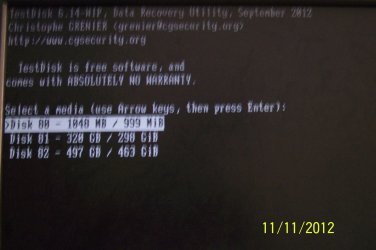
When this question resurfaced here and seeing the OP's screenshots( where I noticed 6.14-WIP) , I quickly created a bootable MSDOS pendrive using Rufus and the DOS version of TestDisk and ran it and this is how it looks like:

100_3131.JPG

Hard Disk 80 is the Imation 1GB pendrive from which TestDisk runs ( The C drive), Disk 81 is the 320GB Seagate external drive and Disk 82 is the 500GB internal drive in the system. The disks have to be necessarily identified by the capacity.

It is quite obvious that OP's cousin had run it from a Live Linux pendrive and hope that the OP may be able to throw more light on it.
 
Last edited:

My Computer

OS
Windows 7 Home Premium 32 bit
jumanji, what do you think about the screenshots in the OP's post here:

http://www.sevenforums.com/hardware-devices/259269-harddisk-appears-local-disk-5.html#post2173046

Why do you think the drive seems to referenced as three different entries? I don't recall ever seeing anything like that before.

It is quite obvious that OP's cousin had run it from a Live Linux pendrive and hope that the OP may be able to throw more light on it.

I'm not really sure I see that. What am I missing between those two screenshots that tells you that?
 

My Computer

OS
Windows 7 Ultimate x64
I really have no answer on what is depicted in those screenshots. Test Disk seems to give erratic information when not used properly. For example a FAT 12 partition in the other thread when all the OP had was NTFS.

My interest centered around how the hard disks will look like if run from the DOS version - which I had totally forgotten. From that repeat exercise it is very clear OP's cousin had not used DOS. Now what else could it be, in your opinion?

Bill has already asked the question "What type of OS was on the USB"

Let us wait for the answer.
 
Last edited:

My Computer

OS
Windows 7 Home Premium 32 bit
From that repeat exercise it is very clear OP's cousin had not used DOS. Now what else could it be, in your opinion?

Agreed, probably not DOS, but I've no clue either (as to what OS might've been booted). I thought that first pic was the same as the one the OP had posted earlier, where I had assumed it was run on top of the installed w7:

http://www.sevenforums.com/hardware-devices/259269-harddisk-appears-local-disk-4.html#post2171594

That's what made me think the installed OS was interfering, and why I mentioned (I guess the same as you had) to try and run it while booted with an alternate OS. But the second screenshot in that later post (after the drive had started "working") didn't show me much of anything different. That confuses the heck out of me.

Yeah, I guess we'll have to wait for some answers. Sure could shed some light here (that I'd love to see).
 

My Computer

OS
Windows 7 Ultimate x64
The suspense is killing me =:>

re: thee representations of the drive. I think Testdisk could have cleaned that up as well, but saving the data was of foremost importance. The drive should be replaced, I'm sure Seagate will do the right thing.

re: USB boot. stoleaway's cousin is the only one who can answer that. The two screens are clearly Windows, so I think they are before and after snaps-I don't think they were captured as part of the USB boot, run test disk process - could be wrong though.

stoleaway is working more hours on the job and is probably taking a well deserved rest after this marathon thread.

If I didn't say it before, thanks everyone..

Bill
...and I'm out (again?)
 

My Computer

Computer type
Laptop
Computer Manufacturer/Model Number
HP Pavilion dv6-6c10us
OS
x64 (6.3.9600) Win8.1 Pro & soon dual boot x64 (6.1.7601) Win7_SP1 HomePrem
CPU
AMD A6-3420M APU with Radeon(tm) HD Graphics
Motherboard
Hewlett-Packard 1805
Memory
6.00 GB
Graphics Card(s)
AMD Radeon(TM) HD 6520G
Sound Card
(1) AMD High Definition Audio Device (2) IDT High Definiti
Monitor(s) Displays
HP W2072a 20" LCD (1600 x 900) @ 60 Hz
Screen Resolution
1366 x 768 x 32 bits (4294967296 colors) @ 60 Hz
Hard Drives
ST640LM0 00 HM641JI SATA Disk Device
Keyboard
Logitech k520 wireless KB
Mouse
Logitech m320 wireless mouse (bundled with KB)
Internet Speed
15/5 | 54 MB Wireless 'n'
Antivirus
Realtime: Defender or Avast | On-demand: Malwarebytes, ESET
Browser
IE 11 on Win8, IE 10 on win 7
Other Info
Media: [Gimp, Audacity, VLC] || Comm: [WEmail 2012, Skype] || Productivity: [OpenOffice,| Textpad] || Utils: [Sysinternals, cCleaner, Speccy, Defraggler]
The suspense is killing me =:>

You've got that right!

re: thee representations of the drive. I think Testdisk could have cleaned that up as well, but saving the data was of foremost importance. The drive should be replaced, I'm sure Seagate will do the right thing.

To be honest, that's where I thought Windows might have been interfering; I didn't think Testdisk would clear that up, instead I thought there was some Windows cleanup required (in addition to the cleanup the drive itself may have needed).

re: USB boot. stoleaway's cousin is the only one who can answer that. The two screens are clearly Windows, so I think they are before and after snaps-I don't think they were captured as part of the USB boot, run test disk process - could be wrong though.

I don't know. I've used Testdisk/Photorec under Win and Linux, but just don't recall what all of the differences were in the output. Maybe jumanji does and can comment on that. I've never used it under DOS and was rather surprised at the output (jumanji's screenshot).

stoleaway is working more hours on the job and is probably taking a well deserved rest after this marathon thread.

Let's hope he gets a break and gets the opportunity to respond. In the meantime, I think it's appropriate to use the thread to do some analysis (compare thoughts at least) as it's relevant to the topic (and may even be useful for anyone stumbling across it).

If I didn't say it before, thanks everyone..

Ditto on that, for sure!
 

My Computer

OS
Windows 7 Ultimate x64
Hi Slartybart and F5ing,

Check this reference » How To Fix: External Disk Drive Suddenly Became RAW which wb303 has provided here: http://www.sevenforums.com/hardware...nts-me-format-but-there-data.html#post2178556 ( I have already repped him for sharing that link.))

The learned author therein has actually tried TestDisk in a real recovery situation and definitely it throws more light.

The points to note:

1. ANALYZE may show what looks like incorrect partition data. ( The author seems to know why but does not explain perhaps not to confuse and only maintain focus on the objective of data recovery. ( I have no clue of what it could be.:) It may have something to do what is on the hard drive - a virtual drive ?????)

2. Irrespective, Close your eyes to that and do a QUICKSEARCH.

3. If the partition that comes up shows only some files that are not of relevance, [Q] [ENTER] to go back and do a DEEPER SEARCH. That brings the real Partition Structure. ( Check and Recover Files if you want)

4. After confirming that you have the right partition data, go back and then WRITE the partition table.

5. If a boot sector repair is prompted BACKUP BS - if it is indicated OK in the window or REBUILD BS.
 
Last edited:

My Computer

OS
Windows 7 Home Premium 32 bit
Great find jumanji!

There's a critical point mentioned in the page that was linked to in that thread, that I don't think gets mentioned often enough when messing with hard drives:

Before proceeding beyond this point, you need to be aware of the risks involved. If the problem with the drive is not simply a logical error but is a manifestation of physical damage then the more you use it and try to repair, the worse the damage may become.

That's a problem when folks recommend a chkdsk run without being aware of how healthy the drive is. At a minimum I always do a quick check (check SMART at least) on drive health before doing anything.

I've recovered data from a few hard drives, and I've always ended up doing the Deeper Search. I'm not positive, but I think what may be happening is that during the Deeper Search it's actually going to the partition file tables and file data, and then reconciling the info it finds there with what it found in the MBR/PBR. Again, I'm not really sure why, but that's what I've always had to do to get the data recovered.

Seems like every time I've used Testdisk on a drive where the data's been scrambled, erroneous partition data is often displayed until a Deeper Search has been run. Depressing at first, until the Deeper Search finishes and shows the correct info.

By the way, for what it's worth, I support your comment (in the other thread) about running it from alternate media (live linux CD/pendrive). For one thing, just to ensure that the running OS isn't interfering. Always good to take a look at the problematic drive from two perspectives anyway.
 

My Computer

OS
Windows 7 Ultimate x64
Testdisk has a few layers to it. I was going to try and get to the next layer when stoleaway announced SUCCESS using it off-line (USB boot). This is what I meant when I said we'll deviate from the illustrated guide - the intent was to get to the BS screen (unfortunately, I categorized it as boot manager - should have said boot sector). It sounds as though a full fledge SF tutorial is needed for this powerful tool. The Testdisk site has loads of examples and documentation to draw upon.

So how was this resolved?

  1. Update Windows to SP1
    -> resolve SP1 update issues

  2. Test other components
    • try drive in other USB ports
    • try another USB cable
    • try drive on another machine
    • remove ghost devices using device manager

  3. Testdisk - following jumanji's illustrated guide
    ->a number of attempts were not successful
    ->could not get to the advanced screen (fix boot sector)
    ->boot from USB drive, run Testdisk outside of windows
    ----->this seems to be the key to this situation
    ----->note that Testdisk 6.14 was used


    A backup of the data was created and the drive was RMA'd to Seagate. No further action was taken to resolve the way the drive was represented in Testdisk. The Testdisk site does provide some examples for different scenarios and I think if the drive was out of warranty, the tool could have resolved that as well. Since the data was recovered and the drive was still under warranty, there was no need to pursue it further.


    This thread should be marked solved.

That's about it in a nutshell
 

My Computer

Computer type
Laptop
Computer Manufacturer/Model Number
HP Pavilion dv6-6c10us
OS
x64 (6.3.9600) Win8.1 Pro & soon dual boot x64 (6.1.7601) Win7_SP1 HomePrem
CPU
AMD A6-3420M APU with Radeon(tm) HD Graphics
Motherboard
Hewlett-Packard 1805
Memory
6.00 GB
Graphics Card(s)
AMD Radeon(TM) HD 6520G
Sound Card
(1) AMD High Definition Audio Device (2) IDT High Definiti
Monitor(s) Displays
HP W2072a 20" LCD (1600 x 900) @ 60 Hz
Screen Resolution
1366 x 768 x 32 bits (4294967296 colors) @ 60 Hz
Hard Drives
ST640LM0 00 HM641JI SATA Disk Device
Keyboard
Logitech k520 wireless KB
Mouse
Logitech m320 wireless mouse (bundled with KB)
Internet Speed
15/5 | 54 MB Wireless 'n'
Antivirus
Realtime: Defender or Avast | On-demand: Malwarebytes, ESET
Browser
IE 11 on Win8, IE 10 on win 7
Other Info
Media: [Gimp, Audacity, VLC] || Comm: [WEmail 2012, Skype] || Productivity: [OpenOffice,| Textpad] || Utils: [Sysinternals, cCleaner, Speccy, Defraggler]
So Bill I have just read through that guide and forgive my ignorance is this better than DISKPART for showing up any drives because I have always been able to find drives normally hidden using that feature.

The only other thing I can think of is does it go on to repair the disk? I am not real sure on that point.

If this is as good or better than DP then it is a wonder Microsoft have not cottoned onto it by now.

One last thing it mentions putting it (Testdisk) on your C: drive could this also be run from a stick if the machine you were trying to fix was log jammed I'm thinking of say booting from it?
 

My Computer

Computer type
PC/Desktop
Computer Manufacturer/Model Number
Own build (new) Desk1 / Asus ROG Win 7 / Desk2 1st build
OS
Desk1 7 Home Prem / Desk2 10 Pro / Main lap Asus ROG 10 Pro 2 laptop Toshiba 7 Pro Asus P2520 7 & 10
CPU
Desk1 i5 3750K / Laptop i7 GTX 860M / Desk2 i5 2500
Motherboard
Desk1 Asus P877-V / Desk2 Gigabyte H67 UD3H / Laptop ?
Memory
Desk1 8GB (1866) / Desk2 16GB (1333) / Laptop 8Gb DDR3
Graphics Card(s)
Desk 1& 2NVidia GTX 650 & Laptops on board Intel
Sound Card
Desk 1 & 2 -XONAR DG Realtek High Def audio Laptop
Monitor(s) Displays
Desk 1 Benq HD 2450 / Desk2 Philips 24" / Laptop 17.5"
Screen Resolution
1920x1080 D1 & D2 & Laptop 1
Hard Drives
Desk1 Samsung 120GB 830 SSD
Asus ROG 256GB 850 Pro SSD
Desk2 Samsung 840 256 SSD
Toshiba 120GB EVO
PSU
Desk 1 Corsair HX 1050/ Laptop ? / Desk 2 Corsair HX 650
Case
Desk 1 Cooler HAF XM ? Toshiba laptop / Desk2 Coolermaster
Cooling
Fans on all Desk1 -2 Desk2 - all Coolermasters 5 Laptop ?
Keyboard
Desk 1 MS Sidewinder X6 Desk 2 MS Sidewinder X 4
Mouse
Desk 1&2 - Gigabyte MS 900 gamer - laptop - Logitec wireless
Internet Speed
ADSL2+
Other Info
One other Desktop (tester) and spare Toshba laptop both with SSD's
Running Kaspersky 2016 ISS on all machines config'd identically
Logitec audio stereo systems on each machine (x3)
Canon MG5250MFC
Router/modem TP-Link running WPA2SK
sorry all for the late reply! was busy with my cousin's wedding, work, tests and all ><

hmm my cousin said that he tried booting from a USB? and then he plugged in my ext harddisk again and even though it takes a while for it to load (I think about 10 mins or so?) then something will pop up? like when you plug it in and they will ask you to scan/ repair the harddisk or something? then my cousins said he clicked that and waited and all is done.

once again, really thankful to you guys who helped & am sorry for the late reply!
 

My Computer

Computer Manufacturer/Model Number
HP Pavillion Slimline
OS
Microsoft Windows 7 Home Premium 64-bit 7600 Multiprocessor Free
CPU
Intel(R) Core(TM) i3 CPU 550 @ 3.20GHz
Motherboard
MSI 2A9C
Memory
4.00 GB
Graphics Card(s)
ATI Radeon HD 5450
Sound Card
(1) ATI High Definition Audio Device (2) Realtek High Defi
Screen Resolution
1600 x 900 x 32 bits (4294967296 colors) @ 60 Hz
Hard Drives
(1) ST3500418AS (2) Generic- Multi-Card USB Device (3) WD 10EAVS External USB Device
Congratulations to your cousin on their wedding.

Glad you posted what worked for you, although it sounds s though Testdisk wasn't part of the solution. If I understand correctly
the machine was booted normally
the ext HD was plugged in
eventually the system responded with a recommendation to scan the disk
the scan was launched (normally with only the fix errors box checked - not sure in your case though)
waited until the scan finished
drive was usable

Funny thing, this actually coincides with something I've been experiencing with my WD ext HD.
My symptoms were the drives were unwritable... I could read them fine, at accepted speeds.
USB 2.0 drive on USB 3.0 port

If I rescanned the drive in Disk management, it might report the status as read-only but not always. Regardless, I could not write to the disk.

For a while I would just open an elevated command prompt and launch Diskpart to clear the read-only bit, even though he read-only bit wasn't set on the volume or the disk - clearing it still resolved the issue.... for a while.

After I installed new drives on my new machine (unrelated), I decided to revisit the ext HD issue (thanks in part to helping you with the issue you had with your ext HD)

I moved the data to my main drive and cleaned all the ext HD.
the drive was re-partitioned and before I moved the data back to it, I wanted to experiment / test the drive. Quite an interesting number of revelations.

At one point Disk Management told me that one of the NTFS parts was a FAT32 - ok.... delete it and recreate it.
At another point the 1st part grew 1 MB (100 +1), but Computer reported 1 less MB (100 -1).
For each drive created, Diskpart reported 1 MB unallocated (free) - this is just an observation, I believe the "new" NTFS filesystem introduced in Vista has a 1 MB buffer.
No matter how I configured the parts, (all primary, 3 primary, 1 extended) the readonly problem persisted.
I changed the disk policy from quick removal to better performance (write-behind) and finally back to quick removal. Again, nothing seemed to resolve the readonly issue.

I chkdsk'd I defrag'd I formatted, and answered yes each time the system asked me to check the disk before use.

Only once did the system warn me about the dirty bit being set. This, I believe, is the crux of the matter. Something isn't finishing normally and leaving a write as incomplete. I have two suspicions - 1) Indexing, and 2) Libraries -Explorer and or Media Player.

If that is the case, there's isn't much I can do to resolve it - other than using the work arounds (diskpart clear readonly and chkdsk)

I also noticed that if I tick the "fix filesystem errors" on chkdsk, the drive I'm checking is reported Local Disk (hey.... isn't that how you opened this thread in the first place?). If I follow that with a chkdsk with no boxes ticked, the volume name appears back in Computer. More importantly...... the drive is writeable (it might take two scans)

chkdsk - fix filesystem errors - ticked, followed by
chkdsk - no boxes - ticked (until I can write to the drive)

For now the drive is working far better than it has in the past few years.....and I have an easy workaround.

Sooooo, my friend, you are welcome and I have to thank you as well.


Bill
.
 

My Computer

Computer type
Laptop
Computer Manufacturer/Model Number
HP Pavilion dv6-6c10us
OS
x64 (6.3.9600) Win8.1 Pro & soon dual boot x64 (6.1.7601) Win7_SP1 HomePrem
CPU
AMD A6-3420M APU with Radeon(tm) HD Graphics
Motherboard
Hewlett-Packard 1805
Memory
6.00 GB
Graphics Card(s)
AMD Radeon(TM) HD 6520G
Sound Card
(1) AMD High Definition Audio Device (2) IDT High Definiti
Monitor(s) Displays
HP W2072a 20" LCD (1600 x 900) @ 60 Hz
Screen Resolution
1366 x 768 x 32 bits (4294967296 colors) @ 60 Hz
Hard Drives
ST640LM0 00 HM641JI SATA Disk Device
Keyboard
Logitech k520 wireless KB
Mouse
Logitech m320 wireless mouse (bundled with KB)
Internet Speed
15/5 | 54 MB Wireless 'n'
Antivirus
Realtime: Defender or Avast | On-demand: Malwarebytes, ESET
Browser
IE 11 on Win8, IE 10 on win 7
Other Info
Media: [Gimp, Audacity, VLC] || Comm: [WEmail 2012, Skype] || Productivity: [OpenOffice,| Textpad] || Utils: [Sysinternals, cCleaner, Speccy, Defraggler]
thanks alot, really ^^
 

My Computer

Computer Manufacturer/Model Number
HP Pavillion Slimline
OS
Microsoft Windows 7 Home Premium 64-bit 7600 Multiprocessor Free
CPU
Intel(R) Core(TM) i3 CPU 550 @ 3.20GHz
Motherboard
MSI 2A9C
Memory
4.00 GB
Graphics Card(s)
ATI Radeon HD 5450
Sound Card
(1) ATI High Definition Audio Device (2) Realtek High Defi
Screen Resolution
1600 x 900 x 32 bits (4294967296 colors) @ 60 Hz
Hard Drives
(1) ST3500418AS (2) Generic- Multi-Card USB Device (3) WD 10EAVS External USB Device
Back
Top