
Harddrive constantly running!

sisrace

New member
Power User
VIP
Local time
3:08 AM
Messages
474
Location
Sweden in a tiny quiet town
Hi i mentioned this earlier but i didnt solve the problem, im running my desktop windows vista machine, and the harddrive never stops working, it sound really bad, i searches for this and someone said that you coult see what whas happening in the task manager with io reads and other io activity tabs turned on, the tasks that showing the most activity was windows tasks and the highest is avg with over 20-40k reading score i will remove avg and se if it fixes it but othervise, what should i do?
 

My Computer

Computer type
PC/Desktop
Computer Manufacturer/Model Number
Custom Built
OS
Windows 10 64Bit
CPU
Intel i7 6700K Cooled by Noctua NH-U14S
Motherboard
ASUS Z170 Pro Gaming
Memory
16GB 2133MHZ DDR4 Corsair
Graphics Card(s)
ASUS Direct CUII OC GTX 660
Sound Card
Supreme FX (On-Board)
Monitor(s) Displays
1: 24" Asus 144hz 2: 21.5" Benq 3: 20" Hp 2009m
Screen Resolution
1:1920x1080 2:1920x1080 3:1600:900
Hard Drives
Primary/OS: Samsung 850 EVO SSD 250GB
Secondary/Main: Seagate 1TB SSHD 3.5"
Media/Backups: WD Green 2TB HDD 3.5"
PSU
Corsair RM 650W
Case
Fractal Design R4
Cooling
2 140mm Noctua NF-A14 ULN, Noctua NH-U14S Cpu cooler
Keyboard
Corsair K70 RGB
Mouse
ROCCAT Kone XTD
Internet Speed
100 Mbit/s Download 100MBit/s Upload
Antivirus
F-Secure SAFE
Browser
Chrome, Firefox
Other Info
I hope hanging up your harddrives in rubber-bands for noise reasons isn't too harmful for the drives :S, but eh, rather silence than lasting drives.. :|
Hi i mentioned this earlier but i didnt solve the problem, im running my desktop windows vista machine, and the harddrive never stops working, it sound really bad, i searches for this and someone said that you coult see what whas happening in the task manager with io reads and other io activity tabs turned on, the tasks that showing the most activity was windows tasks with over 12-19k reading score.. why is this?

Check the following site for some useful information regarding hard drive faliure;

http://www.howtogeek.com/134735/how-to-see-if-your-hard-drive-is-dying/

HTH
 

My Computer

Computer type
PC/Desktop
Computer Manufacturer/Model Number
Custom Built
OS
Windows 7 Professional x64
CPU
Intel i5 quad processor
Motherboard
DP67BG
Memory
16 GB
Graphics Card(s)
Radeon HD 5770
Sound Card
Realtek High Definition Audio
Monitor(s) Displays
Samsung SyncMaster
Screen Resolution
1920X1080
Hard Drives
WD 2TB (SATA Internal)
WD 1TB (USB External)
PSU
Corsair GS800
Case
Tower (Generic)
Cooling
3 Internal Fans
Keyboard
MS Wireless
Mouse
MS Optical Wired
Internet Speed
54 mbps
Antivirus
Emsisoft
Browser
IE-Version 9, Palemoon-Version 24.2.0
Hi i mentioned this earlier but i didnt solve the problem, im running my desktop windows vista machine, and the harddrive never stops working, it sound really bad, i searches for this and someone said that you coult see what whas happening in the task manager with io reads and other io activity tabs turned on, the tasks that showing the most activity was windows tasks with over 12-19k reading score.. why is this?

Check the following site for some useful information regarding hard drive faliure;

http://www.howtogeek.com/134735/how-to-see-if-your-hard-drive-is-dying/

HTH

i checked fast and i dont think its about to fail at all, but the thing that worries me is that it never freaking stops smattering and working and all that!
 

My Computer

Computer type
PC/Desktop
Computer Manufacturer/Model Number
Custom Built
OS
Windows 10 64Bit
CPU
Intel i7 6700K Cooled by Noctua NH-U14S
Motherboard
ASUS Z170 Pro Gaming
Memory
16GB 2133MHZ DDR4 Corsair
Graphics Card(s)
ASUS Direct CUII OC GTX 660
Sound Card
Supreme FX (On-Board)
Monitor(s) Displays
1: 24" Asus 144hz 2: 21.5" Benq 3: 20" Hp 2009m
Screen Resolution
1:1920x1080 2:1920x1080 3:1600:900
Hard Drives
Primary/OS: Samsung 850 EVO SSD 250GB
Secondary/Main: Seagate 1TB SSHD 3.5"
Media/Backups: WD Green 2TB HDD 3.5"
PSU
Corsair RM 650W
Case
Fractal Design R4
Cooling
2 140mm Noctua NF-A14 ULN, Noctua NH-U14S Cpu cooler
Keyboard
Corsair K70 RGB
Mouse
ROCCAT Kone XTD
Internet Speed
100 Mbit/s Download 100MBit/s Upload
Antivirus
F-Secure SAFE
Browser
Chrome, Firefox
Other Info
I hope hanging up your harddrives in rubber-bands for noise reasons isn't too harmful for the drives :S, but eh, rather silence than lasting drives.. :|
Oh btw, the biggest hardrive user is svchost.exe usage: System and its using over 450K I/O readings!what is this and why does it use so much harddrive?
 

My Computer

Computer type
PC/Desktop
Computer Manufacturer/Model Number
Custom Built
OS
Windows 10 64Bit
CPU
Intel i7 6700K Cooled by Noctua NH-U14S
Motherboard
ASUS Z170 Pro Gaming
Memory
16GB 2133MHZ DDR4 Corsair
Graphics Card(s)
ASUS Direct CUII OC GTX 660
Sound Card
Supreme FX (On-Board)
Monitor(s) Displays
1: 24" Asus 144hz 2: 21.5" Benq 3: 20" Hp 2009m
Screen Resolution
1:1920x1080 2:1920x1080 3:1600:900
Hard Drives
Primary/OS: Samsung 850 EVO SSD 250GB
Secondary/Main: Seagate 1TB SSHD 3.5"
Media/Backups: WD Green 2TB HDD 3.5"
PSU
Corsair RM 650W
Case
Fractal Design R4
Cooling
2 140mm Noctua NF-A14 ULN, Noctua NH-U14S Cpu cooler
Keyboard
Corsair K70 RGB
Mouse
ROCCAT Kone XTD
Internet Speed
100 Mbit/s Download 100MBit/s Upload
Antivirus
F-Secure SAFE
Browser
Chrome, Firefox
Other Info
I hope hanging up your harddrives in rubber-bands for noise reasons isn't too harmful for the drives :S, but eh, rather silence than lasting drives.. :|
One of the svchost.exe is now running at 1.2million I/O readings and 8.8million other I/O Readings
 

My Computer

Computer type
PC/Desktop
Computer Manufacturer/Model Number
Custom Built
OS
Windows 10 64Bit
CPU
Intel i7 6700K Cooled by Noctua NH-U14S
Motherboard
ASUS Z170 Pro Gaming
Memory
16GB 2133MHZ DDR4 Corsair
Graphics Card(s)
ASUS Direct CUII OC GTX 660
Sound Card
Supreme FX (On-Board)
Monitor(s) Displays
1: 24" Asus 144hz 2: 21.5" Benq 3: 20" Hp 2009m
Screen Resolution
1:1920x1080 2:1920x1080 3:1600:900
Hard Drives
Primary/OS: Samsung 850 EVO SSD 250GB
Secondary/Main: Seagate 1TB SSHD 3.5"
Media/Backups: WD Green 2TB HDD 3.5"
PSU
Corsair RM 650W
Case
Fractal Design R4
Cooling
2 140mm Noctua NF-A14 ULN, Noctua NH-U14S Cpu cooler
Keyboard
Corsair K70 RGB
Mouse
ROCCAT Kone XTD
Internet Speed
100 Mbit/s Download 100MBit/s Upload
Antivirus
F-Secure SAFE
Browser
Chrome, Firefox
Other Info
I hope hanging up your harddrives in rubber-bands for noise reasons isn't too harmful for the drives :S, but eh, rather silence than lasting drives.. :|
it is probably indexing your drive did you recently install the os?
 

My Computer

Computer type
PC/Desktop
Computer Manufacturer/Model Number
Custom
OS
10 Pro x64
CPU
Ryzen 9 3900X
Motherboard
Asrock x370 Tachi
Memory
64GB(4x16GB) DDR4
Graphics Card(s)
EVGA 1080ti FTW3
Sound Card
ASUS Xonar Essence STX (V4 Bursons), ODAC rev B, NFB-11, O2
Monitor(s) Displays
3xASUS PB278Q/R, Optoma HD142X
Screen Resolution
3x1440p, 1080p
Hard Drives
512GB 850 EVO(OS, Programs)
4TB (Movies)
3TB (Downloads)
3TB (Programs)
1TB HDD (Games)
2x6TB R1 (videos)
PSU
AX760
Case
Fractal Define R5
Cooling
NH-D15S
Keyboard
Massdrop Ctrl with Box Navy's
Mouse
G903, Alioth XXL Mat
Internet Speed
280/40
Antivirus
MBAM, ESET
Browser
Canary 64 Bit
Other Info
I also own a Thinkpad P50 Xeon 4K, X220T, X1C5
it is probably indexing your drive did you recently install the os?

Well i reinstalled the computer but that was for quite a while ago, but im getting a lot of updates and the computer has been unused for a while, but the harddrive was doing that even when i had used the computer for a long time like a year or so, it a windows vista if i didnt mention that before
 

My Computer

Computer type
PC/Desktop
Computer Manufacturer/Model Number
Custom Built
OS
Windows 10 64Bit
CPU
Intel i7 6700K Cooled by Noctua NH-U14S
Motherboard
ASUS Z170 Pro Gaming
Memory
16GB 2133MHZ DDR4 Corsair
Graphics Card(s)
ASUS Direct CUII OC GTX 660
Sound Card
Supreme FX (On-Board)
Monitor(s) Displays
1: 24" Asus 144hz 2: 21.5" Benq 3: 20" Hp 2009m
Screen Resolution
1:1920x1080 2:1920x1080 3:1600:900
Hard Drives
Primary/OS: Samsung 850 EVO SSD 250GB
Secondary/Main: Seagate 1TB SSHD 3.5"
Media/Backups: WD Green 2TB HDD 3.5"
PSU
Corsair RM 650W
Case
Fractal Design R4
Cooling
2 140mm Noctua NF-A14 ULN, Noctua NH-U14S Cpu cooler
Keyboard
Corsair K70 RGB
Mouse
ROCCAT Kone XTD
Internet Speed
100 Mbit/s Download 100MBit/s Upload
Antivirus
F-Secure SAFE
Browser
Chrome, Firefox
Other Info
I hope hanging up your harddrives in rubber-bands for noise reasons isn't too harmful for the drives :S, but eh, rather silence than lasting drives.. :|
oh i figured it was seven also where are you seeing your performance numbers? in the resource monitor?
 

My Computer

Computer type
PC/Desktop
Computer Manufacturer/Model Number
Custom
OS
10 Pro x64
CPU
Ryzen 9 3900X
Motherboard
Asrock x370 Tachi
Memory
64GB(4x16GB) DDR4
Graphics Card(s)
EVGA 1080ti FTW3
Sound Card
ASUS Xonar Essence STX (V4 Bursons), ODAC rev B, NFB-11, O2
Monitor(s) Displays
3xASUS PB278Q/R, Optoma HD142X
Screen Resolution
3x1440p, 1080p
Hard Drives
512GB 850 EVO(OS, Programs)
4TB (Movies)
3TB (Downloads)
3TB (Programs)
1TB HDD (Games)
2x6TB R1 (videos)
PSU
AX760
Case
Fractal Define R5
Cooling
NH-D15S
Keyboard
Massdrop Ctrl with Box Navy's
Mouse
G903, Alioth XXL Mat
Internet Speed
280/40
Antivirus
MBAM, ESET
Browser
Canary 64 Bit
Other Info
I also own a Thinkpad P50 Xeon 4K, X220T, X1C5
oh i figured it was seven also where are you seeing your performance numbers? in the resource monitor?

i looked in the task manager and whent into monitor something... and there i activated I/O reading and other I/O thing.. and there the svhost.exe or what it was was running at over 10million other io readings and 2million io readings
 

My Computer

Computer type
PC/Desktop
Computer Manufacturer/Model Number
Custom Built
OS
Windows 10 64Bit
CPU
Intel i7 6700K Cooled by Noctua NH-U14S
Motherboard
ASUS Z170 Pro Gaming
Memory
16GB 2133MHZ DDR4 Corsair
Graphics Card(s)
ASUS Direct CUII OC GTX 660
Sound Card
Supreme FX (On-Board)
Monitor(s) Displays
1: 24" Asus 144hz 2: 21.5" Benq 3: 20" Hp 2009m
Screen Resolution
1:1920x1080 2:1920x1080 3:1600:900
Hard Drives
Primary/OS: Samsung 850 EVO SSD 250GB
Secondary/Main: Seagate 1TB SSHD 3.5"
Media/Backups: WD Green 2TB HDD 3.5"
PSU
Corsair RM 650W
Case
Fractal Design R4
Cooling
2 140mm Noctua NF-A14 ULN, Noctua NH-U14S Cpu cooler
Keyboard
Corsair K70 RGB
Mouse
ROCCAT Kone XTD
Internet Speed
100 Mbit/s Download 100MBit/s Upload
Antivirus
F-Secure SAFE
Browser
Chrome, Firefox
Other Info
I hope hanging up your harddrives in rubber-bands for noise reasons isn't too harmful for the drives :S, but eh, rather silence than lasting drives.. :|
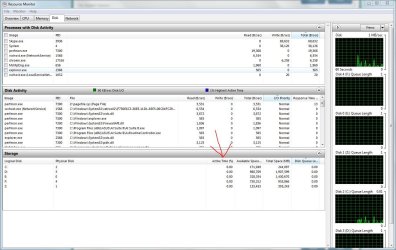
are you seeing activity show up this window?
 

Attachments

  • activity.JPG
    activity.JPG
    152.9 KB · Views: 4

My Computer

Computer type
PC/Desktop
Computer Manufacturer/Model Number
Custom
OS
10 Pro x64
CPU
Ryzen 9 3900X
Motherboard
Asrock x370 Tachi
Memory
64GB(4x16GB) DDR4
Graphics Card(s)
EVGA 1080ti FTW3
Sound Card
ASUS Xonar Essence STX (V4 Bursons), ODAC rev B, NFB-11, O2
Monitor(s) Displays
3xASUS PB278Q/R, Optoma HD142X
Screen Resolution
3x1440p, 1080p
Hard Drives
512GB 850 EVO(OS, Programs)
4TB (Movies)
3TB (Downloads)
3TB (Programs)
1TB HDD (Games)
2x6TB R1 (videos)
PSU
AX760
Case
Fractal Define R5
Cooling
NH-D15S
Keyboard
Massdrop Ctrl with Box Navy's
Mouse
G903, Alioth XXL Mat
Internet Speed
280/40
Antivirus
MBAM, ESET
Browser
Canary 64 Bit
Other Info
I also own a Thinkpad P50 Xeon 4K, X220T, X1C5

My Computer

Computer type
PC/Desktop
Computer Manufacturer/Model Number
Custom Built
OS
Windows 10 64Bit
CPU
Intel i7 6700K Cooled by Noctua NH-U14S
Motherboard
ASUS Z170 Pro Gaming
Memory
16GB 2133MHZ DDR4 Corsair
Graphics Card(s)
ASUS Direct CUII OC GTX 660
Sound Card
Supreme FX (On-Board)
Monitor(s) Displays
1: 24" Asus 144hz 2: 21.5" Benq 3: 20" Hp 2009m
Screen Resolution
1:1920x1080 2:1920x1080 3:1600:900
Hard Drives
Primary/OS: Samsung 850 EVO SSD 250GB
Secondary/Main: Seagate 1TB SSHD 3.5"
Media/Backups: WD Green 2TB HDD 3.5"
PSU
Corsair RM 650W
Case
Fractal Design R4
Cooling
2 140mm Noctua NF-A14 ULN, Noctua NH-U14S Cpu cooler
Keyboard
Corsair K70 RGB
Mouse
ROCCAT Kone XTD
Internet Speed
100 Mbit/s Download 100MBit/s Upload
Antivirus
F-Secure SAFE
Browser
Chrome, Firefox
Other Info
I hope hanging up your harddrives in rubber-bands for noise reasons isn't too harmful for the drives :S, but eh, rather silence than lasting drives.. :|
Just double checking, how much RAM do you have installed on this computer, and how much of it is being used? If you only have a two or three gigabytes, the memory manager may be storing less active applications in the hard drive, and then summoning them back when you start to use them. If this is the case, getting some more memory would be a good idea. I would also recommend running a memtest to see if all the RAM is working, although it probably is, since you didn't mention any blue screens.

Otherwise, it sounds as if AVG is doing some sort of scan on your computer. Defragmenting your computer could help with access time (by putting things in the same place).

One last thing. How big is your hard drive? It may be worth it to simply clone your old drive onto a faster one, which will reduce the % time the drive is active, if this behavior isn't the work of software.
 

My Computer

Computer type
Laptop
Computer Manufacturer/Model Number
Acer
OS
Windows 7 professional 64 bit
CPU
Intel i5
Memory
6 gb
Graphics Card(s)
Intel HD3000
Monitor(s) Displays
2
Screen Resolution
1366x786
Hard Drives
1 TB WD Blue
Keyboard
Microsoft Ergonomic 4000
Mouse
Logitech Wireless
Internet Speed
25 mb/s
Antivirus
Kaspersky Antivirus
Browser
Google Chrome
Just double checking, how much RAM do you have installed on this computer, and how much of it is being used? If you only have a two or three gigabytes, the memory manager may be storing less active applications in the hard drive, and then summoning them back when you start to use them. If this is the case, getting some more memory would be a good idea. I would also recommend running a memtest to see if all the RAM is working, although it probably is, since you didn't mention any blue screens.

Otherwise, it sounds as if AVG is doing some sort of scan on your computer. Defragmenting your computer could help with access time (by putting things in the same place).

One last thing. How big is your hard drive? It may be worth it to simply clone your old drive onto a faster one, which will reduce the % time the drive is active, if this behavior isn't the work of software.

I can derfrag it yes, I have 4Gb ram, the drive is 500gb but its 450gb accessable and its 50-60gb used or something becouse i havent used this computer much at all, and i will probably not change it, becouse i dont have money
 

My Computer

Computer type
PC/Desktop
Computer Manufacturer/Model Number
Custom Built
OS
Windows 10 64Bit
CPU
Intel i7 6700K Cooled by Noctua NH-U14S
Motherboard
ASUS Z170 Pro Gaming
Memory
16GB 2133MHZ DDR4 Corsair
Graphics Card(s)
ASUS Direct CUII OC GTX 660
Sound Card
Supreme FX (On-Board)
Monitor(s) Displays
1: 24" Asus 144hz 2: 21.5" Benq 3: 20" Hp 2009m
Screen Resolution
1:1920x1080 2:1920x1080 3:1600:900
Hard Drives
Primary/OS: Samsung 850 EVO SSD 250GB
Secondary/Main: Seagate 1TB SSHD 3.5"
Media/Backups: WD Green 2TB HDD 3.5"
PSU
Corsair RM 650W
Case
Fractal Design R4
Cooling
2 140mm Noctua NF-A14 ULN, Noctua NH-U14S Cpu cooler
Keyboard
Corsair K70 RGB
Mouse
ROCCAT Kone XTD
Internet Speed
100 Mbit/s Download 100MBit/s Upload
Antivirus
F-Secure SAFE
Browser
Chrome, Firefox
Other Info
I hope hanging up your harddrives in rubber-bands for noise reasons isn't too harmful for the drives :S, but eh, rather silence than lasting drives.. :|
Just double checking, how much RAM do you have installed on this computer, and how much of it is being used? If you only have a two or three gigabytes, the memory manager may be storing less active applications in the hard drive, and then summoning them back when you start to use them. If this is the case, getting some more memory would be a good idea. I would also recommend running a memtest to see if all the RAM is working, although it probably is, since you didn't mention any blue screens.

Otherwise, it sounds as if AVG is doing some sort of scan on your computer. Defragmenting your computer could help with access time (by putting things in the same place).

One last thing. How big is your hard drive? It may be worth it to simply clone your old drive onto a faster one, which will reduce the % time the drive is active, if this behavior isn't the work of software.


and i uninstallen avg and installed avast
 

My Computer

Computer type
PC/Desktop
Computer Manufacturer/Model Number
Custom Built
OS
Windows 10 64Bit
CPU
Intel i7 6700K Cooled by Noctua NH-U14S
Motherboard
ASUS Z170 Pro Gaming
Memory
16GB 2133MHZ DDR4 Corsair
Graphics Card(s)
ASUS Direct CUII OC GTX 660
Sound Card
Supreme FX (On-Board)
Monitor(s) Displays
1: 24" Asus 144hz 2: 21.5" Benq 3: 20" Hp 2009m
Screen Resolution
1:1920x1080 2:1920x1080 3:1600:900
Hard Drives
Primary/OS: Samsung 850 EVO SSD 250GB
Secondary/Main: Seagate 1TB SSHD 3.5"
Media/Backups: WD Green 2TB HDD 3.5"
PSU
Corsair RM 650W
Case
Fractal Design R4
Cooling
2 140mm Noctua NF-A14 ULN, Noctua NH-U14S Cpu cooler
Keyboard
Corsair K70 RGB
Mouse
ROCCAT Kone XTD
Internet Speed
100 Mbit/s Download 100MBit/s Upload
Antivirus
F-Secure SAFE
Browser
Chrome, Firefox
Other Info
I hope hanging up your harddrives in rubber-bands for noise reasons isn't too harmful for the drives :S, but eh, rather silence than lasting drives.. :|
Back
Top