My Harddrive is running constantly

sisrace

New member
Power User
VIP
Local time
3:31 PM
Messages
474
Location
Sweden in a tiny quiet town
Hello! my old computer's HD is Running constantly. i cant get it to stop work. is it a hardware problem or software? and how can i solve it? thanks for your help ;)
 

My Computer My Computer

Computer type
PC/Desktop
Computer Manufacturer/Model Number
Custom Built
OS
Windows 10 64Bit
CPU
Intel i7 6700K Cooled by Noctua NH-U14S
Motherboard
ASUS Z170 Pro Gaming
Memory
16GB 2133MHZ DDR4 Corsair
Graphics Card(s)
ASUS Direct CUII OC GTX 660
Sound Card
Supreme FX (On-Board)
Monitor(s) Displays
1: 24" Asus 144hz 2: 21.5" Benq 3: 20" Hp 2009m
Screen Resolution
1:1920x1080 2:1920x1080 3:1600:900
Hard Drives
Primary/OS: Samsung 850 EVO SSD 250GB
Secondary/Main: Seagate 1TB SSHD 3.5"
Media/Backups: WD Green 2TB HDD 3.5"
PSU
Corsair RM 650W
Case
Fractal Design R4
Cooling
2 140mm Noctua NF-A14 ULN, Noctua NH-U14S Cpu cooler
Keyboard
Corsair K70 RGB
Mouse
ROCCAT Kone XTD
Internet Speed
100 Mbit/s Download 100MBit/s Upload
Antivirus
F-Secure SAFE
Browser
Chrome, Firefox
Other Info
I hope hanging up your harddrives in rubber-bands for noise reasons isn't too harmful for the drives :S, but eh, rather silence than lasting drives.. :|
There's quite a few things that can have that effect. Let's start simple and work up.

How old is the hard drive?

I would check the overall space of the hard drive, good practice to have at least 20% free. The HD may also be fragmented, you can check the status of both of these from the disk defragment application. If the HD space is lower then 20%, you may want to delete temporary files from Disk cleanup.

Next I would check the RAM and Virtual memory amount, it depends on what system your running, but a good baseline is anywhere from 2gb to 4gb of ram, and 1.5x your current ram amount = virtual memory. You can confirm these from the Task Manager, under the Performance tab.

If those come up clean and fine, you may want to do a quick virus scan. I personally recommend Malwarebytes, you can find the most current version from their website at Malwarebytes : Free anti-malware download
 

My Computer My Computer

Computer type
Laptop
OS
Windows 7 Enterprise x64
Is your AVG set to run a scan every time you boot up?
 

My Computer My Computer

Computer Manufacturer/Model Number
8 home-builds from the 80's into 2004
OS
W7 Home Premium 32bit

My Computer My Computer

Computer type
PC/Desktop
Computer Manufacturer/Model Number
Custom Built
OS
Windows 10 64Bit
CPU
Intel i7 6700K Cooled by Noctua NH-U14S
Motherboard
ASUS Z170 Pro Gaming
Memory
16GB 2133MHZ DDR4 Corsair
Graphics Card(s)
ASUS Direct CUII OC GTX 660
Sound Card
Supreme FX (On-Board)
Monitor(s) Displays
1: 24" Asus 144hz 2: 21.5" Benq 3: 20" Hp 2009m
Screen Resolution
1:1920x1080 2:1920x1080 3:1600:900
Hard Drives
Primary/OS: Samsung 850 EVO SSD 250GB
Secondary/Main: Seagate 1TB SSHD 3.5"
Media/Backups: WD Green 2TB HDD 3.5"
PSU
Corsair RM 650W
Case
Fractal Design R4
Cooling
2 140mm Noctua NF-A14 ULN, Noctua NH-U14S Cpu cooler
Keyboard
Corsair K70 RGB
Mouse
ROCCAT Kone XTD
Internet Speed
100 Mbit/s Download 100MBit/s Upload
Antivirus
F-Secure SAFE
Browser
Chrome, Firefox
Other Info
I hope hanging up your harddrives in rubber-bands for noise reasons isn't too harmful for the drives :S, but eh, rather silence than lasting drives.. :|
Hello! my old computer's HD is Running constantly. i cant get it to stop work. is it a hardware problem or software? and how can i solve it? thanks for your help ;)
Is this the computer that is in your system specs? If not, please post its system specs in another post (you don't need to change your current system specs). Also, is your computer slower than before?
Let's try some things to help with this:
1. Try rebooting your computer. That may help with this issue.

2. Go to start, type in msconfig and press enter. Go to the startup tab and disable everything except your antivirus. Then, reboot your computer.

3. Do what antikythera said: Run Disk Defragmenter. To run disk defragmenter, go to start, type in disk defragmenter, and press enter. Click on Defragment disk. Run Malwarebytes Anti-Malware, too. Be sure to untick the box that at the end of the installation says "Enable Free Trial of Malwarebytes Anti-Malware PRO."

Also, Windows 7 does things in the background, so you will see hard drive activity, even if there aren't any programs running.
 

My Computer My Computer

Computer type
PC/Desktop
Computer Manufacturer/Model Number
HP Pavilion P7-1010
OS
Windows 7 Professional x64 Service Pack 1
CPU
AMD Athlon X4 645
Motherboard
Foxxcon N-Alvorix RS880
Memory
6GB DDR3 1066
Graphics Card(s)
Sapphire Radeon HD 5670 512MB GDDR5
Sound Card
Realtek Integrated Audio
Monitor(s) Displays
HP 2011x
Screen Resolution
1600x900
Hard Drives
1. Crucial M4 128GB SSD
2. 1TB Seagate Barracuda 7200.12 RPM
3. 1TB Western Digital Caviar Green 5400RPM
PSU
Seasonic S12 II Bronze 380 Watt
Case
HP OEM
Cooling
Coolermaster Heatsink, AVC Case Fan
Keyboard
HP OEM- Made by Chicony
Mouse
HP OEM- Made by Logitech
Internet Speed
20MBit Down/4 Up
Antivirus
Microsoft Security Essentials
Browser
Internet Explorer 10
There's quite a few things that can have that effect. Let's start simple and work up.

How old is the hard drive?

I would check the overall space of the hard drive, good practice to have at least 20% free. The HD may also be fragmented, you can check the status of both of these from the disk defragment application. If the HD space is lower then 20%, you may want to delete temporary files from Disk cleanup.

Next I would check the RAM and Virtual memory amount, it depends on what system your running, but a good baseline is anywhere from 2gb to 4gb of ram, and 1.5x your current ram amount = virtual memory. You can confirm these from the Task Manager, under the Performance tab.

If those come up clean and fine, you may want to do a quick virus scan. I personally recommend Malwarebytes, you can find the most current version from their website at Malwarebytes : Free anti-malware download

The harddrive is about 3,5 years and i just made a system reset so im having 613 Gb free of a 652 gb hd
Im not having any viruses. becouse the only thing i did on the internet "with AVG on" is youtube vids, sevenforums, avg's website, javas website, minecraft.net and Feed the beast and nvidia. so i shouldnt have any viruses... Is there a easy way to see if your hd have any problems and how to fix it?. The HD led indicator is Constantly Yellow. sometimes it flickers a bit and somethimes it does turn off.. just sometimes.
 

My Computer My Computer

Computer type
PC/Desktop
Computer Manufacturer/Model Number
Custom Built
OS
Windows 10 64Bit
CPU
Intel i7 6700K Cooled by Noctua NH-U14S
Motherboard
ASUS Z170 Pro Gaming
Memory
16GB 2133MHZ DDR4 Corsair
Graphics Card(s)
ASUS Direct CUII OC GTX 660
Sound Card
Supreme FX (On-Board)
Monitor(s) Displays
1: 24" Asus 144hz 2: 21.5" Benq 3: 20" Hp 2009m
Screen Resolution
1:1920x1080 2:1920x1080 3:1600:900
Hard Drives
Primary/OS: Samsung 850 EVO SSD 250GB
Secondary/Main: Seagate 1TB SSHD 3.5"
Media/Backups: WD Green 2TB HDD 3.5"
PSU
Corsair RM 650W
Case
Fractal Design R4
Cooling
2 140mm Noctua NF-A14 ULN, Noctua NH-U14S Cpu cooler
Keyboard
Corsair K70 RGB
Mouse
ROCCAT Kone XTD
Internet Speed
100 Mbit/s Download 100MBit/s Upload
Antivirus
F-Secure SAFE
Browser
Chrome, Firefox
Other Info
I hope hanging up your harddrives in rubber-bands for noise reasons isn't too harmful for the drives :S, but eh, rather silence than lasting drives.. :|
Hello! my old computer's HD is Running constantly. i cant get it to stop work. is it a hardware problem or software? and how can i solve it? thanks for your help ;)
Is this the computer that is in your system specs? If not, please post its system specs in another post (you don't need to change your current system specs). Also, is your computer slower than before?
Let's try some things to help with this:
1. Try rebooting your computer. That may help with this issue.

2. Go to start, type in msconfig and press enter. Go to the startup tab and disable everything except your antivirus. Then, reboot your computer.

3. Do what antikythera said: Run Disk Defragmenter. To run disk defragmenter, go to start, type in disk defragmenter, and press enter. Click on Defragment disk. Run Malwarebytes Anti-Malware, too. Be sure to untick the box that at the end of the installation says "Enable Free Trial of Malwarebytes Anti-Malware PRO."

Also, Windows 7 does things in the background, so you will see hard drive activity, even if there aren't any programs running.


Dont have any programs really installed right now. Have made a system reset and now im installing 98 updates :P and Heres the specs:
Amd Phenom 8750 Triple-Core Processor
4 Gb DDR2 Ram 400MB/s (reading all this from my computers website)
Gpu: ENGT430
500Gb HD (says in my computer that its 652 Gb o.O
300W Psu
Windows Vista home premium
( Compaq Presario CQ5043SC )
 

My Computer My Computer

Computer type
PC/Desktop
Computer Manufacturer/Model Number
Custom Built
OS
Windows 10 64Bit
CPU
Intel i7 6700K Cooled by Noctua NH-U14S
Motherboard
ASUS Z170 Pro Gaming
Memory
16GB 2133MHZ DDR4 Corsair
Graphics Card(s)
ASUS Direct CUII OC GTX 660
Sound Card
Supreme FX (On-Board)
Monitor(s) Displays
1: 24" Asus 144hz 2: 21.5" Benq 3: 20" Hp 2009m
Screen Resolution
1:1920x1080 2:1920x1080 3:1600:900
Hard Drives
Primary/OS: Samsung 850 EVO SSD 250GB
Secondary/Main: Seagate 1TB SSHD 3.5"
Media/Backups: WD Green 2TB HDD 3.5"
PSU
Corsair RM 650W
Case
Fractal Design R4
Cooling
2 140mm Noctua NF-A14 ULN, Noctua NH-U14S Cpu cooler
Keyboard
Corsair K70 RGB
Mouse
ROCCAT Kone XTD
Internet Speed
100 Mbit/s Download 100MBit/s Upload
Antivirus
F-Secure SAFE
Browser
Chrome, Firefox
Other Info
I hope hanging up your harddrives in rubber-bands for noise reasons isn't too harmful for the drives :S, but eh, rather silence than lasting drives.. :|
Hello! my old computer's HD is Running constantly. i cant get it to stop work. is it a hardware problem or software? and how can i solve it? thanks for your help ;)
Is this the computer that is in your system specs? If not, please post its system specs in another post (you don't need to change your current system specs). Also, is your computer slower than before?
Let's try some things to help with this:
1. Try rebooting your computer. That may help with this issue.

2. Go to start, type in msconfig and press enter. Go to the startup tab and disable everything except your antivirus. Then, reboot your computer.

3. Do what antikythera said: Run Disk Defragmenter. To run disk defragmenter, go to start, type in disk defragmenter, and press enter. Click on Defragment disk. Run Malwarebytes Anti-Malware, too. Be sure to untick the box that at the end of the installation says "Enable Free Trial of Malwarebytes Anti-Malware PRO."

Also, Windows 7 does things in the background, so you will see hard drive activity, even if there aren't any programs running.


Dont have any programs really installed right now. Have made a system reset and now im installing 98 updates :P and Heres the specs:
Amd Phenom 8750 Triple-Core Processor
4 Gb DDR2 Ram 400MB/s (reading all this from my computers website)
Gpu: ENGT430
500Gb HD (says in my computer that its 652 Gb o.O
300W Psu
Windows Vista home premium
( Compaq Presario CQ5043SC )
That says Vista Home Premium. Is that what it has always run or is it running Windows 7 now?
 

My Computer My Computer

Computer type
PC/Desktop
Computer Manufacturer/Model Number
HP Pavilion P7-1010
OS
Windows 7 Professional x64 Service Pack 1
CPU
AMD Athlon X4 645
Motherboard
Foxxcon N-Alvorix RS880
Memory
6GB DDR3 1066
Graphics Card(s)
Sapphire Radeon HD 5670 512MB GDDR5
Sound Card
Realtek Integrated Audio
Monitor(s) Displays
HP 2011x
Screen Resolution
1600x900
Hard Drives
1. Crucial M4 128GB SSD
2. 1TB Seagate Barracuda 7200.12 RPM
3. 1TB Western Digital Caviar Green 5400RPM
PSU
Seasonic S12 II Bronze 380 Watt
Case
HP OEM
Cooling
Coolermaster Heatsink, AVC Case Fan
Keyboard
HP OEM- Made by Chicony
Mouse
HP OEM- Made by Logitech
Internet Speed
20MBit Down/4 Up
Antivirus
Microsoft Security Essentials
Browser
Internet Explorer 10
Is this the computer that is in your system specs? If not, please post its system specs in another post (you don't need to change your current system specs). Also, is your computer slower than before?
Let's try some things to help with this:
1. Try rebooting your computer. That may help with this issue.

2. Go to start, type in msconfig and press enter. Go to the startup tab and disable everything except your antivirus. Then, reboot your computer.

3. Do what antikythera said: Run Disk Defragmenter. To run disk defragmenter, go to start, type in disk defragmenter, and press enter. Click on Defragment disk. Run Malwarebytes Anti-Malware, too. Be sure to untick the box that at the end of the installation says "Enable Free Trial of Malwarebytes Anti-Malware PRO."

Also, Windows 7 does things in the background, so you will see hard drive activity, even if there aren't any programs running.


Dont have any programs really installed right now. Have made a system reset and now im installing 98 updates :P and Heres the specs:
Amd Phenom 8750 Triple-Core Processor
4 Gb DDR2 Ram 400MB/s (reading all this from my computers website)
Gpu: ENGT430
500Gb HD (says in my computer that its 652 Gb o.O
300W Psu
Windows Vista home premium
( Compaq Presario CQ5043SC )
That says Vista Home Premium. Is that what it has always run or is it running Windows 7 now?


Still vista
 

My Computer My Computer

Computer type
PC/Desktop
Computer Manufacturer/Model Number
Custom Built
OS
Windows 10 64Bit
CPU
Intel i7 6700K Cooled by Noctua NH-U14S
Motherboard
ASUS Z170 Pro Gaming
Memory
16GB 2133MHZ DDR4 Corsair
Graphics Card(s)
ASUS Direct CUII OC GTX 660
Sound Card
Supreme FX (On-Board)
Monitor(s) Displays
1: 24" Asus 144hz 2: 21.5" Benq 3: 20" Hp 2009m
Screen Resolution
1:1920x1080 2:1920x1080 3:1600:900
Hard Drives
Primary/OS: Samsung 850 EVO SSD 250GB
Secondary/Main: Seagate 1TB SSHD 3.5"
Media/Backups: WD Green 2TB HDD 3.5"
PSU
Corsair RM 650W
Case
Fractal Design R4
Cooling
2 140mm Noctua NF-A14 ULN, Noctua NH-U14S Cpu cooler
Keyboard
Corsair K70 RGB
Mouse
ROCCAT Kone XTD
Internet Speed
100 Mbit/s Download 100MBit/s Upload
Antivirus
F-Secure SAFE
Browser
Chrome, Firefox
Other Info
I hope hanging up your harddrives in rubber-bands for noise reasons isn't too harmful for the drives :S, but eh, rather silence than lasting drives.. :|
Dont have any programs really installed right now. Have made a system reset and now im installing 98 updates :P and Heres the specs:
Amd Phenom 8750 Triple-Core Processor
4 Gb DDR2 Ram 400MB/s (reading all this from my computers website)
Gpu: ENGT430
500Gb HD (says in my computer that its 652 Gb o.O
300W Psu
Windows Vista home premium
( Compaq Presario CQ5043SC )
That says Vista Home Premium. Is that what it has always run or is it running Windows 7 now?


Still vista
Does it have a Windows 7 upgrade?
 

My Computer My Computer

Computer type
PC/Desktop
Computer Manufacturer/Model Number
HP Pavilion P7-1010
OS
Windows 7 Professional x64 Service Pack 1
CPU
AMD Athlon X4 645
Motherboard
Foxxcon N-Alvorix RS880
Memory
6GB DDR3 1066
Graphics Card(s)
Sapphire Radeon HD 5670 512MB GDDR5
Sound Card
Realtek Integrated Audio
Monitor(s) Displays
HP 2011x
Screen Resolution
1600x900
Hard Drives
1. Crucial M4 128GB SSD
2. 1TB Seagate Barracuda 7200.12 RPM
3. 1TB Western Digital Caviar Green 5400RPM
PSU
Seasonic S12 II Bronze 380 Watt
Case
HP OEM
Cooling
Coolermaster Heatsink, AVC Case Fan
Keyboard
HP OEM- Made by Chicony
Mouse
HP OEM- Made by Logitech
Internet Speed
20MBit Down/4 Up
Antivirus
Microsoft Security Essentials
Browser
Internet Explorer 10

My Computer My Computer

Computer type
PC/Desktop
Computer Manufacturer/Model Number
Custom Built
OS
Windows 10 64Bit
CPU
Intel i7 6700K Cooled by Noctua NH-U14S
Motherboard
ASUS Z170 Pro Gaming
Memory
16GB 2133MHZ DDR4 Corsair
Graphics Card(s)
ASUS Direct CUII OC GTX 660
Sound Card
Supreme FX (On-Board)
Monitor(s) Displays
1: 24" Asus 144hz 2: 21.5" Benq 3: 20" Hp 2009m
Screen Resolution
1:1920x1080 2:1920x1080 3:1600:900
Hard Drives
Primary/OS: Samsung 850 EVO SSD 250GB
Secondary/Main: Seagate 1TB SSHD 3.5"
Media/Backups: WD Green 2TB HDD 3.5"
PSU
Corsair RM 650W
Case
Fractal Design R4
Cooling
2 140mm Noctua NF-A14 ULN, Noctua NH-U14S Cpu cooler
Keyboard
Corsair K70 RGB
Mouse
ROCCAT Kone XTD
Internet Speed
100 Mbit/s Download 100MBit/s Upload
Antivirus
F-Secure SAFE
Browser
Chrome, Firefox
Other Info
I hope hanging up your harddrives in rubber-bands for noise reasons isn't too harmful for the drives :S, but eh, rather silence than lasting drives.. :|
Last edited:

My Computer My Computer

Computer type
PC/Desktop
Computer Manufacturer/Model Number
HP Pavilion P7-1010
OS
Windows 7 Professional x64 Service Pack 1
CPU
AMD Athlon X4 645
Motherboard
Foxxcon N-Alvorix RS880
Memory
6GB DDR3 1066
Graphics Card(s)
Sapphire Radeon HD 5670 512MB GDDR5
Sound Card
Realtek Integrated Audio
Monitor(s) Displays
HP 2011x
Screen Resolution
1600x900
Hard Drives
1. Crucial M4 128GB SSD
2. 1TB Seagate Barracuda 7200.12 RPM
3. 1TB Western Digital Caviar Green 5400RPM
PSU
Seasonic S12 II Bronze 380 Watt
Case
HP OEM
Cooling
Coolermaster Heatsink, AVC Case Fan
Keyboard
HP OEM- Made by Chicony
Mouse
HP OEM- Made by Logitech
Internet Speed
20MBit Down/4 Up
Antivirus
Microsoft Security Essentials
Browser
Internet Explorer 10

My Computer My Computer

Computer type
PC/Desktop
Computer Manufacturer/Model Number
Custom Built
OS
Windows 10 64Bit
CPU
Intel i7 6700K Cooled by Noctua NH-U14S
Motherboard
ASUS Z170 Pro Gaming
Memory
16GB 2133MHZ DDR4 Corsair
Graphics Card(s)
ASUS Direct CUII OC GTX 660
Sound Card
Supreme FX (On-Board)
Monitor(s) Displays
1: 24" Asus 144hz 2: 21.5" Benq 3: 20" Hp 2009m
Screen Resolution
1:1920x1080 2:1920x1080 3:1600:900
Hard Drives
Primary/OS: Samsung 850 EVO SSD 250GB
Secondary/Main: Seagate 1TB SSHD 3.5"
Media/Backups: WD Green 2TB HDD 3.5"
PSU
Corsair RM 650W
Case
Fractal Design R4
Cooling
2 140mm Noctua NF-A14 ULN, Noctua NH-U14S Cpu cooler
Keyboard
Corsair K70 RGB
Mouse
ROCCAT Kone XTD
Internet Speed
100 Mbit/s Download 100MBit/s Upload
Antivirus
F-Secure SAFE
Browser
Chrome, Firefox
Other Info
I hope hanging up your harddrives in rubber-bands for noise reasons isn't too harmful for the drives :S, but eh, rather silence than lasting drives.. :|
Hello! my old computer's HD is Running constantly. i cant get it to stop work. is it a hardware problem or software? and how can i solve it? thanks for your help ;)

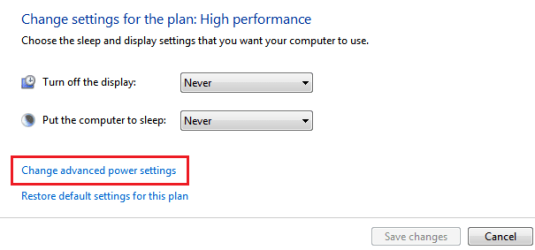
I don't know what you actually wanna do but if you want your HD to automatically turn off when idle, you can do the following:


  • Click Start :orb: > Control Panel > Power options
  • Click "Change plan settings" against the selected power plan:

Capture.PNG


  • Now click "Change advanced power settings":

Capture4.PNG


  • Expand hard disk > Turn off hard disk after > Set the time in minutes:

Untitled.png


  • Click OK. Done.

Sorry if I posted something you did not need.
 
It might be something simple like CHROME. Are you running Chrome? I use it sometimes. Just opened Task manager and HDD is going like crazy, I can hear it. Close Chrome and it goes to basically zero and stops making all that racket.
 

My Computer My Computer

Computer type
PC/Desktop
Computer Manufacturer/Model Number
Asus
OS
Windows 7 Home
Sp here's the thing. I've got myself a new computer. win 8.1, amd fx 8350, gtx 660 1tb sshd and 2tb wd green. this computer was first build with the secondary hdd as the old harddrive this thread is about. when i made the hdd into a secondary hdd it had an auto shut off. but when it started it made quite loud head noises and a noise where a humbeling sound faded in and faded out slowly. i then got the 2tb wd green and put the old seagate to rest on a shelf.. when i pick it up and spin it next to my hear, i hear a squeeking noise as the disc turns. this harddrive has bad bearings. its old and it belongs to the shelf now. so this thread is marked as "hopeless case"
 

My Computer My Computer

Computer type
PC/Desktop
Computer Manufacturer/Model Number
Custom Built
OS
Windows 10 64Bit
CPU
Intel i7 6700K Cooled by Noctua NH-U14S
Motherboard
ASUS Z170 Pro Gaming
Memory
16GB 2133MHZ DDR4 Corsair
Graphics Card(s)
ASUS Direct CUII OC GTX 660
Sound Card
Supreme FX (On-Board)
Monitor(s) Displays
1: 24" Asus 144hz 2: 21.5" Benq 3: 20" Hp 2009m
Screen Resolution
1:1920x1080 2:1920x1080 3:1600:900
Hard Drives
Primary/OS: Samsung 850 EVO SSD 250GB
Secondary/Main: Seagate 1TB SSHD 3.5"
Media/Backups: WD Green 2TB HDD 3.5"
PSU
Corsair RM 650W
Case
Fractal Design R4
Cooling
2 140mm Noctua NF-A14 ULN, Noctua NH-U14S Cpu cooler
Keyboard
Corsair K70 RGB
Mouse
ROCCAT Kone XTD
Internet Speed
100 Mbit/s Download 100MBit/s Upload
Antivirus
F-Secure SAFE
Browser
Chrome, Firefox
Other Info
I hope hanging up your harddrives in rubber-bands for noise reasons isn't too harmful for the drives :S, but eh, rather silence than lasting drives.. :|
I FOUND IT! It's a crummy little piece of software called Seagate Dashboard, and it's installed automatically when you plug in a Seagate external HD. This POS software does something about once a second, no tellin' what, but it involves RAM. Since my computer's 1GB of RAM is largely in use -- the anti-virus software seems to chew up about half of it -- the system goes to virtual RAM and engages the hard drive. Getting the virtual RAM readjusted takes about a second -- just in time for Seagate Dashboard to hit it AGAIN! The HD remains in a permanent state of activation, nothing else on the 'puter works as it should, and none of this shows up on a list of activities!

The fix is simple:

Start -> Control Panel -> Administrative Tools
double-click on Services
scroll down to Seagate Dashboard Service
right-click on it and hit "Stop". Your 'puter will work better IMMEDIATELY.
right-click on it again and change it from "automatic" to "manual" -- or even "disable" -- so it won't bother you again.

Something keeps looking for Seagate Dashboard on bootup. That's probably the Memeo Instant Backup. Whatever, someone else can figure out how to clean that up.
 

My Computer My Computer

Computer type
PC/Desktop
Computer Manufacturer/Model Number
Dell
OS
Windows 7
Browser
Chrome, Firefox, Seamonkey
Back
Top