Hardware compatability

cosmicpulsar

New member
Local time
1:54 AM
Messages
13
Location
Cyprus. Originally from Doncaster
Hi there folks, have just changed from Windows XP to Windows 7 and find my scanner -Epson Perfection 1660 Photo and printer -Epson Stylus Photo 915 are not compatable with the original drives. Can these be updated?
 

My Computer

Computer Manufacturer/Model Number
HP - Pavilion
OS
windows 7 Home
Welcome to Windows Seven Forums.

Other than trying Windows Vista drivers, which may or may not work, you're probably out of luck.

Epson and Windows 7

Have you considered upgrading your hardware?

I've recently bought the HP Envy 110 wireless/web all-in-one from the John Lewis Partnership who have it on offer.

Setting it up after the driver installation took literally seconds and it cuts down on cable clutter.

http://www.johnlewis.com/231350360/...-9730-dc09-e291-00002ebe237b&s_kwcid=7x866218

You can also print directly from the latest iPhone with it too.
 

My Computer

Computer Manufacturer/Model Number
HP Pavilion Elite 495UK
OS
Windows 7 Ultimate SP1 64-Bit
CPU
Intel Core i7 870 @ 2.93GHz
Motherboard
MSI 2A9C (CPU1)
Memory
8Gb Dual-Channel DDR3 @ 664MHz
Graphics Card(s)
nVidia GeForce GTX 460 1024MB dedicated RAM
Sound Card
Realtek HD Audio
Monitor(s) Displays
HP2310i
Screen Resolution
1920 x 1080
Hard Drives
1x1954GB Hitachi HDS22020ALA 330 (RAID), 1x1954GB Hitachi External for backup and storage
PSU
460W
Case
HP Elite
Cooling
Air cooled
Keyboard
Logitech K750 solar-powered keyboard
Mouse
Logitech Wireless M180 mouse
Internet Speed
2Mb
Other Info
Pure Avanti Flow Internet Radio with iPod Dock, 64Gb iPod, HP USB Speakers, Sony MDR-V500 Headphones, Sony Vaio F-Series Laptop
Hi Sea Vixon, I know knack all about computers apart from using Adobe Elements 10, doing me emails and listening to me music. If its as you say, it looks like I will have to buy a new printer etc. Thanks
 

My Computer

Computer Manufacturer/Model Number
HP - Pavilion
OS
windows 7 Home
The suggestion is to try Vista drivers first. Don't buy anything just yet.
 

My Computer

OS
Windows 7 Ultimate x64 SP1
CPU
Intel Core i7-2600
Motherboard
Gigabyte GA-P67A-UD3P-B3
Memory
12 GB Patriot Extreme DDR3-1333
Graphics Card(s)
Nvidia GTX 470
Monitor(s) Displays
Dell UltraSharp 2209WA
Hard Drives
OCZ Agility3 240 GB, WD5001AALS, WD7501AALS
PSU
OCZ ModStream 700W
Case
CoolerMaster HAF 912 Advanced
Cooling
CoolerMaster Hyper 212 Plus
Hi DeaconFrost, I'm not very literate with the workings . I'm just a user... just being the operative word. LoL So how do I get Vista drivers?
 

My Computer

Computer Manufacturer/Model Number
HP - Pavilion
OS
windows 7 Home
You get them right from Epson's website....the same place you always got drivers for the printer. The discs that come with hardware are often outdated before you by the product...so they are normally used as frisbees or drink coasters. You also can google the model of your printer and Windows 7 to see if anyone has workarounds or other drivers that work.
 

My Computer

OS
Windows 7 Ultimate x64 SP1
CPU
Intel Core i7-2600
Motherboard
Gigabyte GA-P67A-UD3P-B3
Memory
12 GB Patriot Extreme DDR3-1333
Graphics Card(s)
Nvidia GTX 470
Monitor(s) Displays
Dell UltraSharp 2209WA
Hard Drives
OCZ Agility3 240 GB, WD5001AALS, WD7501AALS
PSU
OCZ ModStream 700W
Case
CoolerMaster HAF 912 Advanced
Cooling
CoolerMaster Hyper 212 Plus

My Computer

OS
Windows 7 Ultimate x64 SP1
CPU
Intel Core i7-2600
Motherboard
Gigabyte GA-P67A-UD3P-B3
Memory
12 GB Patriot Extreme DDR3-1333
Graphics Card(s)
Nvidia GTX 470
Monitor(s) Displays
Dell UltraSharp 2209WA
Hard Drives
OCZ Agility3 240 GB, WD5001AALS, WD7501AALS
PSU
OCZ ModStream 700W
Case
CoolerMaster HAF 912 Advanced
Cooling
CoolerMaster Hyper 212 Plus
Check out DeaconFrost's helpful suggestions first as it is quite surprising what a search on Google will reveal.
 

My Computer

Computer Manufacturer/Model Number
HP Pavilion Elite 495UK
OS
Windows 7 Ultimate SP1 64-Bit
CPU
Intel Core i7 870 @ 2.93GHz
Motherboard
MSI 2A9C (CPU1)
Memory
8Gb Dual-Channel DDR3 @ 664MHz
Graphics Card(s)
nVidia GeForce GTX 460 1024MB dedicated RAM
Sound Card
Realtek HD Audio
Monitor(s) Displays
HP2310i
Screen Resolution
1920 x 1080
Hard Drives
1x1954GB Hitachi HDS22020ALA 330 (RAID), 1x1954GB Hitachi External for backup and storage
PSU
460W
Case
HP Elite
Cooling
Air cooled
Keyboard
Logitech K750 solar-powered keyboard
Mouse
Logitech Wireless M180 mouse
Internet Speed
2Mb
Other Info
Pure Avanti Flow Internet Radio with iPod Dock, 64Gb iPod, HP USB Speakers, Sony MDR-V500 Headphones, Sony Vaio F-Series Laptop
If all else fails, the Perfection 1660 is supported by the third-party Vuescan:

Epson Perfection 1660 Scanner Driver and Software

It's far from free, but there's a free trial version that you could consider playing with.

You may prefer to consider a new scanner, or a multifunction device (printer, scanner, copier, perhaps fax), and hope that its maker supports it under Windows 8. ;)
 

My Computer

Computer Manufacturer/Model Number
homegrown
OS
Windows 7 Pro X64 SP1
CPU
Intel Core I7-3930k
Motherboard
Asus P9X79 Pro
Memory
16 GB Gskill DDR3-2133
Graphics Card(s)
eVGA GTX680
Sound Card
Creative X-Fi Titanium
Monitor(s) Displays
As PA246Q
Screen Resolution
1920 X 1200
Hard Drives
Corsair Force GT, 120 GB
WDC 1.5TB Caviar Black
PSU
PCP&C Silencer 750 Crossfire
Case
Silverstone FT02
Cooling
Noctua NH-D14
Keyboard
cheap Logitech USB
Mouse
Microsoft Intellimouse Explorer (old optical) USB
Internet Speed
6Mb cable
Other Info
Pioneer BDR-205
Samsung SH-203B
Monsoon 5.1 speakers
DeaconFrost, if Windows 7 has built in drivers for the photo 915, how do I get the printer to work. I'm not in the least bit technical... make it easy LoL
 

My Computer

Computer Manufacturer/Model Number
HP - Pavilion
OS
windows 7 Home
It's explained in the link I sent you. I know not everyone is a computer expert, but a lot of these steps are ones a typical user would know to take...like using Google or going to the manufacturer's website. They are designed for everyone's use...not just experts.

You plug the printer in to your computer. It may automatically detect and load drivers for you. If not, while the printer is connected and powered on, run Windows Update, or the "Add Printer" wizard from Devices & Printers.
 

My Computer

OS
Windows 7 Ultimate x64 SP1
CPU
Intel Core i7-2600
Motherboard
Gigabyte GA-P67A-UD3P-B3
Memory
12 GB Patriot Extreme DDR3-1333
Graphics Card(s)
Nvidia GTX 470
Monitor(s) Displays
Dell UltraSharp 2209WA
Hard Drives
OCZ Agility3 240 GB, WD5001AALS, WD7501AALS
PSU
OCZ ModStream 700W
Case
CoolerMaster HAF 912 Advanced
Cooling
CoolerMaster Hyper 212 Plus
We were all noobs at one time, but Windows 7 is very helpful and intuitive.

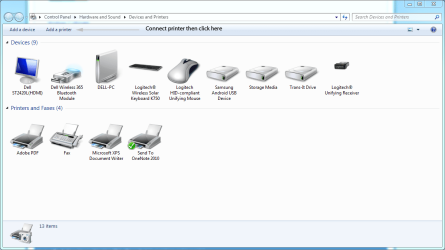
Connect your printer with the power and USB leads, click Start>Devices & Printers>Add a Printer then let Windows do the rest.

Print.PNG
 

My Computer

Computer Manufacturer/Model Number
HP Pavilion Elite 495UK
OS
Windows 7 Ultimate SP1 64-Bit
CPU
Intel Core i7 870 @ 2.93GHz
Motherboard
MSI 2A9C (CPU1)
Memory
8Gb Dual-Channel DDR3 @ 664MHz
Graphics Card(s)
nVidia GeForce GTX 460 1024MB dedicated RAM
Sound Card
Realtek HD Audio
Monitor(s) Displays
HP2310i
Screen Resolution
1920 x 1080
Hard Drives
1x1954GB Hitachi HDS22020ALA 330 (RAID), 1x1954GB Hitachi External for backup and storage
PSU
460W
Case
HP Elite
Cooling
Air cooled
Keyboard
Logitech K750 solar-powered keyboard
Mouse
Logitech Wireless M180 mouse
Internet Speed
2Mb
Other Info
Pure Avanti Flow Internet Radio with iPod Dock, 64Gb iPod, HP USB Speakers, Sony MDR-V500 Headphones, Sony Vaio F-Series Laptop
half way there..

Hi to all that helped me yesterday... have sorted the epson printer and its working OK. Will now get onto the Adobe Flash problem... thanks again,. Have a good day or nite, wherever you are. LoL
 

My Computer

Computer Manufacturer/Model Number
HP - Pavilion
OS
windows 7 Home
Back
Top