
Hi, I recently bought a computer (8 months ago) for my university research and occasional gaming. Its a very fast i7 core based system. I have had no problems whatsover up until last week (Please see system specs)
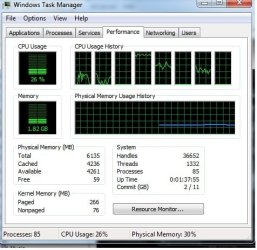
I recently received a free upgrade to windows 7 because I purchased my pc after june 2009 where you get a special offer from the store. I really like the new OS. Its elegant, fast and looks good. I have had windows 7 for about 1 month. However, just last week I noticed the CPU usage was between 25-30%. Core 3 was completey loaded while others are partially coping. Three are still parked at idle (see attached) . The PC still runs fast but I have noticed slight performance degradation occasionally as the CPU load fluctuates. In addition, whenever I restart the system appears to HANG, after a delay it resumes its normal cycle and the OS starts.
I therefore proceeded to try every trick in the PC book (including hitting the desk!) to try and resolve the problem. This is what I have tried so far as well as the facts to this point. The bold points are the problem areas. Are they related?? I wonder.
Just to let you know I have searched the forum extensively with the topic based on hardware interrupts but as always each mans story is always told a little bit different.
Any suggestions?? I would really appreaciate ANY pieces of advice or ideas on how to get rid of this annoying problem.
Thank you for your time.
Benny
I recently received a free upgrade to windows 7 because I purchased my pc after june 2009 where you get a special offer from the store. I really like the new OS. Its elegant, fast and looks good. I have had windows 7 for about 1 month. However, just last week I noticed the CPU usage was between 25-30%. Core 3 was completey loaded while others are partially coping. Three are still parked at idle (see attached) . The PC still runs fast but I have noticed slight performance degradation occasionally as the CPU load fluctuates. In addition, whenever I restart the system appears to HANG, after a delay it resumes its normal cycle and the OS starts.
I therefore proceeded to try every trick in the PC book (including hitting the desk!) to try and resolve the problem. This is what I have tried so far as well as the facts to this point. The bold points are the problem areas. Are they related?? I wonder.
- Memory test (OK)
- CPU temp (OK)
- Graphics card temp (OK)
- Drivers (Up to date however the driver scan reports and error on the keyboard and mouse not being fully installed or bad ACPI driver error)
- Ran in safe mode. Problem still there.
- Turned off all unneccessary services and strartup tools. Problem still there.
- ChKDisk (OK but reverts to BSOD driver_power_state_failure, is this related?)
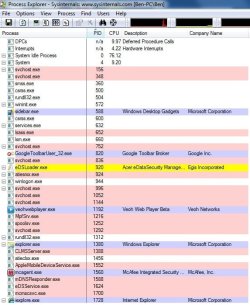
- Ran process explorer to determine the process causing problems (Apparently there is around 10% towards hardware interrupts (see attached diagram)
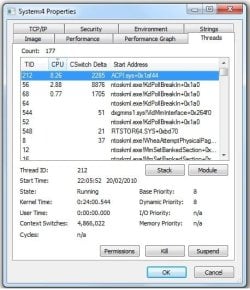
- In looking at the internals of the 'system' process it appears that a file called ACPI.sys+0x1af44 (see attached diagram) has reared its ugly head and taking 8%.
Just to let you know I have searched the forum extensively with the topic based on hardware interrupts but as always each mans story is always told a little bit different.
Any suggestions?? I would really appreaciate ANY pieces of advice or ideas on how to get rid of this annoying problem.
Thank you for your time.
Benny
Attachments
My Computer
At a glance
Windows 7 Home-Premium 64 bitProcessor Intel(R) Core(TM) i7 CPU 920 @ 2.67...6.00 GB DDR3 MemoryATI Radeon HD 4850 1.00 GB
- Computer Manufacturer/Model Number
- Acer Aspire M7720
- OS
- Windows 7 Home-Premium 64 bit
- CPU
- Processor Intel(R) Core(TM) i7 CPU 920 @ 2.67GHz, 4 CORE X2
- Motherboard
- Intel x58 Express Chipset
- Memory
- 6.00 GB DDR3 Memory
- Graphics Card(s)
- ATI Radeon HD 4850 1.00 GB
- Sound Card
- Realtek 7.1 HD surround
- Monitor(s) Displays
- Acer X243H
- Hard Drives
- WDC WD6400AAKS-22A7B2 600 GB (300 GB x2 partitioned)
- PSU
- 750W
- Case
- Acer
- Cooling
- Air-based/Pipe
- Keyboard
- ACER wireless
- Mouse
- ACER wireless
- Internet Speed
- 4MB


