Hardware Interrupts causing 25% - 30% CPU usage

Benny

New member
Hi, I recently bought a computer (8 months ago) for my university research and occasional gaming. Its a very fast i7 core based system. I have had no problems whatsover up until last week (Please see system specs)

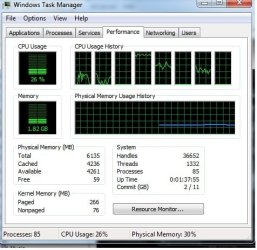
I recently received a free upgrade to windows 7 because I purchased my pc after june 2009 where you get a special offer from the store. I really like the new OS. Its elegant, fast and looks good. I have had windows 7 for about 1 month. However, just last week I noticed the CPU usage was between 25-30%. Core 3 was completey loaded while others are partially coping. Three are still parked at idle (see attached) . The PC still runs fast but I have noticed slight performance degradation occasionally as the CPU load fluctuates. In addition, whenever I restart the system appears to HANG, after a delay it resumes its normal cycle and the OS starts.

I therefore proceeded to try every trick in the PC book (including hitting the desk!) to try and resolve the problem. This is what I have tried so far as well as the facts to this point. The bold points are the problem areas. Are they related?? I wonder.

  • Memory test (OK)
  • CPU temp (OK)
  • Graphics card temp (OK)
  • Drivers (Up to date however the driver scan reports and error on the keyboard and mouse not being fully installed or bad ACPI driver error)
  • Ran in safe mode. Problem still there.
  • Turned off all unneccessary services and strartup tools. Problem still there.
  • ChKDisk (OK but reverts to BSOD driver_power_state_failure, is this related?)
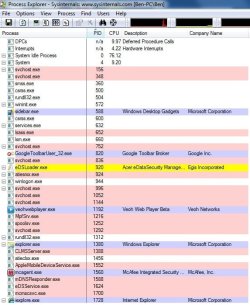
  • Ran process explorer to determine the process causing problems (Apparently there is around 10% towards hardware interrupts (see attached diagram)
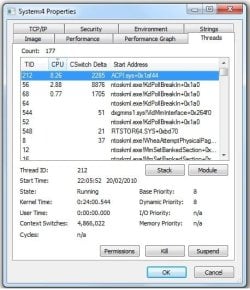
  • In looking at the internals of the 'system' process it appears that a file called ACPI.sys+0x1af44 (see attached diagram) has reared its ugly head and taking 8%.
I also noticed that when powered up cold where I have not used it for a while there is a delay in the Hardware interrupts appearing of approx 1 hour. Now, what I want to know is what the hell is going on with the system and if I have any options left other than performing a full wipe and starting over again (my worst case scenario as I have a lot of custom settings invoked).

Just to let you know I have searched the forum extensively with the topic based on hardware interrupts but as always each mans story is always told a little bit different.

Any suggestions?? I would really appreaciate ANY pieces of advice or ideas on how to get rid of this annoying problem.

Thank you for your time.
Benny
 

Attachments
  • Process explorer - Hardware interrupts.jpg
    Process explorer - Hardware interrupts.jpg
    138.2 KB · Views: 510
  • System thread - ACPI.sys +0x 1af44.jpg
    System thread - ACPI.sys +0x 1af44.jpg
    94.1 KB · Views: 430
  • Task manager.jpg
    Task manager.jpg
    88.6 KB · Views: 205

My Computer

Computer Manufacturer/Model Number
Acer Aspire M7720
OS
Windows 7 Home-Premium 64 bit
CPU
Processor Intel(R) Core(TM) i7 CPU 920 @ 2.67GHz, 4 CORE X2
Motherboard
Intel x58 Express Chipset
Memory
6.00 GB DDR3 Memory
Graphics Card(s)
ATI Radeon HD 4850 1.00 GB
Sound Card
Realtek 7.1 HD surround
Monitor(s) Displays
Acer X243H
Hard Drives
WDC WD6400AAKS-22A7B2 600 GB (300 GB x2 partitioned)
PSU
750W
Case
Acer
Cooling
Air-based/Pipe
Keyboard
ACER wireless
Mouse
ACER wireless
Internet Speed
4MB
Any takers guys?

Will pay £50 through paypal if anybody can sort this out, its an annoying problem. Just to update when I plugged the computer in and turned the switch at the socket the computer turned on straight away. I get the feeling the signs are pointing more to hardware than drivers.

Hope you can help me.
 

My Computer

Computer Manufacturer/Model Number
Acer Aspire M7720
OS
Windows 7 Home-Premium 64 bit
CPU
Processor Intel(R) Core(TM) i7 CPU 920 @ 2.67GHz, 4 CORE X2
Motherboard
Intel x58 Express Chipset
Memory
6.00 GB DDR3 Memory
Graphics Card(s)
ATI Radeon HD 4850 1.00 GB
Sound Card
Realtek 7.1 HD surround
Monitor(s) Displays
Acer X243H
Hard Drives
WDC WD6400AAKS-22A7B2 600 GB (300 GB x2 partitioned)
PSU
750W
Case
Acer
Cooling
Air-based/Pipe
Keyboard
ACER wireless
Mouse
ACER wireless
Internet Speed
4MB

My Computer

Computer Manufacturer/Model Number
HP, Dell, Gateway, Toshiba - 4 laptops and 2 desktops
OS
Vista, Windows7, Mint Mate, Zorin, Windows 8
CPU
from 1.6GHz Duo to i7
Monitor(s) Displays
2x HP w2207
Hard Drives
5x HDD, 7x SSD, 12x Externals
Keyboard
with trackball - no mices
Mouse
Trackball mice
Internet Speed
DSL 6000
Hi, thanks for your reply.

Yes I ran latency checker and everything is in the green. 150 units avg which is nothing. So i guess that rules out the network card. Do you think any of the resart "pauses" point to a PSU overheating?, I have system tools which tells me everything is fine but cannot check the PSU temp. Its a very quiet system but now I can hear the CPU fan intermittently.

Like i mentioned before when the system powers up cold I do not have this problem then after 30 minutes the NT Kernal keeps popping up at first intermittently then it remains fixed and draws CPU usage.
 

My Computer

Computer Manufacturer/Model Number
Acer Aspire M7720
OS
Windows 7 Home-Premium 64 bit
CPU
Processor Intel(R) Core(TM) i7 CPU 920 @ 2.67GHz, 4 CORE X2
Motherboard
Intel x58 Express Chipset
Memory
6.00 GB DDR3 Memory
Graphics Card(s)
ATI Radeon HD 4850 1.00 GB
Sound Card
Realtek 7.1 HD surround
Monitor(s) Displays
Acer X243H
Hard Drives
WDC WD6400AAKS-22A7B2 600 GB (300 GB x2 partitioned)
PSU
750W
Case
Acer
Cooling
Air-based/Pipe
Keyboard
ACER wireless
Mouse
ACER wireless
Internet Speed
4MB
Hmm, the fact that it only starts after a while may suggest a heat problem. Question is where. The PSU is an unlikely candidate unless you overloaded it by adding a high powered Graphics card. Also, the PSU does not generate interrupts and you apparently get an unusual interrupt stack.
I suggest you disconnect everything non-vital including the DSL and run for a while. If the problem persists, it must come from the remaing devices (screen, mouse, keyboard). But then at least you have the start of a handle. If the problem does not manifest itself, then one of the disconnected devices is the cause. Those you can replug one by one and verify the effect.
 

My Computer

Computer Manufacturer/Model Number
HP, Dell, Gateway, Toshiba - 4 laptops and 2 desktops
OS
Vista, Windows7, Mint Mate, Zorin, Windows 8
CPU
from 1.6GHz Duo to i7
Monitor(s) Displays
2x HP w2207
Hard Drives
5x HDD, 7x SSD, 12x Externals
Keyboard
with trackball - no mices
Mouse
Trackball mice
Internet Speed
DSL 6000
Okay, thanks whs, i was trying to hold out on doing this for a while because the product is still under warranty (the seal isnt broken so I have not added anything new hardware wise) and has run fine for 6 months so I am resisting to look under the bonnet at the moment. The only thing I have updated is windows 7 from vista. My keyboard and mouse are wireless and the only connection is via a usb receiver which I have removed a couple of times to check. Therefore I can rule out the keyboard and mouse.

I recently installed a game (latest one) which can put a strain on the graphics card yet runs perfectly. It was a couple of days after I then received the problem. I will run the game and see what the GPU temp gets to, strange how it goes constant at idol though without running anything.
 

My Computer

Computer Manufacturer/Model Number
Acer Aspire M7720
OS
Windows 7 Home-Premium 64 bit
CPU
Processor Intel(R) Core(TM) i7 CPU 920 @ 2.67GHz, 4 CORE X2
Motherboard
Intel x58 Express Chipset
Memory
6.00 GB DDR3 Memory
Graphics Card(s)
ATI Radeon HD 4850 1.00 GB
Sound Card
Realtek 7.1 HD surround
Monitor(s) Displays
Acer X243H
Hard Drives
WDC WD6400AAKS-22A7B2 600 GB (300 GB x2 partitioned)
PSU
750W
Case
Acer
Cooling
Air-based/Pipe
Keyboard
ACER wireless
Mouse
ACER wireless
Internet Speed
4MB
Okay while the game is running I get a 65% temparture reading from my graphics card, but I dont think that matters really I guess because the problem comes on when at idol.
 

My Computer

Computer Manufacturer/Model Number
Acer Aspire M7720
OS
Windows 7 Home-Premium 64 bit
CPU
Processor Intel(R) Core(TM) i7 CPU 920 @ 2.67GHz, 4 CORE X2
Motherboard
Intel x58 Express Chipset
Memory
6.00 GB DDR3 Memory
Graphics Card(s)
ATI Radeon HD 4850 1.00 GB
Sound Card
Realtek 7.1 HD surround
Monitor(s) Displays
Acer X243H
Hard Drives
WDC WD6400AAKS-22A7B2 600 GB (300 GB x2 partitioned)
PSU
750W
Case
Acer
Cooling
Air-based/Pipe
Keyboard
ACER wireless
Mouse
ACER wireless
Internet Speed
4MB
Okay while the game is running I get a 65% temparture reading from my graphics card, but I dont think that matters really I guess because the problem comes on when at idol.

65C is ok. That is not outside the norm. No need to open the box. Just play with your outboard devices - on/off, starting with the DSL. That would be my first suspect.
 

My Computer

Computer Manufacturer/Model Number
HP, Dell, Gateway, Toshiba - 4 laptops and 2 desktops
OS
Vista, Windows7, Mint Mate, Zorin, Windows 8
CPU
from 1.6GHz Duo to i7
Monitor(s) Displays
2x HP w2207
Hard Drives
5x HDD, 7x SSD, 12x Externals
Keyboard
with trackball - no mices
Mouse
Trackball mice
Internet Speed
DSL 6000
Okay I have disabled the network card and also played with the keyboard and mouse, the problem is still there but the interrupts have lowered to around 18% as opposed to 35%. Wierd. Do you understand what ACPI.sys is? that seems to be the thread in the system process that is taking up all this CPU usage (see screenshot). I have now attempted everything without opening the box.
 

My Computer

Computer Manufacturer/Model Number
Acer Aspire M7720
OS
Windows 7 Home-Premium 64 bit
CPU
Processor Intel(R) Core(TM) i7 CPU 920 @ 2.67GHz, 4 CORE X2
Motherboard
Intel x58 Express Chipset
Memory
6.00 GB DDR3 Memory
Graphics Card(s)
ATI Radeon HD 4850 1.00 GB
Sound Card
Realtek 7.1 HD surround
Monitor(s) Displays
Acer X243H
Hard Drives
WDC WD6400AAKS-22A7B2 600 GB (300 GB x2 partitioned)
PSU
750W
Case
Acer
Cooling
Air-based/Pipe
Keyboard
ACER wireless
Mouse
ACER wireless
Internet Speed
4MB
I see only 2 other possibilities:

1. The ACPI.sys is corrupted. An sfc /scannow in elevated cmd may fix it.
2. Although very unlikely, it could be a virus. Check with Process Explorer that the path is
c:\windows\System32\DRIVERS\ACPI.sys Any other path would be suspicious.

Don't open the box. That will not give you any new leads.
 

My Computer

Computer Manufacturer/Model Number
HP, Dell, Gateway, Toshiba - 4 laptops and 2 desktops
OS
Vista, Windows7, Mint Mate, Zorin, Windows 8
CPU
from 1.6GHz Duo to i7
Monitor(s) Displays
2x HP w2207
Hard Drives
5x HDD, 7x SSD, 12x Externals
Keyboard
with trackball - no mices
Mouse
Trackball mice
Internet Speed
DSL 6000
Hi whs, thank you for your help so far.

I have run the cmd system scan under administrator and the integrity of the system is OK. I have run multiple virus checkers and I have mcafee as my main A-V tool. They have found no errors or virus. Its really puzzling, as the ACPI.sys is a thread within the process "system", I cannot access it because process explorer says it cannot find the thread in system.

When I run a game or application that is intensive the problem seems to disappear completely as I minimise the window to check process explorer. Therefore in addition I dont think I have a heat problem, especially since the computer has been running for 6 months. I have also reinstalled windows 7 with the upgrade option only. All files and settings were kept as originals. That didnt make any difference.
 

My Computer

Computer Manufacturer/Model Number
Acer Aspire M7720
OS
Windows 7 Home-Premium 64 bit
CPU
Processor Intel(R) Core(TM) i7 CPU 920 @ 2.67GHz, 4 CORE X2
Motherboard
Intel x58 Express Chipset
Memory
6.00 GB DDR3 Memory
Graphics Card(s)
ATI Radeon HD 4850 1.00 GB
Sound Card
Realtek 7.1 HD surround
Monitor(s) Displays
Acer X243H
Hard Drives
WDC WD6400AAKS-22A7B2 600 GB (300 GB x2 partitioned)
PSU
750W
Case
Acer
Cooling
Air-based/Pipe
Keyboard
ACER wireless
Mouse
ACER wireless
Internet Speed
4MB
Hmm, the situation gets desperate. One last idea (although a long shot). Set the "windows driver foundation" service to manual or disabled (from automatic). This bugger had given me a lot of unexplainable similar issues in the past. Maybe it helps - maybe not.
 

My Computer

Computer Manufacturer/Model Number
HP, Dell, Gateway, Toshiba - 4 laptops and 2 desktops
OS
Vista, Windows7, Mint Mate, Zorin, Windows 8
CPU
from 1.6GHz Duo to i7
Monitor(s) Displays
2x HP w2207
Hard Drives
5x HDD, 7x SSD, 12x Externals
Keyboard
with trackball - no mices
Mouse
Trackball mice
Internet Speed
DSL 6000
Hi, Okay I tried that and no luck. I guess I am staring down the barrel of a full backroll to vista then windows 7 re-upgrade, at least then I will be sure of whatever is causing the problem (virus or software) will have gone. If it isnt then logically it will be a hardware error although I dont see that to be honest and then I can take it to get it seen by professionals as at least it is still under warranty.

Thanks for your help.
 

My Computer

Computer Manufacturer/Model Number
Acer Aspire M7720
OS
Windows 7 Home-Premium 64 bit
CPU
Processor Intel(R) Core(TM) i7 CPU 920 @ 2.67GHz, 4 CORE X2
Motherboard
Intel x58 Express Chipset
Memory
6.00 GB DDR3 Memory
Graphics Card(s)
ATI Radeon HD 4850 1.00 GB
Sound Card
Realtek 7.1 HD surround
Monitor(s) Displays
Acer X243H
Hard Drives
WDC WD6400AAKS-22A7B2 600 GB (300 GB x2 partitioned)
PSU
750W
Case
Acer
Cooling
Air-based/Pipe
Keyboard
ACER wireless
Mouse
ACER wireless
Internet Speed
4MB
I guess we lost the battle. Sorry.
 

My Computer

Computer Manufacturer/Model Number
HP, Dell, Gateway, Toshiba - 4 laptops and 2 desktops
OS
Vista, Windows7, Mint Mate, Zorin, Windows 8
CPU
from 1.6GHz Duo to i7
Monitor(s) Displays
2x HP w2207
Hard Drives
5x HDD, 7x SSD, 12x Externals
Keyboard
with trackball - no mices
Mouse
Trackball mice
Internet Speed
DSL 6000
Hey Benny,

From reading through this entire thread, I think you should be focusing on one general area. The BIOS and the Chipset drivers that talk to the BIOS. The file, ACPI.sys, is a system driver that is used to facilitate the advanced power management features of the motherboard. There appears to be a conflict on your system between the BIOS and the driver layer of your system. Specifically, ACPI.sys.

Assuming you have already installed the latest chipset drivers from HP; The first thing I would do it go into your BIOS settings and disable any power management options you see. If in fact they are already disabled, then go ahead and enable them and use the default values. Try S3 if you have that option. You could even reset your BIOS to it's defaults and see if that helps too.

If all that doesn't help, you can try disabling the ACPI drivers from the Windows side. Go into Device Manager and expand the System Devices. Disable any items here that mention ACPI. Keep in mind that this may stop sleep mode from working.

Hope this helps,
Chris
 
Last edited:

My Computer

OS
Windows 7 Ultimate x64
CPU
Core2 Duo
Memory
4 GB
Here's how I solved my issue: I had exactly the same symptoms as the original poster. Everything had been fine up until a few days ago. Then I realised that something was slowing my system down. Ran Process Explorer and noticed the Hardware Interrupts smashing one core of my dual core processor, accounting for about 35% total CPU usage.

After some investigation I found that disabling the onboard NIC halved the CPU usage to around 17%. Didn't make sense and led me down the wrong path for a while. After trying pretty much everything mentioned in this post, I decided to reinstall the OS. The issue persisted post install, so I physically disconnected as much hardware as I could, leaving CPU, RAM, HDD, Mouse & Keyboard. Connecting one piece of hardware at a time the culprit was eventually found...

PCI Modem! (or maybe PCI slot)! Disabling the modem in Windows and removing the phone cable did not reduce the Hardware Interrupts. Only when the card was removed from the PCI slot did the Hardware Interrupts drop to 0. I don't actually use it any more for faxing, so I didn't bother putting it in another PCI slot to see if the issue persisted. Finally.

Hope this story helps someone.
 
Last edited:

My Computer

OS
Windows 7 x64
PCI Modem! (or maybe PCI slot)! Disabling the modem in Windows and removing the phone cable did not reduce the Hardware Interrupts. Only when the card was removed from the PCI slot did the Hardware Interrupts drop to 0. I don't actually use it any more for faxing, so I didn't bother putting it in another PCI slot to see if the issue persisted. Finally.
Lardi, thank you for reporting how you solved the problem. You are already the second person I saw having this problem with the PCI modem. The other person had it on a laptop and could not take it out but solved the problem some other way (I forgot).
 

My Computer

Computer Manufacturer/Model Number
HP, Dell, Gateway, Toshiba - 4 laptops and 2 desktops
OS
Vista, Windows7, Mint Mate, Zorin, Windows 8
CPU
from 1.6GHz Duo to i7
Monitor(s) Displays
2x HP w2207
Hard Drives
5x HDD, 7x SSD, 12x Externals
Keyboard
with trackball - no mices
Mouse
Trackball mice
Internet Speed
DSL 6000
Hi,

I've had the same problem with ACPI.sys using as much as 60% on one core of my CPU. I'm using Windows 7 x64.
The problem occured only after I put the system on "sleep". After few hours the system spontaneously woke up and I noticed the high CPU usage.
I discovered that ACPI.sys+0x1af44 thread was responsible (using sysinternals ProcessExplorer).
Since it happened after waking up from sleep I went through Event Viewer to see what triggered the resume.
The result: "Wake Source: Device -Intel(R) ICH10 Family PCI Express Root Port 5 - 3A48"
Proceeded to device manager to see what was on that port and voila: "Realtek PCIe GBE Family Controller" was shown.


Next I disabled the option in Power Management for the device: "Allow this device to wake the computer"
Immediately the CPU usage went to normal (without restarting).


I'm using the latest NIC drivers.
Sadly I want to use the WOL feature so this is kind of a nuissance...
I'll contact the mobo manufact and explain the situation but I don't expect much :\


~
 

My Computer

OS
Microsoft Windows 7 (x64)
CPU
Intel Pentium 4 3.6Ghz (Prescott)
Motherboard
Gigabyte GA-8I955X Pro
Memory
2x1GB OCZ
Graphics Card(s)
Nvidia 7950GT
Sound Card
Realtek ALC882
Screen Resolution
1280*1024
Hard Drives
ST3250824AS
ST3500630NS
ST380815AS
PSU
Chieftec 500W
Case
Chieftec CX-04B-B-A
Cooling
Zalman 7700-CU
Keyboard
Logitech UltraX Cordless
Mouse
Logitech 1000MX
Thanks for giving us your experience report. That might be very helpful for another "victim".
 

My Computer

Computer Manufacturer/Model Number
HP, Dell, Gateway, Toshiba - 4 laptops and 2 desktops
OS
Vista, Windows7, Mint Mate, Zorin, Windows 8
CPU
from 1.6GHz Duo to i7
Monitor(s) Displays
2x HP w2207
Hard Drives
5x HDD, 7x SSD, 12x Externals
Keyboard
with trackball - no mices
Mouse
Trackball mice
Internet Speed
DSL 6000
Hello! Sorry for my English! :o
I have similar problem: Process Explorer shows Interrupts (Hardware Interrupts) causing 20-35% CPU usage. But I can't find source of my problem, because it doesn't always happens. Sometimes the problem does not appear at all, but when starts, it will not stop until hybrid sleep or restart.
I don't know how to identify problematic hardware, because problem can start unexpectedly, without any specific reasons.

Today it startеd again. I tried to disable some hardware (e.g. Network adapter, IDE ATA/ATAPI controllers) but takes no effect.

Need your help! Thanks in advance. :D
 

My Computer

OS
Windows 7 Ultimate x64
CPU
Intel Core i5 2500
Motherboard
ASUS P8H61-M LX2
Memory
4 GB DDR3
Graphics Card(s)
GT440 1GB
Sound Card
Onboard
Monitor(s) Displays
NEC LCD22WV
Screen Resolution
1680x1050 px
Hard Drives
Seagate 500 GB
PSU
400 Watt
Case
Vento
Keyboard
Genius SlimStar i220
Mouse
A4 Tech WOP-35
Internet Speed
1024/512 Kbps
Back
Top