Solved Hardware reserved Memory?

bala2289

New member
Member
VIP
Local time
2:18 AM
Messages
101
Location
india
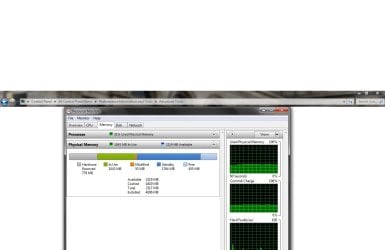
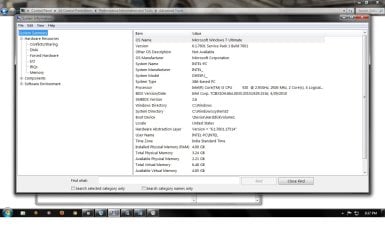
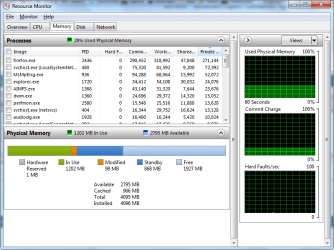
I had 2 gb of ddr3 ram installed before, yesterday i added 2 more gb but the system uses only 3.24 gb and the rest is reserved for hardware. I hope it is used for graphics memory but i have an external graphic card of 1 gb video memory. How to release this memory. I have searched many forums and they suggested to uncheck the maxmemory in msconfig, that didnt work.

Also they asked to enable memory remapping in bios, but my bios doesnt have that option. My OS is windows 7 ultimate 32 bit.

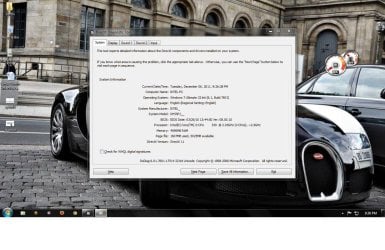
I'm attaching the screenshots below.
 

Attachments
  • dxdiag.jpg
    dxdiag.jpg
    149.9 KB · Views: 1,243
  • resmon.jpg
    resmon.jpg
    68.4 KB · Views: 1,884
  • sysinfo.jpg
    sysinfo.jpg
    95.4 KB · Views: 1,049

My Computer My Computer

Computer type
PC/Desktop
Computer Manufacturer/Model Number
Intel
OS
windows 7 ultimate x32
CPU
core i3 530 @ 3.63 ghz
Motherboard
Intel dh55pj
Memory
4 gb ddr3 1333mhz
Graphics Card(s)
Sapphire radeon 7770 1gb Ghz Edition
Monitor(s) Displays
lg 19"
Screen Resolution
1368*768
Hard Drives
Seagate 500gb @ 7200 rpm
PSU
Zebronics 450 w
Case
Zebronics
Cooling
Cooler master Tx3 Evo cpu and cooler master 120mm Inlet fan
Mouse
Lenovo razer 1600 dpi laser
Internet Speed
8 Mbps dsl
Antivirus
Avast Free
Browser
Chrome
There are a lot of things that can cause this. However since you are on 32 bit windows 3.2 gigs is the maximum it will make use of. This is a limitation in the 32bit system not an actual error per say.
 

My Computer My Computer

Computer Manufacturer/Model Number
Insane hobo technologies. ;-)
OS
Windows 7 x64
CPU
Intel i7 2600k
Motherboard
Asrock z68 extreme 4 gen 3
Memory
G.skill Ripjaw 16gigs @ 1866
Graphics Card(s)
Nvidia gtx580 (evga)
Sound Card
Integrated HD audio + hdmi
Monitor(s) Displays
24" ASUS widescreen + 42" insignia
Screen Resolution
1080p (1920x1080)
Hard Drives
128 Samsung 830
256 Samsung 840
3 x 1tb storage drive (various)
1 western digital 1tb (eSATA)
1 Seagate 1tb (eSATA)
PSU
1 kilowatt SLI/Crossfire rated Silverstone modular
Case
NZXT Phantom + additional 220 fan
Cooling
Zalmann
Keyboard
Microsoft wireless 3000 (v2)
Mouse
MS - wireless 5000 (bluetrack)
Internet Speed
depends on if you ask me or my provider.
Other Info
The above information is provided as is, and the author assumes no responsibility for issues it may cause with your sanity or fanboyism.
thanks for the reply, so no way for using the remaining 750mb ram :cry:. I have another question.. hope you saw the screen shots i attached it shows that i have 6+ gb of virtual memory. Is it really necessary to have such huge space since i've already have 3.2 GB of ram..
 

My Computer My Computer

Computer type
PC/Desktop
Computer Manufacturer/Model Number
Intel
OS
windows 7 ultimate x32
CPU
core i3 530 @ 3.63 ghz
Motherboard
Intel dh55pj
Memory
4 gb ddr3 1333mhz
Graphics Card(s)
Sapphire radeon 7770 1gb Ghz Edition
Monitor(s) Displays
lg 19"
Screen Resolution
1368*768
Hard Drives
Seagate 500gb @ 7200 rpm
PSU
Zebronics 450 w
Case
Zebronics
Cooling
Cooler master Tx3 Evo cpu and cooler master 120mm Inlet fan
Mouse
Lenovo razer 1600 dpi laser
Internet Speed
8 Mbps dsl
Antivirus
Avast Free
Browser
Chrome
It's because you're using 32bit OS. I have the same as you when was using 32 bit, but now I don't. ;)

resmon.png
 

My Computer My Computer

Computer type
PC/Desktop
Computer Manufacturer/Model Number
Custom Build
OS
Windows 10 Pro x64
CPU
Intel Core i5 4440 @Stock
Motherboard
Gigabyte Z97 D3H
Memory
4 x 4GB HyperX Fury DDR3
Graphics Card(s)
Gigabyte GTX 1050Ti O4G
Sound Card
Integrated
Monitor(s) Displays
Dell P2417H
Screen Resolution
1920 x 1080
Hard Drives
Samsung EVO 850 120GB / Toshiba DT01ACA050 1TB 7200prm 32MB
PSU
Riotoro Onyx 750W
Case
NZXT H500 Black-Red
Cooling
Stock CPU + NZXT 120mm + 2x120mm red fans
Keyboard
Modecom Volcano Lanparty
Mouse
Asus ROG Gladius / DeepCool E-Pad Plus
Internet Speed
DOCSIS 50/3 Mbit
Browser
Google Chrome
Other Info
Asus K55VJ(i5 3210M, GT635M / 2GB, 8GB DDR3, 500GB HDD)
Have a look at this and note the "Hardware Reserved" section.... Investigate memory usage with Windows 7 Resource Monitor | TechRepublic

Typically, the amount of Hardware Reserved memory ranges from 10MB to 70MB but can vary depending on the system’s hardware configuration and might be several hundred MB.

You might also want to see these posts....

- http://www.sevenforums.com/performa...al-memory-but-1-74-gb-usable.html#post1649304

- http://www.sevenforums.com/performa...-memory-but-1-74-gb-usable-4.html#post1650067
 

My Computer My Computer

Computer type
PC/Desktop
Computer Manufacturer/Model Number
Custom built by me.
OS
Windows 10 Pro
CPU
Intel Core i7-4770K (3.5Ghz)
Motherboard
Gigabyte G1 Sniper 5 (F10 Bios)
Memory
32 gig Corsair Dominator Platinum (4x8Gig)
Graphics Card(s)
Sapphire Tri-X R9 Fury
Sound Card
Soundblaster ZXR
Monitor(s) Displays
NEC PA242W 24" LCD Monitor
Screen Resolution
1920 x 1200
Hard Drives
Primary - Samsung 850 Pro (512gig), Samsung 840 Pro (256gig), 2TB WD Caviar Black.
PSU
EVGA Supernova 1000 G2
Case
Cooler Master HAF X
Cooling
Corsair H100i with Corsair Air Series SP120 Quiet Fans
Keyboard
Logitech Wireless Wave
Mouse
Logitech Performance MX
Internet Speed
High Speed Cable
Antivirus
Norton Security
Browser
IE11
Other Info
Memory Timings - 1866MHz @ 9-9-9-27-1T @ 1.5 volts
The memory is not hardware reserved. 32-bit Windows 7 deliberately prevents you from using it even if PAE is enabled.

To demonstrate this as fact...

1) Download and install Gavotte Ramdisk 1.0.4096.5
2) Create a PAE ramdisk
3) Use ramdisk
4) Point proven

On my 4GB 32bit system Gavotte Ramdisk is able to use 990MB of supposedly 'hardware reserved' RAM. This is a fact - not something that I read somewhere.

If you're willing to forego the use of hibernate or hybrid-sleep (sleep works fine and I have a UPS so I don't care) then you can create an additional page file on the ram disk which Windows will prefer due to the fact that it will likely be at least 20 times faster than your HDD.

How to use full 4GB RAM in Windows 7 32 Bit (Gavotte RAMDisk in Windows 7) | Homepage of Jens Scheffler
 
Last edited:

My Computer My Computer

Computer Manufacturer/Model Number
AOpen MP45
OS
Windows 7 Pro x86
CPU
T6600 @ 0.975V
Motherboard
i45GMx-I
Memory
4GB DDRII-800
Graphics Card(s)
Onboard Intel 4500mhd
Sound Card
Onboard Realtek + SteelSeries USB
Monitor(s) Displays
Asus ProArt 246
Screen Resolution
1920x1200
Hard Drives
Seagate Momentus XT 750
Keyboard
Cherry G230
Mouse
MS Wireless 3500
The fact that you can only use 3.2GBs is not a RAM problem per se but an address space problem. A 32bit system has only 4GB-1 of address space and everything has to fit into there. And that also includes a graphics card with its own RAM. It has to be addressed somehow.

Here is a bit more about all the other stuff that needs address space: Maximum Memory in 32-bit Windows Vista : Windows Vista and Windows 7 Help
 

My Computer My Computer

Computer Manufacturer/Model Number
HP, Dell, Gateway, Toshiba - 4 laptops and 2 desktops
OS
Vista, Windows7, Mint Mate, Zorin, Windows 8
CPU
from 1.6GHz Duo to i7
Monitor(s) Displays
2x HP w2207
Hard Drives
5x HDD, 7x SSD, 12x Externals
Keyboard
with trackball - no mices
Mouse
Trackball mice
Internet Speed
DSL 6000
You're right on one point: none of the memory is actually reserved for anything. What is reserved is a portion of the 32-bit address space just below the 4GB barrier. (You can't address more than 4GB with just 32 bits, it's numerically impossible.)

Where it gets tricky is that modern motherboards actually have at least a 36-bit address bus (from what I understand) - the 4 additional bits would allow access to 16 blocks of 4GB each for a total address space of 64GB. This is where PAE (physical address extension) comes in, using exactly these extra bits to allow a 32-bit Windows system to access memory that was mapped above 4GB (which is possible and even normal even if only 4GB of physical RAM is actually installed).

Using PAE, however, Windows could access memory that was remapped by the BIOS to reside in an address space above 4GB. The reason it won't is because far too many 32-bit device drivers were developed under the assumption that there'll never be any memory addresses beyond 4GB of RAM available, and if these drivers suddenly had to deal with memory addresses above 4GB they'd crash and burn, bringing the system down with it.

So Microsoft had to implement this classic 3.xx GB limitation in all 32-bit versions of Windows, so that no address space above the 4GB barrier is visible to anything running on the system.

That is, unless something explicitly requests access to the "invisible" memory, which is what Gavotte Ramdisk does.

So, the reason Windows only uses 3.25GB out of 4GB is because only 3.25GB are mapped within the address space below 4GB. The rest is mapped above 4GB up to 4.75GB, while the address space between 3.25GB and 4GB is mapped to all PCI devices and motherboard resources so they can exchange data with the system through that address space. This is the only way to ensure 32-bit drivers will work correctly, by not exposing them to the >4GB address space. Thus the artificial limitation.

But using PAE, Windows is able to allow Gavotte Ramdisk to access the >4GB memory and use it for the RAM disk.
 

My Computer My Computer

Computer type
PC/Desktop
Computer Manufacturer/Model Number
Custom-built
OS
Windows 7 Professional SP1 32-bit
CPU
Intel Core 2 Duo E6600 2.4GHz
Motherboard
Asus PL5D2
Memory
4GB DDR2-667 (4x1GB in dual-channel config)
Graphics Card(s)
nVidia GeForce 9800 GT
Sound Card
Creative X-Fi XtremeMusic
Monitor(s) Displays
Acer P236H
Screen Resolution
1920x1200 (DVI)
Hard Drives
OCZ SSD Vertex Plus 60GB SATA (Firmware 3.55), 64MB cache
Hitachi HD321KJ SATA, 320GB, 7200rpm, 16MB cache
PSU
Antec TruePower 2.0
Case
Cooler Master Centurion
Cooling
Too many fans
Keyboard
Standard
Mouse
Microsoft wireless optical mouse
Internet Speed
AT&T U-verse (18mbit/sec)
Antivirus
Microsoft Security Essentials
Browser
Firefox
Other Info
Other devices:
Compaq CQ-60 laptop
Google Nexus 7 (2012) tablet
Nvidia SHIELD tablet (US/LTE)
Hardkernel ODROID-XU single-board computer (Samsung Exynos 5420)
The memory is not hardware reserved. 32-bit Windows 7 deliberately prevents you from using it even if PAE is enabled.

So, it is therefore... hardware preserved. The fact that you can use a 3rd party program to get around it doesn't negate the fact that "Windows 7 deliberately prevents you from using it even if PAE is enabled"

I'm just reporting what's stated here - Investigate memory usage with Windows 7 Resource Monitor | TechRepublic

And here - Windows 7 memory usage: What's the best way to measure? | ZDNet

Anyway I'm not going to call myself a memory expert so.... :confused:

And yes WHS, it is a address space thing.
 

My Computer My Computer

Computer type
PC/Desktop
Computer Manufacturer/Model Number
Custom built by me.
OS
Windows 10 Pro
CPU
Intel Core i7-4770K (3.5Ghz)
Motherboard
Gigabyte G1 Sniper 5 (F10 Bios)
Memory
32 gig Corsair Dominator Platinum (4x8Gig)
Graphics Card(s)
Sapphire Tri-X R9 Fury
Sound Card
Soundblaster ZXR
Monitor(s) Displays
NEC PA242W 24" LCD Monitor
Screen Resolution
1920 x 1200
Hard Drives
Primary - Samsung 850 Pro (512gig), Samsung 840 Pro (256gig), 2TB WD Caviar Black.
PSU
EVGA Supernova 1000 G2
Case
Cooler Master HAF X
Cooling
Corsair H100i with Corsair Air Series SP120 Quiet Fans
Keyboard
Logitech Wireless Wave
Mouse
Logitech Performance MX
Internet Speed
High Speed Cable
Antivirus
Norton Security
Browser
IE11
Other Info
Memory Timings - 1866MHz @ 9-9-9-27-1T @ 1.5 volts
Edit: Snipped, misread last sentence as a question

The memory is not hardware reserved. 32-bit Windows 7 deliberately prevents you from using it even if PAE is enabled.

So, it is therefore... hardware preserved. The fact that you can use a 3rd party program to get around it doesn't negate the fact that "Windows 7 deliberately prevents you from using it even if PAE is enabled"

...

And yes WHS, it is a address space thing.

The RAM between 3.25GB and 4GB is absolutely not hardware reserved; it's remapped (as Corazon stated) to above 4GB so that the devices in the machine can be accessed through memory-mapped I/O in the region below 4GB. The remapping is necessary because the PCI-Express bus still only has 32bit address lines and can't address memory above 4GB. This is true even in 64bit Windows, Linux or whatever - it's not done by the operating system.

By contrast, every processor since the Pentium-I-can't-remember-which-one-exactly has been capable of 36bit PAE addressing (that's 64GB)

The claim that allowing PAE addressing in Windows causes (or caused at some point in the past) problems with some drivers may well be true for drivers that are not written following the Windows DDK specification, with the 'gotcha' being that realistically, there's no way to tell in advance of them crashing your system. For that reason I more-or-less accept Microsoft's stated rationale for hobbling PAE on desktop Windows since XP-SP3, but the fact remains that there exists a way to use this memory in a way that makes badly written drivers irrelevant, so I often feel the need to point this out.

It's interesting to note that Gavotte Ramdisk is based on a sample ramdisk program provided by Microsoft in the Windows DDK a long time ago.
 

My Computer My Computer

Computer Manufacturer/Model Number
AOpen MP45
OS
Windows 7 Pro x86
CPU
T6600 @ 0.975V
Motherboard
i45GMx-I
Memory
4GB DDRII-800
Graphics Card(s)
Onboard Intel 4500mhd
Sound Card
Onboard Realtek + SteelSeries USB
Monitor(s) Displays
Asus ProArt 246
Screen Resolution
1920x1200
Hard Drives
Seagate Momentus XT 750
Keyboard
Cherry G230
Mouse
MS Wireless 3500
It does make you wonder why Microsoft doesn't just enable the extra memory in 32-bit Windows for special usages - a default RAM disk, supplemental pagefile.sys for the current session or just a place to use for Superfetch/Readyboost caching instead of regular main memory.

Then again, with the ongoing 64-bit crusade this is becoming less and less relevant anyway.

Interesting point in case: I actually use a RAM disk on my laptop with 4GB RAM in the invisible memory. Windows only sees 2.75GB because the onboard video takes a 256MB chunk from 2.75GB to 3GB for itself. Only a few MB above 3GB is actually wasted to map PCI address space, so I'm able to use nearly a full gigabyte for the RAM disk.

(I've since discovered that the laptop's BIOS maps the fourth GB of RAM to an address space from 4096MB to 5120MB, leaving a 1GB hole between 3072MB and 4096MB. Crazy!)

I've arranged for pagefile.sys to live exclusively in that RAM disk so I don't need one on the HD, saving me extra space - and in terms of security, it's the ultimate solution since the pagefile is zapped into nothingness with every reboot. :)
 

My Computer My Computer

Computer type
PC/Desktop
Computer Manufacturer/Model Number
Custom-built
OS
Windows 7 Professional SP1 32-bit
CPU
Intel Core 2 Duo E6600 2.4GHz
Motherboard
Asus PL5D2
Memory
4GB DDR2-667 (4x1GB in dual-channel config)
Graphics Card(s)
nVidia GeForce 9800 GT
Sound Card
Creative X-Fi XtremeMusic
Monitor(s) Displays
Acer P236H
Screen Resolution
1920x1200 (DVI)
Hard Drives
OCZ SSD Vertex Plus 60GB SATA (Firmware 3.55), 64MB cache
Hitachi HD321KJ SATA, 320GB, 7200rpm, 16MB cache
PSU
Antec TruePower 2.0
Case
Cooler Master Centurion
Cooling
Too many fans
Keyboard
Standard
Mouse
Microsoft wireless optical mouse
Internet Speed
AT&T U-verse (18mbit/sec)
Antivirus
Microsoft Security Essentials
Browser
Firefox
Other Info
Other devices:
Compaq CQ-60 laptop
Google Nexus 7 (2012) tablet
Nvidia SHIELD tablet (US/LTE)
Hardkernel ODROID-XU single-board computer (Samsung Exynos 5420)
Thanks guys...:) I dont want to waste my 750 mb unused so im going to install Gavotte Ramdisk...
One more doubt guys.. my video card has 1 gb of memory and even if the hardware reserved memory is added to it. It should be some 1700 mb but my dxdiag says it has 2417 mb, where did the remaining memory come from and will it be utilized entirely by the applications?
 

Attachments

  • Untitled.png
    Untitled.png
    355.8 KB · Views: 175
Last edited:

My Computer My Computer

Computer type
PC/Desktop
Computer Manufacturer/Model Number
Intel
OS
windows 7 ultimate x32
CPU
core i3 530 @ 3.63 ghz
Motherboard
Intel dh55pj
Memory
4 gb ddr3 1333mhz
Graphics Card(s)
Sapphire radeon 7770 1gb Ghz Edition
Monitor(s) Displays
lg 19"
Screen Resolution
1368*768
Hard Drives
Seagate 500gb @ 7200 rpm
PSU
Zebronics 450 w
Case
Zebronics
Cooling
Cooler master Tx3 Evo cpu and cooler master 120mm Inlet fan
Mouse
Lenovo razer 1600 dpi laser
Internet Speed
8 Mbps dsl
Antivirus
Avast Free
Browser
Chrome

My Computer My Computer

Computer type
PC/Desktop
Computer Manufacturer/Model Number
Me
OS
Win 7 Ultimate x64
CPU
FX-8350 @ 4.6 GHz so far
Motherboard
Asus M5A97 EVO
Memory
ADATA XPG V1 Series Black 8GB DDR3 1600
Graphics Card(s)
Sapphire R9 270x Dual-X
Sound Card
Xonar DGX w/ Corsair Vengence 1300
Monitor(s) Displays
Acer S232HL Abid
Screen Resolution
1920x1080
Hard Drives
120 GB OCZ Vertex 3
500 GB Seagate 7200.12
PSU
Antec Earthwatts 650W Green
Case
Antec Three Hundred
Cooling
Cooler Master 212 EVO
Keyboard
Logitech G510
Mouse
Logitech G500s
Internet Speed
35000/3000
The card doesn't map its memory into the PCI address space all at once. The claim that you'll lose whatever onboard RAM the card has is a myth.

It does map its onboard memory through a much smaller window to transfer data to and from the CPU/system RAM. Portions of the videocard's onboard memory are dynamically mapped in and out as needed through that window.

As for the 2417MB shown in DXDiag, that's the amount of shared system memory your card can use if its own onboard memory fills up completely (1GB onboard plus ~1417MB system RAM), but Windows has the last word on that. Don't worry, it doesn't mean the card actually keeps 1417MB of your RAM from being usable.
 

My Computer My Computer

Computer type
PC/Desktop
Computer Manufacturer/Model Number
Custom-built
OS
Windows 7 Professional SP1 32-bit
CPU
Intel Core 2 Duo E6600 2.4GHz
Motherboard
Asus PL5D2
Memory
4GB DDR2-667 (4x1GB in dual-channel config)
Graphics Card(s)
nVidia GeForce 9800 GT
Sound Card
Creative X-Fi XtremeMusic
Monitor(s) Displays
Acer P236H
Screen Resolution
1920x1200 (DVI)
Hard Drives
OCZ SSD Vertex Plus 60GB SATA (Firmware 3.55), 64MB cache
Hitachi HD321KJ SATA, 320GB, 7200rpm, 16MB cache
PSU
Antec TruePower 2.0
Case
Cooler Master Centurion
Cooling
Too many fans
Keyboard
Standard
Mouse
Microsoft wireless optical mouse
Internet Speed
AT&T U-verse (18mbit/sec)
Antivirus
Microsoft Security Essentials
Browser
Firefox
Other Info
Other devices:
Compaq CQ-60 laptop
Google Nexus 7 (2012) tablet
Nvidia SHIELD tablet (US/LTE)
Hardkernel ODROID-XU single-board computer (Samsung Exynos 5420)
Thanks a lot stormy,murmatron and corazon..:D
 
Last edited:

My Computer My Computer

Computer type
PC/Desktop
Computer Manufacturer/Model Number
Intel
OS
windows 7 ultimate x32
CPU
core i3 530 @ 3.63 ghz
Motherboard
Intel dh55pj
Memory
4 gb ddr3 1333mhz
Graphics Card(s)
Sapphire radeon 7770 1gb Ghz Edition
Monitor(s) Displays
lg 19"
Screen Resolution
1368*768
Hard Drives
Seagate 500gb @ 7200 rpm
PSU
Zebronics 450 w
Case
Zebronics
Cooling
Cooler master Tx3 Evo cpu and cooler master 120mm Inlet fan
Mouse
Lenovo razer 1600 dpi laser
Internet Speed
8 Mbps dsl
Antivirus
Avast Free
Browser
Chrome
lol:confused: Ramdisk uses 16 mb of missing memory... what happen to the rest??

Guys sorry for asking so dumb questions..
I notice that the pagefile's used size changes from time to time even when a lot of the system's ram is free, y this that?
I thought that the page file will be used when the ram runs out.. So y use it when u have enough ram?
 

Attachments

  • Untitled.png
    Untitled.png
    67.9 KB · Views: 195
Last edited:

My Computer My Computer

Computer type
PC/Desktop
Computer Manufacturer/Model Number
Intel
OS
windows 7 ultimate x32
CPU
core i3 530 @ 3.63 ghz
Motherboard
Intel dh55pj
Memory
4 gb ddr3 1333mhz
Graphics Card(s)
Sapphire radeon 7770 1gb Ghz Edition
Monitor(s) Displays
lg 19"
Screen Resolution
1368*768
Hard Drives
Seagate 500gb @ 7200 rpm
PSU
Zebronics 450 w
Case
Zebronics
Cooling
Cooler master Tx3 Evo cpu and cooler master 120mm Inlet fan
Mouse
Lenovo razer 1600 dpi laser
Internet Speed
8 Mbps dsl
Antivirus
Avast Free
Browser
Chrome
Why don't you just leave it as is. There is no reasonable way to make use of the 750MBs with a x86 system. If you want to use that total RAM, you will have to get a x64 system. If you keep playing around with it, you will just ruin your system.
 

My Computer My Computer

Computer Manufacturer/Model Number
HP, Dell, Gateway, Toshiba - 4 laptops and 2 desktops
OS
Vista, Windows7, Mint Mate, Zorin, Windows 8
CPU
from 1.6GHz Duo to i7
Monitor(s) Displays
2x HP w2207
Hard Drives
5x HDD, 7x SSD, 12x Externals
Keyboard
with trackball - no mices
Mouse
Trackball mice
Internet Speed
DSL 6000
Why don't you just leave it as is. There is no reasonable way to make use of the 750MBs with a x86 system. If you want to use that total RAM, you will have to get a x64 system. If you keep playing around with it, you will just ruin your system.
My system is x64 capable but noway i'm going to reinstall :cry: all the applications to use 64 bit os.
 

My Computer My Computer

Computer type
PC/Desktop
Computer Manufacturer/Model Number
Intel
OS
windows 7 ultimate x32
CPU
core i3 530 @ 3.63 ghz
Motherboard
Intel dh55pj
Memory
4 gb ddr3 1333mhz
Graphics Card(s)
Sapphire radeon 7770 1gb Ghz Edition
Monitor(s) Displays
lg 19"
Screen Resolution
1368*768
Hard Drives
Seagate 500gb @ 7200 rpm
PSU
Zebronics 450 w
Case
Zebronics
Cooling
Cooler master Tx3 Evo cpu and cooler master 120mm Inlet fan
Mouse
Lenovo razer 1600 dpi laser
Internet Speed
8 Mbps dsl
Antivirus
Avast Free
Browser
Chrome
My system is x64 capable
That does not mean anything if you are running a 32bit OS. And if you do not want to install a 64bit system, you will have to live with the 3.25GBs of used RAM. In daily life there is not really such a difference to using 4GBs - you would probably not notice any real difference.

Have a look in Resource Monitor > Memory tab. The colored bar will tell you how much RAM is being used. And remember, the dark blue portion is for caching only and is "available" RAM.
 

My Computer My Computer

Computer Manufacturer/Model Number
HP, Dell, Gateway, Toshiba - 4 laptops and 2 desktops
OS
Vista, Windows7, Mint Mate, Zorin, Windows 8
CPU
from 1.6GHz Duo to i7
Monitor(s) Displays
2x HP w2207
Hard Drives
5x HDD, 7x SSD, 12x Externals
Keyboard
with trackball - no mices
Mouse
Trackball mice
Internet Speed
DSL 6000
Why is this thread still going on?
I mean seriously it was solved in the first two responses.
The rest of this really seems like meaningless bickering to me.
I'm sorry guys but this is really unlike most of you.
 

My Computer My Computer

Computer Manufacturer/Model Number
Insane hobo technologies. ;-)
OS
Windows 7 x64
CPU
Intel i7 2600k
Motherboard
Asrock z68 extreme 4 gen 3
Memory
G.skill Ripjaw 16gigs @ 1866
Graphics Card(s)
Nvidia gtx580 (evga)
Sound Card
Integrated HD audio + hdmi
Monitor(s) Displays
24" ASUS widescreen + 42" insignia
Screen Resolution
1080p (1920x1080)
Hard Drives
128 Samsung 830
256 Samsung 840
3 x 1tb storage drive (various)
1 western digital 1tb (eSATA)
1 Seagate 1tb (eSATA)
PSU
1 kilowatt SLI/Crossfire rated Silverstone modular
Case
NZXT Phantom + additional 220 fan
Cooling
Zalmann
Keyboard
Microsoft wireless 3000 (v2)
Mouse
MS - wireless 5000 (bluetrack)
Internet Speed
depends on if you ask me or my provider.
Other Info
The above information is provided as is, and the author assumes no responsibility for issues it may cause with your sanity or fanboyism.
Back
Top