Has anyone successfully installed Wifi 6 (802.11ax) drivers for W7?

SIW2 Thank you for all your reply's . Just to clear up the above comment is for a modified install done with you updater. The win7 install respectively is not on a NVMe it is on a standard win7 install from unmodified install software so these HDD's I am using do not have your drivers.

I still would like help with getting The HDD's in question to be able to see the installed NVME on the monster MB If you can.
I have executed the hotfix patches on both drives there hotfix says it is already installed . But as stated within windows the NVMe does not show up .
It is only visible in the BIOS. Being the monster MB with no support I am screwed, so If I can install win 10 there so be it.
I am a bit confused about where you want my discussion. If it is about NVME then should it not be where I was posting. This main thread is about the WiFi driver and win7 . I asked here be cause it is a blend of NVME and WiFi 802.11
I was concerned about the fact the WiFi is on an NVMe type card installed directly to M.2 port.
I did not intend for this to become a discussion about a MB that no one has ever heard of. The only thing common to MB's is that it has a simple American Megatrends BIOS
 

My Computer My Computer

At a glance

windows 7 pro 64bitintel 78 gig Skill ddr3 2133intel integrated
Computer type
PC/Desktop
Computer Manufacturer/Model Number
custom
OS
windows 7 pro 64bit
CPU
intel 7
Motherboard
ASUS Z97-A
Memory
8 gig Skill ddr3 2133
Graphics Card(s)
intel integrated
Hard Drives
1 tb ssd 6gbps
Antivirus
none
Browser
Firefox
You should start a thread specific to your problem i.e. that motherboard

There is no point in posting on the 7updater thread because it is not a 7updater problem. There is no point in hijacking this thread started by bfa1509 about his trackpad and integrated wi-fi chip.

so If I can install win 10 there so be it.

you can try installing win10 on a different partition same disk as your win7 install.

I would be surprised if win10 could see the nvme when win7 with the correct nvme updates can't.

I have executed the hotfix patches on both drives there hotfix says it is already installed


You could try installing this using dism++ View attachment msnvmex64.zip

https://github.com/Chuyu-Team/Dism-.../download/v10.1.1002.2/Dism++10.1.1002.1B.zip

and this ( need to merge the included reg file first ) View attachment samsung-nvme3-community.zip

I dont know if the hotfixes you have already installed will get in the way. You can try.
 
Last edited:

My Computers My Computers

  • At a glance

    7 X64i5 84002x8gb 3200mhz
    Computer type
    PC/Desktop
    OS
    7 X64
    CPU
    i5 8400
    Motherboard
    gigabyte b365m ds3h
    Memory
    2x8gb 3200mhz
    Hard Drives
    various
    PSU
    pure power 11 400w cm
    Case
    Coolermaster
    Cooling
    cryorig m9i
  • At a glance

    7x64g54008gb ddr4 2400
    Computer type
    PC/Desktop
    OS
    7x64
    CPU
    g5400
    Motherboard
    ga b365m ds3h
    Memory
    8gb ddr4 2400
    PSU
    xfx pro 450w
You asked Why . Well My first post says why I wanted to retain the use of Autocad 2000 that will run only in the XP environment. I tried to bring that to an NVme drive ,But could not load Xp into the modified Win 7 NVme install.
You are fighting a losing battle. Just install Windows 10 or 11 on your modern computer and be done with it. Then install a Windows XP virtual machine in Windows 10 or 11. That way you can install Autocad 2000 in it.

You could probably do the same on a computer with Windows 7 but then there is problem with drivers. I have seen where people have installed Windows 7 on NVME drives using workarounds. With LAN & Wi-Fi you might have to settle with whatever works.

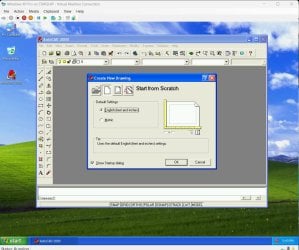
I have a laptop with Windows 11 Pro. I used Hyper-V to install a Windows XP Pro virtual machine. Autocad 2000 installed fine in it. here is a screenshot of it.

AutoCAD2000 in XP VM.jpg

BTW, I have computers with Windows XP, 7, 10, 7/10 and 11. Each computer only has a O/S on it which supports the hardware in it. The only exception is an old laptop from 2006. It came with Windows XP Tablet PC Edition. The drive failed on it so I installed Windows 7 on it. I later did a free upgrade to Windows 10. I might go back to Windows 7 because Windows 10 is kind of slow on it. The only downside is Microsoft no longer allows free upgrades from 7 or 8 to Windows 10 anymore.
 
Last edited:

My Computers My Computers

  • At a glance

    Windows 7 Professional 64bit / Windows 10 Hom...AMD FX-8350GSKILL Ripjaw-X PC3 12800 12GB (2x4GB, 2x2GB)ASUS ENGTX560 DCII OC/2DI/1GD5 1GB
    Computer type
    PC/Desktop
    Computer Manufacturer/Model Number
    Custom build
    OS
    Windows 7 Professional 64bit / Windows 10 Home 64bit
    CPU
    AMD FX-8350
    Motherboard
    Gigabyte GA-990FXA-UD3 (AM3+) Rev. 4.0
    Memory
    GSKILL Ripjaw-X PC3 12800 12GB (2x4GB, 2x2GB)
    Graphics Card(s)
    ASUS ENGTX560 DCII OC/2DI/1GD5 1GB
    Sound Card
    Integrated
    Monitor(s) Displays
    Asus VE228H (21.5-in)
    Screen Resolution
    1920x1080 60Hz
    Hard Drives
    SAMSUNG 870 EVO 1TB (2.5" SATA SSD)
    SAMSUNG 870 EVO 500GB (2.5" SATA SSD)
    PSU
    Antec TruePower (new) TP-650 (650 watts)
    Case
    Antec Three Hundred
    Cooling
    AMD stock (plan to upgrade to Cooler Master Hyper 212 EVO)
    Keyboard
    Logitech K540 (wireless)
    Mouse
    Logitech M310 (wireless)
    Internet Speed
    Comcast Gigabit X2 Internet (2100Mbps down / 300Mbps up)
    Browser
    Firefox, Edge, Chrome
    Other Info
    Optical drive: ASUS DRW-24B3ST/BLK/G (Black) (24X)
    External hard drives: 2TB & 6TB
    Internet Gateway: Comcast XB8
  • Computer type
    PC/Desktop
I have seen where people have installed Windows 7 on NVME drives using workarounds

No "workarounds" needed. MS provides the updates for win7 nvme.

The op is having difficulty because he has a weird motherboard. Jingsha H61S
 

My Computers My Computers

  • At a glance

    7 X64i5 84002x8gb 3200mhz
    Computer type
    PC/Desktop
    OS
    7 X64
    CPU
    i5 8400
    Motherboard
    gigabyte b365m ds3h
    Memory
    2x8gb 3200mhz
    Hard Drives
    various
    PSU
    pure power 11 400w cm
    Case
    Coolermaster
    Cooling
    cryorig m9i
  • At a glance

    7x64g54008gb ddr4 2400
    Computer type
    PC/Desktop
    OS
    7x64
    CPU
    g5400
    Motherboard
    ga b365m ds3h
    Memory
    8gb ddr4 2400
    PSU
    xfx pro 450w
No "workarounds" needed. MS provides the updates for win7 nvme.
The op is having difficulty because he has a weird motherboard. Jingsha H61S
The update only helps if you add it during Windows 7 setup. There are ways to do that. A Windows update doesn't help during the setup.

There is nothing weird about that particular motherboard. It is the same for all those new mini-PCs and micro motherboards we are seeing coming from China. They are only meant to run on the version of Windows they support. No other support or drivers are or will be available. I have read where the people that are buying the mini-PC with Windows included complain of the lack of support. If the OP wants a motherboard with better support he needs to look elsewhere.
 

My Computers My Computers

  • At a glance

    Windows 7 Professional 64bit / Windows 10 Hom...AMD FX-8350GSKILL Ripjaw-X PC3 12800 12GB (2x4GB, 2x2GB)ASUS ENGTX560 DCII OC/2DI/1GD5 1GB
    Computer type
    PC/Desktop
    Computer Manufacturer/Model Number
    Custom build
    OS
    Windows 7 Professional 64bit / Windows 10 Home 64bit
    CPU
    AMD FX-8350
    Motherboard
    Gigabyte GA-990FXA-UD3 (AM3+) Rev. 4.0
    Memory
    GSKILL Ripjaw-X PC3 12800 12GB (2x4GB, 2x2GB)
    Graphics Card(s)
    ASUS ENGTX560 DCII OC/2DI/1GD5 1GB
    Sound Card
    Integrated
    Monitor(s) Displays
    Asus VE228H (21.5-in)
    Screen Resolution
    1920x1080 60Hz
    Hard Drives
    SAMSUNG 870 EVO 1TB (2.5" SATA SSD)
    SAMSUNG 870 EVO 500GB (2.5" SATA SSD)
    PSU
    Antec TruePower (new) TP-650 (650 watts)
    Case
    Antec Three Hundred
    Cooling
    AMD stock (plan to upgrade to Cooler Master Hyper 212 EVO)
    Keyboard
    Logitech K540 (wireless)
    Mouse
    Logitech M310 (wireless)
    Internet Speed
    Comcast Gigabit X2 Internet (2100Mbps down / 300Mbps up)
    Browser
    Firefox, Edge, Chrome
    Other Info
    Optical drive: ASUS DRW-24B3ST/BLK/G (Black) (24X)
    External hard drives: 2TB & 6TB
    Internet Gateway: Comcast XB8
  • Computer type
    PC/Desktop
It is definitely weird. It is an h61 chipset which must have been salvaged to which they have added m2 nvme slots and some kind of bios they have made.

A Windows update doesn't help during the setup.

The microsoft nvme updates are also for winpe aka boot.wim and winre.wim
 

My Computers My Computers

  • At a glance

    7 X64i5 84002x8gb 3200mhz
    Computer type
    PC/Desktop
    OS
    7 X64
    CPU
    i5 8400
    Motherboard
    gigabyte b365m ds3h
    Memory
    2x8gb 3200mhz
    Hard Drives
    various
    PSU
    pure power 11 400w cm
    Case
    Coolermaster
    Cooling
    cryorig m9i
  • At a glance

    7x64g54008gb ddr4 2400
    Computer type
    PC/Desktop
    OS
    7x64
    CPU
    g5400
    Motherboard
    ga b365m ds3h
    Memory
    8gb ddr4 2400
    PSU
    xfx pro 450w
Back
Top